
eSynic Professional ARC Extractor
4.5Editor score
ARC and eARC TV input
RCA and 3.5mm outputs
24-bit 192kHz PCM support
Our HDMI Audio Extractor guide compares ten models for ARC/eARC support, 4K and 8K video, optical, RCA, and 3.5mm audio outputs. Find your ideal fit.
An HDMI audio extractor separates digital sound from an HDMI connection so it can reach speakers, amplifiers, soundbars, or headphones through optical, RCA, or 3.5mm outputs. A capable extractor can also improve control over your audio setup, but compatibility depends heavily on the source, television, display, and chosen audio format.
We compared the ten extractors by examining ARC and eARC support, maximum video resolution, output options, surround-sound handling, power requirements, and setup considerations. The list covers basic HDMI-to-stereo adapters as well as advanced models designed for 4K, 8K, Dolby Atmos, DTS, and home-theater equipment.
Each review explains the product's strongest use case and its practical limitations. The top selections stand out for broad feature coverage, specialized TV-audio extraction, or convenient switching, while the remaining models offer alternatives for different equipment and connection needs. Product availability and prices can change, so confirm current details before purchasing.
4.5Editor score

4.2Editor score

4.4Editor score
The comparison below highlights each extractor's connection style, video capability, audio outputs, and most important compatibility consideration.




This VPFET adapter is a straightforward HDMI audio extractor for separating sound from source devices and sending it to either an optical or 3.5mm connection. Its 4.1 rating reflects a generally useful device, while the combination of three operating modes and two output types gives it more flexibility than a simple HDMI-to-stereo adapter.
We may earn a commission when you buy through this link, at no additional cost to you.
Its most useful feature is the mode selector. The 2.0CH setting is intended for the 3.5mm output, the 5.1CH setting is intended for optical audio, and PASS mode provides a fallback when a source and television combination does not initially produce video and audio. The extractor supports HDCP 1.4, 4K at 30Hz in RGB or YUV 4:4:4, DTS 5.1 over optical, and PCM 2.0 over 3.5mm.
There are important limits. It does not support ARC or eARC, cannot accept a television as its input source, and cannot provide 7.1-channel audio through the 3.5mm output. The 4K specification is also modest, and certain streaming or gaming devices may provide only 1080p signals to the extractor. A 5V USB supply is required, although the unit can draw power from a connected device's USB port.
This is a practical choice for a game console, Blu-ray player, streaming box, or computer that needs its audio routed to a sound system while video continues to a television. Buy it when you want optical or analog extraction from a conventional HDMI source and do not need television-return audio. The selectable modes make it a flexible option for mixed audio equipment.
Choosing between optical and 3.5mm output allows the extractor to serve both digital receivers and simpler analog speaker systems. Matching the operating mode to the selected output improves the likelihood of a stable connection.
The extractor is well suited to game consoles, disc players, streaming devices, and PCs that lack a convenient analog or optical audio jack. It is not designed to recover sound from a television through ARC.
We may earn a commission when you buy through this link, at no additional cost to you.
This OREI model combines HDMI source extraction, television ARC input, 4K60 video, and simultaneous digital and analog audio outputs. Its 4.4 rating is among the stronger results in this group, and the feature set is particularly appealing for users who want a single box to handle modern video, surround formats, and legacy stereo equipment.
We may earn a commission when you buy through this link, at no additional cost to you.
Video support extends to 4K at 50Hz or 60Hz with YUV 4:4:4 sampling, HDR, HDR10, HDR10+, Dolby Vision, and HLG. Audio can be extracted from HDMI sources or ARC-equipped televisions and delivered through optical SPDIF and RCA left/right outputs at the same time. Dolby Digital and DTS 5.1 can be downmixed to two-channel PCM, while multichannel audio remains available through compatible HDMI and optical paths.
CEC pass-through allows the television and media device to communicate through the extractor, although the television remote will not adjust volume on the optical or analog outputs. ARC support is valuable for television apps, but the absence of eARC means it is not the ideal choice when the full bandwidth and features of an eARC link are required. The package includes the extractor, a power adapter, and a user manual.
This is a strong all-around option for a modern living room where the television supports ARC and the audio system may include both an amplifier and powered speakers. It is especially useful for users who value 4K HDR passthrough, flexible outputs, and downmixing without moving to a more specialized 8K extractor.
Support for 4K60 YUV 4:4:4 and major HDR formats makes this extractor suitable for current high-end displays. The full source, extractor, and display chain must support the desired format for it to operate as intended.
Optical and left/right outputs can be used simultaneously, allowing one extractor to serve a digital receiver and analog speakers. Dolby Digital and DTS content can also be downmixed for stereo equipment.
We may earn a commission when you buy through this link, at no additional cost to you.
The OREI B07BHYXVTY is aimed at source-device users who want high-resolution video and broad surround-format support without paying for an extractor focused on newer 8K standards. Its 4.2 rating reflects a capable unit whose main limitation is the lack of ARC support.
We may earn a commission when you buy through this link, at no additional cost to you.
The extractor supports 4K at 50Hz and 60Hz with YUV 4:4:4, 10-bit HDR, HDMI 2.0b, HDCP 2.2, and CEC bypass. Its audio list is notably broad, covering LPCM in 2, 5.1, and 7.1 channels, Dolby Digital, DTS 5.1, Dolby Digital Plus, Dolby TrueHD, DTS-HD Master Audio, Dolby Atmos, and DTS:X through the appropriate paths. Optical and 3.5mm outputs provide access to digital and analog audio systems.
The specification is not compatible with every possible HDMI mode. It does not support 1440p at 120Hz, 4K at 30Hz, 1080p at 120Hz, or 1080p 3D at 60Hz. It also lacks ARC, meaning it cannot extract television-return audio. The included dual-voltage supply supports international use, and the metal housing is well suited to a permanently installed home-theater setup.
Choose this model for a Blu-ray player, game console, PC, or streaming device connected to a 4K60 television or projector. It is a strong choice when Dolby Atmos, DTS:X, or other advanced formats matter, particularly if optical output is the primary connection and television ARC audio is unnecessary.
The long list of supported surround formats makes this converter useful for varied disc, streaming, and gaming sources. Matching the source's format to a compatible output remains essential.
HDMI 2.0b bandwidth, HDCP 2.2, HDR support, and CEC bypass cover common home-theater requirements. Its fixed 4K60 ceiling keeps it below newer 8K alternatives.
We may earn a commission when you buy through this link, at no additional cost to you.
This eSynic converter is designed for a specific but common problem: getting television audio to speakers or headphones when the television offers only HDMI ARC or eARC. Its 4.5 rating makes it one of the most favorably rated products in the list, while its narrow purpose helps keep the setup straightforward.
We may earn a commission when you buy through this link, at no additional cost to you.
The device accepts audio from a television's HDMI eARC or ARC port and provides 3.5mm and left/right stereo outputs. It supports PCM and PCM 2.0 up to 24-bit and 192kHz according to the supplied information, and status indicators help show whether the adapter is active. USB power is required, but no software or drivers are needed.
Its limitation is important: it does not act as a general HDMI source extractor. Other HDMI devices are not supported, and the product has no optical output or Dolby-only decoding. The television's audio format must be set to PCM, and the television must have ARC or eARC enabled. Volume control may also remain on the television or connected audio device rather than following the usual ARC behavior.
This is an excellent fit for someone adding powered speakers, a small amplifier, or headphones to a television that lacks analog or optical audio outputs. It is not appropriate for extracting sound from a game console, disc player, or set-top box. For those needs, choose a conventional source extractor with an HDMI input.
The converter creates analog stereo outputs from a television's ARC or eARC connection. It is particularly helpful for improving the audio system connected to a modern television without replacing the entire setup.
Support for up to 24-bit and 192kHz PCM accommodates high-resolution television audio when the source, television, and extractor are configured correctly. The TV's output format must be changed to PCM.
We may earn a commission when you buy through this link, at no additional cost to you.
The J-Tech Digital JTD18G-H5CH provides optical and 3.5mm audio extraction from an HDMI source while supporting a broad set of common video modes. Its 4.1 rating indicates a capable general-purpose converter, though compatibility caveats mean buyers should check their specific source equipment.
We may earn a commission when you buy through this link, at no additional cost to you.
The product supports 4K at 60Hz, 1080p at 120Hz and 144Hz, HDMI 2.0, HDCP 2.2, CEC, and HDR10. Dolby Digital and DTS signals can pass through the optical route, while the analog output requires the source to provide PCM. This distinction is essential because the extractor does not decode surround formats into a conventional stereo analog signal.
Compatibility is less universal than the headline specifications may initially suggest. The supplied information notes that the unit is not compatible with the third-generation Apple TV model A2843, certain Comcast Xfinity boxes, HDMI 1.2 sources, or monitors produced before 2005. Users should therefore verify the exact model of any streaming box or display they intend to connect.
This converter is a good fit for a source device that sends HDMI video to a display and digital surround sound to an optical receiver. It is less suitable for users who want the extractor to convert Dolby Digital or DTS into stereo for analog speakers. Ensuring the source is set to PCM solves that limitation when analog-only equipment is used.
Optical output preserves compatible digital surround audio, while 3.5mm output serves headphones and stereo systems. The source must output PCM for reliable analog playback.
Modern HDMI specifications do not guarantee universal compatibility with every device. Particular streaming hardware, older HDMI sources, and early monitors may require a different extractor.
We may earn a commission when you buy through this link, at no additional cost to you.
This VPFET model extracts television audio from an HDMI ARC or eARC connection and converts it into optical and coaxial digital signals. Its 4.1 rating reflects a focused solution for users who want to connect modern television audio to equipment with digital inputs.
We may earn a commission when you buy through this link, at no additional cost to you.
The extractor supports sampling rates up to 24-bit and 192kHz and provides simultaneous Toslink and coaxial outputs. Those two digital connection types offer broad compatibility with amplifiers, soundbars, digital-to-analog converters, and headphone amplifiers. An independent status indicator helps confirm whether the ARC or eARC operating mode is active, while the supplied Type-C cable, optical cable, and HDMI ARC cable simplify installation.
This is not a general HDMI source extractor. The television's ARC or eARC port is the only supported input, and CEC is absent. The television may also need its eARC function manually enabled and its internal TV-speaker option disabled. Some televisions do not pass volume commands through ARC, so users may need to adjust volume on the external audio device.
The product is best suited to a home theater or soundbar system whose amplifier accepts optical or coaxial digital audio while the television provides only HDMI ARC or eARC. Buyers should verify that their television has a dedicated eARC or ARC port and can output PCM-compatible audio through it. The included 19+1 HDMI cable and digital connection cable make this a convenient package for that exact use case.
Providing both optical and coaxial outputs increases compatibility with different amplifiers and converters. Users can select the connection already supported by their audio system.
The extractor focuses on recovering sound from a television's ARC or eARC connection. It cannot extract audio from a console, disc player, or other conventional HDMI source.
We may earn a commission when you buy through this link, at no additional cost to you.
The OREI B0CN1M74S8 is the most technically ambitious extractor in the list, supporting 8K at 60Hz, 4K at 120Hz, 48Gbps FRL bandwidth, and a broad collection of advanced video and audio features. Its 4.2 rating reflects a capable premium device rather than a simple converter.
We may earn a commission when you buy through this link, at no additional cost to you.
The extractor includes one HDMI input and outputs for HDMI ARC, optical S/PDIF, and analog left/right audio. It supports HDMI 2.1 features such as ALLM, QMS, QFT, SBTM, HLG, Dolby Vision, HDR, and HDR+. Supported audio formats include LPCM in 2, 5.1, and 7.1 channels, Dolby Digital, DTS 5.1, Dolby Digital Plus, Dolby TrueHD, DTS-HD Master Audio, Dolby Atmos, and DTS:X.
ARC is supported, but eARC is not. That distinction matters for viewers who require the additional bandwidth or features of eARC, particularly when combining modern audio formats with an advanced television ecosystem. The television remote also cannot control the volume of the extracted outputs. Full 8K performance requires a compatible source, extractor, display, and suitably rated HDMI 2.1 cable.
This is a strong choice for a carefully planned home-theater system using an 8K television or projector, a game console, and a receiver that can decode advanced surround formats. The metal housing and global power supply suit a permanent installation. Buyers with a simpler setup can likely meet their needs with a less advanced extractor.
The combination of 8K60, 4K120, 48Gbps FRL, and HDMI 2.1 features provides substantial headroom for demanding displays and sources. Every component in the signal chain must support the intended format.
The extensive codec list enables advanced audio to reach compatible receivers, while ARC provides a way to incorporate television audio. The lack of eARC remains the main feature limitation.
We may earn a commission when you buy through this link, at no additional cost to you.
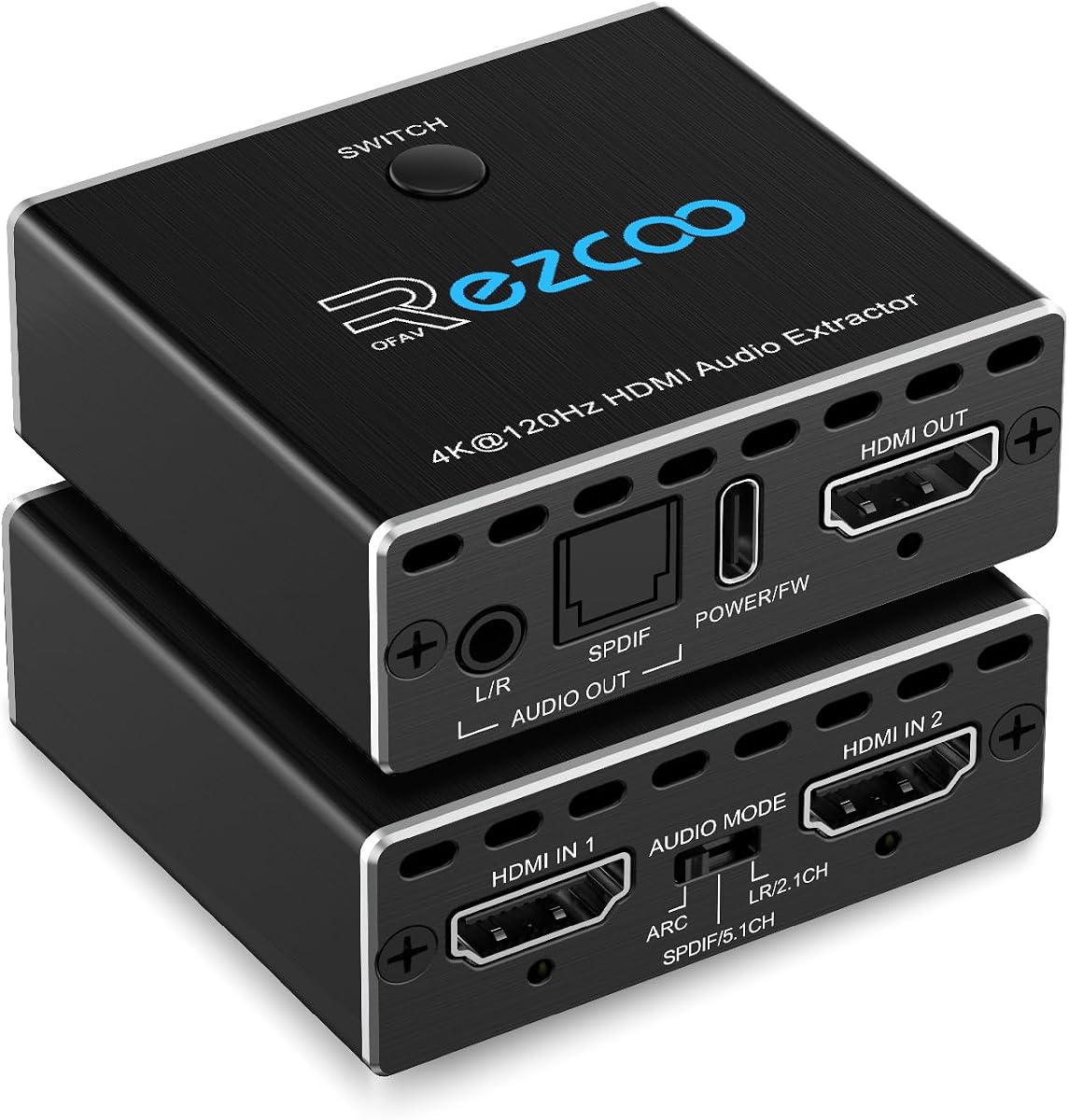
This extractor combines audio extraction with a two-input, one-output automatic HDMI switch, making it especially relevant to gamers who alternate between a console and another source. Its 5.0 rating is the highest listed, although the score should be considered alongside the detailed format and cable requirements.
We may earn a commission when you buy through this link, at no additional cost to you.
The device can send video from one of two HDMI inputs to a single display while providing audio through HDMI, optical SPDIF, or 3.5mm stereo. HDMI output supports digital 7.1-channel audio, DTS:X, TrueHD, and DTS-HD Master Audio, while optical output is limited to 5.1 channels and 3.5mm output provides stereo. Video modes extend to 8K60, 4K120, 1080p240, and 5120×1440 at 120Hz.
The manufacturer recommends a qualified HDMI 2.1 cable shorter than 10 feet, or 3 meters, because an unsuitable cable can cause unstable images or no image. The unit supports only two inputs and one output, is not bidirectional, and does not function as a one-to-two distribution device. It also requires a Type-C power connection.
This product is a compelling choice for a gaming setup with a PS5, Xbox Series X, or other modern source. It removes the need to reconnect cables whenever the user switches between two devices, while also feeding a soundbar or receiver. It is less appropriate for a multi-display installation or a long cable run.
The switching function is the defining benefit, simplifying connections between two frequently used HDMI devices. One display remains connected while the extractor handles source selection.
Support for 8K60, 4K120, and high-refresh 1080p modes targets modern consoles and displays. Qualified short HDMI 2.1 cables remain essential for stable operation.
We may earn a commission when you buy through this link, at no additional cost to you.
This HDMI audio extractor combines source extraction, television return audio, 8K60 video, and three operating modes. Its 4.2 rating reflects a versatile device designed to route the same program to digital and analog audio equipment through several paths.
We may earn a commission when you buy through this link, at no additional cost to you.
In PASS mode, the unit mirrors the television's native audio, with optical output supporting multichannel formats. R/L mode downmixes PCM, Dolby Digital, Dolby TrueHD, and DTS-HD into 2.0 PCM for synchronized left/right, auxiliary, and optical output. SPDIF mode dedicates the optical output to multichannel surround formats. This makes it easier to support both an advanced receiver and simpler powered speakers.
Analog outputs operate correctly only with PCM input. A non-PCM source can produce static hum or buzzing on the RCA and 3.5mm connections, so the source or television should be configured to provide PCM when using those outputs. A Type-C 5V power cable is mandatory, and the television should not be connected directly to the HDMI input as a source; ARC mode instead uses the designated HDMI output with the DIP switch set for television use.
This converter is a good fit for a mixed home theater with a modern television, receiver, and powered speakers. It is particularly useful when the same television audio must feed both surround equipment and a stereo setup. Users who only need a simple source-to-analog adapter will find more options and less complexity in a less advanced model.
PASS, R/L, and SPDIF modes make it possible to choose between direct digital audio, downmixed stereo, and dedicated surround output. The mode should match the format expected by the connected equipment.
Optical, RCA, and 3.5mm outputs allow a television's audio to reach several types of equipment. PCM is required for clean analog operation, while digital outputs can accommodate surround formats.
We may earn a commission when you buy through this link, at no additional cost to you.
This compact HDMI audio splitter is a basic solution for sending stereo sound from a game console, disc player, streaming device, or computer to a conventional amplifier. Its 4.2 rating reflects a straightforward adapter that performs its limited role with a useful collection of included accessories.
We may earn a commission when you buy through this link, at no additional cost to you.
The device extracts analog left/right audio from an HDMI source while passing video onward to a television or monitor. Video support includes 4K at 30Hz, 3D, and 1080p, provided the source, extractor, display, and cable all support the selected mode. The adapter is small and light, making it easy to position behind a television or entertainment console.
It does not support ARC or eARC, and a television cannot be used as the input source. The unit normally operates without a separate power adapter, but some source devices with low-power HDMI ports may require the included USB power cable. Analog output is intended for stereo equipment and does not provide the surround formats or digital connectivity of more advanced extractors.
This is best for a user who needs an inexpensive, uncomplicated way to connect a console or media player to powered speakers or a stereo amplifier. It is less suitable for a modern 4K120 home theater, television-return audio, or a receiver that needs optical surround sound. Its strengths are simplicity, compactness, and broad basic-device compatibility.
The adapter removes the need for separate analog cables directly from a game console or media device. A source, extractor, display, and stereo system can be linked with a straightforward arrangement.
Its small enclosure and minimal power requirements make it convenient for compact entertainment centers. The 4K30 ceiling and lack of digital surround outputs keep it focused on simpler setups.
We may earn a commission when you buy through this link, at no additional cost to you.
The right extractor depends on where the audio originates, where it needs to go, and which video and surround formats the rest of your system can handle. Check connection direction and format support before making a purchase.
A conventional HDMI audio extractor takes sound from a game console, Blu-ray player, streaming device, or computer and passes video to a display while directing audio to another device. An ARC or eARC extractor performs the opposite kind of operation in a sense: it receives television-return audio from a television and converts it for an amplifier, soundbar, DAC, or headphones. These are not interchangeable functions. A product marketed only as an ARC-to-stereo converter may have no usable conventional HDMI input for a console, while a source extractor may not recover audio from a television at all.
ARC can return standard television audio over HDMI, while eARC provides a higher-bandwidth return path designed to support more advanced formats. A model that handles only ARC may be adequate for PCM, Dolby Digital, or DTS television audio, but it may not accommodate every feature available through eARC. Conversely, purchasing an eARC-focused converter does not make it suitable for extracting audio from a game console. Check the exact port labels on the television and the direction of every cable in the proposed setup.
Optical and coaxial outputs are digital and can carry compressed surround formats to compatible receivers, soundbars, and DACs. RCA outputs and 3.5mm connections are analog, usually stereo, and are convenient for powered speakers, amplifiers, and headphones. Many extractors offer both, but the behavior differs by mode. Dolby Digital or DTS may pass through an optical output without being decoded into analog stereo, resulting in silence, noise, or an unusable signal on RCA or 3.5mm outputs unless the source is changed to PCM.
An extractor must preserve the video signal expected by the source and display. A model limited to 4K at 30Hz cannot provide 4K60, 4K120, or 8K60 even if the television supports those modes. Newer extractors may support HDMI 2.1, 48Gbps FRL, 4:4:4 chroma sampling, VRR, HDR10+, Dolby Vision, and HLG. These features only work when the source, extractor, cable, and display all support them. For a console or modern television, matching the extractor's maximum resolution to the intended display prevents unnecessary limits.
Format support determines whether the extractor can pass surround sound intact or convert it to stereo. LPCM, Dolby Digital, DTS, Dolby Digital Plus, Dolby TrueHD, DTS-HD Master Audio, Dolby Atmos, and DTS:X may be supported through HDMI, while optical output commonly carries Dolby Digital and DTS. If the receiving device lacks a decoder, a soundbar accepts only certain formats, or the destination is an analog stereo system, the available formats may need to be downmixed. Review both the extractor's advertised formats and the input format accepted by the connected receiver.
Some compact extractors draw power directly through the HDMI connection, while others require USB or an included power adapter. A dedicated supply is generally more dependable, particularly with game consoles that provide limited power over HDMI. CEC pass-through can allow a television remote to control an attached source, and ARC can sometimes carry volume commands from the television to the audio device. These control features are inconsistent across brands. Users who want remote volume control should check whether the extractor supports it and whether the television's ARC implementation passes commands through correctly.
Some extractors also act as automatic HDMI switches, allowing two sources to feed one display. This is convenient for gaming setups but is not the same as distributing one source to multiple displays. Models supporting 4K120 or 8K60 often require certified HDMI 2.1 cables, and long or poor-quality cables may cause flickering, unstable images, or no picture. The supplied information for several products specifically recommends shorter, qualified cables. Check the length needed for the installation and the connector clearance around a wall-mounted television or entertainment console.
Start by identifying the direction of the audio path. For source extraction, connect the source device to the extractor's HDMI input and the display to its HDMI output. For television return audio, connect the television's designated ARC or eARC port to the appropriate extractor input, following the model's instructions. Connect the extractor to the amplifier, soundbar, speakers, DAC, or headphones, then select the output mode and audio format that match the destination.
Power the extractor as directed. Some units use the connected HDMI source for power, some require a USB connection, and others include an AC adapter. Once the indicator lights and the display shows an image, select the source, output route, and operating mode. If an analog output is silent, buzzing, or unstable, change the source or television output to PCM. If a digital receiver has no sound, verify that it supports the incoming codec and that the correct optical or coaxial input is selected.
For ongoing care, keep the enclosure ventilated and avoid stacking it beneath power bricks or other equipment that traps heat. Do not force cables into ports, and avoid sharply bending HDMI leads near their connectors. Periodically reseat cables if a display or source changes resolution unexpectedly. Before changing equipment or television settings, record the current configuration so the source resolution, color format, and audio mode can be restored if a later connection proves incompatible.
Yes, if the television has a usable ARC or eARC output and the external speakers or amplifier are better suited to your needs. An ARC/eARC extractor can route television audio to powered speakers, headphones, an amplifier, or a soundbar. The television must support the required return-audio function, and the selected output format must be compatible with the receiving equipment.
The most common cause is a non-PCM source format. Many extractors pass Dolby Digital or DTS through an optical output but cannot decode those formats into analog stereo. Change the source or television audio setting to PCM, select the appropriate 2.0 mode, and confirm that the amplifier is set to the correct analog input.
No. Some support only 4K30, while others handle 4K60, 4K120, or 8K60. The source, extractor, HDMI cable, and display must all support the intended resolution and refresh rate. Consult the complete signal-chain specifications before buying a model for a high-end gaming display or home theater.
Source extraction separates audio from a console, player, streaming device, or computer while passing video to a display. ARC extraction receives television-return audio from an HDMI ARC or eARC port. A dedicated ARC adapter generally cannot be used as a conventional extractor for a game console, so identify the equipment that owns the original audio first.
It depends on the soundbar's inputs. A soundbar with optical or coaxial input can accept digital audio from a compatible extractor, and a soundbar with ARC or eARC may work with a television-oriented setup. Passive speakers with only RCA or 3.5mm inputs are better served by an analog-output model, usually with the source set to PCM.
A suitably rated HDMI 2.1 cable is strongly recommended for the highest resolutions and refresh rates. A basic cable, damaged cable, or overly long run may prevent a stable image. The extractor, source, display, and every intermediary device must also support the intended format.
Some extractors pass video and audio but do not pass volume commands to their analog or optical outputs. The specification may also distinguish between ARC and eARC behavior. Check the product's control limitations, configure the television's HDMI-CEC or ARC settings as directed, and use the external amplifier's volume control if commands are not recognized.
Most of the listed products are extractors or a two-input switch, not one-to-two video splitters. Sending one source to multiple displays requires a compatible HDMI distribution amplifier and may require additional considerations for protected content, resolution, and control. Choose a product specifically designed for that distribution task if multiple screens are essential.
The OREI 8K model is the most capable option for a modern home theater, with 8K60, 4K120, HDMI 2.1, extensive surround support, and both ARC and conventional source extraction. The OREI 4K60 ARC extractor offers a balanced premium feature set for 4K users, while the eSynic Professional is a focused and highly rated solution for adding stereo speakers or headphones to an ARC or eARC television.
Prioritize the function you actually need before considering resolution. Choose a conventional HDMI source extractor for consoles, disc players, and streaming boxes; select an ARC or eARC model when the audio originates in the television. Then match the output type to your sound system, and verify the source's audio format, cable requirements, power method, and remote-control behavior.
Finally, check the current product details and price before ordering. HDMI standards, television firmware, audio-format settings, and cable availability can all affect whether an extractor works as expected. Keeping the source, display, and receiving device aligned on resolution and format remains the most reliable path to stable video and clean audio.