
8Bitdo M30 Wired Controller
4.2Editor score
Six-button fighting layout
USB-C wired connection
Three switchable profiles
Discover the best fightpads for PC in October 2026, comparing button layouts, connectivity, compatibility, features, and performance for competitive fighting
Fightpads for PC give fighting-game players a more focused alternative to a standard gamepad. Six-button layouts, short-throw sticks, microswitch triggers, stable construction, and tournament-oriented inputs can make practice sessions more comfortable and precise, especially when compared with a conventional Xbox-style controller.
The products in this guide were compared using their stated layouts, connection methods, platform support, control features, customization options, and suitability for different fighting-game needs. The list covers licensed PlayStation and Xbox fightpads, universal leverless controllers, premium hall-effect models, renewed hardware, a compact fighting stick, and one entry-level gamepad that may suit casual players.
Each pick highlights a different reason to consider it, from straightforward tournament-ready controls to wireless freedom, multi-platform versatility, and advanced rapid-trigger settings. Ratings and availability can change over time, and current prices fluctuate, so compare the latest product details and platform requirements before making a final purchase.
4.2Editor score

4.1Editor score

4.2Editor score
The comparison below places the ten controllers by control style, connection, platform support, and notable features, making it easier to identify the right option for competitive play, practice, or a broader multi-platform setup.


The HORI Fighting Commander OCTA is a wired tournament-style fightpad with a 4.1 rating, a six-button arrangement, a short-throw analog stick, and an 8-way gate. Its PlayStation 5, PlayStation 4, and PC compatibility makes it one of the most versatile conventional fightpads here, especially for players who move between console and PC training.
We may earn a commission when you buy through this link, at no additional cost to you.
Its strongest qualities are centered on execution control. The short-throw stick and 8-way gate are designed to help players reach directional inputs quickly, while microswitch buttons provide a distinct, consistent press. Adjustable D-pad sensitivity lets users tune the directional pad to their preferences, and the familiar six-button face arrangement keeps the controls close to the standard used by many competitive fighters.
The wired connection is a trade-off, but one that is reasonable for a desk-based fightpad. A cable can also eliminate wireless input uncertainty, while the supplied headset input and onboard audio controls add convenience for longer sessions. The companion app is useful for custom settings, although players who want absolutely no software interaction may prefer a more direct configuration process.
This is a strong recommendation for competitive players who want a proven fightpad layout and do not need leverless buttons or rapid-trigger adjustment. It is less ideal for players who value wireless operation above all else, but for PS5, PS4, and PC users it offers a well-rounded balance of control layout, directional precision, and multi-platform support.
The short-throw left stick and 8-way gate are the standout features for motion-heavy characters. Adjustable D-pad sensitivity adds another layer of control, allowing the player to choose how quickly the directional pad registers a change.
Support for PlayStation 5, PlayStation 4, and PC makes this practical for a multi-platform collection. The six-button layout and wired connection align closely with the demands of serious arcade-style fighting-game training.
We may earn a commission when you buy through this link, at no additional cost to you.
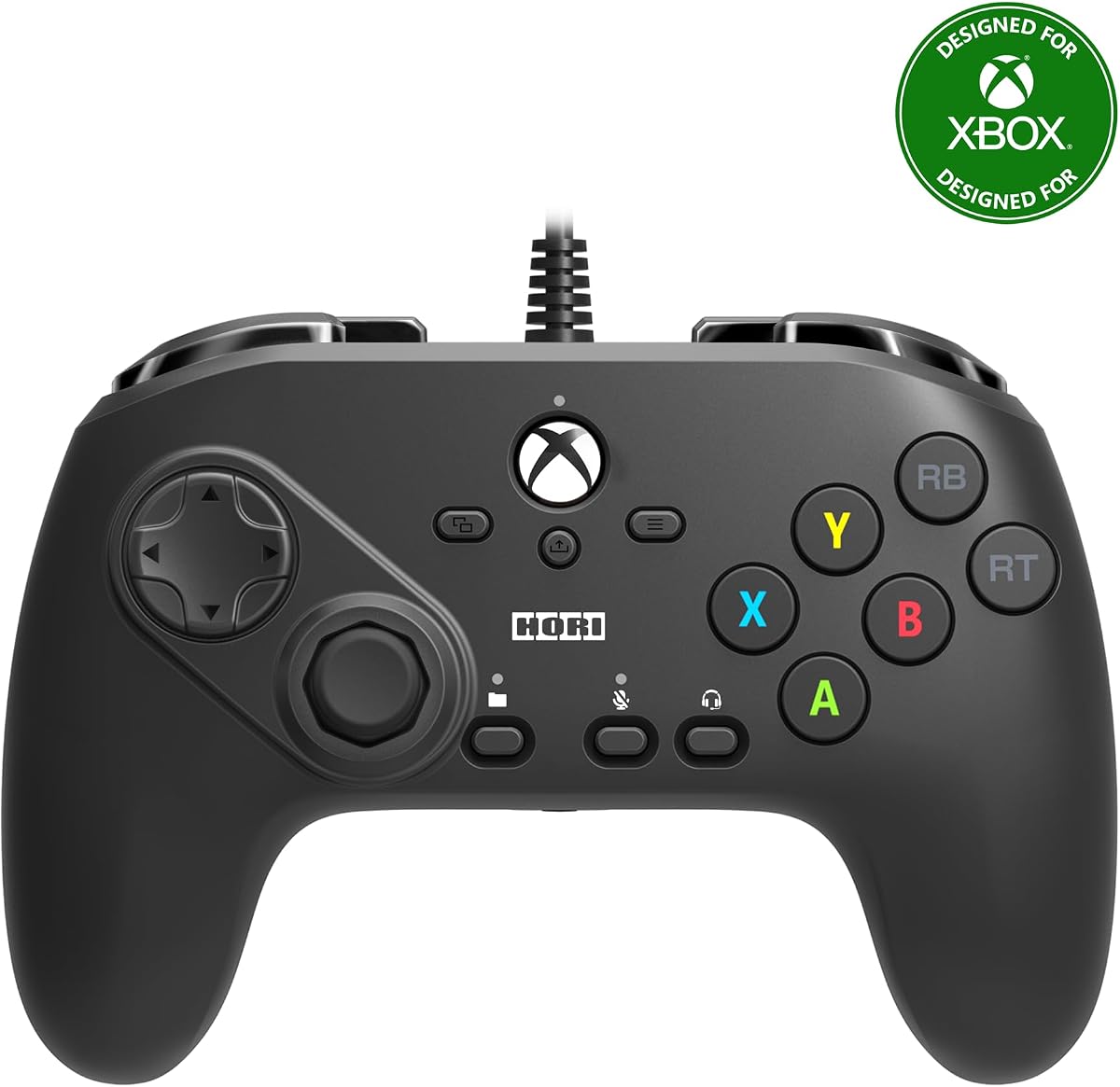
This Xbox version of the HORI Fighting Commander OCTA carries a 3.5 rating and offers a six-button fighting layout for Xbox Series X|S, Xbox One, and Windows 10. It is a natural fit for PC players who primarily use an Xbox ecosystem and want a controller that avoids the feel of a general-purpose gamepad.
We may earn a commission when you buy through this link, at no additional cost to you.
The fightpad uses microswitch buttons, an adjustable D-pad, and a short-throw analog stick with an 8-way gate. These features support quick directional execution and give players a more focused input layout. The ability to save up to four profiles with the companion app is particularly useful for switching between characters, training configurations, and other control setups.
Its 3.5 rating suggests that some buyers may have found aspects less satisfying, and the product data does not explain the reason. The wired design also keeps players tethered, while the lack of PlayStation support narrows its appeal compared with the broader multi-platform HORI model. Even so, its core directional tools remain well aligned with fighting-game needs.
Choose this controller if you mostly play on Windows 10, Xbox One, or current Xbox Series consoles and value a dedicated fightpad layout. It may be less compelling for PC gamers who want one device across PlayStation, Xbox, and PC or who prioritize leverless controls and advanced trigger settings.
Four saved profiles make it easier to retain separate configurations for different characters or training habits. The dedicated profile button allows players to change setups without repeatedly navigating the companion app.
Compatibility with Xbox Series X|S, Xbox One, and Windows 10 covers current and previous-generation Microsoft platforms. That makes this a straightforward choice for players whose PC games already recognize Xbox-style controllers.
We may earn a commission when you buy through this link, at no additional cost to you.
The officially licensed 8Bitdo M30 has a 4.2 rating and combines a six-button face layout with support for Xbox Series X|S, Xbox One, and Windows. It offers a practical entry point for PC fighting-game players who want more specialized controls without moving into a premium leverless ecosystem.
We may earn a commission when you buy through this link, at no additional cost to you.
Its USB-C wired connection is positioned as virtually lag-free, which is useful during competitive matches. Two button-layout switches provide a way to manage the available face-button arrangements, while a dedicated profile button cycles among three stored configurations. The controller also includes a 3.5mm audio jack and volume control for convenient headset use.
The main limitation is its platform focus. Without PlayStation support, it does not offer the same console-to-PC flexibility as the first HORI model. It also lacks the deeper trigger, SOCD, and display customization found on higher-end leverless products, so advanced competitors may eventually want a more configurable device.
For a new PC fighting-game setup, this is a sensible first fightpad. It supplies the essential six-button format, stable wired operation, and convenient profiles while remaining straightforward to set up. Players who mainly use Microsoft platforms will find its compatibility especially convenient.
The six-button layout provides the visual and physical orientation many fighting-game players prefer over a traditional console gamepad. It is suitable for learning motions while keeping controls recognizable and compact.
Three profiles can be accessed through a dedicated switch, reducing the need to enter software between matches. Support for 8BitDo Ultimate Software adds an additional route for more detailed configuration.
We may earn a commission when you buy through this link, at no additional cost to you.
The DOYOKY Leverless Controller earns a 4.4 rating and combines a 16-button hitbox-style layout with five input modes for PC, PS4, PS3, Nintendo Switch, and Steam Deck. It stands out as a versatile modern controller for players who want leverless controls without limiting themselves to one platform family.
We may earn a commission when you buy through this link, at no additional cost to you.
Its built-in OLED screen displays the active input mode, SOCD setting, and Turbo status. Browser-based customization allows players to change buttons, macros, and related settings without relying on a conventional installation process. Mechanical switches are hot-swappable, and the package includes spare keycaps, a spare switch, and a puller for changing the feel without soldering.
Its three SOCD modes—Neutral, Last-Input, and Up-Priority—provide useful ways to handle opposite directional inputs. Turbo macros and a 16-button arrangement add further flexibility, while the reinforced USB-C port and braided 1.5-meter cable address common durability concerns. The non-slip rubber feet and 29.6-by-21-centimeter base help keep it stable during intense inputs.
This is a compelling recommendation for cross-platform players who value visible settings, physical switch customization, and broad compatibility. It is less ideal for someone seeking adjustable magnetic rapid trigger or extremely high scan specifications, but it covers the essential customizability expected from a competitive leverless controller.
The OLED provides immediate confirmation of the selected input mode, SOCD behavior, and Turbo status. Browser-based configuration expands the available button and macro controls while keeping the process visible and approachable.
XInput, DInput, PS4, Switch, and keyboard modes expand compatibility beyond ordinary PC controllers. This is especially useful for players who regularly move between PC, older PlayStation systems, Switch, or Steam Deck.
We may earn a commission when you buy through this link, at no additional cost to you.
The Akko FUNBOX Leverless Controller has a 4.2 rating and is built around Kailh Star Mini 2.8mm hall-effect switches, a 16-button arrangement, an adjustable rapid trigger, and a large customization display. Its specification-focused design makes it the most ambitious premium option in this guide.
We may earn a commission when you buy through this link, at no additional cost to you.
Rapid Trigger is adjustable from 0.1 to 2.8 millimeters, allowing the activation point to be tuned for either feather-light taps or more deliberate presses. The controller lists a 50KHz scan rate and 8,000Hz polling on PC, features that appeal to players focused on fast competitive inputs. The hall-effect switches use a contactless design, and their hot-swappable construction allows conventional Kailh low-profile mechanical switches to be installed without soldering.
A two-inch full-color LCD handles mode selection, SOCD settings, input testing, and standby animations through a browser-based driver. The aluminum multi-function dial offers direct access to settings without navigating complicated button combinations. Outside Tournament Lock mode, the controller provides four SOCD modes and full button remapping; the locked mode restricts opposing directional inputs and disables several auxiliary functions for competition compliance.
This is a strong recommendation for advanced players who value rapid-trigger adjustment, high polling, switch interchangeability, and comprehensive on-device information. It is less appropriate for a beginner who wants immediate plug-and-play simplicity or for a PlayStation 5 user unwilling to obtain the required Brooks adapter.
The 0.1-to-2.8-millimeter adjustment range can accommodate different activation habits. Fine-tuning can create a more immediate response for players who frequently move between light taps and full button presses.
The two-inch color LCD supports input testing, mode changes, SOCD selection, and custom standby graphics. An aluminum dial provides tactile menu navigation without relying on a sequence of controller buttons.
We may earn a commission when you buy through this link, at no additional cost to you.
The Tekken 8 Edition of the HORI Fighting Commander OCTA has a 3.8 rating and is designed specifically for Windows PC. Its six-button configuration, microswitch buttons, accurate D-pad, and short-throw 8-way analog stick provide the core qualities expected from a dedicated fighting-game pad.
We may earn a commission when you buy through this link, at no additional cost to you.
This model is officially licensed by Bandai Namco Entertainment, giving it a clear appeal to Tekken players and fans of the series. The short-throw left stick is designed to help with execution speed, while the directional gate and dedicated face buttons support the kind of rapid command sequences seen in competitive fighting games.
An analog slide pad is included for in-game lobby navigation, providing a convenient way to move through menus without relying solely on the D-pad. As a wired, PC-focused design, it avoids wireless pairing and multi-platform complexity, but that focus also means it will not be the natural choice for players who regularly switch between console ecosystems.
Choose this fightpad if you primarily play fighting games on Windows and appreciate a specific Tekken 8 edition. The lower rating and narrower platform focus limit its broad appeal, but the directional stick and microswitch action make it a credible choice for players who value a traditional six-button layout.
The Windows-specific configuration keeps the focus on PC play. A dedicated analog slider improves menu navigation while preserving the primary fightpad controls for competitive action.
The short-throw stick and 8-way gate are intended to make directional transitions quicker. Combined with microswitch face buttons, they create a conventional competitive layout.
We may earn a commission when you buy through this link, at no additional cost to you.
The HORI Wireless Fighting Commander OCTA Pro is a wireless fightpad for PlayStation 5 and Windows 11/10, with a 3.6 rating. It brings a six-button microswitch layout, an 8-gate analog stick, rear-button programmability, and multiple D-pad options to players who want more freedom than a wired model provides.
We may earn a commission when you buy through this link, at no additional cost to you.
The directional system includes three selectable D-pad options, allowing users to experiment with different layouts rather than accepting one fixed design. Programmable rear buttons add extra commands for supported games, while the analog slider pad handles lobby navigation. Tactile shoulder buttons and the familiar six-button arrangement maintain a fighting-game focus.
The included USB-C charging cable has a locking feature intended to prevent accidental disconnections during use. One important setup requirement is downloading and installing the latest HORI firmware before using the controller or resolving potential issues. This extra step, combined with wireless operation, makes it less frictionless than a conventional wired pad.
This model is best for PC and PS5 players who specifically prefer wireless play and value the swappable D-pad choices. Its 3.6 rating is the lowest in the lineup, and the firmware requirement adds complexity, so players wanting a simple wired tournament setup may be better served elsewhere.
The swappable D-pad system gives players more ways to match their preferred directional layout. It is a meaningful feature for a fightpad because the feel and positioning of directional controls can affect comfort and execution.
Programmable rear buttons expand the available command set for compatible games. The wireless format reduces cable management, while the locking charging connector helps protect the connection during a session.
We may earn a commission when you buy through this link, at no additional cost to you.
This renewed HORI Fighting Commander OCTA is an officially licensed tournament-grade fightpad for PlayStation 5, PlayStation 4, and PC. The product data describes an eight-button layout, a touchpad, and programmable macros, giving it a broader feature set than the standard six-button model.
We may earn a commission when you buy through this link, at no additional cost to you.
The three-platform support is a major strength for players who want a single controller for Sony consoles and PC. A touchpad provides familiar PlayStation navigation, while programmable macros can reduce repetitive input sequences when supported by the game or configuration software. The renewed status may make it possible to obtain an established official design at a lower cost than a new unit.
Renewed products naturally carry some uncertainty because no customer rating is available in the supplied data. Cosmetic wear, previous ownership, packaging condition, or warranty details can vary by listing, so the condition description and seller information deserve careful review. The controller's exact condition should be considered before ordering.
This is a good option for a budget-conscious PS5, PS4, and PC player who accepts the condition uncertainty associated with renewed hardware. It is less suitable for someone who needs a newly sealed product, a consistent warranty position, or a large body of current customer feedback.
Support for PS5, PS4, and PC allows the same fightpad to move between a console collection and PC training. This makes renewed ownership particularly useful for players who value cross-platform compatibility.
Because the listing has no current rating, buyers should examine the condition notes, included accessories, and seller details. A renewed product may deliver strong functionality, but its cosmetic and warranty terms may differ from a new purchase.
We may earn a commission when you buy through this link, at no additional cost to you.
The Logitech G F310 has a 4.4 rating and uses the familiar Xbox 360-style layout, making it an accessible option for PC players who want a responsive conventional gamepad without committing to a fightpad-shaped device. It offers a floating D-pad, 10 programmable buttons, and a six-foot USB cable.
We may earn a commission when you buy through this link, at no additional cost to you.
The D-pad rests on four switches rather than a single pivot point, which is intended to make quick directional changes more responsive. Profiler software can assign keyboard and mouse commands to the controller for games that lack standard gamepad support. This adds a degree of adaptability that can be useful for older PC titles as well as fighting games that do not provide extensive control customization.
Its standard console layout is less specialized than the six-button and leverless alternatives in this guide. It also has no face-button row beyond the familiar gamepad arrangement, so it will not replicate the physical layout of an arcade stick. The supplied compatibility references include older Windows versions, so buyers should confirm current driver and game support before purchasing.
This is a sensible recommendation for beginners, casual fighters, and players who want a comfortable, recognizable controller for a broader PC library. It is not the strongest choice for tournament specialists, but its 4.4 rating, programmable buttons, and responsive floating D-pad make it a practical all-purpose alternative.
Resting the D-pad on four switches can improve the response to rapid direction changes. That behavior makes the controller more practical for action games than a pivot-style directional pad.
Programmable controls and Profiler software let the controller represent keyboard and mouse commands where needed. The familiar layout also makes it easy to use across a wider collection of PC games.
We may earn a commission when you buy through this link, at no additional cost to you.
The HORI Fighting Stick Mini carries a 4.2 rating and provides an eight-button, joystick-based alternative to conventional fightpads. It supports PlayStation 5, PlayStation 4, and PC, so it works well for Sony-oriented players who want an arcade-style control surface at a manageable size.
We may earn a commission when you buy through this link, at no additional cost to you.
Its compact, lightweight construction is the defining feature. The small chassis is easier to store and transport than a full-size arcade cabinet, while the eight-button arrangement provides a more complete action-button layout than a four-button gamepad. The eight-foot cable gives players room to position the stick comfortably relative to a desk or monitor.
HORI's original joystick uses a V-cut housing, and the product is designed for both arcade games and traditional fighting titles. The trade-off is that a stick occupies more desk space than a flat fightpad and is less convenient for players who want to use the controller while seated farther back. It also does not offer the trigger and input adjustments seen on premium leverless controllers.
Choose the Fighting Stick Mini if you prefer joystick play, need a full eight-button arrangement, or want a portable arcade-style option for PS5, PS4, and PC. It is especially useful for players moving between fighting and arcade titles, though dedicated fightpad users will find the slimmer form more comfortable for long training sessions.
The compact body and lightweight design reduce the footprint normally associated with a full-size fighting stick. It offers an eight-button layout and a V-cut joystick housing for a more traditional arcade feel.
Eight buttons provide a broader set of face inputs than a standard console gamepad. That makes the stick useful for characters and arcade games that require more than the usual four action buttons.
We may earn a commission when you buy through this link, at no additional cost to you.
The right PC fightpad depends on your preferred control format, the games you play, and the amount of setup or customization you want. A six-button pad, leverless board, wireless model, and compact stick can all serve fighting games, but each offers a different mix of precision, portability, and flexibility.
Begin by comparing traditional six-button fightpads with leverless controllers and joystick-based sticks. A six-button design closely resembles many arcade sticks and keeps the action buttons in a familiar arrangement. Leverless controllers can feel more responsive for some players and offer more trigger options, while an eight-button stick supports traditional arcade layouts and a wider range of action-button commands. The right choice depends more on personal preference than on any universal rule.
Choose the layout that matches your previous experience and the games in your collection. If you are switching from a standard gamepad, a six-button fightpad is usually the least disruptive step.
Directional execution deserves as much attention as the face buttons. Look for a short-throw stick, an 8-way gate, adjustable D-pad sensitivity, or multiple swappable D-pad options. A short-throw stick can make motion inputs feel faster because less travel is required, while an 8-way gate helps prevent ambiguous diagonal registration. Players who prefer the D-pad should also check whether sensitivity is adjustable or whether different pad shapes are included.
Prioritize the directional system that feels natural in your hands. Consistent execution is more valuable than having every possible feature enabled at once.
Check whether the controller supports XInput, DirectInput, keyboard, or platform-specific modes, and verify that the games you play recognize those inputs. Some fightpads support only PC and one console family, while universal leverless products can switch among PC, PlayStation, Switch, Xbox, and Android. Pay particular attention to adapter requirements, especially when connecting to a current PlayStation or Xbox console.
For PC-only play, broad multi-platform support may be less important than response settings and layout. For mixed-device use, confirm every platform and input method before ordering.
Wired fightpads provide a straightforward connection and avoid the need to manage wireless charging or pairing. They are especially convenient for desk-based training because a stable cable can reduce concerns about connection drops. Wireless models offer greater freedom from cable position and can suit players who alternate between sitting close to the monitor and moving around, although they add firmware, charging, and latency-management considerations.
Choose wired for simplicity and consistent station use. Choose wireless when freedom of movement and a cleaner desk setup matter more to you.
Competitive features range from simple profile buttons to browser-based remapping, SOCD modes, Turbo macros, programmable rear buttons, and rapid-trigger adjustment. SOCD handling determines how the controller resolves simultaneous opposing directions, while tournament lock can restrict certain inputs and functions. A built-in display showing the active mode is useful because it reduces the need to guess whether a setting has been applied.
Prioritize features you will actually use. Extra customization cannot compensate for an uncomfortable layout, so test the core controls before investing time in advanced settings.
Leverless players can compare mechanical, optical, and hall-effect switch designs. Hall-effect switches use a contactless magnetic mechanism, while hot-swappable construction allows the switch feel to be changed without soldering. Rapid trigger adjusts how far an input must travel before it registers and can be useful for games that reward fast repeated presses. Polling and scan-rate figures can also be compared, although they should be considered alongside the game, operating system, and overall control design.
Look for adjustable settings and swappable parts if you expect your preferences to evolve. Beginners can start with the default configuration and refine it after learning the games.
A fightpad should remain stable during long sessions. Look for a broad base, non-slip feet, a durable cable connection, and a housing that suits your preferred angle. Wired models should have enough cable length to place the controller comfortably without pulling against the connection, while portable sticks should balance their footprint against the number of buttons they provide. A reinforced or locking USB-C connector can add reassurance in a frequently used setup.
Check the dimensions and intended playing position before buying. A compact desktop model is easy to store, while a full stick may need more space and a clear surface.
Some controllers work immediately with standard PC input, while others require a companion app, browser-based driver, or firmware installation. This matters when you want to jump directly into training. Wireless products in particular may require the latest firmware before first use. Software is not inherently a disadvantage when it exposes useful options such as profiles, remapping, trigger settings, or SOCD controls, but the learning curve should match your experience level.
Read the setup instructions and confirm that the required software is available for your operating system. A simple plug-and-play experience is valuable for beginners and tournament days when preparation time is limited.
Begin by connecting the controller with the specified wired cable or completing the required pairing and firmware process. For a leverless model, choose the correct XInput, DirectInput, keyboard, or console mode before launching a game. Confirm the active mode on any built-in display, then test every face button, directional input, bumper, trigger, and auxiliary control in the game's menu.
Begin with default settings rather than changing every option at once. Adjust stick or trigger behavior gradually, create separate profiles for characters with different input demands, and record which configuration works best in each game. If the controller supports SOCD and tournament-lock options, confirm the selected behavior before an online match so accidental inputs do not become an issue.
Keep the controller stable, route cables away from feet and chair wheels, and avoid placing excessive weight on the stick, buttons, or leverless switches. Clean the surface with a soft, dry cloth, and do not use liquid directly on the controller. Periodically check cable connections, switch caps, firmware, and software updates, especially if inputs become inconsistent or a device has been stored for an extended period.
A fightpad can be better for competitive fighting games because it places the action buttons in a consistent six-button layout and typically uses short-throw sticks or microswitches. It may not suit every player because the shape differs from a standard gamepad, and some games do not support specialized layouts well. Familiarity and comfort should guide the decision.
Yes, the products in this guide list Windows or PC compatibility, although the supported Windows versions and input methods vary. The HORI Xbox model specifies Windows 10, the wireless OCTA Pro lists Windows 11/10, and universal leverless models may use XInput, DirectInput, or keyboard modes. Check the individual listing and your game's controller requirements before purchasing.
A six-button fightpad uses raised action buttons and generally includes a short-throw stick, closely resembling an arcade stick. A leverless controller uses low-profile switches and often provides adjustable triggers, remapping, and SOCD options. The best choice depends on button preference, game support, and how much customization you want.
A wireless fightpad can be a strong choice when you value freedom of movement or want to reduce cable management around your desk. The HORI Wireless OCTA Pro includes programmable rear buttons and swappable D-pad options, but it also requires firmware installation. Compare that extra setup with the simplicity of a wired model before deciding.
Rapid trigger changes the distance a leverless switch must travel before the controller registers the input. Adjustable settings can make repeated fast inputs feel more responsive. The Akko FUNBOX offers a stated 0.1-to-2.8-millimeter range, giving players room to tune the activation point to their preferred speed.
A renewed fightpad can be worthwhile when the hardware is well maintained and the listing provides clear condition and warranty details. The renewed HORI OCTA in this guide supports PS5, PS4, and PC and includes programmable macros, but it has no current customer rating. Inspect the condition description and seller terms before choosing it over a new unit.
It depends on the controller and how you plan to connect it. Most PC fightpads use USB and work directly, while universal models may offer several selectable input modes. Console support can require platform-specific modes or an additional adapter, as noted for the Akko FUNBOX with PlayStation 5. Confirm the connection method before checkout.
Choose a fightpad if you prefer a compact device that sits flat on a desk and want quick access to all action buttons. Choose a fighting stick if you prefer joystick control, want a traditional arcade-style layout, or need an eight-button arrangement for arcade games. Both can suit fighting games, so your preferred control method is the deciding factor.
The HORI Fighting Commander OCTA is the strongest all-around recommendation for PS5, PS4, and PC players because it combines a six-button tournament layout, short-throw 8-way stick, and adjustable directional controls. The 8Bitdo M30 stands out for budget-conscious Microsoft-platform users, while the Akko FUNBOX offers the most advanced control and customization features.
Prioritize the elements you will notice every time you play. Directional performance and button layout matter more than an elaborate display, while compatibility, connection method, and tournament settings should determine whether a controller fits your actual routine. Multi-platform support is useful, but a focused device can be simpler and more satisfying for a single platform.
Before purchasing, verify the latest platform support, software requirements, condition for renewed items, and current market price. Ratings, firmware, product listings, and prices can change, so use the guide as a structured comparison and check the latest details before placing your order.
