
HDMI ARC Audio Extractor 4K60Hz
4.8Editor score
Optical and 3.5mm outputs
TV, stereo, and surround modes
4K60Hz video support
Our HDMI Arc to 3.5mm Aux Audio Extractor guide compares 10 options for ARC/eARC support, outputs, sampling rates, compatibility, and setup ease today.
HDMI Arc to 3.5mm Aux Audio Extractor devices can restore analog stereo connections to modern televisions, allowing older amplifiers, speakers, and headphones to work with TVs that lack a conventional audio output. The right adapter depends on ARC or eARC support, supported audio formats, available outputs, and whether it must also pass video.
This guide compares ten extractors and converters based on their documented specifications and stated compatibility. It covers dedicated TV audio-return cables, box-style adapters with optical and analog outputs, and versatile extractors that accept standard HDMI sources. The analysis highlights meaningful differences in supported sampling rates, multichannel formats, remote-control behavior, power requirements, and installation.
The top selections represent the strongest options for different priorities: a well-rounded integrated cable, a feature-rich extractor, and a straightforward ARC converter. Each review explains the product's main benefits, limitations, and ideal setup. Product ratings and availability can change, and current selling prices vary, so confirm the specifications and listing details before purchasing.
4.8Editor score

4.4Editor score

4.2Editor score
The table below compares every extractor's core capabilities, including ARC/eARC handling, output options, audio-format support, and intended connection method. Read it alongside the detailed reviews because some products are dedicated TV adapters, while others are general-purpose HDMI extractors.


This integrated HDMI ARC to 3.5mm AUX extractor cable is the most complete general-purpose pick in the guide. It has a 4.4 rating and combines an HDMI ARC/eARC plug, USB power lead, and 3.5mm stereo output in one compact assembly. That design is especially useful for a television or entertainment center where separate converter boxes and short adapter cables can make setup look cluttered. It is designed specifically to extract the digital audio return signal from a television and convert it into analog stereo audio for an amplifier, active speakers, soundbar, or headphones.
We may earn a commission when you buy through this link, at no additional cost to you.
Its strongest specifications include support for HDMI ARC and eARC television ports, PCM and LPCM audio, and sampling rates up to 24-bit/192KHz. The manufacturer also states that the gold-plated HDMI and AUX connectors, aluminum connector shells, reinforced wire diameter, and nylon braided jacket are intended to improve durability and resistance to interference. A built-in audio-processing module handles the digital-to-analog conversion, while digital noise reduction is intended to minimize interference. These details make the cable more substantial than a basic passive-looking adapter, even though its real role remains digital signal conversion and power delivery.
The important limitation is that it converts only PCM/LPCM stereo. It does not decode Dolby 5.1 or DTS 5.1, so the television must be configured for a compatible two-channel format. It is also strictly directional: HDMI ARC/eARC input travels to the 3.5mm output, and the reverse does not work. It cannot accept audio directly from a game console, set-top box, or standard HDMI source, although another HDMI cable can be used with an ARC-capable source. USB power must remain connected, and a second audio output is not offered.
This is a strong recommendation for someone who wants a tidy TV-to-stereo connection and has an ARC or eARC television. It is easier to live with than a full box adapter because the principal connections are built into the cable. Users with a new television and an older analog amplifier, particularly, gain a practical way to connect existing speakers without replacing the whole system. Check the television manual for its exact ARC/eARC port, enable the relevant return-audio setting, select PCM or LPCM, and confirm that the connected amplifier or speakers accept a 3.5mm stereo input.
The integrated breakout structure reduces the number of separate pieces around the television. It is a particularly good fit for living rooms, conference rooms, and home theater systems where cable management matters and the goal is simply to route television audio to an analog stereo system.
The converter can handle high-resolution PCM streams, but it is designed for two-channel output. Setting the television to PCM or LPCM is essential for reliable results because compressed surround formats are outside the product's stated capabilities.
We may earn a commission when you buy through this link, at no additional cost to you.
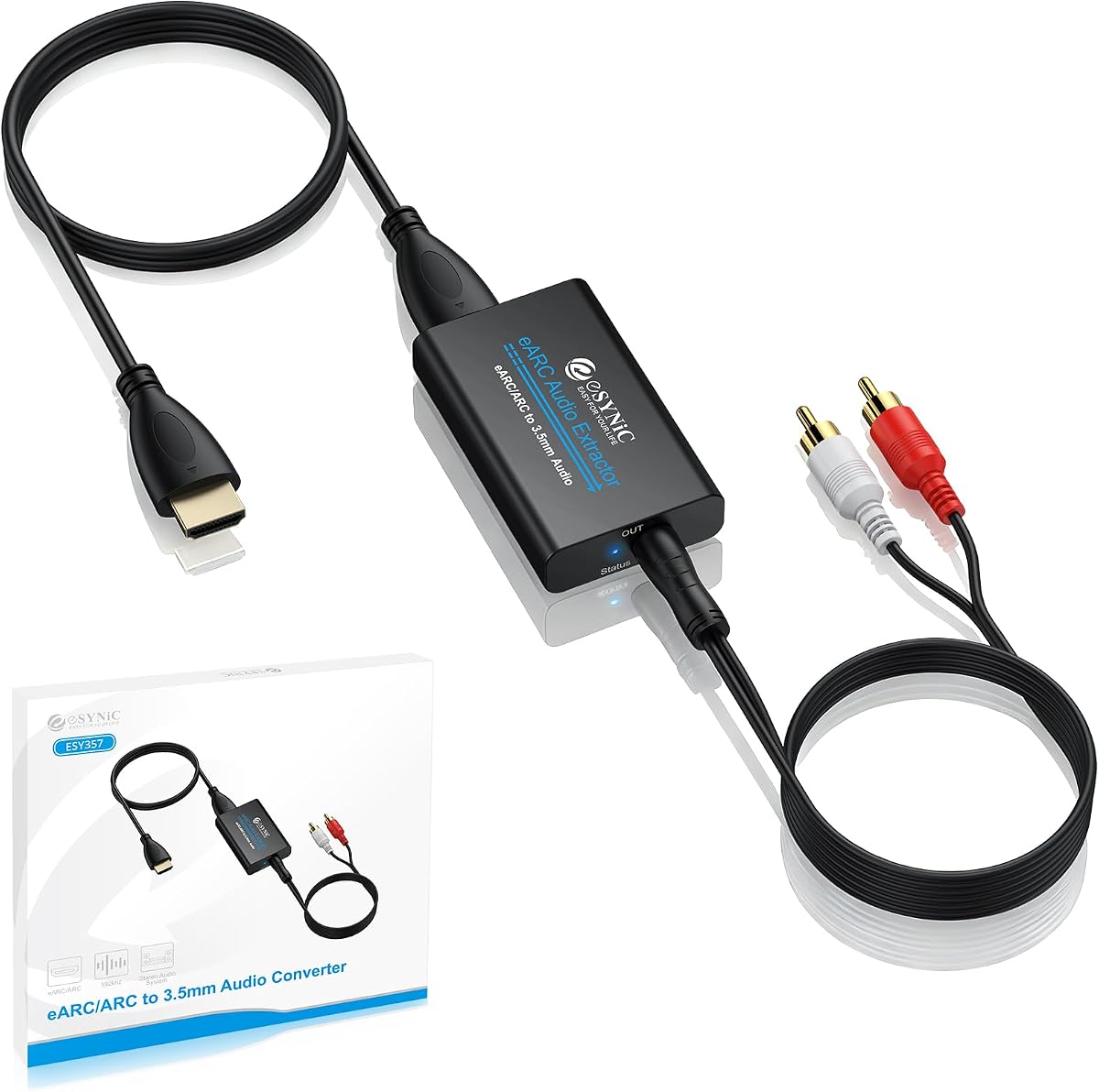
The eSynic Professional extractor earns a 4.5 rating and stands out for offering both a 3.5mm AUX connection and separate left/right output options. Unlike a simple cable that terminates in one male stereo plug, this box-style adapter provides more ways to connect analog audio. It can feed a headphone jack, powered speakers, a stereo amplifier, or a receiver with individual channel inputs. The product is aimed specifically at extracting audio from an HDTV's HDMI ARC or eARC port, making it more focused than general-purpose HDMI-to-AUX converters.
We may earn a commission when you buy through this link, at no additional cost to you.
Its documented audio performance reaches 24-bit/192KHz and is intended for PCM and PCM 2.0 material. Signal indicators provide visual confirmation of operating status, which can make troubleshooting easier when a television, amplifier, and converter are chained together. USB power is required, but no software, drivers, or complex configuration utility is needed. The product's processing is described as producing clean, low-interference stereo audio, while its compact enclosure should fit more readily than a larger power brick and adapter combination.
There are important boundaries. It works with a television's ARC/eARC interface, not with arbitrary HDMI devices, and it does not provide a general-purpose HDMI input for a game console or media player. The supported format list excludes Dolby-only and optical input, and compressed surround streams are not its intended use. The television must be switched into ARC or eARC output and set to PCM. These constraints are reasonable for a dedicated TV audio-return device, but buyers expecting a universal converter will need a different design.
Choose this model when your installation needs flexibility at the analog end, particularly if you want both 3.5mm and L/R connections. It is a strong middle ground between a simple integrated cable and a larger extractor with optical output and HDMI video passthrough. The high sampling-rate support and status lights make it appealing for a carefully configured living-room or home-theater installation, while the dual analog outputs reduce the need for additional adapters. Confirm that your television has the correct return-audio port and that your equipment accepts stereo rather than multichannel input.
Providing both a 3.5mm jack and L/R outputs is useful when one system uses a stereo mini-plug while another expects individual left and right connections. That flexibility can also simplify planning for shared conference-room or living-room audio equipment.
The signal indicators make it easier to confirm that the extractor is active. They do not replace correct ARC, PCM, and USB-power settings, but they provide a useful check when a television seems to be sending audio without sound appearing at the amplifier.
We may earn a commission when you buy through this link, at no additional cost to you.
This dedicated ARC-to-3.5mm converter has a 4.5 rating and focuses on a narrow but common use: getting digital television audio into a stereo amplifier, mixer, soundbar, or speaker. Its stated 192KHz capability is appropriate for high-resolution PCM sources, and the plug-and-play design avoids software installation. The product description also provides television-specific instructions for changing the output format to PCM, which can be valuable because many compatibility problems originate from the wrong audio setting rather than the hardware itself.
We may earn a commission when you buy through this link, at no additional cost to you.
The converter supports common sampling rates including 32, 44.1, 48, 96, and 192KHz, along with 24-bit data streams as described by the manufacturer. It uses digital noise reduction during extraction to reduce distortion and produce a cleaner analog signal. USB power is required during operation, and no additional drivers are needed. The output is intended for stereo equipment, so the TV should be configured for PCM or stereo rather than Dolby AC3 or DTS.
Its most significant restriction is explicit in the product name and description: it does not support eARC and cannot be used with ordinary HDMI ports. It also cannot decode 5.1-channel compressed formats. Another practical limitation is that the television's audio cannot be controlled with the remote while the converter is in use; volume must instead be adjusted on the headphones, speakers, or amplifier. These constraints make it better for users who already know that their television has a standard ARC port and whose primary need is a reliable analog stereo connection.
This converter is a sensible pick for an HDTV with conventional ARC, a pair of active speakers, and a home stereo amplifier that lacks HDMI. Its useful combination of high sampling rates, detailed setup guidance, and uncomplicated operation makes it approachable for first-time users. It is less suitable for eARC televisions, modern all-HDMI receivers, or setups that require Dolby and DTS surround decoding. Before buying, check the label beside the television's HDMI ports rather than assuming every HDMI socket supports ARC.
The listing includes example navigation paths for Samsung, LG, and Sony televisions. Those instructions reduce the guesswork involved in locating the digital audio-output setting, though the exact menu can vary by model and software version.
By limiting the converter to PCM stereo, the product avoids multichannel decoding problems. It is ideal when the destination is headphones, active bookshelf speakers, or a two-channel amplifier rather than a full surround-sound receiver.
We may earn a commission when you buy through this link, at no additional cost to you.
The 192KHz HDMI ARC to 3.5mm extractor offers a focused way to connect a conventional ARC television to analog audio equipment. Its 4.2 rating reflects a basic product aimed at stereo soundbars, speakers, home theater amplifiers, and mixers. The adapter supports HDMI ARC digital input, 3.5mm AUX stereo output, USB power, and plug-and-play operation without driver installation. It also advertises a maximum 192KHz sampling rate and support for several lower rates.
We may earn a commission when you buy through this link, at no additional cost to you.
This design is attractive for users who do not need optical output or HDMI video passthrough. A single analog connection keeps the signal path easy to understand, while digital noise reduction is included to minimize distortion. The product listing provides useful television-specific setup instructions and emphasizes that the audio format should be changed to PCM or stereo. That guidance is important because a compatible port alone does not guarantee that a television will deliver the expected format.
The limitations are closely related to the product's simple design. It does not support eARC, ordinary HDMI inputs, or compressed 5.1-channel audio such as Dolby AC3 and DTS. It also lacks television-remote volume control, so output level must be handled by the connected headphones, speakers, or amplifier. USB power must remain attached throughout use. Buyers seeking a single box that can also accept a game console or pass 4K video will need a more general-purpose extractor.
For value-conscious buyers with a known ARC port, this is one of the most straightforward choices in the guide. It supports high-resolution stereo without adding optical processing, multi-mode switches, or bulky adapters. The result is a practical converter for revitalizing older audio equipment around a modern television. Confirm that the television's port is labeled for ARC rather than eARC, set the output to PCM, and test the system with the intended amplifier or speakers before running it through a longer cable run.
The product avoids unnecessary modes and controls. Once the TV is set to PCM and the USB lead is powered, the intended role is simply to move television audio to the connected analog stereo equipment.
Support for 32, 44.1, 48, 96, and 192KHz gives the adapter flexibility across common television and streaming audio sources. The practical benefit is a high-resolution digital-to-analog path for stereo playback.
We may earn a commission when you buy through this link, at no additional cost to you.
The VPFET is a general-purpose HDMI audio extractor rather than a dedicated TV ARC adapter. It has a 4.1 rating and accepts audio from standard HDMI devices before sending it to optical and 3.5mm connections. Its source list includes Blu-ray players, DVD players, cable or satellite boxes, streaming devices, game consoles, and computers. This makes it useful when the television itself is not the desired source, although its lack of ARC and eARC support means it should not be connected to a television in the way a conventional HDMI-to-HDMI ARC system would be.
We may earn a commission when you buy through this link, at no additional cost to you.
Three operating modes provide meaningful flexibility. The 2.0-channel mode is intended for the 3.5mm stereo output, while the 5.1-channel mode is designed for optical output. Pass mode serves as a fallback if no audio or video appears in the first two modes. The optical path can carry DTS 5.1, whereas the analog 3.5mm output is limited to PCM 2.0. This distinction matters for anyone hoping to feed a surround receiver through a stereo mini-jack.
Video specifications include support for 4K at 30Hz with RGB or YUV 4:4:4, HDMI 1.4 bandwidth, and HDCP 1.4. The listing also notes that certain streaming devices and game consoles are limited to 1080p output. A 5V USB connection is required, either from another connected device or a suitable USB power adapter. Pass mode adds another consideration: users must select the correct mode based on the source and output rather than expecting every device combination to behave identically.
This extractor is best for a media component that lacks a convenient analog audio output, particularly when optical audio is wanted. It is not the correct solution for extracting a television's return audio, because TV input is explicitly unsupported. For a game console, disc player, or streaming box feeding a legacy sound system, however, its standard HDMI input and audio modes make it more versatile than the dedicated TV extractors. Use the 2.0 setting for analog stereo and the surround setting for optical output, and verify compatibility before buying.
Most products in this guide focus on television audio return. This model instead addresses game consoles, disc players, and media boxes whose audio needs to be separated from the HDMI signal and sent to older audio equipment.
The mode switch reflects the physical limitations of each output. The 3.5mm jack carries two-channel PCM, while the optical path can support DTS 5.1 when the source and mode are configured correctly.
We may earn a commission when you buy through this link, at no additional cost to you.
The 10-foot integrated cable is the most useful option in the guide when the television and analog audio equipment are not close together. It has a 4.0 rating and combines an HDMI ARC/eARC plug, USB power lead, and 3.5mm AUX output in a single run. The physical length can make it easier to place an amplifier, active speaker pair, or stereo system in a different part of the room without immediately adding a separate HDMI extension or several short adapters.
We may earn a commission when you buy through this link, at no additional cost to you.
The product supports PCM and LPCM two-channel audio with sampling rates up to 24-bit/192KHz. Gold-plated HDMI and AUX connectors, aluminum alloy housings, an overmolded circuit-board assembly, and a braided 4.0mm cable are listed as durability and interference-resistance features. The separate 1.6-foot USB lead is for power only and can draw from a television USB port or an external 5V source. Setup does not require drivers, and the listing includes a detailed reminder that USB power must be connected.
Its restrictions closely match those of other dedicated ARC cables. It cannot accept audio from a standard HDMI port, game console, or set-top box, and it does not decode Dolby Digital 5.1, DTS, or 7.1. It works only in the direction of television HDMI ARC/eARC to 3.5mm analog output. The stated HDMI CEC behavior allows TV-remote volume adjustment for AUX output when the television and setup support it, but the television still needs to send PCM or LPCM audio.
This is a strong fit for a living room in which the TV is wall-mounted and the stereo equipment sits on a shelf or stand several feet away. The integrated construction also keeps the visible connection path tidy. It is less attractive when maximum length is unnecessary, because a shorter cable is usually easier to route and conceal. For the intended use, verify the television's ARC/eARC label, select a PCM output format, and route the cable so it is not stretched tightly or pinched around furniture.
Ten feet of cable provides room to position speakers or an amplifier away from the television wall. It also reduces the need for a male-to-male HDMI extension that could add another failure point.
The braided jacket and metal connector housings are intended to withstand repeated handling. Gold-plated contacts are also designed to support stable connections in a permanently installed entertainment setup.
We may earn a commission when you buy through this link, at no additional cost to you.
The 4K60Hz HDMI ARC extractor has the highest rating in this guide at 4.8 and offers the broadest combination of modern video and versatile audio routing. It can extract audio from HDMI sources, return television audio through ARC, and provide both optical/SPDIF and 3.5mm analog outputs. Its video capabilities extend to 4K at 60Hz, with stated backward support for 4K30Hz, 2K60Hz, 2K30Hz, and 1080p. That makes it more versatile than a converter intended only for a television's analog audio.
We may earn a commission when you buy through this link, at no additional cost to you.
Three modes cover TV/ARC, 2.0-channel, and 5.1-channel operation. A DIP switch selects the TV mode when using a television's HDMI ARC port through the converter's HDMI output. The other modes handle standard HDMI sources, with optical output suited to surround formats and 3.5mm suited to stereo. A 3.5mm-to-RCA cable is included for compatibility with many amplifiers. The extractor can also be used with only the optical or only the 3.5mm output when a display connection is unnecessary.
Important cautions apply. It does not support eARC, and when using ARC, a full-featured HDMI ARC cable is required. CEC support depends on the source, television, or amplifier also supporting it. The 3.5mm output does not provide volume control or amplification, so compatible headphones or an amplifier are needed. It also should not receive a television directly through the HDMI input. USB power is mandatory, and PCM/LPCM is the recommended source format when troubleshooting missing sound.
This is the strongest choice for a user who wants more than a simple ARC-to-stereo cable and may also route audio from a game console, laptop, disc player, or streaming box. The 4K60Hz capability is a major advantage when the extractor is also involved in video routing. It is less appropriate for someone with an eARC-only television or for gaming headsets that require microphone support. Carefully follow the mode-switching instructions, use the supplied ARC cable where appropriate, and confirm that the destination amplifier can accept the selected analog connection.
The extractor is unusually capable for a compact adapter, combining 4K60Hz video support with optical and analog audio outputs. Every link in the chain still needs corresponding support for the intended resolution.
TV mode handles return audio, while the stereo and surround modes support conventional HDMI sources. This expands the product's usefulness beyond the specific ARC-to-3.5mm task.
We may earn a commission when you buy through this link, at no additional cost to you.
The 4K60Hz ARC adapter is a box-style converter focused on television audio return, with the useful ability to feed both a 3.5mm stereo output and individual L/R outputs at the same time. Its 4.1 rating reflects a capable design with some notable constraints. The adapter supports HDMI ARC from a television and converts the returned digital audio into analog stereo for a soundbar, speaker, or amplifier.
We may earn a commission when you buy through this link, at no additional cost to you.
Sampling rates of 32, 44.1, 48, 96, and 192KHz are listed, providing a high-resolution conversion path. Digital noise reduction is included, while the aluminum housing is intended to improve heat dissipation and durability. The simultaneous outputs are convenient when one destination uses a mini-jack and another uses left/right RCA-style inputs. The product also states that it can synchronize multi-channel output without delay, although the 3.5mm and L/R paths are specifically analog stereo outputs.
The television must have a genuine ARC port, and HDMI 1.4 or a later suitable cable is recommended. The output format should be set to PCM 2.0; DTS, DSD, 5.1-channel, and 7.1-channel raw formats are not supported. The adapter has no built-in CEC protocol, so the television remote cannot directly adjust its output volume. A confusing point in the listing is that it mentions compatibility with several source-device categories even though the dedicated ARC converter is described as television-only; for a standard game console or disc player, a general-purpose extractor is the safer choice.
This model is a good candidate for a shared analog system because it can feed two output styles without requiring two separate extractors. It is also appropriate for users who want a 4K-rated adapter chassis in a mixed entertainment setup. It is not ideal when television-remote volume control is essential, nor does it solve the need to decode surround audio. Verify the port label, enable ARC in the television menu, select PCM 2.0, and connect the destination to the appropriate output.
The simultaneous L/R and 3.5mm outputs are useful for linking a legacy amplifier and a set of active speakers. It also reduces the need to move a single plug when changing audio destinations.
The adapter supports high sampling rates but leaves volume control to the speakers, headphones, or amplifier. That behavior is predictable for analog equipment with its own level adjustment.
We may earn a commission when you buy through this link, at no additional cost to you.
The avedio links extractor combines HDMI input and output, optical/SPDIF, and a 3.5mm stereo jack in a versatile box. Its 4.0 rating reflects a broad feature set with a few software-format limitations. It supports 4K at 60Hz, HDMI 2.0, and HDCP 2.2, making it suitable for installations that need video passthrough as well as audio extraction. The ARC function can accept return audio from an HDTV's eARC or ARC interface.
We may earn a commission when you buy through this link, at no additional cost to you.
Three operating modes—pass, 2.0-channel, and 5.1-channel—determine how the device handles video and audio. The 3.5mm output accepts PCM or LPCM stereo, while the optical output can carry PCM 2.0, Dolby Digital, Dolby TrueHD, and DTS-HD. Optical and 3.5mm can be used separately, which is useful when connecting a soundbar, amplifier, or headphones without a display. To receive audio from both outputs, the source format must be set to PCM or stereo.
The product explicitly does not support Dolby Digital Plus or CEC. It also cannot create surround audio in the 3.5mm path: that output remains analog stereo even when a 5.1-channel source is present and optical output is selected. Despite the wide source-device compatibility, users should distinguish between standard HDMI source extraction and the special TV ARC/eARC input arrangement. Correct mode selection and compatible cables are essential.
This model suits a home theater where the television, receiver, and speakers need both HDMI video and separated audio. It is also appropriate for users who want a choice between stereo headphones and a surround-capable optical receiver. The inclusion of eARC support distinguishes it from several dedicated ARC-only models, while the optical output preserves surround formats that a 3.5mm connection cannot carry. Check the television and source menus for supported audio formats, especially when using an eARC television.
The optical path can carry DTS 5.1 and other supported surround formats to a compatible receiver. The 3.5mm path remains a two-channel analog option, so output selection should match the destination equipment.
The included HDMI input and output allow the device to sit within a theater signal chain without preventing video from reaching a display. Pass mode provides a fallback when the usual 2.0 or 5.1 configurations do not produce the expected result.
We may earn a commission when you buy through this link, at no additional cost to you.
This eARC audio extractor has a 4.5 rating and is notable for handling both television return audio and conventional HDMI source devices. A toggle switch determines whether the unit uses the TV's ARC/eARC connection or accepts a source such as a DVD player, game console, or streaming device. In either arrangement, audio can be sent to a soundbar, amplifier, or wired headphones through the optical and 3.5mm outputs. This makes the device broader than a one-purpose TV return adapter.
We may earn a commission when you buy through this link, at no additional cost to you.
The stated audio support includes Dolby, DTS 5.1, and PCM 2.0, although 7.1-channel output is not supported. The extractor can also be used to take audio from a conventional HDMI source and relay it to a soundbar or amplifier whose compatible input is optical or 3.5mm. Its 4K30Hz video capability is lower than several competing models that support 4K60Hz, so it may be less attractive for next-generation high-frame-rate video installations.
Remote-control support is another useful distinction. The ARC and 3.5mm outputs support volume adjustment through the television remote, while the optical output does not. This follows the common behavior of optical equipment, which generally relies on its own volume control. The product's stated compatibility with source devices should be understood in the context of its modes: ARC/eARC is for a television's return path, while the alternate input is for a standard HDMI source.
The extractor is best for a system that alternates between television return audio and a separate media source while still wanting analog or optical sound. It is also compelling for users who want television-remote volume control with a 3.5mm headphone connection. It is less suitable for a 4K60Hz theater chain or for 7.1-channel output. Check the TV's eARC readiness, select the correct toggle position, and confirm that the destination amplifier supports the chosen digital or analog format.
The ARC/eARC and HDMI modes let the adapter serve both a television and a separate media device. That versatility reduces the need for a second extraction box in a shared entertainment center.
Television-remote control is available for the ARC and 3.5mm paths, which is particularly useful with headphones. The optical output remains volume-adjustable only through the connected sound system.
We may earn a commission when you buy through this link, at no additional cost to you.
The right extractor depends first on where the audio begins and where it needs to end. ARC/eARC capability, output format, power requirements, and television control should be checked before considering cable length or additional features.
An HDMI port does not automatically support audio return. Look for a port explicitly labeled ARC or eARC in the television manual or beside the connector. ARC sends television audio back through HDMI, while eARC is an enhanced version that can carry more advanced audio information. Some extractors accept either label, while others are limited to standard ARC. This distinction is the most important compatibility check because an unsuitable port may produce no audio even when every cable is connected correctly.
A 3.5mm AUX output normally provides two-channel analog stereo. It is appropriate for headphones, active speakers, and amplifiers with a stereo mini-jack, although some systems require a 3.5mm-to-RCA adapter. L/R outputs provide separate analog channel connections. Optical output is the better option for a surround-capable receiver because the 3.5mm path cannot carry multichannel surround audio. Consider both your existing equipment and whether you want the extractor to serve more than one destination.
Many inexpensive ARC-to-stereo adapters accept only PCM or LPCM, often described as PCM 2.0. They do not decode Dolby Digital, DTS, DTS-HD, or other compressed surround formats, and the television may need to be changed to stereo output before sound becomes available. Products with optical output may support surround decoding, but that does not mean the same formats are available through their analog jack. Check both the input formats and the output path rather than relying on a broad label such as Dolby support.
A stated maximum of 192KHz indicates support for high-resolution digital streams, but useful quality also depends on the television's actual output, the source content, and the connected analog hardware. PCM data at 24-bit/192KHz is not automatically more audible if the source is compressed or the amplifier is the limiting component. For most television listening, 48KHz is a common working rate. A high sampling-rate specification is still valuable because it can avoid unnecessary resampling and suits a broader range of source formats.
Active conversion and digital-to-analog processing require power. Most products in this guide use a USB lead for operating power, and the television's USB port may be convenient when it supplies enough current. An external USB power adapter can be used if the television port is unavailable or unreliable. A passive-looking cable still needs power when it contains a processing circuit. Keep the power lead connected during operation, and avoid assuming that an included USB cable means a USB power adapter is included.
A dedicated TV audio cable normally has no HDMI video output because its only purpose is to extract return audio. General-purpose extractors may include both HDMI input and output so video can continue to a television or projector. That is useful for source devices without analog audio, but it adds complexity and may impose resolution limitations. A product limited to 4K30Hz may be sufficient for conventional television viewing, while a 4K60Hz chain should use components that support the intended frame rate.
Some ARC extractors pass television remote volume commands to the analog output, while others provide no CEC handling and require volume adjustment on the amplifier or headphones. A product that supports CEC is still dependent on the television and the rest of the chain. If convenient television-remote control is important, confirm that behavior in the listing. Otherwise, controlling volume directly on the connected speakers may be more reliable.
Integrated cables are compact and visually tidy, but their fixed length dictates how the television and audio equipment are positioned. A longer run can reach a wall-mounted television from a shelf several feet away, while a shorter cable is easier to hide behind a television. For box-style adapters, a standard HDMI cable allows the extractor to sit near the equipment. Route cables without sharp bends, avoid pinching the braided jacket, and leave enough slack to prevent strain at the connectors.
First, identify the television's ARC or eARC port and confirm that the adapter supports that exact function. Connect the extractor's HDMI plug or HDMI input cable to the correct television port. For a general-purpose extractor, use an HDMI cable rated for the intended video and ARC functions. Connect the 3.5mm output to headphones, active speakers, or an amplifier, and connect any optical cable to a compatible receiver. Do not confuse the television's return-audio port with a standard HDMI input.
Next, provide USB power and configure the television. Select the ARC or eARC sound output, enable the relevant CEC or return-channel setting if required, and set the format to PCM, LPCM, or stereo for a 3.5mm-only converter. On box-style products, select the correct operating mode: TV mode for television return audio, 2.0-channel mode for analog stereo, and 5.1-channel mode for optical surround output when the device provides those choices. Start with a moderate volume on both the television and amplifier to avoid an unexpectedly loud output.
Finally, test the complete chain and care for the connections. Play ordinary television audio before testing high-resolution or surround content, and adjust volume on the connected equipment if the television remote does not control the extractor. Keep the USB power connected, route the cable without sharp stress, and periodically inspect the plugs for dust or damage. Use appropriate adapters without forcing a connector, and avoid connecting the output to a line-level or powered input that does not match the extractor's design.
Only televisions with a working HDMI ARC or eARC port are suitable for the dedicated adapters in this guide. The port must be explicitly identified as ARC-compatible, and the relevant return-audio setting must be enabled on the television. A standard HDMI input generally cannot send audio back to the converter. General-purpose extractors can accept ordinary HDMI sources, but they solve a different task.
The most common cause is an incorrect television audio format, particularly when the television is sending compressed surround audio to a stereo-only converter. Set the output to PCM, LPCM, or stereo and reconnect the USB power. Also verify that the correct ARC port is selected, the cable is fully seated, and the amplifier or speakers are powered and set to the appropriate input.
Most dedicated 3.5mm extractors support only two-channel PCM and do not decode Dolby or DTS surround streams. Products with an optical output may support surround formats through that digital connection, but the 3.5mm path remains stereo. Check the exact format list for each model rather than assuming that optical support also applies to the analog output.
It depends on the converter. Some models include CEC handling and allow television-remote volume adjustment through the ARC or 3.5mm output, while others require volume changes on the connected amplifier or headphones. Optical output generally uses the volume control of the connected receiver. The television and all other components must also support the relevant control functions.
Most products in this guide do because they actively decode and convert the digital audio signal. The included USB lead may draw power from the television or another suitable source, while some installations require a separate USB power adapter. A converter without sound despite a visible HDMI connection is often simply missing operating power.
Dedicated ARC-to-3.5mm cables generally cannot because they expect audio return from a television. General-purpose HDMI extractors can accept sources such as game consoles, Blu-ray players, laptops, and streaming devices, then separate their audio into analog or optical outputs. Check the product's input type and operating mode before connecting a source directly.
ARC is the standard television audio-return function available over an HDMI port. eARC is an enhanced version designed to support more advanced audio information and features. An ARC-only converter may still work with an eARC television's compatible ARC function, but a product that does not support eARC may not handle every feature or format associated with that connection.
Choose 3.5mm for headphones, active stereo speakers, or an amplifier with a stereo mini-input. Choose optical when connecting to a surround-capable receiver and retaining supported multichannel formats. Some extractors offer both, allowing the same television audio to feed different systems. Neither output should be assumed to carry surround audio unless the product explicitly states that it does.
The integrated 3-foot ARC/eARC cable is the most well-rounded choice for a straightforward television-to-stereo installation. The 4K60Hz feature-rich extractor stands apart for users who also need optical output, multiple modes, and high-frame-rate video, while the dedicated 192KHz ARC converter offers a focused and economical route to analog stereo. Each approach solves the basic need to recover television audio, but their extra capabilities differ considerably.
Prioritize the connection path before any secondary feature. Confirm ARC or eARC support, determine whether the source is a television or another HDMI device, and verify the destination's required connection. Then match the audio format, power method, volume behavior, and video requirements. A longer integrated cable can be more convenient than a box adapter when furniture is fixed in place, while a general-purpose extractor is safer for a console, disc player, or streaming device.
Ratings, product details, and selling prices can change, so check the current listing before ordering. In particular, verify the exact port label, supported formats, included cables, and power requirements. Those details determine whether an extractor will deliver sound in your particular entertainment setup and help avoid an otherwise unnecessary return or troubleshooting effort.