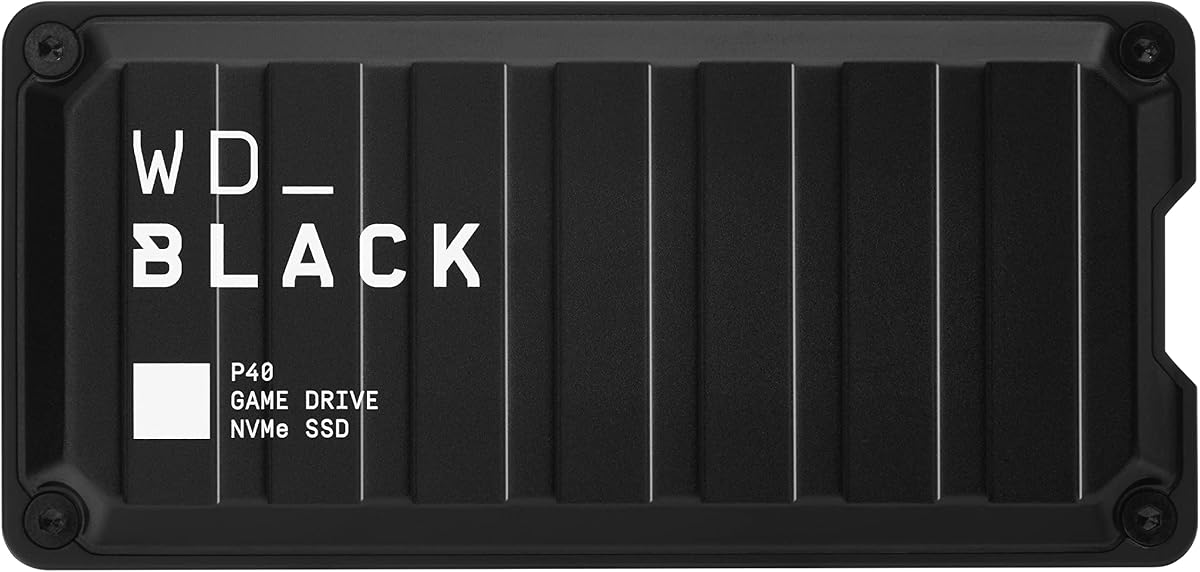
Western Digital P40 Game Drive SSD
4.6Editor score
Up to 2,000MB/s read speed
Xbox Series X|S compatibility
Customizable RGB lighting
Our guide compares 10 external SSDs and storage options for Xbox Series X, evaluating speed, capacity, compatibility, design, durability, and everyday gaming
An external SSD can give an Xbox Series X more room for modern games, but compatibility matters more than raw transfer speed. The best option depends on whether you need direct game launching, simple storage expansion, faster transfers, or a large portable library. Xbox Series S also has built-in storage, making capacity especially valuable.
This guide compares ten external SSDs and portable storage products using their stated capacities, interfaces, speeds, console support, designs, and warranty information. It covers dedicated Xbox drives, gaming-focused models, general-purpose portable SSDs, an NVMe expansion card, and one external hard drive that offers capacity rather than SSD-level performance.
The picks show why the fastest interface does not always produce the best gaming experience and why official Xbox certification can be more important than a headline speed figure. Review each drive for direct-play requirements, available space, and supported functions. Prices and promotions change, so confirm the current listing and console requirements before purchasing.
4.6Editor score

4.8Editor score

4.7Editor score
This side-by-side comparison highlights storage type, stated performance, capacity, and Xbox support. It also separates dedicated expansion hardware from portable SSDs and larger-capacity external drives so buyers can match the product to their actual console needs.


The Seagate 2TB Game Drive is an Xbox-focused external hard drive built around one clear purpose: expanding the console's Game Vault. It holds 2TB and is listed as compatible with Xbox Series X, Xbox Series S, and all generations of Xbox One. Its 4.5 rating reflects a strong reception among buyers who prioritize straightforward storage expansion over SSD performance.
We may earn a commission when you buy through this link, at no additional cost to you.
The drive's most important limitation is stated directly in its product information: games cannot be played directly from it. It works as a place to store titles that can be moved between the console and the drive. The bold console-inspired enclosure and illuminated green LED bar also help it blend into an Xbox setup better than a generic utility drive.
This is a mechanical hard drive connected through USB 3.0, so it should not be compared directly with a portable NVMe SSD in terms of loading or transfer speed. Its appeal instead comes from 2TB of capacity, broad console support, and a clear organization workflow. The included three-year Rescue Data Recovery Services add some reassurance for storing a sizable game collection.
Choose the Seagate 2TB Game Drive when your priority is keeping a large library organized and moving games on and off the console. It is less suitable for players who want to launch games directly from external media. In that case, an Xbox-optimized expansion card or a compatible gaming SSD with a faster interface will serve more demanding setups better.
Xbox certification and a dedicated 2TB capacity make this drive straightforward for players who regularly move games between internal and external storage. Its Game Vault role keeps the console library organized without requiring a general-purpose drive to imitate the feature.
The refined enclosure and built-in green LED give the drive a deliberate gaming aesthetic. It is a practical choice for a media shelf or entertainment center where a plain external hard drive might look out of place.
We may earn a commission when you buy through this link, at no additional cost to you.
The Western Digital P40 combines a gaming-focused design with one of the most ambitious speed ratings in this guide. It offers up to 2,000MB/s read performance through USB 3.2 Gen2x2, a 1TB capacity, and compatibility with Xbox Series X|S. Its 4.6 rating makes it a strong all-around choice for buyers who want more speed than a conventional external drive.
We may earn a commission when you buy through this link, at no additional cost to you.
The P40's compatibility details distinguish native console games from older Xbox One titles. The product information states that Xbox Series X|S systems can play and store Xbox One games while archiving Xbox Series X|S games, which reflects how Xbox manages supported content on external storage. Users should still verify the current behavior and requirements for the titles they own.
RGB lighting is customizable through the Windows-only WD_BLACK Dashboard, allowing the enclosure to match a gaming setup. The shock-resistant structure is also rated to survive drops of up to two meters. However, the advertised 2,000MB/s figure is based on read speed and internal testing, so the console or computer ultimately sets the achievable transfer rate.
This is our budget-minded top pick because it combines 1TB of capacity, a high-speed interface, broad console compatibility, and gaming aesthetics without moving to the largest-capacity premium tier. It is a strong candidate for maintaining a portable collection of supported games and transferring files between modern devices. Buyers wanting maximum space should compare its price with a larger WD_BLACK gaming drive.
A USB 3.2 Gen2x2 interface and stated read speed of up to 2,000MB/s make the P40 well suited to large game transfers. Actual console results will be lower, but the specification provides ample headroom for file movement and other portable storage tasks.
The RGB system gives the drive visual appeal while the shock-resistant construction adds everyday resilience. A two-meter drop rating offers greater confidence than an unprotected drive, especially when the SSD travels between a console, desktop, and living-room setup.
We may earn a commission when you buy through this link, at no additional cost to you.
The Lexar ES3 1TB is a compact portable SSD designed to work across consoles, computers, cameras, laptops, mobile devices, and more. Its listed compatibility explicitly includes Xbox X|S, while USB 3.2 Gen 2 speeds of up to 1,050MB/s read and 1,000MB/s write make it suitable for quick file transfers. It carries a 4.4 rating.
We may earn a commission when you buy through this link, at no additional cost to you.
Physical portability is a defining advantage. At 42 grams and 10.5 millimeters thick, the ES3 is smaller than a typical memory card and includes a Type-C cable for plug-and-play use. That makes it convenient for gamers who move between a console and computer or want a drive that is easy to carry without being tied to one desk.
Data protection is another strength. The included Lexar DataShield 256-bit AES encryption software is designed to protect files, and the product's broad platform support makes the drive useful beyond the Xbox ecosystem. The listing also notes that MagSafe is not available on this version, and compatibility can vary when a connected device does not support USB 3.2 Gen 2.
The ES3 is a compelling choice for users who need one small drive for several devices and want strong portable performance. Xbox users should confirm the current direct-play and game-moving requirements for their specific console and title before relying on it for active game storage. For the listed Xbox X|S compatibility alone, however, it is a flexible and travel-friendly choice.
The 42-gram weight and 10.5mm thickness make the ES3 easy to carry between home, work, and travel. Its slim shape offers more storage capacity than a typical removable card while remaining substantially less cumbersome than many external gaming drives.
Compatibility with cameras, laptops, mobile devices, PlayStation systems, and computers makes this a broader portable drive than a console-specific model. The included encryption software also gives buyers a way to protect files when the SSD is used away from home.
We may earn a commission when you buy through this link, at no additional cost to you.
The WD_Black C50 is the most purpose-built choice in this guide. It is an officially licensed 1TB NVMe storage expansion card for Xbox Series X|S, with a 4.8 rating that is the highest among the ten products. Rather than connecting over USB, it expands the console through its dedicated storage slot and integrates directly with Xbox features.
We may earn a commission when you buy through this link, at no additional cost to you.
Its standout feature is Xbox Velocity Architecture optimization. The card is designed to provide fast, high-speed access to supported games while using less of the console's internal storage. It also supports Quick Resume, allowing a player to move between suspended games and return to the point where they stopped. Plug-and-play installation further reduces the setup barrier.
The important trade-off is that the C50 is not a general-purpose USB SSD. It needs a compatible Xbox Series X or Series S expansion slot and cannot be carried between devices like a conventional portable drive. Its value comes from tight console integration and official licensing rather than broad cross-platform use, and supported-game behavior should always be checked for the title in question.
This is the editor's choice for players who want the most integrated external-storage experience on Xbox. It offers 1TB of extra space, optimized access, and Quick Resume support in hardware designed specifically for the console. Choose it when installation inside the console and full Xbox integration matter more than portability or cross-device file storage.
Licensing and Velocity Architecture support allow the C50 to work as intended with supported Xbox games. That integration is more meaningful for direct play and Quick Resume than raw transfer speed alone, making it the strongest choice for console-focused storage expansion.
The plug-and-play format removes the need for a separate enclosure or special external adapter. A 1TB increase can give large current-generation games room to install while the console's internal storage remains available for other content.
We may earn a commission when you buy through this link, at no additional cost to you.
The Seagate 1TB Game Drive SSD combines external solid-state storage with an enclosure explicitly designed for Xbox consoles. It supports Xbox Series X|S, all generations of Xbox One, and Game Pass, and earns a 4.5 rating. Its green LED and console-inspired form make it one of the most visually cohesive choices in the guide.
We may earn a commission when you buy through this link, at no additional cost to you.
As an external SSD, it offers an important advantage over a mechanical Game Drive: solid-state storage is better suited to frequent game movement and quicker file operations than a conventional hard disk. The interface is USB 3.2 Gen 1, however, which is less ambitious than the Gen2x2 connections offered by several competing gaming SSDs.
A 1TB capacity may feel modest for a growing library, especially when modern titles consume substantial space. The product information also notes that available capacity can vary. On the positive side, the drive includes three years of Rescue Data Recovery Services and a three-year limited warranty, offering reassurance for a device holding valuable games and saves.
This is the premium-style console pick for a buyer who values Xbox-specific design, broad compatibility, and dedicated storage over portability or maximum transfer speed. It is especially suitable for Xbox One owners also using an Xbox Series console. For a larger modern library, compare the available cost with the WD P40 or a higher-capacity portable gaming SSD.
Using an SSD rather than a hard drive makes this drive better aligned with frequent transfers and quick access than the 2TB Seagate Game Drive. Its enclosure and green illumination give it a deliberate appearance that suits an entertainment center.
Compatibility with Series X|S, Xbox One, and Game Pass broadens its usefulness within the Xbox ecosystem. The included recovery period and limited warranty add practical value for protecting a large personal game collection.
We may earn a commission when you buy through this link, at no additional cost to you.
The Samsung T7 1TB is a refined, general-purpose portable SSD with a 4.7 rating and performance of up to 1,050MB/s read and 1,000MB/s write. Its USB 3.2 Gen 2 interface, compact aluminum body, and broad device support make it a strong travel and editing drive, even though the supplied product information does not explicitly identify Xbox compatibility.
We may earn a commission when you buy through this link, at no additional cost to you.
The T7 uses PCIe NVMe technology in a small enclosure that is easy to carry between computers, phones, and cameras. Its stated features also support high-resolution video workflows, including 4K 60fps recording and iPhone 15 Pro ProRes 4K at 60fps in supported arrangements. Those capabilities make it useful to creators who need more than game storage.
Durability is another major selling point. The solid aluminum unibody construction provides shock resistance and fall protection up to six feet. Samsung also states that its firmware and components are produced in-house, including DRAM and NAND. These details support confidence in a portable device likely to be moved among multiple locations and systems.
For Xbox Series X buyers, the T7 can be considered as a fast portable SSD, but the absence of explicit Xbox support in the listed information means it should not be presented as a certified game drive. Confirm current console behavior, game support, and direct-play requirements first. As a general portable SSD, it remains one of the most polished and well-rounded products in the guide.
NVMe performance and a compact enclosure make the T7 effective for moving large project folders, game files, and high-resolution media. The drive's value is strongest for users who need one fast storage device across work, travel, and entertainment.
The aluminum unibody and stated six-foot fall protection suit a drive that moves between bags, desks, and home consoles. Solid-state construction also avoids the mechanical moving parts found in a portable hard drive.
We may earn a commission when you buy through this link, at no additional cost to you.
The WD P50 4TB is the highest-capacity portable SSD in this comparison and one of the fastest by stated specification. It reaches up to 2,000MB/s read speed through a SuperSpeed USB 20Gb/s interface, carries a 4.7 rating, and is compatible with PlayStation, Xbox, PC, and Mac systems. It suits players who want substantial game space without the C50's console-only format.
We may earn a commission when you buy through this link, at no additional cost to you.
Four terabytes allows a larger collection of current games, older favorites, and other media to remain on one portable drive. The P50 is built for access to a gaming library from different systems, while the shock-resistant enclosure helps protect it during transport. Its performance is stated as read speed, and actual results depend on the host device, usage conditions, and drive capacity.
The included 18-inch USB Type-A to Micro-B cable supports SuperSpeed transfers up to 5Gbps. That connection works with the drive's gaming role, but buyers who want a USB-C-first setup may need to check their available ports and cables. The high capacity also carries a substantially higher cost than the 1TB options, making value a legitimate consideration.
This is the best premium choice for a buyer whose main requirement is a very large, fast, portable SSD. It balances capacity and performance better than a basic external hard drive while remaining more flexible than an Xbox expansion card. If direct launching of a large number of games is essential, verify Xbox requirements for every title before buying.
The 4TB capacity provides room for many large games in a portable enclosure. It offers substantially more space than 1TB gaming SSDs while retaining solid-state responsiveness and broad cross-platform flexibility.
A stated read speed of up to 2,000MB/s and a USB 20Gb/s interface are useful when moving sizable game packages. The host connection remains the deciding factor, so users should pair the drive with a suitable SuperSpeed port.
We may earn a commission when you buy through this link, at no additional cost to you.
The 2TB Lexar ES3 balances a generous capacity with fast portable solid-state performance. It offers up to 1,050MB/s read and 1,000MB/s write speeds and earns a 4.5 rating. Compared with the 1TB ES3, it gives Xbox or multi-device users twice the storage while maintaining the same core performance class.
We may earn a commission when you buy through this link, at no additional cost to you.
Thermal management is an interesting feature for a compact high-speed SSD. Built-in double-layer graphite sheets are designed to conduct heat away and keep the drive cool during fast transfers. That makes the ES3 appealing for repeated large-file movement, provided the connected host supports the advertised USB 3.2 Gen 2 performance.
The supplied information does not explicitly state Xbox compatibility, so this should not be presented as a certified Xbox game drive. It includes a two-in-one USB-C and USB-A cable for use with PCs, Macs, tablets, and smartphones, plus stated drop resistance up to two meters. It is a flexible storage device rather than a console-specific accessory.
This ES3 configuration is a compelling option for users who need more capacity than a 1TB portable SSD but prefer a slimmer, cooler, and less expensive product than the largest premium gaming drives. Xbox buyers should verify game-moving and direct-play requirements for their console and games. For general storage, the 2TB capacity makes the drive particularly adaptable.
The 2TB capacity creates room for large project files, media, and a portable game collection. Solid-state storage also provides quicker access and better shock tolerance than the 6TB hard drive in this guide.
Double-layer graphite sheets help move heat away from the internal components. This design is particularly relevant during large transfers, when compact portable SSDs generate more heat than they do during occasional file access.
We may earn a commission when you buy through this link, at no additional cost to you.
The ADATA SE880 is a lightweight, high-speed portable SSD with a 1TB capacity and a 4.5 rating. It supports USB 3.2 Gen2x2 and offers read speeds of up to 2,000MB/s. Its product information also states that it supports new-generation game consoles and multiple operating systems, making it a flexible option for mixed-device users.
We may earn a commission when you buy through this link, at no additional cost to you.
A compact, lightweight design makes the SE880 easy to carry without adding much bulk to a console or computer setup. It does not carry the RGB lighting found on some WD_BLACK models, but its cleaner appearance may appeal to buyers who want a portable SSD without conspicuous gaming accents. The interface supports the same headline speed class as the WD P40.
The key limitation is the lack of specific Xbox function details in the supplied information. Although new-generation console support is stated, the listing does not explain which Xbox games can be moved, stored, or launched directly. That makes the SE880 better positioned as a fast general-purpose portable SSD than a substitute for an officially licensed Xbox storage product.
Consider the SE880 when high transfer speed, portability, and cross-platform usefulness matter more than tightly integrated console features. Xbox users should check the current manufacturer and console guidance before attempting to store or run games. With a 1TB capacity, it is most appropriate for active projects, a selective game collection, and fast everyday transfers.
The SE880 combines a high-speed Gen2x2 interface with a portable form factor. Its support for multiple operating systems makes it useful for moving files between platforms instead of dedicating it to one console.
Its understated titanium enclosure avoids lighting and other decorative features. That can make it a better fit for a desk, work bag, or shared entertainment unit where a neutral design is preferred.
We may earn a commission when you buy through this link, at no additional cost to you.
The WD_Black P10 6TB is the largest-capacity product in the guide and offers an exceptional amount of game storage in a portable 2.5-inch hard drive. It is rated to hold up to 150 games, reaches speeds of up to 130MB/s, and carries a 4.7 rating. It is an excellent archival library for Xbox Series X|S, although it is not a solid-state drive.
We may earn a commission when you buy through this link, at no additional cost to you.
Compatibility is stated for Xbox Series X|S, with support for playing and storing Xbox One games and archiving Xbox Series X|S games. It also works with PlayStation 5 and PC. The metal-top enclosure gives the drive a durable, professional appearance, and its portable format lets users maintain a large collection without permanently filling the console's internal storage.
The mechanical design means file operations are considerably slower than the portable SSDs in this comparison. Spinning storage is also more sensitive to shock and movement than a solid-state device, making careful handling important. A drive advertised for up to 150 games may also become less practical as individual game sizes continue to grow.
Choose the P10 6TB when the primary goal is to store the largest possible collection and move supported games into a dedicated library. Do not choose it expecting the responsiveness of an NVMe SSD or the direct-play integration of the WD_Black C50. It is a capacity-first solution for a player with many older or archived titles.
Six terabytes can hold up to 150 games according to the product information, making it useful for preserving older favorites beside newer releases. It provides a straightforward alternative to buying additional internal storage.
The stated speed of up to 130MB/s is substantially lower than the 1,050MB/s and 2,000MB/s figures associated with the SSDs in this guide. The trade-off is worthwhile when affordable, high-capacity storage matters more than rapid transfers.
We may earn a commission when you buy through this link, at no additional cost to you.
The right Xbox storage device depends on direct-play support, capacity, interface speed, and whether portability or full console integration matters. Review Xbox requirements first, then match the drive's certification and connection method to the games and workflow you actually intend to use.
In short, confirm certification, direct-play behavior, and supported title types before buying.
In short, decide whether direct launching is essential or whether organized game storage is enough.
In short, allow extra room for future releases rather than filling a new drive completely.
In short, prioritize a suitable host connection and realistic performance over a maximum number.
In short, choose the C50 for integration and a USB SSD for flexibility across systems.
In short, favor a shock-resistant SSD when the drive will travel frequently between locations.
In short, give priority to adequate cooling for large transfers and a design that fits your setup.
In short, consider recovery coverage and warranty length as protection for an irreplaceable game library.
Before adding storage, confirm that the drive is supported by your exact Xbox model and that the games involved permit the intended function. Follow the console's storage instructions, connect the drive with the appropriate USB port, and use the onscreen storage interface to format it when prompted. Give the system uninterrupted time to complete formatting and any required game movement before disconnecting the device.
Build the library in manageable batches rather than moving the entire collection at once. This reduces the chance of interruption and makes it easier to identify whether a particular game or system feature is causing a problem. Keep the original installation media or other recovery options for important titles, and leave reasonable free space on the console's internal drive for updates, temporary files, and system operations.
Protect the drive physically and logically. Safely eject it from the console or computer before unplugging it, avoid moving a mechanical hard drive while it is active, and keep the enclosure dry and away from direct heat. Occasionally inspect important saved data, retain a separate backup where practical, and replace the connection cable if transfers become unstable. Never format the drive while important games are still stored exclusively on it.
No. A drive may support file storage and movement without supporting direct game launching. The Seagate 2TB Game Drive explicitly cannot launch games directly, while the officially licensed WD_Black C50 is optimized for Xbox storage and Quick Resume. Individual games can also have their own external-storage requirements, so check both the drive and title support before relying on direct play.
It is an NVMe SSD expansion card, but it is not a USB drive that can be moved between devices. It installs in a compatible expansion slot on Xbox Series X|S and is officially licensed for Xbox use. That native design allows deeper integration, including Velocity Architecture optimization and Quick Resume support, making it a strong option for console-only expansion.
Not always. A faster interface can improve file transfer speed, but console game-loading behavior depends on the game's storage requirements, the Xbox architecture, and the mode in which the title is running. The C50 is specifically optimized for Xbox Velocity Architecture, while a generic fast USB SSD may primarily deliver quicker file movement rather than faster launches.
A 1TB drive works well for active games and a modest selection, while 2TB is more comfortable for a growing library. The 4TB P50 and 6TB P10 prioritize high capacity, although the P10 is a mechanical hard drive rather than an SSD. Consider future game sizes, your need for internal console space, and the difference between storing and directly launching games.
An external SSD generally responds faster and transfers files more quickly, while an external hard drive usually offers more capacity for less money. The WD_Black P10 6TB can hold up to 150 games according to its product information, making it useful for archives. The faster SSDs are better suited to active use, frequent movement, and performance-sensitive storage tasks.
It can be useful for file transfers, but the fastest interface does not automatically mean the best console experience. The console, title, storage mode, and drive certification determine the outcome. The WD P40, P50, and ADATA SE880 support Gen2x2, while official Xbox integration may matter more for direct play and Quick Resume.
A portable USB SSD can be useful across devices, provided each system supports the drive and its filesystem. The WD P40, P50, Lexar ES3, Samsung T7, and ADATA SE880 all support broader device use to varying degrees. Format requirements can differ, and using the same drive for Xbox libraries and other files may affect the amount of space available for games.
Use the console's approved storage-management process and let every transfer finish before disconnecting the drive. Keep the game installed internally until you have confirmed that the external copy is valid, and do not use the external copy as the only source for important data. Safely eject the drive, maintain a separate backup where possible, and avoid unplugging it during formatting or a system update.
The WD_Black C50 is the strongest overall choice because official licensing, Xbox Velocity Architecture optimization, and Quick Resume support deliver the most integrated experience. The WD P40 offers an impressive balance of speed, 1TB capacity, RGB styling, and broad compatibility, while the 4TB P50 is the premier option for buyers who need a large portable SSD library.
Prioritize the function you need before considering speed. Choose a dedicated expansion card for direct console integration, a fast USB SSD for flexible file management, or a high-capacity hard drive for a large archive. Check game-specific compatibility, leave room on internal storage, and make sure the drive's capacity can accommodate larger releases expected in your library.
Product listings and promotions can change, so review the current price, included cable, warranty, and compatibility details before purchasing. The most suitable external SSD for Xbox Series X storage is not always the fastest or largest model. It is the one that supports the games and console functions you need while fitting your budget, available space, and preferred setup.