
Nomo Medical Alert System
4.1Editor score
Fall-detecting wearable tags
Hub with two range extenders
Caregiver circle notifications
Elderly monitoring systems guide comparing fall detection, cameras, call buttons, bed alarms, caregiver alerts, connectivity, and ease of use.
Elderly monitoring systems can provide valuable assistance after a fall, during nighttime wandering, or when a senior needs to summon help without reaching a phone. The most useful setup matches the risk, the home environment, and the caregiver’s response plan instead of relying on one feature alone.
The systems in this guide cover bed and floor alarms, video monitors, motion sensors, call buttons, wearable pendants, and complete fall-detection kits. We compared their alert methods, coverage, connectivity, caregiver notifications, installation requirements, and practical features using the supplied product information.
Each review explains what the device does best, where its limitations may matter, and who should consider it. Ratings and configurations can change, product availability varies, and prices fluctuate, so shoppers should confirm the current listing and subscription terms before purchasing.
4.1Editor score

4.4Editor score

4.4Editor score
The comparison below highlights each system’s core monitoring method, alert delivery, coverage, and most important practical consideration, helping families narrow the field without overlooking installation or subscription requirements.






The Lunderg Wireless Early Alert Bed Alarm System is a focused solution for seniors who get out of bed unsafely, especially at night. It carries a 4.4 rating and stands out for placing the pressure sensor at hip level, an approach intended to produce an early warning before a full bed exit rather than after it occurs. The system is aimed at caregivers who want a private alert that is heard nearby rather than a loud alarm in the resident’s room.
We may earn a commission when you buy through this link, at no additional cost to you.
Its strongest feature is the patented PreRise Early-Alert design. The 10-by-33-inch sensor pad connects wirelessly to a lightweight handheld monitor, which can be carried in a pocket or mounted on a wall. The monitor offers adjustable volume, vibration-only mode, and a range of up to 400 feet. Because the setup needs no Wi-Fi, application, or special tools, it may appeal to households seeking a straightforward way to monitor bed exits. The pad also wipes clean and is described as incontinence-resistant, which is useful for real-world caregiving.
The trade-offs are important. This is not an all-around senior monitoring system: it does not provide fall detection, voice communication, GPS tracking, or a live camera view. Its value depends on the sensor being placed correctly and the caregiver being positioned within the stated range. Families should also check battery charging routines and understand that a pressure mat can only report a bed-related event, not every possible emergency affecting a senior.
Overall, this is the most balanced pick in the guide for households specifically seeking an early bed-exit warning without Wi-Fi dependence. It is particularly suitable for nighttime fall-risk reduction and dementia-related wandering around a bed. For a home needing video, automatic fall detection, or help beyond the bedside, one of the more comprehensive systems would be a better fit.
The wireless pager moves the alert away from the senior, allowing a caregiver to receive a vibration or sound without creating a noisy bedside alarm. This can support dignity while reducing the likelihood that repeated alarms cause agitation.
No application or internet connection is required. After the sensor and monitor are paired, the pad can be positioned beneath the appropriate area of the mattress and the monitor placed where a caregiver can hear or feel it.
We may earn a commission when you buy through this link, at no additional cost to you.
The Nomo Medical Alert System with Fall Detection for Seniors at Home is the guide’s most complete monitoring package. It combines a smart hub, two satellite range extenders, and wearable tags within a system rated 4.1 by customers. Rather than limiting the family to a bedside alert or a single camera, it is designed to support a broader at-home safety network with movement tracking, emergency alerts, and direct communication.
We may earn a commission when you buy through this link, at no additional cost to you.
Setup is described as a quick plug-and-play process. The hub and satellites connect to wall outlets, while tags can be worn or placed on important items. The system supports two-way voice communication through the hub, and the wearable tags include a panic button. Unusual movement patterns and fall events can generate notifications to a trusted Care Circle. Two range extenders also make it more practical for larger homes or buildings where coverage from one hub may not be sufficient.
The main consideration is the service model. The kit includes a 30-day trial of 24/7 monitoring through the Nomo app and RapidSOS emergency services; a monthly subscription applies after that trial, and the service can be canceled. Buyers should compare the continuing service terms, response procedures, equipment requirements, and cancellation policy with the family’s needs. Secure Wi-Fi is required, and the tag must be worn for automatic personal fall detection to be practical.
This is a strong option for families seeking one coordinated system instead of several disconnected devices. It is especially relevant for a senior who spends time in multiple rooms, wants wearable fall detection, and has relatives prepared to respond through a shared digital care circle. Buyers who need a one-time device with no ongoing service should look instead at a local camera, call button, or motion alarm.
The two included satellite range extenders can improve coverage in larger homes. They make the hub-and-tag approach more adaptable than a standalone monitor that may struggle through multiple walls.
Care Circle notifications give designated family members a way to learn about unusual movement, a fall event, or a panic-button press without relying solely on a sound inside the home.
We may earn a commission when you buy through this link, at no additional cost to you.
The Elderly Monitor with Camera and Audio is a broad caregiver console that combines live video, two-way communication, programmable reminders, and a dedicated call button. Its 4.1 rating reflects a versatile feature set, and the included 2.8-inch screen makes it useful for checking on a senior without relying on a smartphone. It can be wall-mounted or placed on a table, offering flexibility for bedrooms, living rooms, and other care spaces.
We may earn a commission when you buy through this link, at no additional cost to you.
The system supports a wide range of daily-care functions. A one-touch button can send distinct alerts for SOS, movement, toilet needs, water, and general help. Medication and meal reminders can be set at intervals from 30 minutes to four hours. The camera adds infrared night vision, eight soothing melodies, and a temperature sensor that sends an alert when a room moves outside a chosen range. Smart VOX mode can suspend the screen during quiet periods and reactivate it when sound crosses the chosen threshold.
Compared with networked cameras, the secure 2.4GHz FHSS connection avoids dependence on internet service, monthly fees, or cloud-based data. That makes the system convenient for caregivers who want a local connection. The tradeoff is that range depends on the home layout, and there is no described GPS tracking, cellular connection, or automatic fall detection. A fixed viewpoint also cannot follow a senior who leaves the camera’s field, although the four-times zoom helps with closer inspection.
This monitor is a compelling choice for families that want one device to combine visual reassurance, daily prompts, and an easy call method. It suits caregivers who appreciate physical controls and a portable display, especially when avoiding Wi-Fi is important. A household seeking automatic detection of a fall or alerts beyond the camera’s range would need a wearable or broader hub-based system.
Medication reminders, meal prompts, temperature alerts, and programmable call categories turn the camera into a multi-purpose daily-care station. These features may be more useful than video alone for households managing memory-related difficulties.
The 2.4GHz FHSS connection keeps the system independent of Wi-Fi and recurring internet-based fees. It is a practical option for local monitoring where stable wireless infrastructure is not a priority.
We may earn a commission when you buy through this link, at no additional cost to you.
The PILSAMAS WiFi Caregiver Pager is a simple multi-button assistance system for people who can press a call device but may not benefit from a complicated wearable. It carries a 4.1 rating and includes two wall- or table-mounted call buttons along with a wearable wristband panic button. The receiver links to 2.4GHz home Wi-Fi, while the buttons communicate with the receiver over a stated range of up to 230 feet.
We may earn a commission when you buy through this link, at no additional cost to you.
The app adds useful remote visibility. Users can assign custom tones, select among four volume levels, monitor battery and signal status, and name individual devices so alerts are easier to interpret. Pressing a button triggers a loud alarm with flashing lights on the receiver and can also generate an app notification. Family members may share notifications through the app, although SMS, telephone, and email delivery require a subscription. The package is pre-paired and ready for placement in rooms such as a bedroom or clinic.
Families should note that the wearable band, unlike a pendant, may be easier to wear consistently because it stays on the wrist. However, the system still depends on users pressing the button, so it does not independently detect a fall. The receiver also needs a connection to 2.4GHz Wi-Fi, and the 230-foot range may be challenged by thick walls or a large multistory property.
This setup is best for a senior who prefers straightforward buttons and has family members comfortable checking a phone app. It works well as a bedroom, hallway, or bathroom assistance system and could also support a caregiving facility. Those wanting automatic fall detection, GPS location, or continuous two-way calling should consider a wearable medical alert or full monitoring kit instead.
Two fixed buttons and a wristband provide several ways to request assistance. Placement near a bed, chair, or bathroom can make help more reachable than a phone or wall-mounted screen.
Battery status, signal status, custom tones, and real-time app notifications are available without a recurring monitoring package. Broader communication channels may require a separate subscription.
We may earn a commission when you buy through this link, at no additional cost to you.
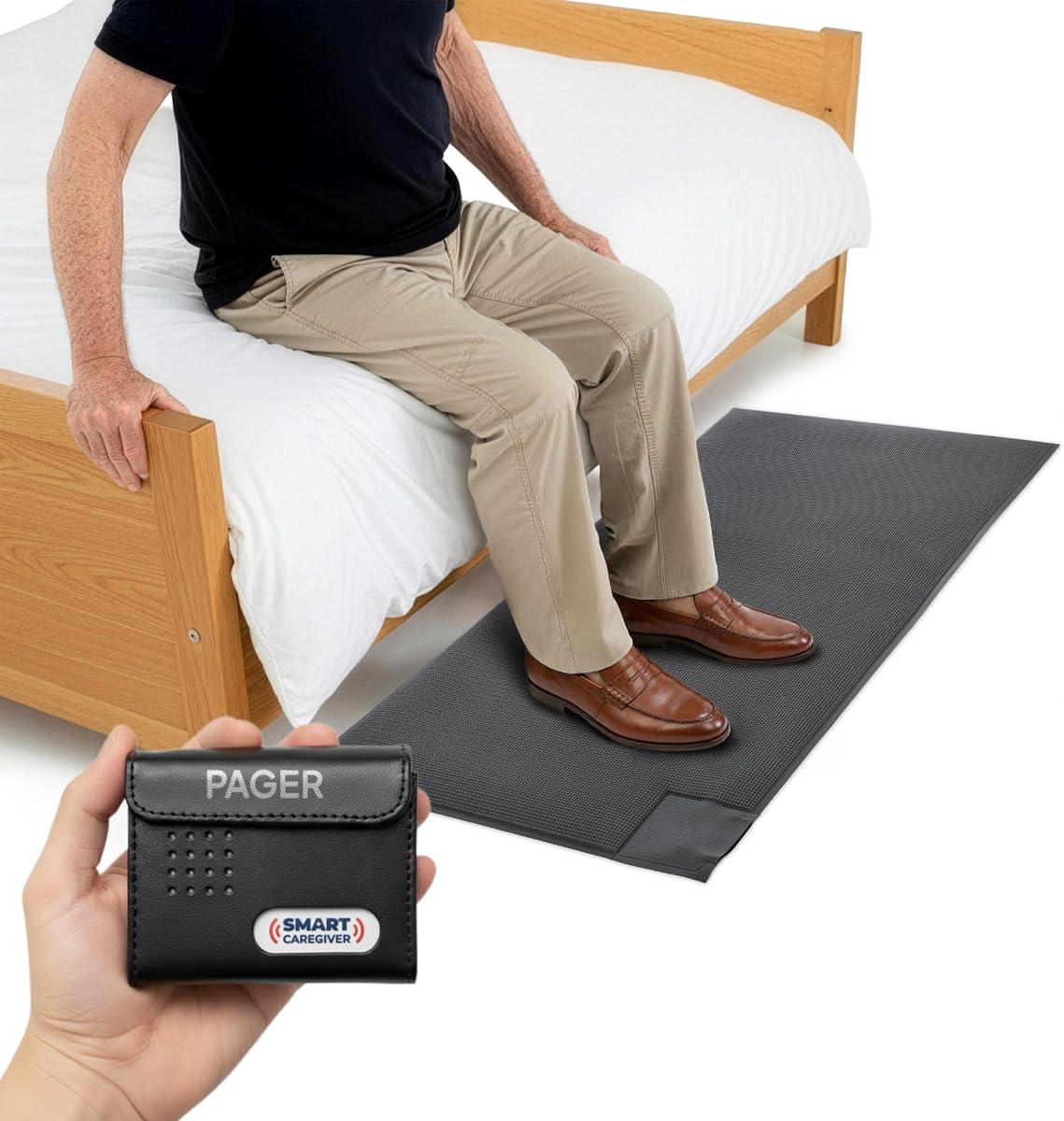
The Smart Caregiver Floor Mat Alarm and Pager System is a targeted solution for detecting a senior’s movement from a bed or doorway. Its 4.6 rating is the highest among the products in this guide, which makes it a notable choice for nighttime wandering and fall-risk reduction. Instead of placing an alarm directly on the senior, the system uses a durable pressure-sensitive mat and sends a wireless notification to a caregiver pager.
We may earn a commission when you buy through this link, at no additional cost to you.
The mat measures 24 by 48 inches and can be positioned beside a bed or near an exit door. When someone steps on it, the included pager can sound an audible alert or vibrate. The caregiver can carry the pager or place it nearby, with a stated communication range of up to 300 feet. Vibration mode is particularly useful at night or in shared spaces because it can inform a caregiver without generating a loud alarm in the senior’s room.
The system is flexible but narrow in scope. It reports weight on the mat rather than diagnosing a fall, and it will not monitor activity anywhere else unless additional compatible Smart Caregiver devices are added. Call buttons, motion sensors, and bed or chair pads are sold separately. The pager requires two AA batteries, which are not included, and mat placement must avoid areas where a trip hazard could be created.
This is an excellent option for a home caring for someone who gets out of bed at night or may attempt to leave through a specific doorway. It can provide a low-profile early warning that preserves the senior’s room from noisy alerts. Families needing monitoring throughout the home should pair it with complementary sensors or choose a more comprehensive platform.
Positioning the mat beside the bed creates a practical trigger for a common nighttime routine. It can alert a caregiver before a disoriented senior reaches an exit or moves through a dark hallway.
The included pager can work with additional compatible Smart Caregiver sensors. Families can build a targeted system around bed exits, doorways, chairs, or rooms without changing the core paging method.
We may earn a commission when you buy through this link, at no additional cost to you.
The SecuLife Medical Alert Pendant is designed for seniors who need protection both at home and away. It has a 3.8 rating and centers on a wearable device with automatic fall detection, real-time GPS tracking, two-way cellular calling, and direct notifications to selected emergency contacts. Unlike a camera or motion sensor confined to one property, the pendant is intended to accompany the wearer throughout daily life.
We may earn a commission when you buy through this link, at no additional cost to you.
The device automatically detects falls and can call and send SOS notifications to preselected contacts. Its one-touch emergency button supports cellular calls, while auto-answer provides hands-free communication with caregivers. GPS location history and custom safe zones add another layer of awareness: family members can be notified when the wearer enters or leaves a designated area. A clear display shows the time, battery, and signal, while the large SOS button and simple interface are designed with older adults in mind.
The most significant trade-off is the continuing service cost. A monthly subscription is required and includes unlimited fall alerts, live tracking, an assistive speakerphone with unlimited voice minutes, intelligent alerts, and customer care. The product is also advertised as contract-free, but families should still review the activation, renewal, cancellation, and equipment terms. Its 3.8 rating is lower than several alternatives, although ratings should be considered alongside the full feature set.
This pendant is best for an active or mobile senior, a family that wants location updates, and caregivers who can receive and act on direct cellular alerts. It is less appropriate for someone who dislikes wearing a device, needs assistance without pressing a button, or does not want an ongoing monitoring service. Indoor-only monitoring systems may provide a simpler alternative.
GPS tracking and location history help contacts know where a wearer is when a fall, panic press, or geofence event occurs. This makes the pendant suitable for errands, walks, and travel within the service coverage.
Alerts go to preselected emergency contacts, and hands-free calling provides a direct way to speak with them. The approach may appeal to families that prefer personal contact over a professional monitoring workflow.
We may earn a commission when you buy through this link, at no additional cost to you.
The Smart Caregiver Video Monitor for Elderly Care and Caregivers is a portable, local video system designed for households that do not want to depend on internet service. It has a 3.6 rating, the lowest score in this roundup, but its rechargeable components, secure connection, infrared night vision, and caregiver call button offer a distinct combination of mobility and privacy.
We may earn a commission when you buy through this link, at no additional cost to you.
Both the camera and monitor recharge through included USB-C cords. The camera can move around the home during the day and be plugged in at night for continuous overnight use and charging. The 2.8-inch monitor includes a belt clip and can sit on a table, allowing a caregiver to carry it around the house. Infrared illumination supports nighttime visibility, while the wireless button provides five assistance choices: general help, bathroom assistance, water, help moving, and urgent SOS.
The product operates without Wi-Fi, internet access, or an application, which can simplify setup and limit reliance on cloud infrastructure. Two-way audio includes push-to-talk from the monitor and an always-on microphone at the camera. Its limitations are the absence of automatic fall detection and a relatively low customer rating. The camera’s location also determines what it can see, so moving it between rooms means adapting the monitoring angle each time.
This monitor is well suited to a family that wants private, at-home visual monitoring without internet service and values a portable caregiver screen. It may help a caregiver check on a senior before entering a dark room or hearing a call for assistance. Those needing proactive fall detection, GPS location, or remote viewing from outside the property should consider a wearable or networked system.
The camera’s integrated battery makes it easier to move the viewing point, while the monitor’s belt clip keeps the caregiver’s display close at hand. Nighttime charging supports continuous use.
Five button categories let a senior request bathroom help, water, mobility assistance, general support, or urgent SOS. More specific requests can help a caregiver prioritize what kind of response is needed.
We may earn a commission when you buy through this link, at no additional cost to you.
The SYMYNELEC Elderly Monitoring Camera with Screen is a networked family-communication device with a 4.4 rating. It combines a 2.8-inch screen at the senior’s location with a 1080p pan-tilt-zoom camera, giving relatives a way to see one another and request help through a one-touch call. The senior does not need a smartphone or application, although a family member uses the app to manage the system and share access.
We may earn a commission when you buy through this link, at no additional cost to you.
When the call button is pressed, bound family phones ring and vibrate simultaneously, and the first person to answer connects. The camera can automatically track movement, while fall, distress, and loud-crash sounds can generate phone alerts. A mechanical privacy mode physically rotates the lens away from the live feed, and timers can automate daily on-and-off periods. A family-photo screensaver gives the standby screen a more personal appearance.
The system operates on 2.4GHz Wi-Fi and is designed for constant plug-in power, avoiding battery-dead anxiety. Local continuous recording and replay can use a memory card up to 128GB, although the card is not included. The product listing says camera features, two-way calls, and smart tracking are available without monthly subscription fees, but users still need suitable Wi-Fi coverage and a family member comfortable configuring app access. Privacy practices and permissions should be reviewed before enabling remote family viewing.
This camera is an appealing choice for reducing isolation while giving relatives a way to check in and communicate. It particularly suits families that value a true video call, active camera movement, and physical privacy control. It is less suitable for homes with unreliable 2.4GHz Wi-Fi or for caregivers who need automatic wearable fall detection without relying on sound-based alerts.
The senior-facing screen allows a one-touch video call without requiring an app on the senior’s phone. This can make family contact simpler while preserving familiar video interaction.
The mechanical lens rotation physically interrupts the live view, and scheduled timers can automate privacy periods. These controls are especially relevant in bedrooms and private spaces.
We may earn a commission when you buy through this link, at no additional cost to you.
The CallToU 2-Way Talk Baby Monitors for Elderly is a local video monitor adapted for senior care, dementia support, and room monitoring. It has a 3.6 rating and combines a wide-angle camera, a portable 2.8-inch receiver, infrared night vision, two-way audio, and a one-press SOS button. The design focuses on caregiver mobility and privacy rather than internet-connected remote access.
We may earn a commission when you buy through this link, at no additional cost to you.
The receiver fits in a pocket, allowing a caregiver to move around the home while retaining a live view. A four-times zoom on the 720p screen helps users inspect details, and a temperature sensor can issue room alerts. The assistance device supports an SOS press plus daily prompts for drinking water, moving, using the toilet, and requesting general help. Its connection uses secure 2.4GHz FHSS and does not require Wi-Fi, internet access, or recurring cloud fees.
Families should consider the limitations of a local system. There is no described automatic fall detection, GPS tracking, or remote viewing over the internet, so alerts depend on the caregiver being near the receiver. The 3.6 rating may encourage buyers to investigate compatibility, range, and recent customer feedback before committing. As with any camera used for care, it should be positioned responsibly and used in a way that respects the senior’s dignity and consent.
This system is best for a caregiver who works mainly inside the home and wants a portable screen with direct audio, video, and call-button support. It may be particularly useful for prompting routines and checking a room at night. Remote family members who need to monitor from an office or another property will be better served by a Wi-Fi camera or cellular wearable.
The compact receiver can travel with a caregiver around the home. That mobility makes it easier to check different rooms without returning to a fixed monitor station.
Water, movement, toilet, general-help, and SOS prompts can reinforce a routine. The camera view and quick communication provide context that a basic call button cannot.
We may earn a commission when you buy through this link, at no additional cost to you.
The Smart Caregiver Wireless Motion Sensor Alarm System is a straightforward way to monitor movement around a bed, doorway, or other important area. It carries a 4.4 rating and includes a mountable motion sensor, a wireless caregiver pager, and an adjustable mounting bracket. Its core advantage is simplicity: instead of an app or complex wearable, it sends a wireless signal when movement is detected.
We may earn a commission when you buy through this link, at no additional cost to you.
The motion detector can be placed where a senior’s movement matters, such as beside a bed or near an exit. The caregiver may carry the pager or keep it in another convenient location, allowing monitoring from up to 300 feet away. A vibrating alert removes alarm noise from the bedside, which may be preferable during sleep or in a shared care environment. The system does not require a Wi-Fi connection, and its small form factor makes placement relatively unobtrusive.
The specification list contains some ambiguity about batteries. It identifies two AA batteries for the pager and three AA batteries for the motion sensor as included, while also describing the pager and sensor batteries as sold separately. Shoppers should inspect the package and seller listing carefully to confirm which batteries are present. The device detects motion rather than a fall directly, so placement and the caregiver’s interpretation remain important.
This is the best budget pick for a family seeking a basic, local alert for wandering or nighttime movement. It is appropriate when a simple vibration pager meets the need and the home does not require video, GPS, or professional monitoring. For more complex caregiving situations, combining it with a bed pad, floor mat, camera, or call button can provide more dependable coverage.
The adjustable mounting bracket supports different monitoring angles and locations. A doorway can serve as a wandering checkpoint, while a bed area can identify nighttime movement.
The caregiver pager transmits movement alerts without placing a noisy alarm beside the senior. This supports monitoring while preserving a calmer sleeping environment.
We may earn a commission when you buy through this link, at no additional cost to you.
The right elderly monitoring system depends on the kind of help needed, where the senior spends time, and how quickly a caregiver can respond. Consider the alert type, coverage, connectivity, power, privacy, and ongoing service before choosing.
Different systems detect different events. A bed alarm responds to movement on a pressure pad, a floor mat detects a footstep, and a motion sensor identifies activity in a defined area. Video and pendant systems can provide visual confirmation or automatic fall alerts, while call buttons require the senior to request help. Match the device to the risk rather than expecting one technology to cover every situation.
In summary, choose automatic detection for unseen falls and wandering, and choose a call button for seniors who remain able and willing to request assistance.
Check the distance between the sensor and the caregiver’s pager or receiver. Stated ranges are maximum conditions, and walls, floors, appliances, and building materials can reduce actual performance. Large homes may need range extenders or multiple coordinated devices. Placement around the bed, bathroom, doorway, and living area can matter more than the headline range.
In summary, test signal reach in the intended rooms and add extenders or additional sensors whenever one alert device cannot cover the property.
Some systems operate on a local 2.4GHz connection without internet, while others require 2.4GHz Wi-Fi, cellular service, an app, or a cloud account. Local systems can offer simpler setup and fewer recurring fees, while networked products are better for off-site notifications. Confirm the home’s router band, cellular coverage, app requirements, and account permissions before buying.
In summary, select connectivity that matches the home and the people who need alerts, rather than assuming every monitoring device works the same way.
Automatic fall detection is not available in every category. Wearable tags and pendants may analyze movement to identify a likely fall, while cameras can trigger sound-based distress alerts but may also produce false alarms. A senior who never wears a pendant cannot benefit from its automatic features. Caregivers should understand whether an alert requires confirmation, verification, or immediate escalation.
In summary, verify how a fall is detected and what happens after the alert so the response plan matches the technology.
A monitoring system is only as useful as the person or service receiving the alert. Consider whether alerts will be heard during sleep, seen on a phone, or answered promptly when nobody is home. Remote professional monitoring may be valuable for frequent travel or when relatives cannot respond immediately. Direct family alerts are useful when several trusted relatives have clearly assigned responsibilities.
In summary, match alert delivery to real caregiver availability and create a backup plan for missed or unreachable notifications.
Cameras and cloud-connected wearables collect visual, voice, or location information. Look for local-storage options, physical privacy controls, encrypted connections, clear recording behavior, and settings that prevent unnecessary monitoring. A senior should know when a camera is active, and caregivers should avoid placing a camera in a private space without informed agreement. Vibration paging and local sensors can reduce surveillance concerns.
In summary, favor privacy controls that are understandable to the senior and designed for respectful everyday caregiving.
Sensors may use replaceable batteries, rechargeable cells, or continuous wall power. Rechargeable devices require a dependable charging routine, while battery-operated devices require regular checks. Include sensors, receivers, pagers, buttons, and backup batteries in a weekly inspection. Secure placement matters as well: a loose floor mat or poorly mounted motion sensor can create a trip hazard or fail to trigger.
In summary, build power checks and sensor inspections into the caregiving routine, and confirm which replacement batteries are included.
Devices with professional monitoring, cellular calling, or expanded app messaging may require a monthly subscription after a trial. No-fee products can still have ongoing costs for memory cards, replacement batteries, or replacement equipment. Before purchasing, read the renewal terms, cancellation policy, activation charges, service coverage, and hardware requirements. Compare the total cost of ownership rather than focusing only on the initial listing.
In summary, review service and accessory costs carefully so the monitoring plan remains practical over the period it will be used.
Begin by mapping the senior’s normal routine, identifying the highest-risk areas, and deciding who should receive each type of alert. Place the sensor, camera, button, or wearable where it can detect the intended event without obstructing pathways. Complete the pairing or app setup before relying on the system, and confirm that every caregiver knows how to respond.
Run a planned test using the product’s normal test procedure. For a call system, trigger each button and verify that the receiver and app notifications arrive. For a camera, check the viewing angle, night vision, audio direction, and privacy timer. For motion, bed, or floor devices, activate the sensor from the expected path and confirm pager reception in the bedroom or other monitoring location.
Inspect devices and batteries on a regular schedule, clean sensors according to the manufacturer’s instructions, and keep camera lenses unobstructed. Review caregiver contact lists, wearable charging habits, and subscription renewals. After a fall, a hospitalization, or a change in mobility, revisit placement and testing because the senior’s behavior and the home environment may have changed.
The most useful system depends on the senior’s specific risks and caregiver routine. Bed alarms and floor mats are effective for nighttime movement, call buttons are useful for people who can request help, and wearables offer portability and automatic fall detection. A combination of complementary devices often works better than a single device.
No, not all of them. The Lunderg bed alarm, Smart Caregiver video monitor, CallToU monitor, floor mat, and motion sensor can operate without internet connectivity. The PILSAMAS system and SYMYNELEC camera require home Wi-Fi, while the SecuLife pendant and Nomo system use connected services that come with subscription conditions.
Only systems with dedicated fall-detection technology can make that claim. The Nomo wearable tags and SecuLife pendant include automatic fall detection, while some camera monitors can issue alerts based on detected sounds such as a loud crash or a cry for help. A bed mat, floor mat, call button, or motion sensor generally reports movement or a button press rather than confirming a fall.
They can be, but privacy deserves careful attention. Look for a physical privacy mode, scheduled camera shutoff, local recording, and clear placement away from sensitive spaces. It is also important for the senior and caregiver to agree on when the camera is active and who may view recordings.
A wearable pendant or complete hub-based kit is generally better suited to out-of-home protection because it can use cellular or GPS services. A networked camera can also provide off-site viewing. Local call buttons and motion sensors usually require a caregiver or receiver to remain within their stated range.
Start with the most likely risk, then add coverage for other important events. A bed alarm or floor mat can cover nighttime movement, a camera can provide visual context, a call button can support toilet or water needs, and a wearable can protect the senior away from home. Confirm that separate devices use compatible alerts or that the family can respond to each notification type.
Test the complete alert path at installation and then on a regular schedule, such as weekly. Also test after moving the camera, changing the Wi-Fi network, replacing a battery, updating the app, or changing a caregiver contact. Regular testing helps reveal low batteries, weak signals, and mistaken device settings before an emergency occurs.
Treat the first alert as a reason for prompt assessment rather than assuming the worst or ignoring it. If the senior is safe, confirm the cause and reset the device according to its instructions. If there is no response, potential injury, breathing difficulty, or other immediate concern, contact appropriate emergency services and follow the family’s care plan.
The Lunderg Wireless Early Alert Bed Alarm is the strongest overall choice for focused nighttime monitoring, while the Nomo Medical Alert System is the most comprehensive option for fall detection, range extension, and shared caregiver alerts. The Smart Caregiver Motion Sensor offers the best budget approach for simple bed or doorway monitoring. Each serves a different need rather than attempting to replace every other category.
Start with the event that worries you most: a nighttime bed exit, a fall away from home, a missed call for help, or wandering toward an exit. Prioritize the corresponding sensor type, verify range in the actual home, and make sure a responsible person can respond. Privacy, power management, wearable compliance, and recurring service terms are just as important as the headline feature.
Before buying, check the current listing, package contents, compatibility requirements, and subscription details. Ratings, firmware, app behavior, and service terms can change, and prices fluctuate, so confirm the latest information directly from the product page. A carefully chosen system, paired with a realistic response plan, can provide meaningful reassurance and earlier help when something goes wrong.