
Creality Laser Engraver Enclosure 2.0
4.4Editor score
Compact foldable structure
Dual filtered viewing windows
Integrated 4000 RPM fan
Broad machine compatibility
A laser engraver enclosure creates a more controlled workspace by helping contain smoke, dust, fumes, noise, and bright light. The right model should fit your engraver, support effective exhaust, provide a clear view of the work, and offer a practical balance between protection, accessibility, and convenience.
We compared ten enclosures based on the supplied dimensions, construction materials, ventilation systems, viewing options, compatibility claims, storage features, assembly requirements, and customer ratings. The list covers cabinet-style, fabric-covered, and rigid-panel designs for desktop laser engravers across a range of workspace needs.
Each review explains what distinguishes the enclosure, where it offers the strongest advantage, and which buyers should pay close attention to fit, airflow, or setup. Ratings reflect the information available at the time of research, while product availability and prices can change without notice.
4.4Editor score
4.2Editor score

As an Amazon Associate we earn from qualifying purchases.
The table below compares all ten enclosures by their enclosure format, stated dimensions, airflow design, and most important practical feature. Because fit and ventilation requirements vary, buyers should check their engraver measurements and workspace conditions before ordering.


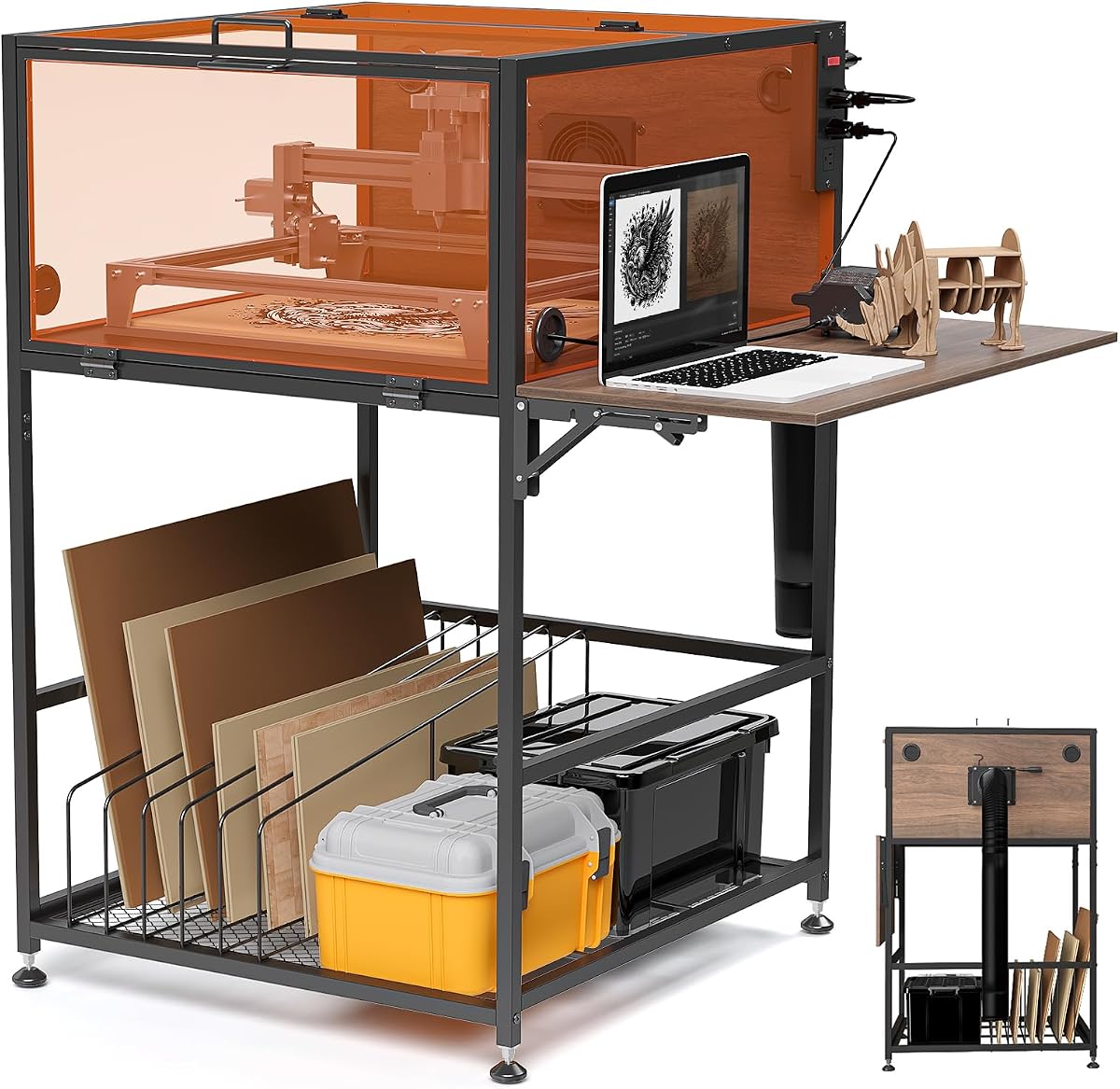
The Crafit Laser Engraver Enclosure Cabinet is a full cabinet-style solution rather than a lightweight cover. It has a supplied customer rating of 4.2 and stands out for its sturdy metal frame, thickened heat-resistant wood construction, integrated power strip, and unusually organized workspace. The stated interior measures 24.8 by 27.1 by 12.6 inches, so buyers should confirm that their engraver and accessories will clear those dimensions.
We may earn a commission when you buy through this link, at no additional cost to you.
Its strongest feature is the combination of exhaust and workspace control. A 20W high-efficiency fan and included flexible pipe are intended to improve circulation and move smoke, particles, and odors away from the work area. Multi-sided semi-transparent panels provide broad visibility while filtering part of the blue light produced during engraving. The switch-controlled three-outlet power strip can simplify connections for the engraver, fan, laptop, and air assist equipment.
The cabinet also solves several practical problems that fabric covers tend to leave to the user. A foldable side panel supports a laptop or air assist kit, the lower storage rack includes dividers for material sheets and blanks, and cable holes keep wiring more orderly. Magnetic doors, easy-grip handles, adjustable feet, and wide access openings improve daily handling. These are meaningful advantages for frequent users, although they do not compensate for an enclosure that may be too bulky for a small workbench.
This is the strongest all-around choice for a dedicated craft area where organization matters almost as much as containment. It is particularly appealing to users who want a stable enclosure that functions like a compact workstation rather than a temporary tent. Buyers should verify clearance for the machine, exhaust routing, and lid height before purchasing. It is not marketed as professional laser safety equipment, so it should complement rather than replace appropriate safety practices and ventilation planning.
The built-in power strip, laptop shelf, divided material rack, and cable openings reduce clutter around the machine. That makes the cabinet especially useful for lengthy or frequent projects where repeated access to materials and connections would otherwise interrupt the workflow.
The semi-transparent panels provide visibility from several directions while filtering part of the blue light associated with engraving. This balance is useful when a user wants to monitor progress without leaving the enclosure open, which would undermine smoke and dust containment.
We may earn a commission when you buy through this link, at no additional cost to you.
The Creality Laser Engraver Enclosure 2.0 delivers the core functions of an enclosure at an approachable cost, making it a strong budget choice. Its supplied rating is 4.4, and the product combines a 28.3-square-inch footprint area with a 15.7-inch height. The manufacturer states that it fits most laser engravers, particularly Creality Falcon-series models, although measuring the machine and any attached accessories remains essential.
We may earn a commission when you buy through this link, at no additional cost to you.
Unlike a simple fabric tent, this model includes a 4000 RPM high-efficiency ventilation fan, a closed design, and a dual-window viewing arrangement. Blue-light-blocking PVC panels allow the user to observe engraving progress while reducing direct exposure to a portion of the emitted light. The steel pipe frame and flame-retardant fabric are intended to provide structural stability, waterproofing, and resistance to deformation.
Its main trade-off is the nature of a fabric-covered enclosure. Although the upgraded frame and foldable design make it portable and space-saving when not in use, it does not offer the rigid panels, integrated shelving, or comprehensive power management of a cabinet. The exhaust hose also needs to be connected and positioned thoughtfully, and buyers should not assume that an enclosure eliminates the need for safe exhaust routing.
This enclosure is ideal for hobbyists, students, and casual creators who want meaningful smoke, noise, odor, and viewing control without investing in a full cabinet. It also suits users who need to reclaim workbench space between projects. Confirm the dimensions, ensure the engraver does not press against the frame, and follow the enclosure instructions carefully when connecting the fan and pipe.
The dual-window layout gives users a broad view of the engraving bed from useful angles. Blue-light-filtering PVC supports observation while helping limit glare and direct blue-light exposure during the run.
Because the enclosure folds after assembly, it can be stored away when the engraver is not in use. This makes it especially practical in homes and shared studios where a permanent machine-sized structure would take up valuable space.
We may earn a commission when you buy through this link, at no additional cost to you.
The Integrated LED Enclosure combines smoke containment, filtered observation, and internal task lighting in a foldable 28.3 by 28.3 by 15.7-inch structure. Its supplied rating is 4.4, and the most distinctive feature is the integrated LED strip. That addition helps illuminate the engraving bed when external lighting would otherwise require the enclosure to remain open or cast uneven light across the work area.
We may earn a commission when you buy through this link, at no additional cost to you.
Its fully sealed bottom is designed to reduce smoke escape and collect more dust and debris during operation. The enclosure uses aluminum-mold Oxford cloth and iron supports for a balance of flexible coverage and stable framing. A thickened PVC viewing window filters blue light, while the 4000 RPM fan and upgraded three-layer composite exhaust pipe are intended to extract smoke and resist residue buildup on the pipe interior.
The main compromise is that this remains a fabric-and-frame design rather than a rigid cabinet. The pipe and support frame must be positioned correctly so they do not interfere with the machine or each other. Compatibility claims include xTool D1 and D1 Pro, Ortur, Sculpfun, and Atomstack engravers, but users should still compare those dimensions with the enclosure's stated interior and check the space needed for attachments.
This model is a good choice for creators who often need a clear view of detailed work and value dedicated lighting. It is also useful where smoke control and dust collection are priorities but a full cabinet would be unnecessary. Confirm that the LED strip and viewing window do not obstruct controls, route the exhaust outdoors or according to appropriate local guidance, and allow adequate clearance around the machine.
A bright internal strip makes it easier to inspect positioning, surface detail, and the progress of a job. It supports better monitoring without repeatedly opening a viewing panel and allowing smoke or dust to escape.
The three-layer composite pipe is designed to make smoke and dust less likely to adhere to the inner wall. That supports more consistent exhaust routing, although correct installation remains necessary for effective extraction.
We may earn a commission when you buy through this link, at no additional cost to you.
The Green Acrylic Laser Engraver Enclosure is a rigid, cabinet-like cover for desktop engravers that need a secure structure rather than a folding tent. Its dimensions are listed as 29.9 by 16.9 by 26.7 inches, and the product description specifically advises checking the engraver dimensions before purchase. No customer rating was available in the supplied product data, so its evaluation relies on the stated construction and features.
We may earn a commission when you buy through this link, at no additional cost to you.
A black aluminum alloy frame, connector brackets, and thickened acrylic panels create a more substantial enclosure than soft-sided models. The green acrylic is intended to help reduce smoke diffusion, dust, debris, and material splashing. A front hinged door with a handle and magnetic stop makes it convenient to load and unload work, while cable threading openings help position the machine without routing cords awkwardly through the door.
This enclosure's most important limitation is that it does not list an integrated exhaust fan or pipe. Rigid panels can improve containment, but a closed enclosure still needs an effective air-removal plan. Buyers should account for the depth of their machine, the space needed for material feed and exhaust hardware, and the path required to remove fumes. The supplied hardware and manual simplify assembly, but the panels and brackets still require careful alignment.
The enclosure is best for users who value durability, a defined workspace, and neat front access over the portability of a fabric cover. It is particularly suitable for a fixed studio table where the engraver will remain in one location. Confirm that the unusually specific 760 by 430 by 680 millimeter footprint matches the machine and accessories, and plan ventilation separately if the enclosure is operated without another extraction method.
The aluminum frame and rigid acrylic panels resist the shifting shape associated with fabric tents. This makes the enclosure easier to keep aligned around a stationary desktop engraver and provides a more permanent workshop appearance.
The hinged front door opens for loading materials and performing adjustments, while its handle and magnetic stop support convenient use. Dedicated cable holes keep power cords and air-assist lines from interfering with the door seal.
We may earn a commission when you buy through this link, at no additional cost to you.
The Creality Laser Engraver Enclosure 2.0 with Vent is a straightforward fabric enclosure for users who need smoke and noise isolation without complicated setup. It has a supplied rating of 4.2, a stated size of 28.3 by 28.3 by 15.7 inches, and compatibility claims covering Creality Falcon machines and a broad range of other laser engravers.
We may earn a commission when you buy through this link, at no additional cost to you.
Its transparent viewing design filters blue light while allowing the user to monitor the job from outside the enclosure. A built-in smoke ventilation system is designed to expel smoke and dust while the machine is operating, helping keep the internal area cleaner. The product also emphasizes reduction of cooling-fan noise and provides a foldable, lightweight structure that can be carried or stored more easily than a rigid cabinet.
Compared with more elaborate covers, this model's product information gives fewer details about fan speed, pipe construction, and frame reinforcement. That does not make it ineffective, but it gives buyers fewer technical benchmarks for comparing exhaust performance. The flexible enclosure may also settle or shift over time, so users should inspect the seams and reconnect any panels that come loose.
This cover is well suited to occasional makers, students, and home users who value quick assembly and compact storage. It works especially well when the engraver sits on a table with enough clear space around it and an appropriate place to route the exhaust. Verify that the machine fits within the enclosure without pushing against the walls, and follow the instructions so the fan and pipe remain stable during operation.
The transparent panel supports real-time monitoring while helping limit blue-light exposure. It lets users check alignment and progress without opening the enclosure and allowing fumes or dust to escape.
The lightweight, foldable structure is convenient for users who only need containment while engraving. Once the job is finished, the enclosure can be moved or stored to reclaim workspace.
We may earn a commission when you buy through this link, at no additional cost to you.
The LONGER Large Size Enclosure is designed for desktop laser engravers that need more internal room than smaller tent-style covers. Its stated dimensions are 31 by 28.7 by 20.8 inches, and it carries a supplied rating of 4.4. The manufacturer explicitly mentions compatibility with the LONGER B1 series while describing the enclosure as suitable for most laser engraving machines.
We may earn a commission when you buy through this link, at no additional cost to you.
A large transparent viewing area allows users to monitor the engraving bed and machine operation from outside. The enclosure uses fire-retardant, easy-clean materials and includes a built-in smoking fan intended to circulate air and support smoke and odor removal. It also aims to reduce the noise generated during engraving and to protect the workspace from dust and debris.
The extra height and depth are the main reasons to consider this model over a 15.7-inch-tall cover, particularly when the machine includes a rotary attachment or requires additional working clearance. That room comes with a larger footprint and less convenient portability. As with every enclosure, the advertised dimensions do not guarantee compatibility unless the engraver, feet, cables, air assist, and rotating accessories all have adequate space.
This enclosure is a good fit for a dedicated hobby room or small workshop where the engraver remains stationary. It offers a strong combination of viewing area, airflow, and cleanup-friendly construction for users working with larger desktop machines. Measure the full machine and its accessories, ensure the exhaust outlet can reach a suitable external route, and allow enough workspace around the enclosure for loading and maintenance.
The taller interior can accommodate more than a low-profile fabric tent, making it more practical for accessories or rotary equipment. It reduces the chance that a user must remove a component simply to gain clearance.
The broad transparent design makes it easier to inspect a larger work area and check the machine during longer jobs. That visibility is valuable for users who work with varied materials or detailed patterns.
We may earn a commission when you buy through this link, at no additional cost to you.
The Creality Laser Engraver Cover V2.0 combines upgraded support rods with a 4000 RPM exhaust fan and dual filtered viewing windows. It has the highest supplied customer rating in this group at 4.5, making it an attractive option for buyers prioritizing ventilation and a well-supported frame. The enclosure measures 28.3 by 28.3 by 15.7 inches.
We may earn a commission when you buy through this link, at no additional cost to you.
Its second-generation design focuses on structural robustness and air movement. The upgraded metal rods are intended to reduce flexing and deformation, while the square shape improves observation and portability. Blue-light-filtering PVC windows provide a clear view of the engraving process from multiple directions. The higher interior is also stated to accommodate a rotary roller, expanding the range of projects that can be handled.
The product description names xTool D1, D1 Pro, Creality CR-Laser Falcon, Ortur, Sculpfun, and Atomstack machines among compatible examples. Nevertheless, compatibility claims should be treated as a starting point rather than a guarantee. Users must account for the rotary attachment's physical dimensions, machine controls, cable routing, and the clearances needed to operate the enclosure doors or panels.
This cover is well suited to frequent hobbyists who need strong exhaust without moving to a full cabinet. Its combination of high fan speed, metal supports, filtered windows, and foldable storage makes it a versatile choice. Buyers should verify the height of their engraver when a rotary roller is installed, attach the exhaust pipe securely, and ensure that the frame does not interfere with the machine bed.
Upgrading the supports to metal helps the enclosure retain its shape more reliably than a lightweight all-plastic frame. That stability is useful during repeated setup, removal, and normal handling around a working engraver.
The 4000 RPM fan is designed to move smoke, particles, and odors quickly, while the two filtered windows let the user monitor the work. Together they support a more controlled process without needing to keep the cover open.
We may earn a commission when you buy through this link, at no additional cost to you.
The Creality 700x720x400 Enclosure is a highly rated fabric-and-frame cover with a 4.5 supplied rating. Its stated interior dimensions are 27.5 by 28.3 by 15.7 inches, offering a slightly different footprint from the square 28.3-inch models in the list. The manufacturer names xTool D1, D1 Pro, Creality CR-Laser Falcon, Ortur, Sculpfun, and Atomstack engravers among suitable machines.
We may earn a commission when you buy through this link, at no additional cost to you.
The enclosure is designed to isolate smoke, odor, noise, fire-related effects, dust, and water while providing a large window for real-time observation. A built-in smoke ventilation system helps expel smoke and debris during engraving or cutting, and the viewing panel filters blue light. The interior is also described as tall enough for a rotary roller, which broadens its usefulness for cylindrical work.
One installation detail deserves special attention. The supplied guidance recommends pressing the two-way or three-way pipe firmly against the connecting rods during installation to avoid excessive pressure on the cover body. That advice suggests the exhaust arrangement must be supported carefully rather than pulling on the fabric or frame. Users should also inspect whether the machine's feet, cables, and accessories can sit inside without distorting the enclosure.
This enclosure is a strong choice for regular users who want a recognized combination of ventilation, viewing, and broad machine support. It performs best in a fixed workspace where the pipe can be secured and the enclosure can remain assembled between sessions. Confirm the non-square dimensions, provide stable clearance for any rotary unit, and follow the installation steps closely to get a stable seal and consistent extraction.
The large viewing window makes it convenient to follow job progress and check material placement. Its filtered construction helps reduce direct blue-light exposure while maintaining visibility.
The stated rotary roller clearance allows the enclosure to serve more than flat-bed work. Users should still verify the complete rotating assembly's height and footprint before committing to this model.
We may earn a commission when you buy through this link, at no additional cost to you.
The Creality Universal Vent Enclosure combines a 4.5 supplied rating with an easy-to-install fabric design intended to isolate smoke, odor, and noise. It measures 27.5 by 28.3 by 15.7 inches and is marketed for Creality, xTool, and other laser engravers. The manufacturer also states that the interior has enough height to accommodate a rotary roller.
We may earn a commission when you buy through this link, at no additional cost to you.
Its defining material feature is a flame-retardant construction that is stated to withstand temperatures up to 1000°C. The enclosure includes a fan and exhaust pipe to move smoke and dust out during operation. A large filtered viewing window allows observation of the engraving progress, while the closed shape is intended to limit the spread of noise, dust, water, and odors.
As with any fabric enclosure, users should maintain safe distance from heat sources and avoid treating the stated temperature tolerance as permission to place the enclosure against hot surfaces. The tool-free foldable assembly is convenient, but the frame must still be positioned correctly for the fabric to maintain its shape. The absence of integrated lighting may make external illumination useful for very detailed or low-contrast work.
This model is a good fit for users who value flame-retardant materials, high customer feedback, and quick assembly. It is particularly attractive for home studios that need containment around multiple supported engraver brands without committing to a large rigid cabinet. Verify the clearance for a rotary attachment, keep the exhaust pipe stable, and avoid placing the enclosure where it blocks ventilation or creates a trip hazard.
The stated flame-retardant fabric is one of the most useful points to compare when the enclosure will be used regularly. It is designed to improve resilience around an engraving process, although normal clearances and safe operation remain necessary.
The foldable structure can be assembled in a few steps without additional tools and collapsed for storage. That makes it convenient for users who need protection temporarily rather than as a permanent workstation.
We may earn a commission when you buy through this link, at no additional cost to you.
The VEVOR Laser Engraver Enclosure offers one of the largest stated interiors in the group, measuring 31.5 by 31.5 by 19.6 inches. It has a supplied rating of 4.1 and is aimed at both hobbyists and professional users who need room around their engraver. The square footprint and elevated height may be especially useful for machines with taller frames, accessories, or rotary equipment.
We may earn a commission when you buy through this link, at no additional cost to you.
A 4000 RPM fan and exhaust pipe are included to move smoke, dust, noise, and odors, while exhaust ports on both sides provide flexibility in how the enclosure is positioned. The enclosure also has adjustable fastener strips on each side that can hold tools of different shapes. This hanging storage turns otherwise loose accessories into organized, accessible equipment.
Its foldable construction lets the enclosure collapse without requiring a complete reinstallation, and the stated lightweight design helps with portability. That portability is relative, however, because the large enclosure still requires more room than the smaller fabric covers. Buyers should account for exhaust hose clearance and ensure that side storage does not interfere with the engraver or the enclosure panels.
This model is a practical choice for a small studio that prioritizes interior space, flexible exhaust positioning, and tool organization. It may be less convenient for a limited desk or a frequently changing workspace. Check the complete machine dimensions, allow space for hoses on either side, and maintain the fabric panels in a taut position so that their containment performance is not reduced.
Exhaust ports on both sides allow the hose to follow a more convenient path around the machine or worktable. This can help avoid sharp bends and make it easier to connect the enclosure to a suitable exhaust route.
Adjustable fastener strips provide hanging storage for accessories with different shapes. Keeping those items organized and accessible is especially helpful for users who change materials, air-assist components, or calibration tools between jobs.
We may earn a commission when you buy through this link, at no additional cost to you.
The most useful enclosure is one that fits the actual machine, captures contaminants effectively, remains easy to operate, and matches the available workspace. Buyers should evaluate dimensions, exhaust, construction, visibility, safety claims, compatibility, and setup rather than choosing on appearance alone.
Start with the full footprint and height of the engraver, including feet, attached lids, air-assist hardware, rotary rollers, and any elevated frame. A stated enclosure size only establishes the available area; it does not account for every cable, control panel, or accessory a user may add. Measure the machine while it is in its normal operating position and compare those measurements with the enclosure's interior dimensions. Leave enough space to open panels, load material, and remove finished pieces without forcing the cover.
Choose an enclosure with comfortable clearance rather than the smallest possible fit. Extra room can improve airflow and make rotary projects easier, but it also increases the footprint. Measure the table, nearby storage, and the intended exhaust path before committing to a large cabinet.
Ventilation is central to an enclosure's purpose because smoke, particulates, and odors must leave the work area rather than accumulate inside. Compare the stated fan speed, included pipe, exhaust ports, and sealed design, but also consider where the air will go. A flexible duct should lead toward a suitable external exhaust or filtration arrangement without sharp bends, kinks, or blocked outlets.
Fan specifications help compare the listed models, with several fabric covers using a 4000 RPM fan and the Crafit cabinet using a 20W fan. Actual performance also depends on sealing, duct length, and the machine's own cooling system. Never treat an enclosure as a substitute for careful exhaust planning or manufacturer-specified safety procedures.
Cabinets with metal frames and wood or acrylic panels tend to feel more permanent, while fabric tents are easier to fold and carry. Metal support rods can give a soft-sided enclosure greater rigidity, but the panels may still settle or shift if the frame is not fully seated. Rigid enclosures generally offer cleaner lines and stable access, while portable covers are more attractive to users who share a workbench or store equipment between projects.
Consider how often the enclosure will be assembled and moved. A permanent cabinet rewards greater organization and stability, while a portable tent is more practical when storage space is limited. Also inspect included hardware and the availability of replacement rods, brackets, panels, or fasteners.
A viewing window should make it possible to follow the engraving without leaving the cover open. Dual-window layouts provide broader observation, and filtered PVC or green acrylic can reduce glare and direct blue-light exposure. The quality and tint of the panel also affect visibility under different lighting conditions. A bright internal LED strip, available in the Integrated LED Enclosure, can make close inspection easier.
Choose a window with enough clarity for your work. Very dark filtering may improve eye comfort but reduce detail visibility, while a clear panel may show more light during operation. If a task light is not included, plan for external illumination that does not require opening the enclosure.
Enclosure materials should be selected for the heat and conditions produced by the intended material. Several fabric models state that they are flame retardant or fireproof, and one product specifies a temperature tolerance of up to 1000°C. These claims can help distinguish the designs, but they should be interpreted within the manufacturer's instructions and normal safety clearances. Material condition, machine ventilation, and nearby combustibles remain important regardless of the enclosure's rating.
Look for descriptions that identify the fabric, frame, panels, and support materials clearly. Buyers who work with especially hot or volatile materials should review the machine's own safety guidance and use a purpose-designed extraction system. An enclosure should support safe operation, not create the impression that every possible hazard has been eliminated.
Universal compatibility language is useful only when the enclosure's dimensions and clearances match the particular engraver. The listed products mention machines from Creality, xTool, Ortur, Sculpfun, Atomstack, and LONGER, but buyers should compare those claims with the exact model. Controls, lids, feet, and exhaust connections can vary significantly even within one product family.
Check whether a rotary roller is supported and whether it fits after installation. A machine that operates safely on an open table may require more height, depth, or front clearance when enclosed. It is also important to make sure the enclosure's panels do not press against the moving bed, lid, or adjustment mechanisms.
An enclosure can improve a workspace beyond containment by providing a defined place for the machine, cables, materials, and tools. The Crafit cabinet includes an integrated power strip, cable holes, a laptop shelf, and divided storage. The VEVOR enclosure offers adjustable hanging strips, while rigid cabinets generally provide a more stable surface for accessories. These features are valuable when the engraver is used regularly.
Consider daily access. A large front door can make loading materials easier, while a flexible cover may require reaching through an opening that is only as large as the machine needs. Magnetic closures, handles, and clearly arranged panels reduce inconvenience during repeated use. Balance storage benefits against the footprint and setup required.
Foldable covers can be collapsed after a project and carried to another room, while cabinet-style enclosures generally remain in place. Lightweight frames and fabric are convenient for transport but may require more frequent reshaping. A permanent cabinet is easier to keep taut and aligned but requires a dedicated area with enough clearance around the door, panels, and exhaust connection.
Cleaning is another daily-use factor. Smooth cabinet panels can generally be wiped down more easily than fabric and fine mesh, while fabric covers need gentler care. Review whether the product description identifies washable or easy-clean surfaces. Buyers should also consider how the enclosure will be stored without trapping moisture or leaving the fan and pipe under pressure.
Before assembly, measure the engraver and prepare a stable surface with adequate room around the enclosure. Assemble the frame, secure all rods and panels, and confirm that the machine sits level without pressing against the cover. Install the fan and exhaust pipe according to the instructions, then check that the duct has no kinks and connects to an appropriate external route.
Run a short test with the exhaust active before beginning a full project. Confirm that the panels remain taut, the viewing window is unobstructed, cables can move freely, and the fan continues operating without unusual noise. Keep the enclosure closed during engraving, monitor airflow through the intended exhaust path, and do not position materials against the fan or block ports.
After use, allow the machine and exhaust system to cool, disconnect power, and remove any accumulated dust from the bed and accessible panels according to the machine and enclosure instructions. Wipe or clean the enclosure using methods suitable for its materials, allow damp fabric to dry fully, and fold or cover the unit before storing it. Inspect rods, seams, hinges, and fan attachments periodically for looseness or damage.
Choose an enclosure with interior dimensions comfortably larger than the engraver's full footprint and height. Include the machine feet, lid, air-assist unit, rotary attachment, cables, and material feed clearance in your measurements. A tight fit may restrict movement, airflow, or access even if the listed dimensions appear to match.
Yes. An enclosure collects smoke, dust, and fumes while they are being removed, but the exhaust system must discharge the air safely. Route the included pipe toward a suitable external exhaust or filtration arrangement without kinks, and follow the laser engraver and enclosure manufacturers' ventilation instructions.
Several listed fabric covers are described as flame retardant or fireproof, but those claims do not replace safe operating practices. Maintain the recommended clearance from the laser source, avoid blocking ventilation, and prevent combustible materials from contacting the enclosure. Review the relevant product instructions and your engraver's safety guidance.
Many models claim compatibility with Creality, xTool, Ortur, Sculpfun, Atomstack, LONGER, and other engravers. Those claims depend on dimensions rather than branding, so buyers should compare the exact machine and its accessories with the enclosure's interior measurements before ordering.
A rigid enclosure generally offers more stable framing, a defined workspace, and neater access, but it may cost more and take up more permanent space. A fabric cover is usually lighter, foldable, and easier to store. The better choice depends on whether portability or durability and organization matter more in your workspace.
An LED strip is helpful for observing detail and machine placement, but it is not required for every enclosure. It is especially useful in the Integrated LED model, which includes one. With other products, use suitable external lighting without opening the cover during operation, since opening it can reduce containment.
An enclosure can reduce noise and keep fumes contained while the exhaust system removes them, but it cannot guarantee perfect isolation. Performance depends on panel sealing, machine airflow, duct condition, and where the exhaust terminates. Using the enclosure as part of a broader ventilation plan is the safer approach.
Check seams, support rods, screws, fan attachments, and exhaust connections before each session or whenever you notice looseness or unusual airflow. More frequent inspection is appropriate if the enclosure is moved frequently, cleaned aggressively, or exposed to heat, dust, and repeated assembly. Replace damaged components according to the manufacturer's guidance.
The Crafit Enclosure Cabinet is the most complete workstation-style option, combining filtered visibility, exhaust, power management, a laptop shelf, and organized storage. The Creality Enclosure 2.0 stands out as a cost-conscious, foldable solution, while the rigid Green Acrylic Enclosure suits buyers who value permanent construction and straightforward front access.
For most other users, the deciding factors will be the fit of the engraver, the effectiveness of the exhaust arrangement, and the amount of permanent space available. Measure before purchasing, account for rotary accessories, and prefer a slightly roomier enclosure when airflow and access are priorities. A model that suits the machine and routing conditions will be more useful than one selected only by appearance.
Product ratings, availability, and prices can change, so check the current listing and updated dimensions before placing an order. Review the enclosure instructions, the engraver's safety guidance, and the required exhaust destination at the time of purchase to ensure the setup matches current conditions.