
Andonstar AD249S-M Plus
4.7Editor score
Expanded soldering station
Three interchangeable lenses
Component storage and tool holder
A microscope for mobile repairing should make tiny solder joints, connectors, flex cables, and board components easier to inspect without forcing you to hunch over the work. The most useful models combine steady positioning, focused illumination, practical magnification, and a display that reduces eye strain during extended bench work.
We compared ten digital microscopes for factors that matter in phone repair, including working distance, screen size, stand adjustability, lighting, image capture, device compatibility, and dedicated soldering features. The list covers handheld models, phone-connected cameras, all-in-one LCD systems, HDMI workstations, and multi-lens kits.
Each review explains the product’s strongest repair applications, important limitations, and ideal buyer. Ratings and specifications reflect the supplied product information, while magnification figures describe manufacturer-stated capabilities rather than guaranteed visual results. Product availability, features, and prices can change, so verify current listings before purchasing.
4.7Editor score
4.6Editor score

4.4Editor score
As an Amazon Associate we earn from qualifying purchases.
The table below compares all ten microscopes by their most repair-relevant characteristics, including display format, magnification approach, lighting, and connectivity. It is designed to help technicians, hobbyists, and repair-shop buyers identify the most suitable workflow before making a purchase.


The Andonstar AD246S-M combines a built-in digital display, three interchangeable lenses, 2160P recording, and an adjustable metal boom arm. Its 4.5 rating reflects a generally capable package for users who need more than a simple phone camera. The included Lens L is specifically intended for soldering and repair work, making this a strong all-around option for mobile electronics inspection.
We may earn a commission when you buy through this link, at no additional cost to you.
The boom arm is one of the model’s most useful repair-oriented features. Its front, rear, left, and right adjustments allow the microscope to be placed over a circuit board while maintaining a stable working distance. The focusing wheel and object-distance knob offer direct physical control, and the metal construction is suitable for the elevated temperatures associated with soldering. External HDMI output can also provide a much larger image when working on a spacious repair bench.
The microscope supports 2160P video, photos, eight lighting levels, and a supplied microSD card. Its Windows measurement software can measure object dimensions, calculate area, and capture images or video. These functions are useful for documenting a repair, inspecting a connector, or comparing a board region before and after work. The downside is that the multiple lenses and software controls introduce more setup than a basic handheld camera, and lens changes require removing and reinstalling screws.
This is a sensible recommendation for mobile repair hobbyists and technicians who want a dedicated microscope without committing to the larger Plus workstation. It suits users who need soldering, coin, and general inspection capabilities in one system. Those wanting an expanded base, integrated tool storage, helping hands, or a larger display should consider the AD249S-M or AD249S-M Plus instead, while buyers wanting extreme simplicity may prefer a phone-connected model.
Lens L provides a lower working range intended for solder joints, small components, and mobile-phone internals. The adjustable stand and physical focus controls make it easier to move systematically across a board without repeatedly changing the camera position.
HDMI output allows the image to be shown on a larger monitor, which can help a repairer, customer, or colleague examine the same tiny feature. The supplied measurement software adds documentation and basic dimensional-analysis options for Windows users.
We may earn a commission when you buy through this link, at no additional cost to you.
The Skybasic Wireless Digital Microscope is a portable inspection camera for Android phones, iPhones, iPads, Windows computers, and Mac computers. Its 4.2 rating makes it a practical middle-ground option for users who already have a suitable screen and want a compact microscope. It captures 1080P images for a phone and 720P through a computer connection.
We may earn a commission when you buy through this link, at no additional cost to you.
The microscope operates through its own WiFi hotspot and the Max-see application, while USB provides an alternative for computer viewing. Eight adjustable LEDs illuminate the subject, and the camera button offers straightforward photo and video capture. Its stated optimal object distance is 3 to 60 millimeters, giving users a clear focusing range to maintain. A bracket, base, and USB cable are included for basic positioning.
Its most significant limitation is that it is described as a fixed-focus magnifying glass rather than a traditional microscope. Digital magnification can also make fine detail look different from direct optical viewing. Compatibility instructions are more involved on computers, particularly older versions of Windows, and the manufacturer calls for the latest application update. The lack of a dedicated LCD also means a phone or computer must be ready whenever the microscope is used.
This is a good match for mobile repair learners, field technicians, and owners of older phones who do not want to purchase a separate monitor. It is less suitable for a stationary professional bench where a larger screen, fixed support, and quick lens changes are priorities. Pair it with a small tripod or the included stand for steadier work, and verify app compatibility with the exact phone or computer before use.
WiFi operation is particularly convenient for users who prefer a cable-free phone workflow, while USB offers a straightforward alternative for Windows and Mac systems. The included software supports common inspection, photo, and video tasks across the supported devices.
The lightweight handheld format makes this microscope easier to carry between a workbench and another location. It is also practical for quick inspections of circuit boards, small parts, collectibles, and everyday objects where a full microscope station would be excessive.
We may earn a commission when you buy through this link, at no additional cost to you.
The TOMLOV DM9 is a seven-inch LCD digital microscope designed for close-up observation, with a 4.4 rating and specifications that extend beyond coin collecting. It is marketed for PCB inspection, hobby electronics, jewelry, and general repair. A 12MP camera, 1080P video, included 16GB card, and PC connectivity make it a complete bench system for documenting findings.
We may earn a commission when you buy through this link, at no additional cost to you.
Its metal base and 8.5-inch metal stand offer a stable platform for electronics work, while height adjustment changes the viewing distance and magnification. The seven-inch screen is large enough to reduce the need to lean closely over a board. Eight built-in LEDs and two flexible gooseneck lights allow illumination to be repositioned around solder joints, helping reduce shadows and reveal surface texture.
The DM9 is less modular than the three-lens Andonstar systems, so it cannot readily switch between a low-range soldering view and high-range biological observation. While Windows and Mac computer viewing is listed, buyers should confirm the current software and cable requirements for their particular setup. Its broad collection of functions also makes the controls less focused than those of a dedicated soldering microscope.
This microscope is a strong choice for repair learners, coin collectors, and electronics hobbyists who value a large screen and solid support over lens versatility. It can be especially useful when you want to compare a board area with reference images, record a repair, or show another person what you are seeing. A specialist multi-lens workstation is a better fit for frequent switching between very different inspection tasks.
The seven-inch LCD provides a more comfortable inspection area than a phone screen and reduces the temptation to bring your face too close to the workpiece. Image and video capture make it easy to save a defect, connector, or solder joint for later reference.
Two flexible gooseneck lamps complement the built-in LEDs, allowing light to be placed on opposite sides of a component. This can help expose surface relief and reduce the dark shadows that obscure small connectors or uneven solder beads.
We may earn a commission when you buy through this link, at no additional cost to you.
The Five-Inch C-Clamp Digital Soldering Microscope is a compact inspection system built around a five-inch IPS display and a clamp-style support. Its 4.5 rating reflects a focused feature set for PCB work. The flexible arm can reach into crowded spaces, while physical distance and the silver focus wheel control clarity and magnification.
We may earn a commission when you buy through this link, at no additional cost to you.
For repair work, the C-clamp is a meaningful advantage over a conventional weighted base. It can secure the microscope to the edge of a bench or work surface and leave more room beneath the camera for a phone or circuit board. The multi-angle goose-neck arm accommodates irregular components, and the IPS display is intended to make detailed viewing more comfortable during extended sessions.
The microscope does not autofocus. Users must move the flexible arm and rotate the focus wheel carefully, particularly when switching between a board surface and a raised component. Saving 1080P videos and batches of high-resolution photos requires a microSD card, and the card is not included. PC viewing is otherwise refreshingly simple: PC Camera mode works with the Windows Camera app or Mac Photo Booth without a complicated third-party application.
This is an excellent option for cramped benches, small workspaces, and repairers who value direct computer viewing without software complexity. It is less convenient for users who expect one-button capture or a memory card in the box. It may also suit users who prefer a smaller display that can be placed closer to the work. Ensure the clamp has a suitable edge and test focus before undertaking delicate rework.
The C-clamp support creates open space below the camera, making it easier to inspect a phone logic board, a small PCB, or a component already fixed to a repair mat. The flexible arm can be repositioned without moving the entire base.
PC Camera mode turns the microscope into a straightforward camera for supported computers. This reduces setup friction and can be useful for showing a customer a component or presenting a live image during a repair demonstration.
We may earn a commission when you buy through this link, at no additional cost to you.
The Elikliv EDM4 is a 4.3-inch digital microscope with an adjustable stand, eight LED lights, and up to 1000X manufacturer-stated magnification. Its 4.5 rating and broad application list position it as an accessible inspection tool for circuit boards, watches, electronics, jewelry, and other detailed objects. It can display live images, save media, and connect to Windows or Mac computers.
We may earn a commission when you buy through this link, at no additional cost to you.
The height-adjustable stand lets users change both angle and camera-to-object distance. A 720P HD sensor and adjustable illumination support clear examination of solder joints, small components, and watch mechanisms. Photo and video recording are useful for documenting repairs, while the built-in rechargeable battery offers up to three hours of continuous use and avoids a permanent connection to a wall outlet.
Its actual magnification varies with screen size and working distance, so buyers should treat headline figures as maximum operating ranges rather than a guarantee of usable detail. A memory card must be supplied separately for saving images or video. The handheld form also does not provide the expansive workstation features found in the larger Andonstar models, and its 4.3-inch display is smaller than a seven- or ten-inch screen.
The EDM4 fits buyers who want a portable microscope with a built-in screen and do not need multiple lenses or extensive repair accessories. It is suitable for field repair, hobby electronics, watch inspection, and occasional phone work. For a permanent bench with larger components or frequent team demonstrations, consider the TOMLOV DM9 or an Andonstar multi-lens system instead.
The rechargeable battery and compact screen make the EDM4 convenient for inspecting components away from a fixed workstation. Its stand provides more consistency than a completely unsupported handheld camera while preserving portability.
Eight adjustable LEDs can brighten recessed areas and reduce reliance on room lighting. Adjusting the stand height and the camera-to-subject distance allows users to balance illumination, focus, and field of view during a repair.
We may earn a commission when you buy through this link, at no additional cost to you.
The Bysameyee USB Digital Microscope is a direct-connection inspection camera with 40X to 1000X stated magnification. Its 4.0 rating reflects a straightforward design aimed at students, engineers, hobbyists, and collectors. It connects to Windows, Mac, Linux, and Android devices with OTG, but it does not support iPhone or iPad.
We may earn a commission when you buy through this link, at no additional cost to you.
Its metal stand, OTG adapter, ruler, driver, and carrying case create a useful entry-level repair kit. Eight built-in LEDs shine through a diffuser to provide softer illumination, and a wired control adjusts brightness. Connected software supports screenshot capture and video recording, while the measurement function is restricted to Windows. That makes the microscope useful for dimensions and layout checks when the repair workflow runs on a Windows computer.
Compatibility is the main consideration. Although the stated operating-system range is broad, software behavior can differ by system, and an OTG-compatible Android phone is required. The lack of Apple mobile support rules it out for many users. It also lacks a built-in display, so the connected computer must remain close to the workpiece, which can make a bench-mounted arrangement less tidy.
This microscope is best for a Windows-centered repair workspace or an Android phone with confirmed OTG support. Its included stand and case make it convenient to store and transport, while the diffused LEDs are suitable for general PCB and component inspection. Buyers using Apple devices or seeking a completely self-contained display system should choose a model with native iOS compatibility or its own LCD.
Direct USB output makes the microscope suitable for computer-based repair documentation. Screenshots and video can be captured through the installed software, while the ruler supports simple scale-related checks on supported systems.
Android users should confirm OTG support and the required application before buying. iPhone and iPad owners should choose a microscope with explicit Lightning compatibility or a WiFi-based mobile connection.
We may earn a commission when you buy through this link, at no additional cost to you.
The 4-in-1 USB Microscope is a compact camera designed for iPhone, iPad, Android, Windows, Mac, Linux, and Chrome systems. Its 4.4 rating and supplied USB, Micro USB, Type-C, and Lightning adapters make it a convenient choice for users who work across different devices. It captures 1080P photos and video and includes a simple stand.
We may earn a commission when you buy through this link, at no additional cost to you.
This microscope avoids the need to purchase a separate adapter for each device. The included four-in-one connection kit covers the most common phone and tablet interfaces, while the same system can feed an image to a computer. Eight adjustable LEDs provide illumination for solder joints, circuit traces, jewelry, stamps, and other small subjects. Buttons located on the cable allow photos and video to be captured without touching the microscope body and introducing movement.
It requires software for the corresponding platform, but the listing describes installation as driver-free and otherwise straightforward. Android compatibility still depends on OTG support. There is no built-in screen or premium focusing system, and the simple stand is less suitable than a heavy metal arm for long, precision soldering sessions. Image quality and comfort also depend on the display connected to the camera.
This is a strong budget choice for phone repair learners, students, teachers, and hobbyists who need broad device compatibility. It is particularly handy for quick inspections because it requires no charging and the camera draws power from the connected device. A dedicated LCD microscope will be more comfortable for extended work, while this adapter-rich model is better suited to occasional tasks and flexible locations.
The four included connectors reduce compatibility friction across phones, tablets, and computers. This is useful for a repairer who alternates between inspecting a board on an Android handset and showing the image on a Mac or Windows computer.
Placing the capture buttons on the cable helps prevent the camera from shifting when a photo or video starts. Adjustable LEDs can compensate for shadows and provide clearer detail around tiny components and reflective surfaces.
We may earn a commission when you buy through this link, at no additional cost to you.
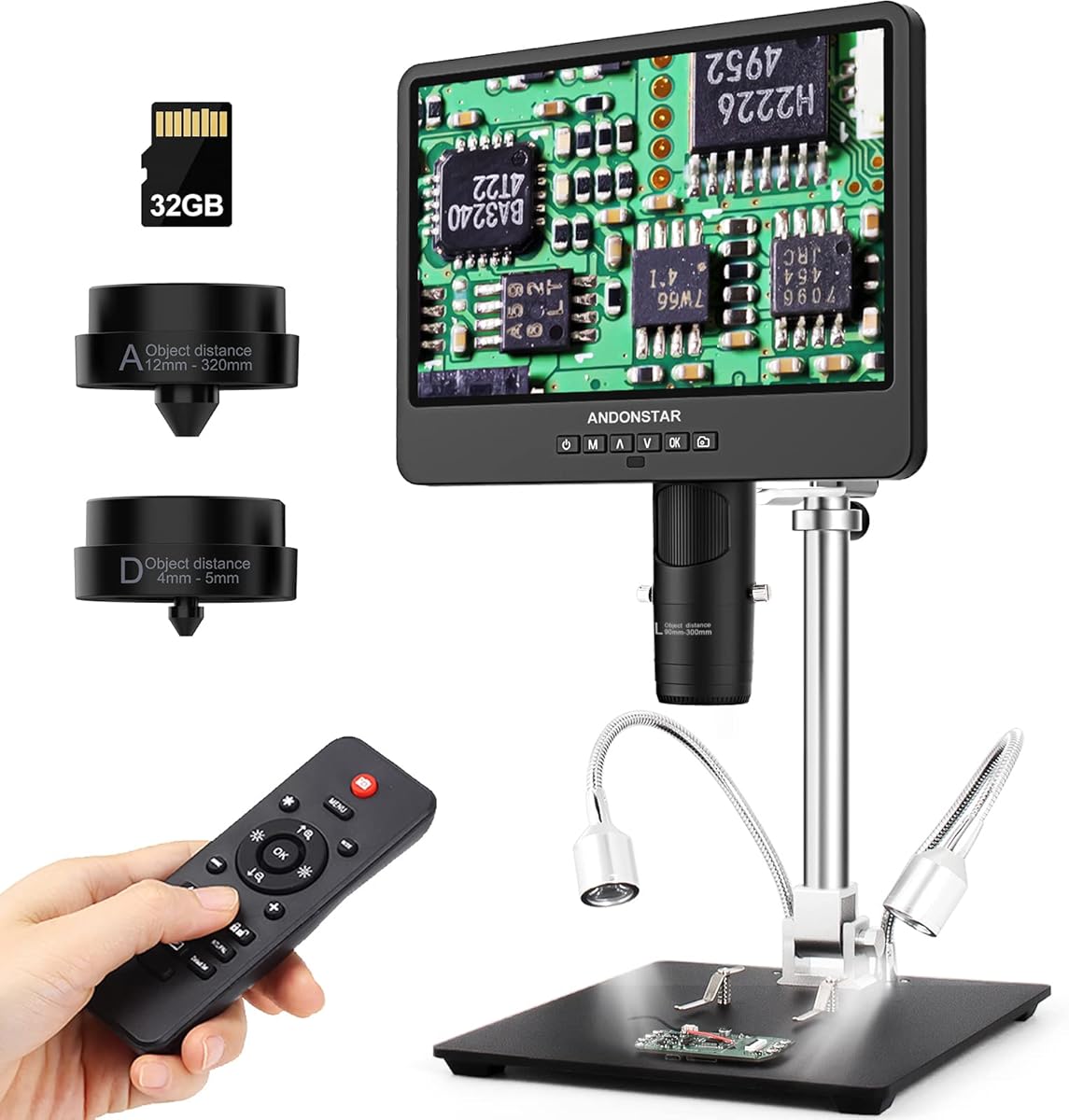
The Andonstar AD249S-M is a 10.1-inch, three-lens digital microscope with 2160P recording, HDMI output, and an adjustable metal boom-arm stand. Its 4.6 rating places it among the stronger choices in this guide. The large screen and interchangeable lenses make it especially useful for repairers who want comfortable viewing without immediately moving to a full workstation package.
We may earn a commission when you buy through this link, at no additional cost to you.
Lens L supports soldering and mobile-phone repair, Lens A handles coins, parts, plants, and stones, and Lens D is intended for biological slides. On the built-in display, the stated ranges differ considerably between lenses; when output is sent to a 28-inch HDMI monitor, the available digital zoom also changes the working range. A wireless remote handles zoom, discoloration, and other image functions without touching the camera.
The arm adjusts in several directions and is made from metal for elevated-temperature environments. This gives the microscope a more repair-specific foundation than lightweight portable stands. Photo and video capture, an included 32GB microSD card, measurement software, and eight lighting levels round out the feature set. Its large display and broad stand, however, require considerably more bench space than a handheld model or the compact C-clamp design.
This is an excellent recommendation for a serious hobbyist, repair instructor, or professional who prefers a large integrated screen and occasionally needs to switch observation tasks. It provides the core benefits of the Plus model without every workstation accessory. Choose the AD249S-M Plus if integrated helping hands, tool storage, and an expanded base are important to your workflow.
The 10.1-inch display gives repairers more room to examine a board and reduces the need to move the microscope or repeatedly change the viewing angle. Interchangeable lenses extend the microscope beyond electronics without requiring separate cameras.
The metal boom arm adjusts forward, backward, sideways, and in angle to find a comfortable working position. Its strong construction is appropriate for soldering stations where a lightweight plastic stand would be less reassuring.
We may earn a commission when you buy through this link, at no additional cost to you.
The Andonstar AD249S-M Plus is a comprehensive 10.1-inch digital microscope and soldering station with a 4.7 rating. It combines three interchangeable lenses, 2160P video, HDMI output, and a boom-arm stand with an expanded base. The accessory package is unusually complete for mobile repair, including component storage, a tool holder, helping hands, a soldering mat, lighting, cables, and a 32GB card.
We may earn a commission when you buy through this link, at no additional cost to you.
Lens L is intended for soldering and repair, Lens A for broad object inspection, and Lens D for biological slides. The large display provides a comfortable view of small board components, while the adjustable metal arm supports stable positioning. The extension base increases the stated soldering work area and includes storage boxes, reducing the need to keep loose parts scattered across the bench.
Helping hands with rotatable clamps can secure a phone, board, wire, or delicate component while you work. A dedicated tool holder keeps frequently used items close, and the included soldering mat supports a more organized bench. The system supports photos, video, measurement software, eight lighting intensities, remote control, and external display output. As with the other Andonstar models, changing lenses requires removing and reinstalling screws, and the workstation occupies substantial counter space.
This is the most complete choice for a buyer who wants a microscope and an organized soldering environment in one package. It is particularly suitable for frequent electronics repair, education, or a dedicated hobby bench. Those needing the same lens flexibility on a smaller footprint can choose the standard AD249S-M, while buyers who only need occasional inspection can find a less complex and more portable option.
The extension base, component boxes, tool holder, and helping hands address common bench problems at once. Parts can be sorted, tools kept within reach, and the workpiece secured while both hands remain available for delicate work.
The 10.1-inch screen makes the system suitable for prolonged inspection and for demonstrating a board to another person. HDMI output, 2160P recording, remote operation, and measurement software add flexibility for documentation and shared diagnosis.
We may earn a commission when you buy through this link, at no additional cost to you.
The Andonstar AD246S-M Plus combines a seven-inch display with the same three-lens, 2160P, HDMI-focused feature set found in the premium Andonstar line. Its 4.7 rating makes it one of the most well-regarded products in this roundup. The expanded base, tool holder, rotatable helping hands, and soldering mat distinguish it from ordinary digital microscopes.
We may earn a commission when you buy through this link, at no additional cost to you.
The 60X to 240X Lens L range is designed for soldering and repair, while Lens A supports coins, parts, plants, and stones and Lens D reaches higher magnification for biological slides. A metal boom arm supports the camera, and the extension base enlarges the soldering area while providing component storage. This configuration is more focused on repair organization than a simple inspection camera.
The included equipment is extensive: a metal base, clips, beam, tool holder, helping hands, extension base, soldering mat, bottom light stage, slides, observation box, tweezers, remote, 32GB card, adapter, cables, and manual. The manufacturer also lists a 24-month warranty. While that level of equipment is convenient, it adds setup time, and the seven-inch screen is smaller than the AD249S-M Plus display.
This model is ideal for a serious electronics bench where a compact premium display is preferable to the largest available screen. It suits users who value included repair accessories, interchangeable lenses, and a complete station without needing a ten-inch panel. For lighter use, the five-inch C-clamp model offers a more compact route, while the 4-in-1 USB microscope is easier to carry between locations.
The seven-inch screen provides enough room for detailed visual work while keeping the station smaller than the 10.1-inch alternative. The included base, storage, helping hands, and mat deliver a ready-to-configure soldering environment.
The three lenses let users move between repair, general object observation, and high-magnification slides. Physical focus and distance controls provide direct control, while remote access and HDMI output support more comfortable viewing arrangements.
We may earn a commission when you buy through this link, at no additional cost to you.
The best microscope for mobile repairing is the one that combines a usable working distance, even illumination, stable positioning, and an image large enough to diagnose small components. Your phone, computer, repair volume, and preferred workflow should determine whether a simple connected camera or a complete soldering workstation makes more sense.
Working distance is the space between the lens and the object being inspected, and it strongly affects both focus and useful magnification. A phone logic board is thin, but raised components, shielding, connectors, and stacked parts require more clearance than a flat coin. Digital microscopes may advertise very high maximum magnification, yet the resulting image can become too narrow to orient yourself. Look for a model with a stated focal range or an adjustable stand that lets you move the camera methodically through several distances.
Choose a microscope that supports both wide orientation and close inspection. Physical focus control is especially useful because boards are rarely perfectly flat. A fixed-focus handheld model may be adequate for quick checks, but a stand-mounted camera with a focus wheel gives a repairer more reliable control.
A larger screen makes it easier to recognize a connector, inspect a solder joint, and navigate around a crowded board without repeatedly repositioning the camera. Five-inch, seven-inch, and 10.1-inch LCD options provide different balances between visibility and bench footprint. Phone-connected models can be highly portable, but they also depend on the quality and size of the connected display. Repairers spending long periods at a bench usually benefit from a dedicated screen that can be placed directly in their visual field.
Match the screen to your working style rather than choosing by headline magnification alone. A seven-inch model offers a useful compromise, while the ten-inch model provides the largest viewing area. If you already use a laptop as a central display, a direct USB or HDMI connection may be just as effective.
Small metallic components can reflect the microscope’s own light and create glare, while recessed areas can remain dark. Adjustable LEDs let you control brightness, and movable gooseneck lights can illuminate from different angles to reveal texture, cracks, solder shape, or a hairline defect. A diffuser can soften harsh reflections, while a bottom light stage can illuminate translucent or flat subjects from below.
For repair work, lighting is not a cosmetic accessory. Look for multiple brightness levels and enough control over light direction. Brightness that is too low makes fine details difficult to see, while overly strong, direct lighting can wash out pale surfaces and obscure solder boundaries.
The stand determines whether you can keep the camera steady while both hands work on the board. A weighted metal base, adjustable boom arm, or clamp-mounted goose neck is more suitable for soldering than a lightweight plastic base. The design should also let you approach the work from different angles and leave enough room beneath the camera for a phone, PCB, mat, or fixture.
Look for broad height, angle, and horizontal adjustment. A C-clamp can be particularly valuable on a crowded bench because it secures to an edge and keeps the base clear. For a permanent workstation, a metal boom arm with an expanded platform may provide better stability and organization.
WiFi, USB, and HDMI each serve different workflows. WiFi makes a microscope easy to use with a phone without occupying the charging port, while USB provides power and a direct computer connection. HDMI is useful for presenting a large, stable image on a separate monitor. Some devices also support measurement software, photo capture, and video recording, but compatibility and installation processes vary.
Confirm that the microscope works with the operating system and devices you already own. Check whether a memory card is included, whether the application must be downloaded, and whether the camera can appear in a standard computer camera application. A product that works reliably with one platform is more valuable than one with a long feature list but uncertain support.
Maximum magnification should be treated as one part of a broader image-quality assessment. A very high number may show a tiny area without adding useful detail, while lower magnification helps you understand the component’s position on the board. Interchangeable lenses are valuable when you need a wide orientation view and a close solder-level view during the same session. A dedicated repair lens should also provide enough working distance for raised components.
Pay attention to the model’s stated lens ranges rather than only the maximum headline figure. Also consider whether the claimed magnification applies on the built-in screen, on an external display, or only after digital zoom. The most useful setup combines practical range with adjustable focus and good lighting.
Photos and video are valuable for documenting faults, showing customers the damage, comparing a component before and after repair, and recording a board layout. A device with a supplied microSD card is ready for immediate use, whereas a model requiring a separate card may need a compatible card of the supported capacity. Built-in computer viewing is also useful for taking screenshots without interrupting a repair.
Decide whether documentation is occasional or routine. Light users may only need occasional screen captures, while a repair business may value dedicated storage, remote controls, and measurement software. Check included cables and adapters so you do not have to solve connection problems during an urgent job.
A complete soldering station can include helping hands, a tool holder, component boxes, a soldering mat, clips, tweezers, and a bottom lighting stage. These accessories improve organization and can make it easier to keep small parts under control. A portable microscope, by contrast, may be better for field diagnostics, educational demonstrations, or a limited workspace. The best choice depends on where and how often you repair.
Consider the full bench footprint before buying a large system. A premium workstation may need room for a mat, parts, cables, and a display. If space is limited, choose a clamp or compact stand. If mobility matters more than organization, select a lightweight connected camera and a simple support.
Begin by cleaning the phone or board and placing it on a stable, nonconductive repair surface. Disconnect power before opening a device, and avoid leaving the microscope lens pressed against a component. Set the stand so the camera can move vertically and laterally, then adjust the lighting before increasing magnification. Start with a low-power view to locate the component, center it, and bring the lens closer until the image becomes sharp.
Change the working distance gradually rather than making large jumps. Raise the camera for orientation and lower it for solder joints, connectors, or damaged components. If the image becomes dim or reflective, change the LED brightness or move a flexible light to a different angle. Use the focus wheel in small increments and keep the board still; a moving subject can make even a sharp camera appear difficult to use.
For image capture, use a supported microSD card where required or connect the microscope to a computer before starting a recording. Save reference images before repair, again after component replacement, and once more when the final inspection is complete. Clean the lens with a soft, dry cloth, keep liquids away from the electronics, and allow the camera to cool before moving or storing it after extended soldering work.
A microscope with a dedicated low-range repair lens, adjustable metal stand, and even lighting is generally more useful than one that relies only on headline magnification. The Andonstar AD246S-M and AD249S-M models include a Lens L intended for soldering and circuit-board work. Look for enough clearance to view raised connectors without touching the board.
A built-in LCD is convenient for a dedicated bench because it gives you a consistent viewing area without tying the microscope to a computer. Phone-connected models are more portable and often less expensive to carry between jobs. If you already work with a laptop beside the repair area, direct USB viewing can be sufficient.
No. Very high magnification can show a tiny area while making it harder to understand where the component sits on the board. Start with lower magnification for orientation, then increase it for solder joints. Adjustable focus, working distance, lighting, and image clarity are often more important than the largest advertised number.
Some models support iPhones through WiFi or a Lightning adapter. The 4-in-1 USB Microscope includes a Lightning connector, while the Skybasic model connects to iOS devices through its WiFi hotspot. The Bysameyee USB model explicitly excludes iPhone and iPad, so check the connection method before purchasing.
No, but many models require one to save photos and video. The Andonstar multi-lens systems include a 32GB card, and the TOMLOV DM9 includes 16GB. The Elikliv EDM4 and five-inch C-clamp model require the user to prepare a compatible card, so check the package contents before planning your workflow.
A metal arm is not essential for every quick inspection, but it provides steadier positioning and better height control during extended soldering. The included simple stands on portable models are adequate for occasional tasks. A clamp-mounted microscope can also work well when bench space is limited.
Some models include measurement software that can estimate length and calculate area, particularly the Andonstar systems that support Windows computers. Accuracy depends on calibration, consistent scale, and stable positioning. Treat measurements as a useful reference rather than laboratory-grade measurement unless the manufacturer specifically states otherwise.
Digital zoom can help frame a small detail, but it does not add the same level of physical detail as reducing the working distance. Adjust the physical distance and focus first, then use digital zoom only when necessary. Excess zoom can make the field of view too narrow for precise navigation around a board.
The Andonstar AD249S-M Plus stands out as the most complete repair workstation, combining a large display, three lenses, 2160P recording, HDMI output, storage, helping hands, and an expanded soldering base. The AD249S-M delivers a similar core imaging system with a large display, while the AD246S-M Plus offers the premium station package in a more compact seven-inch format.
Prioritize working distance, stable positioning, effective lighting, and a screen you can comfortably use before focusing on maximum magnification. For occasional repairs across several devices, the 4-in-1 USB Microscope is a flexible and economical option with broad connection support. A full LCD model is more comfortable for sustained bench work, while a C-clamp design works well in confined spaces.
Review the current listing, package contents, software requirements, and device compatibility before ordering. Magnification, included accessories, and product features can vary between listing updates, and current prices are worth comparing at the time of purchase. Choose the microscope that matches your phone, bench, and repair volume rather than the model with the largest specification number alone.