
Uncaged Ergonomics Retractable Power Strip Tower
5.0Editor score
Retractable six-foot cord
320-joule surge protection
Mountable base feet
Discover the best Desk Mounted Outlet Towers by comparing charging options, outlet capacity, surge protection, mounting designs, and desk-saving features.
Desk mounted outlet towers combine a multi-outlet power strip with a compact upright or clamp-mounted design, making them useful for offices, dorm rooms, studios, and modern workstations. The best models offer enough AC outlets, convenient USB charging, protected connections, and a form that reduces cable clutter without interfering with daily equipment.
This guide compares ten outlet towers using the specifications and feature details supplied for each product. It examines outlet counts, USB and USB-C charging options, extension-cord lengths, surge-protection ratings, mounting methods, safety features, and physical dimensions so readers can identify the most practical configuration for their workspace.
Each review highlights a different reason to consider a tower, from high-powered laptop charging and retractable cords to flush wall-plug designs and under-desk clamps. Product ratings and configurations reflect the supplied listings, while availability, promotions, and prices can change, so readers should confirm current details before purchasing.
5.0Editor score

4.8Editor score

4.8Editor score
The comparison below places all ten towers side by side, focusing on the attributes that most affect desk organization, device charging, installation, and electrical protection.




The TenTrend Power Strip Tower combines six AC outlets with eight USB ports in a compact 3.15-by-3.15-by-5.12-inch vertical unit. Its 4.5 rating reflects a versatile approach to desk power, particularly for users who need both traditional plug-in equipment and several USB-charged accessories. The most notable feature is the stated 230W total charging capacity.
We may earn a commission when you buy through this link, at no additional cost to you.
Two orange USB-C ports can deliver up to 65W individually, making them the most capable laptop-oriented connections in this list. Two additional USB-C ports provide up to 20W, while four USB-A ports offer up to 15W. A single tower can therefore serve phones, tablets, earbuds, and compatible laptops while retaining six AC outlets for monitors, lamps, and other equipment.
The flat plug measures 0.31 inches and sits close to a wall, while the five-foot flat extension cord is intended to lie neatly along a desk edge or floor. Protection includes overcurrent, overvoltage, short-circuit, and overheat safeguards. The main trade-off is that the shared charging capacity may be divided when several devices charge simultaneously, and the shorter cord may not reach distant wall outlets in every room.
This is a strong recommendation for a shared workstation that mixes high-power USB-C devices with numerous conventional accessories. Buyers who regularly charge a USB-C laptop should pay particular attention to the 65W port, while those needing extra reach can consider a longer alternative. For most desk setups, however, the combination of AC outlets, USB-C options, protection, and compact dimensions is unusually complete.
The 230W total output separates this model from towers that provide basic USB charging only. It is especially relevant for desks that need to accommodate a compatible USB-C laptop alongside several smaller devices without keeping separate wall bricks on the desk.
The small vertical body gathers cords into one accessible location, while the slim plug and flat cable reduce visual clutter around the wall outlet. The upright format also makes it easier to reach the individual switches and connections.
We may earn a commission when you buy through this link, at no additional cost to you.
The Uncaged Ergonomics Retractable Power Strip Tower is an eight-in-one charging station with four AC outlets, two USB-C ports, and two USB-A ports. Its 5.0 rating is the highest supplied rating in the group, while the retractable six-foot cord distinguishes it from conventional towers with permanently exposed cables.
We may earn a commission when you buy through this link, at no additional cost to you.
Pulling the cord from the base provides only the length required, and releasing it triggers automatic rewind. This approach eliminates the loose cable loop that often collects under a desk. The tower itself remains upright on desks, shelves, and floors, while the supplied mountable feet can secure it to a wall, workbench, or beneath a desk when a more permanent installation is preferred.
The listed 320-joule surge-protection rating and 16-gauge copper cable rated for 1625W provide a useful layer of protection for connected electronics. Its USB-C ports offer up to 20W, which suits many phones, tablets, earbuds, and watches but is below the 65W and 70W laptop charging offered by the TenTrend and Anker models. Four AC outlets also require careful prioritization in a heavily equipped office.
Choose this tower when cord management is the central problem. It is particularly compelling for conference tables, studio desks, dorm rooms, and shared workspaces where a trailing extension cord creates visual clutter. The combination of retractability, mountable feet, compact charging, and surge protection makes it the most specialized premium option among the ten products.
The built-in reel keeps unused cord length inside the base instead of leaving loops on the floor. This makes the tower particularly useful beneath desks or in high-traffic areas where a conventional extension cable could become an obstacle.
The tower works freestanding, but the mountable feet add another level of organization. Under-desk mounting can free the surface, while wall or workbench placement can keep frequently used outlets within reach.
We may earn a commission when you buy through this link, at no additional cost to you.
This SMALLRT power strip tower provides 12 AC outlets plus three USB-A ports and one USB-C port. The 4.7 rating and 16-in-one layout make it a substantial option for home offices, college dorms, and shared work areas where many devices need access to a single wall receptacle.
We may earn a commission when you buy through this link, at no additional cost to you.
Four separated switches allow users to control four groups of outlets and USB connections. That flexibility can reduce the need to unplug devices individually, particularly when a group of charging accessories is not in use. The vertical tower is especially practical for bulky power adapters because it avoids the sideways crowding associated with a long horizontal strip.
The listing states that the tower supports 125V, 10A, and up to 1250W. USB output totals 5V/3.4A, with maximums of 2.4A for each USB-A port and 3A for the USB-C port. Overload, short-circuit, and over-current safeguards are included, although these charging ratings do not provide dedicated high-wattage laptop performance.
This model is well suited to users who value outlet quantity and grouped switching more than rapid USB-C charging. It is especially useful in dorm rooms, conference areas, and shared offices where multiple people can connect their own equipment. Buyers should distribute high-draw devices responsibly and verify that the combined load remains within the stated rating.
The separated switches make it possible to turn down specific groups without disrupting the entire tower. That convenience is valuable in offices where a monitor and computer may remain active while phone chargers are temporarily idle.
Twelve outlets spread vertically create convenient access for adapter-heavy setups. The design is especially helpful where a conventional horizontal strip would leave neighboring plugs in awkward positions.
We may earn a commission when you buy through this link, at no additional cost to you.
The Anker Nano Power Strip combines a desk clamp, six AC outlets, two USB-C ports, two USB-A ports, and up to 70W USB-C charging. Its 4.8 rating, substantial surge-protection rating, and true clamp-based installation make it a leading choice for a permanent, organized workstation.
We may earn a commission when you buy through this link, at no additional cost to you.
The dual-zone layout separates the connections into top and bottom groups, reducing the visual impact of a crowded power setup. USB-C output up to 70W is sufficient for many compatible laptops as well as tablets and other USB-C devices. This charging capability can replace several bulky wall adapters, which is one of the model's most valuable features for a cleaner desktop.
The adjustable clamp is designed to remain stable during one-handed plugging and unplugging. It fits desk edges from 0.6 to 1.8 inches thick, but it is not compatible with curved edges, edges sloped over 45 degrees, or desks without an accessible edge. Its five-foot power cord provides reach from the wall while the mounting mechanism keeps the outlet hub close to the work surface.
For a fixed desk with a compatible edge, this is an excellent all-around choice. It combines meaningful laptop charging, abundant AC access, surge protection, and a stable mounting format without asking the user to balance a traditional tower on the surface. Desk-mounted users who do not meet the clamp requirements should look instead to a freestanding or wall-mounted alternative.
Up to 70W makes the USB-C connection substantially more versatile than basic phone-charging ports. It can support compatible laptops while also handling routine charging for smaller electronics.
The clamp keeps the power hub from shifting when a cable is inserted or removed. Its under-desk or edge-mounted position also preserves valuable desktop surface area.
We may earn a commission when you buy through this link, at no additional cost to you.
The SMALLRT Extension Cord with Multiple Outlets offers 12 AC outlets and four USB ports, including one USB-C connection, in a freestanding tower. Its 4.8 rating and balanced 16-in-one configuration make it an accessible option for users who need many conventional outlets without requiring a high-power desktop charger.
We may earn a commission when you buy through this link, at no additional cost to you.
The four USB ports share 3.4A of output, with each USB-A port listed at up to 2.4A and the USB-C port at up to 3A. Smart charging technology is described as detecting connected devices and delivering an appropriate charging speed. That makes the tower useful for phones, earbuds, and other USB accessories, although it is not designed to replace a dedicated high-wattage laptop adapter.
A 6.5-foot extension cord provides practical reach from most nearby outlets, and the reinforced junction between tower and cable is designed to resist wear. The PC shell is described as flame retardant, while the reset switch and integrated circuit breaker provide overload protection. An anti-slip mat on the base helps the tower remain stable on a desk or other flat surface.
This is a strong budget-oriented recommendation for dorm rooms, home offices, and shared workspaces that prioritize outlet count. It provides enough capacity for numerous low- and moderate-draw devices, and the four USB ports add convenience for everyday accessories. Users with USB-C laptops should verify charging requirements or select a model with a higher-wattage port.
Twelve vertically arranged AC outlets make the tower useful for rooms where chargers, monitors, lamps, and other adapters all need access to power. The upright format also helps keep every connection visible and reachable.
The anti-slip base and reinforced cable junction address two common practical concerns: movement and wear at the power-cord connection. Four USB ports reduce the need for separate charging adapters for compatible accessories.
We may earn a commission when you buy through this link, at no additional cost to you.
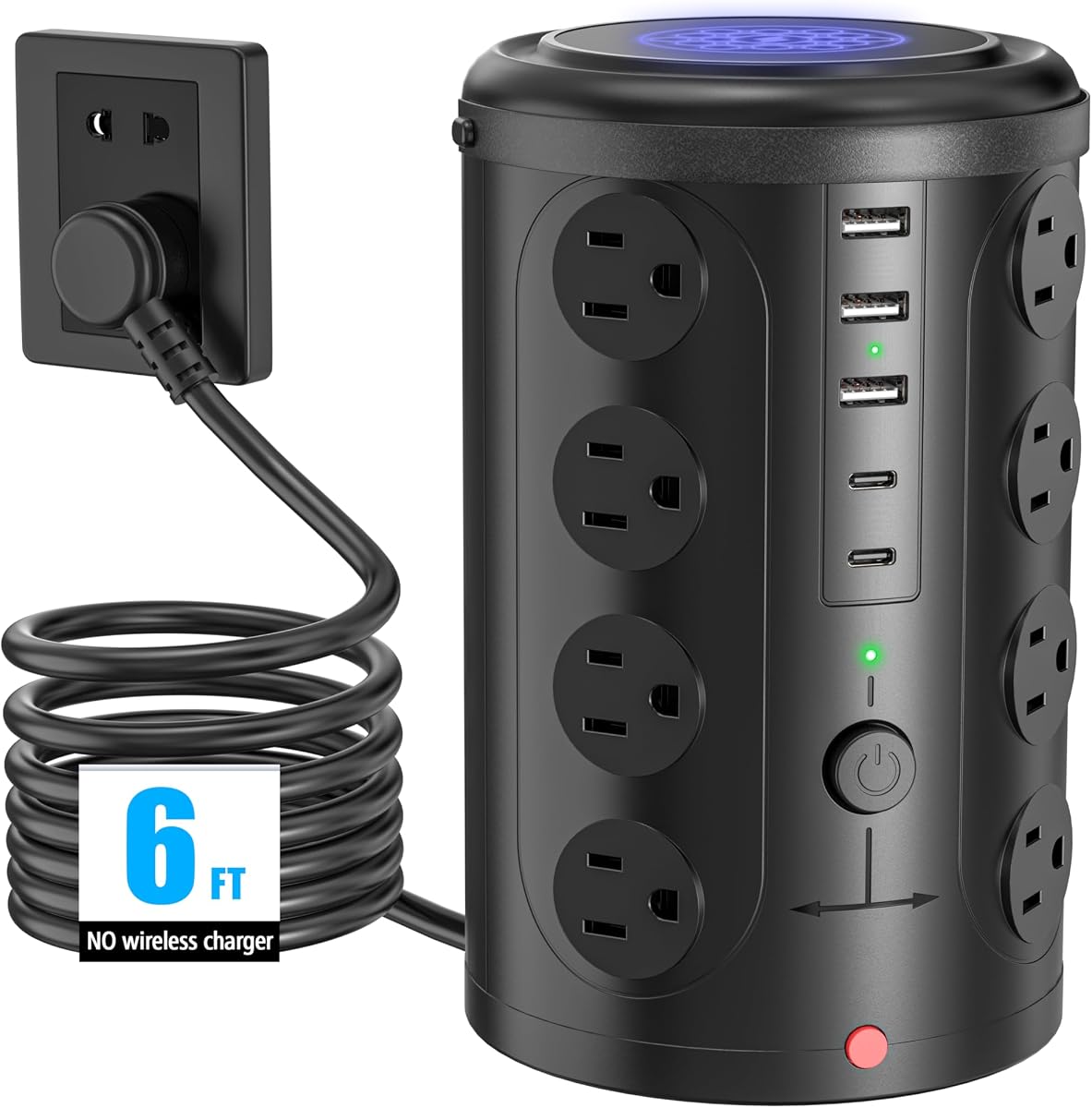
The 6FT Power Strip Tower with 16 wide-spaced outlets is the largest AC-capacity model in this guide. Its 4.6 rating reflects a configuration aimed at offices, dormitories, and homes where numerous conventional devices need to be connected to one wall receptacle.
We may earn a commission when you buy through this link, at no additional cost to you.
Sixteen AC outlets are supplemented by two USB-C and three USB-A ports, producing a stated 21-device total. The vertical arrangement gives each AC socket room for different types of plugs, helping reduce the crowding that can occur with horizontal strips. The tower also includes a six-foot cord, giving users more placement flexibility than shorter models.
Protection features include 10A overload protection, a built-in short-circuit fuse, and lightning protection. The AC rating is listed at 1875W/125V or 3600W/240V. USB connections share 17W/3.4A, which is suitable for common accessories but offers less charging capacity than the dedicated 65W or 70W USB-C ports in the TenTrend and Anker towers.
Choose this product when the number of AC devices matters more than rapid charging or a compact mounted footprint. It is a practical central power hub for a dorm room, conference table, or office where numerous users may plug in at once. Because the tower is large in outlet count, users should still consider whether a narrower vertical model would better fit the available surface.
The generous outlet count and spacing make it easier to connect a mix of standard plugs without covering adjacent sockets. This is valuable in shared rooms where the power hub must accommodate several different device types.
Overload protection, a short-circuit fuse, and lightning protection cover several common electrical risks. These safeguards add value in a tower intended to serve an entire office or dorm room.
We may earn a commission when you buy through this link, at no additional cost to you.
The TESSAN Tower Power Strip Flat Plug combines 11 AC outlets and three USB ports in a compact four-sided tower. With a 4.8 rating, 1050-joule surge protection, and a low-profile plug, it offers a balanced choice for desks where both outlet capacity and physical neatness matter.
We may earn a commission when you buy through this link, at no additional cost to you.
The plug is only 0.31 inches thick and uses a 45-degree right-angle shape. That geometry helps the tower sit closer to the wall while leaving room for another plug below it on a duplex receptacle. The six-foot extension cord provides a useful balance of reach and manageable cable length, and four rubber feet help prevent sliding.
The USB configuration includes two USB-A ports rated at up to 2.4A and one USB-C port rated at up to 3A. These are suitable for common phones, tablets, and earphones, with automatic device detection intended to provide suitable charging speed. Protection includes overload, short-circuit, and over-current functions, along with a reliable on/off switch.
This tower is a good fit for users who want more outlets than a small desk strip without moving into the largest 16-outlet configuration. The flush plug and compact vertical body are especially useful beside furniture or near a crowded wall outlet. It is less suitable for anyone requiring a high-power USB-C laptop connection.
The slim plug and angled design reduce the gap between the tower and the wall. This is useful behind a nightstand, sofa, or bookcase where a conventional projecting plug would consume valuable space.
A 1050-joule surge rating and several circuit protections make the tower suitable for routine electronics. Rubber feet add stability, helping connected cables remain in place during everyday use.
We may earn a commission when you buy through this link, at no additional cost to you.
The VILONG Dual Layer Desk Clamp Power Strip provides ten AC outlets and three USB ports in a clamp-on design. Its 4.4 rating reflects a practical alternative to a freestanding tower, with the ability to mount under a desk or keep connections near the desktop surface.
We may earn a commission when you buy through this link, at no additional cost to you.
Two independent switches allow separate control of device groups, while the USB-C port supplies up to 20W for compatible phones, tablets, and smaller accessories. The clamp remains firmly attached to the desk, which makes one-handed unplugging easier and avoids the tipping associated with some traditional strips. Installation requires no drilling or extra tools.
The power station includes 700-joule surge protection, a built-in circuit breaker, and safeguards for overload, short circuits, and overheating. Its 45-degree flat plug can reach a wall outlet in a tight location without blocking the lower socket on a standard duplex receptacle. The six-foot cord provides additional placement flexibility, and the clamp supports desktops up to 1.6 inches thick.
This model is well suited to fixed workstations where saving surface area matters. The dual-layer arrangement allows the user to select a location that suits the desk, while the clamp keeps the hub stable. Its USB-C output is modest for modern laptops, and the surge rating is lower than several competing towers, so buyers with demanding charging needs should look elsewhere.
The dual-layer design supports under-desk and desktop configurations, allowing the user to keep cords hidden or ports within easy reach. This flexibility is valuable in compact or minimalist offices.
The clamp twists onto a compatible desk edge without drilling. That makes installation quick and avoids permanent modification of the furniture.
We may earn a commission when you buy through this link, at no additional cost to you.
The 6FT Power Strip Tower Surge Protector combines 12 wide-spaced AC outlets with two USB-A and two USB-C ports. Its 4.7 rating and stated 1800-joule surge protection make it one of the stronger options for users who prioritize both outlet capacity and electrical safeguards.
We may earn a commission when you buy through this link, at no additional cost to you.
The four USB ports share 3.4A of total output. Each USB-A port is listed at up to 3.1A, while the USB-C connection can provide up to 3.4A and is described as charging up to 30 percent faster than a standard 5W charger. The tower is compatible with many smartphones, tablets, and earphones, though the shared output is not intended to match a dedicated laptop charger.
Its wall plug measures just 0.30 inches and has a 45-degree right-angle profile. This design helps the tower sit flush behind a sofa, nightstand, bookshelf, or headboard while leaving space for another wall plug. A reset/off switch supports overload control, and the tower includes overload, short-circuit, and over-current protection. Four rubber feet help keep the body stable.
This is a well-rounded tower for home offices and dorm rooms that need many outlets, several USB connections, and solid surge protection. Its 3.15-by-3.15-by-5.79-inch body remains compact despite the 12-outlet capacity. The main limitation is charging power, making it better for everyday accessories than USB-C laptops.
The stated 1800-joule rating is among the highest listed for the vertical towers in this guide. It provides substantial protection for a desk containing computers, monitors, routers, or other connected electronics.
The ultra-thin, angled plug fits closely behind furniture and preserves access to the neighboring receptacle. That makes the tower practical where a standard projecting plug would be inconvenient.
We may earn a commission when you buy through this link, at no additional cost to you.
The 16-Port Flat-Plug Tower provides 12 AC outlets and four smart USB ports, including two USB-C connections. Its 4.8 rating and 1080-joule protection rating make it a versatile low-profile hub for apartments, dorm rooms, and desks with many simultaneous accessories.
We may earn a commission when you buy through this link, at no additional cost to you.
The four USB ports provide a combined 5V/3.4A output, with USB-A ports listed at up to 2.4A and USB-C ports at up to 3A. Smart detection is intended to deliver suitable charging speed for recognized devices, making the tower useful for common phones, tablets, and earphones. It does not offer the much higher output needed by the most demanding USB-C laptops.
Wide spacing between the 12 AC outlets helps accommodate different plug shapes. The vertical format preserves desk area, and the 0.35-inch flat plug can sit close to a wall behind a sofa, nightstand, bookshelf, or headboard. A braided fabric cord is described as flexible and less prone to tangling, while the reset/off switch and integrated circuit breaker support overload protection.
Short-circuit, over-current, over-voltage, and overheating protection are also listed, giving the tower a broad safety feature set. It is a good general-purpose option for users who want more than a conventional four- or six-outlet strip but do not need laptop-level USB-C charging. Confirming the latest cord length and physical dimensions before ordering is advisable because those details are not clearly stated in the supplied listing information.
The combined 12 AC and four USB connections provide substantial capacity for a single desk hub. This makes the tower useful in rooms where several people or several types of equipment share one available wall outlet.
Braided fabric helps the cord remain flexible and reduces the visual appearance of ordinary cable clutter. Combined with the slim angled plug, it supports a tidier setup around furniture.
We may earn a commission when you buy through this link, at no additional cost to you.
The right outlet tower depends on your devices, available desk space, installation preferences, and charging requirements. Use the following factors to narrow the choices before comparing final features and current listings.
Begin by counting the devices that require direct AC power. Towers in this guide range from four to 16 AC outlets, and a larger count is only useful if the vertical body fits the intended location. Wide-spaced outlets are especially helpful for desk power bricks, monitor plugs, and other bulky adapters because they reduce crowding and make every connection easier to reach.
USB-C presence alone does not reveal charging capability. Some models provide only 3A or 3.4A for phones, tablets, earbuds, and accessories, while the TenTrend tower includes a 65W USB-C port and the Anker Nano supports up to 70W. Compatible laptop charging requires reviewing the output rating carefully rather than assuming every USB-C connection offers equal power.
A true desk-mounted product should attach securely to a compatible edge. The Anker clamp accommodates desk thicknesses from 0.6 to 1.8 inches, while the VILONG clamp supports desks up to 1.6 inches thick. The Anker model does not fit curved edges, sharply sloped edges, or desks without an edge, so inspect the furniture before choosing a clamp design.
Cord length determines whether the tower can reach a wall outlet without creating a long cable loop. Most models use cords between five and 6.5 feet, while the Uncaged model stores a retractable six-foot cord inside its base. Retractable and flush cord designs can improve visual organization, but users should consider the distance from the desk to the nearest outlet.
Protection features help guard connected devices from electrical fluctuations, overloads, short circuits, and overheating. Listed surge ratings range from 320 joules on the Uncaged tower to 1800 joules on the 12-Outlet USB-C Tower, with several models between 700 and 1080 joules. The rating alone should be evaluated alongside the number and type of protective functions stated for the product.
A tower with four or five USB ports can reduce the number of separate wall adapters needed, but many models share total output across all ports. Shared power can be convenient for several low-draw accessories but may reduce charging speed when multiple devices are connected. A dedicated high-wattage port is preferable when a laptop is the primary charging target.
A thin flat plug can fit behind a nightstand, sofa, bookshelf, or headboard where a standard plug protrudes too far. Right-angle configurations can also preserve access to the lower socket on a duplex wall receptacle. The supplied dimensions range from 0.30 to 0.35 inches for several examples, allowing useful comparison with the available clearance.
Individual switches, separated outlet groups, retractable cords, flat cables, and mounting feet all affect how easily a tower supports an organized workspace. The SMALLRT 12-Outlet Tower provides four separated switches, while the Anker and VILONG models use clamps to keep their hubs stable. The best option depends on whether convenience, placement, or device-level control matters most.
Position the tower near the devices it serves, but keep the extension cord fully uncoiled and avoid placing it where it can be pinched, walked over, or exposed to moisture. For clamp-mounted models, confirm that the desk edge falls within the specified thickness range and tighten the clamp before adding heavier power adapters.
Connect high-draw equipment and charging devices according to the product's stated electrical limits. Do not exceed the listed amperage or wattage, and distribute loads across the available outlets or switches when practical. Use the appropriate USB-C port for a compatible laptop and avoid assuming that every USB port can deliver laptop-level charging.
Inspect the plug, cord, and connections periodically for bending, damage, heat, or looseness. Unplug the tower before cleaning it, and keep liquids away from the power connections. If a switch trips or a protection feature activates, identify and remove the excess load before resetting the unit.
A desk-mounted tower attaches to a compatible desk edge with a clamp, while a freestanding tower stands upright on the surface. Clamp models can save surface space and remain stable, although they require a suitable edge and may need installation. Freestanding towers are easier to reposition and can be used beyond a permanent workstation.
It depends on the port's maximum output and the laptop's charging requirements. The TenTrend tower includes a USB-C port rated up to 65W, and the Anker Nano supports up to 70W. Other models provide lower outputs intended mainly for phones, tablets, earphones, and accessories, so check both the charger and device requirements.
The listed connection counts range from eight combined AC and USB connections to 21. The Uncaged model offers four AC and four USB connections, while the 16-Outlet USB-C Tower offers 16 AC and five USB connections. Connection count is not the same as simultaneous charging performance because USB output may be shared.
Compatibility depends on the model's specified range. The Anker Nano fits edges from 0.6 to 1.8 inches thick, and the VILONG model supports desks up to 1.6 inches thick. The Anker clamp also does not work with curved edges, edges sloped over 45 degrees, or desks without an accessible edge.
A retractable tower stores unused cord length inside its base, eliminating the loose loop left by a conventional extension cord. This can reduce floor clutter and trip hazards beneath a desk. The Uncaged model uses a six-foot cord that pulls out as needed and rewinds when released.
Surge protection is intended to reduce exposure to voltage spikes reaching connected equipment, but it does not prevent every type of electrical problem. Users should also respect amperage and wattage limits, distribute heavy loads appropriately, and inspect cords and connections. Overload, short-circuit, and thermal protections remain important.
Placement depends on cord routing, available space, and how the tower is used. A freestanding model can work on a desk, shelf, or floor if it remains stable and the cord is protected. Under a desk may be better for cable concealment, while a clamp model provides a fixed alternative without requiring a freestanding tower.
Many freestanding models include rubber feet or an anti-slip base, which helps during normal use. Users should also avoid leaning the tower against connected devices, keep the cord from pulling the body sideways, and place it on a level surface. A clamp-mounted model is the most stable choice for a fixed desk.
The Anker Nano Power Strip stands out as the most complete desk-mounted option because it combines a stable clamp, six AC outlets, four USB connections, and up to 70W of USB-C charging. The Uncaged Retractable Tower offers the most focused solution for cord control, while the SMALLRT 12-Outlet Extension Cord provides abundant capacity and everyday USB charging at a budget-oriented level.
Start with the devices that matter most. Prioritize 65W or 70W USB-C output for a compatible laptop, a high outlet count for shared rooms, a retractable or flat cord for clutter reduction, and a surge rating appropriate to the equipment being protected. Check desk-edge compatibility before choosing a clamp, and compare the tower's footprint with the available space.
Ratings, configurations, and product details can change, while prices and promotions also vary over time. Review the current listing and confirm cord length, dimensions, electrical limits, charging output, and mounting requirements before making a final purchase decision.