
HTDYOO S Video to HDMI Converter
4.2Editor score
Integrated RCA and S-Video
720P and 480P outputs
USB-powered simple operation
Our S Video to HDMI Upscaler guide compares ten converters for resolution, aspect ratio, audio, included accessories, compatibility, and ease of use today.
An S Video to HDMI upscaler connects legacy analog video sources to modern HDMI televisions, monitors, and projectors. These adapters are especially useful for VHS players, VCRs, older DVD players, camcorders, and retro game consoles. The best choice depends on signal direction, supported resolutions, aspect-ratio handling, and included cables.
This guide compares ten converters based on their documented inputs, outputs, supported standards, aspect-ratio controls, scaling options, accessories, and device compatibility. It covers direct S-Video-to-HDMI converters, RCA-to-HDMI alternatives, a capture-focused model, and reverse HDMI-to-analog adapters that are useful for different equipment combinations.
Each entry identifies the converter's most useful traits and any limitations visible in the supplied specifications. The list shows why resolution labels, input selection, audio support, and included cables matter, while current prices and availability can change. Readers should confirm connector types and source compatibility before purchasing.
4.2Editor score

4.2Editor score

4.4Editor score
The comparison below highlights each adapter's conversion direction, supported output resolutions, input flexibility, and principal extra feature, making it easier to distinguish direct S-Video-to-HDMI models from RCA-only and reverse-conversion options.



The ClearClick AV to HDMI Converter 3.0 combines S-Video and RCA composite inputs with 1080P or 720P HDMI output, making it a strong general-purpose adapter for legacy media equipment. Its documented rating is 4.2, but the remote-controlled picture adjustments are the feature that most clearly separates it from simpler converters. Brightness, contrast, saturation, hue, resolution, and aspect ratio can be adjusted without navigating a tiny control panel on the box.
We may earn a commission when you buy through this link, at no additional cost to you.
The converter accepts standard-definition analog video from VCRs, VHS decks, camcorders, Hi8 equipment, DVD players, set-top boxes, and compatible gaming systems. PAL and NTSC support broadens its relevance for international media collections, while the plug-and-play approach avoids software and computer drivers. An S-Video connection can provide a cleaner source than composite video when the original equipment supports it, and the output can be viewed on an HDMI television or monitor.
The aspect-ratio controls are particularly useful for preserving the original 4:3 composition with black bars or stretching the image to fill a 16:9 screen. This is more flexible than relying on a display's automatic scaling, which can crop the picture. The trade-offs are that the S-Video cable is not included and the RCA cable is needed to carry audio. The unit is also strictly one-way, so it cannot convert HDMI back to RCA or S-Video.
This is the most compelling choice for a collector who wants more than basic signal conversion. The remote makes routine setup adjustments accessible from the sofa, while the included warranty and technical support add reassurance for a product intended to sit within an entertainment setup. Choose it when a VCR, camcorder, or older console needs flexible video control and both 720P and 1080P output are important. It is less suitable for someone who needs the reverse conversion direction or expects every cable to be included.
The included remote provides direct access to brightness, contrast, saturation, hue, resolution, and aspect-ratio settings. This is especially valuable with noisy or faded analog recordings, where a fixed converter may produce an image that looks dull or incorrectly cropped.
Switching between a pillarboxed 4:3 presentation and a stretched 16:9 view gives users control over how archival footage fills modern screens. Preserving the original framing is usually preferable for movies and television recordings, while stretching may suit some console games.
We may earn a commission when you buy through this link, at no additional cost to you.
The HTDYOO S Video to HDMI Converter is a practical choice for users who want an uncomplicated way to connect an RCA or S-Video source to an HDMI display. It has a 4.2 rating and supports 720P and 480P output along with 16:9 and 4:3 screen ratios. Its main attraction is convenience: both an RCA cable and an S-Video cable are integrated into the package, and a USB cable supplies power from a compatible 5V port.
We may earn a commission when you buy through this link, at no additional cost to you.
This converter is designed for familiar analog sources, including older game systems and media players. The documented compatibility list covers PS One, PS2, PS3, N64, Wii, NES, SNES, GameCube, several Sega systems, set-top boxes, VHS equipment, VCRs, Blu-ray DVD players, and projectors. Because the device supports both S-Video and composite RCA input, it can cover many collections without requiring a different adapter for each connector type.
There are important limitations. The two analog inputs cannot be used simultaneously, an HDMI cable must be supplied separately, and the unit supports 480i input but not 480P. It is also a one-way converter, so it cannot send an HDMI signal to an S-Video or RCA display. These constraints make it best for a standard-definition source that is already producing an interlaced picture, rather than a source requiring 480P or a high-definition analog signal.
The HTDYOO is a good budget-oriented pick when the main priorities are straightforward operation, included source cables, and broad support for older consoles and video components. It may be less attractive for someone with modern high-resolution source equipment or a display that lacks convenient USB power. For a basic S-Video collection or a classic gaming setup, however, it covers the essential conversion path with little complication.
Both S-Video and RCA composite are supported, allowing the converter to serve camcorders, VCRs, DVD players, and multiple generations of game consoles. The input selection process remains simple because only one source can be active at a time.
Powering the unit from a 5V USB port can reduce the number of wall adapters required for an entertainment center. An appropriate USB power source and a separate HDMI cable are still needed to complete the installation.
We may earn a commission when you buy through this link, at no additional cost to you.
The RCA Svideo to HDMI Converter stands out for offering a broad accessory package and unusually flexible display-ratio selection. Its 4.0 rating is the lowest among the ten products in this guide, but the documented feature set is substantial. It accepts RCA composite video with right and left audio or an S-Video signal, then provides 720P or 1080P at 60Hz over HDMI.
We may earn a commission when you buy through this link, at no additional cost to you.
Four aspect-ratio modes are available: 4:3, 16:9, 16:10, and Full. The 4:3 setting is useful for preserving the shape of retro games, while 16:9 is intended for widescreen content. A physical output-resolution switch lets users choose between 720P and 1080P without software. Compatibility is broad, covering VHS decks, VCRs, DVD players, Wii, GameCube, PlayStation 1 and 2, and other equipment with RCA or S-Video output.
The package includes a power adapter, RCA cable, S-Video cable, and HDMI cable, making it one of the most installation-ready options in the list. That completeness is especially helpful when the converter must bridge an older source to a television that only has modern HDMI connections. The trade-off is that it does not offer remote-controlled color or sharpness adjustment, and its 4.0 rating suggests its overall customer satisfaction trails the stronger-rated models.
This converter is best for readers who want a direct analog-to-HDMI path, prefer having every necessary cable in the box, and want more aspect-ratio choices than a basic RCA-to-HDMI adapter. It is also a sensible pick for a multi-console gaming shelf because its supported source types and output controls cover common legacy formats. Buyers primarily interested in fine image calibration may prefer a model with a remote.
The availability of 4:3, 16:9, 16:10, and Full modes can help users avoid accidental cropping or stretching. Each source may look different on a modern display, so keeping several ratio options close at hand is valuable.
Included power, source, and HDMI cables simplify the initial connection. This reduces setup friction and makes the converter especially convenient for connecting a VCR, DVD player, or classic console to a new television.
We may earn a commission when you buy through this link, at no additional cost to you.
The Tendak HDMI to Composite Converter is included because it solves a related but opposite problem: bringing an HDMI source to an older television, projector, or display with S-Video or RCA connections. It has a 4.1 rating and accepts HDMI signals at standard-definition and high-definition resolutions, including 1080p at 50Hz and 60Hz. It is not a direct S-Video-to-HDMI upscaler despite the broad keyword match.
We may earn a commission when you buy through this link, at no additional cost to you.
Two analog video options are offered, allowing S-Video or composite RCA video to be selected according to the display. Right and left stereo audio are also provided. Compatibility documentation includes Apple TV, Roku, Xbox, set-top boxes, VCRs, Blu-ray and DVD players, PlayStation 3 and 4, laptops, televisions, and projectors. A PAL and NTSC switch helps users accommodate different regional television standards.
The key limitation is directionality. HDMI cannot be converted back to S-Video or RCA in the same direction through this unit, and the specification explicitly states that bidirectional conversion is unsupported. Analog output is also limited to 576p or 576i and 480p or 480i, so the converter does not transmit the full 1080P picture as an analog signal. It therefore serves as an input-output bridge rather than a full-resolution analog-to-digital scaler.
This product is worth considering when a modern streaming device, game console, or laptop must feed a projector or television that predates HDMI. It is not relevant to a collector trying to display S-Video tapes on a modern screen. For that goal, choose a direct RCA or S-Video-to-HDMI converter. The Tendak is best reserved for a specific legacy-display installation where HDMI input is the only available option.
Older projectors and television sets sometimes retain S-Video or composite inputs after their HDMI functionality has become unreliable or inconvenient. This converter gives current HDMI sources a path to those displays without requiring a replacement screen.
The words HDMI to S-Video describe input and output direction precisely. Buyers should identify which connector is available on the source and which is available on the display before choosing any conversion adapter.
We may earn a commission when you buy through this link, at no additional cost to you.
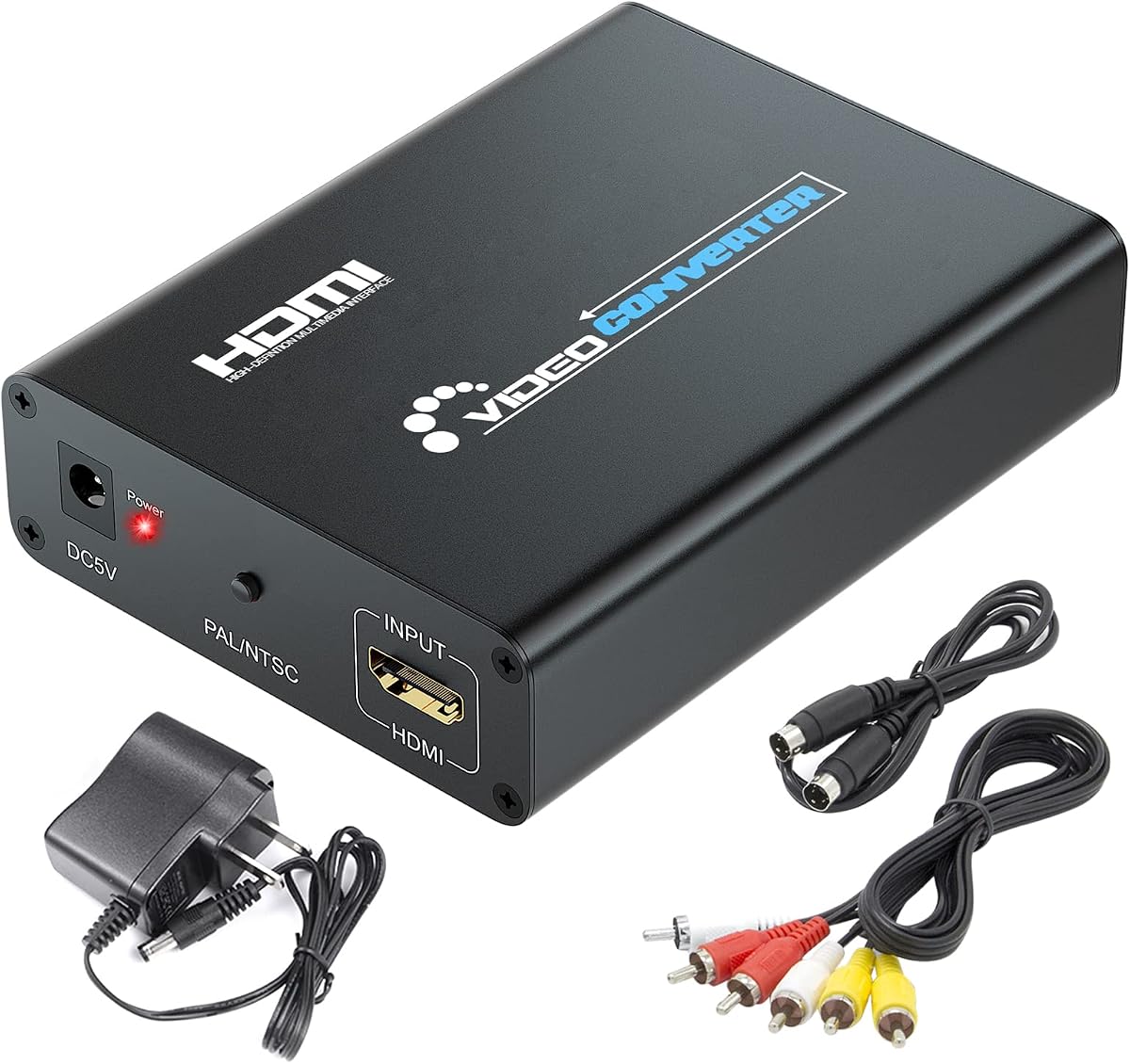
The RCA Svideo to HDMI Converter offers a balanced feature set and has a 4.3 rating, the highest among the direct S-Video-to-HDMI alternatives in this guide. It accepts RCA composite CVBS video or S-Video together with right and left audio, then upscales 480i NTSC or 576i PAL input to 720P or 1080P HDMI output. This makes it a natural fit for old game consoles, VCRs, DVD players, and cameras.
We may earn a commission when you buy through this link, at no additional cost to you.
A useful feature is the ability to keep composite and S-Video sources connected simultaneously. A switch button determines which input is active, making it easy to move between a DVD player and a game console without reconnecting cables each time. The output includes HDMI and a 3.5mm audio jack, offering an additional way to route analog sound to speakers, headphones, or an external amplifier when the connected display does not provide convenient audio controls.
The converter operates without software and is described as easy to install. The package includes an AC power adapter, composite cable, and S-Video cable, covering the source side of the connection. On the other hand, the supplied specifications do not list an aspect-ratio switch, remote control, or detailed picture calibration. Users who want to preserve 4:3 framing or adjust brightness, contrast, saturation, and hue directly may need to make those adjustments in the television instead.
This is a strong general recommendation for someone with several analog sources who wants fast input switching and a separate audio connection. It should particularly appeal to owners of N64, PS2, Wii, or similar equipment who want the lowest documented rating among the direct converters in this comparison. It is less suited to a user whose priority is a complete cable package or a dedicated picture-control remote, but its core conversion and switching functions are well specified.
Keeping both analog input types connected allows quick changes between devices through the input switch. This is a practical advantage for a gaming setup or media cabinet containing more than one legacy source.
The 3.5mm output provides an option for taking sound to an external system. Users should still verify the expected audio format and connection requirements before building a permanent installation around it.
We may earn a commission when you buy through this link, at no additional cost to you.
The RCA Svideo to HDMI Converter with HD Cable is a compact, straightforward option for bringing older equipment onto a modern display. Its 4.2 rating reflects a generally solid feature set, while the integrated cabling and included HDMI cable make setup convenient. The converter accepts RCA composite and S-Video sources and provides selectable 720P or 1080P HDMI output.
We may earn a commission when you buy through this link, at no additional cost to you.
Its input processing automatically detects 480i NTSC or 576i PAL standard-definition video and upscales it to the selected high-definition output. The stated compatibility range includes VHS players, VCRs, DVD players, set-top boxes, and older consoles such as NES, Super Nintendo, N64, Wii, Wii U, Xbox, and PS2. This broad retro-oriented support makes the adapter a common choice for game rooms and media cabinets.
The unit uses plug-and-play operation without drivers and can be powered through a 5V USB port. Integrated RCA and S-Video leads help reduce the number of loose cables, while the included HDMI cable completes the path to a television or projector. The specifications mention advanced signal processing for color, resolution, and detail, but do not describe user-adjustable brightness, contrast, hue, saturation, or aspect-ratio controls. Display settings may therefore be the only calibration tools available.
This converter is well suited to portable or temporary setups because it is lightweight and straightforward. It is also a sensible choice when a user wants the required video and HDMI leads in one package. It may not be the best option for a dedicated installation that depends on manual aspect-ratio correction or a remote. For straightforward legacy-console and VHS viewing with USB power nearby, however, the convenience is difficult to overlook.
The built-in RCA and S-Video leads and compact format make the converter easier to carry between a television, projector, and stored media components. This convenience can be valuable for temporary gaming sessions or a mobile media setup.
Support for both 480i NTSC and 576i PAL helps the converter adapt to different source standards. Automatic detection reduces the chance of a mismatched image when switching between regional media.
We may earn a commission when you buy through this link, at no additional cost to you.
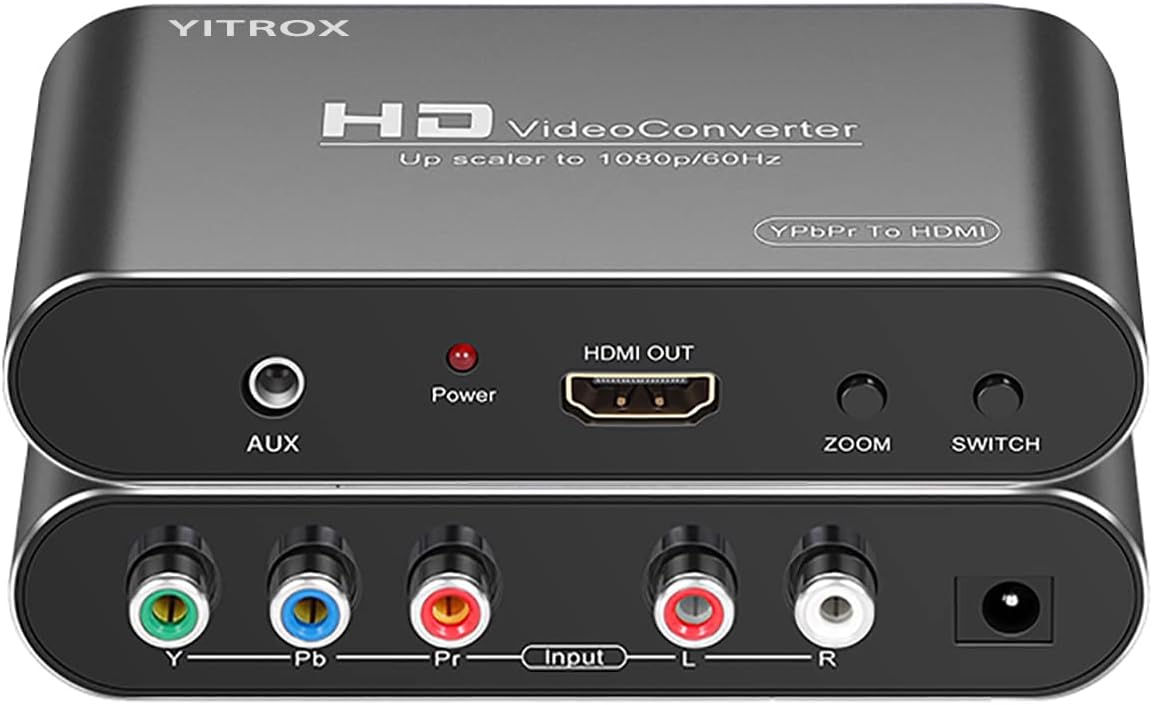
The Component to HDMI Converter Upscaler is designed for the highest-quality analog video output available on many classic game consoles and older disc players. It accepts YPbPr component video plus right and left audio and converts that signal to HDMI, with output resolutions reaching 1080P at 50Hz or 60Hz. Its 4.1 rating and extensive scaling menu make it more specialized than the direct S-Video products in this list.
We may earn a commission when you buy through this link, at no additional cost to you.
The scaler supports five output resolutions: 800×600, 1024×768, 1280×720, 1280×1024, and 1920×1080. Seven zoom options are also documented, including gradual enlargement, gradual reduction, and automatic adaptation. These controls can help match a source to different television sizes and reduce the need to rely on overscan settings. Image processing features include motion optimization, color optimization, contrast adjustment, and digital noise reduction.
The strongest use case is connecting a Wii, PS2, PS3, Xbox 360, or compatible DVD and Blu-ray player through component output to a modern HDMI television. The specification notes that PS2 users may need to change the console's AV setting to YPbPr if no image appears. Audio and video synchronization is another advantage, and an auxiliary audio port offers a separate sound connection. Crucially, an S-Video cable must not be used for this model because it can produce a black-and-white image.
Choose this converter if component output is available and important to you; it can provide a stronger source than composite, and its broad scaling controls suit enthusiasts who want to fine-tune a console image. It is not the correct choice for a camcorder or VCR that only offers S-Video, nor is it a reverse HDMI-to-component adapter. The requirement for a proper component cable also means existing S-Video equipment will need different hardware.
YPbPr separates color and brightness information into separate signals, offering a more detailed analog image than composite video when the source device supports it. This makes the converter relevant to consoles capable of outputting progressive or high-definition component signals.
Five resolutions and seven zoom options provide a more granular way to fit legacy output onto a contemporary television. These controls are useful when a standard screen preset does not produce the desired framing.
We may earn a commission when you buy through this link, at no additional cost to you.
The SoundBeast AV to HDMI Converter & Recorder 2.0 combines analog-to-HDMI conversion with USB video capture, and its 4.4 rating is the highest in the guide. It accepts RCA composite video through yellow, white, and red connections and provides 720P or 1080P HDMI output. That makes it more than a display adapter: it can also send a captured image to a Windows or Mac computer for recording.
We may earn a commission when you buy through this link, at no additional cost to you.
The USB capture function records at 640×480 pixels and requires no drivers, with capture software included. It does not need a separate computer for ordinary conversion, but a computer becomes relevant when the user wants to save a recording rather than only view it on a television. The converter remains one-way and does not send HDMI back to RCA, so its reverse-conversion capability should not be inferred from the recording feature.
The 4:3 control preserves the original composition with black bars on the sides, while a standard 16:9 option can fill a widescreen display. This is a meaningful distinction from converters that stretch everything horizontally. The unit supports PAL and NTSC and is intended for VCRs, camcorders, Hi8 equipment, DVD players, and compatible gaming systems. A one-year warranty and support from a USA-based small business are included, with an option to extend coverage.
This is the premium choice for archivists, teachers, or hobbyists who want to digitize analog footage while also using the converter for ordinary television viewing. The main limitations are that it accepts composite RCA video rather than S-Video and records at a modest 640×480. Users needing direct S-Video capture should confirm their source and capture requirements carefully. For those who only need display conversion, a dedicated S-Video adapter with higher output control may offer a better fit.
The USB capture function adds a recording path to a converter that already works as a standalone HDMI adapter. Included software and the stated lack of required drivers simplify getting analog footage onto a computer.
The 4:3 mode keeps older recordings in their intended shape and adds side bars. The alternative 16:9 mode offers a full-screen option for users who prefer filling the display over preserving every original edge.
We may earn a commission when you buy through this link, at no additional cost to you.
The RCA Svideo to HDMI Converter with Cables is a balanced option for connecting standard-definition media equipment to a modern HDTV. It has a 4.2 rating and accepts either RCA composite or S-Video video, along with right and left audio. Both analog formats can be connected at the same time, with a switch button determining which source is sent to the 720P or 1080P HDMI output.
We may earn a commission when you buy through this link, at no additional cost to you.
Its 3.5mm audio output gives users a way to connect sound to a separate amplifier, speaker system, or set of headphones. The converter supports 480i NTSC and 576i PAL input, making it suitable for common North American and international analog sources. The documented device list includes cameras, VCRs, DVD players, and game consoles such as NES, Super Nintendo, N64, PlayStation 1, PlayStation 2, and PlayStation 3.
Compared with the similarly featured rank-five converter, this model adds clear mention of included composite and S-Video cables, while still offering easy plug-and-play operation. It does not list a remote, aspect-ratio controls, or computer capture. That means picture framing and calibration may depend on the connected television's menus. The fixed scaling from standard-definition input can make the output appear clearer and larger, but it cannot create genuine high-definition detail that was absent from the source recording.
This converter is a good general-purpose pick for a media shelf containing several generations of consoles and VCR equipment. The combination of switchable inputs, HDMI scaling, analog audio extraction, and included source leads covers the essentials without demanding a complex setup. It is less appropriate for someone who specifically requires S-Video capture, a remote, or advanced zoom controls, but it remains a practical bridge for enjoying legacy media on a contemporary television.
The ability to leave both composite and S-Video sources connected is useful for setups with a DVD player, VCR, and game console sharing one display. A physical switch makes changing the active source direct.
The 3.5mm jack can be more useful than television audio when an existing speaker system or amplifier is part of the setup. It provides a separate route for the source's analog sound alongside the HDMI video.
We may earn a commission when you buy through this link, at no additional cost to you.
The HDMI to S-Video Converter has a 4.4 rating and provides a convenient bridge for HDMI sources that need to reach older displays. It accepts HDMI signals at 480p, 576p, 720p, 1080i, and 1080p with supported 50Hz or 60Hz rates. From that digital input, it can output S-Video video or RCA composite video alongside right and left analog stereo audio.
We may earn a commission when you buy through this link, at no additional cost to you.
Including both S-Video and RCA outputs is the main practical advantage. S-Video can provide a cleaner image than composite on compatible legacy screens, while RCA composite remains useful for older televisions and projectors. The package includes both output cables, making it easier to connect the converter to a range of displays. Modern source compatibility includes media players, televisions, set-top boxes, VCRs, Blu-ray and DVD players, PlayStation 3 and 4, laptops, and projectors.
It is essential to understand that this product does not perform the S-Video-to-HDMI conversion suggested by the search phrase. Its direction is HDMI to S-Video, and its analog video output is limited to 576p or 576i and 480p or 480i. Although a 1080P signal can be accepted at the HDMI input, that image is down-converted to an analog format for the available outputs. It is best considered a bridge for a specific legacy display, not an upscaler for analog sources.
Choose this converter when a current streaming device, console, laptop, or disc player has HDMI but the desired television or projector accepts only analog video. It is a good option for preserving access to an older display rather than replacing it. It will not meet the needs of someone with a VCR or camcorder that sends S-Video and wants to watch it on a modern HDMI television; for that direction, select one of the direct RCA or S-Video-to-HDMI converters in the guide.
Having both S-Video and RCA composite available allows the same HDMI source to connect to different generations of displays. The appropriate output can be selected according to the connectors available on the television or projector.
Support for common 480p, 576p, 720p, 1080i, and 1080p source formats makes the converter usable with many current devices. The eventual analog output remains standard-definition, regardless of the incoming resolution.
We may earn a commission when you buy through this link, at no additional cost to you.
A good S Video to HDMI upscaler should match the source's output, the display's input, the desired resolution, and the type of media you want to view. Connector direction and included accessories deserve as much attention as headline resolution labels.
Start by identifying where the video signal begins and where it needs to end. A direct S-Video-to-HDMI converter takes an analog source and sends it to a modern television, monitor, or projector. A reverse HDMI-to-S-Video adapter does the opposite and is useful when a current console or streaming device must feed an older analog screen. These are not interchangeable, and neither performs bidirectional conversion unless its documentation explicitly says so.
A VCR, DVD player, camcorder, or game console may provide S-Video, composite RCA video, component YPbPr, or a combination. S-Video generally offers a better analog image than composite, while component video can carry more detail from compatible consoles. The HTDYOO, RCA, and ClearClick models support S-Video and composite, whereas the SoundBeast model is documented for RCA composite input. The component converter requires a proper YPbPr cable and should not be connected with an S-Video lead.
An upscaler converts a standard-definition 480i or 576i source to a larger HDMI output such as 720P or 1080P. The resulting image can fill a modern screen more effectively, but it cannot recover high-definition detail that was never recorded. Output resolution describes the format delivered to the television; it does not mean the analog source contains 1080P content. For genuine 1080P source material, the source device and display both need to support that standard.
Old media is commonly framed in 4:3 even when shown on a 16:9 display. A converter with 4:3, 16:9, 16:10, or Full modes lets the viewer preserve the original boundaries, fill the screen, or try alternative framing. The ClearClick and SoundBeast models offer explicit 4:3 and 16:9 choices, while the rank-three RCA converter lists four ratio modes. A model without ratio controls may rely on the television's own processing, which can crop or stretch the image unexpectedly.
The converter must carry sound as well as video, or users may be left with a silent image. Some products accept right and left RCA audio, some include a 3.5mm analog output, and the SoundBeast adds computer capture. HDMI can carry digital audio from a converter, while the separate jack may be useful for an existing amplifier or speaker system. Check whether the necessary audio lead is included and whether the source exposes separate red and white connectors.
A converter may include the source leads but omit the HDMI cable or power adapter, while another provides nearly everything. The ClearClick includes a remote but not an S-Video cable, and its RCA cable is needed for audio. The HTDYOO includes RCA and S-Video leads but not an HDMI cable. The rank-three RCA model includes power, source, and HDMI cables, making it especially installation-ready. USB-powered models require access to a suitable 5V port.
Analog recordings can benefit from brightness, contrast, saturation, hue, resolution, and aspect-ratio adjustments. The ClearClick's remote is the clearest example of this type of control, while other converters mainly provide fixed scaling or physical switches. If you also want to digitize tapes, the SoundBeast's USB capture function records to a computer at 640×480 with included software. These extra capabilities are useful but should not replace checking the essential input and output compatibility.
NTSC and PAL are regional analog television systems, and their supported formats are listed by several products in this guide. A converter that handles both 480i NTSC and 576i PAL is more versatile, particularly if your collection includes tapes or discs recorded in different regions. Some reverse-conversion models also include a PAL and NTSC output switch. The selected setting must match the source, or the display may show an unstable, incorrectly framed, or otherwise unsuitable image.
Begin by identifying the output connector on the legacy source and the input connector on the television, monitor, or projector. For a direct S-Video setup, connect the source's S-Video output to the converter's S-Video input, then connect the converter's HDMI output to the display. If using composite RCA video, connect the yellow video plug and the red and white audio plugs. Power the converter only after the source and display are connected, using its supplied power adapter or the documented USB power method.
Select the correct source on the converter, choosing S-Video when it is available because it generally produces a cleaner image than composite video. Set the output resolution and aspect ratio to suit the content. Preserve 4:3 framing for recordings that were composed for a standard-definition screen, or experiment with widescreen and full options for games and other content. If the picture is absent, check the input selection, cable orientation, television source setting, and whether the source has enabled the correct AV output mode.
For long-term care, keep the converter and power supply ventilated, away from moisture, and not buried beneath stacked equipment. Route cables so their connectors are not pulled sideways, and avoid frequent unnecessary unplugging. Clean the exterior with a dry or lightly damp cloth rather than spraying liquid into the box. If using a capture function, safely eject recordings, close capture software before disconnecting USB, and keep the original tapes stored separately as the primary preservation copy.
It can improve how old standard-definition video is displayed on a modern screen, but it cannot create detail that was absent from the recording. Upscaling makes the image larger and can produce a cleaner-looking HDMI presentation, yet noise, blur, fading, and worn tape damage remain part of the source. Using S-Video rather than composite usually provides a better starting signal because it separates color from brightness.
Most models need an HDMI cable to connect the converter to the television, monitor, or projector, but inclusion varies. The rank-three RCA converter and the rank-six model include an HDMI cable, while the HTDYOO explicitly does not. Check the package contents before ordering and add a suitable cable if one is not supplied.
No, not with the one-way converters in this guide. The direct models convert RCA or S-Video into HDMI and explicitly do not support HDMI to RCA or S-Video. The rank-four Tendak and rank-ten HDMI to S-Video Converter perform the reverse direction instead, accepting HDMI and providing analog video and audio outputs.
The answer depends on the console's available output and the desired level of control. The rank-five and rank-nine converters support switchable RCA and S-Video inputs, while the rank-three model offers several aspect-ratio modes and a complete cable package. The rank-seven component converter is better when a console supports YPbPr and progressive or high-definition component output.
The source was probably composed in 4:3 but is being displayed on a widescreen screen. ClearClick and SoundBeast provide explicit 4:3 and 16:9 options, and the rank-three RCA model offers four aspect-ratio modes. If no ratio control is available, check the television's aspect-ratio, picture-size, or overscan settings.
The SoundBeast AV to HDMI Converter & Recorder 2.0 is designed for that combined use. It converts RCA composite input to HDMI for display and can record through USB to a PC or Mac at 640×480 using the included software. The other products in the guide are primarily display adapters and do not list a computer-capture function.
Use S-Video whenever the source supports it and provides a complete video connection. It generally carries a cleaner image than the yellow composite RCA plug, especially after the signal is scaled for a modern display. Composite remains useful as a fallback for equipment that lacks S-Video, and it can also carry left and right audio through the red and white RCA plugs.
Many of the listed devices support both 480i NTSC and 576i PAL input, including the ClearClick, rank-three RCA, rank-five, rank-six, rank-nine, and SoundBeast models. The appropriate source format should be detected or selected automatically on many units. Reverse HDMI-to-analog converters may also provide a PAL and NTSC switch for the output standard.
The ClearClick AV to HDMI Converter 3.0 is the strongest all-around option for viewers who value remote-controlled picture and aspect-ratio adjustments. The HTDYOO converter is a straightforward budget choice with both source leads integrated, while the SoundBeast AV to HDMI Converter & Recorder 2.0 is the most feature-rich option for users who also want USB computer capture.
Prioritize conversion direction first, followed by the source connector that provides the best available signal. Then consider output resolution, aspect-ratio controls, audio routing, included cables, and regional format support. Dedicated S-Video models are appropriate for most legacy media collections, whereas the two reverse adapters serve modern HDMI sources connected to older analog displays.
Product specifications and availability can change, and current prices should be checked before purchasing. Comparing the package contents with the equipment already in your setup will help avoid buying an unnecessary cable, an adapter with the wrong signal direction, or a converter that cannot support your preferred display mode.