
Thermaltake Pure 20
4.5Editor score
Thirty-millimeter thick fan frame
Long-life sleeve bearing design
Focused high-airflow blade geometry
A 200mm case fan can move substantial air through a desktop PC while occupying less of the space taken by several smaller fans. The best choice depends on case clearance, noise tolerance, connector type, lighting preferences, and whether you need variable-speed control. A larger frame also demands careful attention to thickness, mounting holes, and airflow direction.
This guide compares ten 200mm fans across important specifications and practical use cases. It covers standard 30mm-thick PC models, a slimmer 25mm illuminated option, and a deep 60mm AC unit for equipment enclosures. The comparison also distinguishes PWM, FLX, USB-powered, RGB, and ARGB configurations so readers can find a fan that fits their system rather than relying on diameter alone.
Each review explains the fan's standout features, limitations, and ideal installation environment. The selections range from budget-oriented airflow to premium quiet cooling and feature-rich illuminated designs. Product specifications and availability can change, and prices fluctuate over time, so readers should verify current details and case compatibility before making a purchase.
4.5Editor score
4.8Editor score

4.6Editor score
As an Amazon Associate we earn from qualifying purchases.
This side-by-side comparison highlights the major differences among the ten fans, including physical depth, power input, speed control, airflow claims, lighting, and bearing construction.


The Thermaltake Pure 20 is a budget-minded 200mm fan built around a substantial 200x30mm frame, and its 4.5 rating reflects its favorable reception among builders looking for straightforward cooling. Rather than surrounding the basic cooling task with elaborate controls or lighting, it concentrates on blade geometry, airflow, and an installation-focused frame design.
We may earn a commission when you buy through this link, at no additional cost to you.
Its defining feature is the 30mm-thick body, which is intended to produce useful static pressure as well as volume airflow. The blade design directs air through the frame while reducing the noise associated with turbulence. A long-life sleeve bearing supports durability, while the shaved frame and anti-vibration mounting system help the fan fit into compatible chassis and limit the transmission of vibration.
The main limitation is the lack of a clearly documented PWM range in the supplied specifications. Buyers who require automatic motherboard control should verify the connector and control interface before ordering. The product information also presents LED-equipped versions as an option within the broader Pure 20 series, but the featured listing itself is a plain black model, so lighting should not be assumed as a standard feature.
This is a persuasive choice for a first 200mm case fan, a straightforward system upgrade, or a builder who values airflow without paying for premium acoustic engineering. It also makes sense when the case supports 30mm-thick 200mm fans and the system can handle a fixed-speed fan. For users who require confirmed PWM operation or a detailed acoustic rating, one of the Noctua models may be easier to specify.
The Pure 20 blade is shaped to concentrate airflow and reduce excess noise. That makes the fan more compelling in a large case or intake position where moving a meaningful volume of air matters.
The shaved frame and anti-vibration mounting design improve installation around chassis edges. Buyers should still check radiator clearance and confirm that the case accepts 30mm-deep 200mm fans.
We may earn a commission when you buy through this link, at no additional cost to you.
The Noctua NF-A20 PWM chromax.black.swap carries a 4.6 rating and is designed for builders who want a restrained, coordinated appearance without sacrificing quiet operation. Its all-black finish suits dark cases, while the included swappable anti-vibration pads provide a small but useful degree of visual customization.
We may earn a commission when you buy through this link, at no additional cost to you.
The fan measures 200x200x30mm and operates on 12V through a four-pin PWM connector. Its documented speed range runs from 350 to 800 RPM, and Noctua lists maximum noise at 18.1 dB(A). Flow Acceleration Channels and the Advanced Acoustic Optimisation frame support the emphasis on moving air with low acoustic output.
The trade-off is that this edition does not include RGB lighting, so buyers seeking a glowing centerpiece will need a different model. Its premium positioning may also be difficult to justify when basic cooling is the only goal. However, the swappable red, black, white, blue, yellow, and green pads make the otherwise monochrome design more adaptable to component colors.
This model is ideal for a restrained high-end build, a quiet workstation, or an all-black gaming PC where visual clutter is undesirable. It is also a sensible premium choice when four-pin PWM control and documented low-noise operation are more important than lighting. Buyers should confirm case clearance and the available header type before installation.
The all-black frame blends into dark components, while four pads in each of six colors allow subtle matching. It offers personalization without the sustained illumination of an ARGB fan.
A 350-to-800 RPM PWM range lets the motherboard reduce speed when cooling demand is lower. The stated maximum of 18.1 dB(A) makes this a strong option for acoustically sensitive systems.
We may earn a commission when you buy through this link, at no additional cost to you.
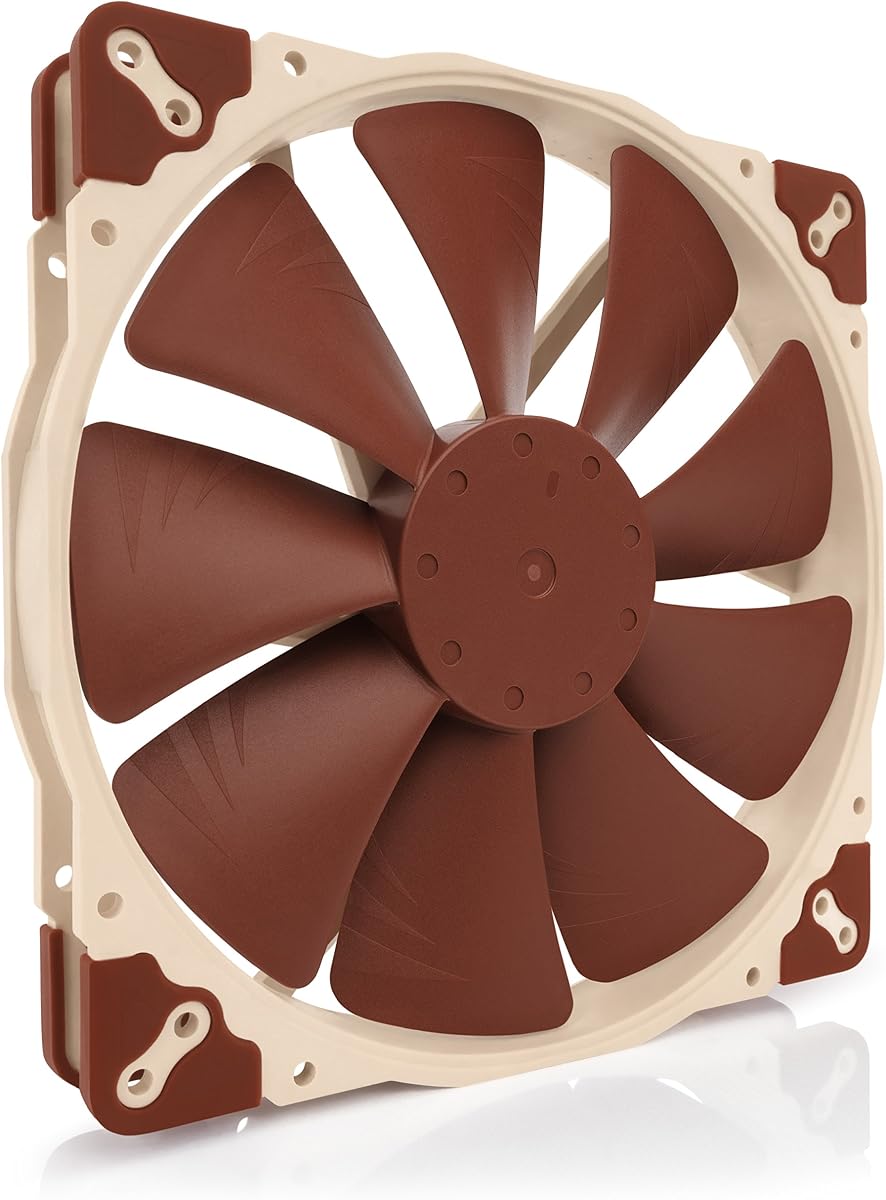
The Noctua NF-A20 PWM is the strongest all-around choice in this roundup, earning the highest listed rating at 4.8. It combines a large 200mm frame, quiet-focused design, and automatic speed control in a package that suits both gaming PCs and professional workstations.
We may earn a commission when you buy through this link, at no additional cost to you.
This version measures 200x200x30mm and uses a 12V four-pin PWM connection. Its maximum speed is 800 RPM, maximum noise is listed as 18.1 dB(A), and rated MTTF exceeds 150,000 hours. Flow Acceleration Channels and Noctua's Advanced Acoustic Optimisation frame are central to its airflow and noise-focused construction.
The supplied product information also highlights three mounting-hole patterns, allowing compatibility with many 200mm positions. The package includes anti-vibration mounts, screws, a Low-Noise Adaptor, an extension cable, and a y-cable for running two PWM fans from one header. These details improve flexibility, although owners should avoid overloading headers and follow the motherboard's guidance for multiple fans.
The main practical caution is physical clearance. Noctua specifically calls attention to the 30mm thickness, and a radiator, hard drive cage, or tightly managed cable area can make installation difficult. The absence of RGB may also disappoint builders focused on illuminated systems. Even so, the combination of quiet operation, PWM control, broad mounting support, and accessories makes this the most balanced recommendation.
Flow Acceleration Channels guide air through the frame, while the optimized frame helps reduce unwanted noise. Together, they support strong 200mm cooling in a comparatively restrained package.
The included y-cable and extension cable simplify two-fan arrangements. The Low-Noise Adaptor adds another useful control option when reduced output is appropriate.
We may earn a commission when you buy through this link, at no additional cost to you.
The Thermaltake CT200 PWM is aimed at builders who want a visually coordinated black fan with more assertive cooling specifications. Its 4.3 rating is the lowest among the rated products in the guide, but the fan still offers a useful combination of high airflow, documented static pressure, and PWM control.
We may earn a commission when you buy through this link, at no additional cost to you.
Nine blades are optimized to move up to 131.6 CFM while producing up to 1.92mm-H2O of static pressure. That makes the CT200 relevant to intake positions, restrictive airflow paths, and radiators, provided the mounting area and the attached hardware are compatible. The hydraulic bearing is designed to support quiet, reliable operation while the motor remains capable of higher output.
Its speed range extends from 500 to 900 RPM. The upper end may be more audible than a deliberately quiet fan, particularly in a case with resonant panels. A lower PWM setting can help balance noise and cooling, but buyers should understand that the headline airflow figure represents maximum capability rather than a guaranteed operating point at every speed.
The CT200 is well suited to a black-themed build that already uses the matching CT line or wants strong intake performance. Daisy-chainable four-pin PWM connectors and extension cables make multi-fan arrangements convenient. It is less compelling for a strictly silent workstation, where the Noctua options provide a more clearly documented low-noise ceiling.
The nine-blade design and stated 131.6 CFM airflow target substantial cooling. Its 1.92mm-H2O static-pressure figure also adds useful context for restrictive installations.
Daisy-chainable PWM connectors reduce cable clutter when several fans are grouped together. Extension cables help reach a suitable motherboard or controller header.
We may earn a commission when you buy through this link, at no additional cost to you.
The Cooler Master SickleFlow 200 aRGB stands out for its combination of cooling, lighting, and a 4.6 rating. It is intended for builders who want a 200mm fan to function as both an airflow component and a coordinated visual element.
We may earn a commission when you buy through this link, at no additional cost to you.
The fan supports dynamic PWM control from 0 to 800 RPM through a four-pin header. Its redesigned hybrid frame and optimized blades are designed to improve airflow and stability, while the frosted blade surface disperses the ARGB lighting into a softer glow. A two-tier sealing mechanism is intended to limit dust and lubricant leakage and support longer-term stability.
One limitation is that exact airflow and maximum noise figures are not provided in the supplied specifications. That makes it harder to compare the SickleFlow directly with fans that publish detailed performance numbers. It also requires compatible ARGB control hardware and a free header, which can be a deciding factor in a densely equipped system.
The SickleFlow is a strong fit for a gaming build with a coordinated RGB or ARGB theme, especially when visual presentation matters as much as cooling. It should be considered alongside the CT200 for coordinated Thermaltake builds or against the Noctua fans for quieter operation. Checking case clearance and available ARGB headers is essential before ordering.
Frosted blades soften the effect of the internal LEDs, creating a more even glow. This avoids the harsher points of light sometimes seen on fan frames.
The hybrid, anti-resonance frame is designed to minimize vibration. A flexible mounting approach can also help reduce the transfer of noise into case panels.
We may earn a commission when you buy through this link, at no additional cost to you.
The Noctua NF-A20 FLX is a 4.7-rated option for systems with three-pin Molex fan headers or for builders who prefer simple two-speed operation. It preserves the core 200x30mm A-series design while offering a connector configuration that remains useful in older or nonstandard cooling setups.
We may earn a commission when you buy through this link, at no additional cost to you.
The fan provides 800 and 550 RPM settings through the included Low-Noise Adaptor, with a maximum listed noise level of 18.1 dB(A). Flow Acceleration Channels and the Advanced Acoustic Optimisation frame retain the airflow and acoustic features associated with this Noctua family. An extension cable and a 3-to-4-pin adapter are included for broader power options.
The principal difference from the standard PWM model is control granularity. Instead of a broad automatic range, the FLX version uses two fixed speeds. That simplicity can be desirable in a basic build, but it gives the motherboard less authority to respond to changing temperatures and workload.
Choose the FLX when three-pin power, manual low-speed operation, or compatibility with an existing three-pin setup is the priority. For a new motherboard with modern four-pin headers, the standard NF-A20 PWM provides more precise and automatic control. Either way, the 30mm depth and three available mounting-hole patterns deserve a case-clearance check.
The 550 RPM setting can reduce noise in cooler conditions, while 800 RPM provides greater output when more cooling is needed. A manual mode is predictable and easy to understand.
Hole patterns at 154x154mm, 170x170mm, and 110x180mm support many common case layouts. The included extension cable simplifies routing to an available header.
We may earn a commission when you buy through this link, at no additional cost to you.
The Noctua NF-A20 5V PWM is a specialized 200mm fan for five-volt applications, and its 4.7 rating demonstrates that the quiet A-series design still performs well in this less conventional format. It is particularly relevant to powered enclosures, USB-powered equipment, and custom projects rather than a conventional ATX motherboard.
We may earn a commission when you buy through this link, at no additional cost to you.
The fan uses a five-volt four-pin PWM input, reaches a maximum of 800 RPM, and is listed at up to 18.1 dB(A). Polarity protection is included for appropriate five-volt setups. A USB power adapter allows operation from host ports, power banks, and USB power supplies commonly used with smaller devices.
The crucial caution is electrical compatibility. This model should not be treated as a drop-in replacement for a 12V PC case fan, and the installer must confirm that the power source can safely support its requirements. The included OmniJoin adapter set supports connection to certain proprietary fan headers, while the extension cable assists with physical routing.
This is a compelling choice for specialized cooling or ventilation projects that need a large, quiet fan operating from five-volt power. For a normal desktop case, the 12V PWM version remains the more sensible selection because it aligns with motherboard headers and conventional PC power distribution. The 30mm frame depth also requires appropriate clearance.
The USB adapter opens the door to host ports, power banks, and other suitable five-volt sources. This makes the fan useful beyond a conventional desktop chassis.
Automatic four-pin PWM control is retained despite the lower operating voltage. The 800 RPM maximum and stated 18.1 dB(A) noise maintain the model's quiet-cooling identity.
We may earn a commission when you buy through this link, at no additional cost to you.
The Cooler Master MF200R RGB is a 200mm intake fan with a 4.4 rating and compatibility with several major RGB ecosystems. Its listed support covers ASUS Aura, ASRock RGB, Gigabyte Fusion, and MSI RGB, making it a practical option for builders who want illumination without limiting themselves to one lighting platform.
We may earn a commission when you buy through this link, at no additional cost to you.
Cooler Master states airflow of 90 CFM and noise of 28.0 dB. The hybrid design combines jet-engine and helicopter-style blade concepts to balance airflow with static pressure. Rubber pads and noise-reduction technology are also included to limit sound transmission, while a smart fan sensor can stop the motor if an obstruction causes a jam.
The fan's stated noise level is higher than that of the Noctua models in this guide, so it may not satisfy a builder whose top priority is near-silent operation. RGB control also requires a compatible controller, and the product should not be expected to operate as a standard non-lit fan without addressing that connection.
The MF200R is a sensible option for a colorful gaming system that uses one of the supported RGB platforms. Its jam-protection feature is useful in an intake role where cables or other obstructions may be present. For a quieter build, the absence of integrated lighting and the preference for lower acoustic output would point more strongly toward Noctua.
Support for several established lighting ecosystems is a major advantage. The required controller makes it possible to synchronize illumination with other compatible case components.
The automatic jam sensor can stop the motor when an object obstructs the blades. This is a useful safety-oriented feature for a fan installed in a busy intake position.
We may earn a commission when you buy through this link, at no additional cost to you.
The CHICIRIS 200mm ARGB is a slim illuminated option distinguished by a 25mm frame, a 95 CFM airflow claim, and a maximum speed of 1,000 RPM. It is especially relevant for builders who need a 200mm fan in a tighter mounting area and want lighting controlled through a five-volt, three-pin ARGB connection.
We may earn a commission when you buy through this link, at no additional cost to you.
Its 200x200x25mm size fits standard 200mm fan mounts more easily than the common 30mm format. The nine-blade design is intended to optimize airflow, while 34 RGB lamp beads—10 on the inner circle and 24 on the outer circle—create a diffused glow through the translucent blades. Motherboard synchronization is supported for compatible major brands.
A four-pin PWM interface provides automatic control from 400 to 1,000 RPM. The hydraulic bearing includes a large oil-storage area and sealed cover intended to reduce lubricant leakage and friction. The product information states noise as low as 9 dBA, although that wording should be treated carefully because it is presented as a minimum rather than a full operating-range specification.
This fan is a good fit for a compact, colorful gaming PC with 25mm fan clearance. It is less appropriate for a buyer who prioritizes documented customer feedback because no rating is available, or for a build without a compatible ARGB header. Its higher maximum speed also means it should be tuned carefully if noise is important.
The 25mm depth provides useful flexibility around radiators and other tightly arranged hardware. It remains important to confirm that the case's mounting pattern is designed for 200mm fans.
Separate inner and outer LED rings help create a layered effect. Translucent blades diffuse the illumination for a softer appearance than bare LED points.
We may earn a commission when you buy through this link, at no additional cost to you.
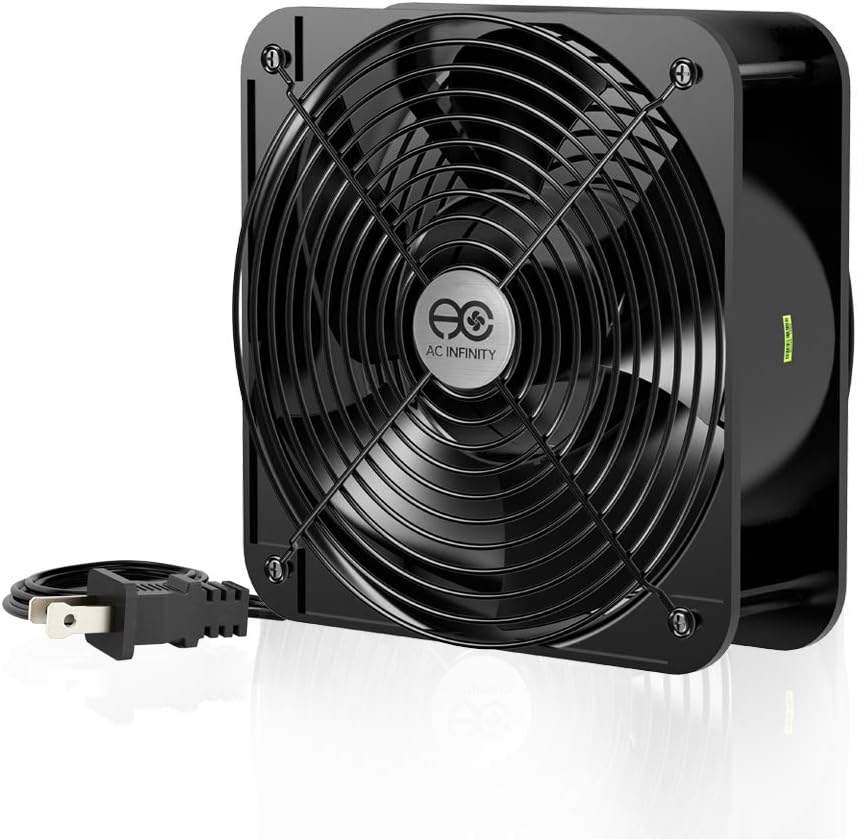
The AC Infinity AXIAL 2060 is fundamentally different from the PC case fans in this guide. It is a 200x200x60mm, 100-to-120V AC ventilation fan rated at up to 425 CFM and 3,200 RPM, making it intended for equipment enclosures, ventilation projects, or fan replacement applications.
We may earn a commission when you buy through this link, at no additional cost to you.
Its heavy-duty aluminum construction and dual-ball bearings support durability in demanding environments. The bearings have a listed lifespan of 67,000 hours, and the fan may be mounted flat or positioned upright. The package includes a power plug cord, two fan guards, and a mounting screw set, covering several basic installation needs.
The trade-offs are substantial for a desktop PC. At 60mm thick and up to 3,200 RPM, this model demands much more clearance than a conventional case fan. Its listed 65 dBA noise level can be too loud for many applications, and the AC power connection is incompatible with ordinary motherboard fan headers. It also lacks the low-speed PWM refinement expected from modern PC cooling products.
The AXIAL 2060 is the right choice when an enclosure needs aggressive ventilation or a high-output replacement fan and the installer has space for a deep frame. It is not a natural upgrade for a compact gaming PC, quiet office, or audio-sensitive listening environment. In those cases, a 25mm or 30mm PWM model would be easier to integrate.
The 425 CFM airflow claim and 3,200 RPM maximum make this a high-output option. It is intended for moving air quickly through a suitable enclosure.
Aluminum construction, dual-ball bearings, guards, and mounting hardware suit equipment projects. Flat or upright positioning adds flexibility when the installation area is unusual.
We may earn a commission when you buy through this link, at no additional cost to you.
Choosing a 200mm case fan requires balancing physical clearance, electrical compatibility, noise, airflow, and appearance. The following factors help narrow the field before you compare individual models.
A 200mm fan designation describes diameter, not depth. Most of the PC models in this guide are 30mm thick, the CHICIRIS model is 25mm, and the AC Infinity unit is 60mm. Measure the space behind the mounting position, especially where a radiator, drive cage, cable bundle, or rear exhaust may be located. A fan that is slightly too deep can prevent the case panel or component from closing, while an overly restrictive installation may reduce performance.
In short, confirm both the 200mm mounting pattern and the exact frame depth before purchasing. Physical fit is the first non-negotiable step.
Most modern desktop cases use 12V four-pin PWM headers, but the options in this guide include three-pin Molex, five-volt PWM, five-volt ARGB, and 120V AC. These connectors are not interchangeable without appropriate, electrically correct adapters. Verify both the fan's input voltage and the available header, and confirm whether your motherboard or fan controller provides software-based speed control.
Choose the electrical format that matches the installation directly. Do not rely on an improvised adapter for an unknown voltage or connector.
Noise specifications are most useful when they describe maximum operating output under comparable conditions. The Noctua models list a maximum of 18.1 dB(A), while the Cooler Master MF200R lists 28.0 dB and the AC Infinity model reaches 65 dBA. These figures are not identical in every respect, but they provide a useful warning about very different acoustic profiles. PWM control and anti-vibration pads can further reduce audible interference.
For a quiet office or recording environment, favor a documented low-noise model. For a high-output enclosure, higher noise may be an acceptable trade-off.
High airflow is valuable when a case has generous open space, while static pressure becomes more important near radiators, restrictive filters, and tight intake paths. The CT200 lists up to 131.6 CFM and 1.92mm-H2O of static pressure, the CHICIRIS lists 95 CFM, and the Cooler Master MF200R lists 90 CFM. The AC Infinity model is built for very high-volume ventilation at up to 425 CFM. These claims come from different manufacturers and should be treated as product-specific figures rather than perfectly standardized test results.
Match the specification to the installation. Volume airflow supports open-case cooling, while pressure-oriented design helps push air through restrictive components.
Illuminated fans can define the visual character of a build, but they also require compatible lighting connections. The SickleFlow 200 uses a five-volt ARGB setup, while the MF200R RGB supports several major RGB ecosystems and requires an RGB controller. The Noctua chromax.black.swap avoids active lighting but offers swappable colored anti-vibration pads. Plain models such as the Pure 20 are easier to coordinate with any case.
Select lighting only when your motherboard, controller, and case design can support it. A coordinated non-RGB build may be better served by a clean monochrome fan.
Bearing design influences long-term reliability, dust resistance, and noise. The Pure 20 uses a long-life sleeve bearing, the CT200 and CHICIRIS use hydraulic-bearing designs, the SickleFlow includes a two-tier seal, and the AC Infinity model uses dual-ball bearings. Noctua's models list MTTF above 150,000 hours, while the AC Infinity specification gives its dual-ball bearings a 67,000-hour lifespan. These figures come from different systems and should not be compared as identical laboratory measures.
Look for a bearing approach suited to the environment and desired maintenance level. A sealed design is generally attractive for intake positions exposed to dust.
Mounting-hole patterns can determine whether a fan fits a case even when the diameter is correct. Noctua lists support for 154x154mm, 170x170mm, and 110x180mm patterns, while the AC Infinity package includes guards and mounting screws. Extension cables, y-cables, low-noise adapters, and proprietary-header adapters can also make an installation easier. Useful accessories do not replace the need to verify dimensions and electrical requirements.
Check the complete mounting kit before ordering. The best installation is one that fits, connects, and routes cables without forcing the chassis closed.
One large fan can replace several smaller units, but it does not automatically deliver the same distribution throughout a case. Intake fans commonly help bring cool air toward components and radiators, while exhaust fans remove rising warm air. A balanced arrangement often performs better than concentrating every fan in one location. The number of available headers, the presence of a fan hub, and whether the system can drive multiple PWM units should all be considered.
Plan airflow as a complete system. Match the fan's role, direction, and quantity to the case layout rather than selecting a model in isolation.
Before installation, switch off and unplug the computer, disconnect the power supply, and verify that the case has a compatible 200mm mounting location. Remove the existing fan if applicable, identify the correct intake or exhaust direction from the frame markings, and compare the fan's depth with all nearby components. Connect the proper power and lighting cables before securing the frame so that the wiring is not trapped under an edge.
After fitting the fan, restore power and use the motherboard software or fan controller to select a conservative PWM curve. Allow the system to operate under a normal workload before increasing the speed. Listen for airflow noise, vibration, cable interference, and unusual bearing sounds. Confirm that the lighting software detects the fan and that all configured RGB or ARGB effects appear as intended.
For routine care, power down before reaching into the case and use a soft brush or compressed air to remove dust from the blades and frame. Keep the intake path clear of cables and avoid blocking the fan grille. Check that mounting screws remain secure and that anti-vibration pads have not shifted. If a fan becomes noisy, develops vibration, or fails to start, stop using it and investigate the bearing, power connection, and clearance.
A 200mm fan can move substantial air with less rotational speed than several smaller fans, but noise depends on the model, speed, blade design, bearing, and mounting. Some premium 200mm models are exceptionally quiet, while high-output or 120V units can be loud. Compare documented maximum noise and expected operating speed, not just fan size.
No. The case must have a compatible 200mm mounting pattern and enough depth for the fan and its connectors. Most models in this guide are 25mm or 30mm thick, while the AC Infinity model is 60mm deep. Check radiators, drive cages, cable space, and the distance from the intake or exhaust opening before ordering.
A four-pin PWM fan includes a dedicated speed-control pin, allowing compatible motherboards or controllers to adjust output automatically. A three-pin fan generally offers two voltage-based speed settings rather than smooth automatic control. The Noctua NF-A20 PWM and FLX versions illustrate how the same general fan family can suit different connector arrangements.
Usually, no, if the motherboard has an available four-pin PWM header. The fan can then be managed through the motherboard's fan-control software. A controller or hub is useful when you want a manual dial, dedicated lighting control, finer curves, or more fans than the motherboard can conveniently power.
Generally, no. Five-volt three-pin ARGB and 12V four-pin RGB are electrically and functionally different. Connecting the wrong type can damage the fan, controller, or lighting system. Always check the connector specification and use a controller designed for the exact lighting standard.
The AC Infinity AXIAL 2060 is intended for 100-to-120V AC equipment ventilation and should not be connected to a PC motherboard fan header. Its high speed, deep 60mm frame, and 65 dBA noise also make it unsuitable for most conventional desktop cases. It is better considered for a separate ventilated enclosure.
Orient the fan according to its airflow arrows and the role you want it to perform. Intake generally moves outside air into the case, while exhaust moves air out. A balanced setup often performs best, but radiator placement, case design, and component airflow requirements should guide the final arrangement.
Rubbing can indicate a blade touching the frame, a misaligned mounting position, insufficient cable clearance, or a bearing issue. Power down and inspect the frame, screws, and surrounding components without forcing the fan. If the blades contact the housing or the sound persists, stop using the fan and seek troubleshooting or replacement support.
The Noctua NF-A20 PWM is the strongest all-around selection because it combines strong customer feedback, documented quiet operation, four-pin PWM control, and broad mounting support. The Thermaltake Pure 20 is a compelling budget-oriented airflow option, while the Noctua NF-A20 PWM chromax.black.swap serves premium builders who want a restrained appearance and swappable accent pads.
The remaining picks address more specialized requirements. The CT200 emphasizes airflow and static pressure, the SickleFlow 200 aRGB and CHICIRIS add coordinated lighting, the MF200R RGB supports established RGB ecosystems, and the Noctua FLX and 5V versions cover legacy or specialized power arrangements. The AC Infinity AXIAL 2060 belongs in an equipment enclosure rather than a typical PC case.
Before ordering, measure the mounting space, verify the connector and voltage, and decide whether quiet operation, maximum airflow, or lighting is the priority. Specifications and prices can change, so check the current listing and confirm that the latest case, motherboard, and accessory requirements remain compatible.