
Beelink Mini S12 Pro
4.6Editor score
Intel N100 processor
16GB DDR4 memory
500GB solid-state storage
Dual 4K displays
Our Linux Mini Pcs guide compares ten compact computers for performance, Linux support, memory, networking, displays, expandability, and everyday value today.
Linux Mini Pcs appeal to developers, engineers, privacy-conscious users, and anyone who wants a compact computer with more flexibility than a locked-down consumer appliance. The best model depends on processor power, memory capacity, storage expansion, display support, and networking—not simply its size or operating system badge.
We compared ten mini PCs using their stated processors, memory, storage, ports, wireless capabilities, display support, and intended workloads. The list covers Linux-ready systems, preinstalled Linux options, and general-purpose mini PCs that may require an operating system and driver check before purchase.
Each review shows which users are most likely to benefit from the hardware, along with the compromises that matter in daily use. Product configurations and availability can change, and prices fluctuate, so confirm the current hardware, Linux compatibility, and seller details before ordering.
4.6Editor score


The table below compares all ten mini PCs by processor, memory, storage, display capability, and major connectivity features, with special attention to the needs of Linux users.


The TK Node Mini PC stands out in this roundup because it arrives with Zorin OS Core Linux already installed and presents a particularly clear path for users moving away from Windows. Its 5-by-5-by-1.7-inch enclosure is compact without being restrictively small, while the Ryzen R2314 processor, 8GB of RAM, and 512GB SSD form a sensible starting point for productivity, development, and lightweight server tasks.
We may earn a commission when you buy through this link, at no additional cost to you.
Expandability is the strongest feature in the supplied specifications. Dual SO-DIMM slots support up to 64GB of memory, and dual NVMe slots support up to 4TB of total storage. Display flexibility is equally notable: HDMI, DisplayPort, and USB-C can drive up to three 4K displays. Gigabit Ethernet, Wi-Fi, and Bluetooth provide a complete desktop connectivity foundation, while a VESA mounting kit helps reclaim desk space.
The main limitation is the entry configuration. Eight gigabytes of RAM can be restrictive for simultaneous browser tabs, large development environments, containers, and virtual machines, although the stated memory slots make an upgrade straightforward. The Ryzen R2314 is an efficient four-core, four-thread part, so buyers should not mistake it for a high-end workstation processor. It is better viewed as a flexible everyday and light-production platform.
This is the strongest general recommendation for readers who specifically want Linux without an initial operating-system installation project. It suits software developers, students, home administrators, and office users seeking a tidy, quiet, and serviceable computer. Buyers planning intensive compilation, heavy virtualization, or professional rendering should choose a faster processor and more memory, but for the listed Zorin OS configuration, the combination is unusually well aligned with the audience.
Zorin OS Core gives buyers a ready-to-use Ubuntu-based environment with a desktop layout designed to feel approachable. That makes the TK Node especially useful for users evaluating Linux for ordinary productivity rather than experts comfortable with a bare installation.
The two memory slots and two NVMe positions are meaningful advantages in a compact computer. They allow the owner to add capacity as browser use, development tools, containers, or stored projects become more demanding.
We may earn a commission when you buy through this link, at no additional cost to you.
The Beelink SER3 is a conventional compact desktop that should appeal to Linux users seeking capable everyday performance without the complexity of a specialized workstation. It carries a 4.3 rating and pairs an AMD Ryzen 3 3200U processor with 16GB of DDR4 memory and a 500GB M.2 PCIe SSD. That combination is better suited to routine office work, browsing, development, and media than demanding 3D production or advanced virtualized environments.
We may earn a commission when you buy through this link, at no additional cost to you.
Its practical advantage is the balance of memory and connectivity. The listed memory is expandable to 32GB with two 16GB modules, giving owners more room for browser-heavy sessions and parallel applications. Gigabit Ethernet, dual-band Wi-Fi, Bluetooth, four USB 3.2 ports, and two HDMI connectors make it straightforward to form a productive desk setup with multiple peripherals or displays.
The processor is the main constraint. Its two cores and four threads, with a listed maximum turbo frequency of 3.5GHz, are adequate for common tasks but can feel limited during sustained compilation, large project builds, and heavily threaded workloads. The Radeon Vega 3 graphics configuration is also modest, so the system should be treated as an office and media computer rather than a gaming platform.
The SER3 is a good fit for students, home offices, and developers running manageable applications. Its stated lifetime technical support, three-year warranty, and 24/7 after-sales service add reassurance, although Linux users should still verify the desired distribution and peripheral compatibility. For general computing, the larger memory allocation makes it more balanced than many entry-level alternatives.
The supplied 16GB of DDR4 memory is a meaningful advantage for web research, office applications, and lighter programming work. It provides a more comfortable foundation than an eight-gigabyte configuration while leaving room for an upgrade to 32GB.
Dual HDMI outputs, four fast USB ports, Gigabit Ethernet, dual-band Wi-Fi, and Bluetooth cover most desktop needs. The wired network is particularly relevant for large file transfers and self-hosted Linux services.
We may earn a commission when you buy through this link, at no additional cost to you.
The ASUS NUC 14 Pro is the clear premium selection in this guide, combining a Linux Mint installation with high-end hardware. Its Intel Core Ultra 7 155H processor provides 16 cores and 22 threads, while the included 64GB of DDR5 RAM and 2TB PCIe SSD leave considerable room for development environments, containers, large datasets, and professional desktop applications.
We may earn a commission when you buy through this link, at no additional cost to you.
Connectivity is a major strength. The stated port list includes USB 3.2 Gen2 Type-C and Type-A, HDMI 2.1, Thunderbolt 4, and 2.5GbE Ethernet, supplemented by Wi-Fi 6E and Bluetooth 5.3. The system supports up to four 4K HDR displays, making it suitable for multi-window analysis, creative workflows, development environments, and other productivity setups that benefit from extensive screen real estate.
Thermal design is another differentiator. The listed aluminum fins, dual copper heat pipes, and optimized airflow are intended to support quiet, efficient operation during sustained workloads, including Linux servers, development environments, and AI inference tasks. Memory can be expanded to 96GB according to the supplied information, and optional SATA storage is supported for projects that require additional capacity.
This NUC is intended for developers, AI researchers, creative professionals, and organizations willing to invest in performance. Its powerful processor and 64GB memory make it far more capable than the entry-level choices, while Linux Mint reduces initial setup friction. The trade-off is cost, and buyers should confirm that software acceleration, vendor support, and Linux drivers meet their requirements rather than assuming every advertised AI or graphics capability will be available in their chosen workflow.
The 16-core, 22-thread processor provides substantially more parallel performance than the quad-core and dual-core options in this roundup. That headroom is valuable for compiling code, running containers, managing virtual machines, and processing large working sets.
Support for up to four 4K HDR displays makes the NUC particularly useful for developers, analysts, and creators who keep multiple applications visible. Thunderbolt 4 and 2.5GbE also make it easier to connect advanced peripherals and a fast network.
We may earn a commission when you buy through this link, at no additional cost to you.
The Beelink Mini S12 Pro is the best budget Linux Mini PC in this guide because it combines a 4.6 rating with an efficient Intel N100 processor, 16GB of DDR4 memory, and a 500GB SSD. The N100 has four cores, four threads, a listed maximum turbo frequency of 3.4GHz, and a six-watt standard processor power target, making it efficient for Linux desktops, lightweight servers, and always-available household computing.
We may earn a commission when you buy through this link, at no additional cost to you.
Its feature set is thoughtful for the class. Two HDMI 2.0 ports support two 4K displays at 60Hz, while the storage design includes an M.2 2280 SATA SSD slot and a SATA 3 interface for a 2.5-inch drive. The supplied system includes 16GB of memory, while the single SODIMM slot supports DDR4-3200 memory up to 16GB. That memory ceiling is the most important limitation for buyers planning virtual machines or large development workloads.
Network and peripheral features include Gigabit Ethernet, Wi-Fi 6, Bluetooth 5.2, four 10Gbps USB Type-A ports, and a 3.5mm audio connection. BIOS options for automatic power-on, wake-on-LAN, and PXE are especially relevant to Linux users building a headless server, media appliance, or remotely managed workstation. The cooling system combines a larger silent fan, a copper heat sink, and an SSD cooling shield.
The Mini S12 Pro is ideal for office software, browsing, Linux learning, light development, media playback, and small home-server tasks. It is less appropriate for demanding 3D work, intensive compiling, or many simultaneous virtual machines. Within that practical envelope, it offers an attractive balance of efficiency, connectivity, and everyday capability.
The six-watt N100 design is well aligned with quiet desktops and always-on home use. It provides enough performance for ordinary applications while keeping the system compact and comparatively energy conscious.
Wake-on-LAN, PXE, and automatic power-on support can simplify remote access and diskless deployment. These features make the Mini S12 Pro more versatile than a basic office mini PC.
We may earn a commission when you buy through this link, at no additional cost to you.
The KAMRUI Pinova P2 has a 4.4 rating and combines an eight-thread AMD Ryzen 7 3300U processor with 16GB of LPDDR4X memory. Its four cores and eight threads provide a useful balance for Linux users who routinely keep a browser, documentation, terminal, and communication applications open at the same time. The processor can boost to a listed 4.3GHz and includes 8MB of L3 cache.
We may earn a commission when you buy through this link, at no additional cost to you.
Its display support is one of the strongest aspects. HDMI 2.0, DisplayPort 1.4, and a full-function USB-C port with DisplayPort Alt Mode support simultaneous triple 4K output at 60Hz. Two 10Gbps USB Type-A ports, Gigabit Ethernet, Wi-Fi, and Bluetooth round out a versatile desk setup. The integrated Radeon graphics are also more substantial than those in many low-power mini PCs.
Storage starts at 256GB, which is the principal weakness for users with large repositories, media libraries, or multiple virtual-machine images. Two M.2 2280 expansion positions are listed, including a SATA/NVMe PCIe 3.0 slot and a SATA slot, with total storage capacity stated up to 4TB. The included 16GB of LPDDR4X is well suited to its efficient design, but the title does not advertise a user-upgradeable memory pathway, so buyers needing much more RAM should verify the board before purchase.
The Pinova P2 is a strong choice for software developers, remote workers, and multi-monitor users who want more processor threads and display flexibility than a basic N-series system. It is also manageable at 5.05 by 5.05 by 1.73 inches and can mount behind a display. For Linux, its modern hardware and USB-C display support are attractive, but buyers should confirm Linux driver availability for all peripherals and displays.
The Ryzen 7 3300U gives the P2 more parallel throughput than typical two-core or four-thread entry processors. That makes it well suited to parallel browser workloads, development tools, and several lightweight applications running together.
HDMI, DisplayPort, and DisplayPort Alt Mode provide three independent 4K output options. This is especially useful for traders, programmers, and remote workers who want documents, calls, and monitoring tools visible at once.
We may earn a commission when you buy through this link, at no additional cost to you.
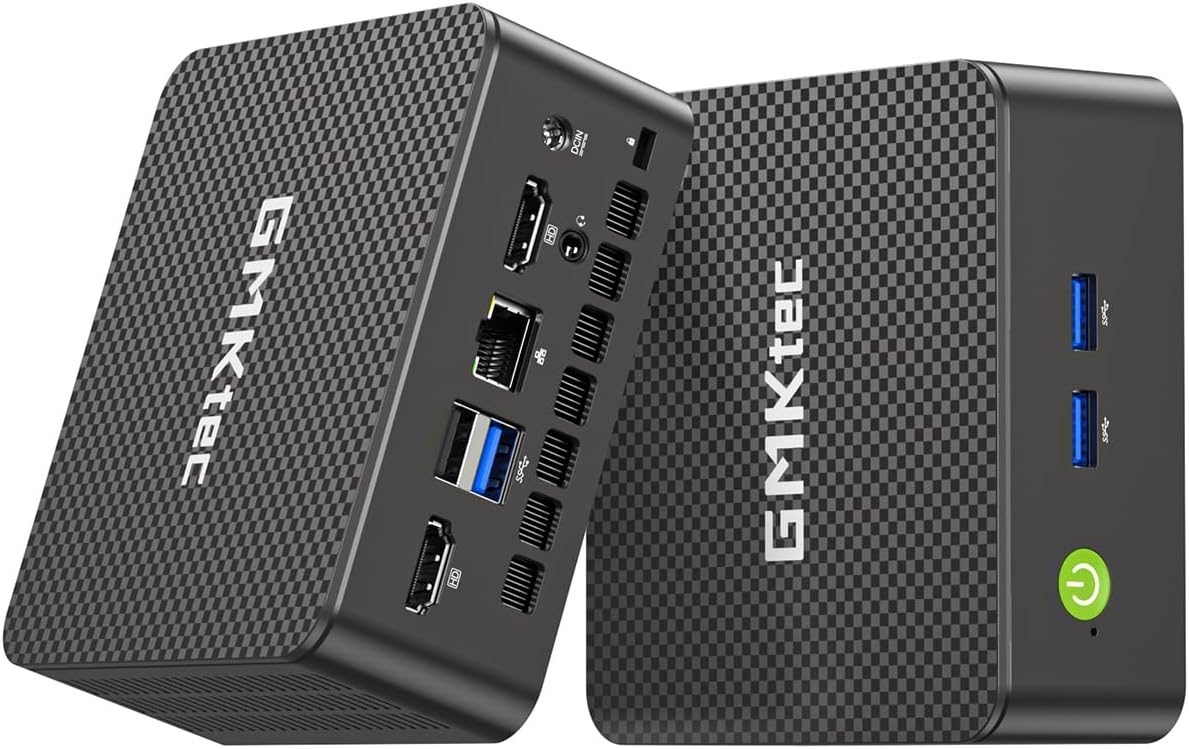
The GMKtec G11 is a specialized proposition within this roundup, with networking and continuous operation at the center of its design. Its AMD Ryzen Embedded R2514 processor is intended for 24/7 commercial, industrial, and professional use. The system includes dual 2.5GbE Ethernet, making it especially attractive for firewall, router, VPN, NAS, home-lab, and isolated-network projects built around open-source software.
We may earn a commission when you buy through this link, at no additional cost to you.
The listed 16GB of dual-channel DDR4 memory uses two 8GB modules and gives the integrated Radeon GPU access to a wider memory path than a comparable single-channel arrangement. The stated AMD Radeon graphics support three 4K displays, H.265 and HEVC handling, DirectX 12, and Vulkan. Connectivity includes Wi-Fi 6E, Bluetooth 5.2, multiple USB 3.2 ports, and 10Gbps USB-C.
The dual-network design is more than a convenience. One interface can connect to a local network while the other links to another segment, creating a useful arrangement for segmentation, VPN routing, firewall appliances, and virtualized networking. Linux users considering Proxmox, pfSense, or OPNsense may find this combination particularly relevant, subject to software support for the exact hardware configuration.
The G11 is recommended for networking enthusiasts, home-lab builders, and organizations creating a compact always-on Linux system. Its embedded-oriented processor and cooling expectations make it less suitable for heavy desktop rendering or demanding sustained compilation. The system also warrants careful attention to memory and storage options, which can vary by seller configuration, so buyers should verify the included components before purchase.
Two high-speed Ethernet ports make the G11 particularly suitable for routing, segmentation, and firewall duties. Linux users can divide traffic between WAN and LAN interfaces or use one connection for management.
The Ryzen Embedded R2514 is positioned for continuous operation in professional environments. That focus makes the G11 more compelling as a small network appliance or server than as a general office computer.
We may earn a commission when you buy through this link, at no additional cost to you.
The CyberGeek Mini PC targets users who want a high-performance processor in a compact Linux machine. It carries a 4.0 rating and pairs an 11th-generation Intel Core i9-11900H with eight cores, 16 threads, and a listed maximum clock of 4.9GHz. The included 32GB of DDR4 memory and 1TB PCIe SSD provide a generous foundation for developer tools, multiple virtual machines, and Linux-based workstation tasks.
We may earn a commission when you buy through this link, at no additional cost to you.
Ubuntu Linux is preloaded, which makes this a straightforward choice for users seeking a ready-to-use open-source desktop. Connectivity is especially strong: six USB ports, dual LAN connections, Wi-Fi 6, and Bluetooth 5.2 support a broad range of peripherals and network arrangements. DisplayPort, HDMI, and Type-C outputs support up to three 4K displays, while the advanced cooling design is intended to sustain processor frequency under load.
The i9-11900H provides considerably more compute capacity than the entry-level alternatives, making it better suited to large codebases, parallel builds, creative applications, and multiple virtualized systems. However, its high-performance mobile processor design also means higher power use and heat than an N-series or embedded mini PC. Integrated Intel UHD graphics are suitable for displays and general acceleration but should not be interpreted as a dedicated gaming solution.
The CyberGeek is a good match for developers, technical professionals, and experienced Linux users who need more processing power without a full-size tower. The preinstalled Ubuntu environment reduces setup time, while the memory, storage, ports, and dual networking support a productive environment. Buyers should check application compatibility, Linux drivers, and their expected workload before selecting this power-oriented model.
Eight cores and 16 threads give the CyberGeek a substantial advantage in build-heavy and multitasking environments. It is better positioned for intensive Linux work than the smaller dual-core and low-power quad-core systems in the guide.
A preloaded Ubuntu system simplifies setup for users who want to begin working immediately. The supplied capacity also makes the machine more credible as a development and virtualization platform than a basic eight-gigabyte mini PC.
We may earn a commission when you buy through this link, at no additional cost to you.
The BOSGAME E5 earns a 4.6 rating and pairs the AMD Ryzen 3 5300U with 16GB of DDR4 memory and a 512GB NVMe SSD. Its four cores and eight threads make it a capable everyday computer, and the supplied memory is enough for substantial multitasking in a Linux environment. The product information is appropriately candid that it targets business software, spreadsheets, online classes, and network-server applications rather than intensive 3D rendering or demanding 3A games.
We may earn a commission when you buy through this link, at no additional cost to you.
Its defining feature is the pair of 2.5GbE Ethernet ports based on the Realtek RTL8125. For Linux enthusiasts, that makes the E5 an interesting foundation for a high-speed NAS, a pfSense or OPNsense firewall, virtual machines, or a home server where one network connection may serve management while another carries data. Dual SODIMM slots support up to 64GB, and an additional empty M.2 2280 NVMe slot allows dual-drive expansion.
Display support is also surprisingly capable for a compact server-oriented system. HDMI 2.0, DisplayPort, and a full-function Type-C port can drive three independent 4K displays at 60Hz. The front Type-C connector supports data transfer, video, and Power Delivery 3.0. Copper heat pipes and an optimized cooling fan are intended to keep operation quiet and stable.
The E5 is a good recommendation for home-lab users, self-hosting beginners, and office users who want expandable storage and fast networking. Its 512GB SSD is reasonable for an operating system and active projects, but a second NVMe drive would improve its usefulness for backups, virtual-machine images, and media. It is not the right choice for professional 3D production, even though its multi-display capability may look similar to a more graphics-focused system.
Dual 2.5GbE connections make the E5 well suited to NAS, firewall, and segmented-network projects. The two ports can support a flexible topology for data transfer, management, and virtualized services.
The included NVMe drive offers fast application loading, while a second M.2 slot allows another drive without replacing the system disk. That is useful for backups, containers, virtual machines, and locally hosted media.
We may earn a commission when you buy through this link, at no additional cost to you.
The BOSGAME E4 Air is a straightforward entry point into compact Linux computing. It has a 4.2 rating and uses an AMD Ryzen 5 3500U processor with four cores, eight threads, and a listed maximum frequency of 3.7GHz. The system includes 8GB of DDR4 memory and a 256GB SATA SSD, which is adequate for browsing, office applications, video calls, and routine media use.
We may earn a commission when you buy through this link, at no additional cost to you.
The integrated Radeon Vega 8 graphics are stated to support three 4K monitors through HDMI, DisplayPort, and USB-C. That makes the E4 Air useful for a multi-window workspace or a media setup, although the included graphics are not intended to replace a discrete GPU for demanding 3D work. USB 3.2 provides fast peripheral and storage connections.
Networking is unusually useful for a compact system. Two Gigabit Ethernet ports allow the computer to join or bridge networks, while dual-band Wi-Fi 5 and Bluetooth 5.0 cover wireless peripherals and everyday connectivity. The main limitations are the 8GB memory and relatively small 256GB SATA storage. Heavy browser use, local media libraries, and multiple development projects can quickly fill both constraints.
The E4 Air is best for learners, light office users, and Linux newcomers who want a dedicated small computer without a complex build. Its processor offers more threads than many entry-level alternatives, and the dual wired network is convenient for experimentation. Buyers should plan to add memory and larger storage if available for their chosen configuration, and confirm Linux support for the exact Wi-Fi and display hardware.
The Ryzen 5 3500U's four cores and eight threads offer enough capability for common productivity applications and several lightweight tasks. It is a more balanced starting point than a dual-core system when multitasking.
Two Gigabit Ethernet ports make it possible to connect the system to separate networks. Linux users can use that flexibility for experiments, small routing tasks, or a dedicated management connection.
We may earn a commission when you buy through this link, at no additional cost to you.
The GMKtec G3S is designed for users who want a simple, efficient mini PC for routine computing. Its 4.4 rating, Intel N95 processor, 8GB of DDR4 memory, and 256GB M.2 SSD create a practical configuration for web browsing, office applications, digital displays, and light home-server duties. The N95 has four cores, four threads, 6MB of cache, and a listed boost frequency of up to 3.4GHz.
We may earn a commission when you buy through this link, at no additional cost to you.
The system supports two 4K displays at 60Hz through dual HDMI 2.0 outputs. Its Intel UHD graphics are listed at up to 1000MHz with AV1 decoding, which is useful for modern media playback. USB 3.2, a 3.5mm audio jack, Wi-Fi 5, Bluetooth 5.0, and Gigabit Ethernet cover the essential connectivity needs of a small office, study room, or media setup.
Eight gigabytes of memory and 256GB of storage are the two constraints to keep in mind. They leave limited headroom for many browser tabs, large development tools, virtual machines, or substantial media collections. The system can still perform well within a carefully chosen set of applications, particularly when used as a focused workstation, display controller, or lightweight network host.
The G3S is a good value-oriented choice for Linux learners and users with straightforward requirements. It offers more than the bare minimum for a compact office computer, including dual 4K support and AV1 decoding, while the efficient processor should keep power and noise comparatively low. For heavier multitasking, choosing a 16GB model or a more powerful mini PC would be wise.
The N95's four-core, low-power design is well matched to browser work, documentation, office software, and media playback. It is most satisfying when the system is assigned focused tasks rather than every application at once.
Dual HDMI output allows users to spread work across two 4K screens without moving to a full-size tower. AV1 decoding adds value for users who regularly play modern compressed video.
We may earn a commission when you buy through this link, at no additional cost to you.
Choosing a Linux Mini PC means balancing processor capability, memory, storage, graphics, networking, display support, and the operating system or drivers you expect to use. The most important step is to match the hardware to your workload rather than relying on a model name alone.
Processor cores and threads determine how well the system handles parallel work. A four-core processor with eight threads, such as the Ryzen 7 3300U, Ryzen 3 5300U, or Ryzen 5 3500U, is more comfortable for compilation, containers, multiple applications, and virtual machines than a two-core chip. Premium systems with more cores provide additional headroom for heavy development, large datasets, and demanding professional software.
Memory is especially important under Linux because browsers, development tools, containers, and virtual machines can consume substantial RAM. Eight gigabytes works for light tasks, 16GB is a better general-purpose target, and 32GB or 64GB suits intensive development or server use. Buyers should also check whether memory is soldered or installed in accessible SO-DIMM slots.
An SSD is essential for responsive Linux performance, but the capacity and expansion options matter over time. NVMe storage offers fast transfers and suits operating systems, source repositories, containers, and virtual-machine images. Systems with M.2 or SATA expansion can add bulk storage for media or backups, while compact SATA drives are often quieter and inexpensive for secondary data.
A mini PC with Linux preinstalled is the simplest option, but a preinstalled system does not guarantee that every wireless adapter, port, or graphics function works perfectly. Systems using newer Intel, AMD, or USB4 components may require current kernels and distributions. Check kernel and driver support for Wi-Fi, Bluetooth, audio, display output, GPUs, and any specialized peripherals before making a hardware-only decision.
The number of independent display outputs influences how the mini PC can function as a productivity machine. Dual 4K support is common among the stronger choices, while several systems offer a third display through DisplayPort or USB-C. Confirm the resolution and refresh rate, whether Type-C supports DisplayPort Alt Mode, and whether all outputs can run simultaneously at the advertised settings.
Gigabit Ethernet is sufficient for most desktop use, while dual 2.5GbE ports can support faster transfers, network segmentation, firewall appliances, and compact servers. Wi-Fi 6 or Wi-Fi 6E improves wireless capacity, but Linux support for the included adapter should be confirmed. Systems with wake-on-LAN, PXE, and automatic power-on features are especially useful for headless administration.
Compact computers concentrate their components in a small enclosure, so cooling matters when the processor remains busy. Systems designed for continuous operation may emphasize embedded processors, quiet fans, heat pipes, and optimized airflow. A high-performance mobile processor can deliver more speed but will generally require more power and produce more heat than an efficient N-series or embedded model.
A mini PC should save useful desk space, but its dimensions should still accommodate ventilation and cable routing. Compact systems around four or five inches wide are easy to place behind a monitor, under a desk, or beside a display. VESA mounting support improves flexibility, while warranty and technical-support terms add long-term confidence, especially for systems intended to operate continuously.
Before installing your preferred Linux distribution, connect the mini PC to a monitor, keyboard, mouse, and network, then review the included documentation and confirm the boot method. If the system includes Linux, update the distribution, kernel, firmware, and graphics stack before installing essential applications. For a fresh installation, test Wi-Fi, Bluetooth, audio, all display outputs, USB ports, and wired networking immediately.
Keep the intake and exhaust areas unobstructed, particularly when the computer is mounted behind a monitor or inside a cabinet. Use a stable surface, retain the supplied power adapter, and avoid placing the chassis on soft fabric that could block ventilation. For a server or always-on appliance, schedule regular operating-system updates and make sure critical data is backed up to a separate device rather than only the internal SSD.
Treat firmware, BIOS, and Linux compatibility as an ongoing maintenance task. Keep enough free storage available for package updates, use stable power where practical, and test backups rather than assuming they work. When adding memory or drives, check the supported form factor and capacity, and review the current seller listing to confirm the exact configuration of the model you are purchasing.
The ASUS NUC 14 Pro is the strongest option in this list for demanding development because it combines a 16-core, 22-thread processor, 64GB of DDR5 memory, and a 2TB PCIe SSD. The KAMRUI Pinova P2 and CyberGeek Mini PC are more moderate alternatives with eight-thread processors and 16GB or 32GB of memory. The right choice depends on whether you need lightweight scripting, multiple containers, or large virtualized environments.
Ubuntu can generally be installed on modern x86 mini PCs, but hardware compatibility still needs to be checked. Pay particular attention to Wi-Fi, Bluetooth, audio, graphics, and USB-C docking because those features may require additional drivers. Models listed with Zorin OS, Linux Mint, or Ubuntu already preinstalled reduce setup work and offer a useful indication of the intended Linux experience.
Eight gigabytes is adequate for documentation, light office work, basic programming, media playback, and a focused browser session. It becomes restrictive with many browser tabs, containers, virtual machines, large codebases, or memory-intensive applications. A 16GB configuration is the more practical starting point for a machine expected to serve several tasks at once.
The GMKtec G11 and BOSGAME E5 stand out because each has dual 2.5GbE Ethernet, a feature that is useful for firewall, VPN, NAS, and segmented-network applications. The Beelink Mini S12 Pro also offers useful remote-management features such as wake-on-LAN, PXE, and automatic power-on. Storage capacity, drive reliability, cooling, and software compatibility should be considered alongside network speed.
Several models in the guide support two or three 4K displays. The TK Node, KAMRUI Pinova P2, GMKtec G11, CyberGeek Mini PC, BOSGAME E5, and BOSGAME E4 Air list triple-display support, while the ASUS NUC 14 Pro supports up to four displays. Verify that USB-C is wired for DisplayPort Alt Mode and that the selected Linux graphics driver supports the intended multi-monitor arrangement.
Yes, for light productivity, browsing, coding education, media playback, and basic home-server duties. The Intel N95 and N100 models are efficient and can feel surprisingly capable within those limits. Buyers should choose a more powerful processor for heavy compilation, intensive virtual machines, professional 3D work, or sustained parallel applications.
NVMe is generally the better choice for the primary Linux installation because it provides faster transfers and quicker application loading. SATA remains useful for inexpensive secondary storage, especially for media libraries, backups, or a virtual-machine data disk. Consider both the available expansion bays and the type of drive your chosen Linux distribution or workload expects.
Search the manufacturer's support materials for the exact model and search Linux community or distribution forums for reports involving its wireless, graphics, audio, and USB controllers. Check whether the listing includes the operating system you want, and confirm the hardware revision and included configuration. If Linux support is the deciding factor, a model explicitly shipped with Linux offers the clearest path.
The ASUS NUC 14 Pro is the standout premium recommendation because it combines Linux Mint, a 16-core processor, 64GB of memory, 2TB of fast storage, and extensive display and high-speed connectivity options. The Beelink Mini S12 Pro is the best budget choice for efficient everyday use, while the GMKtec G11 stands out for dual 2.5GbE networking and continuous-operation potential.
Prioritize the workload rather than the smallest enclosure or the newest label. Memory, processor threads, storage expansion, Linux drivers, and networking can matter more than a clock speed. Check monitor support and peripheral compatibility, and favor 16GB of memory for general productivity. If the system will act as a server, investigate remote boot features, cooling, and network interfaces before purchasing.
Product configurations and prices can change, so review the current listing before ordering. Confirm the processor, memory, storage, operating system, included accessories, and warranty for the exact seller. Doing that final check will help ensure that the mini PC supports the Linux software and daily tasks you actually intend to run.