
NETGEAR Nighthawk CAX30
4.1Editor score
AX2700 dual-band WiFi 6
DOCSIS 3.1 cable modem
Four Gigabit Ethernet ports
Up to 2,000 square feet
Our modem router combos for gaming guide compares DOCSIS 3.1, WiFi 6 or 7, Ethernet options, coverage, and setup on busy home networks.
A modem router combo can simplify a gaming setup by putting the cable modem and WiFi router in one enclosure, but speed alone does not determine a good gaming experience. Wired port speed, wireless band configuration, DOCSIS support, coverage, ISP compatibility, and network management all influence how smoothly a console or PC behaves during online matches.
We compared ten relevant networking products using their published specifications, listed ratings, provider support, wired connectivity, WiFi generation, device capacity, and intended use. The list includes six true cable modem router combos, a mesh combo with an included satellite, and two standalone routers that may suit gamers who already have compatible internet service and want more control over their local network.
Each review explains the strongest reason to consider the product while also identifying limitations or compatibility concerns. The top recommendations cover different priorities: a balanced all-purpose system, a high-speed option for newer cable plans, and a mesh solution for broad homes. Availability and prices change, so confirm both with your provider and current retailer before ordering.
4.1Editor score

3.9Editor score

4.0Editor score
The comparison highlights each product's modem capability, WiFi standard, wired networking options, and coverage potential, with special attention to features that affect gaming latency, congestion handling, and setup flexibility.
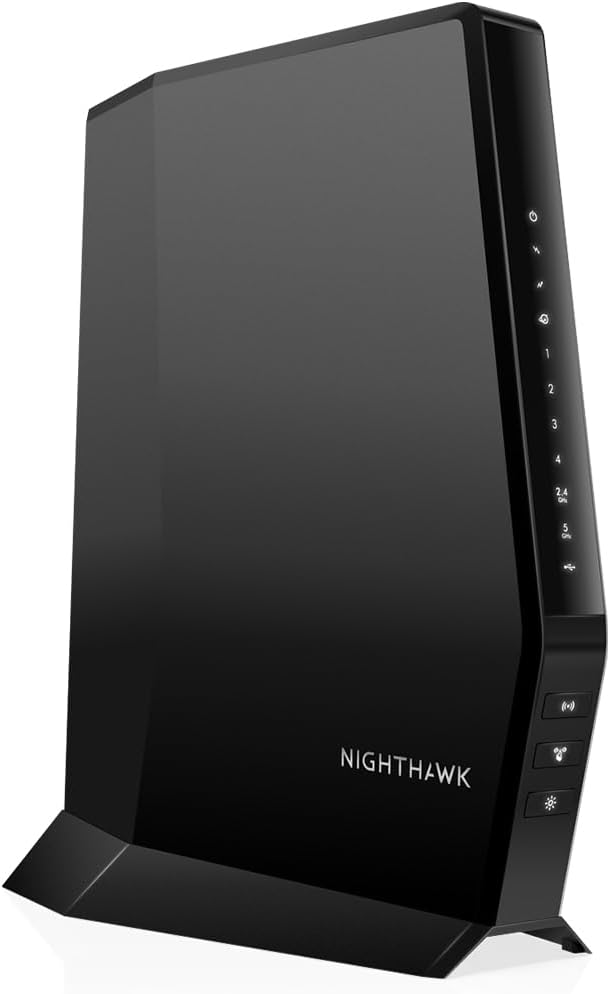


The NETGEAR Nighthawk CAX30 is a two-in-one DOCSIS 3.1 cable modem and AX2700 WiFi 6 router with a listed rating of 4.1. It stands out as the most balanced recommendation because it combines current-generation cable support, four Gigabit Ethernet ports, dual-band WiFi 6, and coverage rated for up to 2,000 square feet without moving into the more specialized high-end category.
We may earn a commission when you buy through this link, at no additional cost to you.
For gaming, the four wired ports are the most important feature. A console, desktop, or another latency-sensitive device can connect through Ethernet, avoiding avoidable wireless contention. The modem side supports multi-gig cable service, while OFDMA is intended to improve response during congestion. The listed provider compatibility reaches 800 Mbps on Xfinity and 1 Gbps on Spectrum and Cox, giving users a clear path as their plans develop.
The CAX30 also offers app-based setup, remote management, guest networks, WPA3 encryption, firewall protection, and denial-of-service attack prevention. Its 25-plus-device capacity and stated 2,000-square-foot coverage make it practical for many apartments and medium homes. The main compromise is that every wired port is Gigabit rather than 2.5 Gig, and real wireless reach depends on walls, floors, interference, and device placement.
This is a strong choice for a gamer who wants one device instead of separate modem and router equipment, especially when a console or gaming PC can be hardwired. It is less compelling for homes that require multi-gig Ethernet or expansive mesh coverage, but it offers a practical mix of speed, features, and ease of management. For most cable users, it remains the easiest place to start.
Four Gigabit Ethernet ports let the gaming PC, console, television, and another essential device remain connected by cable. That is the most direct way to reduce wireless variability while keeping the installation compact.
DOCSIS 3.1 provides multi-gig capability, while the specified provider support reaches gigabit-tier plans. Actual throughput still depends on the subscribed plan, ISP equipment, network conditions, and the number of active users.
We may earn a commission when you buy through this link, at no additional cost to you.
The NETGEAR Nighthawk CAX80 combines a DOCSIS 3.1 cable modem with AX6000 dual-band WiFi 6 and carries a listed rating of 3.9. Its defining feature for a gaming network is the 2.5 Gigabit Ethernet port, which can be valuable for a high-end gaming computer, network storage device, or other equipment that benefits from a faster wired link.
We may earn a commission when you buy through this link, at no additional cost to you.
The wireless system provides more aggregate capacity than the CAX30 and is rated for up to 2,500 square feet and more than 30 connected devices. That makes it well suited to gamers who also stream in 4K, participate in video calls, or live in a busy household. Four additional Gigabit Ethernet ports remain available for consoles, smart televisions, and other equipment, although only one port offers the multi-gig option.
Provider support includes Xfinity plans up to 800 Mbps and Spectrum and Cox plans up to 1 Gbps based on the supplied data. The router includes OFDMA, WPA3, firewall protection, automatic management features, and a Nighthawk app for setup and monitoring. Its drawbacks are the lower listed rating than several alternatives, the limited number of multi-gig ports, and the possibility that a single household cannot use the full wireless capacity in real conditions.
Choose the CAX80 when a gigabit cable plan, 2.5 Gb wired networking, and higher WiFi 6 capacity are priorities. It is especially relevant to gamers with modern hardware that can use faster Ethernet. Users with several wired 2.5 Gb devices should consider whether one port is enough, while those whose plan is substantially slower may find the CAX30 more proportionate.
The 2.5 Gig port gives newer gaming PCs and other capable devices additional headroom over Gigabit Ethernet. It can also serve as a backbone to another router or access point without tying the entire network to a single wireless link.
AX6000 performance and support for more than 30 devices make the CAX80 appropriate for homes where gaming competes with streaming, browsing, downloads, and remote work. Device quality and spectrum conditions still determine the real-world result.
We may earn a commission when you buy through this link, at no additional cost to you.
This renewed NETGEAR Nighthawk CAX30 offers the familiar combination of a DOCSIS 3.1 modem and AX2700 WiFi 6 router, with a listed rating of 4.2. It provides the same broad feature foundation as the standard CAX30, including four Gigabit Ethernet ports, multi-gig cable capability, and support for a substantial number of connected devices.
We may earn a commission when you buy through this link, at no additional cost to you.
The renewed listing describes a router designed for smoother gaming, 4K streaming, browsing, and improved indoor and outdoor coverage. Its link-aggregation support and additional wired capacity can be useful for more complex home-network arrangements. A gaming PC or console connected by Ethernet should receive a stable local path, while WiFi 6 handles mobile devices and other less latency-critical equipment.
As with any renewed product, the primary uncertainty is physical or cosmetic condition and the availability of a meaningful return policy. Buyers should review the seller's condition description and warranty terms carefully. From a technical perspective, the absence of a 2.5 Gig port and the more modest AX2700 capacity keep it below the CAX80 for high-speed local networking.
This renewed model is most compelling for a buyer who understands the CAX30 platform and wants the same core capabilities at a potentially lower acquisition point. It is best for gamers with standard Gigabit Ethernet needs and moderate wireless demand. Buyers who prioritize a multi-gig port, pristine condition, or the newest standardized platform should choose a new alternative.
The renewed listing centers on the CAX30 combination of DOCSIS 3.1 and AX2700 WiFi 6. That makes it easier to compare it directly with the standard CAX30 rather than expecting a different modem generation.
Renewed electronics can differ in cosmetic wear, packaging, and included accessories. Confirm the stated condition, return window, warranty, and required cables before placing the order.
We may earn a commission when you buy through this link, at no additional cost to you.
The discontinued NETGEAR Nighthawk C7000 is a DOCSIS 3.0 modem and AC1900 dual-band WiFi 5 router with a listed rating of 4.2. It remains relevant for gamers whose cable plans and equipment needs are modest, offering a compact way to combine internet termination and wireless networking without investing in a current DOCSIS 3.1 platform.
We may earn a commission when you buy through this link, at no additional cost to you.
Its four Gigabit Ethernet ports are the chief gaming benefit. A console or gaming PC can use a direct wired connection, while AC1900 WiFi, Beamforming+, and coverage rated for up to 1,800 square feet support other devices. The listed provider support includes Xfinity plans up to 800 Mbps and Cox plans up to 500 Mbps, which is enough for common online games but not for users seeking multi-gig service.
The principal trade-offs are age and longevity. DOCSIS 3.0, WiFi 5, and the discontinuation label make this a less future-oriented purchase than the CAX30 or CAX80. It also lacks the newer OFDMA approach described for current Nighthawk devices, while the product data lists WPA2 rather than WPA3 for wireless security. Availability can be irregular because the model is no longer actively produced.
A gamer with an existing 500-to-800-Mbps-tier cable plan who wants straightforward wired connectivity can consider the C7000 when its condition and seller support are satisfactory. It is less appropriate for a new multi-gig installation, a densely connected smart home, or anyone who wants long-term platform upgrades. The strongest buyers already understand exactly which service tier and provider they need.
For standard-definition streaming, browsing, and online multiplayer gaming, a sub-gigabit cable connection can be perfectly serviceable. The C7000 focuses its four Gigabit ports on giving essential devices a direct wired route.
WiFi 5 and DOCSIS 3.0 still work for many households, but they offer less capacity and future headroom than the current DOCSIS 3.1 and WiFi 6 models in this guide.
We may earn a commission when you buy through this link, at no additional cost to you.
The NETGEAR Nighthawk RS700S is technically a standalone WiFi 7 router rather than a modem router combo, but it is highly relevant to gamers with fiber, DSL, satellite, or a compatible cable service. Its listed rating of 4.4 is the highest among the products covered, and its tri-band design provides substantial wireless capacity for demanding homes.
We may earn a commission when you buy through this link, at no additional cost to you.
A 10 Gig WAN port allows the router to connect to a modern modem or gateway without making the local network the limiting factor. One 10 Gig LAN port and four 1 Gig LAN ports serve gaming rigs, storage devices, and smart televisions. The supplied data describes up to 19 Gbps aggregate wireless speed across 2.4, 5, and 6 GHz bands, along with a 12-stream design rated for as many as 200 devices.
The largest limitation is that users need a separate compatible modem or gateway. Some combinations may also require bridge mode, adding configuration work. Despite that drawback, the RS700S can be a better fit than a cable-specific combo for a premium fiber household, particularly when the internet source already delivers multi-gig service. The 6 GHz band also benefits compatible modern devices that support it.
This is the choice for gamers whose priority is a powerful and expandable local network rather than a single integrated appliance. It makes more sense with fiber or another source that can feed its 10 Gig WAN port. Cable-only users seeking a simple all-in-one solution should favor the CAX30, CAX80, or Orbi CBK752 instead.
The 10 Gig WAN and LAN ports are the defining advantage for users with fast internet sources, large game transfers, and modern network storage. They also provide a flexible path to a separate cable or fiber modem.
Tri-band operation separates traffic across three frequency ranges, with the 6 GHz band intended to support capable modern devices. Older clients will still use the lower bands but may not realize the full benefit of the newer standard.
We may earn a commission when you buy through this link, at no additional cost to you.
The ARRIS Surfboard G34 is a compact DOCSIS 3.1 cable modem and AX3000 WiFi 6 router with a listed rating of 3.7. It offers a straightforward combination for gamers who want current cable support, a space-conscious design, and four wired connections without moving to a larger premium platform.
We may earn a commission when you buy through this link, at no additional cost to you.
Its modem supports cable plans up to 2.5 Gbps, allowing it to take advantage of faster tiers where the provider permits. The dual-band AX3000 wireless system offers up to 3 Gbps aggregate performance, and four Gigabit Ethernet ports can serve a console, gaming PC, television, and another device. Its simple indicators show power, upstream and downstream status, and online state.
The lowest rating in the group does not by itself reveal why a customer disliked the product, so it should not be treated as proof of a specific defect. Still, the G34 has less visible capacity than the CAX30, CAX80, and Orbi models: there is no 2.5 Gig Ethernet port, and its wireless tier is AX3000. Provider approval also needs confirmation for the exact model, even though it is certified across major US cable providers.
Choose the Surfboard G34 when a compact DOCSIS 3.1 combo and standard Gigabit wired connections are the main requirements. It is a practical fit for an apartment, smaller home, or secondary gaming setup. Gamers seeking broader mesh coverage, a 2.5 Gb wired port, or higher-end wireless capacity should compare one of the NETGEAR alternatives.
The space-saving enclosure is useful where a full-size router would crowd a media cabinet or desk. Its physical simplicity does not reduce the gaming value of the four Gigabit Ethernet connections.
Cable operators maintain lists of approved hardware and sometimes update them. Confirm that the exact G34 model is supported for the user's provider, service tier, and any bundled-service requirements before ordering.
We may earn a commission when you buy through this link, at no additional cost to you.
The GL.iNet Flint 2 is a dedicated WiFi 6 gaming router rather than a cable modem combo, and it carries a listed rating of 4.5. It stands out for gamers who already have a modem or gateway and want more control over VPN performance, local networking, and multi-gig wired connections.
We may earn a commission when you buy through this link, at no additional cost to you.
Two 2.5 Gigabit Ethernet ports provide a fast path for a gaming PC or network storage device, while the AX6000 eight-stream wireless design supports high local throughput. The product data cites WireGuard speeds up to 900 Mbps and OpenVPN speeds up to 880 Mbps, although actual results depend on the internet service, network environment, server location, and VPN provider. Supporting more than 100 devices also makes it suitable for busy connected homes.
The Flint 2 adds AdGuard Home support for DNS-based ad filtering, while 1 GB of DDR4 memory and 8 GB of eMMC storage provide resources for customization. The critical trade-off is that it does not include a cable modem, so it adds another device rather than reducing the equipment stack. GL.iNet specifically advises updating the firmware during initial setup to enhance performance and the user experience.
This router is a compelling choice for a gamer already using fiber, a compatible cable service with its own modem, or another provider. It is especially attractive when VPN routing and 2.5 Gb Ethernet matter more than owning a modem. A first-time cable user who wants one integrated box should select a true combo from the NETGEAR, ARRIS, or Motorola entries instead.
The two 2.5 Gigabit ports, strong WiFi 6 platform, and VPN support give the Flint 2 a more specialized gaming profile than a general-purpose combo. It rewards users who understand how to configure a local router.
AdGuard Home can block selected advertising and tracking at the DNS level through a local web interface. The result can make everyday browsing feel less cluttered, although it does not replace broader network security practices.
We may earn a commission when you buy through this link, at no additional cost to you.
The Motorola MG8702 pairs a DOCSIS 3.1 cable modem with an AC3200 WiFi 5 router and has a listed rating of 4.1. It is a practical middle ground for gamers who want a current cable modem without paying for the newest WiFi standard or a mesh system.
We may earn a commission when you buy through this link, at no additional cost to you.
Intelligent Power Boost, Range Boost, and AnyBeam WiFi beamforming form the core of the wireless feature set. These technologies are intended to support reliable coverage and stronger performance for compatible clients. The product also includes a smart app for setup, guest network management, usage monitoring, speed testing, parental controls, and network security alerts. It is approved for Comcast Xfinity, Cox, and Charter Spectrum.
The central limitation is the WiFi 5 designation. AC3200 aggregate capacity can still serve a gaming household effectively, but it has less room for growth than the AX3000, AX4200, AX6000, and WiFi 7 models elsewhere in this guide. The supplied data also does not identify a 2.5 Gig LAN port, so users with multi-gig local hardware may have less to gain.
The MG8702 makes sense for a gamer who prioritizes DOCSIS 3.1, provider approval, and straightforward management but does not need WiFi 6. It can be particularly attractive where a wired console or computer is the primary gaming path. Buyers planning a major smart-home expansion should consider a WiFi 6 model for additional device and bandwidth headroom.
The modem's power-boosting feature is designed to help maintain throughput when multiple connected devices create demand. It complements the router's beamforming features but cannot overcome a limited internet plan or ISP-side congestion.
The included application puts guest access, monitoring, speed tests, parental controls, and security alerts in a mobile interface. This makes routine adjustments easier for users who do not want to manage the router through its web interface.
We may earn a commission when you buy through this link, at no additional cost to you.
The NETGEAR Orbi CBK752 is a DOCSIS 3.1 cable modem router paired with an Orbi mesh satellite, and its listed rating is 4.0. It is the premium choice for a large gaming home because the included hardware creates one mesh network rated to cover up to 5,000 square feet and support 40 or more devices.
We may earn a commission when you buy through this link, at no additional cost to you.
AX4200 tri-band WiFi 6 uses a dedicated band for the mesh connection, helping client traffic move between the router and satellite without relying on the same shared wireless path. Four Gigabit Ethernet LAN ports appear on the cable modem router, with two on the satellite. A gaming PC or console can therefore use a direct connection near the primary unit, while wireless clients throughout the home can roam across the system.
The listed provider certification includes Xfinity up to 900 Mbps and Spectrum and Cox up to 1 Gbps. It does not work with fiber, DSL, or satellite services. Walls, floors, and interference can reduce the stated coverage, and additional Orbi satellites may be needed in difficult layouts. The system also adds more equipment and potentially more points of configuration compared with a single-router combo.
Buy the CBK752 when wireless dead zones, large homes, and multi-floor layouts are central concerns. It is a strong match for gamers who want console or PC Ethernet in the main room and dependable roaming wireless coverage elsewhere. Smaller homes may find the CBK752 unnecessary, while users who do not need the included satellite can consider the CBR750 instead.
The tri-band design reserves a high-speed band for communication between the router and satellite. This is a meaningful advantage in a gaming home because wireless devices in distant rooms can remain associated with the mesh system instead of depending on a distant access point.
The combination of ports on the router and satellite lets essential devices use Ethernet where available. A gaming rig can remain wired in the primary area while the satellite expands convenient wireless access elsewhere.
We may earn a commission when you buy through this link, at no additional cost to you.
The NETGEAR Orbi CBR750 combines a DOCSIS 3.1 cable modem with an AX4200 tri-band WiFi 6 router and has a listed rating of 4.0. It offers a strong single-unit starting point for a gaming home, with coverage rated for up to 2,500 square feet and support for more than 40 devices.
We may earn a commission when you buy through this link, at no additional cost to you.
The tri-band configuration provides more capacity than a basic dual-band router and can dedicate a band to backhaul when an optional Orbi satellite is added. Its current modem supports fast cable plans, including provider-specific certification for Spectrum and Cox up to 1 Gbps and Xfinity up to 900 Mbps. The Orbi app simplifies setup and management, while built-in security features and automatic updates support ongoing protection.
Unlike the CBK752, the CBR750 does not include a satellite. That makes it potentially simpler for a medium-sized home and more economical for someone who may not need immediate mesh expansion. Conversely, a large or multi-story home will need additional compatible Orbi hardware, sold separately. The product data does not highlight a 2.5 Gigabit Ethernet port, so multi-gig local connections remain a differentiator for the CAX80, Flint 2, and RS700S.
The CBR750 is a good fit for gamers who want Orbi's tri-band architecture, DOCSIS 3.1, and future satellite expansion without adding a second unit immediately. Choose the CBK752 instead when the stated large-home coverage should be available from the box. This model is also a better fit than a basic single router for households with many connected clients.
The CBR750 can serve as the foundation of an Orbi mesh system, with each optional satellite adding a stated 2,500 square feet. This lets a buyer start with one enclosure and expand only after identifying real coverage gaps.
AX4200 tri-band performance is well suited to a home with many wireless clients. A gaming console connected by cable can reduce pressure on the wireless bands, allowing phones, televisions, and computers to share the available capacity more comfortably.
We may earn a commission when you buy through this link, at no additional cost to you.
The right choice depends on service type, provider approval, internet speed, home layout, wired-device needs, and the importance of low-latency access. Review these factors before selecting equipment, because a technically advanced router cannot improve an inadequate internet plan or overcome ISP congestion.
For cable internet, DOCSIS 3.1 is the most future-oriented standard in this list. It provides multi-gig downstream capability and is a better match for modern gigabit and multi-gig service tiers than DOCSIS 3.0. The CAX30, CAX80, ARRIS G34, Motorola MG8702, Orbi CBK752, and Orbi CBR750 use this approach, while the older C7000 uses DOCSIS 3.0. The stated maximum supported plan is only a ceiling: a faster modem cannot exceed the speed available from the provider, and actual results depend on network conditions and usage.
Choose a DOCSIS 3.1 combo if your current plan is gigabit-class or if you expect to upgrade later. A DOCSIS 3.0 model can still serve a lower-tier plan adequately, especially with Ethernet, but offers less technological headroom.
A technically capable device is useless if the cable provider does not support its exact model. The listed compatibility varies among products: the CAX30 and CAX80 support Xfinity up to 800 Mbps and Spectrum and Cox up to 1 Gbps, while the Orbi CBK752 extends Xfinity certification to 900 Mbps. The ARRIS G34 is tested and qualified for Cox, Xfinity, and Spectrum, but the provider should still confirm the specific model. Verizon, AT&T, CenturyLink, DirecTV, DISH, and bundled voice plans are explicitly excluded from several products.
Before purchasing, check the provider's approved hardware list, service tier, and any voice or bundle restrictions. ISP activation is also required for cable modems, so leave time for that step.
Wired Ethernet remains the most dependable way to reduce local network variability for a gaming console or PC. Most products in the guide provide four Gigabit Ethernet ports, which is sufficient for most internet plans and gaming devices. The CAX80, Flint 2, and RS700S add 2.5 Gigabit Ethernet, giving newer hardware and local transfers more capacity. The RS700S also includes a 10 Gig WAN port for use with a separate high-speed modem or gateway.
Prioritize Gigabit Ethernet for the primary gaming device. Choose 2.5 Gig when a compatible computer, network storage device, or high-speed local workflow genuinely needs it; otherwise, the extra port speed may not produce a visible gaming benefit.
WiFi 6 models provide a modern balance for most gaming homes, while WiFi 7 on the RS700S targets newer, high-capacity clients. The guide ranges from AX3000 on the ARRIS G34 to AX6000 on the CAX80 and Flint 2. Older AC3200 and AC1900 systems can still support a smaller number of users, and the C7000 uses WiFi 5 entirely. Stated aggregate wireless speeds are laboratory categories, not guarantees at every location.
Match wireless capacity to the number of nearby devices and the home's interference level. A gaming PC on Ethernet reduces the burden on WiFi, while a busy household benefits from tri-band or higher-capacity designs.
Coverage claims are useful only as general guidance because walls, floors, building materials, placement, and neighboring networks all change the result. The CAX30 is rated for up to 2,000 square feet, while the CAX80 reaches 2,500 square feet. The Orbi CBK752 includes a satellite and claims up to 5,000 square feet, whereas the CBR750 covers up to 2,500 square feet before optional satellites are added. The RS700S reaches up to 3,500 square feet.
Estimate coverage by floor plan rather than total area alone. Use one powerful unit for an open apartment, consider a mesh combo for a large home, and use a standalone high-performance router when an existing modem or fiber service makes the network architecture more important than integration.
Gaming features should be judged by practical relevance. The Flint 2 is explicitly positioned around gaming and supports two 2.5 Gigabit ports, high VPN throughput, and AdGuard Home. The Orbi products emphasize tri-band networking and mesh roaming. The Motorola includes power-boosting and beamforming features, while the NETGEAR combos provide OFDMA and app management. None of these features can reduce ISP-side lag or compensate for an overloaded local network, but they can improve control, capacity, and connection stability.
Prioritize features you can use: a multi-gig port for compatible hardware, a dedicated backhaul band in a larger home, or VPN support if remote access is part of your routine. Ignore specialized labels that do not match your actual network demands.
Every modern network benefits from a clear management interface. The Nighthawk and Orbi systems use their respective apps for setup, device management, guest networks, speed tests, and monitoring, while the Motorola app includes parental controls and security alerts. The Flint 2 provides a web administration panel, AdGuard Home support, and a requirement to update firmware during initial setup. Several NETGEAR products also list WPA3, firewall protection, automatic firmware updates, and a trial of NETGEAR Armor.
Check which software features are included permanently and which depend on an optional subscription. Update firmware promptly, use a strong administrator password, enable WPA3 where available, and change default WiFi credentials.
A combo replaces two boxes and can simplify cable routing, but it may not provide the flexibility of separate equipment. Standalone gaming routers such as the Flint 2 and RS700S preserve control over the local network and work with compatible cable, fiber, DSL, or satellite services. They require an existing modem or gateway, and the RS700S may need bridge mode with certain combinations. Cable combos require provider activation, while all products require thoughtful placement and appropriate security settings.
Choose a combo for convenience and fewer devices, or a separate router for greater control and service flexibility. Confirm that the final configuration is something you can install and maintain without relying on advanced technical support.
Begin by confirming that the exact device is approved for your internet provider and plan. Connect the coax cable to the modem router, attach any essential gaming PC or console by Ethernet, and power the unit on. Cable providers usually require activation through an account portal or activation service, so complete that process before troubleshooting WiFi or game performance.
After activation, use the manufacturer's app or web interface to set a unique administrator password, change the default WiFi name and passwords, and enable the strongest available wireless encryption. Place the router in an open central location rather than beside entertainment equipment or inside a closed cabinet. Update the firmware as directed, especially on products such as the Flint 2 that explicitly request an early update.
Run speed tests at different times and compare them with the expected range of your plan. Use Ethernet for competitive gaming whenever possible, keep the console or PC's local network setting automatic, and close unnecessary downloads or uploads on the same connection. Periodically review connected devices, firmware updates, guest access, and security subscriptions, and reboot the equipment when performance unexpectedly degrades.
A combo can be better for a cable customer who wants fewer devices and straightforward setup, because the modem and router share one enclosure and one power connection. Separate equipment can offer more flexibility, better port selection, and a stronger specialized gaming router. The best choice depends on provider compatibility, internet speed, wired needs, and whether advanced local network control matters.
It can remove a potential equipment bottleneck when the provider offers a faster DOCSIS 3.1 plan. It cannot exceed the speed included in the subscription or guarantee better results during ISP congestion. The modem, wired connections, WiFi range, and competing household traffic all influence the complete gaming experience.
Ethernet is generally preferable for competitive play because it provides a stable local path and avoids radio interference. A modern console can also perform well on a well-positioned WiFi 6 or WiFi 7 network, especially in the 5 GHz or 6 GHz band. Test the connection in the room where the console is actually used rather than relying on a speed result from another location.
Multi-gig Ethernet provides a faster local connection than a standard Gigabit port. The CAX80 and Flint 2 include 2.5 Gigabit Ethernet, while the RS700S includes 10 Gigabit connectivity. The benefit depends on compatible devices and local workloads, because internet downloads still cannot exceed the provider's available speed.
A mesh system is helpful when the primary router cannot provide strong wireless coverage throughout the home or when dead zones remain after careful placement. The Orbi CBK752 includes a satellite for stated coverage up to 5,000 square feet, while the CBR750 supports expansion with optional units. Coverage varies with walls, floors, layout, and interference, so measure the problem before buying.
Yes, if the existing cable modem or gateway provides a suitable Ethernet connection and can be placed in bridge mode when required. The Flint 2 and RS700S do not include a cable modem, so they add a dedicated local-network layer rather than replacing the provider's equipment. This arrangement can be worthwhile when multi-gig ports, VPN features, or advanced router control are priorities.
Confirm the exact model with the provider, check the supported plan speed, and review restrictions involving bundled voice or television service. During installation, use the manufacturer's setup app or web interface, update the firmware, change all default passwords, and complete the provider's activation process. A successful WiFi connection does not always mean the modem has been fully authorized for service.
The NETGEAR Nighthawk CAX30 is the most balanced pick for a typical cable household, combining DOCSIS 3.1, WiFi 6, four Gigabit Ethernet ports, and straightforward app management. The CAX80 takes the lead when 2.5 Gigabit Ethernet and greater wireless capacity are worthwhile, while the Orbi CBK752 is the premium option for a large home that needs included mesh coverage.
Prioritize provider approval and subscribed internet speed before any other feature. From there, use Ethernet for the primary gaming device, choose enough wireless capacity for concurrent household use, and match mesh hardware to the actual floor plan. The Flint 2 and RS700S deserve attention when an existing modem or a high-speed non-cable service makes a dedicated gaming router more appropriate than an integrated combo.
Product conditions, promotions, and prices change, so check current retailer listings and provider requirements before buying. Reviewing the latest firmware notes, return policy, included accessories, and activation process can prevent surprises and help ensure that the chosen network equipment is ready for the gaming setup when it arrives.