BENFEI HDMI to VGA Gold-Plated Adapter
4.6Editor score
Full HD resolution support
Compact portable adapter
One-way HDMI-to-VGA conversion
This HDMI to VGA Converter Adapter guide compares ten options for resolution, audio support, power, portability, compatibility, and everyday display use.
An HDMI to VGA converter adapter makes it possible to connect a modern HDMI source to an older VGA monitor, projector, or television. The right choice depends on signal direction, resolution, audio handling, connector layout, and whether a low-power source needs extra power.
The products in this guide were compared using their stated specifications and customer ratings, with particular attention to supported resolution, active or passive conversion, external-power requirements, audio options, device compatibility, and the presence or absence of integrated cables.
Each review explains where that adapter stands out, where limitations may matter, and which users are most likely to benefit. Ratings and specifications can change over time, and current prices should be checked before purchasing.
4.6Editor score

4.5Editor score

4.4Editor score
This side-by-side comparison highlights the most important differences among the ten adapters, including supported resolution, signal direction, audio capability, power requirements, connector arrangement, and intended source compatibility.


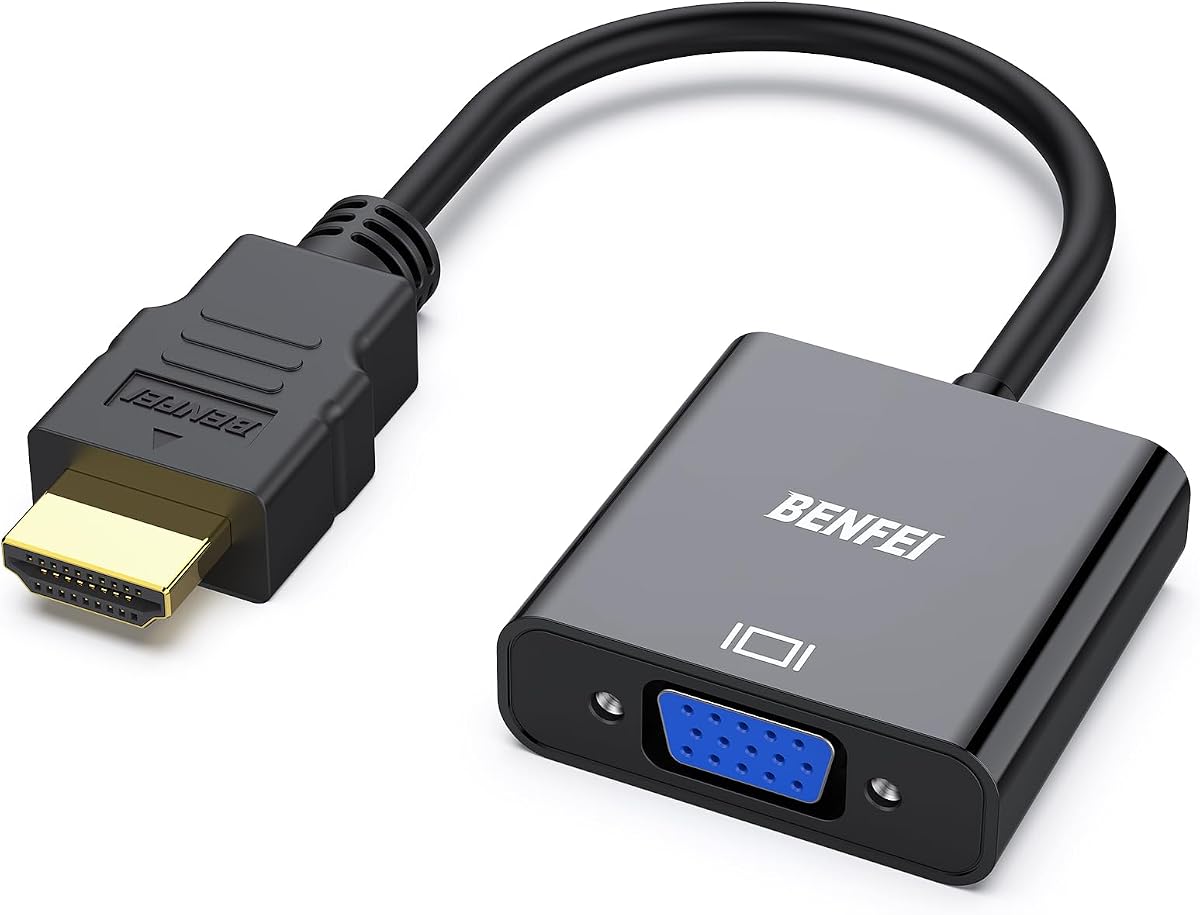
The BENFEI HDMI to VGA Gold-Plated Adapter is a compact one-way converter with a 4.6 customer rating. It is designed to connect HDMI-equipped computers and media devices to older VGA displays, making it a practical choice for office presentations, legacy monitors, classroom setups, and travel where an established VGA projector is already available.
We may earn a commission when you buy through this link, at no additional cost to you.
Its main strength is the combination of straightforward HDMI-male-to-VGA-female construction and broad stated device support. The built-in conversion chipset handles the change from digital HDMI to analog VGA, while the adapter supports resolutions up to 1920×1080 at 60Hz, along with 720p, 1600×1200, and 1280×1024. The gold-plated HDMI connector is intended to resist corrosion and abrasion, while molded strain relief adds mechanical protection.
The trade-offs are straightforward. A VGA cable is required, and the adapter does not provide audio output, so sound must come from the source device through another route. It also converts only in the HDMI-to-VGA direction. Certain devices with low-power HDMI outputs are expressly excluded, including the Sony PS4, Retina-display MacBook Pro, Mac mini, and Apple TV, making device verification important before purchase.
This is the strongest general recommendation for buyers who want a small, uncomplicated adapter for a conventional VGA display. Check the source device first, then confirm that you have a suitable VGA cable. If audio from the source must reach speakers, choose an adapter with a 3.5mm audio output or plan to use a separate audio connection.
For an office user, student, or traveler, the adapter combines a favorable rating with useful Full HD support and no need for external power. It offers more flexibility than a fixed cable while remaining easier to organize than a larger converter. That balance makes it a particularly sensible first purchase in this category.
The adapter's small form makes it easy to carry between an office, classroom, or meeting room. It can remain attached to a laptop bag or sit in a cable pouch without adding much bulk, while its HDMI-male-to-VGA-female configuration works with many existing display arrangements.
Support for 1920×1080 at 60Hz covers common Full HD monitors and projectors without requiring a more specialized converter. The supported lower resolutions also make it useful for older displays that do not accept a modern digital signal.
We may earn a commission when you buy through this link, at no additional cost to you.
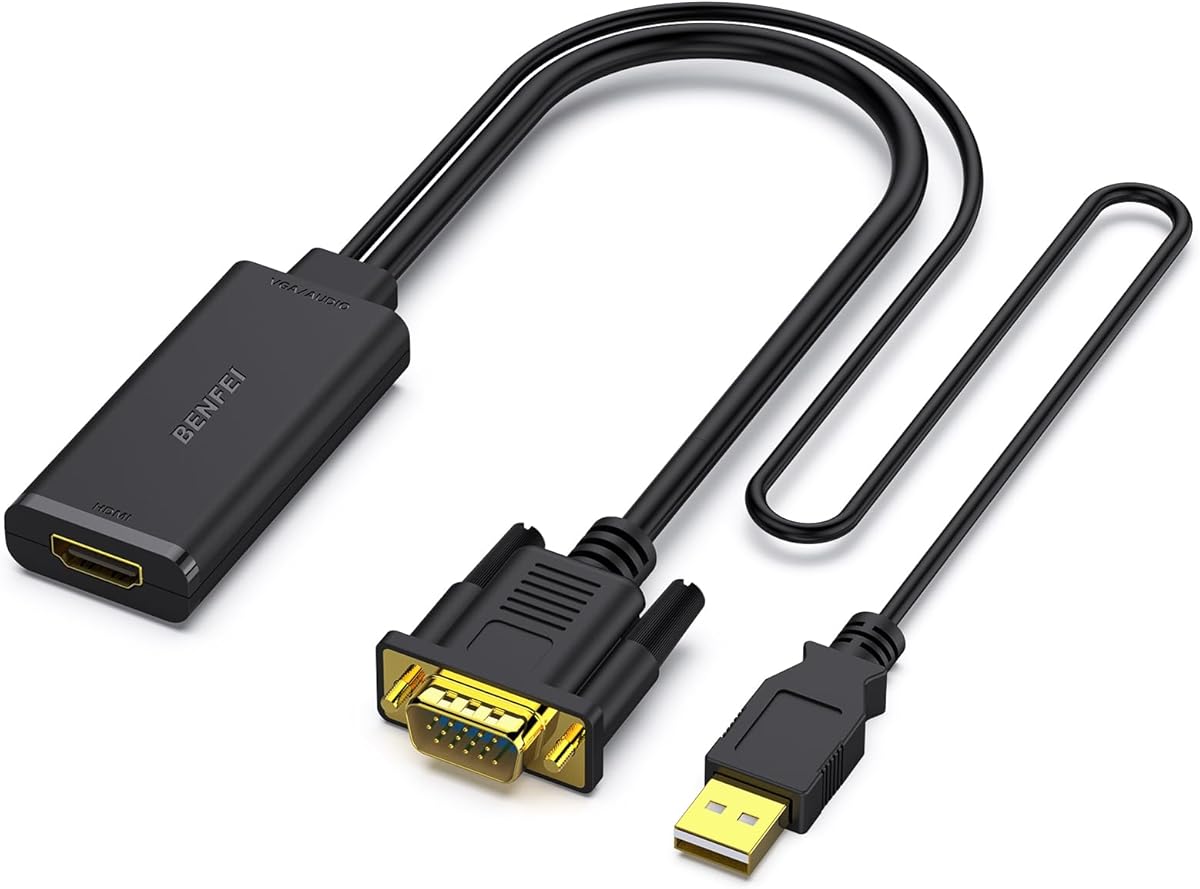
The BENFEI VGA to HDMI Adapter has a 4.5 rating and serves the reverse use case from most adapters in this roundup. It takes a VGA analog signal from an older computer or laptop and converts it for an HDMI television or monitor. That makes it especially relevant to legacy office equipment that cannot provide HDMI output.
We may earn a commission when you buy through this link, at no additional cost to you.
The most distinctive feature is its integrated USB audio cable. VGA does not carry audio, so the adapter embeds digital USB audio into the HDMI output. On a Windows computer, the audio source can be selected from the Sound menu and routed to the connected display. Video conversion itself is handled by a built-in chipset, and the adapter is designed for straightforward plug-and-play use.
There are important limits to understand. This unit is explicitly unidirectional and cannot send HDMI signals to a VGA display, so it is not an HDMI-to-VGA adapter despite being closely related technology. It also requires an HDMI cable, which is not included according to the supplied description. Users who need audio should expect to configure the correct Windows sound output rather than expecting every connected speaker to work automatically.
Choose this product when the old computer has VGA but the new television only has HDMI. It offers a practical way to modernize an older workstation without replacing the whole system, and its integrated audio route can preserve sound where the original VGA port never could. It is not the right choice for a modern laptop with HDMI output.
For business, laboratory, or home-office users maintaining legacy hardware, this converter fills a specific and useful gap. Its 1080p capability and audio support make it more versatile than a simple video-only adapter, provided the source really is VGA and the destination is HDMI.
The integrated USB audio cable solves a common VGA limitation by adding sound to the converted HDMI output. Windows users can choose the USB audio device in sound settings, making the adapter useful for presentations or watching video on a newer television.
Older desktop PCs can remain useful when paired with a modern HDMI television. This adapter reduces the need to replace a functioning computer simply because the replacement display removed the familiar VGA input.
We may earn a commission when you buy through this link, at no additional cost to you.
The Moread HDMI to VGA Adapter earns a 4.6 rating and offers a simple solution for connecting HDMI sources to VGA displays. It closely matches the core functionality of the leading BENFEI adapter, with support for resolutions up to 1920×1080 at 60Hz and a compact HDMI-male-to-VGA-female layout.
We may earn a commission when you buy through this link, at no additional cost to you.
An advanced IC chip performs the one-way digital-to-analog conversion. Gold plating on the HDMI connector is intended to improve durability and signal transmission, while molded strain relief helps protect the connection. The product works with a wide range of computers, notebooks, Chromebooks, Raspberry Pi devices, game consoles, set-top boxes, and other HDMI sources, subject to output limitations.
The limitations are worth noting before buying. It does not send video from VGA to HDMI, carries no audio, and needs a separate VGA cable. Moread also expressly excludes Roku, Blu-ray players, and low-power HDMI devices such as the PS4, Retina MacBook Pro, Mac mini, and Apple TV. That makes source compatibility less forgiving than the product's long list of supported device categories might initially suggest.
This adapter is a good option for anyone who wants the same basic functionality as the top-ranked model without needing its particular brand or listed device exceptions. Confirm that your source provides a suitable HDMI signal and that your display has a female VGA input. Once that is settled, the rest of the setup is uncomplicated.
Its 4.6 rating, Full HD ceiling, and five-year stated warranty give it a strong profile for standard office and educational displays. It is particularly attractive for users who only need video and already own a quality VGA cable. The lack of audio and several low-power exclusions keep it from being a universal solution.
The short HDMI-to-VGA layout is easy to explain and use: the HDMI plug enters the source, the VGA receptacle receives the display cable, and the conversion happens internally. It avoids the extra parts associated with powered audio adapters.
Gold plating and molded strain relief address two common wear points on portable adapters. These details do not guarantee a particular service life, but they support the product's suitability for repeated travel and office use.
We may earn a commission when you buy through this link, at no additional cost to you.
The StarTech Active HDMI to VGA Adapter, model HD2VGAE3, is the most broadly oriented recommendation in the roundup. Its 4.5 rating is supported by a specification set designed for modern computing environments: active HDMI-to-VGA conversion, no drivers, no external power, and compatibility across major operating systems and hardware platforms.
We may earn a commission when you buy through this link, at no additional cost to you.
The adapter supports resolutions up to 1920×1200 and 1920×1080 at 60Hz, giving it a slightly broader stated ceiling than many of the compact alternatives. It is compatible with Windows, macOS, ChromeOS, and Linux, as well as HDMI-enabled laptops, desktops, tablets, and Chromebooks. Its active conversion design uses the integrated or dedicated GPU with minimal CPU involvement, which can make it a better fit for extended-display workflows.
One potential complication is that VGA output is physically limited by the legacy standard and the connected display, so a high nominal source resolution does not guarantee that every projector or monitor will accept the intended mode. The adapter also has no audio output. Its one-way design is another nonnegotiable limitation, and users will still need a VGA cable, preferably one with screw-locking connectors for a more secure installation.
This is the best fit for mixed IT environments, cross-platform users, and anyone who wants a clean installation without device-specific drivers. It also works well when the adapter needs to travel between a Windows laptop, a Mac, and a Chromebook. Business presentations and temporary workstation expansion are particularly suitable use cases.
Compared with simpler dongles, the StarTech emphasizes broad system compatibility and flexible display use without adding a power brick. Compared with audio-equipped converters, it stays focused on video. That clarity, together with the screw-locking support and active chipset, makes it an especially confident all-purpose recommendation.
Compatibility with Windows, macOS, ChromeOS, and Linux removes the need to hunt for a different driver after changing computers. The adapter also supports hardware from Intel, Nvidia, and AMD, which helps in shared workspaces and traveling offices.
The adapter can serve a primary VGA display or add a secondary mirrored or extended screen to a workstation. This makes it useful for users who still rely on VGA equipment but also need to connect to a modern notebook or tablet.
We may earn a commission when you buy through this link, at no additional cost to you.
The BENFEI HDMI to VGA 6 Feet Cable offers a different approach from the small adapters. Rather than combining a short HDMI plug with a female VGA receptacle, it provides an integrated six-foot cable with an HDMI male connector at the source end and a VGA male connector at the display end.
We may earn a commission when you buy through this link, at no additional cost to you.
This arrangement can be especially convenient when the display has a male VGA port or when a separate male-to-male VGA cable would otherwise be required. It reduces the number of pieces to organize and carry, making it appealing for a laptop bag, presentation case, or permanent workstation. The cable supports up to 1920×1080 at 60Hz, as well as 720p, 1600×1200, and 1280×1024.
The major limitation is connector compatibility. A VGA male plug cannot fit into a female VGA port without an additional coupler, and some displays, adapters, and docking arrangements use female receptacles. The product also lacks an integrated audio path, and the supplied description does not mention an external power input. Users should confirm both connector ends before treating this as a drop-in solution.
This cable is best for a fixed connection between an HDMI computer and a display with a matching VGA male input, particularly when avoiding loose adapters is a priority. It is less flexible for travel than a tiny dongle because of its length, although the integrated design still keeps the setup simple.
For a permanent office, classroom, or conference-room arrangement, it can provide a clean single run from computer to display. The 4.4 rating reflects a solid general-purpose product, with the appeal coming primarily from convenience rather than added conversion features.
The integrated six-foot run simplifies the physical connection between a computer and a compatible display. It is particularly useful in permanent installations where one additional adapter or loose coupling point would add unnecessary clutter.
Although the product uses an older cable format, its stated conversion performance reaches 1920×1080 at 60Hz. That makes it suitable for many Full HD VGA monitors and projectors when the source and display support the required signal.
We may earn a commission when you buy through this link, at no additional cost to you.
The BENFEI HDMI to VGA Audio Adapter is built around a distinctive female-to-male connector arrangement and explicit support for TV sticks. It has a 4.4 rating and combines one-way HDMI-to-VGA conversion with a 3.5mm audio output, addressing a limitation found in many basic video adapters.
We may earn a commission when you buy through this link, at no additional cost to you.
The adapter is designed to connect an HDMI source to a VGA display while sending audio separately through the 3.5mm jack. An audio cable is included, allowing the signal to reach external speakers or the audio input of a display. A micro-USB power port is available for devices whose HDMI output is too low-powered to drive the conversion reliably.
The source-side female HDMI socket means the user may need an HDMI cable to reach a laptop, desktop, streaming stick, or other device, depending on its connector layout. The display-side male VGA plug requires a VGA male-to-male cable or an equivalent connection. The product's performance reaches 1920×1080 at 60Hz and also lists several lower resolutions.
This is the most natural choice in the roundup for a streaming stick that must feed a legacy projector or monitor, particularly when sound is also required. The included audio cable and power input create a more complete package than a video-only dongle. Users should still identify the source's power requirements and confirm that the display has a suitable VGA input.
Its flexible audio setup makes it more useful for entertainment presentations than a basic office converter. The trade-off is the need for power in some situations and the additional cable management created by its HDMI-female, VGA-male layout.
Because a standard VGA connection carries video only, the 3.5mm output gives the adapter a practical way to preserve sound. Users can connect headphones, powered speakers, an amplifier, or a display with a compatible audio input.
The micro-USB input provides a way to support compatible low-power HDMI sources. The supplied description recommends testing the connection and identifying low-power devices carefully before installation.
We may earn a commission when you buy through this link, at no additional cost to you.
The UGREEN Active HDMI to VGA Adapter has a 4.5 rating and combines video conversion, a 3.5mm audio jack, and optional micro-USB power. Its broad device list includes computers, laptops, ultrabooks, Chromebooks, Raspberry Pi devices, Apple TV, Roku media players, smart TV boxes, and other HDMI sources.
We may earn a commission when you buy through this link, at no additional cost to you.
The active chipset converts HDMI digital video into VGA analog output, with a stated maximum video resolution of 1920×1080 at 60Hz. Since VGA itself does not transmit audio, the adapter provides a separate 3.5mm line-out jack. This allows video to go to a projector or monitor while sound is routed to external speakers or headphones through an appropriate cable.
Power is an important consideration. A separate micro-USB cable is included and is optional for power, but it can improve compatibility with low-output devices such as certain MacBook Mini models, Apple TV, Raspberry Pi, and smart Android TV boxes. A VGA male-to-male cable is still required and is sold separately, as is the 3.5mm audio cable if the user does not already have one.
This adapter is a good middle ground for a user who wants more device flexibility than a basic adapter offers but does not want to manage a larger external power supply. It is particularly useful for presentations involving a streaming device, a Raspberry Pi, or a low-power HDMI source connected to an older display.
Its 4.5 rating and active-conversion design make it a versatile choice. The deciding factors are whether the source may need supplemental power and whether separate VGA and audio cables fit the intended setup.
The optional micro-USB connection gives users a way to help low-output HDMI devices work with the converter. It also allows the same adapter to travel between a standard laptop and a smaller source that has less power available.
The 3.5mm output preserves sound by sending it outside the VGA connection. With a separate cable to speakers or headphones, the adapter can support a complete audiovisual presentation instead of video alone.
We may earn a commission when you buy through this link, at no additional cost to you.
The JideTech HDMI to VGA Converter with Audio is the featured premium option because it takes a more installation-oriented approach. Its 4.4 rating reflects a converter designed around an active chipset, external 5V power, and a separate 3.5mm audio output rather than a minimal passive dongle.
We may earn a commission when you buy through this link, at no additional cost to you.
Its stated purpose is stable one-way conversion from an HDMI source to a VGA display, supporting resolutions up to 1080p Full HD. External power can improve signal stability and compatibility across source devices, including in setups where cable runs are longer or the converter remains connected continuously. The separate audio jack allows sound to reach external speakers, amplifiers, or headphones.
The powered design is the central trade-off. A 5V DC connection adds a cable and power requirement, making this less convenient for spontaneous travel than a small adapter that draws power from the source. The stated maximum is 1080p, which is ample for many legacy displays but narrower than the StarTech model's advertised 1920×1200 ceiling.
This converter is most appropriate for conference rooms, educational systems, commercial AV installations, surveillance displays, industrial equipment, and other semi-permanent setups. Reliability and complete audiovisual support matter more there than carrying the smallest possible accessory. Installers should plan the power source and verify the display's supported resolution in advance.
It earns the premium distinction because its external power and active chipset target dependable operation rather than merely basic conversion. For users who want simple travel hardware, the trade-off may be unnecessary, but for a fixed installation it offers a more deliberate approach.
External 5V power gives the active chipset a more consistent operating condition. That is valuable in conference rooms, classrooms, and commercial installations where a temporary connection could cause unreliable performance or inconvenient restarts.
The 3.5mm output separates sound from the VGA video path and supports external speakers, amplifiers, or headphones. In a permanent presentation system, this provides a clearer audio-routing option than a video-only adapter.
We may earn a commission when you buy through this link, at no additional cost to you.
The StarTech.com HD2VGAA2 has a 4.3 rating and combines a portable active-adapter format with a separate audio output. Its stated resolution support reaches 1920×1200 or 1080p, giving it a useful ceiling for legacy displays that still handle high-definition signals.
We may earn a commission when you buy through this link, at no additional cost to you.
Its integrated audio port allows a VGA monitor's speakers to be connected to the converter, giving users a way to carry sound alongside video without relying on the source device's built-in speakers. The plug-and-play approach requires no installation software or drivers, reducing the setup time for presentations and temporary display connections.
The adapter is described as compact and light enough for a laptop carrying case. It is also unidirectional, so it is intended specifically for an HDMI source feeding a VGA display. The supplied information does not identify an external power input, so users should follow the included setup guidance and confirm that their source produces sufficient output.
It is most useful for mobile workers or small offices that need to present to a legacy VGA monitor and also want an option for external sound. Compared with the JideTech converter, it is less focused on fixed power infrastructure; compared with simple dongles, it adds an audio route and higher stated resolution support.
The 4.3 rating is slightly below the leaders, but the product remains a capable portable option with a clear advantage for users who need audio. Verify the required cables and monitor compatibility before buying, and choose a more explicitly powered model if the source device has unusually low HDMI output.
The lightweight adapter is designed to fit into a laptop case without requiring a separate converter box. Its simple setup suits presenters who need to connect quickly to whatever legacy display is available at the destination.
Support up to 1920×1200 or 1080p and an integrated audio port cover two common presentation priorities. This combination is useful when the connected monitor has built-in speakers that need an independent sound source.
We may earn a commission when you buy through this link, at no additional cost to you.
The Dell HDMI to VGA Adapter is a compact dongle identified by Dell part number 470-AALJ. It has a 4.5 customer rating and provides a straightforward way to connect an HDMI source to a VGA display, particularly for users already familiar with Dell-compatible equipment.
We may earn a commission when you buy through this link, at no additional cost to you.
The main appeal is focused compatibility. Rather than advertising an expansive range of source devices or advanced audio features, this product presents itself as a specific Dell display adapter. Its dongle form should be easier to manage than a long cable and useful for a laptop bag, service kit, or workstation where a VGA port remains necessary.
The supplied product information is limited compared with the other entries. It confirms the HDMI-to-VGA adapter identity and Dell connector designation but does not provide a detailed resolution list, audio support statement, external-power information, or broad operating-system compatibility. Those omissions make careful model verification especially important for a buyer.
This adapter makes the most sense for someone who knows their Dell computer or display model and needs a matching original or OEM-style accessory. It may also suit an IT inventory where maintaining a consistent hardware set is preferable. Users with only generic compatibility information may find one of the products with more fully stated specifications easier to evaluate.
Its favorable rating indicates solid customer reception, but the limited technical disclosure should guide the final decision. Confirm the Dell part number, source connector, display connector, required cable, and desired resolution before ordering. With those details in hand, it can be a clean solution for a compatible legacy-display setup.
The adapter gives compatible Dell systems a path to a VGA display when newer video standards are not available on the equipment. Its focused design can be useful in offices that standardize on a particular hardware ecosystem.
Because the supplied listing provides a specific Dell part number but limited general specifications, matching the exact equipment model is essential. Confirm connector types and display requirements before treating the dongle as universally compatible.
We may earn a commission when you buy through this link, at no additional cost to you.
The best HDMI to VGA converter adapter is the one that matches your source connector, display connector, audio needs, power limitations, and intended resolution. Checking those details before buying prevents the most common installation problems.
Most products in this roundup convert HDMI output to a VGA display input, but one reverses that path for older computers. HDMI-to-VGA models require an HDMI source and a VGA-capable monitor or projector. The BENFEI VGA-to-HDMI model instead accepts VGA from a legacy computer and sends digital video to an HDMI television. These directions cannot be reversed unless a product explicitly states bidirectional operation, and none of the listed converters does.
Choose the direction that matches your actual equipment. Label the source and display cables to prevent confusion, especially in shared workspaces where similar-looking adapters are stored together.
An adapter's HDMI plug and VGA socket do not always align with the devices you own. Some adapters use an HDMI male plug and a VGA female receptacle, while others use an HDMI female socket and a VGA male plug. A fixed cable with male connectors at both ends may require a particular type of display port. Audio-equipped versions also need a 3.5mm cable, and several products require a separate VGA male-to-male cable.
List every required cable and connector before ordering. A compact adapter is not automatically convenient if it forces you to find an unusual cable or makes the setup difficult to route.
Full HD video at 60Hz is the common target among the better-specified products in this guide. Some adapters state support for 1920×1080 at 60Hz, while the StarTech HD2VGAE3 reaches 1920×1200 at 60Hz and the JideTech converter lists support up to 1080p. The source, converter, cable, and display must all agree on a usable resolution.
For ordinary office documents, presentations, and video playback, 1920×1080 at 60Hz is a practical target. Check the manual for your projector or monitor because legacy equipment may accept only specific refresh rates even when its panel resolution is high.
VGA carries video but not audio, so an HDMI source may stop sending sound to the converted display even when the picture works. Adapters with a 3.5mm jack can provide a separate audio route to speakers, headphones, an amplifier, or a monitor with an audio input. The UGREEN and JideTech models include or describe this feature, as do the BENFEI audio adapter and StarTech.com HD2VGAA2.
Choose a dedicated audio output when sound is central to the presentation or entertainment. Otherwise, speakers connected directly to the source may be sufficient and a simpler video-only adapter may reduce cable clutter.
Most source devices can power a basic adapter, but streaming sticks, compact computers, Raspberry Pi systems, and other low-output HDMI sources may need supplemental power. The BENFEI audio adapter and UGREEN adapter include or describe a micro-USB power option, while the JideTech model uses external 5V DC power. The StarTech HD2VGAE3 and the simplest dongles require no external power.
Check the source's output requirements first. Supplemental power improves compatibility but adds a cable, and external 5V power is most worthwhile for fixed installations where reliability matters more than minimal size.
The smallest dongles are easiest to carry and can remain attached to a source or display with only one loose cable. A six-foot integrated cable reduces parts but takes more space. Powered converters, separate audio leads, and additional USB power connections offer more functionality but require more careful organization before every presentation.
For frequent travel, prioritize a compact active adapter and a short cable kit. For a permanent installation, choose the arrangement that is easiest to secure, label, and maintain rather than the smallest possible accessory.
The word HDMI does not guarantee that every device will drive every HDMI-to-VGA converter. Some products support broad categories of computers and streaming devices but explicitly exclude low-output hardware. The listed BENFEI and Moread adapters warn against devices such as low-output Apple hardware, the PS4, or certain streaming devices, and the Moread model specifically lists Roku as incompatible.
Search for your exact device model before buying and look for a stated exclusion or requirement. If support information is missing, as it is for the Dell adapter, contact the manufacturer or seller to verify compatibility.
A higher rating does not guarantee that an adapter fits a particular setup, and extra features are not always necessary. Video-only users may prefer the simplicity and lower weight of a small dongle. Audio users may need a 3.5mm output, while fixed installations may benefit from dedicated 5V power and a stable active chipset.
Prioritize the requirements that would actually interrupt use: correct direction, matching connectors, acceptable resolution, and reliable power. Treat added audio or extended warranty coverage as secondary benefits once the core connection is secure.
Begin by identifying the source and destination ports. Connect the adapter's HDMI side to the computer, laptop, streaming device, or other HDMI output, then attach the required VGA cable between the adapter and the monitor or projector. If your model uses a female HDMI input, connect an HDMI cable to the source instead. Power the adapter only if its instructions or the source device require supplemental power.
Turn on the source and display, then select the appropriate input on the monitor or projector. Set the computer's resolution and refresh rate to a mode supported by both devices. For adapters with audio, connect the 3.5mm output to powered speakers, headphones, an amplifier, or a display audio input, and select the correct sound device in the source operating system.
To keep the setup reliable, avoid sharply bending the adapter or repeatedly pulling on connected cables. Keep the conversion end clear of moisture and dust, and do not leave a connected display powered through an adapter that is not designed for unattended use. If the image is unstable, test the source at a lower supported resolution, confirm that supplemental power is connected when required, and reseat each cable before troubleshooting further.
Not through the VGA connection itself, because VGA carries video but does not carry audio. Some converters provide a separate 3.5mm audio output, as seen on the UGREEN, JideTech, BENFEI audio, and StarTech.com models. Alternatively, sound can remain connected directly to the source device through its own speakers or headphone output.
No. Most standard laptops are supported, but some devices provide very little power on their HDMI output. Several listed products specifically caution against low-power sources such as certain Apple models, the Sony PS4, Raspberry Pi systems, and streaming devices. Check the adapter's compatibility notes and use the supplemental power connection if the manufacturer requires one.
Only if it is explicitly designed for that reverse direction. Most adapters, including the majority featured here, are one-way HDMI-to-VGA converters. The BENFEI VGA-to-HDMI model works in the opposite direction and can also carry USB audio into an HDMI display, but it cannot solve an HDMI-source-to-VGA-display setup.
Start with 1920×1080 at 60Hz when both the source and display support it. If the picture is unstable, unsupported, or absent, try a lower listed resolution such as 1280×1024 or 720p. The source, adapter, VGA cable, and display must all support the selected mode, and some older projectors have narrow refresh-rate requirements.
It depends on the product. Basic HDMI-male-to-VGA-female adapters need a standard VGA cable to reach the display. Models with a VGA male plug still need a VGA male-to-male cable or an appropriate mating connection. The six-foot BENFEI cable already includes the VGA side, while the Dell listing should be checked for its exact connector configuration.
First confirm that the signal direction is correct and that the display is selected to the proper VGA input. Reseat the HDMI and VGA connections, reduce the source resolution, and verify that the source supports a VGA-compatible output. Low-power devices may need external power, while a display that accepts only specific resolutions may require a different setting.
An active converter can be more compatible with demanding sources and may better support extended displays, but it is not automatically required for every setup. Simple dongles are sufficient for many standard computers and monitors. Active or powered models are more valuable when using a low-output device, adding audio, maintaining a long installation, or needing advanced operating-system support.
It can carry a compatible video signal, but the exact experience depends on the source, display, resolution, and refresh rate. Some gaming consoles and low-power devices are expressly excluded from certain adapters. A converter cannot add graphical performance or remove lag, so check device compatibility and use a properly rated cable if low-latency performance is important.
The BENFEI Gold-Plated Adapter stands out as the strongest general-value pick because it combines a 4.6 rating, Full HD support, compact construction, and broad everyday compatibility. The StarTech Active HDMI to VGA Adapter earns the editor's choice for users who value driver-free cross-platform operation and flexible extended-display support, while the JideTech powered converter is the premium selection for fixed installations that need external power and separate audio.
Prioritize direction, connector shape, resolution, power, and audio before considering smaller differences between similar dongles. A simple video-only adapter is often the easiest choice for a standard laptop and VGA projector. An audio-equipped model becomes necessary when the converted display must provide sound, and a powered model is preferable when the source is low-output or the installation will remain connected for long periods.
Ratings, product details, availability, and prices can change, so confirm the current specifications and cost before ordering. Most listings also require a separate VGA cable, and some require audio or power leads as well. Checking those requirements will prevent the most common disappointment and help ensure that the chosen adapter fits the actual source and display.