
Universal Monitor VESA Mount Adapter
4.4Editor score
Adhesive 75x75mm adapter
Supports monitors up to 24 pounds
Fits 13 to 27 inch displays
Explore the best Non VESA Monitor Stands, comparing compatibility, adjustment, load capacity, installation methods, stability, and cable management options.
Non VESA monitor stands solve a frustrating compatibility problem: the display may have a flat back or a mounting pattern that does not match a conventional 75x75mm or 100x100mm VESA plate. The right solution can be a freestanding riser, a clamp-mounted arm, or an adapter that converts the screen for use with a standard mount.
This guide compares ten stands and mounting solutions by checking monitor-size limits, weight ratings, VESA requirements, adjustment ranges, mounting methods, base design, and cable-management features. It also distinguishes between products intended for displays with standard VESA holes and products specifically designed to accommodate non-VESA monitors.
Each review explains the strongest reason to consider the product, along with compatibility limitations that could affect a purchase. Ratings and specifications reflect the supplied product information, while prices and availability can change. Always verify your monitor's dimensions, weight, rear layout, and desk construction before ordering.
4.4Editor score
4.6Editor score
3.7Editor score
The table below compares all ten products by type, supported display size, load capacity, adjustment, and installation method, making it easier to identify the option that matches your monitor and desk.


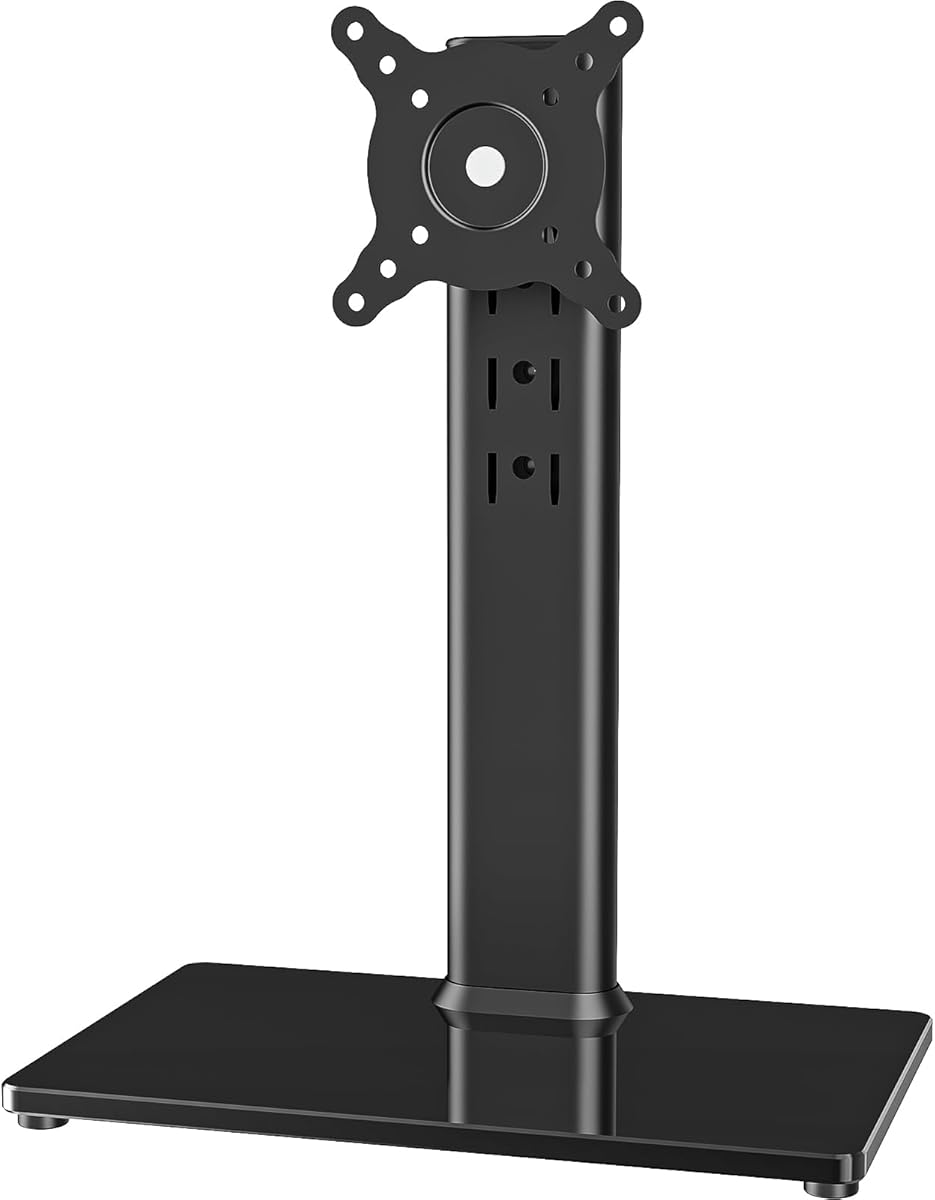
This freestanding monitor riser combines a high stated load capacity with broad articulation, earning a 4.6 rating in the supplied product data. It supports one display from 13 to 32 inches, including larger LCD, LED, and plasma panels, and can hold up to 77 pounds. Its tempered-glass base gives the design a substantial appearance and eliminates the need to clamp or drill into a desk.
We may earn a commission when you buy through this link, at no additional cost to you.
The mounting system provides four height levels, a -15-degree to +10-degree tilt range, a -50-degree to +50-degree swivel, and 360-degree rotation. Those controls make it easy to move a display closer for reading, share a screen across a desk, or rotate it into portrait orientation. Compatibility covers the common 50x50mm, 75x75mm, and 100x100mm rear mounting patterns, while cable management helps keep cords from spreading across the work surface.
Its most important limitation is also the most important consideration for a buyer searching specifically for a non-VESA solution: the screen must have compatible mounting holes. The word non-VESA can also refer to the overall product search rather than the precise rear-panel standard, but this particular stand does not convert a display with an entirely flat back. Buyers should therefore inspect the monitor before ordering, especially with unusual or older hardware.
Despite that caveat, this is an excellent general-purpose stand for a VESA-equipped display. It is best suited to home offices, studios, and shared workstations where a freestanding base, high load rating, and broad range of motion matter more than a clamp-mounted design. It remains our top overall selection for users who have a compatible VESA pattern and want a large adjustment range without modifying the desk.
The wide tempered-glass base keeps the installation simple because it only needs to be placed on the desktop. Four height levels provide meaningful vertical movement, making the stand useful for displays that otherwise sit too low for a comfortable line of sight.
Tilt, swivel, and 360-degree rotation provide more practical flexibility than a fixed riser. These adjustments are particularly useful for switching between landscape and portrait layouts or sharing information with someone seated nearby.
We may earn a commission when you buy through this link, at no additional cost to you.
The HUANUO Universal VESA Mount Adapter is a purpose-built solution for flat-panel displays that lack a standard mounting pattern. It carries a 4.2 rating and supports most 17 to 27 inch LCD, LED, and OLED monitors, provided the panel falls within the stated thickness range of 1.18 to 2.95 inches. The kit converts the display for attachment to a compatible 75x75mm VESA stand or arm.
We may earn a commission when you buy through this link, at no additional cost to you.
Its adjustable bars can extend to accommodate different monitor shapes and sizes. That flexibility is useful because non-VESA screens do not all present the same flat rear area or center of mass. Powder-coated steel provides a durable connection, and the package includes a manual, screws, and related parts. Installation is designed to be completed in minutes rather than requiring specialized tools or desk modification.
This is an adapter rather than a complete monitor stand, so buyers also need a compatible 75x75mm mounting system. That distinction is important when comparing this product with the freestanding designs in the list. It is also limited to the smaller 75x75mm pattern rather than offering 100x100mm compatibility, and the specified screen-size range is narrower than several complete stands.
The product is a good fit for someone who already owns a dependable VESA arm or desk stand but wants to reuse a non-VESA monitor instead of replacing the display. It offers a more substantial bracket-based approach than adhesive adapters, particularly for thicker monitors. Verify the rear-panel clearance, panel thickness, and load rating of the companion mount before installation.
The steel construction and adjustable bars distinguish this kit from lightweight adhesive adapters. That makes it a practical option when the monitor is thick, the rear surface needs extra structure, or a conventional screw-mounted connection is preferred.
The adapter converts the screen but does not provide the arm, stand, or clamp itself. Buyers should choose a compatible 75x75mm mount whose weight rating and desk attachment method suit their workspace.
We may earn a commission when you buy through this link, at no additional cost to you.
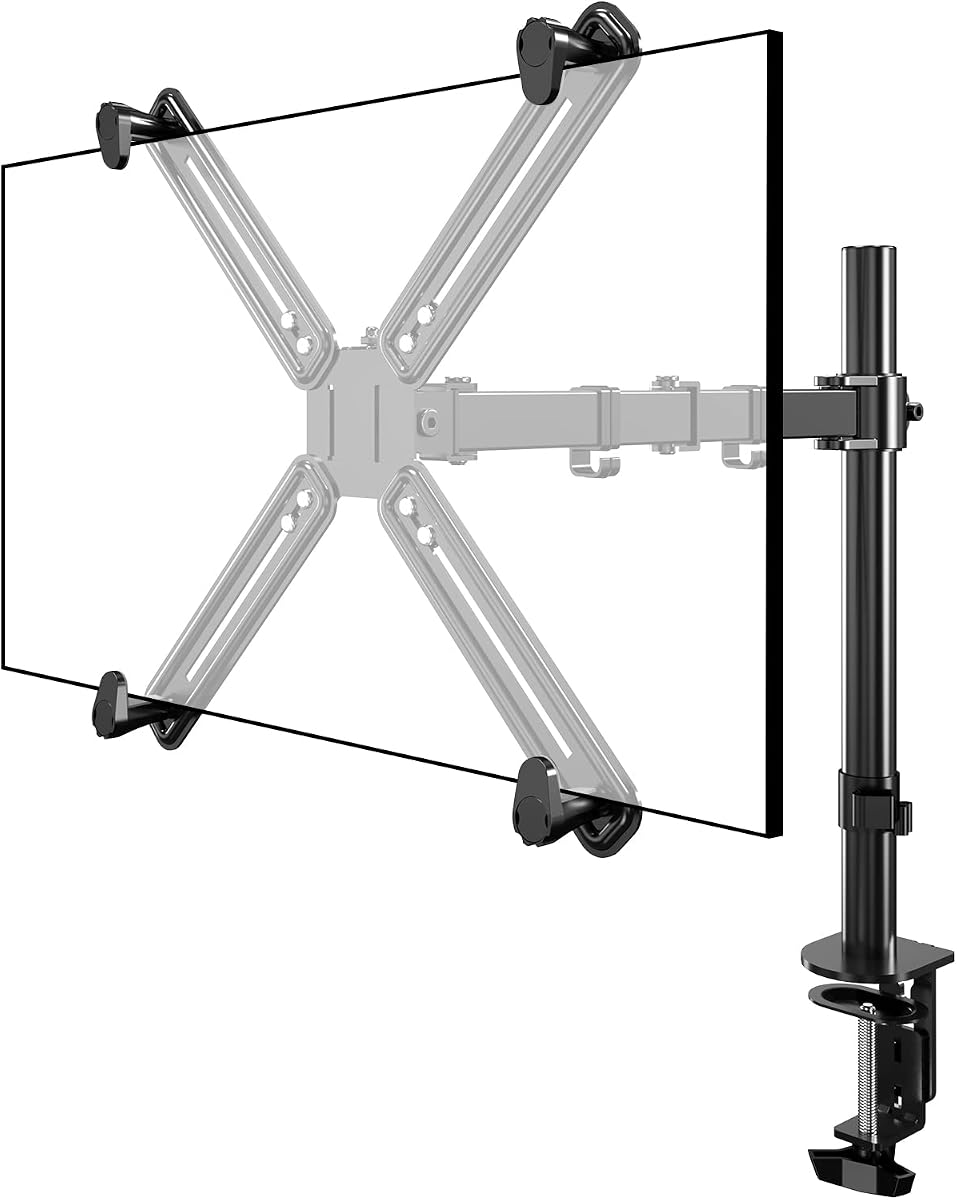
This single monitor arm stands out because it explicitly accommodates monitors without standard VESA holes, and it includes both a desk clamp and a grommet base. Its 3.7 rating is the lowest among the ten products, but the feature set is still highly relevant to users attempting to mount a non-VESA display. The arm supports most 13 to 27 inch screens weighing up to 22 pounds.
We may earn a commission when you buy through this link, at no additional cost to you.
A clamp installation can free the space beneath the display and permit the screen to be positioned at a more suitable height and depth. The grommet option provides an alternative for desks with a suitable cable opening. Between the two bases, the product can accommodate more desk arrangements than a stand that must simply sit on the surface. Protective pads help protect the desktop, and integrated cable guides route display cables along the arm.
The main trade-off is the comparatively modest 22-pound load limit. Some large ultrawide or gaming displays exceed that figure, even when their diagonal size falls within the stated range. The lower 3.7 rating also suggests that buyers should examine the current customer feedback carefully, especially regarding assembly quality, clamp contact, and long-term stability.
This is a sensible choice for a lightweight, non-VESA monitor in a compact workstation. It is especially attractive when desk space is limited and the user wants a true adjustable arm rather than a simple riser. Confirm the monitor's weight, rear shape, and desk thickness before buying, and make sure the chosen base configuration is physically possible.
The C-clamp and grommet choices let users select the attachment method based on the desk. This flexibility is useful for desks with existing cable-management openings as well as solid desktops without a predrilled grommet.
The arm's stated capacity covers many mainstream 13 to 27 inch displays, but weight is the decisive limit. Measure the display and confirm that it falls below the arm's rating before planning the installation.
We may earn a commission when you buy through this link, at no additional cost to you.
This HUANUO freestanding stand is built for larger displays and more height positions than many single-monitor risers. It has a 4.4 rating, supports screens from 13 to 34 inches, and carries a stated maximum load of 44 pounds. Compatibility includes the common 75x75mm and 100x100mm VESA mounting patterns.
We may earn a commission when you buy through this link, at no additional cost to you.
Five height settings span a stated range of 9.27 to 15.26 inches, giving users a broader opportunity to approach eye level. The support arm offers a -50-degree to +50-degree swivel, a -15-degree to +10-degree tilt, and 360-degree rotation. A tall steel column and tempered-glass base create the support structure, while anti-slip pads improve grip and reduce the risk of scratching the desktop.
As with several other complete stands in this guide, it is not a conversion adapter for a completely flat-backed monitor. The display must have a compatible VESA pattern. The product information also warns that an off-center VESA pattern can affect portrait orientation, so buyers should inspect both the hole spacing and the distribution of the mounting points before expecting a particular orientation.
The stand is a strong option for a large, VESA-compatible display on a desk that cannot accept a clamp or grommet installation. Its five height levels are the distinguishing feature for users who want to fine-tune screen elevation. It also includes two cable clips for routing cords along the rear pillar, helping preserve a cleaner desk setup.
The 34-inch upper limit gives this stand an advantage for large desktop monitors and some entertainment displays. Its 44-pound capacity also makes it more versatile than stands limited to lighter screens.
Multiple height settings make it easier to align the upper portion of a display with the user's eye line. This can reduce the need to hunch forward over a low-positioned screen during extended work sessions.
We may earn a commission when you buy through this link, at no additional cost to you.
This adhesive VESA adapter offers the simplest way to convert many non-VESA monitors for use with a 75x75mm arm or stand. It has a 4.4 rating and is intended for 13 to 27 inch screens whose backs provide a flat 6.6 by 5.8 inch mounting area. The stated maximum load is 24 pounds.
We may earn a commission when you buy through this link, at no additional cost to you.
Installation avoids drilling into the monitor and does not require conventional screws through its rear mounting plate. The user peels away a protection film, positions the adapter on the clean flat area, and waits 24 hours before attaching it to a compatible VESA mount. The adhesive is described as strong and intended to provide a solid connection once the recommended waiting period has passed.
The flat-area requirement is crucial. Textured, curved, recessed, vented, or already occupied rear panels may prevent the adapter from sitting flush, and improper positioning can compromise the bond. A 24-hour cure also means the setup cannot be completed immediately. Users should avoid placing the adapter over a heat vent and should confirm that the chosen VESA mount does not exceed the adapter's load limit.
This is best for a user with a flat-backed, non-VESA monitor who already owns a compatible VESA mount and wants a quick conversion. It is less appropriate for curved screens, a rear panel with limited flat space, or anyone unwilling to wait for the adhesive to set. Its simplicity and 4.4 rating make it one of the most approachable options in the guide.
The peel-and-stick format is valuable for displays whose rear panels cannot accept screws or whose original mounting holes are absent. It also avoids adding permanent holes to a monitor that may later be sold or replaced.
A strong bond depends on a clean, flat, undisturbed surface. The adapter should not be repositioned repeatedly during the initial 24-hour curing period, and the monitor should not be attached to an arm before that wait is complete.
We may earn a commission when you buy through this link, at no additional cost to you.
The MOUNT PRO VESA Mount Adapter is a universal bracket for 19 to 32 inch computer screens that lack a standard bolt-hole pattern. It carries a 4.3 rating, supports displays up to 17.6 pounds, and is designed for panel thicknesses from 0.79 to 2.76 inches. The product information lists compatibility with common iMac, Acer, LG, HP, Samsung, Dell, ASUS, and ViewSonic models, subject to their dimensions and rear design.
We may earn a commission when you buy through this link, at no additional cost to you.
Five height adjustment positions and twelve included glue columns allow the adapter to fit different monitor thicknesses and shapes. The steel construction has a rust-proof coating, while a triangular design adds support around the connection area. Anti-slip pads add further security. Necessary screws, hardware, and a user manual are included, making assembly a straightforward bracket-building process.
The product does not include the VESA plate or the monitor mount itself, so it must be paired with compatible equipment. It also does not allow portrait orientation, which removes an important option for coding, document review, and some professional workflows. Its 17.6-pound limit is lower than the load allowance of several complete stands in the comparison.
This adapter is best for owners of a larger flat-backed monitor who already have a sturdy VESA arm and want more structural support than a simple adhesive plate. Check the monitor's thickness and maximum dimensions carefully, and confirm that the companion mount can accommodate both the weight and the adapter's orientation limitations.
The combination of adjustable positions and glue columns allows the bracket to contact several different rear-panel thicknesses. That makes it useful for non-VESA monitors whose backs are flat but not identical in depth.
Users need to source a compatible 75x75mm or 100x100mm plate and a suitable monitor mount. This lets experienced users reuse existing equipment, but it adds a compatibility step compared with buying a freestanding or clamp-mounted stand.
We may earn a commission when you buy through this link, at no additional cost to you.
The ErGear Single Monitor Arm is a high-adjustability option for standard VESA-equipped screens. It has a 4.4 rating and supports most flat or curved 13 to 34 inch monitors up to 19.8 pounds. The mounting head supports both 75x75mm and 100x100mm patterns, providing broad compatibility with mainstream desktop displays.
We may earn a commission when you buy through this link, at no additional cost to you.
Its motion controls are unusually comprehensive. The arm offers 17.5 inches of height adjustment, up to 18.1 inches of reach, a +80-degree to -50-degree tilt range, plus or minus 90 degrees of swivel, and 360-degree rotation. A wider VESA head and tighter-fitting plate are designed to improve stability, while the durable core has reportedly been tested through more than 20,000 adjustment cycles.
Installation is streamlined through a tool-free VESA plate. Buyers can select a C-clamp for desktops between 0.39 and 2.56 inches thick or a grommet base for desktops between 0.39 and 2.95 inches thick. Cable clips open without tools, making it easier to route wiring after the display is positioned. The arm is designed to reclaim substantial desk space by lifting the screen above the work surface.
This is a compelling choice for a VESA-compatible display that benefits from extensive movement. It is not intended to solve a completely flat-backed monitor problem, so a separate adapter would be needed for that application. For users with a compatible pattern, the combination of range, mounting convenience, and cable organization makes it a strong premium workstation upgrade.
The generous height, reach, tilt, swivel, and rotation ranges allow a display to be positioned precisely for different tasks. That flexibility is valuable for alternating between close document work, video viewing, and a shared-screen presentation.
Tool-free VESA attachment and two base options simplify setup across different desk types. Users should still measure their desktop thickness and confirm that the selected base can be installed without interfering with a crossbeam or drawer.
We may earn a commission when you buy through this link, at no additional cost to you.
The MOUNTUP freestanding stand provides a simple way to raise and reposition a VESA-compatible display without attaching hardware to the desk. It carries a 4.5 rating, fits 13 to 32 inch computer screens, and supports up to 17.6 pounds. It is intended for home offices and other workspaces where a freestanding footprint is more convenient than a clamp or grommet mount.
We may earn a commission when you buy through this link, at no additional cost to you.
Adjustment includes plus or minus 45 degrees of tilt, plus or minus 25 degrees of swivel, plus or minus 180 degrees of rotation, and height adjustment up to 17.49 inches. The display can therefore be used in portrait or landscape orientation, moved horizontally and vertically, and aligned closer to eye level. A strong steel column and wide, heavy base provide support for the stated load.
The design also includes a built-in cable-management clip and a tool-storage slot, which can reduce clutter around the base and keep small assembly tools accessible. Assembly uses an open mounting approach in which the plate and display slide onto the bracket. The package includes an instruction manual, necessary hardware, and tools.
This is a good option for users who have a compatible 75x75mm or 100x100mm mounting pattern and want a simple riser with more adjustment than a fixed stand. It does not convert a non-VESA display, and its load limit is lower than the capacity of several larger freestanding models. Check all three compatibility factors—screen size, weight, and VESA pattern—before purchasing.
The freestanding format requires no clamp, grommet, or drilled hole. It can be moved between desks and positioned where it best supports the user's viewing angle, making it practical for flexible or shared workspaces.
Cable clips and a dedicated tool slot help keep the installation area tidy. These small features are particularly valuable in a home office where visual clutter can make an already compact workspace feel crowded.
We may earn a commission when you buy through this link, at no additional cost to you.
This Single VESA Monitor Stand is a narrowly focused option for 24 to 27 inch screens weighing 7.7 to 11 pounds. It has a 4.0 rating and provides a spring-assisted height mechanism that moves between 300mm and 410mm. The spring allows free suspension, making it easier to place the display at a preferred height without relying on a fixed series of stops.
We may earn a commission when you buy through this link, at no additional cost to you.
The stand supports a 45-degree left and right swivel, a +10-degree to -20-degree tilt, and rotation between portrait and landscape orientations. A 75x75mm or 100x100mm VESA connection provides compatibility with many standard displays. The focused dimensions make it easier to determine quickly whether a particular 24 to 27 inch monitor is suitable.
The most significant limitation is the weight window. A display outside the 7.7 to 11 pound range may not operate safely with the spring mechanism, even if its size and VESA pattern otherwise match. The stand also does not accommodate a truly non-VESA rear panel. Users with a heavier gaming monitor or an unconventional display should choose a model with a broader load allowance or an appropriate conversion adapter.
For a user whose monitor falls precisely within the stated size, weight, and mounting specifications, the spring movement offers a smooth, responsive way to adjust the display. It is best suited to a focused home-office or workstation setup where the screen can be changed regularly between different tasks but does not need to support a wide variety of hardware.
A spring mechanism can make repeated height adjustments feel lighter than a stiff telescoping post. It also allows the display to remain suspended at a chosen position instead of being restricted to a small set of fixed settings.
Spring systems are sensitive to load conditions, so the stated 7.7 to 11 pound range should be treated as a hard fit requirement. Confirming the monitor's actual weight can prevent unstable movement or an unsuitable installation.
We may earn a commission when you buy through this link, at no additional cost to you.
The HUANUO FlowLift Dual Stand is designed for two VESA-compatible screens and carries a 4.6 rating. Each display may measure 13 to 32 inches and weigh between 4.4 and 19.8 pounds, with rear mounting holes at 75x75mm or 100x100mm. Its dual-arm configuration provides a more specialized solution than the single-screen stands elsewhere in the guide.
We may earn a commission when you buy through this link, at no additional cost to you.
Both arms offer a +85-degree to -50-degree tilt range, plus or minus 90 degrees of swivel, and 360-degree rotation. The display can be raised by as much as 15.75 inches, pulled closer for detailed work, or turned into portrait orientation for coding and long documents. A larger platform and dual C-clamp structure are intended to limit wobble, while a grommet mounting option is also available.
Desk compatibility requires particular attention. The product information recommends wooden desks, identifies a thickness range of 0.59 to 3.54 inches, and warns against crossbeams or panels that would interfere with the base. It also requires standard VESA holes, so it does not directly solve the problem of a completely non-VESA screen without a separate conversion solution.
This stand is a strong choice for a productivity-focused dual-screen setup, particularly when spreadsheets, documents, communication windows, or creative applications benefit from more display area. It is less appropriate for glass or plastic desks, crossbeam construction, or users who need a special non-VESA conversion. Measure the desk carefully and confirm both displays meet the stated requirements.
Two independently adjustable arms allow a user to position one display for detailed work and the other for communication or reference material. Rotating a screen into portrait orientation can also improve readability for long text-based workflows.
The dual arms place more demand on the mounting base than a single arm. Check desk material, thickness, underside clearance, and any crossbeams before installation to avoid an unsuitable or unstable setup.
We may earn a commission when you buy through this link, at no additional cost to you.
A successful monitor-stand purchase begins with the rear of your display, not with the appearance of the stand. The mounting method, load limit, desk structure, and intended adjustment range must all align with the hardware you already own.
In short, match the rear pattern exactly and use a true conversion adapter when standard holes are absent.
In short, buy a complete mount for an independent setup or an adapter when reusing existing VESA hardware.
In short, both size and weight must fall within the listed limits, with additional rear clearance considered.
In short, choose the attachment method that matches desk thickness, underside structure, and available space.
In short, prioritize height, reach, and rotation according to your daily workflow rather than selecting the most controls by default.
In short, choose a stable base with ample capacity and ensure the desk itself can support the installation.
In short, choose integrated routing that can follow the display's movement without restricting the arm.
In short, favor screw-based construction for frequent movement and adhesive only when the flat surface is ideal.
Begin by identifying the correct mounting path for the display. For a standard VESA screen, align the holes in the plate or bracket with the matching rear pattern and secure it according to the included instructions. For a non-VESA screen, measure the usable rear area and verify that the selected adapter accommodates the panel's thickness and weight. Do not force a plate against a curved, recessed, or obstructed rear panel.
Install the base in the location where the monitor will actually be used. For a freestanding stand, place the base on a level surface and check that the column and display remain stable. For an arm, tighten the clamp carefully, inspect the underside for obstructions, and confirm that the desk can support it. Keep the display within the product's stated size and weight limits, and allow adhesive adapters the full recommended curing period before applying load.
For everyday care, unplug the display before changing its angle or removing it from the mount. Keep the column, hinges, and base free of dust, and avoid placing the stand where a chair, pets, or moving equipment could strike it. Periodically check screws, clamp tension, and adapter adhesion. Route cables through the supplied guides so they do not pull on the display, and reposition the stand if the screen begins to sag, wobble, or sit unevenly.
A non-VESA monitor lacks the standardized 75x75mm or 100x100mm mounting-hole pattern used by many arms and stands. It may have a completely flat back, a different hole spacing, or another proprietary arrangement. A compatible non-VESA adapter or complete non-VESA mount is required to connect such a display to a conventional monitor support.
No. A standard VESA stand only fits a screen with matching mounting holes and sufficient clearance. Some non-VESA displays can be converted with a suitable adapter, but the adapter must match the display's dimensions, thickness, weight, rear layout, and the VESA pattern of the stand being used.
An adhesive adapter can be suitable when the rear panel is clean, flat, smooth, and free of vents. The supplied instructions for the adhesive model in this guide call for a 24-hour wait before attaching the monitor to a VESA arm or stand. It is important to remain within the stated load limit and never pull a display by its adapter.
A freestanding stand is easier to install and move, and it avoids modifying the desk, but it occupies more surface space. A desk clamp generally offers better height, depth, and reach control while freeing space beneath the display. Choose based on desk thickness, underside clearance, available footprint, and how frequently the display position needs to change.
Check the monitor's product specifications, rear label, or user manual for its weight with the stand excluded. Do not estimate from screen size alone because similar-sized models can differ considerably. Select a stand with a stated capacity comfortably above the display's weight, and also confirm that the adapter or mounting plate carries an equal or higher rating.
Some can, but not all. Rotation depends on the complete mounting system, including the adapter, VESA plate, arm, and rear pattern. Products such as the MOUNT PRO adapter explicitly do not support portrait orientation, while several complete stands do. Verify every component in the chain and make sure the display's rear shape will not collide with the mount.
A curved display can work if its rear mounting pattern, weight, and dimensions match the stand or arm. Adhesive conversion is usually less suitable because the rear panel may not provide a sufficiently large, flat bonding area. A screw-based non-VESA bracket is generally the more appropriate choice for a curved screen, provided the bracket's stated dimensions and clearance requirements are met.
Each arm has its own range, so there is no universal answer. Among the products reviewed, the ErGear C-clamp supports desks from 0.39 to 2.56 inches thick, while the HUANUO FlowLift dual-arm clamp supports a listed range of 0.59 to 3.54 inches. Measure the desk at the intended clamp position and check for an accessible edge, rails, or crossbeams.
The strongest overall option is the Single LCD Free-Standing Stand, which combines a 4.6 rating, a 77-pound stated capacity, four height levels, and extensive movement in a drill-free design. For a monitor that truly lacks standard VESA holes, the purpose-built HUANUO Universal VESA Adapter offers a sturdier conversion route, while the adhesive Universal VESA Mount Adapter provides the simplest installation when the rear surface is ideal.
The right purchase ultimately depends on the display rather than the number of advertised features. Confirm the mounting pattern, actual weight, screen dimensions, and rear clearance first. Then choose between a freestanding riser, a clamp-mounted arm, a dual-screen system, and a non-VESA conversion adapter based on the desk and intended workflow. Weight capacity and installation method should take priority over cosmetic features or extra adjustment options.
Ratings can change as additional customer feedback appears, and prices, promotions, and availability also vary over time. Review the current listing and seller information before buying, and compare the included hardware with any equipment you already own. This final compatibility check will prevent the most common disappointment: choosing an attractive stand that cannot physically support the monitor or connect to its rear panel.