
HOPOW Dual Layer Desk Clamp Power Strip
4.5Editor score
Removable dual-layer design
Thirteen outlets and four USB ports
Adjustable no-drill desk clamp
1700-joule surge protection
Explore the best power strip for under desk setups, comparing mounting options, outlet counts, USB charging, surge protection, and cord flexibility.
A power strip for under desk use should make a workspace safer, cleaner, and easier to navigate without creating another cable-management problem. The best models combine secure mounting, useful outlet spacing, surge and overload protection, flat plugs, flexible cords, and convenient USB charging in a form that suits the available space.
This guide compares ten under desk power strips across the features that materially affect daily use: clamp, screw-mounted, and bracket-based installation; AC outlet count; USB-A and USB-C charging; cord length and thickness; surge protection; and compatibility with different desk styles. It covers options for home offices, workshops, conference spaces, and compact workstations.
The selections show why there is no single ideal choice for every desk. Some prioritize no-drill clamping, others provide abundant outlets and charging, and more rugged models suit workshops or permanent installations. Product details and availability can change, so verify current specifications, outlet requirements, and listing information before purchasing.
4.5Editor score

4.7Editor score

4.7Editor score
The comparison highlights each strip's installation method, power capacity, charging support, and physical design so buyers can quickly identify the option that best matches their desk, available outlets, and cable-management goals.



The CRST 8-Outlet Mountable Metal Power Strip combines eight widely spaced AC outlets with a compact 1.6-inch housing, making it one of the most adaptable options for a permanent under desk installation. Its 4.7 rating reflects a favorable balance of construction, protection, and placement flexibility, while the detachable brackets allow it to sit under a desk, against a wall, on its side, or neatly with the mounting ears concealed.
We may earn a commission when you buy through this link, at no additional cost to you.
The 2100-joule surge protection rating is the strongest stated figure in this comparison, and the resettable 15-amp circuit breaker provides overload protection. An integrated copper bus bar supports conductivity and heat dissipation, while the aluminum housing is better suited to workshop, office, and garage environments than a lightweight plastic strip. The included cable management strap also helps keep the six-foot, 14AWG cord controlled after installation.
Its main limitation is the absence of USB-A and USB-C ports, so phone and accessory charging still requires separate wall chargers. The mounting system also depends on screws, making it less appealing for renters, temporary setups, or desks that cannot be drilled. Even so, those constraints are reasonable for a model whose strongest attributes are rugged construction, broad mounting versatility, and a large number of well-spaced outlets.
This is the strongest general recommendation for an under desk power strip because it adapts to several installation styles without sacrificing outlet capacity or safety features. Choose it for a dedicated workstation, workshop, shared office, or media area. Buyers who prioritize fast USB charging or tool-free installation should instead examine the QBA, Acozvin, or HOPOW alternatives.
The adjustable and detachable brackets create several viable orientations, allowing the strip to be installed under a surface, mounted to a wall, positioned sideways, or presented with a clean profile. This makes the housing practical for desks with limited clearance and for workspaces where the power hub should remain visible and accessible.
Eight outlets are spaced widely enough to accommodate large adapters, an important detail at compact workstations where bulky chargers can otherwise block neighboring sockets. The 2100-joule surge protection and resettable breaker add meaningful safeguards for computers, displays, network equipment, and other connected electronics.
We may earn a commission when you buy through this link, at no additional cost to you.
The VIPWELL 360° Mountable Surge Protector Power Strip is designed for flexible placement in confined areas, with a 12.8-by-2.2-by-1.3-inch body that can be oriented vertically, horizontally under a desk, or wrapped around a table leg. Its 4.5 rating reflects a versatile combination of six AC outlets, four USB ports, surge protection, and a low-profile design.
We may earn a commission when you buy through this link, at no additional cost to you.
Two USB-A and two USB-C ports allow the strip to serve as both a power distribution hub and a basic charging station. The six-foot extension cable uses a pure copper core, and the reinforced USB ports are intended to withstand repeated plugging and unplugging. A 45-degree flat plug allows the plug to sit behind furniture without occupying the entire receptacle or preventing a desk from resting flush against a wall.
The stated 13-amp and 1625-watt overload threshold is worth checking against the combined load of connected devices. The product information does not give individual USB charging wattages, so buyers who need known fast-charging output may prefer the QBA or Acozvin options. Mounting hardware is included, but the flexible clip concept still involves positioning the strip carefully around a surface or leg.
This VIPWELL model is a good match for compact desks where outlet count, USB convenience, and hidden placement all matter. It is especially useful for home offices and entertainment areas where leaving a traditional strip loose on the floor would create visual clutter. Its strongest advantage is installation flexibility, while its biggest trade-off is less explicit USB power information.
The rotating mounting concept lets the power hub follow the geometry of a desk, wall, corner, or table leg. This differs from a conventional strip that must remain aligned with a surface, making the design useful in narrow workspaces and around furniture that cannot be drilled.
Six grounded AC outlets and four USB ports provide a convenient way to consolidate computer accessories, phones, and peripherals. The 45-degree flat plug improves access to a duplex wall outlet while reducing the gap needed behind the desk.
We may earn a commission when you buy through this link, at no additional cost to you.
The HOPOW Dual Layer Desk Clamp Power Strip is the most outlet-rich model here, combining 13 AC outlets and four USB ports for as many as 17 simultaneous connections. Its 4.5 rating reflects the appeal of a no-drill clamp, a long cord, and a detachable two-level construction, though the substantial capacity may be more than a minimalist workstation needs.
We may earn a commission when you buy through this link, at no additional cost to you.
Both power layers can be removed independently. The upper layer can travel with the user, while the lower layer may be removed for wall-mounted use, giving the product a degree of flexibility beyond a basic desk clamp. The adjustable mechanism accommodates tabletop thicknesses up to 2.75 inches and uses nuts with anti-slip pads to improve stability. Installation requires no drilling, assembly, or extra tools.
A 10-foot, thin extension cord adds reach for desks positioned away from convenient wall outlets. Its 0.33-inch flat plug and 45-degree right-angle design help it fit behind furniture without blocking the lower receptacle of a duplex outlet. The trade-off is size: a 17-port, dual-layer system is likely to feel excessive in a small home office where only a computer, monitor, and phone require power.
This HOPOW strip is a compelling premium pick for dense workstations, gaming desks, shared offices, conference rooms, and control tables. It suits users who value capacity, modular placement, and tool-free installation over a compact profile. For a conventional desk with several bulky adapters, the wide outlet availability and long cord are particularly valuable.
The unusual dual-layer arrangement separates the connections while preserving access, making it easier to use several large power adapters without blocking every neighboring socket. Removable layers also allow the installation to evolve as a temporary travel hub or a more permanent wall-mounted power source.
The clamp adjusts to desk thicknesses up to 2.75 inches and uses anti-slip pads to resist movement. This installation method is especially helpful in rentals or shared offices where permanently modifying the desk is undesirable.
We may earn a commission when you buy through this link, at no additional cost to you.
The HHSOET Heavy Duty Long Power Strip delivers eight wide-spaced outlets in a rugged metal enclosure, earning a 4.7 rating that places it among the strongest-rated products in the guide. Its straightforward design is effective for workstations, workshops, offices, garages, and living rooms where dependable outlet access matters more than integrated charging.
We may earn a commission when you buy through this link, at no additional cost to you.
The 0.55-inch distance between outlets provides room for larger plugs, while a switch and built-in 1200-joule surge protection module add practical safeguards. A six-foot, 14AWG cord supports a range of placement options, and the metal shell provides a durable alternative to lightweight plastic power strips. Screw holes and four screws are included for attaching the strip to a workbench or wall.
The lack of USB ports means users must keep separate charging adapters, and the listing specifies that the extension cord is not compatible with rack equipment. Those are meaningful constraints for compact or AV-focused setups, but they do not diminish the strip's strengths for ordinary computer and workshop accessories. Its 15-amp, 125-volt, 60-hertz, 1875-watt rating supports standard household office loads.
This HHSOET model is an attractive practical choice for anyone who wants a simple, durable, mountable outlet hub without paying for a more elaborate charging station. It is particularly well suited to workbenches and fixed installations where spacing and metal construction are priorities. Shoppers wanting USB connectivity should look toward the QBA or VIPWELL models instead.
The metal housing resists the wear and heat exposure associated with workshops, garages, and busy work areas. Wide-spaced sockets improve compatibility with industrial-style plugs, while the mounting holes make it straightforward to secure the strip to a bench.
A built-in switch provides a convenient way to control connected equipment, while the 1200-joule surge module helps guard against power disturbances. The six-foot 14AWG cord offers enough reach for many bench and desk arrangements without the complexity of an integrated USB charger.
We may earn a commission when you buy through this link, at no additional cost to you.
The Acozvin 40W Desk Clamp combines nine AC outlets with eight USB ports in a mounting station rated 4.7 by customers. Its defining feature is the 40-watt total charging system, distributed across two 20-watt USB-C ports, two 12-watt USB-C ports, and four USB-A ports rated to deliver up to 3 amps each.
We may earn a commission when you buy through this link, at no additional cost to you.
The edge-mount bracket clamps onto the back or side of a desk and is secured by turning a bottom button. It accommodates tabletop edges up to 1.7 inches thick, making installation possible without drilling. The semi-permanent placement is designed to keep the hub out of the usual nest of cords and away from accidental bumps at the desktop edge.
A 10-foot flat extension cord provides flexible routing, while the 0.3-inch plug can sit close to a wall or hide behind furniture. The main limitation is the total 40-watt ceiling: the product information clearly states that this is shared output, so demanding multiple fast-charging devices at once may reduce individual charging performance. The narrower clamp range also excludes thicker desk edges.
This Acozvin model is well suited to desks where phones, tablets, and several low-power accessories need convenient charging alongside standard AC equipment. Its explicit port ratings make it easier to plan charging than options that only advertise a USB port count. It is most appropriate for thin-edged desks and users who want a substantial charging hub without drilling.
Two USB-C ports can deliver 20 watts each, while two additional USB-C ports offer up to 12 watts each. Four USB-A ports provide up to 3 amps each, allowing the hub to serve several device types without requiring a separate charger for every connection.
The clamp secures the station to the back or side of the desk and reduces the chance of pulling a loose power hub into the cable bundle. A flat ten-foot cord adds reach, and the low-profile plug makes the wall connection less visually intrusive.
We may earn a commission when you buy through this link, at no additional cost to you.
The Mountable 10-in-1 Power Strip is a flexible under desk hub with six AC outlets, two USB-A ports, two USB-C ports, and an 1800-joule surge protection rating. Its 4.4 rating reflects a broadly useful design that can be mounted under a desk, behind a television, against a wall, or sideways in a tight space.
We may earn a commission when you buy through this link, at no additional cost to you.
Detachable adjustable brackets are the central feature, allowing the strip to adapt to different furniture and clearance conditions. A 0.35-inch flat plug with a 45-degree angle helps the wall connection sit behind furniture, while a low-profile extension cord reduces visual clutter. The USB-C ports support 20-watt PD fast charging, giving the strip useful charging performance without taking up a full USB charging station.
The six-foot cord may be shorter than ideal when a desk sits far from the nearest outlet. Installation also requires setting the brackets correctly, and screw-based mounting can be less attractive in rental spaces. Another detail worth checking is the stated overload capacity: the product information describes both 1625 watts and 16 amps, so users should consult the current listing and label before connecting high loads.
This mountable strip is a solid option for entertainment centers, compact offices, and desks with restricted space. It balances outlet capacity, explicit USB-C charging, surge protection, and a slim mounting profile. It is especially useful when the power hub needs to disappear beneath a desk or behind a screen while preserving convenient access to its outlets.
The adjustable brackets allow the power strip to suit more than one furniture type. Under a desktop, behind a television, or on a wall, the low-profile body reduces wasted space and keeps cords from accumulating in a visible pile.
Two USB-A and two USB-C ports provide a convenient charging mix, with 20-watt PD support on USB-C. An 1800-joule surge protector and automatic overload cutoff add protection for a mixed set of office or entertainment devices.
We may earn a commission when you buy through this link, at no additional cost to you.
The QBA 8-in-1 Under Desk Power Strip has a 4.7 rating and combines four AC outlets with a mix of USB-A and USB-C charging. It is tailored to home offices, conference tables, and other organized workspaces where a compact permanent hub is more useful than a high-capacity travel power strip.
We may earn a commission when you buy through this link, at no additional cost to you.
The orange USB-C port supports PD charging up to 20 watts, the orange USB-A port reaches up to 18 watts, and the two white USB ports support 5 volts at 2 amps. All four USB ports share 5 volts at 3 amps total, which is an important limitation for users planning to charge several high-output devices simultaneously. A six-foot, 14AWG cord makes connection to a distant wall outlet practical.
Four screws allow the unit to be mounted under a desk or attached to furniture, while a nearby on and off switch controls connected devices without requiring repeated unplugging. The fire-resistant ABS housing and 1200-joule surge protection add useful safeguards, and the ETL listing offers buyers another point of consideration when assessing construction standards.
This QBA model is an excellent pick for a clean, focused workstation with a computer, monitor, and a few mobile devices. It delivers faster USB-C charging than a basic four-port strip while remaining much smaller than the 13- or 17-port models. It is less suitable for a workshop or a desk requiring numerous large AC adapters, but for a typical office it offers a balanced and uncluttered design.
A dedicated 20-watt USB-C port supports newer phones, tablets, and compatible accessories without requiring a wall adapter. The additional 18-watt USB-A output broadens compatibility, while the shared USB power ceiling keeps expectations realistic for simultaneous charging.
The relatively small body and four AC outlets are well suited to a standard desk. Mounting it beneath the work surface reduces clutter and puts a power switch within reach without taking valuable desk surface area.
We may earn a commission when you buy through this link, at no additional cost to you.
The CRST 8-Outlet Mountable Metal Power Strip is a durable, protected option for desks that need several AC connections without integrated USB charging. It carries a 4.7 rating and stands out for its 2100-joule surge protection, resettable 15-amp circuit breaker, aluminum housing, and flexible detachable brackets.
We may earn a commission when you buy through this link, at no additional cost to you.
Eight widely spaced outlets help avoid the common problem of large laptop and monitor adapters blocking one another. The housing is only 1.6 inches thick, making it relatively unobtrusive when mounted beneath a desk. Its 14AWG, six-foot cord provides useful flexibility, and the flat plug simplifies placement behind furniture. A cable management strap supports a tidier final installation.
Because there are no USB ports, this is primarily a power-distribution solution rather than a charging station. The screw-based bracket system also requires permanent attachment, and the six-foot cord may be limiting in a large room. Those trade-offs are most relevant to buyers who need fast charging or a tool-free clamp rather than a rugged, permanent hub.
This model suits offices, workshops, garages, and media consoles where multiple grounded devices need one accessible outlet source. Its combination of wide spacing, high surge capacity, compact metal construction, and several mounting orientations makes it one of the most versatile choices for a fixed under desk arrangement.
The aluminum enclosure supports heat dissipation and tolerates the knocks and handling expected in workshops and shared technical areas. A copper bus bar adds conductivity, while the ETL listing provides a useful certification detail for buyers comparing safety-oriented designs.
The wide outlet spacing gives oversized plugs room to operate without taking over adjacent connections. This is a practical advantage in offices where a laptop charger, display adapter, and network equipment may need to remain plugged in simultaneously.
We may earn a commission when you buy through this link, at no additional cost to you.
The 40W Under Desk Clamp Power Strip provides a balanced mix of five AC outlets and four USB ports, with a 4.4 rating. It is designed for installation beneath a desk or other furniture using a screw-sliding cover and power outlet body, making it a good middle ground between compact desktop power bars and large clamp-mounted charging stations.
We may earn a commission when you buy through this link, at no additional cost to you.
Two USB-C ports support PD output up to 20 watts each, while two QC3.0 USB-A ports also reach up to 20 watts. The 40-watt rating is a shared total rather than a guarantee that every port delivers 40 watts simultaneously. The ten-foot cord is only 0.15 inch thick, an unusually slim profile that makes concealed routing beneath carpet, along a wall, or behind furniture more manageable.
Its slim cord can be both helpful and visually noticeable. In a neatly finished office, users should secure it properly so it does not become a loose line crossing a walking path. The screw-sliding installation is also less convenient than the tool-free clamp found in the HOPOW and Acozvin products, and the 1200-joule protection figure is lower than those offered by several competitors.
This strip is a solid option for a desk needing moderate AC capacity and faster USB charging without the bulk of a 13-outlet system. It works particularly well when concealed installation is the priority and the installer is comfortable attaching a mounting cover. Its ten-foot length also gives substantial freedom from the wall outlet.
The four-port USB bank includes two PD USB-C connections and two QC3.0 USB-A connections, with up to 20 watts per port according to the product information. It is a more useful charging arrangement than a basic strip whose USB ratings are unspecified.
At 0.15 inch thick, the extension cord can follow a wall base or pass under a carpet with less bulk than a conventional round cable. The ten-foot length provides valuable reach, although careful routing remains necessary to avoid creating a trip hazard.
We may earn a commission when you buy through this link, at no additional cost to you.
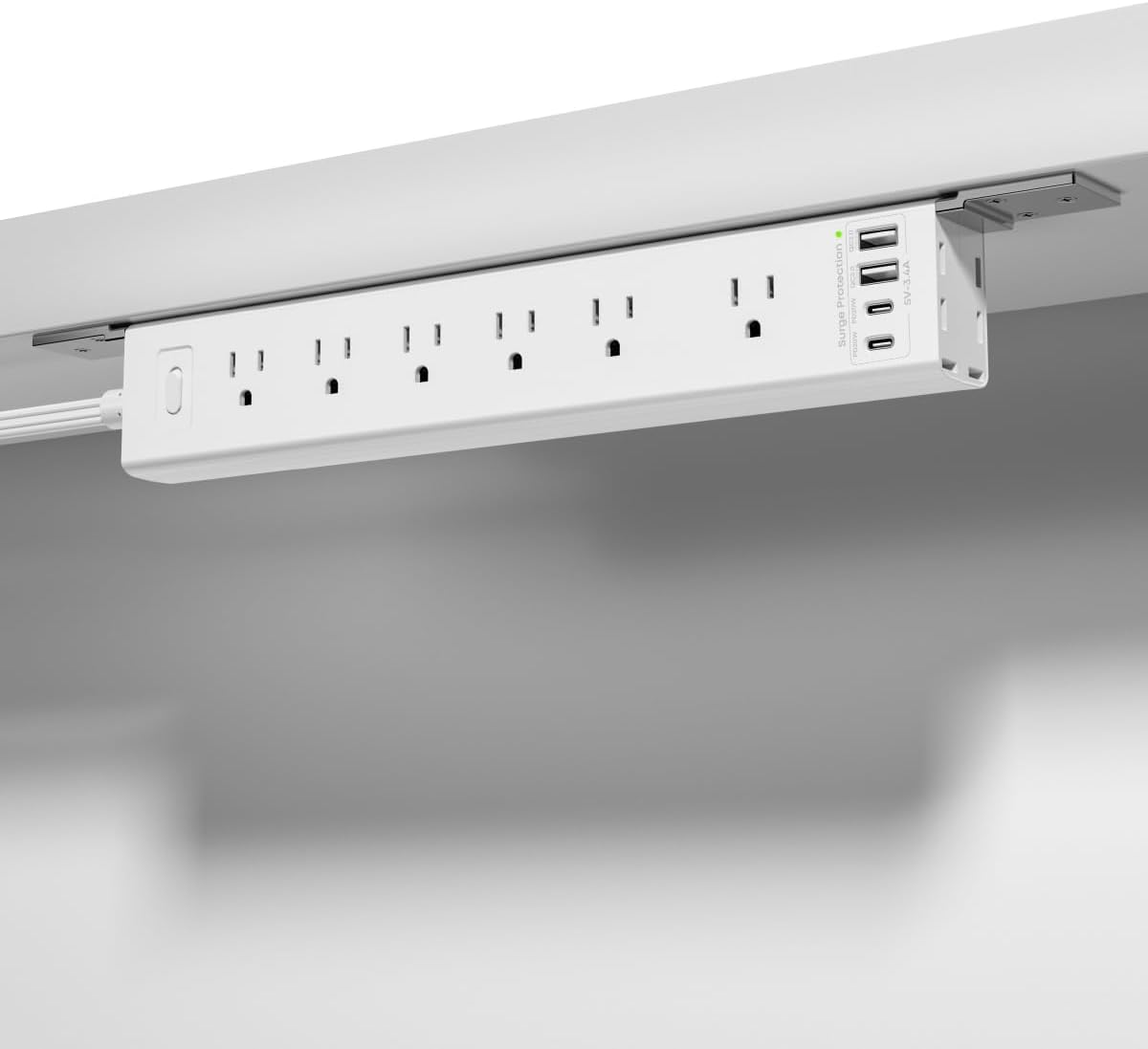
The HOPOW White Dual Layer Desk Clamp Power Strip combines 13 AC outlets and four USB ports in a 4.5-rated, two-level design. Its white housing is a notable alternative to the common black power strip, which can blend more naturally with light desks, white walls, and minimalist office furniture.
We may earn a commission when you buy through this link, at no additional cost to you.
The clamp adjusts to surfaces up to 2.75 inches thick and uses anti-slip pads for stability. No drilling or assembly is required, so the strip can be attached directly to a compatible desk edge. Its ten-foot flat cord reaches farther than most six-foot alternatives, and the 0.33-inch, 45-degree plug is designed to remain accessible and avoid blocking the lower outlet of a duplex receptacle.
Both layers are removable, allowing the upper strip to move with the user and the lower one to be repurposed for wall mounting. This modular quality adds flexibility, although it also makes the overall system larger than conventional mounted bars. The 1700-joule surge protector and 15-amp overload switch are solid safety features, but the product information does not state individual USB output levels.
This white HOPOW model is a strong choice for a light-colored, high-capacity workstation, conference table, gaming desk, or shared office. It is particularly useful where the appearance of a black industrial strip would be visually distracting. Buyers should verify whether seventeen total connections and the dual-layer footprint suit the available desk space.
The adjustable no-drill clamp creates a secure, semi-permanent mounting point while avoiding changes to the desktop. Anti-slip pads help the assembly remain stable, and the 2.75-inch adjustment range covers a broad selection of conventional desks.
The white housing differentiates this model from black power strips and can coordinate more closely with light furniture. Combined with the flat right-angle plug and long thin cord, it helps maintain a cleaner appearance around a modern desk.
We may earn a commission when you buy through this link, at no additional cost to you.
The right under desk power strip depends on your desk construction, device count, charging habits, and tolerance for permanent installation. Use the following factors to narrow the options before making a selection.
Screw-mounted strips provide a strong permanent connection and work well on solid wood or composite desks, workbenches, and wall panels. Bracket systems add orientation flexibility, while true clamp-on models attach to an edge without drilling. A clamp is especially convenient for rental spaces, but buyers should measure the desktop thickness first and account for any trim, edging, or unusual desk shape. Check whether the mounting hardware and instructions are included before planning the installation.
Count the devices that require direct AC power, then add room for bulky laptop, monitor, and printer adapters. Wide outlet spacing can be more valuable than a very high outlet count because it prevents one oversized plug from blocking several neighboring sockets. Also consider the physical bulk of the strip: a 17-port dual-layer model may overwhelm a compact desk, while an eight-outlet mounted bar can be installed discreetly beneath the work surface.
USB-A ports remain useful for accessories and older devices, while USB-C is generally more relevant for modern phones, tablets, and other compatible equipment. Compare individual port ratings rather than relying on the port count alone. Some products list a total wattage shared across all USB outputs, meaning the highest output may not be available on every port at the same time. Fast-charging labels such as PD or QC provide more useful context than a generic USB designation.
The amperage and wattage ratings indicate the maximum connected load before the safety switch should trip. Most computer accessories fit comfortably within common 13-amp or 15-amp strips, but heaters, soldering equipment, large power tools, and other high-draw appliances can require separate circuits. Avoid treating a power strip as an extension of a circuit indefinitely, and do not use a listed product with equipment that exceeds its stated rating.
Surge protection is designed to divert transient voltage spikes, while overload protection disconnects the strip if the combined load becomes excessive. Compare the stated joule ratings, but do not treat them as a guarantee that every device will be protected under every condition. A resettable circuit breaker is convenient because it restores function after reducing the load. Always follow the manufacturer's instructions and replace a damaged or malfunctioning strip.
A six-foot cord works well when the desk is near a wall outlet, while ten feet gives substantially more placement freedom. Thin flat cords are easier to conceal along baseboards, beneath carpets, or behind furniture, but they still need to be routed without creating a trip hazard. Right-angle flat plugs can preserve access to the lower receptacle of a duplex outlet and allow furniture to sit closer to the wall.
ABS construction keeps many strips lightweight and suitable for offices, while metal housings are more appropriate for workshops, garages, and shared technical areas. Fire-resistance claims, ETL listing, and stated operating ratings can help distinguish models intended for more demanding environments. Choose a finish that suits the location: black industrial housings disappear in workshop settings, while white housings coordinate better with light furniture.
A mounted strip is more effective when cables from the computer, monitor, chargers, and peripheral devices are restrained. Look for an integrated cable strap or nearby mounting point, and avoid leaving a cluster of adapters hanging below the desk. Secure extension cords along a leg or wall with appropriate cable-management accessories. The goal is not merely to hide the power strip, but to keep every connected lead predictable and easy to inspect.
Begin by measuring the desk thickness, checking the available clearance, and identifying the nearest suitable wall outlet. Install the strip in its intended orientation before bringing in a collection of cables. For a screw-mounted model, use the supplied hardware and secure the housing to a solid surface. For a clamp model, loosen the adjustment mechanism, position the bracket over the edge, and tighten it gradually until the anti-slip pads hold firmly.
Route the extension cord away from walking paths, moving chair wheels, metal desk legs with sharp edges, and any location where it could be pinched. A thin cord can pass beneath carpet or run along a baseboard, but it should never be compressed against a sharp edge. Connect the most permanent equipment first, then organize the shorter device leads with clips or ties that do not place strain on the plugs.
Periodically inspect the strip for heat, discoloration, loose plugs, damaged insulation, or a breaker that trips repeatedly. Do not reset an overloaded strip until the excess load is removed. If a connector no longer fits snugly, the housing is cracked, or the protection switch behaves abnormally, stop using the unit and have it evaluated. Keep the housing uncovered and keep liquids away from the outlets and controls.
Mounting is generally better for a fixed workstation because it keeps the hub stable and minimizes accidental movement. A clamp is more convenient in rental spaces or on desks that cannot be drilled. Whichever method you choose, confirm that the surface thickness, mounting clearance, and hardware are compatible before installation.
A listed power strip may be suitable for concealed routing if its installation instructions permit it, but the cord must not be pinched, cut, kinked, or placed where furniture can damage it. Use a flat cord where appropriate and follow the manufacturer's guidance. If the instructions are unclear, route the cable along a wall or baseboard instead.
A basic workstation with a laptop, monitor, and a few accessories may need only four to six AC outlets. Gaming desks, conference tables, and creative workstations can require more, especially when large laptop and display adapters compete for space. Count the actual plugs and their dimensions rather than choosing only by device count.
A higher rating means the strip can support a greater combined electrical load before the overload protection activates. It does not guarantee that every USB port delivers its maximum wattage at the same time, since USB charging output is frequently shared. AC and USB ratings should therefore be considered separately.
It depends on the individual port ratings and the strip's shared output ceiling. Models that specify 20 watts per USB-C port are more predictable than those that provide only a total wattage. If several devices may charge together, look for clear per-port and simultaneous-output information.
Surge protection responds to sudden transient voltage spikes, while overload protection disconnects the strip when the connected load exceeds its rated capacity. The two features address different electrical conditions, so a useful under desk strip should provide both rather than relying on a single protective mechanism.
Repeated tripping usually indicates that the connected devices exceed the strip's rated amperage or wattage, or that one device has a fault. Unplug the connected loads and reconnect them in smaller groups to identify the cause. If the breaker still trips, follow the manufacturer's reset instructions and have the strip or connected equipment checked.
A fixed mounted strip can work if its cord and attachments allow the full range of desk movement. A clamp mounted to a movable section may move with the desktop, but the cord must have enough length and flexibility to avoid pulling, tangling, or disconnecting. Check the desk manufacturer's guidance before attaching hardware to a moving surface.
The CRST 8-Outlet Mountable Metal Power Strip is the strongest all-around choice because it combines durable metal construction, 2100-joule surge protection, wide outlet spacing, and several mounting orientations. The HOPOW Dual Layer model is the premium option for exceptionally high outlet capacity, a ten-foot cord, and no-drill installation, while the HHSOET strip provides a durable, straightforward alternative for fixed workbench or office use.
The right choice for most buyers depends on priorities. Select a clamp when drilling is undesirable, a mounted metal strip for workshops or permanent installations, and a USB-C-focused model when charging speed matters. Measure the desk edge, account for adapter size, compare the shared USB output, and confirm that the strip's electrical rating can handle the intended load.
Before purchasing, verify the current listing and manufacturer instructions, especially for outlet ratings, USB output, mounting compatibility, and proper use. Product specifications and market conditions can change, so checking the latest information helps ensure that the selected power strip actually fits the desk, wall outlet, and connected devices.