
TP-Link 10GB PCIe Network Card (TX401)
4.2Editor score
Five-speed RJ45 auto-negotiation
Included CAT6A Ethernet cable
Low-profile bracket included
Explore the best 10GbE network cards for PCs, NAS systems, and servers, compared for ports, controllers, speeds, compatibility, and features.
A 10GbE network card can transform how a desktop, workstation, or server handles large files, NAS traffic, virtual machines, and high-bandwidth applications. The right adapter depends on more than headline speed: port type, controller, PCIe lane requirements, operating-system support, and case clearance all influence whether it will work well.
This guide compares ten 10GbE network cards using their supplied specifications, ratings, port layouts, controller details, supported speeds, and compatibility claims. The list covers RJ45 and SFP+ models from TP-Link, Synology, ASUS, TRENDnet, 10Gtek, and VunLink for a wide range of home, professional, and enterprise-style systems.
Each pick highlights the features that distinguish it within the category, while the buying guide explains the practical details that specifications alone can obscure. The three leading choices cover a balanced general-purpose recommendation, a compact Realtek-based option, and a premium Synology adapter. Availability and prices change over time.
4.2Editor score

4.3Editor score

4.6Editor score
The following comparison places all ten adapters side by side, highlighting their connection types, controllers, supported link speeds, and intended environments. It shows why matching the card to the rest of a network matters as much as maximizing advertised throughput.




The TP-Link TX401 is a straightforward 10GbE upgrade for a compatible PCIe desktop or server, earning a 4.2 rating from buyers. Its most immediately useful feature is the RJ45 port, which allows it to use standard copper cabling instead of requiring an SFP+ module. It also ships with a 1.5-meter CAT6A cable, removing one potential compatibility and installation obstacle.
We may earn a commission when you buy through this link, at no additional cost to you.
Multi-speed auto-negotiation is another strength. The adapter can operate at 10 Gbps, 5 Gbps, 2.5 Gbps, 1 Gbps, or 100 Mbps, making it a practical way to connect a modern host to switches, routers, and NAS systems operating at different speeds. Quality-of-Service support is intended to prioritize gaming traffic and reduce the effect of congestion on a busy local network.
The TX401 also includes both standard and low-profile brackets, which makes it suitable for conventional towers as well as compact mini-tower cases. Its stated system support covers several Windows desktop and Server releases along with Linux. The trade-offs are a single-port layout and no controller detail in the supplied specifications, so buyers prioritizing enterprise virtualization or multiple simultaneous high-speed links may need a more specialized card.
This is a strong general-purpose recommendation for someone adding 10GbE to a compatible PC without wanting to source a transceiver or cable separately. It is particularly attractive when the other end of the connection uses RJ45 and negotiates at 2.5 or 5 Gbps. For users who need dual ports, an SFP+ connection, or a Synology-specific system, one of the more specialized alternatives may be a better match.
Using RJ45 and including a CAT6A cable makes the TX401 approachable for home labs and workstations. The physical connection is familiar, while the card can still negotiate lower speeds when the switch or NAS cannot provide a full 10 Gbps link.
Five-speed auto-negotiation improves the odds of obtaining a useful connection across mixed equipment. It also allows a modern system to connect to legacy 1 Gbps or 100 Mbps infrastructure without requiring a separate basic network card.
We may earn a commission when you buy through this link, at no additional cost to you.
The Synology E10G30-T2 is the premium choice in this roundup, with a 4.6 rating and a purpose-built design for compatible Synology systems. Its two RJ45 10GbE ports make it especially appealing for storage-focused configurations where more than one high-speed connection can separate client traffic from other network functions.
We may earn a commission when you buy through this link, at no additional cost to you.
The adapter automatically negotiates between 10 Gbps and 1 Gbps. That shorter supported-speed list differentiates it from many general-purpose multi-gig cards, but in a validated Synology environment it reflects a focused approach rather than broad flexibility. Its five-year warranty also stands out among the shorter coverage periods associated with several alternatives.
Compatibility is the defining issue. The supplied information directs buyers to a Synology hardware compatibility list and requires DSM 7.1.1-42962 Update 5 or later. It should therefore be selected only after confirming that the specific Synology model, expansion slot, and current DSM release are supported. Attempting to force this adapter into an unrelated desktop or server would waste its strongest advantages.
For a Synology owner who needs two 10GbE connections, this is a particularly compelling option because it combines validated hardware, a high rating, dual RJ45 ports, and long warranty coverage. It is less suitable for a generic workstation builder because its optimization comes at the expense of broad platform compatibility. Verify the Synology compatibility list before ordering.
A dual-port adapter offers more flexibility than a single-port card. One connection can serve high-speed storage clients while another handles a separate workload, potentially reducing contention when a Synology system handles multiple transfer-intensive tasks.
Purpose-built Synology support is more valuable than generic compatibility when the card will remain inside a Synology enclosure. The five-year warranty and required DSM release give buyers clear references for maintenance and system planning.
We may earn a commission when you buy through this link, at no additional cost to you.
The 10Gtek Intel 82599EN adapter has a 4.4 rating and is designed for 10G-only fiber or direct-attach connections. Its single SFP+ port gives it a different role from the RJ45 cards in this guide: instead of using copper Ethernet directly, it accepts a compatible 10 Gigabit SFP+ module, DAC cable, or AOC.
We may earn a commission when you buy through this link, at no additional cost to you.
The original Intel 82599EN controller is the central feature, with I/O virtualization support and compatibility across Windows Server, Windows desktop systems, Linux, and VMware environments. The supplied details also list iSCSI, FCoE, and NFS storage use. A PCIe x8 lane interface makes the card suitable for x8 and x16 slots, while the included low-profile bracket broadens its enclosure options.
This card does not support 1, 2.5, or 5 Gbps links, so it is less forgiving than multi-speed RJ45 adapters. A compatible SFP+ module or DAC must be purchased separately. The listing also warns that Windows 11 needs careful driver setup, that the card does not support hot swapping, and that QNAP or Synology buyers should confirm compatibility before purchasing.
The 10Gtek is best suited to a server or technical workstation already equipped for SFP+ networking and operating at a full 10 Gbps. It offers less convenience for a simple desktop upgrade, but more purposeful infrastructure for data centers, virtualization, and fiber-based storage links. Confirm the transceiver type and operating-system driver path before purchase.
The SFP+ interface supports the use of appropriate optical modules, direct-attach cables, and active optical cables. This makes the adapter useful where cabling distance, rack layout, or switch infrastructure favors fiber-based connections over copper.
I/O virtualization and broad server operating-system support make the Intel controller familiar to infrastructure buyers. The caution is hardware: users need the correct module, slot, driver, and enclosure clearance to take advantage of those capabilities.
We may earn a commission when you buy through this link, at no additional cost to you.
The VunLink Realtek RTL8127 adapter combines a 4.3 rating with an unusually compact PCIe 4.0 x1 interface, making it an editor-friendly choice for modern and compact systems. It supports 10 Gbps, 5 Gbps, 2.5 Gbps, 1 Gbps, and 100 Mbps through a single RJ45 port with automatic negotiation.
We may earn a commission when you buy through this link, at no additional cost to you.
Its broad range of intended uses includes NAS systems, servers, workstations, gaming PCs, home labs, media editing, cloud storage, and fast file transfers. The PCIe x1 design conserves expansion-slot lanes while remaining usable in x1, x4, x8, and x16 physical slots. Both standard and low-profile brackets are included, helping the card fit full-height and compact desktop cases.
The Realtek controller is also presented as a lower-power, lower-heat alternative to traditional 10GbE solutions. That does not eliminate the need for airflow in a densely packed workstation, but it can be useful in builds where power and thermal headroom matter. The supplied specifications note that drivers may be required and that support for NAS platforms, virtualization tools, and Linux distributions can vary.
This is the best fit for a builder who wants a flexible multi-gig upgrade without occupying many PCIe lanes. It is less appropriate when two physical links, hot-swappable optical media, or enterprise-specific traffic-management features are priorities. Check the host operating system, switch, router, and NAS before installation, and use Cat6A cabling for the best chance of reaching the full advertised rate.
A PCIe 4.0 x1 interface is useful in compact builds where expansion lanes are limited. The adapter can still operate in larger slots, allowing it to fit common desktop and server layouts without requiring a multi-lane card.
Five supported speeds allow the card to connect productively to a broad mix of switches and storage systems. This makes gradual upgrades practical, with faster links available when both ends of the connection support them.
We may earn a commission when you buy through this link, at no additional cost to you.
The Vogzone X550-T2 is a dual-port 10GBASE-T adapter built around the original Intel X550-AT2 controller, and it holds a 4.3 rating. Its two copper RJ45 ports support 100 Mbps through 10 Gbps, giving it more connection flexibility than a single-port card while retaining familiar cabling.
We may earn a commission when you buy through this link, at no additional cost to you.
The feature set is notably comprehensive. It includes on-chip QoS, traffic management, load balancing across multiple CPUs, Virtual Machine Device Queues, SR-IOV, Intel Data Direct I/O, checksum offloading, iSCSI, FCoE, NFS, jumbo frames, PXE, DPDK, data center bridging, and auto-MDIX. The PCIe 3.0 x4 interface is compatible with x4, x8, and x16 slots.
A notable maintenance advantage is the supplied Intel NVM Update Utility, which allows supported Windows, Linux, and VMware ESXi systems to refresh adapter firmware in-system. The listing notes that the X550 may require manual configuration when 2.5 or 5 Gbps does not negotiate automatically. Broad OS support includes major Linux distributions, Windows, FreeBSD, and VMware environments.
This is an appealing choice for a server or workstation that benefits from dual high-speed ports and advanced networking features. Its complexity is justified for infrastructure users who understand traffic management and virtualization, but it may be excessive for a straightforward desktop. Confirm manual speed configuration requirements and ensure the case can accommodate the dual-port card and its included low-profile bracket.
QoS, SR-IOV, virtual queue support, checksum offload, and multi-CPU load balancing give administrators meaningful controls for demanding virtualized or storage-heavy environments. These capabilities go beyond simply adding a faster Ethernet port.
In-system NVM updates can simplify fleet maintenance and reduce the need for physical access or bootable media. Support still depends on the host operating system and the specific deployment, so administrators should follow the included utility's guidance carefully.
We may earn a commission when you buy through this link, at no additional cost to you.
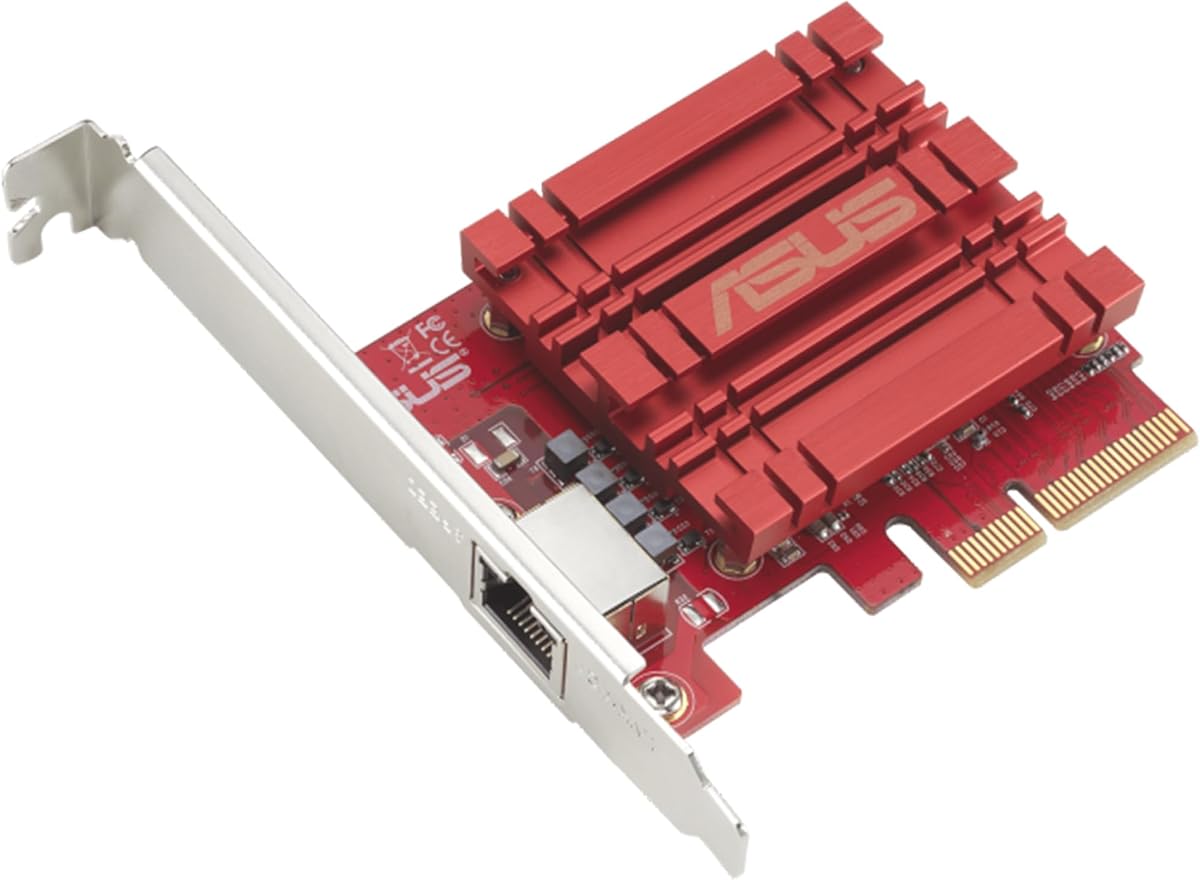
The ASUS NADACA0140 is a single-port 10GbE adapter aimed at upgrading a desktop with faster wired networking. It has a 4.1 rating and supports 10, 5, 2.5, 1 Gbps, and 100 Mbps, giving it broad compatibility with current and older network standards.
We may earn a commission when you buy through this link, at no additional cost to you.
Its standard RJ45 port keeps the physical side of the upgrade familiar. The card supports Windows 10, 8.1, 8, and 7 as well as listed Linux kernels, while built-in Quality-of-Service technology can prioritize selected bandwidth and data packets. That makes it relevant to users who want more than raw transfer speed, such as smoother operation under network contention.
The supplied information is less detailed than for several other products in the guide. It does not identify the controller, state the physical PCIe lane and generation, or clearly list included brackets. Those omissions make careful model verification especially important, particularly for small-form-factor systems or users who need a low-profile installation.
The ASUS is most suitable for a straightforward desktop upgrade using standard copper Ethernet and either Windows or Linux. It is less compelling for a dual-port server, fiber installation, or Synology expansion where validated compatibility matters. Before buying, confirm the physical dimensions, bracket arrangement, host slot, and operating-system driver support against the manufacturer's documentation.
An RJ45 interface avoids the extra expense and configuration associated with SFP+ hardware. It is a natural choice when the nearby switch already presents 10GBASE-T ports and suitable cabling is already installed.
Quality-of-Service support can help selected applications receive preference when the network becomes busy. Its practical value depends on the switch, configuration, and traffic pattern, so buyers should consider it alongside rather than independently of network administration.
We may earn a commission when you buy through this link, at no additional cost to you.
The Synology E10G30-T1 stands out with a perfect 5.0 rating and a clear focus on demanding storage and networking applications. It is a single-port RJ45 adapter designed for compatible Synology systems, offering auto-negotiation across 10, 5, 2.5, 1 Gbps, and 100 Mbps.
We may earn a commission when you buy through this link, at no additional cost to you.
The main advantage is validated compatibility. Rather than presenting itself as a generic desktop PCIe card, the adapter is explicitly validated for performance and fit within supported Synology systems. That focus reduces uncertainty for a buyer who wants to increase network throughput without introducing an unfamiliar expansion card into a storage appliance.
A five-year limited warranty provides additional confidence. The trade-off is specialization: the card is not presented as a general-purpose option for unrelated PCs, and its single port cannot offer the flexibility of the dual-port E10G30-T2. It also cannot expand the number of independent network links on a Synology platform by itself.
This is a particularly strong recommendation for a compatible Synology NAS that needs a faster client connection. The perfect rating reflects the supplied buyer feedback, though it should not be interpreted as a universal performance test. Check the current Synology hardware compatibility list, confirm the DSM version, and verify that the enclosure provides an appropriate PCIe slot before ordering.
Validated Synology compatibility gives administrators a clearer basis for deployment than a generic adapter. It is especially relevant when a high-throughput link will carry storage traffic and interruptions would affect everyday workflows.
Five-speed negotiation allows the adapter to work with both current high-speed switches and older infrastructure. The lack of a second port makes the E10G30-T1 a focused single-link upgrade rather than a flexible dual-port solution.
We may earn a commission when you buy through this link, at no additional cost to you.
The Intel 82599EN X520-DA1-compatible card has a 4.5 rating and presents a well-known SFP+ interface for high-speed network upgrades. Its single port supports the kinds of modules common in 10GbE infrastructure, including third-party DAC twinax cables, AOC cables, 10GBASE-SR multimode optics, and 10GBASE-LR single-mode optics.
We may earn a commission when you buy through this link, at no additional cost to you.
The product is positioned for NAS transfers, virtual-machine migration, and iSCSI storage, with automatic detection cited on Proxmox, TrueNAS, Unraid, and ESXi. QNAP, Synology, Ubuntu, Debian, and CentOS are also listed as detected environments. Windows users need the Intel Ethernet Adapter Complete Driver Pack, which is an important installation consideration.
Its physical design uses four PCIe lanes while remaining usable in x4, x8, and x16 slots. Full-height and low-profile brackets are included for ATX towers, 1U and 2U racks, and mini-ITX systems. The passive heatsink is intentionally used, and the supplied guidance advises that the card can run warm, making case airflow or an additional small fan important in a silent or enclosed build.
This adapter is a good match for infrastructure users who already understand SFP+ connections and want broad media choice. It can be less convenient for a novice because a compatible transceiver is required and the passive thermal design deserves attention. Confirm the exact platform detection, operating-system driver, case airflow, and module requirements before installation.
Support for DAC, AOC, SR, and LR media allows administrators to match the card to a switch and distance requirement. Avoiding restrictions tied to only one branded module type can simplify multi-vendor infrastructure planning.
The passive heatsink is simple and space-efficient, but sustained 10GbE operation may generate meaningful heat. A server airflow path or supplemental fan can help preserve stability in compact or acoustically sensitive enclosures.
We may earn a commission when you buy through this link, at no additional cost to you.
The TRENDnet TEG-10GECTX is a single-port RJ45 adapter that supports 10, 5, 2.5, 1 Gbps, and 100 Mbps. Its 4.1 rating reflects a practical approach centered on conventional copper networking, familiar PCIe installation, and broad operating-system compatibility.
We may earn a commission when you buy through this link, at no additional cost to you.
A distinctive benefit is the stated NDAA and TAA compliance for United States and Canadian government customers. TRENDnet also backs the adapter with three years of manufacturer protection and provides technical support during normal business hours. These details make it easier to shortlist for institutional procurement where procurement rules and ongoing vendor support are important.
The card uses a PCIe Gen 3.0 x4 interface and includes LED indicators. It supports 2.5GBASE-T and 5GBASE-T over standard Cat5e cabling for distances up to 100 meters, although achieving 10 Gbps still requires appropriate cabling and compatible equipment. Windows and Windows Server releases are listed, and the supplied details also cite IEEE standards for 10GBASE-T, 2.5GBASE-T, VLAN tagging, and link aggregation.
This is a well-rounded option for a Windows or compatible server environment where procurement compliance or multi-speed copper support is important. Its single RJ45 port and lack of SFP+ connectivity make it less suitable for fiber-based infrastructure or dual-link designs. Verify bracket clearance, operating-system drivers, and the intended network standard before purchase.
NDAA and TAA compliance can be decisive in government-focused environments. Buyers should still review the current procurement requirements and documentation for their specific project rather than relying only on the product category.
Support for 2.5 and 5 Gbps over Cat5e can make an upgrade possible without immediately replacing existing horizontal wiring. The card remains backward compatible while offering a path toward a full 10 Gbps connection when the complete path supports it.
We may earn a commission when you buy through this link, at no additional cost to you.
The 10Gtek X550-T1 is a single-port RJ45 card built around the original Intel X550-AT2 controller. It has a 4.1 rating and supports 100 Mbps, 1 Gbps, 2.5 Gbps, 5 Gbps, and 10 Gbps, which makes it a flexible option for systems using standard copper cabling.
We may earn a commission when you buy through this link, at no additional cost to you.
The PCIe 3.0 interface works with x4, x8, and x16 lanes, and the card is compatible with a broad set of Windows Server, Linux, FreeBSD, UEFI, and VMware ESXi environments. The supplied listing notes limited functionality with certain older ESXi versions. A low-profile bracket is included for compact servers and other small-enclosure installations.
Two limitations should influence the decision. The product does not support firmware updates, which matters for fleet environments where long-term adapter maintenance is a priority. The listing also says that 2.5 and 5 Gbps may need manual configuration if they do not negotiate automatically, and the card does not support hot swapping.
The 10Gtek X550-T1 is a sensible pick for an established server or workstation that values a familiar Intel controller and one wired multi-gig connection. It is less attractive for administrators who require firmware lifecycle management or frequent live cable changes. Confirm the operating-system version, expected virtualization functionality, and speed negotiation behavior before installing it.
The original X550-AT2 controller is recognizable in server and workstation environments. For administrators who already manage compatible Intel-based networking hardware, the controller can provide continuity in driver expectations and deployment practices.
No firmware update support is important in large or long-lived deployments. Individual users may accept that limitation, while fleet operators should assess it against their maintenance and security requirements.
We may earn a commission when you buy through this link, at no additional cost to you.
A useful 10GbE purchase begins with the host system, network equipment, and intended workloads. The most important decisions are connection type, physical fit, controller capabilities, operating-system support, and whether the complete network can sustain the advertised speed.
RJ45 cards use familiar copper Ethernet and are usually the simplest choice when the switch, router, or NAS has 10GBASE-T ports. They can also negotiate lower rates, depending on the model. SFP+ cards require a compatible module, DAC, or AOC and are more common in servers and data centers where fiber, distance, or media flexibility matters. The supplied products range from one-port RJ45 designs to dual-port RJ45 cards and single-port SFP+ models.
Choose the connector that already matches your infrastructure. In short, buying an SFP+ adapter for a copper-only switch adds complexity, while buying RJ45 for a fiber-only switch makes the card unusable.
The full 10 Gbps rating is only useful when the switch, NAS, router, and cabling path support it. Many RJ45 adapters also negotiate 5, 2.5, 1 Gbps, or 100 Mbps, which makes them practical for gradual upgrades. The 10Gtek Intel 82599EN SFP+ model, by contrast, is described as 10G-only for its supported link rates.
Prioritize a card that can match the speeds available now and in the near future. Multi-speed support is especially helpful when some devices still operate at 1 or 2.5 Gbps.
Check the card's interface generation, lane count, physical connector, and available slot space before buying. The VunLink RTL8127 uses a PCIe 4.0 x1 interface, the TRENDnet and dual-port Vogzone use x4-class layouts, and the 10Gtek Intel 82599EN uses PCIe x8. A card may fit a larger x16 slot, but the physical card and bracket must also clear the case and neighboring components.
In short, confirm both electrical lane requirements and physical clearance. A nominal x16 slot is not automatically suitable for every full-height card.
The controller determines more than headline compatibility. Intel-based options in this list emphasize virtualization, server traffic management, checksum offload, and features such as SR-IOV, QoS, jumbo frames, and iSCSI. Realtek-based cards focus on efficient multi-gig connectivity for general-purpose PCs, NAS systems, workstations, and compact builds. Synology adapters emphasize validated use within their own platform.
Match the controller to the workload. In short, advanced data-center features are useful only when the host OS, drivers, switch, and application stack can actually use them.
The cards list different combinations of Windows, Windows Server, Linux, FreeBSD, VMware, and other environments. Some are designed specifically for Synology and require a particular DSM release, while the 10Gtek SFP+ card warns that Windows 11 needs careful driver configuration. NAS platforms, virtualization environments, and Linux kernel versions can introduce additional variation.
Check the exact operating-system release, virtualization platform, and NAS model before buying. In short, generic support labels should be treated as a starting point rather than proof of plug-and-play operation.
A single port is adequate for many workstations and straightforward NAS connections. Two ports can provide more flexibility for separating traffic, connecting to multiple networks, or supporting specialized routed and switched configurations. The Synology E10G30-T2 and Vogzone X550-T2 provide dual RJ45 layouts, but their target use cases and management features differ.
Choose dual ports only when a concrete workflow benefits from them. In short, paying for unused ports or management complexity provides little practical benefit in a simple home-lab setup.
A 10 Gbps RJ45 connection is only as reliable as the cable path. CAT6A is appropriate for 10GBASE-T, and the TP-Link TX401 includes a 1.5-meter CAT6A cable. The TRENDnet card notes that 2.5 and 5 Gbps can run over standard Cat5e for distances up to 100 meters. Patch-panel quality, cable length, connector condition, and grounding all matter in structured installations.
Plan the complete cable route before ordering. In short, use qualified cabling appropriate to the link speed and distance, especially in walls, ceilings, or shared office pathways.
A 10GbE controller can consume more power and produce more heat than a basic Gigabit adapter, particularly in compact systems. The VunLink RTL8127 is designed with lower heat output, while the passive Intel 82599EN card is specifically described as running warm and needing case airflow or a small fan. Multi-adapter servers also need adequate circulation around the heatsinks.
Consider thermal design alongside performance. In short, a card should not be installed in a sealed or poorly ventilated enclosure merely because it physically fits.
Before installation, identify the host's operating system, confirm the card against the manufacturer's compatibility list, and inspect the case for a free PCIe slot and sufficient bracket clearance. For SFP+ cards, select a compatible module or DAC. For RJ45 cards, use high-quality cable appropriate for the intended speed and verify that the switch and storage device support the desired link rate.
Shut down the system, disconnect its power, and follow the computer or server manufacturer's installation procedure. Seat the card firmly in the correct PCIe slot, attach the power and data cables required by the network equipment, and install the full-height or low-profile bracket that matches the chassis. Restore power and use the supplied operating-system utilities or the manufacturer's recommended driver package.
After installation, verify that the adapter appears with the expected driver and negotiated link speed. Test both local file transfers and access to the wider network, then monitor temperatures during sustained activity. Keep the card's airflow path clear, avoid repeatedly reconnecting a connection that is not designed for hot swapping, and revisit driver or firmware guidance before making major operating-system changes.
Yes, at least one device at each end of the connection must support the link speed you want to use. A 10GbE card connected to a 1 Gbps switch will normally negotiate a lower rate. For the best results, the computer, switch or router, and NAS or storage target should support matching 10GBASE-T or SFP+ connectivity.
CAT6A is a safe choice for a new 10GBASE-T installation and is what the TP-Link TX401 includes. Lower-category cables may work at shorter distances or reduced speeds, but cable length and installation quality affect reliability. Existing Cat5e may support 2.5 or 5 Gbps in suitable runs, while full 10 Gbps should use appropriately rated and installed cabling.
Choose RJ45 when the rest of your network uses 10GBASE-T copper and you want the simplest setup. Choose SFP+ when your switch or server infrastructure uses fiber, DAC, or AOC connections, or when you need specific transceiver options. An SFP+ card also requires the appropriate module or cable, which should be considered before installation.
Most multi-speed RJ45 adapters in this list can negotiate 1 Gbps or lower, and some also support 2.5 and 5 Gbps. The exception is the 10G-only 10Gtek Intel 82599EN SFP+ card. Check the individual card's supported rates and ensure the network configuration permits the speed you need.
Driver requirements vary by adapter and operating system. Some cards are automatically detected on Linux and major NAS or virtualization platforms, while Windows may require the Intel Ethernet Adapter Complete Driver Pack or another manufacturer-provided driver. Synology cards are intended for validated systems and specific DSM releases. Always use the current driver recommended for the exact operating-system version.
It can, but physical and electrical compatibility must both be checked. The VunLink RTL8127 uses a compact PCIe 4.0 x1 design, while several other cards use wider x4 or x8 interfaces. Confirm the case's slot layout, available space beside the card, PCIe lane support, power requirements, and whether a low-profile bracket is included.
The Synology E10G30-T1 and E10G30-T2 are purpose-built for compatible Synology systems, so they are not the natural choice for a generic desktop. Their platform validation and support are useful within that ecosystem. A multi-speed RJ45 adapter from a broader PC-oriented manufacturer is usually more appropriate for an unrelated Windows, Linux, or workstation build.
Requirements depend on the controller, card design, enclosure, and number of adapters. The VunLink RTL8127 is designed for lower heat output, while the passive Intel 82599EN card is described as running warm and may need additional airflow in a compact or silent case. Ensure that intake and exhaust paths keep air moving across the heatsink during sustained transfers.
The TP-Link TX401 is the most balanced general-purpose selection because it combines RJ45 convenience, five-speed negotiation, an included CAT6A cable, and support for common desktop and server operating systems. The VunLink RTL8127 stands out for a compact PCIe 4.0 x1 design and broad multi-gig use, while the Synology E10G30-T2 is the premium choice for validated dual-port Synology deployments.
Before choosing, prioritize compatibility with the system, switch, NAS, cabling, and operating system over headline throughput alone. Determine whether the network needs RJ45 or SFP+, whether a single port is sufficient, and whether advanced controller features will be used. Also check bracket clearance, thermal needs, driver requirements, and any platform-specific DSM or virtualization limitations.
Product availability and prices change, so check the current listing and compatibility documentation at the time of purchase. The right 10GbE network card is not merely the fastest one listed; it is the one that can establish a stable, supported, and properly cabled link within your actual network.