
M-Audio Keystation 88 MK3
4.5Editor score
Velocity-sensitive semi-weighted keys
Immediate USB computer connectivity
Pitch, modulation, and sustain controls
Our expert guide compares the best 88 key weighted MIDI controllers, helping you assess key action, controls, connectivity, software, build quality and studio
An 88-key weighted MIDI controller gives pianists the full keyboard range alongside the tactile response and control surface needed for modern music production. A satisfying key action can improve dynamics, timing, and confidence, while practical knobs, pads, displays, and pedal support determine how efficiently you can shape sounds in a DAW.
We compared all ten products by examining their stated key actions, control layouts, performance features, connectivity options, included software, and intended studio roles. The list covers fully weighted hammer-action models, semi-weighted professional controllers, a hybrid-synth keybed, and one standalone digital piano, revealing which options suit different performance and recording needs.
Each review identifies the standouts, practical compromises, and ideal user for every model, from the best budget-friendly semi-weighted option to premium instruments built for demanding studios. Product configurations and availability can change, so confirm the current specifications, accessories, and software package with the manufacturer or retailer before purchasing.
4.5Editor score
4.6Editor score

3.9Editor score
This side-by-side overview compares the keybed feel, control layout, performance features, and stated connectivity of all ten picks, helping pianists and producers identify the most suitable option for their workspace.


The M-Audio Keystation 88 MK3 combines a full-size, velocity-sensitive semi-weighted keybed with the essential controls of a practical home-studio MIDI controller. Its 4.5 rating reflects a well-balanced approach to keyboard realism, approachable operation, and a slim physical design. Rather than crowding the surface with specialized hardware, it concentrates on functions that most pianists and producers use during everyday composition, recording, and sound design.
We may earn a commission when you buy through this link, at no additional cost to you.
The 88 keys respond to playing velocity and provide more substantial feedback than many basic controllers, while the pitch and modulation wheels support expressive synth and sampler performances. Transport and directional buttons, a volume fader, octave controls, and a sustain-pedal input cover many standard production tasks. USB connectivity works with Mac or PC systems without requiring drivers or a separate power supply, making setup refreshingly direct.
The central compromise is the key action. These are semi-weighted keys rather than a fully weighted hammer-action or graded piano action, so the controller cannot completely duplicate the resistance of a digital piano. It also lacks the illuminated drum pads, multiple assignable faders, and large displays seen on higher-end professional models. Even so, the streamlined layout avoids a learning burden and is likely to satisfy players who want a full keyboard with a convincing response.
This is our top budget recommendation for students, home-studio producers, composers, and pianists who need a capable 88-key MIDI surface without moving to a premium weighted model. It also works well as a straightforward songwriting controller when a sound module runs in a Mac or PC. Those wanting true acoustic-piano resistance or extensive hands-on sound control should examine the fully weighted alternatives later in this guide.
The Keystation's driver-free USB connection reduces setup friction for newcomers and busy creators. It also supports iOS devices through an Apple to USB Camera Adapter, which is sold separately, allowing compatible music applications to become part of the workflow.
The compact control surface places a volume fader, transport controls, octave switches, pitch and modulation wheels, and sustain input within easy reach. It is a practical layout for keyboard-led production without the learning burden of a dense knob-and-fader array.
We may earn a commission when you buy through this link, at no additional cost to you.
The M-Audio Hammer 88 Pro is built around a genuine performance-first proposition: 88 velocity-sensitive, graded hammer-action weighted keys with aftertouch and assignable zones. Its 3.9 rating is the lowest among this group, but the specification sheet presents a remarkably comprehensive instrument for virtual pianos, samplers, effect plugins, and full-scale DAW control. The keybed is the defining attraction for players who care about dynamic realism.
We may earn a commission when you buy through this link, at no additional cost to you.
Beyond the keyboard, the Hammer 88 Pro provides 16 RGB-backlit, velocity-sensitive drum pads, eight assignable knobs, eight assignable buttons, and nine assignable faders. Note Repeat supports repeat-style beat production, clip launching, and soundboard triggering. The controls can be mapped to instruments, effects, and DAW parameters, while auto-mapping, Smart Chord, Smart Scale, and an arpeggiator add useful shortcuts for writing and performance.
Its Native Kontrol Standard integration is especially relevant for users of compatible Native Instruments libraries. The stated package also includes a choice among three curated Komplete 15 Select bundles, along with MPC Beats, Ableton Live Lite, AIR Music Tech's Velvet, Mini Grand, Hybrid 3, and Touch Loops. The only caution is that software eligibility and selection procedures can change, so buyers should confirm exactly what accompanies their particular unit.
The M-Audio Hammer 88 Pro is ideal for a serious virtual-instrument studio, a player who wants both a weighted keybed and production controls, or a producer who regularly works with sampler and Native Instruments workflows. It may be more elaborate than necessary for basic MIDI typing, and its rating warrants checking recent owner feedback, but its stated feature set makes it one of the most complete choices in this roundup.
Velocity sensitivity, graded weighting, aftertouch, and assignable zones provide several ways to shape a virtual performance. These details are particularly useful for acoustic piano simulations, expressive synth patches, and sampler instruments that reward nuanced input.
The illuminated pads and Note Repeat turn the controller into more than a keyboard. They support rhythm programming, clip launching, and triggering from a single hardware surface, while the knobs, buttons, and faders provide deeper access to production parameters.
We may earn a commission when you buy through this link, at no additional cost to you.
The black Arturia KeyLab 88 mk3 brings together a fully weighted hammer-action keybed, 12 pressure-sensitive performance pads, and a streamlined set of pedal connections. Its 4.3 rating suggests a generally positive reception, and the design is clearly aimed at players who want serious resistance under the fingers while retaining a versatile MIDI control surface. The included sheet music stand adds practical value for focused practice and score-based work.
We may earn a commission when you buy through this link, at no additional cost to you.
The 88-key format spans the complete piano range, and the hammer-action construction is the feature that most directly separates this model from a conventional lightweight MIDI keyboard. A player accustomed to weighted digital pianos can preserve more of that physical technique while controlling software instruments. Pressure sensitivity on the pads adds another dimension for finger-drumming, sample selection, and dynamic triggering.
Sustain and auxiliary pedal inputs support realistic phrasing and expanded footswitch workflows. USB-C power is listed in the product data, indicating a modern connection approach for a computer-based setup. The supplied information is concise, however, so buyers should verify the full control layout, included software, dimensions, and any additional bundled applications before making a final decision.
This black KeyLab 88 mk3 is a strong candidate for pianists, composers, and producers who prioritize a weighted action and a restrained visual design. It is also appealing for stage-style setups where a full-size instrument and responsive pads matter more than an extensive bank of faders. Those who require clearly documented software bundles or a large onboard display may prefer one of the models with more comprehensive specifications.
The fully weighted hammer-action keys provide a more substantial playing experience than springy or unweighted alternatives. They are designed to satisfy players who want their keyboard technique to transfer naturally to software pianos.
Twelve pressure-sensitive pads expand the controller beyond two-handed playing, while sustain and auxiliary inputs allow more involved performance arrangements. A sheet music stand rounds out a controller that can serve both practice and production.
We may earn a commission when you buy through this link, at no additional cost to you.
The white Arturia KeyLab 88 mk3 shares the central proposition of its black counterpart: a full 88-note weighted hammer-action keyboard with 12 pressure-sensitive performance pads and support for sustain and auxiliary pedals. Its 3.8 rating is the lowest among the products here, which makes it especially important to assess recent user feedback and verify the complete specification before choosing it. The physical concept remains well suited to pianists and hybrid performers.
We may earn a commission when you buy through this link, at no additional cost to you.
A weighted action changes the character of practice. It asks for greater control from the fingers and arm, but that resistance can help a player develop dynamics, articulation, and timing that may not transfer to a featherweight controller. The USB-C powered connection and USB MIDI focus make the unit more of a computer instrument than a self-contained portable piano, which is important when planning a studio system.
Its most visible distinction is the white finish, which can create a brighter, more contemporary look in a studio or home environment. Functionally, the supplied details do not identify an advantage over the black model. Buyers should therefore compare the finish, current configuration, accessories, and software independently rather than assuming one color receives a different feature set.
Choose the white version for its distinctive appearance and solid weighted-key concept, particularly if it will be the visual centerpiece of a studio. It may also suit performers accustomed to light-colored stage instruments. Confirm the current package, control assignments, and pedal compatibility, and consider the black version if the lower rating appears connected to a specific configuration concern.
The white enclosure gives the instrument a distinctive visual identity compared with the black version. It works well for players who coordinate studio gear with bright, contemporary instruments or stage-oriented setups.
The 88-note hammer-action keybed gives pianists a familiar resistance profile for software instruments. Pressure-sensitive pads and multiple pedal inputs extend that natural approach into beat triggering and expressive control.
We may earn a commission when you buy through this link, at no additional cost to you.
The Novation Launchkey 88 MK3 is one of the strongest all-round choices for musicians who want keyboard performance and computer control in a single device. Its 4.6 rating places it among the most favorably reviewed options in this guide. The 88 premium semi-weighted keys provide a more substantial response than a typical lightweight controller, while 16 velocity-sensitive pads support drums, clips, and performance triggering.
We may earn a commission when you buy through this link, at no additional cost to you.
Deep integration with leading DAWs is the defining feature. Instead of treating the controller as a basic MIDI input, the Launchkey is designed to expose common transport, mixing, and track functions in a workflow that feels integrated with the software. MIDI output also allows it to control external synths and hardware, while Custom Modes offer a more personal approach to control assignments.
The creative tools extend well beyond conventional chord playing. A powerful arpeggiator includes Strum Mode for melodic and rhythmic ideas, and three chord modes—fixed, scale, and user—can generate chords with one finger. These features are useful for songwriters testing harmonic alternatives and for producers who want to move quickly through patterns without repeatedly navigating software menus.
This model is an excellent fit for DAW-based producers, electronic musicians, and pianists who prioritize workflow integration over fully weighted resistance. It is also a persuasive choice for a stage setup where chord generation, pad performance, and external MIDI control are valuable. Buyers who need the heavy downstroke of a graded hammer-action keybed should instead consider one of the fully weighted models.
Deep integration with leading DAWs places frequently used commands on the hardware. This reduces mouse movement and makes the controller feel like an extension of the software rather than a separate input device.
The arpeggiator, Strum Mode, and three chord modes offer quick ways to develop melodic and rhythmic ideas. These performance features are particularly helpful for producers who favor hands-on inspiration over menu-driven programming.
We may earn a commission when you buy through this link, at no additional cost to you.
The Studiologic SL88 MK2 offers a comparatively focused take on the weighted MIDI controller category. Its 4.5 rating reflects a well-received balance, and the core specification is easy to appreciate: 88 weighted keys, an onboard display, seven encoders, and compatibility with Numa Player. The result appeals to producers who want meaningful key resistance and a moderate control surface without an extremely dense layout.
We may earn a commission when you buy through this link, at no additional cost to you.
The onboard display is a practical distinction. It can show contextual information without requiring the user to rely entirely on a computer monitor, making parameter selection easier during a session. Seven encoders provide tactile control over tracks, plug-ins, or virtual instruments, and the weighted keyboard gives pianists a more grounded response than a typical office-style MIDI controller.
Compared with heavily featured competitors, the published specification list is modest. The data does not highlight an onboard pad bank, extensive fader array, specific pedal inputs, or a large software bundle. That does not mean those features are absent, but it does mean buyers should inspect the current manufacturer specification and physical layout to ensure the controller meets their production needs.
The SL88 MK2 is a sensible option for a focused studio, a player who values weight and visual feedback, and a producer who wants enough hands-on control without a crowded surface. It is also relevant to Numa Player users. Those who rely heavily on chord generation, clip launching, or transport-specific hardware buttons may prefer the Novation or Arturia models with more explicitly documented performance tools.
An onboard display keeps important information near the performer. It can make navigation more efficient when the software window is crowded, secondary, or located on another part of the desk.
Seven encoders offer a practical level of direct parameter access without overwhelming the playing surface. This makes the controller approachable for users who want more control than a basic keyboard but less complexity than a full-size mixing console.
We may earn a commission when you buy through this link, at no additional cost to you.
The Yamaha P71 has a 4.7 rating, the highest in this comparison, and excels in a different role from most entries: a straightforward weighted-action digital piano. Its 88 touch-sensitive keys replicate the resistance experience of an acoustic piano, while 10 built-in voices, including a Yamaha grand piano sound, let performers play immediately without a computer or external sound module.
We may earn a commission when you buy through this link, at no additional cost to you.
The simplified operation is one of its strongest qualities. Rather than presenting a dense collection of production controls, the P71 uses a one-button approach designed to keep the focus on music. Dual Mode can layer two voices, such as piano and strings, to create a fuller sound. An included sustain pedal supports more nuanced phrasing, and the supplied power supply completes the basic standalone setup.
The key limitation is category fit. The product information identifies the P71 as a digital piano rather than a USB MIDI controller, and it does not list MIDI connectivity, DAW integration, assignable controls, drum pads, or a production software package. While it may provide useful sound and keyboard performance, a buyer whose main requirement is computer-based MIDI control should not assume that it performs the same role as the other nine products.
This is an excellent choice for students, families, and pianists who want an affordable, uncomplicated weighted keyboard for daily practice. It may also serve as a comfortable monitoring instrument alongside a computer-based production setup, subject to confirmed connectivity. For a controller with a defined MIDI workflow, a DAW, and hands-on production parameters, choose one of the dedicated MIDI keyboards instead.
Ten onboard voices and simple one-button operation make the P71 approachable for practice sessions. A performer can sit down, select a sound, and concentrate on technique rather than software setup or menu navigation.
Touch sensitivity and weighted action create a more traditional playing experience, while the included sustain pedal supports familiar expressive phrasing. The streamlined layout is especially useful for beginners learning dynamics and articulation.
We may earn a commission when you buy through this link, at no additional cost to you.
The Arturia KeyLab Essential mk3 is a software-forward 88-key controller built around a hybrid synth-piano feel. Its 4.4 rating indicates a positive reception, and the generous software package helps distinguish it from a plain hardware MIDI keyboard. The full piano range, RGB-backlit pads, contextual buttons, and bright 2.5-inch LCD make it especially appealing to producers who want inspiration and sound selection close at hand.
We may earn a commission when you buy through this link, at no additional cost to you.
Custom scripts provide deeper control over Ableton Live, Logic Pro X, FL Studio, and other compatible DAWs. Scale Mode, Chord Mode, and an arpeggiator support composition, songwriting, and beat-making, while the pads respond to velocity and pressure. The controller's 2,000 included Analog Lab Pro presets are no longer restricted to vintage sounds, expanding the range into modern synths, orchestral textures, and hybrid instruments.
Its key action remains the important trade-off. The hybrid synth-piano feel is designed to be comfortable and expressive, but it is not the same as a fully weighted hammer-action model. That may be ideal for a player who wants resistance without the weight of a large studio instrument, or it may disappoint someone seeking a digital-piano simulation. The included software also includes subscriptions to Loopcloud and Melodics, so users should consider ongoing access and compatibility.
Choose the Essential mk3 for a producer who values sounds, visual feedback, and DAW-specific control in an approachable controller. It is also a compelling option for composers who want chord, scale, and arpeggiator tools immediately available. Players whose top priority is a traditional weighted action should compare the KeyLab 88 models or other fully weighted alternatives.
Analog Lab Pro and the included piano instruments give users substantial material before they begin building their own sound library. The expanded styles make the controller useful for writing, scoring, and quick inspiration sessions.
The 2.5-inch display provides immediate feedback, while custom DAW scripts translate common software functions into hardware actions. RGB pads add visual state information and pressure-sensitive control for more dynamic performance.
We may earn a commission when you buy through this link, at no additional cost to you.
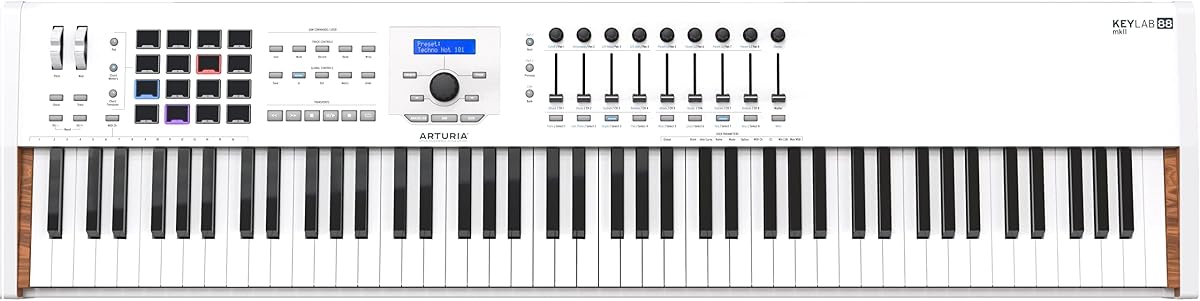
The Arturia KeyLab 88 MkII earns our Editor's Choice for delivering the most complete balance of realistic key action, tactile control, performance features, and software support in this list. Its 4.6 rating is among the strongest, and the 88-note Fatar TP/100LR keybed delivers a high-quality, velocity-sensitive hammer-action feel with aftertouch and a strong piano-like response.
We may earn a commission when you buy through this link, at no additional cost to you.
Its control surface is particularly expansive. Sixteen RGB-backlit performance pads can handle rhythm, clips, samples, or custom assignments, while a control bank contains nine faders and nine rotary knobs. This arrangement allows a producer to mix software instruments, adjust effects, and navigate a DAW without constantly returning to the mouse. The combination is useful for live performance, detailed sound design, and full-scale production sessions.
The model is not flawless. It belongs to an earlier generation of the KeyLab range, so buyers should compare it carefully with the newer KeyLab 88 mk3 variants in terms of current software, control layout, connectivity, and included accessories. The product information also explicitly notes that a stand is not included, which can matter for anyone setting up the controller as the centerpiece of a permanent studio.
Despite those points, the MkII remains a compelling professional choice for players who want a large weighted keyboard and a deep hardware control surface. It is especially well suited to composers, film-scoring users, electronic musicians, and producers who want every major production function within reach. For buyers prioritizing a contemporary feature set, the newer models merit a side-by-side review; for robust weighted playability and abundant controls, this model remains an excellent pick.
The Fatar TP/100LR keybed provides velocity sensitivity, aftertouch, hammer-action response, and a piano-like feel across all 88 notes. Those details support more expressive software-instrument performances than a basic controller can deliver.
Nine faders, nine knobs, and 16 illuminated pads make the MkII function as a compact production desk. Producers can dedicate physical controls to mixing, effects, instruments, and performance tasks while maintaining direct access from the keyboard.
We may earn a commission when you buy through this link, at no additional cost to you.
The Roland A-88MKII is built for musicians who want premium weighted-key feel in a thin, professional instrument. Its 3.8 rating is tied for the lowest in the guide, but the stated design strengths are significant: Roland's PHA-4 keybed, wood and premium construction, a shallow profile, three pedal inputs, and MIDI 2.0 readiness. It is especially relevant to experienced players and stage-oriented workflows.
We may earn a commission when you buy through this link, at no additional cost to you.
The control layout is compact but purposeful. Eight RGB-lit assignable knobs and eight RGB-lit pads provide tactile access to common functions, while three customizable zones let users divide the keyboard for different instruments or control assignments. An onboard arpeggiator and chord memory support performance shortcuts, and the included control application supports deeper customization and instant recall of settings.
Its dimensions are a practical strength. The thin body and shallow depth fit contemporary desks where a bulky 88-key controller would dominate the workspace. USB-C connectivity with bus power simplifies a computer-based setup, and MIDI 2.0 readiness offers forward-looking compatibility for compatible hardware and software. The limited published spec does not emphasize a large fader bank, so this is better viewed as a performance controller than a portable mixing surface.
Buy the A-88MKII for its premium key action, refined construction, shallow enclosure, and flexible zone-based control. It suits stage performers, composers, and studio musicians who value a durable, focused tool. The low rating makes current owner feedback worth reading carefully, but the underlying feature set is compelling for anyone seeking a refined weighted MIDI instrument.
Roland's PHA-4 keybed supplies the central performance experience, while the low-profile enclosure helps preserve desk space. This makes the controller practical for permanent studio installations where a deep chassis would be inconvenient.
Three customizable keyboard zones can divide responsibilities among different patches or control groups. Combined with assignable pads, knobs, an arpeggiator, and chord memory, the layout supports performance setups that extend beyond ordinary two-handed piano playing.
We may earn a commission when you buy through this link, at no additional cost to you.
The right weighted MIDI controller depends on how you play, which software you use, and how much physical control you need. Keybed realism, build quality, workflow integration, and connectivity should be considered together rather than as isolated specifications.
A fully weighted keyboard uses spring or hammer-like resistance to imitate the physical response of an acoustic piano. It is the strongest choice for pianists who want realistic resistance, dynamic shading, and articulation to carry naturally into software instruments. Models such as the Arturia KeyLab 88 models use hammer-action-style keybeds, while the Roland relies on its PHA-4 action. A semi-weighted keyboard still responds to velocity but uses lighter, more uniform resistance, making it easier to move and generally less physically demanding. Choose according to technique and comfort rather than assuming one category is automatically superior.
Velocity sensitivity allows the controller to report how forcefully each key is struck, giving virtual instruments a much wider range of dynamics. Aftertouch goes further by detecting increased pressure after the initial note-on event, allowing performers to bend, swell, or otherwise shape a held sound. Not every weighted model offers aftertouch, and some pads support pressure independently of the keyboard. Check which inputs your preferred virtual piano, synthesizer, and sampler actually respond to, then prioritize a controller with at least velocity sensitivity and, for expressive work, a specified aftertouch implementation.
A MIDI keyboard can send notes to a DAW, but good integration goes further by placing transport, mixing, track, and plugin controls on the hardware. The Novation Launchkey emphasizes direct DAW integration, while the Arturia models combine custom scripts with more conventional banks of faders, knobs, and pads. Count the number of assignable controls and consider whether you need one-finger mixing, clip launching, or effect adjustment. A large control surface adds versatility but also takes desk space and may require a learning period, so match the layout to your actual production tasks rather than purchasing on feature count alone.
Performance pads can trigger drum sounds, samples, clips, or effect commands without interrupting keyboard playing. Velocity-sensitive and pressure-sensitive pads provide more dynamic options than simple buttons, while RGB lighting can indicate assigned banks or performance states. Many controllers also include an arpeggiator, chord-generation modes, scale modes, note repeat, and chord memory. These tools are valuable for electronic music, beat production, and live performance, although they differ greatly in depth. Beginners may find them educational, while experienced users should verify whether the implementation supports the specific rhythmic or harmonic functions they need.
USB MIDI is the primary connection for most modern controllers, but confirm the connector type, whether the unit is bus-powered, and which operating systems are supported. MIDI output can allow the keyboard to control external synths or hardware, while the supplied specifications for some models also mention legacy five-pin output. Apple compatibility may require a suitable adapter and compatible applications. A bundled control application can improve setup and preset recall, but it should also be available for your chosen computer. Treat the computer and software as part of the instrument, not as an afterthought.
An 88-key controller occupies more space than a typical compact MIDI keyboard, and a weighted model can be substantially heavier. The Roland A-88MKII uses a thin, shallow enclosure to reduce its footprint, while other models may require a sturdy stand and more room. Premium materials and a well-constructed keybed can improve longevity and feel, but portability should also be considered for rehearsals, stages, and classrooms. If the controller will remain on a desk, prioritize stability, build quality, and control reach. If it must travel frequently, investigate weight, included stand options, and protective case requirements before committing.
Sustain is essential for realistic piano phrasing, while additional footswitch or expression inputs can control changes, arpeggios, or other parameters. A pedal should feel stable and connect to the correct MIDI function without requiring complicated setup. Displays provide information about the selected sound, parameter, or mode and can reduce dependence on a computer screen. The Studiologic SL88 MK2 and Arturia KeyLab Essential mk3 highlight onboard displays, while the KeyLab 88 mk3 supports sustain and auxiliary pedal inputs. These details are secondary to the key action for some players but can materially improve daily workflow for others.
Bundled software can provide immediate access to pianos, synths, lessons, or recording tools. The Arturia KeyLab Essential mk3 lists Analog Lab Pro, two piano instruments, and subscriptions to Loopcloud and Melodics; the M-Audio Hammer 88 Pro includes a broad production package and Native Kontrol Standard support. Software bundles can change, and subscriptions may involve ongoing terms, so verify the current package and compatibility before purchasing. If you already own a preferred virtual instrument, make sure the controller works smoothly with it. Otherwise, included software may be a meaningful way to begin producing without immediately building a separate library.
Begin by connecting the controller to the computer, opening the DAW, and selecting a suitable MIDI input. Install any required control application and choose a basic preset before loading complex mappings. In the DAW, assign the keyboard as the MIDI input, enable velocity where supported, and set the appropriate audio and MIDI monitoring preferences. Test a few notes at different dynamics, then verify sustain, pitch, modulation, pedal, pad, knob, and fader functions one at a time.
Create a simple control map before building complex assignments. Assign only the knobs, faders, buttons, and pads that match your current project, label them clearly, and save the configuration for reuse. If the controller offers zones, assign each zone to a different instrument or control group. Practice with a small number of sounds first so you can learn how the key action, pads, and software parameters interact without losing time in a large session.
Protect the instrument by using a stable stand, keeping liquids away from the keys and controls, and avoiding abrupt force on pitch and modulation wheels. Clean the surface with a soft, dry or lightly dampened cloth according to the manufacturer's guidance, and do not pour cleaners into gaps around the keys. When transporting it, use an appropriately sized padded case and protect the keybed from heavy pressure. Periodic software updates, cable inspections, and careful storage help preserve both performance consistency and hardware longevity.
A weighted model usually feels closer to an acoustic piano because the keys resist your fingers and require controlled pressure. That can improve dynamics, timing, and articulation when playing virtual instruments, although it also makes the controller heavier and more physically demanding. Unweighted keyboards are often easier to move and may be sufficient for composition, light MIDI control, or portable setups.
Yes. A MIDI keyboard sends note, velocity, controller, and pedal information to software instruments running in a DAW or standalone application. The quality of control depends on the model's supported messages, mappings, and aftertouch capabilities, so check whether your favorite synth and sampler support the relevant features.
Semi-weighted keys add more resistance and response than unweighted keys, but they generally use a lighter and more uniform spring mechanism. Hammer-action keys imitate the leverage and progressive response of an acoustic piano, offering a more traditional weighted feel. The right option depends on your technique, preferred playing style, and portability needs.
Most MIDI controllers include a sustain-pedal input but do not include the pedal itself. If the listing does not specify an included pedal, plan to purchase one that matches the controller's connection. A pedal adds important control over note duration and is especially useful for realistic piano phrasing and organ-style patches.
An 88-key layout is valuable whenever you need a full piano range, from low bass notes to high treble notes. It is particularly useful for piano, strings, film scoring, and realistic virtual-instrument performances. For beat production, sound design, or limited melodic writing, a smaller controller may provide the same essential MIDI functions with less space and weight.
Built-in sounds are convenient for immediate practice and performance, while a blank controller relies on the computer and virtual instruments for sound generation. Dedicated MIDI controllers usually offer greater control over software integration. The Yamaha P71 is primarily a standalone digital piano in this list, so buyers seeking computer-based MIDI workflows should review a dedicated controller instead.
DAW integration provides a predefined bridge between hardware controls and common software functions, while custom scripts allow a more tailored mapping for particular applications. Integration is convenient for rapid setup, and scripts can be more efficient once configured. A controller with both approaches can serve different DAWs, but users should confirm which applications and operating systems are supported.
Inspect the keys for uneven response, sticky keys, excessive noise, and inconsistent weighting. Test velocity, aftertouch if supported, pitch and modulation wheels, pedal inputs, pads, encoders, knobs, faders, buttons, display, USB connectivity, and power. Also confirm the original accessories, controller software, current compatibility, and whether the seller is providing the complete unit.
The M-Audio Keystation 88 MK3 is the leading budget-oriented choice because it combines 88 velocity-sensitive semi-weighted keys with direct USB operation and essential performance controls. The Arturia KeyLab 88 MkII stands out as the most complete production-oriented option, combining a Fatar hammer-action keybed, 16 illuminated pads, nine faders, and nine knobs. For premium weighted playing with extensive native-instrument integration, the M-Audio Hammer 88 Pro is the leading choice in this guide.
Prioritize the playing experience you genuinely need. Traditional pianists should focus on a fully weighted or hammer-action action, velocity response, and aftertouch. Producers who spend more time shaping mixes should look for a useful control bank, DAW integration, and pads, while players who value speed and portability may prefer a lighter semi-weighted model. The Yamaha P71 serves a different need as a self-contained weighted digital piano for practice rather than a specified USB MIDI production surface.
Before ordering, verify the current specifications, included software, accessories, operating-system support, and connection requirements directly with the manufacturer or retailer. Product bundles and configurations can change, and customer feedback evolves over time. Taking those final checks seriously helps ensure that the chosen key action, control layout, and workflow align with your music rather than merely matching a long feature list.
