
ARCTIC P12 Pro A-RGB
4.7Editor score
Wide 4-pin PWM range
Fluid Dynamic Bearing
Radiator-ready static pressure
This Addressable RGB Fans guide compares ten 120mm PWM options for airflow, noise, static pressure, lighting, wiring, radiator support, and ease of installation
Addressable RGB fans give a PC build more than a conventional cooling upgrade: each fan can display coordinated colors, animated effects, and lighting that responds to music or software controls. A worthwhile model should balance attractive illumination with dependable airflow, controllable PWM performance, a suitable bearing, and installation features that keep the internal wiring manageable.
This guide compares ten 120mm ARGB PWM fan products using the specifications and features supplied for each listing. The comparison considers maximum speed, airflow, static pressure, lighting controls, daisy-chain support, bearing design, noise claims, intended case and radiator use, pack configuration, and the practical advantages of included controllers or splitters.
Each entry explains who will benefit most from a particular fan and where trade-offs may appear. The top selections cover budget-conscious, balanced, and feature-rich options, while the full ranking also includes mixed-direction sets and visually distinctive models. Product availability and prices can change, so check the current listing before purchasing.
4.7Editor score

4.6Editor score
4.8Editor score
The table below compares all ten fans by their core cooling, control, lighting, and installation attributes, making it easier to identify the right option for a case, radiator, air cooler, or coordinated RGB build.



The CORSAIR RS120 ARGB earns the Editor's Choice position because it combines strong cooling figures with unusually practical connection features. Its listed maximum of 2,100 RPM, airflow of 72.8 CFM, and static pressure of 2.8 mm-H2O place it among the more capable fans in this guide. The triple pack is aimed at builders who want a coordinated set for a case or radiator rather than a single replacement fan.
We may earn a commission when you buy through this link, at no additional cost to you.
One of its most useful advantages is the daisy-chain arrangement. Multiple fans can be linked so they are controlled through one 4-pin PWM connector and one +5V ARGB connector. This can reduce the number of separate headers required, although the motherboard still needs compatible connections. Eight LEDs per fan provide addressable illumination, and CORSAIR's AirGuide vanes are designed to focus airflow toward components when a fan is mounted on a radiator or heatsink.
The magnetic dome bearing is another point of interest for builders expecting regular operation over time. The trade-off is that the 2,100 RPM maximum gives the fans considerable performance potential but may produce more sound than lower-speed alternatives when the PWM curve allows them to run at full output. Lighting synchronization also depends on a compatible motherboard or another appropriate ARGB control solution. Those requirements are normal for this category but should be confirmed before ordering.
This is a strong all-around recommendation for a new RGB-focused build. Choose the RS120 when you want meaningful radiator-capable airflow, polished programmable lighting, and fewer cables without giving up the high maximum speed of a performance-oriented fan. It is particularly suitable for ATX and larger cases with mounting space for a three-fan set.
Daisy-chaining lets the set share a single PWM connection and a single +5V ARGB connection. That is valuable in cases with limited headers and makes coordinated control of several fans more practical.
The listed 2.8 mm-H2O static pressure supports use behind radiators or restrictive grilles, while the AirGuide vanes help direct air toward the components that need it most.
We may earn a commission when you buy through this link, at no additional cost to you.
The ARCTIC P12 Pro A-RGB is the budget-focused recommendation because it concentrates on the cooling fundamentals rather than adding a large bundle of accessories. It has a 4.7 rating and a stated maximum speed of 3,000 RPM, the highest maximum listed in this roundup. Its self-lubricating Fluid Dynamic Bearing, precision manufacturing, automatic balancing, and revised rotor design make it a compelling option for users who want responsive cooling and quiet operation at lower speeds.
We may earn a commission when you buy through this link, at no additional cost to you.
PWM control is exceptionally broad. The fan can be progressively adjusted through its 4-pin connection and stops completely when PWM falls below 5%. That makes it easy to create a fan curve that reduces noise during ordinary desktop use and increases output when processors or other components become warm. Its high static pressure is designed to move air through dense radiators, narrow perforated panels, and mesh structures, so it is not limited to open case positions.
The primary drawback is pack size. This listing includes one fan, meaning a full case or radiator set may require multiple purchases. The supplied feature information also emphasizes blade design, bearing quality, balancing, and airflow more than elaborate lighting effects. Buyers whose priority is a coordinated multi-fan RGB layout may prefer a triple pack with explicit daisy-chain and synchronization details. Those wanting the highest maximum RPM and very low idle speed may favor this model instead.
The P12 Pro A-RGB is best for a measured cooling build, a radiator upgrade, or a replacement fan that needs a broad speed range. Its combination of high static pressure, precise balancing, and a fluid dynamic bearing makes it a versatile pick for builders who value thermal headroom and adjustable noise levels.
Stopping below 5% PWM gives the system an effective idle setting. Higher speeds can then be introduced through the motherboard curve when heat demand rises.
The fan's high static pressure makes it suitable for radiators and mesh panels where a conventional case fan may struggle to move enough air.
We may earn a commission when you buy through this link, at no additional cost to you.
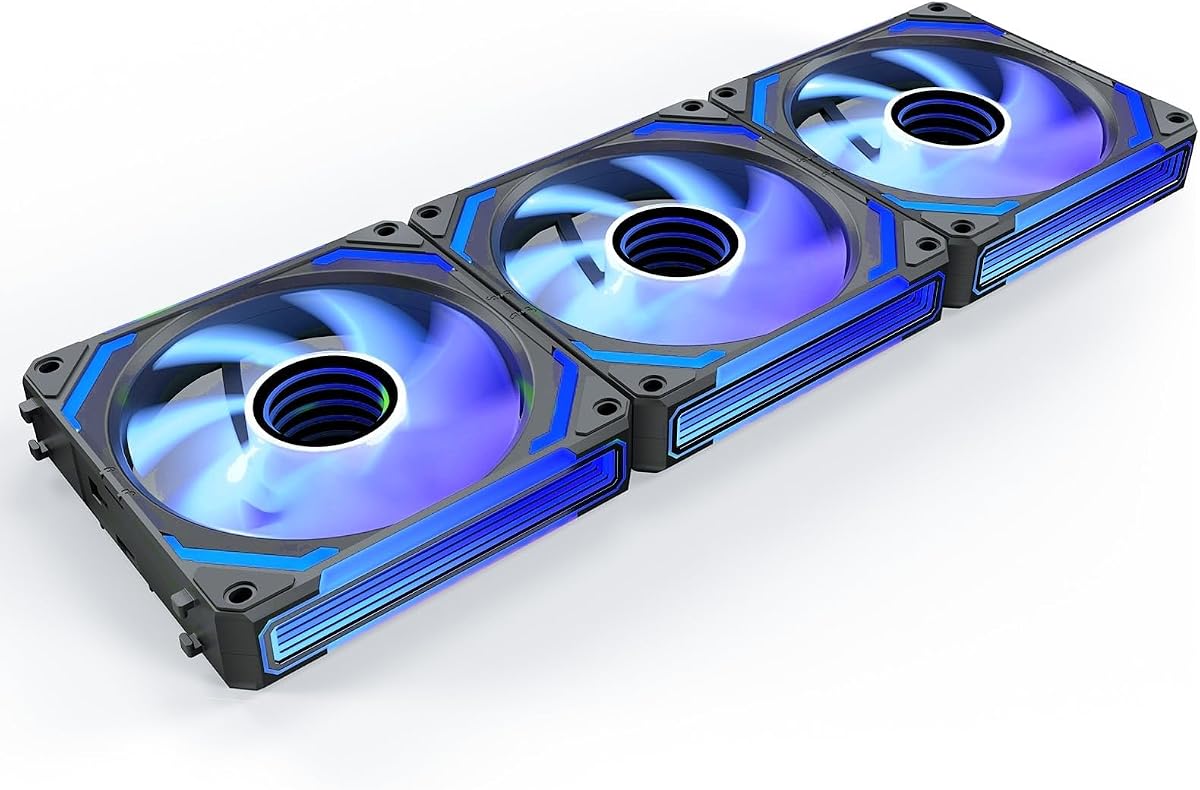
The AsiaHorse COSMIQ 120mm stands out as the premium lighting pick in this guide. It carries a 4.8 rating and uses an infinity mirror RGB design intended to create a layered appearance through the case. Rather than limiting synchronization to a standard motherboard header, it includes a small controller and a high-sensitivity sound pickup module for eight music rhythm lighting modes.
We may earn a commission when you buy through this link, at no additional cost to you.
Cooling performance is also well suited to real build priorities. The fan supports an adjustable 800–2,000 RPM range, reaches 68.5 CFM of airflow, and produces up to 2.05 mm-H2O of static pressure. An FDB bearing supports smooth operation, and the listed maximum noise is 29.2 dB(A). The interlocking daisy-chain design is intended to reduce scattered wiring and keep the interior orderly, while 5V 3-pin ARGB support allows broader case synchronization.
The main qualification is that this is a lighting-led package rather than the maximum-speed choice. Its 2,000 RPM ceiling is below the ARCTIC P12 Pro A-RGB, and the premium attraction depends on how prominently the infinity mirror and reactive lighting will be visible through the case panel. The sound-reactive modes also depend on audible activity in the environment. None of these points prevents it from functioning as a capable PWM fan; they simply define who will gain the most from it.
Buy the COSMIQ for a showcase build where coordinated lighting, music-responsive effects, and a tidy controller-based setup matter as much as cooling. It suits desktop users, office systems, gamers, and PC modders who want a three-fan set with a more dramatic visual identity than a standard ARGB ring.
Eight music rhythm modes use the built-in sound pickup to change the display with game sounds, music, or other ambient noise. Standard 5V ARGB synchronization remains available for unified case lighting.
The 800–2,000 RPM range gives users room to balance quieter daily operation with stronger airflow. Maximum output of 68.5 CFM and 2.05 mm-H2O pressure remains suitable for mainstream cases and liquid-cooling radiators.
We may earn a commission when you buy through this link, at no additional cost to you.
The Thermalright TL-C12C-S 5-Pack is a comprehensive option for a builder who wants enough matching 120mm ARGB fans to configure several case positions at once. Its 4.7 rating reflects a generally strong balance, while the pack includes five fans rather than a smaller standard set. Each fan offers 4-pin PWM control, addressable lighting, and a stated maximum speed of 1,550 RPM.
We may earn a commission when you buy through this link, at no additional cost to you.
The cooling specification is consistent across the set: up to 66.17 CFM airflow, 1.53 mm-H2O static pressure, and noise rated at no more than 25.6 dBA. The PWM connection can draw temperature feedback from the motherboard to vary speed automatically. The fans can be used as case intake or exhaust devices, placed with a CPU air cooler, or fitted to a radiator. That flexibility makes the five-pack practical for new builds and cooling refreshes.
Lighting is handled through the 5V 3-pin ARGB interface, with up to 17 effects and color management through a compatible motherboard. The S-FDB bearing is designed to minimize blade vibration and maintain smooth operation. Compared with higher-speed choices in the guide, the TL-C12C-S has a more modest maximum RPM, and the supplied details do not emphasize a formal daisy-chain system. Users with very few available headers should examine the included wiring and their motherboard's connector layout closely.
This pack is a strong fit for a complete coordinated installation, especially when five mounting positions are available. It is less suitable for a builder who wants one replacement fan or prioritizes aggressive maximum speed. For standard 120mm case layouts, radiator fitting, and moderate-to-high airflow needs, however, the combination of five matching units and detailed PWM control is compelling.
Buying five matching units simplifies visual coordination and provides enough flexibility for intake, exhaust, and cooler positions. ARGB effects can be managed through a compatible motherboard connection.
Once connected through the 4-pin PWM cable, the fans can respond to motherboard temperature feedback. A fixed-speed mode is also available when the user prefers a constant setting.
We may earn a commission when you buy through this link, at no additional cost to you.
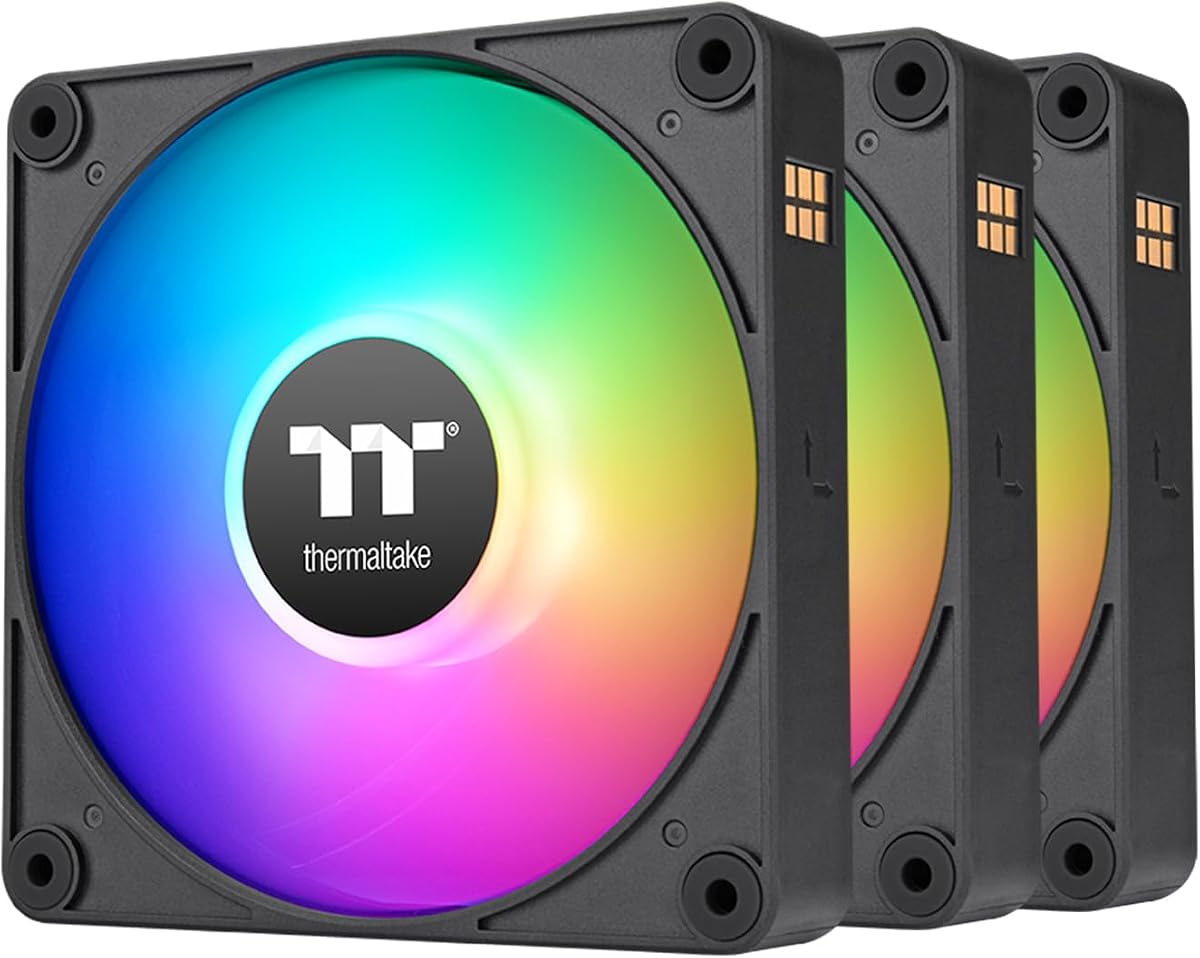
The Thermaltake CT120 EX ARGB is defined most clearly by its MagForce 2.0 magnetic connection design. The three-fan set can be linked so multiple fans use one cable, reducing the number of separate connections required in the case. That makes it particularly appealing for builders creating a coordinated lighting layout or fitting a triple-fan radiator.
We may earn a commission when you buy through this link, at no additional cost to you.
Each 120mm fan includes nine addressable LEDs managed through 5V motherboard synchronization. The advertised color range extends to 16.8 million colors, making the set suitable for systems that already use software-based RGB control. An optimized hydraulic bearing is specified for reliable, silent operation, while an embedded anti-vibration mounting system is intended to reduce vibration at the frame and improve the overall feel of the installation.
Compared with fans that publish detailed airflow, pressure, and RPM figures, the supplied CT120 EX information focuses more on connectivity, lighting, and mounting. Buyers who require exact performance numbers to compare against a radiator or restrictive grille should consult the full product listing. Compatible software and a motherboard with 5V ARGB control are also needed to use the listed synchronization features as intended.
The CT120 EX ARGB is best for builders who prioritize neat magnetic connections and synchronized lighting over published maximum-speed figures. It is a natural choice for a triple-fan radiator, a coordinated case set, or an existing Thermaltake RGB ecosystem. The reduced cable burden can make the installation cleaner and more approachable.
MagForce 2.0 connections let several fans link together with one cable. This reduces connector demand and makes the three included fans easier to arrange as a unified group.
Nine addressable LEDs per fan support 5V motherboard synchronization and a broad color range. A compatible control environment is needed to customize the listed effects.
We may earn a commission when you buy through this link, at no additional cost to you.
This six-fan package is distinctive because it includes four forward fans and two reverse fans. Reverse-blade fans are particularly useful for bottom or side intake positions, where a conventional fan can make its illuminated face less visible. The combination allows a builder to establish a more three-dimensional intake and exhaust arrangement while maintaining a consistent RGB appearance across the chassis.
We may earn a commission when you buy through this link, at no additional cost to you.
Every fan contains 28 high-brightness ARGB LEDs, divided between the center hub and outer ring. The package includes a combined 2-in-1 ARGB and PWM controller, allowing the case fans and other addressable devices to be managed through one hub. PWM temperature control can vary speed using CPU or motherboard case-temperature feedback. With a maximum of 1,550 RPM, nine high-pressure blades, and an HDB bearing, the set targets both strong airflow and reduced noise.
The main trade-off is that the maximum speed is lower than that of several premium rivals, and the 4.4 rating is the lowest among the ten products. The pack may also be more than a small build needs, particularly if the case has fewer than six usable mounting positions. Users should verify radiator dimensions and connector requirements because the listing describes compatibility with 120mm, 240mm, and 360mm liquid-cooling radiators as well as standard 120mm positions.
This set is a strong choice for a gaming case with multiple intake and exhaust locations, especially when reverse fans would improve visibility. The included controller simplifies control, and the mixed-direction format makes it easier to create balanced airflow. It is less compelling for a compact system needing only two or three fans.
The four forward and two reverse configuration supports a deliberate intake-exhaust layout. Reverse fans preserve visible lighting in bottom and side intake positions.
The combined hub manages ARGB lighting and PWM speed connections. It can reduce cable clutter while connecting the six-fan set and other compatible addressable devices.
We may earn a commission when you buy through this link, at no additional cost to you.
The Thermalright TL-C12C-S X3 provides a more compact three-fan version of a well-specified 120mm ARGB design. It has a 4.6 rating and includes matching fans that can serve as case intake, case exhaust, CPU cooler, or radiator fans. The listed maximum speed is 1,550 RPM, with airflow of 66.17 CFM and static pressure of 1.53 mm-H2O.
We may earn a commission when you buy through this link, at no additional cost to you.
Control is handled through a 4-pin PWM connection that allows motherboard-based automatic speed adjustment based on temperature. The cable length is listed at up to 55cm for PWM configurations. Lighting includes up to 17 ARGB effects with color managed and synchronized through a compatible motherboard port. The S-FDB bearing is intended to address blade vibration and maintain low noise while the fan operates.
This listing does not identify a dedicated ARGB or PWM controller, so the included cables and available motherboard headers are more important than they would be for a hub-based package. Its maximum speed also places it below higher-output alternatives such as the ARCTIC P12 Pro A-RGB and CORSAIR RS120 ARGB. Nevertheless, the stated performance remains suitable for ordinary case positions and many radiator arrangements, particularly when several fans work together.
Choose the X3 when you want three matching illuminated fans without purchasing a larger five-fan set. It is a sensible choice for a fresh three-position installation or a 240mm radiator, and it suits builders who value automatic PWM behavior and the broad lighting-mode selection.
The 4-pin interface lets the motherboard automatically adjust speed as temperatures change. This makes the fans easier to tune for quieter everyday operation.
Each 120mm fan can be used in a case, with a CPU cooler, or on a radiator. That flexibility makes the three-pack useful across several types of build.
We may earn a commission when you buy through this link, at no additional cost to you.
The Thermalright TL-C12C-S X5 is another five-fan option, but its supplied specifications place particular emphasis on quiet operation and flexible speed control. It has a 4.7 rating, a maximum speed of 1,550 RPM, and a maximum noise specification of 25.6 dBA. Five matching ARGB fans provide enough equipment for a comprehensive case layout or a larger cooling configuration.
We may earn a commission when you buy through this link, at no additional cost to you.
The 4-pin PWM connection supports automatic temperature-based speed adjustment after the fan is connected to the motherboard. Users can also switch to a fixed speed in DC mode when a constant setting is preferred. Lighting uses the standard 5V 3-pin ARGB interface and offers up to 17 modes, while the S-FDB bearing is designed for smooth, low-vibration operation. Airflow is listed at 66.17 CFM with 1.53 mm-H2O static pressure.
As with other large packs, the case needs enough mounting positions and appropriate cable routing. The specification does not mention reverse-blade fans, so the set may be less useful for builders wanting illuminated bottom or side intakes. It also uses up to 55cm of PWM cable, which should be considered in cases with short wiring paths or tight space behind the motherboard tray.
This X5 is best for a quiet, coordinated five-fan setup where the priority is consistent cooling rather than aggressive maximum RPM. It is particularly appropriate for builders who want automatic thermal control, multiple lighting effects, and matching fans for both case and radiator positions.
A maximum noise specification of 25.6 dBA makes this set relevant to builders seeking restrained acoustics. A suitable PWM curve can further reduce speed during periods of low heat.
The fans can respond automatically to motherboard temperature feedback or run at a selected fixed speed in DC mode, giving users two straightforward control approaches.
We may earn a commission when you buy through this link, at no additional cost to you.
The Thermaltake CT120 ARGB is a straightforward two-fan option for builders who want addressable lighting without installing a large multi-fan set. Its 4.6 rating and listed maximum speed of 2,000 RPM position it as a performance-oriented 120mm unit. The pack is suitable for case intake and exhaust positions, a 240mm radiator, or a CPU cooler requiring matching illuminated fans.
We may earn a commission when you buy through this link, at no additional cost to you.
A redesigned seven-blade layout is intended to optimize airflow and pressure, although the supplied information does not provide exact CFM or mm-H2O figures. PWM control allows speeds up to 2,000 RPM. Each fan uses nine addressable LEDs with 5V motherboard synchronization and support for a broad 16.8-million-color palette. The daisy-chain design is intended to reduce cables and the number of required ports.
The hydraulic bearing is designed for reliable, quiet operation, and a solid anti-vibration frame with an embedded mounting system helps reduce vibration. As with other Thermaltake ARGB products here, users need compatible motherboard software and a 5V ARGB header to take advantage of synchronized lighting. Because only two fans are included, a builder with four or more desired positions may need another set.
The CT120 ARGB is best for a compact or moderate build that needs two matching illuminated fans. Its daisy-chain approach keeps wiring orderly, and its 2,000 RPM ceiling provides ample output for many case and radiator installations. It is a versatile middle ground without an elaborate controller bundle.
The daisy-chain design links fans in sequence and is intended to reduce both cable count and the number of ports needed for a multi-fan installation.
The revised blade design is intended to balance optimized airflow and pressure. PWM control up to 2,000 RPM provides useful flexibility for both case and radiator positions.
We may earn a commission when you buy through this link, at no additional cost to you.
The Thermaltake LE120 ARGB combines a three-pack format with a useful performance range and the highest customer rating in this selection. It has a 4.8 rating and includes three 120mm fans with a controlled speed range of 500–1,500 RPM. The listed airflow is 66.1 CFM, while static pressure reaches 1.41 mm-H2O.
We may earn a commission when you buy through this link, at no additional cost to you.
Nine LEDs per fan are powered through a 3-pin 5V ARGB connector, allowing synchronization with compatible motherboard software and a broad 16.8-million-color palette. Daisy-chained ARGB cables are designed to simplify wiring and leave room for other devices. The pack also includes a three-way PWM splitter for quick installation, which makes it a more complete option than a bare three-fan bundle.
The main limitation is its lower maximum speed compared with the CORSAIR RS120 ARGB, ARCTIC P12 Pro A-RGB, and AsiaHorse COSMIQ. Its static pressure is also more modest, although it remains suitable for standard case positions and many radiator installations. A 500 RPM minimum provides some flexibility, but the upper limit is the more important specification for dense radiators or restrictive filters.
The LE120 ARGB is best for a conventional three-fan build that values a strong rating, straightforward motherboard control, and a complete installation bundle. It is a sensible option for a 240mm radiator or three case positions, particularly when the included splitter simplifies the PWM connection.
The set includes a three-way PWM splitter, reducing the need to source an additional splitter for a three-fan arrangement. ARGB cables can also be daisy-chained.
The 66.1 CFM airflow and 500–1,500 RPM range suit standard case cooling. The hydraulic bearing and broad lighting palette also make the set practical for coordinated builds.
We may earn a commission when you buy through this link, at no additional cost to you.
The best Addressable RGB Fans are not determined by lighting alone. Airflow, pressure, noise, bearing design, connection layout, radiator suitability, and control compatibility should all influence the decision, with the fan's final position setting the priorities.
Airflow indicates how much air a fan can move, while the RPM range shows how much control the user has over that output. The products here range from a maximum of 1,500 RPM for the Thermaltake LE120 ARGB to 3,000 RPM for the ARCTIC P12 Pro A-RGB. A wider range can help a builder create a quieter idle curve and still increase performance under load. The CORSAIR RS120 ARGB offers up to 2,100 RPM, while the AsiaHorse COSMIQ supports an adjustable 800–2,000 RPM range. The most important point is to compare realistic operating points rather than selecting only by the highest headline number.
Static pressure matters when a fan must force air through a radiator, dense grille, filter, or narrow perforated panel. The CORSAIR RS120 ARGB has the highest listed figure at 2.8 mm-H2O, followed by the AsiaHorse COSMIQ at 2.05 mm-H2O. The ARCTIC P12 Pro A-RGB is specifically described as effective against dense radiators and mesh structures. Thermalright models list 1.53 mm-H2O, while the Thermaltake LE120 ARGB lists 1.41 mm-H2O. Because airflow and pressure describe related but different performance aspects, check both values and consider the resistance of the component the fan must cool.
Quiet cooling depends on more than a single maximum noise figure. Bearing quality, blade balance, motor control, and the chosen PWM curve all influence the sound produced during operation. The Thermalright TL-C12C-S variants list maximum noise of 25.6 dBA, while the AsiaHorse COSMIQ lists up to 29.2 dB(A) at its maximum of 2,000 RPM. The ARCTIC P12 Pro A-RGB can stop completely below 5% PWM and is designed for low-speed efficiency, making it attractive for systems that spend much of their time at low load. A broader range of control can help keep the system quiet when it does not need maximum airflow.
The listed bearing systems provide clues about intended operating characteristics. The Thermalright TL-C12C-S models use S-FDB bearings designed to minimize vibration and blade shaking. The ARCTIC P12 Pro A-RGB uses a self-lubricating Fluid Dynamic Bearing and precision manufacturing with automatic balancing. CORSAIR specifies a magnetic dome bearing, while the Thermaltake CT120 EX ARGB, CT120 ARGB, and LE120 ARGB use hydraulic bearings. The six-pack set and the AsiaHorse COSMIQ also identify hydrodynamic-type bearings. None of the supplied descriptions offers a complete durability test, so bearing type should inform expectations without replacing careful installation.
Modern cases often have more fan positions than available PWM or ARGB headers, making daisy-chain capability important. The CORSAIR RS120 ARGB links multiple fans through one 4-pin PWM connector and one +5V ARGB connection. The Thermaltake CT120 EX ARGB uses MagForce 2.0 magnetic connections, while the CT120 ARGB, LE120 ARGB, and AsiaHorse COSMIQ all use daisy-chain layouts. The six-pack ARGB PWM set includes a combined 2-in-1 ARGB and PWM controller, and the LE120 package includes a three-way PWM splitter. Fewer cables make installation cleaner, but connector type and motherboard compatibility still need verification.
Addressable RGB is not automatically the same as basic RGB lighting. Most options in this guide use a 5V three-pin ARGB connection and can synchronize with compatible motherboard software. LED counts vary considerably: the Thermaltake models use nine addressable LEDs per fan, the CORSAIR RS120 ARGB has eight, and the six-pack set places 28 on every fan. The AsiaHorse COSMIQ adds music-reactive modes and a dedicated controller. A compatible motherboard is required for software-based synchronization, so verify that the board includes the appropriate 5V ARGB header and that its control software supports the desired effects.
Pack size should reflect the number of usable mounting positions rather than a desire to fill every opening. The Thermalright TL-C12C-S X3 and X5 are three- and five-fan sets, while the CORSAIR RS120, most Thermaltake triples, and the AsiaHorse COSMIQ include three fans. The Thermaltake CT120 ARGB provides a compact two-fan option, and the ARCTIC P12 Pro A-RGB is a single fan. The six-pack set includes four forward and two reverse fans, making it especially useful for builds that want reverse-blade lighting on bottom or side intakes.
Every product in the guide uses the common 120mm format, but physical format alone does not guarantee compatibility. Check the case's mounting pattern, available depth, radiator dimensions, and any manufacturer-specific restrictions. The Thermalright fans are listed for cases, radiators, and CPU coolers. The six-pack set can replace stock fans on air coolers or fit 120mm, 240mm, and 360mm liquid-cooling radiators. The ARCTIC P12 Pro A-RGB is explicitly suited to dense radiators and mesh panels. Users should also confirm that the installed radiator supports standard 120mm fans and that the case provides adequate clearance for cables and connectors.
Begin by planning each fan's position as intake or exhaust and confirming that the case has enough mounting holes, clearance, and header capacity. Connect the 4-pin PWM leads to a compatible header or splitter, then connect the 5V three-pin ARGB leads to the correct motherboard header. Never treat an ARGB connector as a standard three-pin RGB connector, as the pin assignments are different. Install the fans securely, route cables behind the motherboard tray where possible, and avoid pressing connector ends against moving components.
After installation, enter the motherboard's fan-control software and create a PWM curve appropriate for the workload. Begin with a moderate curve and increase speed if temperatures rise more than desired. Configure the ARGB lighting through compatible software or the controller supplied with the relevant product. Test for smooth rotation at several speeds, listen for changes in bearing noise, and confirm that the lighting, airflow direction, and control signals work before closing the case panels.
For ongoing care, power down and switch off the power supply before removing a fan. Hold the frame rather than the blades, disconnect cables gently, and clear accumulated dust from the blades and frame with a soft brush or suitable compressed air. Keep liquids away from the hub and connectors. If a fan develops grinding, scraping, repeated vibration, or inconsistent speed, replace it rather than forcing it to continue operating.
ARGB fans contain individually addressable diodes, allowing different colors and effects to appear across the light strip. Standard RGB fans generally show one selected color at a time across the entire lighting area. Addressable lighting therefore provides more detailed animations and synchronization options, but it requires a compatible 5V ARGB controller or motherboard header.
Yes, provided the radiator accepts standard 120mm fans and the selected model offers suitable static pressure. The ARCTIC P12 Pro A-RGB is specifically highlighted for dense radiators and mesh structures. The CORSAIR RS120 ARGB and AsiaHorse COSMIQ also list notable pressure specifications. Always confirm the radiator dimensions and mounting pattern before installing a replacement fan.
No. Most models in this guide can connect directly to a compatible motherboard's 5V ARGB header and synchronize through its software. The six-pack set includes a combined ARGB and PWM controller, while the AsiaHorse COSMIQ includes a dedicated controller for independent lighting control. Additional RGB devices can often be linked, but the required connectors must match.
No. Maximum RPM indicates potential output, not the speed at which a fan should always operate. A useful PWM curve can keep a fan quiet during low loads and increase its speed when heat rises. Airflow, static pressure, bearing smoothness, noise, and the resistance of the radiator or grille are also important when comparing alternatives.
PWM control changes the average power delivered to the fan by varying the duty cycle of the electrical signal. DC control generally adjusts fan voltage instead. The Thermalright TL-C12C-S models specifically describe both temperature-controlled PWM operation and the option to use a fixed speed in DC mode. Users should follow the connection and control instructions for their specific motherboard.
No, but they can improve both airflow direction and visual presentation in some layouts. Reverse fans are commonly placed at the bottom or side as intakes so their illuminated faces remain visible. The six-pack ARGB PWM set is the only selection here that expressly includes four forward and two reverse fans. Most builds can be configured effectively with conventional forward fans.
The right number depends on mounting positions, component heat, airflow restrictions, and case design. A three-fan set often fits a 240mm radiator, while five fans can support a 360mm radiator and additional case positions. Avoid adding fans without considering whether they act as intake or exhaust, because an uncoordinated layout can circulate air without moving it through the components effectively.
Create a PWM curve that uses lower speeds at low temperatures and reserves maximum output for heavy loads. Fans with a stop mode can remain stationary during suitable idle periods. Good mounting, balanced blades, clean airflow paths, and suitable bearing designs also help. The ARCTIC P12 Pro A-RGB offers a below-5% PWM stop, while several Thermalright models are rated at no more than 25.6 dBA.
The CORSAIR RS120 ARGB is the most balanced overall recommendation because it combines high airflow, useful radiator-oriented static pressure, daisy-chain connections, and addressable lighting. The ARCTIC P12 Pro A-RGB is the best budget-focused choice for cooling, with a wide 500-to-3,000-RPM-style operating range, a stop below 5% PWM, and strong pressure capability. For a premium visual build, the AsiaHorse COSMIQ offers infinity mirror lighting, music-reactive effects, a dedicated controller, and capable airflow.
For most builders, begin with airflow placement, static pressure, PWM range, and connector availability before choosing the lighting design. A radiator needs different pressure characteristics from an open exhaust position, while a case with limited headers may benefit more from daisy-chain support than from additional fans. Matching the pack size to available mounting positions also prevents unused hardware or an awkward cable layout.
Finally, check the current listing for compatibility, included accessories, and the latest product information before purchasing. Specifications and product availability can change, and prices fluctuate across sellers. The guide is intended to make technical comparisons easier, but the final decision should account for your case, cooling hardware, motherboard lighting software, and preferred installation style.