
SMSL PO100 PRO MQA DDC
4.6Editor score
XMOS XU316 USB interface
PCM 32-bit/768kHz support
Native DSD and DOP64
Optical, coaxial, I2S outputs
Compact portable construction
Explore the best audio converters for Mac, with detailed comparisons of USB DACs, headphone amplifiers, digital interfaces, and analog-to-digital capture
Audio converters for Mac can improve how digital sound reaches headphones, speakers, recording equipment, or an existing stereo system. The right device depends on whether you need USB decoding, analog-to-digital capture, balanced headphone amplification, or a bridge between optical, coaxial, and other audio connections.
We compared the ten products by examining their Mac compatibility, signal direction, supported inputs and outputs, resolution, sampling rates, amplification, portability, installation requirements, and intended use. The list includes desktop DACs, portable headphone DACs, digital interfaces, an analog capture card, and a microphone interface.
Each review explains the device's strongest benefit, important limitations, and ideal user so you can match its capabilities to your Mac setup. Product availability, configurations, and prices can change, so confirm the current listing details before purchasing.
4.6Editor score

4.6Editor score

4.3Editor score
This side-by-side comparison highlights the different signal paths, connection options, resolution limits, and portability of each converter. Some products are designed to improve listening, while others capture analog audio or feed a separate DAC.
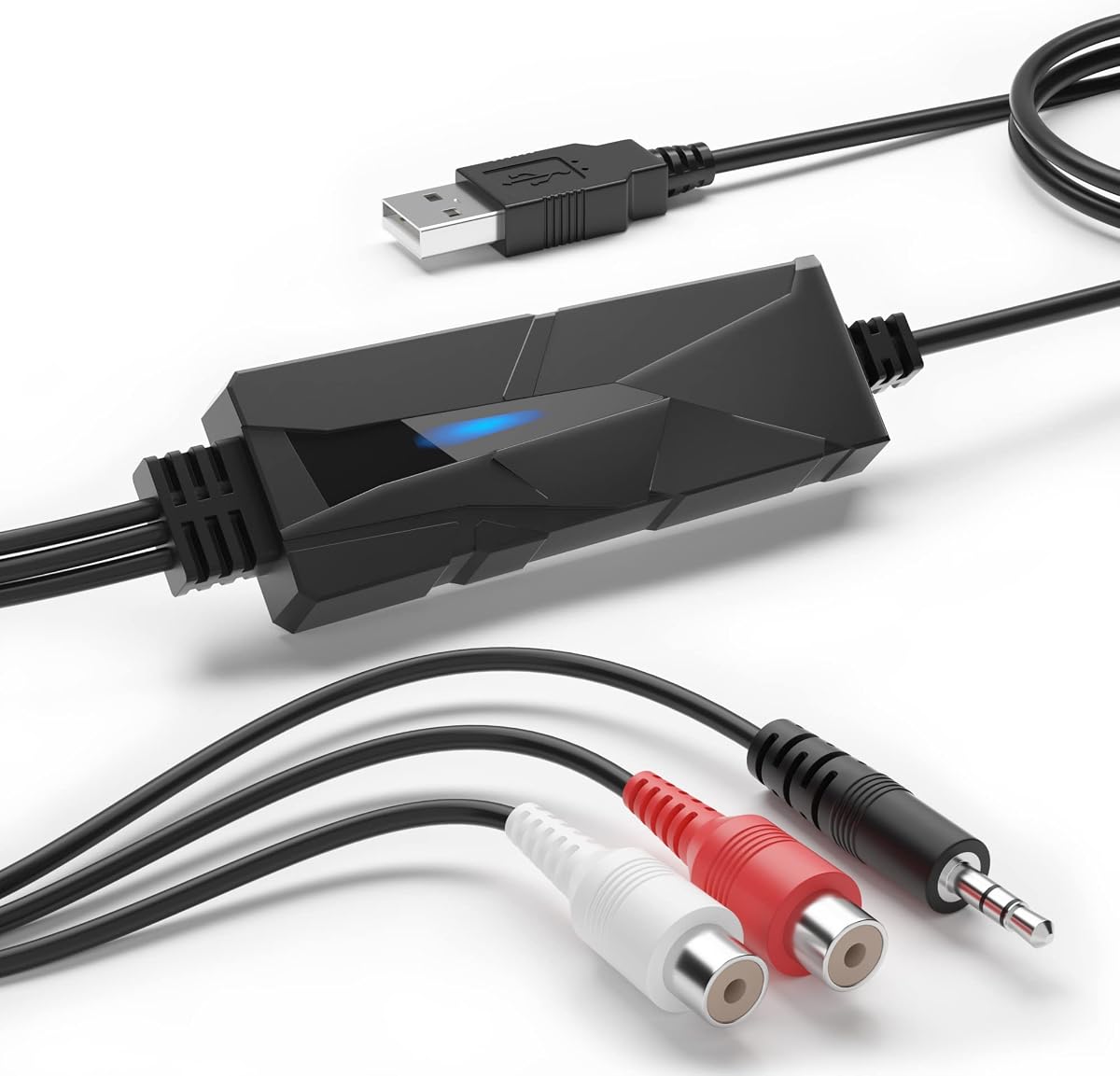


The DriverGenius AudioXfer is an analog-to-digital capture card with a 4.2 rating and a clear purpose: moving sound from a 3.5mm stereo source into a Mac for recording. It suits users digitizing cassette tapes, records, radio broadcasts, boomboxes, MiniDisc equipment, and other analog media. Its straightforward USB connection avoids the need for a conventional desktop sound card when the task is capture rather than high-end listening.
We may earn a commission when you buy through this link, at no additional cost to you.
The supplied specifications emphasize 44.1kHz and 48kHz operation at 16-bit depth, which are practical formats for editing, archiving, and creating digital copies. Audacity is included or made available through the manufacturer's website, giving Mac users a way to record and edit the captured signal. The product information also provides specific guidance for 64-bit Mac users, including a compatible Audacity release and an updated LAME component for MP3 work.
This is not a digital-to-analog converter in the traditional headphone-DAC sense. It does not accept a Mac's digital USB stream and send it to an amplifier, nor does it offer the broad format support or amplification of a dedicated desktop DAC. The relatively modest 16-bit capture resolution and two sampling-rate choices also make it less suited to demanding archival work than a modern professional recording interface.
Choose the AudioXfer when your priority is converting existing analog material into editable files. It is particularly practical for a first digitization project because the signal path and software approach are understandable. Mac owners seeking a DAC for headphones, speakers, or hi-fi playback should look at one of the dedicated digital converters in this guide instead.
Connect the source through the 3.5mm left and right inputs, route the AudioXfer to the Mac with USB, and configure the recording software at the desired 44.1kHz or 48kHz sample rate. Matching the source and project format helps avoid unnecessary resampling during editing.
The listed Audacity guidance is especially relevant for 64-bit Mac systems. Using the specified compatible software version and LAME update can prevent avoidable export and MP3 encoding problems during a tape or record transfer.
We may earn a commission when you buy through this link, at no additional cost to you.
The Fosi Audio K5 Pro combines a USB digital-to-analog converter, headphone amplifier, and desktop audio control center in a compact unit. Its 4.3 rating reflects a flexible option for Mac users who want to connect headphones, powered speakers, or a stereo amplifier. Rather than serving as a simple adapter, it provides enough control and output power to form the center of a small listening setup.
We may earn a commission when you buy through this link, at no additional cost to you.
Digital sources can arrive through USB Type-C, optical, or coaxial connections. USB Type-C is particularly convenient for a Mac, and the product's two-in-one cable design accommodates USB-A or USB-C sources while leaving the connector available for charging on compatible phones. RCA outputs support amplifiers and powered desktop speakers, while the 3.5mm jack can drive headphones from 16 ohms through 300 ohms.
The K5 Pro is built around the Texas Instruments NE5532 op-amp and includes master volume, bass, treble, input selection, and a combined power and volume control. Its USB path supports up to 24-bit/96kHz, while optical and coaxial paths reach 24-bit/192kHz. These figures make it capable of handling high-resolution files, although a computer's actual output is also constrained by the operating system, playback application, and source material.
This converter makes the most sense for a listener who wants one box to serve a Mac, game console, TV, headphones, and powered speakers. It is less suitable for someone seeking a balanced output or a larger desktop DAC with a subwoofer connection. For many compact Mac-based systems, however, its combination of inputs, controls, and amplification is unusually practical.
USB-C, optical, and coaxial inputs let you switch between a Mac, game console, television, or disc source without replacing the entire audio chain. The included cable and controls make the unit practical for a shared entertainment desk.
The supplied output figures cover 16 to 300 ohms, giving the K5 Pro considerably more headphone authority than a basic passive adapter. This is valuable when moving between easy-to-drive earbuds and more demanding studio or audiophile headphones.
We may earn a commission when you buy through this link, at no additional cost to you.
The PROZOR 192KHz DAC is a straightforward digital-to-analog bridge for optical or coaxial sources. It can feed analog left and right RCA outputs and a 3.5mm headphone-style jack at the same time. With a 4.4 rating, it offers a convenient way to connect a television, game console, disc player, or digital receiver to an older stereo system or powered speakers.
We may earn a commission when you buy through this link, at no additional cost to you.
The converter supports uncompressed two-channel PCM or LPCM and accommodates sampling rates from 32kHz through 192kHz with 24-bit S/PDIF input. Its upgraded amplifier chipset and dual-channel operational amplifier are intended to provide cleaner output and lower distortion. An aluminum alloy housing offers shielding and heat dissipation, while gold-plated RCA connectors and a detachable design support practical cable management.
Mac users should note that this unit does not have a USB input, so it cannot directly decode audio sent from a Mac's USB port. A Mac can still benefit when it has access to an optical or coaxial digital source through another device, or when the converter serves a shared home-theater system. The included optical cable and USB power lead support setup, but a suitable 5V 1A adapter is not included.
The biggest potential frustration is source configuration. Many TVs need their digital output set to PCM or LPCM, and optical-output volume may have to be adjusted within the television's settings. With those settings understood, the PROZOR is a dependable and uncomplicated bridge for users who do not need Mac USB decoding.
Set the television's audio output to PCM or LPCM, confirm the optical or coaxial connection carries a signal, and use the specified 5V 1A power supply. These checks address the most common causes of silence with digital television connections.
Simultaneous RCA and 3.5mm outputs let one source serve a stereo amplifier and a pair of headphones or compact speakers. That makes the converter useful in a living room where different listeners may use different output methods.
We may earn a commission when you buy through this link, at no additional cost to you.
The Douk Audio U2PRO is a digital audio interface rather than a conventional DAC. It receives USB audio from a Mac or another compatible source and distributes the digital stream through optical, coaxial, and I2S outputs. That makes it ideal for connecting a computer to an existing DAC, amplifier, or digital receiver that lacks a modern USB input.
We may earn a commission when you buy through this link, at no additional cost to you.
Its XMOS XU316 chip supports high-resolution PCM up to 32-bit/768kHz and DSD512, according to the supplied specifications. Real-time PCM and DSD indicators help identify the active format, while a UAC mode switch provides a driver-free 1.0 mode for compatibility with gaming consoles and a 2.0 mode for advanced high-resolution playback. The product is USB-powered and includes a USB-C-to-USB-A/C cable.
The design is aimed at listeners who already own quality digital-to-analog hardware. Moving the USB-to-digital stage outside the computer can provide a direct path to a separate converter, and the DDC reclocker is intended to create a stable signal with reduced jitter. The U2PRO also includes an expandable oscillator design for users interested in compatible high-precision clock upgrades.
Its rating of 4.1 and advanced feature set may be less attractive to a first-time buyer. It does not directly drive headphones or analog speakers, and a Mac setup requires both this interface and a suitable downstream DAC. For an established system that needs USB-to-optical or USB-to-coaxial conversion, however, the U2PRO offers an unusually broad set of options.
The U2PRO passes a digital signal rather than decoding it into analog audio. This lets a separate DAC perform the final conversion and gives Mac users access to a preferred amplifier or speaker system without replacing the entire chain.
The 1.0 mode prioritizes straightforward plug-and-play operation, while 2.0 mode enables advanced high-resolution use. Checking the playback application, source format, and downstream device before changing modes helps prevent recognition or playback confusion.
We may earn a commission when you buy through this link, at no additional cost to you.
The SMSL SU-1 is a dedicated desktop DAC built around the AKM AK4493S converter and XMOS XU316 interface. Its 4.2 rating makes it a relevant option for Mac users who want the computer's digital stream decoded by a standalone component rather than by the Mac's internal audio hardware. The supplied specifications also highlight support for 32-bit/768kHz PCM, DSD512, and MQA workflows.
We may earn a commission when you buy through this link, at no additional cost to you.
MQA support covers both high-resolution file playback and MQA CD use. A CD player's optical or coaxial output can feed the decoder, which restores and authenticates the original studio signal when the material and playback chain support that function. The AKM chip is specified to achieve distortion below 0.00013%, and the XU316 interface supports modern high-resolution formats.
Compatibility is broad, with USB support listed for Windows and driverless operation on Linux, alongside Mac OS X 10.6 and later, Android, and iOS. Mac operation is therefore possible, but the converter is a specialist component. Users who only need basic headphone output can find more compact and immediately accessible options, while this model makes more sense when MQA, high-resolution streaming, or a permanent desktop connection matters.
The SU-1 is best for an established hi-fi system in which the Mac acts as a source and a dedicated DAC is the center of the signal chain. It offers strong format flexibility and audiophile-oriented specifications, but the unit's larger desktop design and specialized features may be unnecessary for a simple temporary listening setup.
The SU-1 can decode MQA material and support MQA CD signals arriving through optical or coaxial connections. Authentication and restoration depend on the source, playback software, and the rest of the chain, so MQA-compatible playback is an important part of the setup.
Support for PCM 32-bit/768kHz and DSD512 gives the decoder considerable format headroom. The practical result depends on the quality of the source, Mac playback application, and connected amplifier, but the hardware is not the limiting factor.
We may earn a commission when you buy through this link, at no additional cost to you.
The SMSL PO100 PRO is a compact USB digital interface for connecting a Mac to an external DAC. It combines a 4.6 rating with extensive format support, including PCM 32-bit/768kHz, native DSD, DOP64, and MQA decoding. Although its name includes digital-to-analog converter, the core function described in the supplied data is a digital source interface with optical, coaxial, and I2S outputs.
We may earn a commission when you buy through this link, at no additional cost to you.
The XMOS XU316 chip handles USB input through a Type-C connection and uses asynchronous transmission. Optical and coaxial outputs provide familiar ways to reach an external DAC, amplifier, or AV receiver, while I2S offers a direct digital route for compatible equipment. Two mode switches allow the user to move between UAC and I2S operation, and the enclosure is small enough to travel in a bag or backpack.
MQA playback does not require an additional decoder, although the playback application must support ASIO or WASAPI output. The guidance recommends setting the computer's software volume to maximum and controlling level in the downstream analog chain, which helps maintain a clean digital signal. For PS5 use, DOP64 can be selected in playback software and carried over optical or coaxial connections when the receiving device supports it.
This is a strong choice for an audiophile who already owns a capable DAC and wants a compact, high-resolution bridge from a laptop. Its mode switching and external-DAC requirement make it less convenient than an all-in-one headphone DAC, but the rating, portability, and format breadth reward users who value a modular signal chain.
The compact design makes the PO100 PRO easy to move between a home system, office, and listening session. It preserves a direct digital connection while avoiding the need to carry a larger desktop DAC and its separate power supply.
Optical, coaxial, and I2S outputs accommodate different external converters and receivers. That flexibility is useful when a home system uses separate devices for music, television, and gaming rather than one universal input.
We may earn a commission when you buy through this link, at no additional cost to you.
The Sound Blaster Play! 3 is a USB audio adapter designed to give a Mac or other computer a convenient analog headset connection. It carries a 4.5 rating and focuses on ease of use rather than the extensive format and output options found in specialist hi-fi converters. For users switching between gaming headsets, wired earbuds, and studio-style headphones, its connector support can eliminate the need for a Y-splitter.
We may earn a commission when you buy through this link, at no additional cost to you.
The adapter works without drivers, so installation is limited to connecting the USB cable and selecting it as the Mac's output device. Its control-panel software adds audio enhancements and profiles for multiple earphone brands. A 24-bit/96kHz specification is listed, although the real output format remains dependent on the source, operating system, and selected software settings.
Compared with the Fosi and SMSL converters, the Play! 3 does not offer digital inputs, a full-size DAC architecture, or high-power headphone amplification. Its role is closer to a general-purpose audio endpoint. It is therefore most compelling when a user needs broad headset compatibility and simple switching rather than maximum measured performance or a modular digital connection.
The product's supplied information does not state a dedicated Mac configuration procedure, so buyers should verify current system behavior with their chosen headset. Still, its driver-free design and recognizable form factor make it a practical option for calls, gaming, online meetings, and everyday headphone use from a computer.
The adapter accepts analog headsets with either a single combined connector or separate stereo and microphone connections. That flexibility can simplify setups involving older gaming headsets and stereo headphones.
After plugging in the USB adapter, select it in the Mac's sound settings and choose the desired output level. The downloadable control panel can then provide optional enhancements and device-specific profiles.
We may earn a commission when you buy through this link, at no additional cost to you.
The iFi Audio Go Link Max is a portable USB-C DAC and headphone amplifier for high-resolution listening from a Mac or compatible mobile device. Its 4.5 rating and dual ESS Sabre DAC configuration position it as a premium mobile option, particularly for listeners who want a balanced 4.4mm connection rather than a conventional 3.5mm output.
We may earn a commission when you buy through this link, at no additional cost to you.
The balanced output can deliver up to 241mW of power, while Dynamic Range Enhancement and THD compensation are designed to improve the listening experience across different recording levels and headphone impedances. High-resolution support includes 32-bit/384kHz PCM and native DSD256 at 11.3MHz. A Mac can access these formats through compatible playback software, with actual output limited by the source and operating system.
Portability is a major strength. The flexible cable relieves stress on the USB socket, while gold-plated USB-C and headphone connectors and twisted silver-plated copper conductors support durable construction. Plug-and-play operation means there is no separate power supply or desktop box, making the Go Link Max convenient for travel or a minimal desktop.
There are no listed physical volume or tone controls, so software-level control becomes important. A balanced cable and matching balanced headphones may also cost more than a standard 3.5mm setup. For users who value portability, high-resolution decoding, and balanced amplification without a desktop device, though, the Go Link Max is a compelling specialist choice.
The 4.4mm output provides a balanced path and up to 241mW of power, offering more headroom than many small dongles. It is particularly relevant to listeners who already own compatible balanced headphones and cables.
Supporting PCM 32-bit/384kHz and native DSD256 makes the adapter suitable for high-resolution libraries and compatible streaming applications. Its compact cable-based form removes the need for a desktop enclosure while retaining a dedicated DAC and amplifier.
We may earn a commission when you buy through this link, at no additional cost to you.
The Fosi Audio Q6 Mini is a versatile desktop DAC for Mac users who want a permanent upgrade between a computer and a stereo system. It combines an AKM AK4493S DAC, XMOS XU316 processor, and OPA1612 op-amp in a compact aluminum enclosure. Its 4.6 rating, broad source selection, and maximum 32-bit/768kHz PCM and DSD512 support make it one of the most versatile choices in this guide.
We may earn a commission when you buy through this link, at no additional cost to you.
Optical, coaxial, and USB-C inputs allow the Q6 to accept audio from a Mac, television, disc player, streamer, or tablet. At the output stage, gold-plated RCA connections feed a stereo amplifier or powered speakers, while a dedicated subwoofer output supports systems that need a separate bass channel. The unit's signal performance is listed at a signal-to-noise ratio of at least 121dB and total harmonic distortion below 0.00012%.
One important limitation is that the Q6 is a converter, not a powered endpoint. It cannot directly drive headphones or passive speakers. Headphone users need a separate headphone amplifier, and passive speakers need an amplifier with its own output stage. This keeps the Q6 focused on clean conversion and gives it the flexibility to work with many existing stereo components.
The Q6 is the strongest all-around recommendation for a Mac-based home system. It accepts every common digital source in the guide, includes a useful subwoofer connection, offers strong format headroom, and takes up little space. Choose it when you already own capable amplification and want a central, flexible digital hub.
USB-C, optical, and coaxial inputs let the Q6 serve a Mac and other household sources without changing the downstream amplifier. That makes it a convenient desktop centerpiece for music, television, streaming, and gaming.
With a signal-to-noise ratio of at least 121dB and specified total harmonic distortion below 0.00012%, the Q6 is designed to provide a clean analog handoff. A quality amplifier and speakers remain essential because the DAC does not supply speaker power.
We may earn a commission when you buy through this link, at no additional cost to you.
The Shure MVX2U Gen 2 is a specialized XLR-to-USB-C audio interface for recording and streaming with a microphone. It is not a conventional digital-to-analog converter for music playback, but it can still be valuable in a Mac-based audio workflow when the goal is to turn a dynamic or condenser XLR microphone into a computer input.
We may earn a commission when you buy through this link, at no additional cost to you.
The interface provides up to 60dB of clean gain and 48V phantom power for compatible condenser microphones. Onboard Shure Digital Audio Processing includes Auto Level Mode, a real-time denoiser, and a digital popper stopper. Users can select a Dark, Natural, or Bright tone, while the MOTIV applications expand control with EQ, compression, limiter, and other settings.
Its USB-C connection suits modern Macs and provides a direct route into recording, podcasting, livestreaming, or conferencing software. Zero-latency processing is listed for use with an XLR microphone. The practical advantage is that gain, level stabilization, and unwanted-noise reduction can be handled close to the source rather than relying entirely on post-production software.
The Shure interface is the right choice for a creator who already owns an XLR microphone and wants a convenient Mac recorder. It does not address the needs of someone wanting to improve music playback through headphones or speakers, and its listed single XLR connection is focused rather than multichannel. For its intended recording role, however, it offers a focused and approachable feature set.
Plug the microphone into the XLR input and connect the interface to the Mac with USB-C. The signal can then appear in podcasting, streaming, conferencing, or recording software as a standard audio input.
Auto Level Mode adjusts gain in real time to maintain a more consistent output. The denoiser and digital popper stopper can also reduce common problems before a stream or recording reaches the software.
We may earn a commission when you buy through this link, at no additional cost to you.
The right Mac audio converter depends on the direction of the signal, the equipment you already own, and the formats you listen to or record. These are the most important capabilities to evaluate before making a selection.
Match the converter to the next device in the chain, not just to the computer.
Prioritize direct USB-C operation for the simplest Mac setup.
Choose outputs that match existing equipment without requiring unnecessary adapters.
Prioritize formats your actual music library and software can deliver.
Favor built-in amplification for simple headphone setups and separate stages for modular hi-fi systems.
Check source-format settings before assuming a converter is malfunctioning.
Choose a form factor that suits where the converter will actually live.
Buy for the complete signal chain, including cables, amplifiers, speakers, microphones, and source devices.
Begin by identifying the converter's correct direction and connecting it to the source first. For a USB DAC, connect the Mac with the supplied or an appropriate USB-C cable, power the converter if required, and then connect its analog outputs to headphones, powered speakers, or an amplifier. For a digital interface, connect the downstream DAC or receiver through optical, coaxial, or I2S before selecting the appropriate source mode.
On the Mac, open the system sound settings and choose the converter as the output or input device. Set the desired software volume, then use the converter's hardware volume control where one is provided. For high-resolution PCM, DSD, MQA, or ASIO/WASAPI playback, use software that supports the required format and verify that the signal is being sent at the expected resolution.
Treat connections and power carefully. Use the specified power adapter for converters that require one, avoid force-fitting unusual plugs, and do not substitute a cable that carries a different signal. Keep digital and analog connectors supported, inspect cables for damage, and give the device adequate ventilation. Before changing switches or reconnecting equipment, lower the volume to prevent sudden loud playback and protect sensitive headphones or speakers.
A dedicated DAC can provide a more capable conversion stage, additional outputs, or cleaner routing than the Mac's built-in audio. It is most likely to make a meaningful difference when the Mac connects directly to an amplifier, powered speakers, or headphones and the internal converter or output stage is the limiting factor. A better DAC cannot improve poorly recorded source material or compensate for weak speakers and amplification.
Not exactly. A digital interface accepts a digital source and passes or adapts it through outputs such as optical, coaxial, or I2S. A DAC performs the final digital-to-analog conversion and provides outputs for an amplifier or headphones. Products such as the Douk Audio U2PRO and SMSL PO100 PRO therefore pair naturally with a separate DAC, while the Fosi and PROZOR products include the analog output stage.
Only if the converter has a microphone-oriented input and the right signal path. The Shure MVX2U Gen 2 accepts an XLR microphone and includes gain, phantom power, and recording-oriented processing. Most DACs in this guide are intended for playback and do not accept a conventional microphone. The DriverGenius AudioXfer captures audio from a 3.5mm stereo source, but it is not a general-purpose microphone interface.
Yes, if you intend to use passive speakers. The Q6 converts a digital signal into analog stereo and includes a subwoofer output, but the product information explicitly states that it cannot drive passive speakers or headphones directly. Pair its RCA outputs with powered speakers or a separate stereo amplifier. Add a headphone amplifier if you want to use headphones with the Q6.
The K5 Pro includes a two-in-one USB Type-C interface that combines audio input with a charging port, allowing a compatible phone to remain powered while its digital audio is decoded. The audio source still needs to be connected to the appropriate USB-A or USB-C port. Mac users can use the included cable for digital audio, while the charging function mainly benefits compatible mobile devices.
The most common cause is an incompatible output format. Set the television to PCM or LPCM, confirm that the converter's power light is on, and verify that the cable is connected in the correct direction. Some televisions also require digital-output volume to be adjusted in the television's advanced sound settings. A compatible 5V 1A power adapter is important for converters that do not receive sufficient power from a television USB port.
Several products support high-resolution PCM, DSD, or MQA, but the Mac, playback application, source file, and converter must all be compatible. For instance, the Q6 and PO100 PRO support PCM up to 32-bit/768kHz, while the iFi Go Link Max supports 32-bit/384kHz and DSD256. A high-resolution label does not mean every file will be converted automatically or that every source will deliver the maximum rate.
A balanced output can be a good match for compatible high-end headphones because it uses separate signal paths for the left and right channels. The iFi Audio Go Link Max provides a 4.4mm balanced output with up to 241mW of power. You will also need a balanced cable and a compatible headphone or amplifier. For ordinary stereo headphones, a standard 3.5mm output may be more convenient and less costly.
The Fosi Audio Q6 Mini is the most complete general recommendation for a Mac home system because it combines USB-C, optical, and coaxial inputs with RCA and subwoofer outputs. The SMSL PO100 PRO stands out for portable, modular high-resolution use, while the Fosi Audio K5 Pro offers the strongest combination of DAC, headphone amplification, and multi-source controls in a compact enclosure.
For a dedicated hi-fi chain, prioritize the direction of conversion, the inputs you actually use, and the output your amplifier requires. Digital interfaces are appropriate when you already own a separate DAC, capture devices suit analog digitization, and a microphone interface addresses recording rather than playback. Match the converter to the rest of the system instead of choosing on maximum resolution alone.
Finally, verify the current product listing, included accessories, Mac compatibility, and configuration requirements before ordering. Formats, switch positions, cables, and power supplies can affect whether a converter works as intended, and prices and availability change over time.
