
Andoer Kids Video Camcorder
5.0Editor score
1080P video recording
20MP photo resolution
Puzzle games included
Camcorders for kids can turn birthdays, school projects, family trips, and ordinary afternoons into memorable stories. A child-friendly camera should feel easy to operate while producing clear enough footage to share, whether the user is a toddler, a creative teenager, or a beginner learning to make videos.
We compared all ten cameras by examining resolution, photo quality, display design, controls, creative tools, storage options, portability, battery features, and suitability for different ages. The guide includes dedicated children’s models, compact beginner camcorders, and feature-rich options for older kids and family content creation.
Each review highlights a particular strength while noting important limitations such as fixed-focus lenses, card limitations, or age-specific features. Ratings reflect the listed customer feedback, while prices and availability can change, so readers should confirm current details before purchasing.
5.0Editor score

4.2Editor score

4.5Editor score
As an Amazon Associate we earn from qualifying purchases.
The following comparison highlights the main capabilities of each camcorder, including video resolution, photo resolution, screen type, and creative features, so families can quickly identify the model that matches their child’s age and filming interests.




This camcorder combines 2.7K video, 48MP photos, and a rotating 3-inch display in a straightforward package designed for beginners. Its 4.2 rating places it among the stronger general-purpose options, especially when children want to film themselves, make family videos, or experiment with vlogging without relying on a phone.
We may earn a commission when you buy through this link, at no additional cost to you.
A built-in LED fill light helps when indoor lighting is limited, while 18X digital zoom brings distant subjects closer. The flip screen supports selfie framing, and webcam mode expands the camera beyond standalone recording. Face and smile detection, filters, burst mode, self-timer, pause recording, and date stamping add functions commonly found in more advanced beginner camcorders.
The package is notably complete, including a 32GB SD card, Type-C cable, battery, manual, and standard quarter-inch tripod mount. Recording while charging is useful during long events, and the included tripod can help produce steadier family footage. The main compromises are the fixed-focus design, which works best at 0.6 meters or more, and the absence of an HDMI port.
This is a strong all-around recommendation for older children, teenagers, and families who want a versatile camera without complicated controls. It is less suited to very young children who need an especially simplified interface, but for independent creative filming, it offers an unusually broad feature set at a practical entry level.
The 270-degree rotating display makes it straightforward for a child to check framing, record a personal update, or set up a group shot. It also allows the camera to remain visible to the subject while footage is being recorded.
Face detection, smile detection, filters, self-timers, and pause recording help children create structured clips without requiring advanced editing software. The included card and tripod also reduce the number of accessories needed for a first camera.
We may earn a commission when you buy through this link, at no additional cost to you.
This compact digital camcorder is explicitly designed for toddlers and young children, with a rating of 4.9 that makes it one of the most positively reviewed products in the group. It combines 1080P HD video, 44MP photos, a rotating lens, games, and a music player in a lightweight body suited to small hands.
We may earn a commission when you buy through this link, at no additional cost to you.
The lens pans 180 degrees and tilts 270 degrees, allowing children to capture themselves, their friends, and nearby surroundings from different angles. A clip attaches to a backpack, belt loop, or other convenient location, and the 70-gram weight minimizes the burden of carrying the camera during family outings.
Its strongest differentiator is the combination of entertainment features. Five built-in brain games and support for 3.5mm headphones extend the camera’s appeal beyond filming, while the rechargeable Type-C battery avoids disposable battery purchases. A 32GB memory card is included for storing photos, videos, and favorite music.
The camera is a compelling choice for a child between three and six who wants a simple introduction to creating videos. Parents should still supervise initial use, particularly around file management and charging, and recognize that the game-heavy focus makes it less suitable for a teenager seeking a traditional camcorder.
At only 70 grams, the camera is light enough for a young child to carry throughout a day. The included clip and rechargeable battery help it remain available for spontaneous recordings rather than functioning only as a special-occasion device.
The games and music player can reward children for exploring the device, while the rotating lens makes basic recording feel more interactive. This combination can be particularly effective for encouraging independent play and storytelling.
We may earn a commission when you buy through this link, at no additional cost to you.
The VTech KidiZoom Creator Cam is built around imaginative video creation rather than technical specifications. Rated 4.5 stars, it gives children an HD camera, a built-in microphone, special effects, time-lapse capability, and an approachable editing workflow designed for ages five and older.
We may earn a commission when you buy through this link, at no additional cost to you.
More than 20 animated backgrounds allow young filmmakers to place themselves in environments such as outer space or a dinosaur adventure. The included green-screen fabric enables selected effects, while the tabletop tripod and selfie stick support stable framing and self-recording. On-camera editing reduces the need for complicated software during the creative process.
Files can only be uploaded to a computer through the included USB cable, and an adult should decide when that transfer occurs. Some effects also require the green screen. These are meaningful limitations, but they also make the camera more controlled than an unrestricted connected device, allowing parents to manage the sharing process.
For a child who wants to make playful videos for family, this is arguably the most thoughtfully creative model in the list. The rechargeable battery and included accessories support regular use, while its effect library gives young creators more ways to experiment than a conventional point-and-shoot camcorder.
Animated backgrounds and green-screen effects let children become the central character in a short film without needing expensive props. These tools encourage storytelling and experimentation while keeping the process approachable.
On-camera editing helps children finish a project with limited technical knowledge. Adult-guided transfer to a computer also creates a natural checkpoint for reviewing files and deciding which videos are appropriate to share.
We may earn a commission when you buy through this link, at no additional cost to you.
This red 1080P camcorder offers a balanced set of features for teens, students, and beginners. Its 4-star rating reflects a practical package with a rotatable 2.7-inch TFT display, 16X digital zoom, 16MP still images, and a front fill light for improving shots in dim conditions.
We may earn a commission when you buy through this link, at no additional cost to you.
Selfie recording is supported through two fixed timer options, giving children time to position the camera before photos or videos begin. USB connectivity allows the footage to be viewed on a computer, and PC camera mode turns the device into a simple webcam for calls, streaming, or online learning.
The camera supports recording while charging, a useful feature for longer school events, performances, or family gatherings. A 32GB card is supported but not included, so buyers must account for that additional requirement. The specification is less ambitious than newer models with 4K or 48MP output, but it remains adequate for everyday videos.
This model works well for a teenager who wants a straightforward red camcorder for school projects, social clips, and everyday memories. It is less oriented toward very young children because the controls and workflow are more conventional, but it offers an appealing balance of portability, webcam utility, and recording flexibility.
PC camera mode makes the camcorder relevant to remote learning, online meetings, and basic streaming. The rotatable screen helps frame the user while the self-timer provides extra time to get into position.
Recording while charging helps prevent a low battery from interrupting a long activity. Built-in speakers also allow footage to be reviewed directly on the camera before transferring it to a computer.
We may earn a commission when you buy through this link, at no additional cost to you.
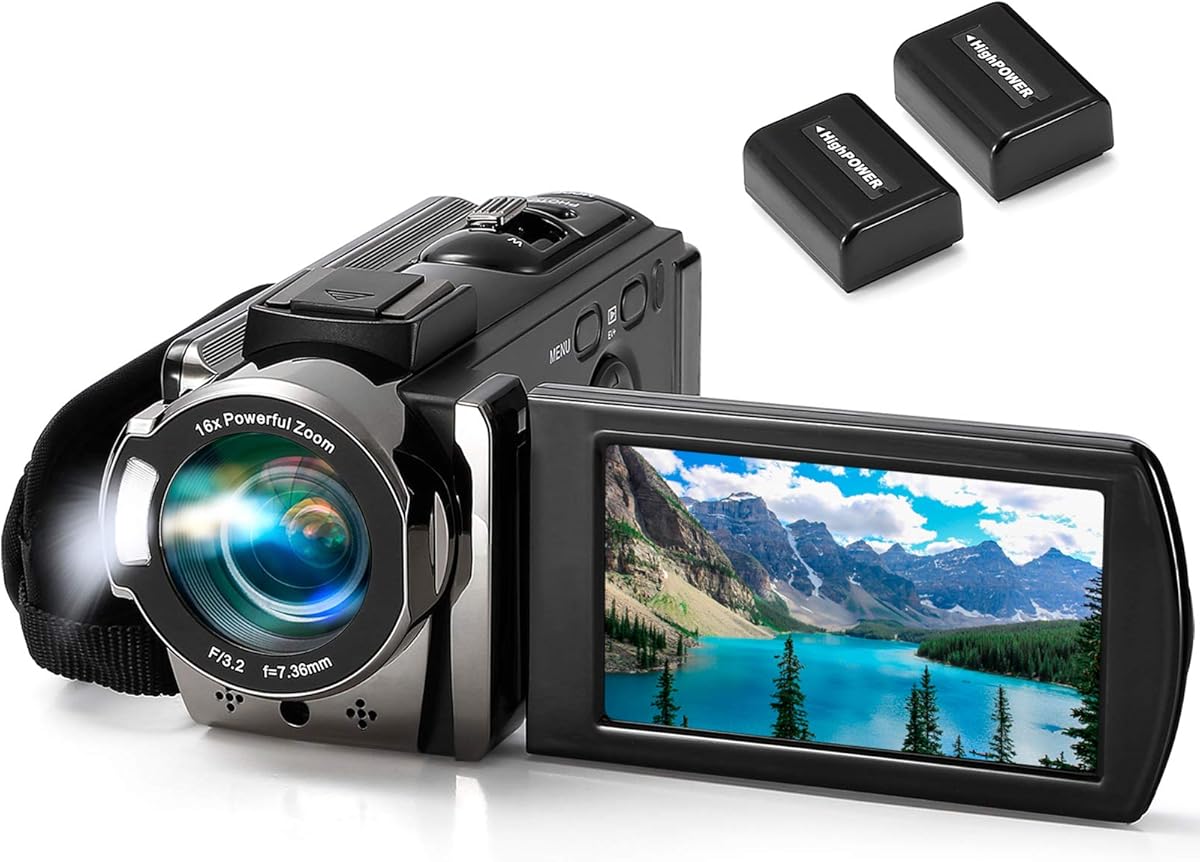
The kimire camcorder brings useful traditional camcorder features to older children, students, and family filmmakers. Its 4.1-star rating is supported by 1080P video, 24MP photographs, a 3-inch 270-degree LCD, 16X digital zoom, anti-shake, and a pair of rechargeable batteries.
We may earn a commission when you buy through this link, at no additional cost to you.
The dual-battery arrangement is particularly useful for parties, school events, and long outings because it reduces dependence on a single charge. Each battery is described as providing approximately 60 to 90 minutes of recording when fully charged, while recording while charging extends options for extended sessions.
It also functions as a webcam after the AMCAP software is downloaded, making it possible to use the camera for video calls with family or friends. An included AV cable supports television playback, and the pause function lets a child continue a recording without creating a separate file. SD, SDHC, and SDXC cards up to 128GB provide ample storage.
The principal trade-off is the 15FPS video frame rate, which produces less fluid motion than cameras recording at 30FPS or more. First-time users are also instructed to charge the batteries for more than eight hours. Even so, this is a well-equipped option for children making longer family recordings and educational projects.
The included batteries are one of this model’s most useful features for children at school events, birthday parties, or on family trips. Swapping a charged battery can keep the camera ready without waiting for a full recharge.
The pause function streamlines editing by avoiding unnecessary file breaks, while USB and AV connections provide two ways to review or share recordings. Webcam support adds another use for a camera that may otherwise remain stored between projects.
We may earn a commission when you buy through this link, at no additional cost to you.
The Focket Retro Camcorder is a compact, retro-styled option intended for teens and beginners. Its 3.4-star rating is the lowest in this group, so buyers should consider the limited published feature information carefully. The camera provides 16X digital zoom and a 2.7-inch color display in a small, lightweight body.
We may earn a commission when you buy through this link, at no additional cost to you.
Its mixed plastic and metal construction is described as sturdy, while the compact size makes it straightforward to carry in a bag or by hand. A built-in microphone and speaker support everyday recording and playback without requiring separate audio equipment.
Memory cards up to 32GB are supported, although none is included. The limited specifications make this model less compelling for a child who wants 4K footage, extensive effects, or advanced connectivity, and the rating suggests mixed experiences among customers. Its strongest appeal is the combination of nostalgic styling and simple operation.
For a teen who values appearance and wants a straightforward camera for short everyday clips, the Focket can be a functional choice. It is less appropriate for a parent seeking a highly capable family camcorder, although its small size and uncomplicated design may be attractive for children who are intimidated by complex controls.
The vintage-inspired appearance gives the camera a distinct look that may appeal to children and teens. Its light, compact construction also makes it easier to carry than a full-size camcorder.
The built-in microphone, speaker, zoom, and small display cover the basic needs of a first camcorder. A compatible memory card is still necessary, and advanced creative workflows are outside the feature set.
We may earn a commission when you buy through this link, at no additional cost to you.
The Andoer Kids Video Camcorder stands out with a perfect 5-star listed rating and a feature set tailored to children. It records 1080P video, captures 20MP photos, and uses a 2.4-inch display large enough for young users to follow framing and review basic menus.
We may earn a commission when you buy through this link, at no additional cost to you.
Ten special effects and puzzle games encourage creative play rather than treating the camera as a stripped-down recorder. The ABS and PC shell is described as impact-resistant and durable, while the top handle and hanging rope make the camera easy for children to grasp, carry, and keep nearby during outings.
A built-in 1000mAh battery supports charging through an AC adapter, power bank, laptop, or other USB source. The manufacturer advertises standby time of up to 30 days, although real-world results will vary with use. Memory cards from 4GB to 32GB are supported, and the TF card is not included.
This is an excellent value-oriented pick for families seeking a straightforward children’s camcorder with games and visual effects. It offers a stronger creative feature list than many basic alternatives, although parents should purchase a compatible TF card and supervise charging to keep the experience smooth.
Special effects and puzzle games add variety to basic recording and can make the camera more engaging for children. The compact size, top handle, and hanging rope support independent use during family activities.
The built-in rechargeable battery removes the need for disposable cells, while flexible USB charging allows use at home or while traveling. A supported TF card is required for saving photos and videos.
We may earn a commission when you buy through this link, at no additional cost to you.
The Goopow Kids Camera targets children between three and eight with a friendly cartoon soft cover, a 2-inch LCD, and simple controls. Its 4.5-star rating indicates strong customer reception for a child-oriented camera that records up to 1080P video and includes an 8X digital zoom.
We may earn a commission when you buy through this link, at no additional cost to you.
Selfie mode helps young filmmakers record themselves, while time-lapse, photo capture, video recording, playback, game play, and date settings provide a varied creative toolkit. Three motion-controlled puzzle games add entertainment, and 28 photo scene selections can help children make images look more distinctive.
The included card reader makes it possible to download photos and videos to a computer for sharing with family and friends. A 100-gram body, compact dimensions, and durable lanyard make the camera easy to wear during travel or outdoor play. Its rechargeable 3.7V lithium battery provides approximately 1.5 to 2 hours of continuous photo use.
Adults should supervise charging, use the included cable or a compatible charger, and avoid fast chargers rated above 1A. The small screen may feel less immersive than those on larger camcorders, but the protective cartoon design and simple operation are well matched to younger children.
The cartoon shell, lanyard, and lightweight body make the camera approachable for younger children. Large-area controls and clear modes help reduce the learning period compared with a conventional camcorder.
Motion-controlled games and scene selections add playful variety, while the included reader supports transfer to a computer. These features let children create distinctive videos and then share selected moments with family.
We may earn a commission when you buy through this link, at no additional cost to you.
This black 4K camcorder is aimed at older kids, teens, students, and beginner content creators who want more capability than a toy camera. Its 4.3-star rating reflects a strong specification sheet that includes UHD 4K video, 48MP photos, 18X digital zoom, a 3-inch IPS display, and a 270-degree flip screen.
We may earn a commission when you buy through this link, at no additional cost to you.
The included wired microphone is designed to record clearer voices and stereo sound, making the camera useful for vlogs, presentations, speeches, and meetings. Webcam mode and recording while charging broaden its use for streaming and extended sessions. Face recognition, anti-shake, pause, flash, timer, slow motion, time-lapse, auto photo, and continuous photo modes add further flexibility.
Creative extras include customized Father’s Day photo frames and Daddy-themed date watermarks, which can personalize family recordings. The feature set is extensive, however, and younger users may need guidance in choosing the right mode. Storage requirements also depend on the selected format and resolution, so adequate card capacity should be confirmed before a major event.
For a teen interested in vlogging, school presentations, or polished family videos, this is a compelling all-in-one option. It is less appropriate for a toddler because of its broad menu and screen-based operation, but it gives older children a capable tool for developing storytelling and content-creation skills.
The external wired microphone improves the capture of voices and surrounding sound compared with relying solely on a built-in microphone. It is particularly useful when a child is presenting, narrating a story, or filming close to the camera.
Slow motion, time-lapse, timer, continuous photo, and auto photo modes let one camera support several styles of project. The flip screen also helps with selfie videos and group shots.
We may earn a commission when you buy through this link, at no additional cost to you.
The VETEK camcorder is designed for children and beginners who may film beyond ordinary daylight conditions. It records 1080P video at 30FPS, captures 30MP photos, and adds infrared night vision, allowing black-and-white recording in dark environments where other compact camcorders may struggle.
We may earn a commission when you buy through this link, at no additional cost to you.
A remote control gives children another way to operate the camera, which is useful for selfies, group shots, and filming from a distance. The package includes a microphone, mini tripod, two batteries, and a 32GB SD card, providing a relatively complete setup for family outings and school projects.
The camera can function as a webcam for streaming and video calls, and an HDMI connection allows playback on a television. It also includes pause, time-lapse, slow-motion, continuous shooting, and self-timer functions. A hot shoe, external microphone jack, and accessory support for an LED light or tripod expand the available setup.
One limitation is that an HDMI cable is not included, although a compatible mini HDMI cable can be used. In PC camera mode, the device enters a sleep state and can only be used with a computer or mobile phone. Overall, the VETEK is especially appealing for camping, parties, and family events where low light may occur.
Infrared night vision gives the camera a meaningful advantage in dim rooms, evening gatherings, and camping scenarios. The resulting imagery is black and white, but it expands the range of situations in which a child can record.
The included remote helps children capture themselves or group scenes without returning to the camera. A microphone, mini tripod, two batteries, and a 32GB card make the package convenient for immediate family use.
We may earn a commission when you buy through this link, at no additional cost to you.
The right camcorder depends heavily on the child’s age, patience, and creative interests. Resolution, durability, battery life, storage, and ease of use should be balanced rather than treating the largest specification as the only measure of quality.
Very young children benefit from cameras that are lightweight, visually playful, and limited to a few understandable modes. Models designed for ages three through six often include games, simple photo scenes, selfie functions, and rounded or cartoon-like shapes. Older children can manage more advanced menus, recording modes, and computer connections without the same amount of guidance.
Choose a model that matches the child’s actual independence. Simple operation matters more than advanced specifications if the camera will frustrate or confuse its primary user.
For family memories and school projects, 1080P is generally a practical level of detail, while 2.7K and 4K models provide more flexibility for editing and large displays. Photo resolution can be useful for printing or capturing still moments, but megapixel figures do not automatically indicate better quality in every lighting condition.
Match output to the intended use. A child creating short, playful clips may need less resolution than a teenager making polished vlogs or documenting events in detail.
Check whether a memory card is included, the maximum supported capacity, and the required card format. Some child-focused cameras include 32GB storage, while others require a separately purchased TF card. Larger and higher-resolution recordings also consume more space, so a generous card can prevent interrupted projects.
Also inspect the box for a USB cable, card reader, tripod, batteries, and carrying options. Included accessories can make a camera easier for a child to use independently.
Rechargeable batteries are generally more convenient than disposable cells for regular use. Models with two batteries are helpful for long school events, parties, and trips, while recording while charging provides another way to extend a session when a suitable power source is available.
Pay attention to charging guidance, especially for products aimed at children. Some manufacturers recommend adult supervision and restrictions on faster chargers, so families should follow the supplied instructions carefully.
A larger rotating or flipping screen makes it easier for a child to see the framing while recording themselves. Two- to three-inch displays provide a useful balance between visibility and compactness, while smaller screens may be easier for very young hands to navigate. Selfie mode and self-timers are valuable for children who cannot comfortably hold the camera at arm’s length.
Look for a screen that can rotate toward the subject and controls that allow timed recording. These details can eliminate many failed first attempts and reduce the need for adult assistance.
Games, animated backgrounds, scene filters, and green-screen effects can make a camera more engaging for children. These tools encourage experimentation and storytelling, particularly for children who are not interested in conventional home videos. They can also keep a camera in regular use rather than tucked away after a single birthday.
Effects are most useful when the child has an adult nearby to explain them. A camera with several creative options should still be easy to operate without advanced editing knowledge.
Children may drop, pull on, or carry a camera in a backpack, so materials, weight, and included carrying accessories matter. A compact body is easier for small hands, while a handle, clip, or lanyard can reduce the chance of losing it outdoors. Protective shells and durable plastic construction are useful additions for active users.
Avoid choosing solely on rugged-looking styling. The stated materials, included strap or handle, and overall dimensions are more useful indicators of how a camera will function during everyday family use.
USB transfer, card readers, webcam mode, and television output determine how easily a child can share finished projects. Some cameras permit transfer to a computer, while others require specific cables or software. PC camera mode can support schoolwork and video calls, but it may limit use of the device to a connected screen.
Check compatibility and adult controls before purchasing. For a younger child, a supervised file-transfer workflow may be preferable to unrestricted direct sharing.
Before the first recording, read the included manual, install any required storage card, and confirm the camera is charged. For models with a new card, formatting it in the camera can help ensure files are organized correctly. A parent should also explain the basic record, stop, playback, and file-management controls before handing the device to a child.
Choose a suitable memory card before recording and check the remaining capacity regularly, especially when using higher-resolution modes. Keep the lens clean, use a protective case or pouch during transport, and avoid exposing the camera to moisture, excessive heat, or impact. Adults should supervise charging, particularly for products intended for young children, and follow guidance about compatible chargers.
To encourage creative results, begin with short practice clips framed in good light. Children can try different angles, use the rotating screen for selfies, and experiment with included games or effects. Parents can review files periodically, preserve favorite memories, and decide which recordings are appropriate to share or upload.
The VTech KidiZoom Creator Cam is especially suited to creative children age five and older because it combines simple controls, animated backgrounds, green-screen effects, and on-camera editing. For a child between three and six who values games and an even simpler format, the Kids Vlogging Camera or Goopow Kids Camera may be easier to use. The best choice depends on the child’s age, attention span, and interest in effects versus basic recording.
Not for every child. A 1080P camera is sufficient for school projects, family clips, and everyday memories, while 4K provides additional detail and flexibility when clips are edited or shown on a larger screen. Young children may benefit more from simple controls, creative effects, and a durable body than from higher resolution.
Most models require removable storage for photos and videos, although some packages include a card. The Andoer, Focket, and 1080P 16MP models do not include their required cards, while several other choices include 32GB storage. Confirm the card format and maximum supported capacity before purchasing, and choose enough capacity for the expected recording resolution.
Several models support PC camera mode, including the 1080P 16MP DV Camcorder, kimire camcorder, 2.7K 48MP model, 4K 48MP model, and VETEK camcorder. Connecting the camera to a computer may require compatible software or a mode change, and some models become unavailable as a standalone camera in PC mode. A webcam function is convenient, but it should not replace a parent’s supervision during online communication.
Many are designed for portability and include handles, clips, lanyards, or protective shells. The Goopow model has a cartoon soft cover, while the Andoer model uses impact-resistant ABS and PC materials. Even with these features, a padded pouch and adult-managed storage are advisable because drops, sand, moisture, and missing accessories remain common risks during travel.
Digital zoom enlarges the image by cropping and processing what the camera sensor captured, so detail can decrease as magnification rises. Optical zoom uses the lens to bring a subject closer while retaining more original detail. Most cameras in this list advertise digital zoom, which is useful for casual framing but should not be expected to match the clarity of a dedicated optical zoom.
Parents should establish a simple routine for reviewing files, saving favorites, clearing or archiving the memory card, and deciding which clips are shared. For younger children, adult-guided computer transfer and privacy decisions are especially important. Keeping transfer and charging activities supervised helps the camera remain useful without introducing avoidable file-management problems.
A dedicated camcorder can be easier for a child because it may have fewer distractions, larger physical controls, games, and age-appropriate effects. It also avoids tying the child’s camera experience to internet access. Smartphones may offer better convenience and connectivity, but dedicated models provide a more focused way to learn recording, framing, and storytelling.
The Camcorder Video Camera 2.7K 48MP is the strongest all-around choice because it combines detailed video, high-resolution photos, a flip screen, webcam functionality, and useful recording tools. The Andoer Kids Video Camcorder offers excellent value and child-focused entertainment, while the VTech KidiZoom Creator Cam provides the most polished creative experience for children ready to explore effects and backgrounds.
For younger children, prioritize lightweight construction, simple controls, rechargeable power, and playful features. Older children and teens may benefit from 4K resolution, external audio, webcam support, and flexible recording modes. In every case, verify memory-card support, charging guidance, and age recommendations before purchasing.
Customer ratings and product availability can change, and current pricing may also vary. Buyers should review the latest listing details, included accessories, and compatibility information before choosing a camcorder for a child.