
Thermal Grizzly TG Scraper 3-Pack
4.8Editor score
Narrow precision scraping tip
Acrylic construction and grip
Three scrapers included
Our Delidding Kits guide compares ten purpose-built and multi-purpose tools for PC, console, and electronics work, highlighting compatibility, precision
Delidding kits help remove integrated heat spreaders, lids, adhesive, and thermal-interface residue from processors and other tightly packaged electronics. A useful kit matches the component being serviced, provides controlled blade access, and reduces the chance of accidental damage to fragile silicon, boards, or surrounding parts.
This guide compares ten delidding tools and related precision instruments for desktop CPUs, PlayStation 3 graphics processors, smartphones, motherboards, and general electronics repair. We considered stated compatibility, intended application, blade design, material, ergonomic handling, replacement availability, and how each product is presented for DIY or professional use.
Each pick highlights a different reason to consider it: dedicated processor tools, console-specific access, multi-blade repair sets, or cleanup instruments. Ratings and availability can change over time, as can product prices and retailer listings, so confirm the current specification and fit for your exact device before purchasing.
4.8Editor score

4.5Editor score

4.1Editor score
The table below compares all ten selections by their primary application, compatibility, construction, and practical role in a delidding or precision-repair workflow.




The Delid Tool V3 is a purpose-built PlayStation 3 CPU delidding tool with a 4.6 rating. Its defining feature is a thin, sharp, flexible blade designed to access the console's integrated heat spreader while reducing the likelihood of slipping onto unrelated board components. The included three-blade arrangement also makes it more practical for repeated work than a tool that depends on one fixed edge.
We may earn a commission when you buy through this link, at no additional cost to you.
This product focuses on the job rather than trying to function as a general electronics knife. A replaceable blade helps maintain a consistently clean edge, while the flexible, narrow geometry can follow the boundary of the lid as it separates. For technicians familiar with PS3 thermal maintenance, that combination of a dedicated profile and serviceable consumable is more meaningful than a large collection of generic attachments.
The limitation is specialization. It is listed specifically for PlayStation 3 compatibility and offers no stated support for desktop CPU sockets, smartphones, BGA packages, or general board-level scraping. It is also a blade-based opener rather than a complete cleaning set, so residue removal and adhesive work may require another appropriate instrument. Buyers should also account for the inherent risk of opening a console heat spreader without specialized board-level repair experience.
This is a strong choice for a PS3 owner or repair technician whose work involves separating the console CPU lid, particularly when a replaceable cutting edge is important. It is less suitable for someone seeking a versatile electronics toolkit. Confirm the console revision and work area before ordering, and treat the tool as one component of a careful disassembly and thermal-interface service process.
A thin blade is the product's central advantage. The stated design intent is to separate the PS3 lid cleanly and accurately, helping the operator keep the working edge away from nearby areas of the board.
Three included blades provide a practical replacement path. A fresh edge can be important when even a small change in blade condition affects the movement needed around an integrated heat spreader.
We may earn a commission when you buy through this link, at no additional cost to you.
The der8auer Delid-Die-Mate X is an integrated heatspreader removal system for Intel Skylake-X and Kaby Lake-X processors on socket 2066. Its 4.1 rating reflects a specialized tool aimed at a clearly defined group of enthusiasts and technicians, rather than a general-purpose blade set. The aluminum and stainless steel construction and measured frame format are the standout features.
We may earn a commission when you buy through this link, at no additional cost to you.
Unlike a knife, the Delid-Die-Mate X is built around the mechanical process of removing a processor heat spreader. Its integrated approach is intended to make the operation more routine and reduce the risks associated with improvised tools. That distinction matters for processors whose exposed die and package components demand controlled access and a repeatable removal method.
Compatibility is narrow by design. Removing the integrated heat spreader can lower the CPU cooler's mounting height, so a cooler with a fixed mounting position may no longer fit without adjustment. The process also carries the risk described in the product information and invalidates the manufacturer's warranty. These are substantial considerations for anyone who may later resell the processor or wants to preserve a fully warrantied system.
The Delid-Die-Mate X is best suited to a technician working specifically with compatible socket 2066 processors and prepared to verify cooler compatibility, manage the risk, and accept the loss of manufacturer warranty coverage. It is less appealing as an all-purpose kit or for a first delidding project. The investment makes the most sense when repeated processor work justifies a dedicated, integrated tool.
The integrated frame and removal mechanism offer a more structured alternative to sliding a loose blade around a lid. That design is intended to improve control while protecting the processor and accessible components.
Once the heat spreader is removed, cooler mounting height decreases slightly. Fixed-height coolers may need to be changed, making this compatibility check an essential part of planning the job.
We may earn a commission when you buy through this link, at no additional cost to you.
The Knife Repair Kit is a general precision-removal instrument for BGA chips, CPU adhesive, power-supply components, and circuit-board maintenance. It carries a 3.6 rating, but its most compelling specifications are its 0.38mm blade, SK5 steel construction, heat tolerance, and narrow working profile. Those details make it more relevant as an electronics-repair knife than as a conventional delidding frame.
We may earn a commission when you buy through this link, at no additional cost to you.
An ultra-thin blade is valuable when navigating tight spaces between chips, baseplates, and package edges. The stated ability to remove adhesive or cut glue-bonded strips supports both general repair and cleanup work around processor packages. The steel blade is described as quench-processed SK5, with a listed heat tolerance of 550°F, while the handle is shaped to provide secure handling during fine movements.
The main drawback is that flexibility and precision demand skill. The product is not described as a dedicated heatspreader-removal system, and no specific CPU socket or console compatibility is stated. Its lower rating also warrants more attention than the higher-rated picks. A thin blade can still scratch or cut a board if the technique is poor, so this is not a beginner-proof solution even though the handling design is intended to be user-friendly.
This kit makes sense for a repair technician who needs a slim scraping and separation blade for motherboard or BGA work. It can also support the cleanup stage of a delidding project when used carefully. For a first-time owner needing a guaranteed fit for a particular processor or console, a dedicated tool would offer a clearer and safer starting point.
The 0.38mm blade is small enough to move between closely spaced components, making the tool relevant for chip removal and adhesive work where a broad blade would be difficult to control.
The kit is best treated as a precision repair instrument rather than a complete delidding solution. It may handle cutting and scraping tasks around components, but the listing does not claim dedicated processor-socket compatibility.
We may earn a commission when you buy through this link, at no additional cost to you.
The Thermal Grizzly Delid-Die-Mate is a CPU heatspreader removal tool developed by Roman “der8auer” Hartung for compatible 12th and 13th generation Intel Core processors. It holds a 4.5 rating and offers one of the clearest compatibility stories in this list. The black-and-red anodized aluminum construction also gives it a purpose-built appearance rather than the look of an improvised repair knife.
We may earn a commission when you buy through this link, at no additional cost to you.
Its main function is to remove the heatspreader so the exposed die can be used in a direct-die cooling arrangement. The product information states that this can improve heat dissipation and reduce temperatures by 10–20°C in suitable setups. Those results depend on the complete cooling solution, mounting method, paste, workload, and ambient conditions, but the tool removes the mechanical barrier that would otherwise prevent direct contact with the die.
The tradeoff is specificity. The listing names 12th and 13th generation Intel Core compatibility rather than universal processor support. A direct-die configuration also requires a complete plan for safe heat transfer and physical retention; simply removing a lid does not by itself create a finished cooling installation. The process exposes sensitive components and should be approached with care and relevant technical knowledge.
This is our Editor's Choice for enthusiasts who specifically work with compatible 12th or 13th generation Intel processors and have a direct-die cooling plan. It offers a much more focused proposition than a generic repair blade. Users with other processor generations, or those who only need an occasional scraping tool, should choose a broader or differently specialized option instead.
By removing the integrated heat spreader, the tool enables a direct-die cooling approach. The listed temperature reduction depends on the rest of the cooling system and should not be treated as a guaranteed result for every installation.
Named support for 12th and 13th generation Intel Core processors gives buyers a useful compatibility target. It is more informative than selecting a generic blade purely by shape or processor family.
We may earn a commission when you buy through this link, at no additional cost to you.
The Thermal Grizzly TG Scraper 3-Pack is a precision cleanup tool for silicone adhesive and indium solder residue left around delidded processors. Its 4.8 rating is the highest among the selected products, and its narrow tip, acrylic construction, and three-piece format make it a focused solution for the careful removal stage of advanced electronics work.
We may earn a commission when you buy through this link, at no additional cost to you.
The tip is designed to reach tight spaces around a CPU package without the broad contact area of a general scraper. Its stated safe-use intent is to reduce scratching when the tool is handled carefully, while the ergonomic shape is intended to preserve control around small components. A three-pack also provides spare tools for different tasks, although users should still avoid forcing the tip against delicate surfaces.
The important limitation is that this is not a delidding frame, heatspreader opener, or complete electronics kit. It is intended to clean silicone adhesive and indium solder residue after a processor lid has been removed. Viewed that way, its limited scope becomes a strength: the tool is shaped for a specific cleanup need instead of claiming to replace every blade and specialty instrument in a technician's bench.
This is the Best Budget pick for someone who already has a safe opening process and needs a dependable cleanup instrument. It is also a sensible companion to one of the dedicated CPU or console tools in this guide. For a first project, buy it alongside a compatible opener rather than expecting the scraper to perform the complete delidding operation on its own.
The narrow tip concentrates the working edge on small deposits of silicone adhesive or indium solder residue. This focused contact is useful where a wider blade could drag across more of the package surface.
This scraper supports the cleanup phase that follows heatspreader removal. It does not replace an opener, so it works best as part of a larger, component-specific workflow.
We may earn a commission when you buy through this link, at no additional cost to you.
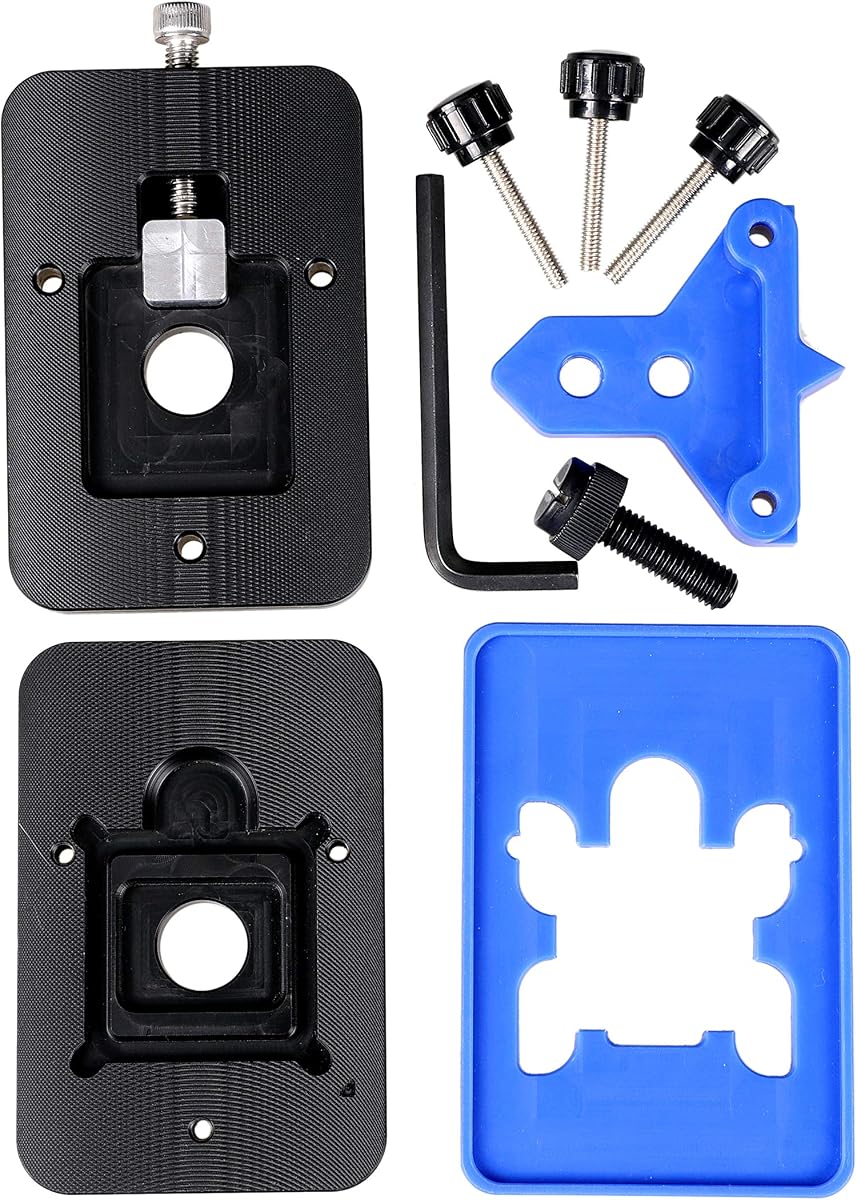
The EG Starts Kaby Intel CPU Delid & Relid tool supports LGA 1150, LGA 1151, and LGA 1155 processors, with the title also referencing several widely used Intel Core families. Its 4.6 rating and support for both opening and closing procedures make it a practical option for enthusiasts working across multiple generations of mainstream Intel platforms.
We may earn a commission when you buy through this link, at no additional cost to you.
A frame-style opener offers a different approach from a handheld blade. The product's warning that the square aluminum block must remain below the plastic plane is particularly important: incorrect positioning can damage the CPU board. That requirement gives the tool a clear operating rule and shows why alignment matters more than simply inserting a thin edge and applying force.
The relid function is another practical differentiator. Many enthusiasts do more than remove a lid once, and a system designed for both procedures can support repeated service cycles. However, the listing's broad list of processor names should not be mistaken for blanket approval for every stepping or package variation. The actual socket, generation, and physical package must all be checked before use.
Choose this tool if you own a supported LGA 1150, 1151, or 1155 processor and value a dedicated frame approach. It is less appropriate for modern desktop processors outside those platforms, console chips, or mobile devices. Read the alignment warning carefully, test the fit without force, and avoid using a tool whose geometry does not correspond to the processor in front of you.
Support for LGA 1150, 1151, and 1155 gives the tool practical value for owners of several compatible Intel systems. Socket verification remains essential because similar platform names do not guarantee identical package geometry.
The aluminum block should remain below the plastic plane. Following that positioning guidance is central to avoiding the board damage the product explicitly warns about.
We may earn a commission when you buy through this link, at no additional cost to you.
The QianLi ToolPlus 009 is a 12-in-1 handle metal craft knife set designed for delicate board repair, adhesive removal, chip lifting, solder-pad cleaning, and microsoldering work. No numerical customer rating is supplied, so its appeal must be assessed from the stated design. The large selection of interchangeable tips and sturdy metal handle make it the broadest general-purpose option in this guide.
We may earn a commission when you buy through this link, at no additional cost to you.
Different blade profiles help with different stages of a repair. Fine points can reach confined areas, while angled edges can handle cutting, lifting, or prying. The stated high-grade steel, balance, and non-slip grip are particularly relevant during long microsoldering sessions, where control and fatigue management can influence the quality of delicate work.
The drawback is that this is a general repair knife rather than a dedicated delidding system. There is no listed processor-socket or console compatibility, and the absence of a numerical rating means buyers cannot use the same review signal available for several alternatives. The many choices also carry a learning curve; using the wrong tip for a package, board, or adhesive can create unnecessary risk.
This kit is best for a technician who repairs phones, BGA packages, and general circuit boards and wants a flexible set of blade shapes. It can support delidding and refurbishment tasks, including A8 and A9 CPU work as described in the product information, but it should not be purchased on the assumption that it is a guaranteed fit for a specific desktop processor. Match the tip carefully to the component and keep the edge controlled.
Twelve interchangeable blades cover fine scraping, angled cutting, lifting, and other repair movements. The variety reduces the need for unrelated tools when moving from adhesive removal to solder-pad cleanup.
The metal handle is described as balanced and non-slip, supporting steady work around mobile-device CPUs and densely populated circuit boards where a loose or shifting grip can be hazardous.
We may earn a commission when you buy through this link, at no additional cost to you.
The RSX GPU Delid Tool is designed specifically for the integrated heat spreader covering the RSX graphics processor in PlayStation 3 Fat and Slim models. No numerical rating is supplied. Its specialized design nevertheless stands out through a clearly defined chip target, a working edge intended to remain away from the main board, and direct access to the thermal interface material.
We may earn a commission when you buy through this link, at no additional cost to you.
That distinction is important in console repair. A generic knife that works around a loose desktop processor package may be a poor choice near a densely mounted board. The RSX tool is described as assisting heatspreader removal while helping keep the working edge positioned away from board contacts, which reflects a more component-specific approach to access and risk reduction.
There are two important limits. The tool works only with the RSX/GPU and does not remove the CELL/CPU heat spreader, so a technician needing both operations still requires another suitable method. It is also not compatible with PS3 Super Slim models because those systems do not use an RSX lid. Any delidding operation still carries a risk of damaging the chip or console.
This is a suitable choice for a PS3 Fat or Slim repair technician who needs to access the RSX thermal interface, especially for replacing aged thermal paste. It is not a general CPU delidding kit and should not be marketed as one. Verify the console model, the targeted chip, and the board condition before use, and follow appropriate console-repair procedures throughout the operation.
Removing the RSX lid exposes the thermal interface material beneath it. That access supports console maintenance when the original paste has aged or when a cleaner application is required.
Compatibility covers PS3 Fat and Slim models but not Super Slim systems. The tool also addresses only the RSX/GPU, not the separate CELL/CPU heatspreader.
We may earn a commission when you buy through this link, at no additional cost to you.
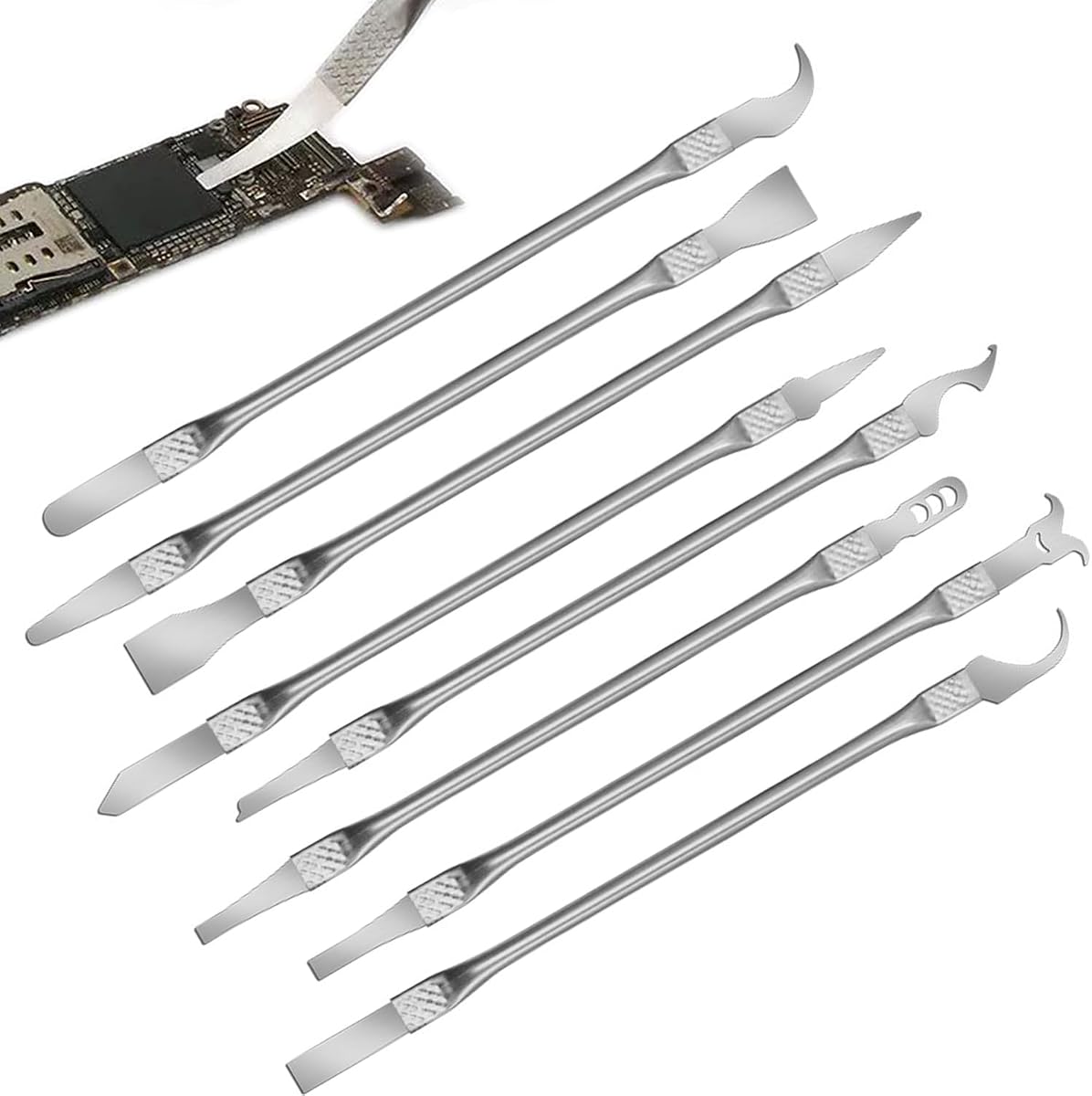
The 8-Piece Multi-Function CPU Removal Tool Set is intended for removing BGA chips, CPUs, and other small components from smartphones, computers, and motherboards. Its 4.0 rating and integrated blade-and-handle design present it as a convenient general repair solution. The set combines several thin tools in a portable format rather than committing to one heatspreader-removal mechanism.
We may earn a commission when you buy through this link, at no additional cost to you.
The ultra-thin geometry is the primary benefit. It can maneuver between chips and boards, while the alloy construction is described as resistant to corrosion and bending. Integrated handles eliminate assembly steps, and the ergonomic shape is intended to reduce fatigue during extended repair sessions. These qualities make the set relevant to technicians moving between mobile and board-level components.
Because it is a general set, it does not provide the same fit assurance as a socket-specific frame or console-specific opener. The word “CPU” in the title covers several very different packages, from mobile application processors to desktop chips, so the actual component and task must be considered. A broad warranty-validity claim is also not possible when using a precision removal tool for advanced modifications.
This set is most useful to a beginner or general repair hobbyist who wants several thin instruments in one compact package and may work across phones and motherboards. Experienced desktop technicians may prefer a dedicated CPU opener, while console repair requires a tool built around the exact board and lid. Treat this as a versatile supporting kit rather than a guarantee of every CPU fit.
Several ultra-thin instruments provide different working options for tightly packed chips. Their compact format is convenient for mobile-device and motherboard tasks.
The integrated blade-and-handle construction removes the need to install individual tips before starting. That convenience is useful for quick repairs and varied work sessions.
We may earn a commission when you buy through this link, at no additional cost to you.
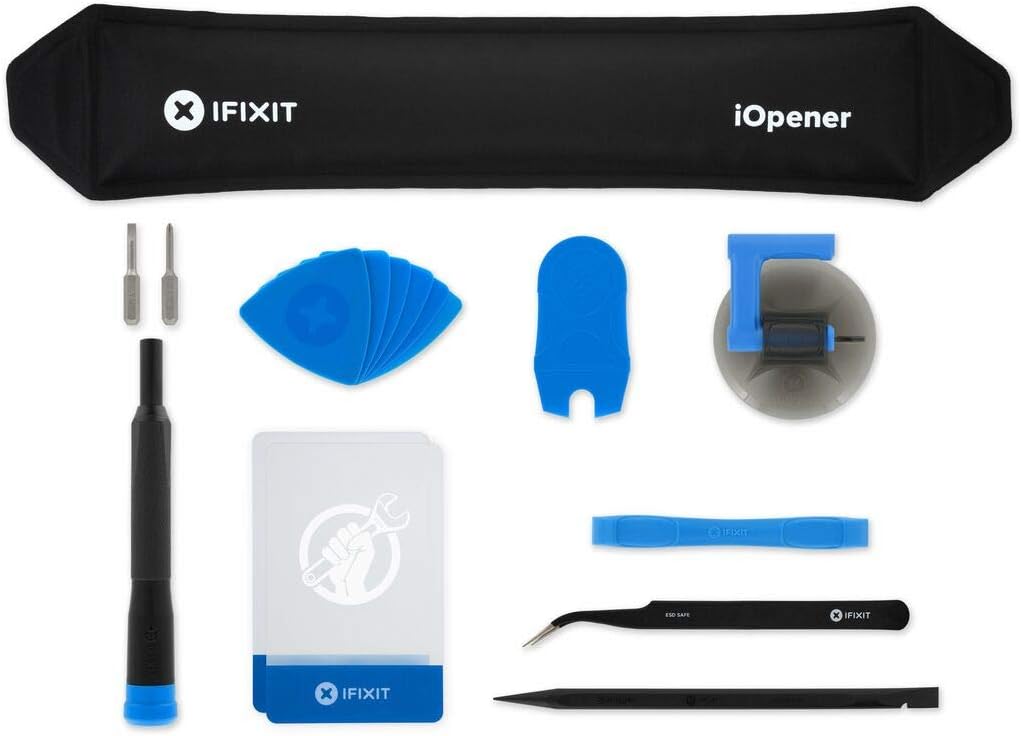
The iFixit iOpener is a heat pad designed to apply heat directly and evenly to screens so adhesive can be loosened during repair. It has a 4.5 rating and is included here because heat-assisted opening is often the preparatory stage in a broader delidding or adhesive-removal workflow. It is not, however, a CPU heatspreader removal frame or a precision scraping tool.
We may earn a commission when you buy through this link, at no additional cost to you.
Even heat distribution is the product's chief advantage. By warming the adhesive bond beneath a display, the iOpener can make separation easier and reduce the force required from a separate opener. It works with iPads and many tablets, iPhones, Android phones, PC laptops, and other electronics that use heat-sensitive adhesive. The included repair accessories broaden its usefulness beyond the pad itself.
Heat must be applied thoughtfully. Electronics can be sensitive to excessive temperature, and a heated pad is not a substitute for the component-specific mechanical tools needed around processors or console chips. The product's non-toxic, food-safe construction addresses material safety, but it does not eliminate the need for caution around batteries, displays, adhesives, and nearby board parts.
Choose the iOpener when the immediate task is loosening screen adhesive or preparing an adhesive-sealed device for disassembly. It pairs well with knife and scraper kits, but it should not be selected as the primary tool for removing a desktop CPU lid. Use controlled heating, follow the device-specific repair guidance, and keep the tool focused on the adhesive application it is designed to soften.
The iOpener's direct and even heating softens screen adhesive before a separate opener is applied. This preparation can make a disassembly process more controlled.
It serves a different role from a delidding blade or CPU frame. Its value comes from heat-assisted adhesive release, making it most useful in broader phone, tablet, and laptop repair work.
We may earn a commission when you buy through this link, at no additional cost to you.
The right delidding tool depends less on the number of accessories than on exact component compatibility, the type of opening action required, and the user's level of board-level repair experience.
Begin with the exact package, socket, or console model that needs service. Some tools are dedicated to Intel 12th and 13th generation processors, while others support socket 2066, LGA 1150, 1151, or 1155 platforms. Console tools may cover only the PlayStation 3 RSX chip, may handle the PS3 CPU, or may exclude Super Slim models entirely. Similar-looking processors can have different lids, package heights, and retention arrangements, so a broad family name is not enough. Check the full product specification and compare it with the model number printed on the component.
In short, verify exact model compatibility before ordering.
A dedicated frame follows the outline of a particular package and can offer more controlled separation than a loose knife. A thin blade is more flexible across different electronics but places greater emphasis on operator technique. The frame is often the better fit for repeated desktop CPU work, while a blade can be necessary around mobile packages, BGA chips, and irregularly mounted console components. Choose the approach that matches both the component and the work rather than assuming one style is universally safer.
In short, use frames for supported packages and blades for varied precision work.
A thin, sharp edge is valuable for separating lids and cutting through adhesive, but flexibility must remain controlled. The blade should be able to enter the intended gap without forcing its way under another component. The Knife Repair Kit highlights an ultra-thin 0.38mm profile, while the Delid Tool V3 emphasizes a sharp, flexible, replaceable blade. Consider whether a fresh replacement edge is available, because a dull blade can require more force and increase the chance of a slip.
In short, favor a sharp, thin, serviceable edge over unnecessary bulk.
Material affects durability, balance, and the way a tool responds under pressure. Aluminum and stainless steel frame tools provide rigidity, while acrylic scrapers offer a controlled alternative for residue cleanup. Metal craft knives can provide a balanced grip for extended microsoldering work, and integrated handles eliminate assembly steps. Look for ergonomic shaping and a non-slip hold, especially when the task involves tiny components or prolonged work sessions.
In short, favor a stable, comfortable handle matched to the repair.
A larger kit is not automatically a better delidding kit. A multi-blade set can cover adhesive removal, scraping, lifting, and solder-pad cleanup, but it may lack the exact frame needed for a specific CPU. Conversely, a dedicated opener may not include the instruments required to clean residue after the lid is removed. Review the included pieces as a workflow: opening, package cleaning, reassembly, and thermal-interface work are separate tasks that may require more than one instrument.
In short, match accessories to each stage of the repair.
If a processor will be opened more than once, a system designed for both delidding and relidding can be more convenient. The EG Starts tool explicitly includes both roles, while dedicated opener systems vary in how they support reinstallation. A complete plan should also account for a suitable replacement lid, direct-die mounting hardware, thermal compound, and the reduced mounting height that can affect cooler compatibility.
In short, consider the full service cycle before opening the package.
Delidding can expose fragile silicon and invalidate a manufacturer warranty. Integrated heatspreader removal may also change the physical relationship between the processor and cooler. A beginner should begin by understanding the target package, watching a complete component-specific procedure, working on a low-value part, and practicing heat and adhesive techniques with less delicate tools. The product's warning language is not a formality; the required tool geometry and force control are central to avoiding damage.
In short, match the tool to your skill level and proceed cautiously.
Before using any delidding tool, identify the exact processor, console, or electronic component and confirm compatibility. Review the device-specific disassembly procedure, disconnect power, remove the component from the system when required, and inspect the work area under suitable magnification and lighting. A dedicated opener should be checked for correct alignment before pressure is applied; the warning attached to the EG Starts tool about keeping its aluminum block below the plastic plane illustrates why geometry matters.
Use controlled, deliberate movements rather than force. On a frame-style opener, follow the intended removal sequence and let the tool's shape guide the lid away from the package. With a knife or scraper, keep the working edge controlled and avoid prying against components that were not part of the intended adhesive boundary. Once the lid is separated, use a dedicated scraper such as the Thermal Grizzly TG Scraper to remove silicone adhesive or indium solder residue with minimal contact.
After the job, clean and store each tool according to its material. Remove residue with an appropriate cleaner, protect cutting edges from impacts, and keep replacement blades in a dry holder. Inspect tools for bending, dulling, scratches, or contamination before each use. The iOpener should be allowed to cool appropriately and stored flat, while electronic tools should remain disconnected from power during maintenance. A labeled container is especially useful for multi-piece kits with easily confused tips.
A delidding kit is used to remove an integrated heat spreader or lid from a processor or other tightly packaged component. The exposed die or chip can then be serviced, cleaned, replaced, or paired with a compatible direct-die cooling arrangement. The required tool depends entirely on the component's package, mounting method, and intended repair.
No. A thin knife may physically reach some packages, but a dedicated frame provides a much better indication that the tool matches the package geometry. Always verify the processor generation, socket, package, and manufacturer specifications before opening a CPU. Attempting an incorrect fit can damage the processor or board.
The der8auer product information specifically states that removing the CPU heat spreader invalidates the manufacturer's guarantee and warranty. Other modifications may similarly affect coverage because the processor has been altered. Buyers who need warranty protection should consult the manufacturer before performing any procedure that changes the processor's physical state.
A delid tool is intended to separate the lid or integrated heat spreader from a component. A precision scraper is intended to clean adhesive, solder residue, or other material after the lid has been removed. The Thermal Grizzly TG Scraper is therefore a complement to an opener rather than a replacement for one.
The RSX GPU Delid Tool is not compatible with PS3 Super Slim models because those consoles do not use an RSX lid. It is designed for PS3 Fat and Slim models and addresses the RSX/GPU heatspreader only. A technician who also needs to work on the CELL/CPU requires a separate suitable method.
The required finishing method depends on the cooling plan. Some enthusiasts install a replacement lid, while others use a purpose-designed direct-die frame and mounting hardware. Because removing the heatspreader can lower the cooler's mounting height, check that the selected cooling hardware can accommodate the modified processor.
No. The iFixit iOpener applies heat to soften screen adhesive and prepare a device for opening. A delidding tool mechanically separates a processor or chip lid. Heating may be part of a broader repair process, but it does not replace a component-specific opener.
Store clean blades in a dry, protected holder where they cannot contact hard surfaces or each other. Keep replacement tips in labeled compartments, and avoid leaving acrylic scrapers or heated pads in direct sunlight. Inspect tools for dullness or damage before each use, since a compromised edge can require more force than a sharp, properly maintained one.
The Thermal Grizzly TG Scraper 3-Pack is the best budget-oriented choice for careful post-delid cleanup, while the Thermal Grizzly Delid-Die-Mate is the Editor's Choice for supported 12th and 13th generation Intel processors. The der8auer Delid-Die-Mate X takes the premium position for technicians specifically working with compatible socket 2066 processors. Each offers a clear function rather than pretending to cover every electronics repair task.
Prioritize exact component compatibility, intended opening method, and the complete workflow before selecting a tool. A dedicated frame is preferable when its package match is known, a precision blade is useful for varied board work, and a scraper is essential for residue cleanup. Experienced users should account for warranty implications, direct-die mounting requirements, heatspreader handling, and the risks of working near exposed silicon.
Ratings, product listings, and prices can change, so review the current availability and manufacturer information at the time of purchase. Confirm the processor generation, socket, console model, and included accessories against your project. That final compatibility check is more valuable than any general ranking because the right delidding tool is the one designed for the component actually in your hand.