
Edible Ink Coffee Printer
Direct beverage surface printing
Five-inch standalone touchscreen
Camera-based visual positioning
300 DPI design resolution
Our Edible Ink Printer guide compares 10 cake, frosting, wafer paper, and coffee-printing options, helping you choose the model for your needs.
An edible ink printer can turn ordinary desserts, drinks, and party decorations into personalized creations, but the right system depends heavily on where you plan to print. Traditional sheet-fed printers work with edible media, while handheld devices apply designs directly to coffee foam, frosting, and other surfaces.
We compared the ten products in this guide by examining their printing methods, included accessories, media support, output resolution, capacity, ease of use, and stated compatibility. The list covers complete printer bundles, refillable cartridge sets, cake-image systems, a direct coffee printer, and a handheld food-printing accessory.
Each review explains what the product is best suited to, while the comparison table and buying guide help narrow the field according to your preferred surface, volume, and workflow. Ratings and product details can change, so always verify the current listing, package contents, and compatibility before purchasing.

4.1Editor score

3.6Editor score
This comparison covers complete edible-printing bundles, conventional refillable ink sets, sheet-based cake systems, and direct food-printing tools. It highlights the differences in output method, included supplies, media support, and ease of use so you can select the product that matches your decorating setup.


The Ediblethingz Cake Topper Image Printer Bundle Kit is the most complete conventional printer bundle in this guide, combining a wireless all-in-one printer with edible decorating media and maintenance supplies. Its 4.1 rating reflects a broadly useful package, although the rating alone does not communicate every aspect of print quality, setup, or long-term reliability. The included materials make it especially appealing for someone who wants to begin creating cake and dessert decorations without assembling a separate printer-and-media system.
We may earn a commission when you buy through this link, at no additional cost to you.
The printer supports print, scan, copy, and fax functions, with stated speeds of 15 pages per minute in black and 10 pages per minute in color. Its 4800 x 1200 dpi resolution is a meaningful advantage when reproducing detailed photographs, decorative illustrations, and text on wafer paper. A three-inch LCD touchscreen provides local control, while Wi-Fi, AirPrint, and Mopria support allow compatible phones, tablets, laptops, and computers to send jobs more conveniently.
The package includes 50 sheets of 0.4 mm premium wafer paper, 12 letter-size supreme icing sheets, and a printer cleaning kit. This is more useful than a bare printer because it addresses the immediate needs of the intended workflow. Auto duplex printing and a 35-sheet document feeder are not essential to every dessert project, but they make the device function more like a general-purpose office printer when it is not occupied with edible-media jobs.
Its main trade-offs are physical size and the requirement to use the included or otherwise compatible edible stock. Unlike the handheld options, it does not deposit ink directly onto a cupcake, latte, or frosted cake. Those who routinely decorate flat images and transfer them onto desserts will probably appreciate the large media selection and high resolution most, while users needing direct surface printing should examine a more specialized system.
This is the strongest general recommendation for home bakers, custom cake decorators, and small food businesses because it combines a capable printer with the supporting supplies needed to begin. Buy it if your priority is detailed sheet-based images, wireless flexibility, and a ready-made bundle. Confirm the exact media dimensions and printer configuration before starting a large order, because the included printer may support more functions than a dedicated edible printer requires.
The stated 4800 x 1200 dpi resolution and support for both wafer paper and icing sheets make this bundle suitable for photographic images, personalized toppers, and decorative graphics. Print on the supplied edible media, allow the image to set as directed by the media instructions, and transfer it to the intended dessert.
Built-in Wi-Fi, AirPrint, and Mopria support reduce cable clutter and make the printer usable from several devices. The touchscreen, document feeder, and duplex function add flexibility, although basic edible projects may not require those office-oriented features.
We may earn a commission when you buy through this link, at no additional cost to you.
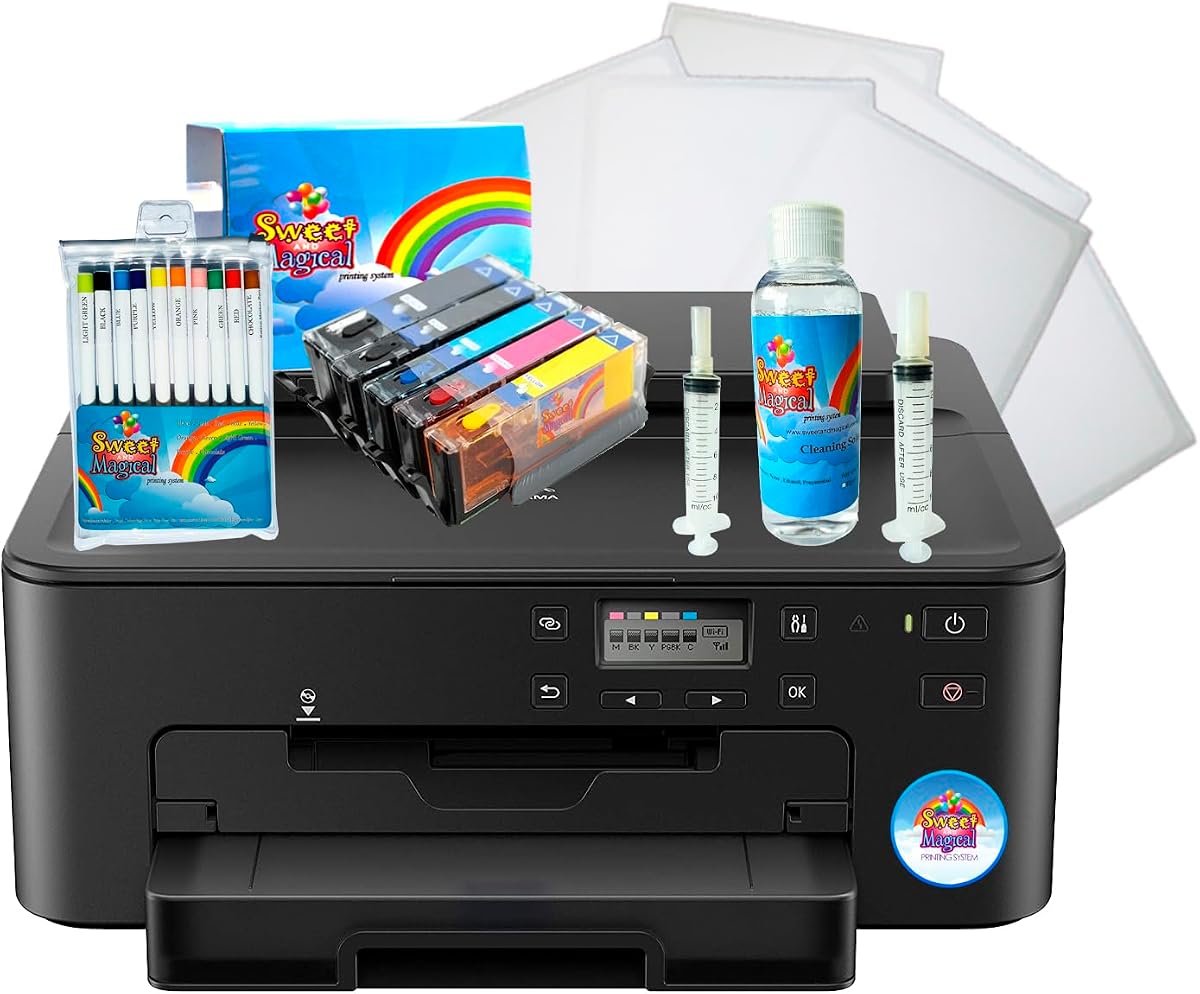
The Cake Birthday Printer Bundle is positioned as an all-in-one solution for birthday cake and dessert decoration. It carries a 4.2 rating and includes five ink cartridges, frosting paper, ten markers, and a printhead kit. That package combination is appealing because it covers both the printing consumables and the supporting items commonly needed to maintain output quality in a custom-decoration workflow.
We may earn a commission when you buy through this link, at no additional cost to you.
The supplied description states that the system can be used on frosting and wafer sheets. Frosting-sheet printing can support decoration on cupcakes and cakes, while wafer-paper sheets are useful for edible images and toppers. Ten markers add a manual option for handwritten names, borders, and small details that would be inconvenient to prepare as a separate digital file.
A printhead kit is valuable for keeping a printer maintained, but bundle buyers should carefully examine the printer configuration and installation process before beginning. The provided information does not state the printer's resolution, connectivity, supported media dimensions, or exact cartridge model. Those missing details make independent verification particularly important if this is intended for regular commercial use.
The bundle is less flexible than a clearly specified premium desktop printer because its technical capabilities are not outlined. It may nevertheless be a practical choice for someone who wants a birthday-focused package with consumables already assembled. Confirm that the five cartridges are edible-image compatible, that the frosting paper dimensions fit the printer, and that all included components are necessary for your chosen workflow.
We recommend this product for beginners who want a coordinated decorating bundle rather than a collection of separate parts. It is particularly relevant for party planners, home bakers, and instructors producing small batches of edible images. Shoppers who prioritize detailed specifications or automatic connectivity should compare the Ediblethingz bundle or a purpose-built coffee printer before committing.
The combination of cartridges, media, markers, and printhead supplies removes much of the guesswork from first-time setup. It is especially convenient for producing themed birthday images, labels, and small decorative accents without ordering every component separately.
Support for both frosting and wafer sheets lets you select a process suited to the dessert and the artwork. The choice of surface can affect image durability, transfer method, and handling, so follow the instructions supplied with the media.
We may earn a commission when you buy through this link, at no additional cost to you.
The Birthday Printer Bundle provides a flexible decorating package with five ink cartridges, ten markers, a printhead cleaner, and twelve premium frosting sheets. Its listing also states that it can print on chocolate transfer, frosting, or wafer paper, making it one of the few products in this guide explicitly associated with three different decorating routes. A rating is not currently shown, so buyers should place more weight on package details and compatibility than on customer feedback.
We may earn a commission when you buy through this link, at no additional cost to you.
Chocolate transfer sheets, frosting sheets, and wafer paper offer different visual and handling results. Chocolate transfer media can create a printed image on a transferable coating, while frosting sheets sit directly on a decorated item and wafer paper produces a lighter, paper-based topper. Supporting several formats can make the bundle useful for parties, birthdays, and mixed dessert orders.
The supplied information does not specify the printer's model, resolution, paper dimensions, or connectivity. It also uses an image shared with another birthday bundle, making it especially important to read the full listing rather than assuming two similar-looking packages contain identical hardware. Verify whether the printer itself is included and whether the cartridges are intended specifically for edible-media printing.
The absence of a visible rating does not automatically make the product less dependable, but it does mean there is less information to help distinguish it from alternatives. Likewise, the range of supported media cannot compensate for an unclear hardware specification. Check the return terms, included accessories, and printhead setup instructions before committing to a larger decorating project.
This package is worth considering if your birthday projects regularly include cupcakes, frosted cakes, wafer toppers, or chocolate transfers. The broad media list is its primary appeal, while the included markers and cleaner improve the usefulness of the package. For buyers who need documented resolution or a clearly specified printer, the Ediblethingz bundle offers more transparent technical information.
Chocolate transfer, frosting, and wafer-paper support create several paths for the same artwork. Select the material according to the dessert, desired finish, and handling conditions rather than assuming every surface will produce the same result.
A printhead cleaner helps owners keep the cartridge system in working condition. Routine care can support more consistent images, but users should still follow the printer manufacturer's cleaning intervals and avoid unapproved solvents.
We may earn a commission when you buy through this link, at no additional cost to you.
This five-pack of PGI-280XL and CLI-281XL compatible cartridges is primarily a conventional printer-ink product, not a complete edible-printing system. It has the highest numerical rating among the ten listings at 4.7, along with detailed information about package contents, compatibility, and page yield. Its relevance to edible printing depends on whether the printer and food-safe printing process use these cartridge formats.
We may earn a commission when you buy through this link, at no additional cost to you.
The package contains one 280XXL large black cartridge, one 281XXL small black cartridge, and 281XXL cyan, magenta, and yellow cartridges. The large black is listed at 600 pages, the small black at 6,360 pages, and each color at 830 pages. These are manufacturer-style yield estimates based on standard coverage, so actual use will vary with image density, document size, and cleaning demands.
Compatibility covers a broad list of Canon PIXMA TS, TR, and related models. That makes the set practical for owners who already own one of those printers and want to reduce cartridge changes. The description does not identify Photo Blue as part of the package, so anyone who relies on that color should verify whether their printing workflow truly needs it.
The essential caution is that cartridge compatibility alone does not establish food safety. Standard ink cartridges and ordinary printer components should not automatically be used for direct edible contact. For cake-decorating workflows, use only inks and printer systems specifically approved for that purpose, and follow the food-safe transfer process required by the edible-media manufacturer.
This cartridge set is best for technically knowledgeable users with a compatible conventional printer who understand the required edible-printing process. It can be useful as a consumable option rather than an entry point into the category. Compare the refillable alternatives for lower waste and chip-based monitoring, but confirm ink formulation, printer support, and food-safe usage requirements before printing anything intended for consumption.
The product identifies a long list of supported Canon PIXMA models, reducing uncertainty when replacing cartridges. Checking the exact printer model against that list is still essential, particularly for printers from different regions or variants with different abbreviations.
The stated page yields make cartridge replacement frequency easier to estimate for ordinary office output. Edible-image jobs can consume ink differently because photographs, saturated colors, and frequent cleaning may produce results that differ from standard coverage tests.
We may earn a commission when you buy through this link, at no additional cost to you.
The Refillable 280XL 281XL Ink Cartridges set is a five-unit alternative for people who want reusable cartridges with electronic monitoring. Its 4.1 rating places it in the middle of the comparison, but the practical distinction comes from the refillable design and upgraded smart chip rather than from a large included accessory package.
We may earn a commission when you buy through this link, at no additional cost to you.
The set includes PGI-280XL black, CLI-281XL black, and CLI-281XL cyan, magenta, and yellow cartridges. An automatic-recognition chip is designed to support installation, prevent common errors, and display remaining ink levels in real time. That feature can be especially useful when managing several colors for detailed edible images, provided the printer recognizes the chip correctly.
The stated yields are 600 pages for PGI-280XL black, 6,360 pages for CLI-281XL black, and 850 pages for each color cartridge at 5% coverage on A4 or letter paper. These are laboratory-style estimates and should not be treated as guaranteed edible-project output. High-color photographs, solid backgrounds, and maintenance cleaning can change consumption substantially.
The listing describes vivid output for birthday decorations, Christmas themes, weddings, and annual parties. However, the product is still a refillable ink-cartridge set rather than a dedicated food printer. Unless the ink itself and the complete printing path are approved for the intended edible use, do not allow printed material to contact food. The cartridge format and print quality alone are not sufficient proof of food safety.
Choose this set if you already own a compatible PIXMA model, want reusable ink containers, and value accurate level monitoring. It is less suitable for someone seeking a turnkey cake-decoration system because it does not include a printer or edible media. Confirm cartridge dimensions, chip behavior, refill procedure, and all food-safety requirements before integrating it into an edible workflow.
The upgraded smart chip is intended to give the printer a more reliable view of remaining ink. This helps prevent a cartridge from unexpectedly running dry during a detailed project, although users should still keep spare units available.
The combination of black, cyan, magenta, and yellow supports photographic and full-color artwork. Refillable containers can reduce replacement waste, but the exact refill method and compatible cartridge shells should be confirmed before purchase.
We may earn a commission when you buy through this link, at no additional cost to you.
This refillable 280XL and 281XL cartridge set combines a 4.3 rating with a straightforward five-color configuration. It is a practical option for owners of compatible PIXMA printers who want refillable ink containers, clear color output, and a smart chip that displays remaining levels. It is best understood as a printer-consumable product rather than an edible printer.
We may earn a commission when you buy through this link, at no additional cost to you.
The package contains one PGI-280XL black cartridge, one CLI-281XL black cartridge, and one each of CLI-281XL yellow, magenta, and cyan. The black small cartridge is listed at 6,360 pages, the large black at 600 pages, and each color at 850 pages under 5% A4 or letter coverage. Actual results depend on image density and other printing conditions.
Compared with the previous refillable listing, this version provides similarly broad compatibility while emphasizing clear, vibrant hues and simple installation. The chip's real-time monitoring can help users balance jobs and avoid running out during a print. That is useful for multi-color images, where consuming one channel much faster than the others can leave the result looking inconsistent.
As with any standard ink system, the listing does not establish that the cartridges or printed images are safe for direct food contact. Edible cake decoration should use inks formulated and approved for that application and an appropriate food-safe transfer sheet. Do not assume that strong color reproduction makes a conventional cartridge suitable for a cupcake, chocolate, or frosted surface.
This is a strong choice for compatible-printer owners seeking refillable cartridges and dependable monitoring, particularly those comfortable managing their own ink system. It does not offer the immediate usability of a bundled cake printer, so beginners should assess whether they already have suitable hardware and a legitimate edible-media workflow before selecting it.
Two black formats plus cyan, magenta, and yellow give the set the essential channels for conventional color printing. The chip helps track usage across those channels, helping support more balanced multi-color jobs.
A straightforward installation process makes the set approachable for regular printer maintenance. Owners should keep cartridges properly sealed, clean the printhead as directed, and verify that the monitoring chip remains recognized after refilling.
We may earn a commission when you buy through this link, at no additional cost to you.
The S & M Topper Image Cake-Printer Bundle is built around a focused workflow: creating edible topper images for birthday celebrations. It has a 4.0 rating and combines a branded cake-image printer, five 100 ml small-and-medium ink bottles, and 25 premium wafer sheets. The generous supply of both ink and media makes it appealing for repeated party projects.
We may earn a commission when you buy through this link, at no additional cost to you.
Its central advantage is coordination. Instead of sourcing the printer, consumables, and transfer medium separately, the buyer receives a package designed for image-based cake decorations. The wafer sheets are particularly relevant for lightweight edible toppers, while the five bottles offer a sizable starting volume for colored images and the printhead system.
The supplied product information is brief and does not identify resolution, connectivity, printer dimensions, or exact cartridge formats. It therefore gives buyers less technical visibility than a conventional printer listing with a full specification list. Before buying, verify that the printer works with the included inks and wafer sheets and that its output size suits the cakes or cupcakes you intend to decorate.
There is also a food-safety distinction to consider. The ink bottles should be used only in the supplied or otherwise approved printer and on compatible edible media. The presence of ink bottles and wafer sheets makes the product more directly relevant to edible decoration than a generic office cartridge set, but buyers should still follow the complete system instructions and avoid direct contact unless explicitly approved.
This bundle is best for a home decorator who produces several birthday toppers and wants enough media and ink to begin. It may be less suitable for someone who needs advanced office features, highly specific technical support, or direct printing onto curved frosting. Its value lies in convenience and a clearly themed decorating package rather than extensive specification detail.
The bundle is organized around producing image toppers for parties. Twenty-five wafer sheets and five ink bottles provide enough starting material to develop a repeatable workflow rather than making only a single trial design.
Each of the five bottles contains 100 ml, providing a substantial supply for colorful images and initial setup. Store the bottles properly, close them when not in use, and follow the printer's cleaning guidance to maintain print quality.
We may earn a commission when you buy through this link, at no additional cost to you.
The Edible Ink Coffee Printer is the premium direct-printing option in this guide. It is designed to place logos, text, graphics, and decorative patterns onto desserts, foam drinks, cocktails, and other surfaces. Unlike a sheet-fed edible printer, it works directly on the item being decorated, and the current listing does not provide a numerical customer rating.
We may earn a commission when you buy through this link, at no additional cost to you.
Its most distinctive feature is the built-in camera and touchscreen preview. This visual positioning system lets the user see where an image will appear before printing, which is particularly valuable on round or irregular surfaces where placement can be difficult. The five-inch display also allows uploads, design selection, and positioning adjustments without requiring a smartphone or separate application.
The usable design area measures 5 by 10 cm, allowing larger logos and graphics than compact handheld models. Output is stated at 300 dpi, enough for crisp lettering and detailed artwork on professional-looking drinks. The device can handle several culinary surfaces, creating opportunities for café branding, event personalization, cocktail decoration, and dessert finishing.
Its trade-offs include the absence of a visible rating and limited disclosed information about included inks, cleaning procedures, and exact surface compatibility. Direct printing also requires careful control of the food surface, ink quantity, and device cleanliness. Users should use only food-grade inks approved for the product and follow its sanitation and storage instructions.
This is the best choice for a café, bar, bakery, or serious home beverage decorator that values standalone operation and accurate placement. It offers a more specialized and visually controlled experience than printing an image on a sheet and transferring it. Before purchasing, confirm which edible inks are included, which surfaces can be printed directly, and how the device should be cleaned.
The camera-assisted preview gives operators a clear reference before ink reaches the surface. This helps reduce misaligned logos and makes it easier to position artwork consistently across a sequence of drinks or desserts.
A five-inch screen handles design uploads, selection, and placement without a mobile app. That simplifies the workflow at a café counter and removes the need for a separate phone at the moment each order is prepared.
We may earn a commission when you buy through this link, at no additional cost to you.
The EVEBOT Handheld Food PrintPen FancyBox is a replacement pod for the EVEBOT PrintPen, offering one of the most approachable ways to begin direct food decoration. It receives a 3.6 rating, the lowest numerical score in this comparison, but its role as an accessory differs significantly from complete printer systems. The product does not include the handheld printer itself.
We may earn a commission when you buy through this link, at no additional cost to you.
The 20 ml pod can produce up to 7,000 impressions in a stated 26 by 50 mm design area. It is designed for desserts, coffee, cakes, beer, macarons, chocolates, cappuccinos, and cocktails. Because the pod is food-grade and intended for direct culinary use, it offers a more focused edible-printing proposition than ordinary refillable office cartridges.
Installation is straightforward: press both sides of the protective clip until the pod releases, remove its transparent protective paper, and fit it into the PrintPen. If a printed line becomes uneven or light, the instructions recommend removing the pod and gently wiping the contact surface in one direction with a soft tissue. That specific cleaning direction helps avoid spreading residue back onto the contact area.
The main limitation is that this is a pod, not a complete printer. Without an EVEBOT PrintPen, the product cannot operate by itself. Its small design area also makes it better suited to concise logos, names, icons, and simple patterns than to a large photographic topper. The lower rating suggests that users may have encountered installation, consistency, or fulfillment issues, so reading current customer feedback is advisable.
This is the best budget choice for a hobbyist who already owns an EVEBOT PrintPen or can obtain that printer separately and wants a manageable way to test direct food printing. It is less appropriate for large batches or users seeking the positioning camera and larger touchscreen of a complete premium system. Keep spare pods sealed, observe the stated storage guidance, and never use the pod if its protective closure or condition is compromised.
The protective clip releases with pressure on both sides, after which the pod can be prepared and fitted to the PrintPen. Follow the sequence exactly because the transparent shipping cover protects the contact surface until installation.
The pod is intended for coffee, cocktails, desserts, cakes, chocolates, beer, macarons, and cappuccinos. Surface texture and shape will influence the result, so test a small design before applying it to an entire order.
We may earn a commission when you buy through this link, at no additional cost to you.
The Refillable PGI-280XXL CLI-281XXL Cartridges set combines a 4.5 rating with a reusable five-cartridge format. It is designed for a broad range of Canon PIXMA models and emphasizes clear text and vivid color. It can be relevant to an edible-image workflow when used with a compatible printer and an approved edible-media system, but it is not itself a complete food printer.
We may earn a commission when you buy through this link, at no additional cost to you.
The package includes one PGI-280XXL large black, one CLI-281XXL black, and one each of cyan, yellow, and magenta. The listing provides an extensive printer compatibility list covering numerous TS, TR, and TS8000-series models. That breadth offers flexibility for owners with several compatible machines, though each exact model should still be checked before ordering.
Yield estimates are approximately 6,360 pages for the 281XXL black cartridge, around 600 pages for the 280XXL black cartridge, and approximately 830 pages for each 281XXL color at 5% coverage. These figures come from standard coverage conditions and should not be applied directly to photograph-heavy or frequently cleaned edible jobs, where actual output can vary.
The refillable format is attractive for ongoing use because it can reduce the need to replace complete cartridge shells. It does not automatically solve food safety, printhead cleanliness, or media compatibility. Standard ink products must not be assumed safe for direct food contact, and edible decorations should use a complete system that has been approved for that purpose.
Choose this product if you already own a compatible printer, want a second set of refillable cartridges, or value the broad model list and strong customer rating. It is less attractive for first-time buyers because it leaves the printer, edible media, and food-safe printing method to be sourced separately. Verify the cartridge fit, refill procedure, chip recognition, and intended ink formulation before use.
The long compatibility list makes the set useful across many PIXMA models. It reduces the chance that a buyer will need a different cartridge number when moving between compatible machines within the covered range.
The listed emphasis on clear text and vivid color is valuable for logos, names, and graphic toppers. Image quality still depends on the source file, printer maintenance, media, and transfer method used afterward.
We may earn a commission when you buy through this link, at no additional cost to you.
Choosing an edible ink printer involves matching the printing method to your target surfaces, understanding the included media and ink, and accounting for the volume of work you expect to handle. The most important distinction is whether you need images on transferable sheets or direct printing on food and drinks.
Sheet-based systems print onto wafer paper, frosting sheets, or chocolate transfer media, which are then placed on or transferred to a dessert. Direct-printing devices deposit edible ink onto foam, frosting, macarons, chocolates, or other surfaces. Sheet-based printers are generally more familiar to home bakers, while direct systems offer speed and placement control for cafés and event beverage displays.
In short, choose sheet printing for portable toppers and broad image transfer, or direct printing when the decorated item itself is the intended canvas.
A cartridge that produces attractive colors is not automatically approved for food use. Look for inks specifically described as food-grade or intended for edible-media printing, and confirm that the complete system—including ink, printhead, cleaning process, and any food-contact surfaces—supports that use. Standard office ink cartridges and refills should never be treated as edible merely because they fit a printer.
In short, food-safe status is a requirement, not an optional feature. Verify it for every ink and accessory that will contact the decorated item.
Resolution matters when reproducing photographs, fine lettering, logos, and decorative patterns. The Ediblethingz bundle lists 4800 x 1200 dpi, while the direct coffee printer lists 300 dpi. These figures describe different classes of device and are not directly interchangeable, so also consider media type, print path, and whether the image will be transferred or applied directly.
In short, prioritize enough detail for your artwork, but use real-world output samples and media guidance as the deciding evidence rather than relying on one resolution number alone.
A printer can produce an attractive image that is still too large for the cake, too small to read across a cupcake, or unsuitable for the curvature of a drink. Sheet-based buyers should check the dimensions of wafer and icing sheets against their feeder. Direct-print buyers should measure the available surface and account for the shape and angle of drinks or desserts.
In short, match both the media sheet and the finished dessert dimensions. A workable design area is more valuable than a large specification that does not fit the project.
A complete bundle may include the printer, edible paper, ink cartridges, markers, and cleaning supplies. Bundles can reduce setup friction, while separate components allow more customization. Read the package list carefully because similar titles may show the same image while listing different accessories, and some ink sets do not include the printer at all.
In short, compare the full contents rather than the headline. Confirm that every essential item is present before planning your first project.
Conventional sheet printers may use Wi-Fi, AirPrint, Mopria, a touchscreen, or direct computer connections. The direct coffee printer uses a five-inch touchscreen and does not require a mobile app. For business use, fast file loading, familiar editing software, and simple menu navigation can matter more than advanced document features.
In short, choose controls that fit your working style. Standalone operation is convenient at a counter, while wireless device support may be better for a design studio.
Printheads require regular cleaning, and direct food-printing devices demand especially careful sanitation. The bundles include cleaning kits or cleaners, but the handheld pod also specifies gentle one-direction wiping and removal during periods of non-use. Ink storage, cartridge sealing, printhead alignment, and the correct cleaning solution all affect consistency.
In short, follow the manufacturer's cleaning and storage schedule and keep spare consumables sealed. Preventive care is usually easier than restoring blocked nozzles or correcting inconsistent color.
Cartridge yield figures are usually measured at standard page coverage, while edible images can contain dense color, large dark areas, or repeated cleaning. A 6,360-page estimate may therefore overstate performance for a photograph-heavy workflow. Consider the number of colors per design, the size of each transfer, and how often you expect to print full-page images.
In short, treat yield as a relative guide rather than an edible-project guarantee. Keep spare ink and media if consistent output matters more than minimizing replacements.
Begin by confirming that the printer, ink, and edible media are compatible and approved for the intended food surface. For a sheet-based workflow, load the wafer, frosting, or transfer sheet as instructed, select the correct media setting, and print a small test image before processing a full order. Check color, text clarity, positioning, and image sharpness on the actual edible stock rather than judging the image on a screen.
For direct-printing equipment, begin with a clean and compatible surface, prepare the ink pod or cartridge according to its instructions, and use the built-in preview or camera where available. Apply the design in a controlled movement and allow the image to set as directed. Remove pods from a handheld device when it will not be used for two or three days, and keep unopened food-grade pods within their stated storage period.
After each session, follow the supplied cleaning guidance and wipe direct-contact surfaces in the recommended direction. Do not use unapproved cleaners or soak components that are intended to remain dry. Store edible media in a protected environment, reseal ink containers, and check printhead alignment periodically so that cleaning residue or a partially blocked nozzle does not undermine the next design.
Some direct food-printing devices can decorate suitable surfaces, while most conventional edible printers print onto wafers, frosting sheets, or chocolate transfer media first. The cake's frosting, shape, cleanliness, and food compatibility all matter. Use only products specifically approved for the surface you intend to decorate and follow the complete system instructions.
No. Compatibility with a printer model does not mean an ordinary ink cartridge is food-safe. An edible-printing system needs inks formulated and approved for food decoration, along with compatible media or surfaces and a cleaning process that does not contaminate the food. Never improvise by printing standard office ink directly onto something that will be eaten.
Wafer paper is a thin edible sheet often used to create portable toppers, while frosting sheets are designed to sit directly on certain decorated foods such as cupcakes or cakes. They use different handling and transfer methods. The media instructions determine drying time, placement, storage, and which surfaces are suitable.
Not necessarily, but the required workflow depends on the device. A sheet printer can create an image that is transferred onto a dessert, whereas a direct printer or handheld pod can apply a design to a drink or food surface. Consider convenience, image placement, throughput, and the surfaces you actually want to decorate before buying.
Use only the approved ink and cleaning materials, and follow the manufacturer's cleaning intervals. Printhead cleaners and gentle surface wiping can help maintain nozzles and contact surfaces. Keep unused pods sealed, remove them from direct-printing devices during longer storage periods, and allow printed media to dry fully before moving or serving it.
A high-resolution sheet printer can produce both detailed photographs and readable text when the source files and media are suitable. Direct handheld tools generally perform best with shorter logos, names, icons, and simple graphics because of their smaller design area. Test small samples because small lettering and fine linework can reveal nozzle or media issues.
Refillable cartridges can be convenient for owners of compatible hardware who want to reduce cartridge-shell replacement and monitor ink levels. However, refillability alone does not make ink food-safe or guarantee good print results. The ink formulation, printer compatibility, chip recognition, cleaning needs, and approved media must all be suitable.
Check the complete package contents, printer model, ink type, media dimensions, connectivity, and stated compatibility before ordering.
For direct systems, confirm included edible inks and the list of surfaces approved for printing.
For refillable cartridges, verify that a conventional printer is already included or separately owned.
Finally, review current customer feedback and confirm that the printer model, ink system, and food-safe media all belong to the same approved workflow.
The Ediblethingz Cake Topper Image Printer Bundle Kit is the most complete general-purpose recommendation because it combines a capable wireless printer, detailed output specifications, wafer paper, icing sheets, and cleaning supplies. The Edible Ink Coffee Printer stands out for premium direct printing, camera-assisted placement, standalone controls, and a larger design area, while the EVEBOT PrintPen FancyBox offers the most accessible way to test direct decoration if you already own the handheld printer.
Your priority should determine the category. Choose sheet-based equipment for detailed transferable toppers, a direct system for professional beverage presentation, or a pod accessory for compact hobby projects. Before purchasing, verify food-safe status, printer and cartridge compatibility, included media, cleaning requirements, and the dimensions of the designs you actually intend to produce.
Ratings, package contents, seller information, and listing details can change over time, so check the current product page before ordering. Confirm that every component belongs to the same approved workflow, understand the maintenance routine, and begin with a small test design before committing to a full batch.
