
GIGABYTE B650 Eagle AX
4.6Editor score
Triple M.2 storage slots
PCIe 5.0 and Wi-Fi 6E
Four-DIMM DDR5 support
Explore the best Gigabyte Motherboard options, comparing AMD and Intel platforms, power delivery, memory, storage, networking, and expansion features for
A Gigabyte motherboard can provide the foundation for a fast, reliable, and highly connected personal computer, but choosing the right model requires matching the board to your processor, memory, case, and expansion plans. The most useful options balance robust power delivery, effective cooling, current connectivity, practical storage support, and an easy installation process.
This guide compares ten Gigabyte motherboards spanning AMD AM5, AMD AM4, and Intel LGA 1700 platforms. We examined processor support, VRM design, memory compatibility, M.2 slot counts, PCIe capabilities, networking, wireless options, thermal features, and builder-friendly details such as EZ-Latch, Q-Flash, and integrated I/O shields.
Each pick highlights a different path for a new build, including value-focused AM4 configurations, polished DDR5 ATX boards, compact mATX options, and premium models with extensive storage and high-speed networking. Product ratings and availability can change, so confirm the latest listing details and current pricing before ordering.
4.6Editor score

4.5Editor score

4.4Editor score
The following comparison places all ten boards side by side, making it easier to identify the right processor platform, memory standard, storage capacity, expansion potential, and network features for your particular build.



The GIGABYTE B650 AORUS Elite AX combines a current AMD AM5 platform with a balanced set of enthusiast features, earning a 4.4 rating among buyers. It supports Ryzen 9000, 8000, and 7000 series processors, giving users flexibility when choosing a CPU or reusing an existing AM5 chip. DDR5 support, 2.5GbE networking, Wi-Fi 6E, and PCIe 5.0 storage make it well suited to a modern gaming or productivity system.
We may earn a commission when you buy through this link, at no additional cost to you.
Its twin 14+2+1 power design uses 70A power stages, an eight-layer, two-ounce copper PCB, a six-millimeter heatpipe, and fully covered MOSFET heatsinks. A dedicated M.2 Thermal Guard helps control drive temperatures, while PCIe Ultra Durable Armor adds physical protection around expansion and storage areas. The board also provides four DIMM slots with AMD EXPO and Intel XMP support, allowing compatible memory profiles to be applied through the firmware.
The main limitation is storage expandability. It provides two PCIe 5.0 NVMe M.2 positions rather than the four found on the newer X870 boards in this guide. Some builders may also need to add a network card or use the onboard 2.5GbE controller instead of relying on wireless networking. These are modest trade-offs for a system that does not require a large collection of high-speed drives.
This is a strong general recommendation for an AM5 builder who values a mature, well-equipped board without moving to the top of the range. It is particularly suitable for a gaming PC, a mixed gaming and work machine, or an upgrade that preserves a current Ryzen processor. Choose it when strong VRM support, modern networking, and practical PCIe 5.0 storage matter more than maximum M.2 slot count.
The 70A power stages, layered PCB, and covered VRM heatsinks provide a reassuring foundation for Ryzen 5000-series and newer processors. The M.2 Thermal Guard adds another layer of protection for compact high-speed SSDs that can generate significant heat during sustained transfers.
Wi-Fi 6E provides a convenient wireless option, while 2.5GbE is useful for large file transfers and high-speed network storage. Front and rear USB-C connectivity, Q-Flash, EZ-Latch, and RGB Fusion add practical features for both assembly and everyday use.
We may earn a commission when you buy through this link, at no additional cost to you.
The GIGABYTE X870 AORUS Elite WIFI7 is a 4.5-rated AM5 board aimed at builders who want extensive storage and current high-speed connectivity without moving to the most elaborate premium models. It supports Ryzen 9000, 8000, and 7000 processors, uses a 16+2+2 power design, and provides four M.2 slots. Dual USB4, front and rear USB-C, Wi-Fi 7, and 2.5GbE make the board well equipped for modern peripherals and networks.
We may earn a commission when you buy through this link, at no additional cost to you.
Its four M.2 positions are especially useful for systems that may eventually use multiple NVMe drives, whether for a large game library, an editing workspace, or a scratch disk for active projects. The board also uses PCIe 5.0 and includes VRM and M.2 Thermal Guard protection. EZ-Latch reduces the effort involved in handling expansion cards and compatible M.2 hardware.
Compared with the B650 AORUS Elite AX, this X870 model offers more storage expansion and newer connectivity, but it does not provide the 80A Smart Power Stage found on the X870E AORUS PRO ICE. Buyers who do not need four M.2 slots or USB4 may find that the lower-tier B650 option offers a more economical route to the same AM5 ecosystem.
The X870 AORUS Elite WIFI7 is best for an enthusiast who plans to expand storage or connect modern high-bandwidth peripherals. It also works well for a future-oriented AM5 system where wireless and wired networking standards matter. Confirm case clearance and M.2 hardware requirements before buying, since four drives and their heatsinks can demand additional space.
Four M.2 positions create room for multiple NVMe drives and reduce the need for a PCIe expansion card. The M.2 Thermal Guard helps keep those drives at suitable temperatures, which is especially relevant when several high-performance SSDs are active at once.
Dual USB4, USB-C on the front and rear, Wi-Fi 7, and 2.5GbE cover the leading connectivity options represented in this guide. These features suit modern displays, docks, external storage, and fast local network transfers.
We may earn a commission when you buy through this link, at no additional cost to you.
The GIGABYTE X870E AORUS PRO ICE delivers a high-end AMD foundation, combining the X870E platform with four M.2 slots, PCIe 5.0, USB4, Wi-Fi 7, and 2.5GbE. Its 4.4 rating reflects a strong enthusiast feature set, while the refined AORUS PRO ICE design targets builders who want a capable board with a polished appearance and extensive cooling provisions.
We may earn a commission when you buy through this link, at no additional cost to you.
The defining hardware detail is its 16+2+2 power design with an 80A Smart Power Stage. VRM and M.2 Thermal Guard protection help maintain operating temperatures, and four M.2 slots allow a substantial storage configuration. Dual USB4, front and rear USB-C, and the Sensor Panel Link make the board suitable for modern accessories, diagnostic displays, and elaborate monitoring setups.
The X870E AORUS PRO ICE shares many headline features with the X870 AORUS Elite WIFI7, including four M.2 slots and the same general connectivity suite. Its clearer distinction is the 80A power stage and premium positioning. Buyers should avoid choosing solely on styling; a simpler board may provide equal practical value if the additional power capacity and aesthetic treatment do not support their intended workload.
This model is a compelling choice for a high-end Ryzen system that will be paired with fast memory, a powerful graphics card, and several NVMe drives. It is also suitable for creators who want room to grow. For a typical gaming system, the B650 AORUS Elite AX may be more restrained, while this board makes the most sense when every major component in the build is being selected for maximum capability.
The 80A Smart Power Stage is the signature power component on this model, working within a 16+2+2 design. Combined with VRM thermal protection, it gives demanding Ryzen processors a robust platform and leaves more headroom for sustained high-performance workloads.
Four PCIe 5.0 M.2 positions make this board suitable for a storage-heavy system. Combined with dual USB4, Wi-Fi 7, and 2.5GbE, the platform supports fast internal drives, external peripherals, and efficient network access without requiring numerous add-in cards.
We may earn a commission when you buy through this link, at no additional cost to you.
The GIGABYTE Z890 AORUS Master is the most connectivity-focused board in this roundup, carrying a 4.2 rating and a substantial Intel specification set. It supports Intel Core Ultra Series 2 processors on LGA 1851 and pairs them with DDR5 memory. Five PCIe 5.0 M.2 slots, dual Thunderbolt 4, Wi-Fi 7, and 10GbE create an unusual amount of native flexibility for a desktop.
We may earn a commission when you buy through this link, at no additional cost to you.
Its 18+1+2 power design uses a 110A Smart Power Stage, and the board adds VRM Thermal Armor plus M.2 Thermal Guard protection. Front USB-C and the Sensor Panel Link complement the rear connectivity. Builder-oriented conveniences include M.2 EZ-Latch, PCIe EZ-Latch, Wi-Fi EZ-Plug, and an EZ-Debug Zone, making this a practical option for a new, carefully planned system.
Although the feature list is extensive, the 10GbE interface and five storage positions are the details most likely to influence value. Some home networks will not benefit from 10GbE, and a typical gaming build may never fill all five M.2 slots. The board therefore makes the most sense for users who regularly transfer large files, use fast network storage, or plan to expand a workstation substantially.
For an Intel Core Ultra Series 2 enthusiast, this is a feature-rich recommendation with five-year warranty coverage. It is especially attractive when the processor and graphics card are top-tier components, since the board does not require extra PCIe cards for several high-speed drives or Thunderbolt peripherals. Review case dimensions and cooling requirements, but the Z890 AORUS Master is a clear fit for expansion-focused Intel builds.
Five PCIe 5.0 M.2 slots set this model apart from every other board in the guide. That capacity is useful for workstation-style storage, extensive game libraries, or projects that benefit from separating operating systems, media, caches, and working files across dedicated drives.
The 10GbE controller offers more bandwidth than the 2.5GbE and gigabit Ethernet options elsewhere in the list. It is especially relevant for NAS users, large file transfers, and professional media workflows, provided the rest of the network can also support those transfer rates.
We may earn a commission when you buy through this link, at no additional cost to you.
The GIGABYTE B650 Eagle AX is a value-focused AM5 board with a 4.6 rating, the highest displayed rating among the ten products. It supports Ryzen 9000, 8000, and 7000 series processors and offers four DDR5 DIMM slots. Three M.2 positions, including one PCIe 5.0 slot, provide a useful balance of current speed and future storage expansion.
We may earn a commission when you buy through this link, at no additional cost to you.
Its 12+2+2 digital VRM design is supported by advanced thermal design and an M.2 Thermal Guard. The board includes AMD EXPO and Intel XMP support, a USB 3.2 Gen 2×2 Type-C connection, AMD Wi-Fi 6E, Realtek gigabit Ethernet, Smart Fan 6, and Q-Flash. These details make it a well-equipped option for a gaming PC, general-purpose workstation, or affordable all-AMD build.
The clear trade-off is wired networking. Realtek gigabit Ethernet is sufficient for everyday internet access and many local transfers, but it is slower than the 2.5GbE found on the B650 AORUS Elite AX and considerably slower than the Z890 AORUS Master's 10GbE. Its storage configuration also includes two PCIe 4.0 M.2 slots, so all three drives cannot operate at the same maximum generation.
This board is a strong recommendation for buyers who want AM5 and DDR5 without paying for the newest chipset features or abundant high-end I/O. It works especially well when a single fast system drive is the main need, with additional storage added later. Select it for efficient core platform features, and choose a more networking-focused model if large transfers over a wired LAN are a daily requirement.
One PCIe 5.0 and two PCIe 4.0 M.2 slots provide a sensible mix of speed and expansion. A builder can reserve the newest slot for an operating system or active project drive while using the other positions for games, media, and general storage.
EXPO and XMP support gives compatible memory an easy route to advertised performance profiles. Q-Flash, Smart Fan 6, and a straightforward three-M.2 layout reduce configuration complexity for first-time and experienced builders alike.
We may earn a commission when you buy through this link, at no additional cost to you.
The GIGABYTE B550 AORUS Elite AX V2 is a well-regarded AM4 board with a 4.5 rating, offering a proven alternative for builders who want to use DDR4 memory or reuse a compatible Ryzen processor. It supports Ryzen 5000, 4000, and 3000 series CPUs. Its 12+2 digital power phase, advanced VRM heatsink, and M.2 Thermal Guard provide a stable foundation for gaming and general computing.
We may earn a commission when you buy through this link, at no additional cost to you.
Storage support consists of one PCIe 4.0 M.2 slot and one PCIe 3.0 M.2 slot, while the primary graphics slot uses PCIe 4.0 x16 with reinforced armor. Connectivity includes 2.5GbE LAN, Wi-Fi 6, front USB-C, and a mixture of USB 3.2 Gen 2 and Gen 1 Type-A ports. Q-Flash Plus makes firmware updates possible without installing the processor, memory, or graphics card.
The key decision is whether AM4 is the right platform for your build. It offers excellent component maturity and avoids the need to replace an existing DDR4 memory kit, but it is not the natural choice for a new system that should remain at the center of AMD's platform roadmap. Two M.2 slots may also prove limiting if you plan to install several NVMe drives immediately.
This motherboard is best for an AM4 upgrade, a value-focused build using existing DDR4 memory, or a Ryzen system that does not require the newest chipset features. It provides modern conveniences such as 2.5GbE, Wi-Fi 6, Q-Flash Plus, and front USB-C while remaining compatible with a broad range of processors.
For a system already equipped with DDR4, the B550 chipset can reduce the cost and disruption of an upgrade. Four memory slots and support for Extreme Memory Profile make the board familiar to builders who already own compatible DDR4 modules.
2.5GbE improves wired transfer performance over basic gigabit Ethernet, while Wi-Fi 6 provides convenient wireless access. Q-Flash Plus and the integrated I/O shield simplify installation and maintenance, reducing common sources of build-day frustration.
We may earn a commission when you buy through this link, at no additional cost to you.
The GIGABYTE Z790 Eagle AX is a 4.4-rated Intel option for builders selecting a 12th, 13th, or 14th generation Core processor on LGA 1700. It combines DDR5 support, a 12+1+1 digital VRM, three M.2 slots, Wi-Fi 6E, and 2.5GbE. The result is a balanced board that covers the important needs of a gaming or productivity system without reaching the feature density of the AORUS Master.
We may earn a commission when you buy through this link, at no additional cost to you.
Its enlarged MOSFET heatsinks and M.2 Thermal Guard support stable operation, while PCIe 4.0 and NVMe M.2 connectivity provide modern expansion. USB 3.2 Gen 2×2 Type-C, Q-Flash, EZ-Latch, and RGB Fusion add convenience and flexibility. The listed specification also notes dual-channel DDR5 across four DIMMs, giving builders room for substantial memory capacity.
Its primary limitation is the platform generation. LGA 1700 is an established ecosystem, but the newer Z890 AORUS Master demonstrates what a current high-end Intel platform can offer, including five PCIe 5.0 M.2 positions, Thunderbolt 4, and 10GbE. The Z790 Eagle AX is more appropriate when cost, an established CPU, or the need for a particular DDR5 kit takes priority.
Choose the Z790 Eagle AX for a conventional Intel gaming build that needs modern storage and networking without multiple premium features. It is a sound recommendation when you already own a compatible processor or have selected one from the supported generations. Verify that your chosen case and cooling solution are designed for LGA 1700 before installation.
Supporting three generations of Core processors gives the board additional flexibility when building from parts. It can serve as a straightforward platform for a new 12th, 13th, or 14th generation Core system while remaining relevant to the mature LGA 1700 ecosystem.
Three M.2 slots provide enough room for an operating system, a dedicated game drive, and one additional storage device. Wi-Fi 6E and 2.5GbE cover both wireless and faster wired networking, while EZ-Latch and Q-Flash assist with assembly and maintenance.
We may earn a commission when you buy through this link, at no additional cost to you.
The GIGABYTE Z790 AORUS Elite AX combines a 4.4 rating with a strong LGA 1700 specification set. It supports 12th, 13th, and 14th generation Intel Core processors, offers four DDR5 DIMM slots, and provides four PCIe 4.0 M.2 positions. For an Intel build that prioritizes storage and power delivery, its combination of a 16+1+2 VRM and 70A power stage is notable.
We may earn a commission when you buy through this link, at no additional cost to you.
Thermal provisions include M.2 Thermal Guard III, fully covered MOSFET heatsinks, and a six-layer PCB. PCIe Ultra Durable Armor adds physical protection, while Wi-Fi 6E, 2.5GbE, USB 3.2 Gen 2×2 Type-C, Q-Flash, EZ-Latch, and RGB Fusion cover networking, peripherals, and builder convenience. The board is well equipped for a high-power Intel system with several storage devices.
The most important caveat is that its four M.2 slots are listed as PCIe 4.0 rather than PCIe 5.0. That distinction matters for builders who expect the fastest possible direct storage link. It also remains on LGA 1700, so it does not offer the newer platform path represented by the Z890 AORUS Master. Users chasing top-tier specifications should compare those details before choosing.
This AORUS Elite AX is a strong fit for a mature Intel gaming or performance PC with multiple NVMe drives. It makes sense when you want robust VRM hardware, 2.5GbE, Wi-Fi 6E, and extensive storage but do not need five PCIe 5.0 drives, Thunderbolt 4, or 10GbE. It is also a solid option for builders assembling around an existing 12th, 13th, or 14th generation processor.
The 16+1+2 design and 70A power stage provide a higher-current VRM arrangement than the basic Z790 Eagle AX. Fully covered MOSFET heatsinks and the six-layer PCB reinforce that foundation for sustained processor performance.
Four M.2 slots offer useful storage flexibility, and M.2 Thermal Guard III helps manage drive temperatures. Although the slots are PCIe 4.0, they remain well suited to high-performance NVMe SSDs used in gaming, content creation, and general productivity.
We may earn a commission when you buy through this link, at no additional cost to you.
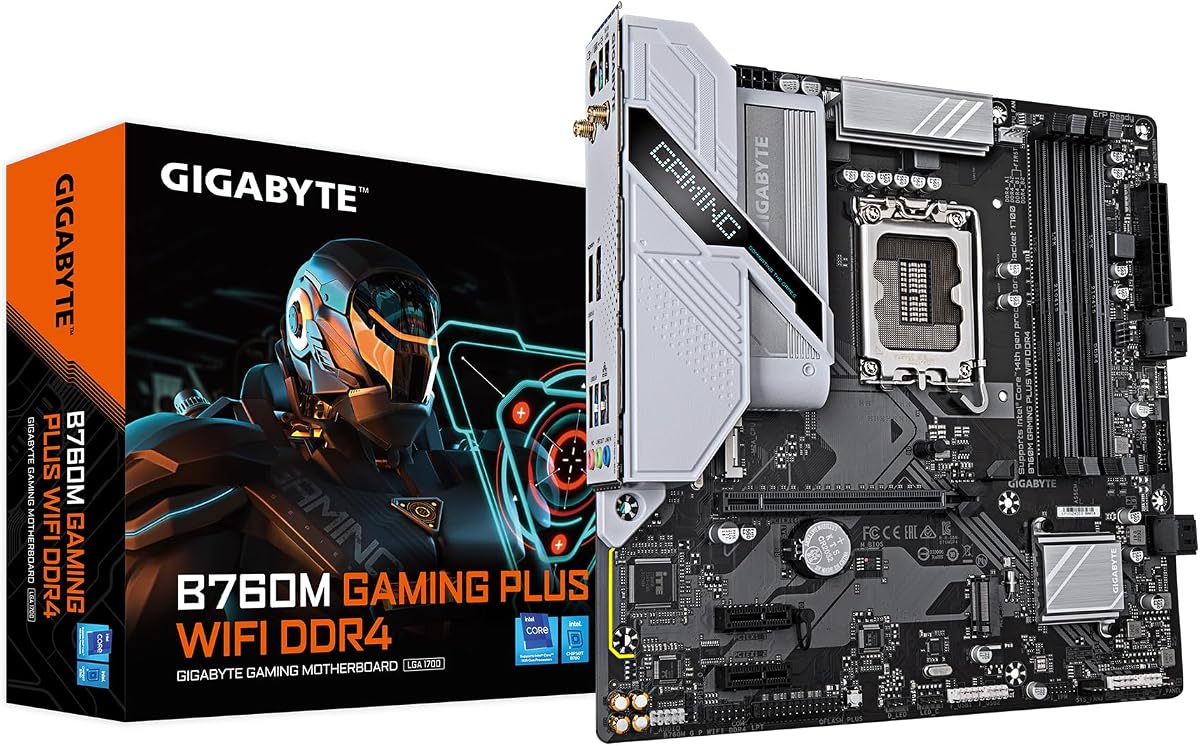
The GIGABYTE B760M Gaming Plus WiFi is a compact Intel B760 board with a 4.3 rating and a notably fast 6GbE Ethernet controller. Its micro-ATX format can suit smaller cases, while DDR4 support and compatibility with 12th, 13th, and 14th generation Core processors make it useful for upgrades based on existing components. Two PCIe 4.0 M.2 slots handle primary and secondary storage.
We may earn a commission when you buy through this link, at no additional cost to you.
A hybrid digital 4+1+1 power phase, premium chokes and capacitors, and enlarged MOSFET heatsinks provide the board's processor power foundation. Connectivity includes a reinforced PCIe 4.0 x16 slot, three USB 3.2 Gen 1 Type-A ports, front USB 3.2 Gen 1 Type-C, and 6GbE LAN. Q-Flash Plus allows firmware updates without installing the CPU, memory, or graphics card, while EZ-Latch simplifies certain installation steps.
Because this is a DDR4 mATX board, it trades some capacity and expansion convenience for a more compact and cost-conscious platform. Two M.2 slots are adequate for many systems but restrictive compared with the quad-slot boards elsewhere in the guide. The 4+1+1 power design also occupies a lower tier than the 12+1+1, 14+2+1, and 16+1+2 designs selected for more demanding processors.
This motherboard is a good fit for a compact gaming or general-purpose PC using DDR4 memory. It is especially attractive for a builder who values a smaller board, fast 6GbE networking, and straightforward firmware maintenance more than maximum storage slots. Ensure your case accepts mATX boards and that the graphics card will fit comfortably before purchasing.
The mATX layout can make a clean, compact build easier to arrange than a full-size ATX system. It preserves room for the essentials while being a natural match for cases designed specifically around smaller motherboards.
The 6GbE controller is faster than the standard gigabit Ethernet found on some models and can improve transfers to compatible network storage. Q-Flash Plus lets a builder update the firmware before installing major components, making troubleshooting and initial setup more convenient.
We may earn a commission when you buy through this link, at no additional cost to you.
The GIGABYTE B550 Gaming X V2 is an approachable AM4 motherboard with a 4.5 rating. It supports Ryzen 5000, 4000, and 3000 series processors, accepts DDR4 memory, and uses a 10+3 digital power phase. One PCIe 4.0 M.2 and one PCIe 3.0 M.2 slot provide a sensible two-drive foundation for a gaming system, while a reinforced PCIe 4.0 x16 slot handles the primary graphics connection.
We may earn a commission when you buy through this link, at no additional cost to you.
The board includes front USB-C, three USB 3.2 Gen 2 Type-A ports, one USB 3.2 Gen 1 Type-A port, gigabit Ethernet, Bluetooth 5.3, and RGB Fusion. An integrated I/O shield simplifies case assembly, and Q-Flash Plus enables BIOS updates without installing the processor, RAM, or graphics card. The refreshed BIOS uses an Easy Mode interface for straightforward hardware monitoring and configuration.
Its limitations center on the basics. The 10+3 power design is less elaborate than the higher-tier AORUS boards, gigabit Ethernet is slower than 2.5GbE alternatives, and two M.2 slots offer limited room for immediate storage expansion. These constraints are more noticeable with very high-power processors, although the board remains a credible option for mainstream Ryzen configurations.
The B550 Gaming X V2 is best for an inexpensive or upgrade-oriented build that already uses DDR4 and has straightforward storage needs. It is well suited to a Ryzen 5000-series gaming PC and includes the convenience features expected from a modern board. Buyers creating a new platform with long-term expansion plans may prefer an AM5 option, but this model delivers a competent foundation for supported AM4 hardware.
Broad Ryzen 5000, 4000, and 3000 series support allows the board to serve new AM4 builds and older component upgrades alike. DDR4 compatibility can also reduce the need to replace an entire memory collection when assembling around an existing platform.
The integrated I/O shield removes one assembly step, while Q-Flash Plus allows firmware work before the main components are installed. Front USB-C, Bluetooth 5.3, and an Easy Mode BIOS interface round out a builder-focused design.
We may earn a commission when you buy through this link, at no additional cost to you.
The right motherboard depends less on a single headline specification than on compatibility, intended workload, expansion needs, and installation preferences. Use the following factors to narrow the field before making a final selection.
Start with the processor family because the socket determines which motherboards can physically and electrically support your CPU. The products in this guide cover AMD AM5, AMD AM4, and Intel LGA 1700, along with the newer LGA 1851 platform on the Z890 AORUS Master. AM5 and AM4 both support multiple Ryzen generations, but they use different memory standards. LGA 1700 supports 12th, 13th, and 14th generation Intel Core processors, while LGA 1851 is intended for Core Ultra Series 2 processors. Always check the exact processor model and the motherboard's official support information before buying.
Memory compatibility can determine whether an existing kit remains useful. The B550 AORUS Elite AX V2, B760M Gaming Plus WiFi, and B550 Gaming X V2 use DDR4, while the AM5 boards and most Intel options in this guide use DDR5. DDR4 can make an upgrade less disruptive when you already own compatible modules. DDR5 is required for current AM5 systems and is also available across the LGA 1700 selections here. Both standards provide four DIMM slots in these models, and compatible boards support EXPO or XMP profiles for easier configuration of advertised memory speeds.
VRM design matters most when pairing the board with a powerful processor, particularly under sustained workloads or when overclocking. The guide includes 10+3, 12+1+1, 4+1+1, 12+2+2, 14+2+1, 16+1+2, 16+2+2, and 18+1+2 arrangements, with some using 70A, 80A, or 110A Smart Power Stages. A larger phase count and higher-current stage do not guarantee a better processor, but they provide more power infrastructure than basic designs. Check whether the VRM heatsinks cover the power components, and confirm that the case has adequate airflow around the upper motherboard area.
Count the M.2 slots and their PCIe generations before choosing a board. Two slots are sufficient for many gaming systems, while four or five benefit users with large game libraries, media collections, or active editing projects. A PCIe 5.0 M.2 slot can accommodate the newest high-speed SSDs, although the drive itself must also support that interface. A PCIe 4.0 slot remains suitable for many excellent drives. The number of conventional expansion slots, their physical spacing, and GPU clearance also matter, especially for compact cases or multi-card systems.
Gigabit Ethernet, 2.5GbE, 6GbE, and 10GbE serve very different network needs. Gigabit Ethernet is sufficient for typical internet browsing and many home networks. Faster connections help with network storage, workstation file transfers, and large downloads, but require compatible routers, switches, and storage devices. Wi-Fi 6E and Wi-Fi 7 provide convenient wireless access, with the newer standard appearing on the X870 boards and Z890 AORUS Master. Decide whether a system needs both wired and wireless connectivity, or whether a single option is enough.
External connectivity can determine how cleanly a system supports docks, displays, storage, and accessories. Every board here provides at least one Type-C connection, but the standards and placement differ. The Z890 AORUS Master includes dual Thunderbolt 4 and front USB-C, while the X870 models provide dual USB4. Other boards use USB 3.2 Gen 2 or Gen 2×2 Type-C. Check the physical rear-panel layout and confirm that your case has a matching front USB-C header if you want a cable-managed connection on the front of the case.
Features such as EZ-Latch, Q-Flash, Q-Flash Plus, integrated I/O shields, and EZ-Debug systems can make assembly and maintenance easier. EZ-Latch is intended to reduce the handling required for compatible M.2 devices and expansion cards. Q-Flash Plus allows firmware updates without installing the processor, memory, or graphics card, which can be useful during initial setup or troubleshooting. An integrated I/O shield saves a separate installation step. These conveniences do not improve graphics performance, but they can reduce assembly complexity and make a board easier to maintain.
Motherboard size must match the case and the intended component layout. Nine products in this guide use ATX, while the B760M Gaming Plus WiFi uses the more compact micro-ATX format. A smaller board can suit a smaller enclosure, but it may also mean fewer expansion slots, less routing room, or less clearance for large graphics coolers. Check CPU cooler dimensions, graphics card length and thickness, M.2 heatsink clearance, memory height, and the position of front-panel connectors. A board with the right features can still be unsuitable if the complete system does not fit comfortably.
Begin by installing the processor, compatible memory, and M.2 drives while the motherboard is outside the case. Consult the board manual for the correct socket orientation, CPU cooler mounting pattern, DIMM population order, and M.2 standoff positions. Connect the front-panel switches, power connectors, fans, and front USB-C header before securing the board. Use the appropriate standoffs so the underside does not contact the case, and avoid overtightening screws that could distort the PCB or damage mounting points.
For firmware setup, Q-Flash or Q-Flash Plus can be used according to the board's instructions, with the latter allowing supported updates without the processor, memory, or graphics card installed. After the system boots, check that the processor, memory, and all installed drives are recognized. Update the firmware when advised, review fan curves, and confirm that EXPO or XMP is enabled only when the installed memory and cooling arrangement can support the selected profile.
After assembly, use a monitoring application to observe processor temperatures, fan speeds, memory behavior, and storage health. Keep airflow moving through the case, avoid placing cables directly against heatsinks or M.2 devices, and make sure the graphics card has adequate clearance. Periodically check that cables remain firmly seated and that fans spin freely. For firmware changes or major hardware work, shut down, disconnect power, use an electrostatic-safe workspace, and follow the manufacturer's handling instructions.
Yes. The B650 options in this guide support current AM5 Ryzen 9000, 8000, and 7000 series processors and use the same DDR5 memory standard as newer X870 boards. A B650 board can be a balanced choice when it includes the storage, networking, and power features you actually need. Compare it carefully with an X870 model if you require four or more M.2 slots, USB4, Wi-Fi 7, or a higher-end power design.
AM5 is the more forward-looking option because it supports current Ryzen processors and DDR5 memory. AM4 can be more practical when you already own a supported Ryzen 5000, 4000, or 3000 series processor and DDR4 memory. If starting from component ownership rather than a specific upgrade, AM5 generally offers a more modern platform, but you should compare the total cost of the processor, memory, and motherboard.
Four slots provide more total memory capacity and more options for balancing memory channels, while two slots offer a simpler layout with less physical space used. All four-slot boards here support dual-channel operation when populated with the correct kit. A single large matched pair is often easier for memory training and stability, but extra slots provide flexibility if capacity needs increase later.
It depends on your drives and performance priorities. PCIe 5.0 SSDs can deliver very high sequential transfer rates and benefit from suitable workloads, but many everyday gaming and productivity systems remain well served by PCIe 4.0 storage. The number of available M.2 slots, drive pricing, cooling, and case clearance are often more important than the extra generation. Choose PCIe 5.0 when you intend to use a compatible high-speed drive or want a board ready for future storage upgrades.
Most online gaming does not require more than gigabit Ethernet, because internet speed is usually limited by the connection itself. Faster Ethernet is more valuable for large file transfers, network storage, and media workflows. A 2.5GbE connection offers a practical middle ground, while 10GbE is most useful when the router, switch, and storage devices can support those speeds.
Wireless support adds placement flexibility and can serve as a backup connection, but the standard alone does not guarantee a better gaming experience. Latency, signal strength, router quality, and network congestion all matter. Wired Ethernet generally remains preferable for competitive online gaming when available, while a faster wireless standard can benefit compatible devices in well-designed networks.
It depends on the memory kit and the stability of the complete system. EXPO and XMP are stored profiles that can enable higher advertised speeds and timings with less manual configuration. Start with the default memory setting if maximum stability is the priority, or enable the intended profile and test the system under realistic workloads. A compatible CPU, memory kit, motherboard BIOS, and adequate cooling all contribute to a stable result.
Confirm the processor socket, memory standard, case motherboard size, CPU cooler mounting pattern, and graphics card clearance. You should also check M.2 standoff locations, available rear ports, front-panel headers, and the case's cable-management space. Reading the board manual before assembly helps prevent incorrect power connections, misplaced standoffs, and other common installation errors.
The GIGABYTE B650 AORUS Elite AX is the most balanced general recommendation in this guide, combining a robust AM5 foundation, dual PCIe 5.0 M.2 support, Wi-Fi 6E, and 2.5GbE. The X870 AORUS Elite WIFI7 stands out when four M.2 slots, USB4, and Wi-Fi 7 are priorities, while the X870E AORUS PRO ICE offers a more refined premium option with an 80A power stage.
For value-focused builders, the B650 Eagle AX provides a high-rated AM5 platform with three M.2 slots and Wi-Fi 6E. AM4 builders can consider the B550 AORUS Elite AX V2 or B550 Gaming X V2, while Intel buyers have the Z790 AORUS Elite AX, Z790 Eagle AX, B760M Gaming Plus WiFi, or the expansion-heavy Z890 AORUS Master. Prioritize socket, memory, storage, networking, and case fit before considering smaller differences.
Ratings, product availability, and prices can change over time, so check the current listing and compare it with your processor, memory, case, cooling, and storage plans. Using an affiliate link can help support the guide, but the final decision should be based on compatibility and features that genuinely fit your system rather than a temporary deal alone.
