
2×2 4K Video Wall Controller
4.6Editor score
HDMI and DVI inputs
Eleven configurable splicing modes
IR, RS232, and button control
Our HDMI Video Wall Controller guide compares 10 models for 4K support, display modes, control options, audio outputs, scalability, and installation ease.
An HDMI Video Wall Controller turns one source device into a coordinated image across multiple commercial or professional displays. A capable unit can handle 2×2 layouts, extended displays, independent screens, audio extraction, bezel compensation, and different control methods. The right model depends heavily on display count, source resolution, and installation requirements.
This guide compares ten controllers by input and output capabilities, supported wall configurations, resolution limits, rotation and edge-masking functions, audio options, control methods, and intended installation scale. It includes dedicated four-screen processors, larger matrix systems, and models with media playback or web-based management for shops, control rooms, studios, and corporate displays.
Each review identifies the product's strongest use case and important limitations based on the available specifications. The top selections represent different priorities: efficient four-screen control, professional matrix features, and a lower-cost dedicated processor. Product availability, configurations, and prices can change, so verify current listing details before purchasing.
4.6Editor score

4.8Editor score

4.2Editor score
The table below compares the ten controllers by output capacity, input flexibility, maximum resolution, layout controls, and specialized features. It helps reveal the difference between dedicated four-screen processors, media-capable systems, and professional switch matrices.



The OREI 4K 2×2 Controller is a well-equipped processor for a four-screen installation, combining HDMI and USB-C source connections with four display outputs. Its 4.2 rating reflects a generally capable package, and its standout qualities include extensive display modes, bezel adjustment, EDID management, 180-degree rotation, and audio extraction through both optical and analog outputs.
We may earn a commission when you buy through this link, at no additional cost to you.
This unit is especially useful when a commercial display needs flexible layouts rather than only a fixed 2×2 canvas. It can divide a source across four screens and offers 2×2, 1×2, 2×1, 1×3, 3×1, 1×4, 4×1, and a 1×4 splitter arrangement. A key distinction is that the full 2×2 source can be 4K60, while the 1×4 wall modes are listed at 1080i per display; the 1×4 splitter mode can instead show the same source on all four screens at 4K each.
There are some meaningful limitations to account for. HDR10 and Dolby Vision are not supported, and the advertised input and output resolution combinations vary by mode. Buyers who need advanced high dynamic range, a very large number of independent inputs, or per-output 4K operation across a four-screen wall should look beyond the standard four-output processor format.
Despite those qualifications, this OREI is a strong choice for retail displays, monitoring rooms, offices, and information installations where one source must be distributed across four screens with good alignment tools. It is particularly compelling when USB-C convenience, extracted audio, and flexible 2×2 or strip layouts are all useful in the same installation.
Eight layouts allow the same controller to serve square video walls, horizontal rows, vertical columns, and independent four-screen distribution. The included remote, front-panel controls, and RS232 support also suit both occasional adjustments and more systematic AV integration.
Bezel adjustment and EDID management help the wall fit its physical panels, while optical and left-right analog outputs let the source audio travel to an amplifier, soundbar, or other sound system. This avoids relying on whichever display happens to carry the soundtrack.
We may earn a commission when you buy through this link, at no additional cost to you.
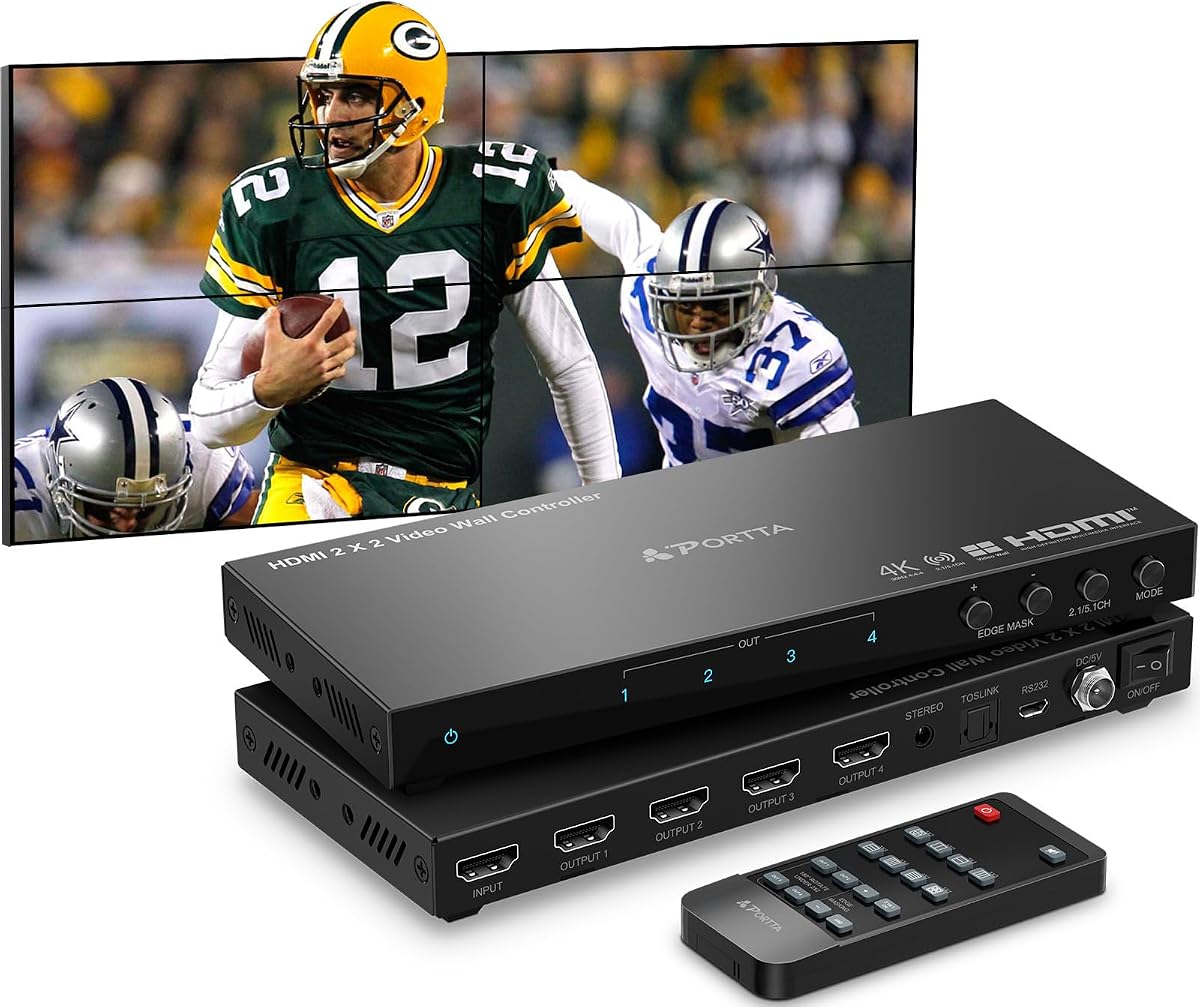
The PORTTA 2×2 Controller is a straightforward four-output video wall processor with a 4.4 rating and a useful set of installation controls. It supports eight display modes, including 2×2, 1×2, 2×1, 1×3, 3×1, 1×4, 4×1, and 1×1 splitting. Its strongest qualities are easy mode selection, RS232 control, rotation, edge masking, and dedicated audio extraction.
We may earn a commission when you buy through this link, at no additional cost to you.
The processor accepts a 4K30 source and distributes it through four HDMI outputs, each operating at 1080p60. That makes it appropriate for a standard-definition or high-definition four-screen wall assembled from HDTVs and monitors. It can also work with portrait-oriented source content in selected vertical configurations when the PC desktop is rotated accordingly.
The main constraint is the fixed 1080p60 output resolution. This is not a problem when the physical wall is designed around 1080p panels, but it means the unit cannot deliver 4K to each of four individual screens. It also has only one listed HDMI source, so users needing to switch among several computers or media devices will require external switching equipment.
For a straightforward shop, exhibit, command display, or office wall, this is a practical and approachable option. It is best for installers who prioritize clear presets, physical control options, and basic image alignment over high-resolution per-panel output or multi-source matrix switching.
The layout presets cover the common two-by-two, one-by-four, four-by-one, and three-display arrangements. A dedicated 1×1 mode also turns the processor into a basic four-output splitter, making it useful beyond traditional video walls.
Each output can be rotated 180 degrees in the 2×2 configuration, while edge masking adjusts the output picture by up to eight pixels on each side. These tools help compensate for thick panel borders and unusual screen orientation.
We may earn a commission when you buy through this link, at no additional cost to you.
The J-Tech Digital JTECH-VW0104-AE combines a 4.8 rating with a focused set of professional video wall features. It accepts a 4K30 source, sends the image across four 1080p outputs, and supports eight common display arrangements. Audio extraction, 180-degree rotation, and edge masking make it a balanced choice for a professionally assembled four-screen wall.
We may earn a commission when you buy through this link, at no additional cost to you.
The layout selection includes 2×2, 1×2, 2×1, 1×3, 3×1, 1×4, 4×1, and a 1×4 splitter mode. Optical output supports a 5.1-channel audio path, while the 3.5mm output provides two-channel extraction. Rotation and edge masking help installers correct panel orientation and minimize the visibility of physical bezel interruptions.
The primary limitation is resolution. The four-panel canvas can accept a 4K30 source, but each output remains 1080p, so the controller does not provide 4K independently to every screen. Rotation and edge masking are also unavailable in 1×1 splitter mode. Users who need HDR, four separate 4K outputs, or multiple source switching should consider a more specialized matrix system.
For retail signage, corporate information walls, monitoring displays, and compact installations, the JTECH-VW0104-AE offers an appealing combination of rating, layout flexibility, and installation features. Its balanced specifications make it one of the most approachable dedicated processors for a four-screen wall built with conventional HDTVs or monitors.
The controller covers the most common wall shapes without requiring a more complex matrix device. It can also use a 1×4 splitter mode when each of four screens should show the same source rather than a single extended canvas.
Five-channel optical extraction is useful for surround-capable audio systems, while the analog output handles simpler stereo installations. Either route can free the wall from depending on the audio embedded in a particular display.
We may earn a commission when you buy through this link, at no additional cost to you.
The OREI 4K Multi-Screen Controller is a four-screen processor designed around a single HDMI or USB-C source. It carries a 4.6 rating and supports 2×2, 1×2, 2×1, 1×3, 3×1, 1×4, and 1×4 splitter configurations. Its standout qualities are USB-C convenience, bezel adjustment, EDID management, and separate optical and analog audio outputs.
We may earn a commission when you buy through this link, at no additional cost to you.
The controller accepts content up to 4K60 and distributes it across four outputs at 1080p. This makes it well suited to an extended four-panel canvas built from HDTVs, commercial screens, or monitors. The included remote, RS232 support, and front-panel operation provide several ways to manage the display configuration.
As with many dedicated four-output processors, its limitations are tied to architecture rather than basic operation. It does not provide several independent inputs, and each output is limited to 1080p. The listed product information also contains a few typographical inconsistencies, so buyers should confirm the detailed specifications and included components on the current listing before installation.
This OREI suits offices, conference areas, retail displays, and command spaces where a laptop, computer, media player, or console is the main source. USB-C makes it especially convenient for modern laptops, while extracted audio allows the visual wall to be paired with a dedicated sound system.
The USB-C input can carry video from a compatible computer or other source without requiring a separate USB-to-HDMI adapter. HDMI remains available for media players, consoles, and conventional computers.
Bezel adjustment and EDID management address the two common problems in multi-display installations: mismatched panel edges and source-detection disagreements. Optical and analog outputs provide flexible audio routing.
We may earn a commission when you buy through this link, at no additional cost to you.
The OREI 4×4 HDMI Matrix is designed for installations that need more source selection than a simple one-input processor can provide. It combines a 4×4 matrix, a 2×2 wall function, and web control, while carrying a 4.1 rating. Four sources can be routed to four displays or one source can be divided across four screens.
We may earn a commission when you buy through this link, at no additional cost to you.
The system supports up to 4K60, including 4K at 24, 25, and 30Hz, along with common HD and legacy formats. Its audio support includes PCM, Dolby Digital, Dolby Digital Plus, DTS, Dolby TrueHD, and DTS-HD, making it more relevant to mixed AV systems than a basic display splitter.
This is a larger system with more configuration considerations than a dedicated 2×2 processor. Web control adds convenience for administrators, but installations must still be planned around four inputs and four outputs. The 4.1 rating is lower than those of the leading dedicated processors, so buyers should compare the matrix functionality carefully rather than judging it only as a four-screen splitter.
The OREI 4×4 matrix fits control rooms, boardrooms, event spaces, and retail environments where operators may need to select among several computers or media sources. It is particularly suitable when a 2×2 video wall is only one of several display-routing tasks the system must perform.
Four HDMI inputs remove the need to change source equipment manually. Users can route any combination of sources to the four outputs, creating a more adaptable AV installation than a fixed one-input controller.
Support for PCM, several Dolby formats, and DTS variants is valuable where source audio formats vary. The web interface also gives system operators a centralized way to manage routing and wall behavior.
We may earn a commission when you buy through this link, at no additional cost to you.
The 2×2 4K Video Wall Controller offers an unusually broad set of layout and control features for a dedicated four-screen processor. Its 4.6 rating reflects a strong combination of 11 splicing modes, IR remote, RS232, button control, settings memory, image rotation, and edge masking. It is designed to combine four displays into one larger canvas.
We may earn a commission when you buy through this link, at no additional cost to you.
HDMI and DVI inputs are both provided. The HDMI source can reach 4K30, while DVI is limited to lower resolutions. Four HDMI outputs support 1920 by 1080 and other common resolutions, giving the unit flexibility for HDTV and monitor installations. The remote, front buttons, and RS232 cover everything from quick local changes to integrated AV control.
The most significant limitation is that the 4K specification applies to HDMI input rather than every output, and the product does not claim 4K independently across all four screens. DVI is also not a path to 4K. Users who need 4K60 input, modern USB-C, advanced audio formats, or web management should select a higher-tier model.
For a cost-conscious four-TV information wall, this controller is difficult to dismiss. Eleven modes, memory, and flexible rotation make it especially useful when the layout may change. It is a practical choice for small business displays, classrooms, monitoring areas, and simple advertising installations.
Beyond the familiar 2×2 layout, the processor supports one-, two-, three-, and four-screen arrangements plus a splitter function. The memory feature retains the last configuration after reconnecting power, reducing repeated setup work.
Front buttons provide immediate local operation, the IR remote supports common mode selection, and RS232 is available for integration with a control system. This range of methods makes the unit adaptable to both public installations and professional AV racks.
We may earn a commission when you buy through this link, at no additional cost to you.
The ISEEVY 4K60 2×2 Controller is aimed at installations where each of four panels needs to support 3840 by 2160 at 60Hz. It has a 4.4 rating and combines HDMI and USB-C inputs with four 4K HDMI outputs. Its main appeal is high-resolution output across the complete 2×2 wall, supported by rotation and simple operating controls.
We may earn a commission when you buy through this link, at no additional cost to you.
The processor supports 2×2, 1×1, 1×2, 2×1, 1×3, 3×1, 1×4, and 4×1 arrangements. Each output can rotate its image 180 degrees, which helps when a panel is installed upside down or oriented in a way that would otherwise reverse the picture. A remote and three front buttons make mode changes straightforward.
The listed features do not emphasize detailed bezel compensation, EDID management, or comprehensive audio extraction. Users requiring those functions should compare one of the dedicated processors with more explicit alignment and sound-system features. The 4K60 output claim is also the distinguishing point, so matching it to four genuinely 4K-capable panels is important.
This ISEEVY model is a strong candidate for premium retail displays, command centers, studios, and corporate installations where all four screens must run at high resolution. The product is described for stable 24×7 operation and offers a simple plug-and-play setup, which suits permanent professional installations.
Unlike processors that accept a 4K canvas but output 1080p per panel, this model lists 4K support on all four HDMI outputs. That makes it a better match for displays designed around 4K content, detailed menus, or high-density data.
Per-output 180-degree rotation is valuable for mixed-orientation installations. It corrects the image without requiring every display to be mounted in exactly the same physical position.
We may earn a commission when you buy through this link, at no additional cost to you.
The J-Tech Digital 4K Seamless Switch Matrix is the most functionally advanced controller in this group, combining four-source switching, multiviewing, video wall creation, output scaling, and web management. Its 4.2 rating does not lead the list, but the product targets professional installations where routing flexibility matters more than a basic four-screen split.
We may earn a commission when you buy through this link, at no additional cost to you.
Any of four 4K60 4:2:0 inputs can be routed to any combination of four outputs without switching delay or picture loss. Five multiviewer presets allow all four sources to appear on one display in arrangements such as 2×2, 1x3L, 1x3U, 1×4, and 4×1. Output resolution can be upscaled or downscaled to 4K30, 1080p, 720p, 2560 by 1440, 1920 by 1200, and 1360 by 768.
The tradeoff is complexity and a capped 4K30 output. The extensive scaling and routing options are unnecessary for a simple four-TV wall, while the 4K60 capability applies primarily to the input side. Installers also need to plan network access and web-control configuration rather than relying entirely on a handheld remote.
This matrix is best suited to control rooms, command centers, broadcast-adjacent installations, and professional spaces where operators must monitor or distribute several sources. Its per-output 180-degree rotation and ten possible wall configurations give it the strongest operational depth among the ten products reviewed.
Five presets let operators place all four source signals onto a single display. This reduces the need for a separate monitor bank when personnel need to watch multiple feeds, presentations, or computer screens at once.
Upscaling and downscaling across several common resolutions allow the matrix to serve mixed display types. LAN and web control also make it easier to manage the system remotely from a supported browser.
We may earn a commission when you buy through this link, at no additional cost to you.
The 4K60 2×2 Media Controller is distinctive because it can display media directly from a USB drive without requiring a separate media player. It holds a 4.8 rating, accepts 4K60 at 4:4:4, and provides two HDMI 2.0 inputs plus USB for content. Its broad mode selection, audio outputs, image controls, and automatic playback make it a self-contained signage solution.
We may earn a commission when you buy through this link, at no additional cost to you.
The USB system supports MP4, MOV, AVI, WMV, and MKV video, MP3, WAV, and FLAC audio, common image formats, and TXT documents. It can auto-play media when a supported USB drive is inserted. Four HDMI outputs create the wall, and layouts include 1×2, 1×3, 1×4, 2×2, 2×1, 3×1, and 4×1.
Its media capabilities come with more configuration and compatibility considerations than a dedicated processor. The 4K60, 4:4:4 specification may require a compatible source and properly configured content. The broad menu and image-adjustment set can also take more time to learn, while USB playback should be considered a digital-signage function rather than a replacement for every professional media workflow.
For shops, menu boards, information kiosks, and promotional walls that must run unattended, the automatic USB display is a major advantage. It is especially suitable when avoiding a permanently connected computer is important and the installation only needs occasional HDMI source switching.
Supported video, audio, image, and text files can be loaded from a USB drive and displayed automatically. This simplifies recurring signage updates in locations where maintaining a computer or network player is inconvenient.
Brightness, sharpness, contrast, and color-temperature settings give installers useful control over how content appears across the wall. Rotation, border adjustment, and cropping further support customized physical layouts.
We may earn a commission when you buy through this link, at no additional cost to you.
The ISEEVY 4K60 2×3 Controller expands the standard four-screen concept into a six-display solution. It has a 4.3 rating, accepts HDMI or USB-C input, and provides six HDMI outputs that each support 3840 by 2160. Its standout feature is the ability to construct a larger wall while retaining high-resolution output on every panel.
We may earn a commission when you buy through this link, at no additional cost to you.
The controller supports 2×3, 3×2, 1×5, 5×1, 1×6, 6×1, 2×2, 1×1, 1×2, 2×1, 1×3, 3×1, 1×4, and 4×1 configurations. That makes it useful for larger information walls as well as more familiar arrangements. Each output can rotate its image 180 degrees, and the remote or three front buttons provide straightforward operation.
The six-output requirement makes this model less practical when the installation has only four screens. Detailed edge masking and bezel compensation are not emphasized in the available specifications, so installers should not assume that physical alignment tools equal to those on dedicated processors are included. It also has one listed source path rather than a multi-input matrix.
This ISEEVY is a good fit for command centers, retail information walls, event displays, and monitoring rooms using six 4K panels. The product is described for stable 24×7 operation, making it a candidate for permanent professional use where a four-output processor cannot meet the display-count requirement.
Six outputs allow installers to create 2×3, 3×2, 1×6, and 6×1 walls, all while listing 4K60 support for each output. This provides a practical path beyond the common four-screen configuration.
Fourteen modes cover six-panel, four-panel, three-panel, two-panel, and single-screen arrangements. The same hardware can therefore adapt as the physical display layout changes.
We may earn a commission when you buy through this link, at no additional cost to you.
Selecting an HDMI Video Wall Controller involves matching output count, source capabilities, layout presets, resolution behavior, audio needs, and control methods to the intended installation. The most important distinction is whether the controller must drive an extended canvas, deliver independent high-resolution images, switch among multiple sources, or play media without a separate device.
Choose at least as many outputs as panels and confirm that the physical arrangement is listed. Also consider whether the wall may expand later, because a controller that fills four panels has no spare outputs for another display.
Match the source, controller, and panels as a system. If all four screens must independently show 4K content, choose a processor with 4K per output. If they form one large 4K canvas, a 4K input with 1080p outputs may be exactly what you need.
Prioritize a model that supports both the intended wall and the fallback layout you may need. Modes with different resolution behavior should be checked carefully, since a 1×4 splitter configuration may offer a different output resolution from the corresponding video wall mode.
Do not assume every 180-degree rotation function works in every mode. Some products restrict it to 2×2, and the J-Tech JTECH-VW0104-AE excludes rotation and edge masking in 1×1 splitter mode. Confirm the exact mode restrictions before ordering.
Check the audio standard required by your amplifier and the number of channels needed. The presence of HDMI audio embedded in each output does not necessarily replace a dedicated audio-extraction connection for a professionally installed wall.
Decide whether the wall needs simple distribution, live source switching, multiviewing, or autonomous media playback. More inputs and switching functions add flexibility, but they can also complicate setup and operation.
Choose based on who will operate the system. A fixed installation with infrequent changes may need only a remote, while a permanent commercial or control-room environment benefits from serial, network, or web administration.
Check the current listing for the exact warranty and support terms before purchase. Also confirm included power supplies, adapters, mounting hardware, remotes, and control accessories so the installation has everything required.
Begin by planning the source, display count, physical layout, and audio destination before connecting cables. Power off the displays and controller, connect the source to the selected HDMI or USB-C input, and connect each display to its numbered HDMI output. The output order should match the controller's expected mosaic arrangement, so label the cables and panel positions before switching the system on.
After power-up, use the front controls, remote, or RS232 interface to choose the correct wall mode. Begin with the basic image and audio paths, then adjust edge masking, bezel compensation, rotation, EDID, brightness, or color settings as needed. Make small changes and verify them on all panels. If the image is reversed or incorrectly positioned, confirm that every cable is in its intended output and that rotation is disabled unless the physical installation requires it.
For ongoing care, keep the controller and power supply in a ventilated, dry location away from dust and excessive heat. Do not repeatedly unplug cables while the system is operating, and avoid placing strain on HDMI leads. Update the control configuration or media files before changing a live installation, and periodically test remote, serial, network, audio, and display connections so a failed component is identified before a scheduled event or workday.
A video wall controller divides one source image into coordinated sections across multiple displays, allowing a 2×2 wall to behave like one large canvas. An HDMI splitter usually duplicates the same complete image onto every output. Many controllers support both functions, so check the available 1×4 and 1×1 modes to see whether duplication is included.
That depends on whether the four screens need independent 4K content or one 4K canvas divided across the wall. The ISEEVY 2×2 lists 4K60 on all four outputs, while several dedicated processors accept a 4K source but output 1080p per panel. Confirm both input and output specifications before connecting high-resolution displays.
EDID management can help displays identify the intended resolution and aspect ratio, especially when using mixed brands or older equipment. It is particularly useful when a source and display negotiate incorrectly. Not every controller in the list offers advanced EDID controls, so this feature is worth prioritizing when the display mix is complex.
The function corrects the orientation of an individual screen image without physically turning the display. It is useful for upside-down mounting, unusual installation positions, and matching panels with different physical orientations. Some controllers allow rotation only in specific modes, such as 2×2, so verify the restrictions before designing the layout.
Extracted audio is useful when the wall displays do not produce adequate sound or when the installation uses a dedicated amplifier, soundbar, or surround system. Optical output supports compatible multichannel formats, while the 3.5mm option is generally for stereo. In many commercial installations, routing audio separately also avoids relying on one display for the entire soundtrack.
Start with matched display models, uniform panel spacing, and correct output assignments. Then use the controller's edge-masking or bezel-adjustment controls to align the image boundaries. Small, incremental adjustments are more effective than a large change, and some controllers restrict these features to particular wall modes. Physical installation quality remains just as important as software correction.
A matrix controller is preferable when several sources must be selected and routed among displays, or when a multiviewer is needed. A basic processor is usually sufficient when one source is distributed across the wall and occasionally repeated on each screen. The J-Tech switch matrix and OREI 4×4 matrix provide more routing flexibility, while dedicated processors focus on wall construction and alignment.
Some models include media playback, and the 4K60 2×2 Media Controller can auto-display supported MP4, MOV, AVI, WMV, and MKV files, as well as common audio, image, and text formats. Other dedicated processors require an external source. Confirm the file formats, storage requirements, and playback behavior in the current product documentation before relying on autonomous signage.
The three leading selections serve different needs. The J-Tech Digital JTECH-VW0104-AE is the strongest balanced dedicated processor, combining a high rating, eight display modes, audio extraction, rotation, and edge masking. The 2×2 4K Video Wall Controller stands out as the value choice with 11 splicing modes and broad control methods, while the J-Tech 4K Seamless Switch Matrix is the premium option for four-source routing, multiviewing, scaling, and web administration.
For most four-screen installations, prioritize the output resolution behavior and physical layout first, then confirm rotation limits, bezel compensation, source connectivity, and audio routing. Six-screen installations may justify the ISEEVY 2×3, standalone signage may favor the USB-capable media controller, and multi-source environments should use a matrix rather than a one-input processor.
Finally, check the current listing, included accessories, warranty, control options, and compatibility requirements before ordering. Product configurations and prices can change, and a controller's value depends on matching its exact output behavior to the displays, source, audio equipment, and room where it will operate.