
Tangxi Stereo Audio Passive Attenuator
5.0Editor score
Six selectable attenuation levels
Multiple connector formats supported
Passive metal-cased construction
Headphone volume control attenuators provide a convenient way to adjust audio output without returning to the source device. A useful model should offer smooth attenuation, reliable connectivity, and compatibility with the headphones, speakers, instruments, and computers in your setup.
We compared the included products by connector support, control style, signal handling, construction, portability, and practical listening applications. The list covers 3.5mm inline controllers, quarter-inch options, a TRRS extension cable, and a selectable passive attenuator with several connection formats.
Each pick highlights a different way to manage volume, from simple analog knobs to stepped attenuation for home theater equipment. Ratings and product availability can change, so check the current listing details and confirm connector compatibility before making a final selection.
5.0Editor score

4.9Editor score

4.3Editor score
As an Amazon Associate we earn from qualifying purchases.
The comparison below places every included attenuator side by side, emphasizing connector compatibility, control type, construction, and the environments in which each model is most useful.



The Cubilux 3.5mm Stereo Volume Controller is a straightforward inline attenuator for listeners who want quick access to headphone or speaker level adjustments. Its 4.3 rating reflects a generally favorable reception, while the full aluminum alloy housing and stepless knob distinguish it from minimal plastic adapters. It supports both stereo and mono audio, making it useful across a broad range of standard 3.5mm equipment.
We may earn a commission when you buy through this link, at no additional cost to you.
The main advantage is the physical control. Turning the knob lets a user reduce output continuously rather than navigating device menus or relying on digital buttons. The controller passes the audio signal without external power and is described as maintaining the original music quality without static. A full aluminum alloy enclosure also provides durability and a measure of interference isolation.
The important limitation is that this is an attenuator, not an amplifier. It cannot make a quiet source louder than the output supplied by the connected device, and the product listing explicitly says that microphone volume is not adjustable. The microphone signal may pass through, but the knob is intended to manage the audio output signal only. Users with headset microphones should account for that distinction before buying.
This is a strong recommendation for anyone using 3.5mm headphones, earphones, speakers, or another portable audio device and wanting a dependable inline knob. It is particularly helpful when the device itself is inconvenient to reach or offers only coarse digital volume steps. Those needing larger quarter-inch connectors, selectable attenuation levels, or microphone-level control should choose a more specialized option.
The stepless knob gives listeners a direct way to set a comfortable level while watching a video, joining a call, or playing music. Turning the control all the way down provides an easy mute function without disconnecting the cable.
Placing the controller between the source and headphones can prevent a sudden high output level from reaching the listener. It is a simple solution for offices, shared computers, and other settings where the source volume may change unexpectedly.
We may earn a commission when you buy through this link, at no additional cost to you.
The Koss VC20 offers a practical combination of extended reach and portable placement. It carries a 4.3 rating and uses a 39-inch cord, allowing the control body to sit farther from a phone or other source than a short inline adapter. The included pocket or belt clip makes it especially easy to keep the volume controller within reach while moving around.
We may earn a commission when you buy through this link, at no additional cost to you.
Its connections are built around the familiar 0.125-inch, or 3.5mm, headphone format. The product information states that it connects to any 3.5mm plug and 0.125-inch headphone jack, making it suitable for compatible cell phones, headphones, and portable music devices. The supplied minijack connector is also identified as compatible with iPhone connections, although it is not gold plated.
There are some practical trade-offs. A 39-inch cord and belt clip are useful when the source is tucked into a pocket, but they make the controller bulkier than the mini inline options on this list. It also offers 3.5mm connectivity rather than 6.35mm, RCA, or selectable attenuation. Buyers who need broad professional connector support should look elsewhere.
The Koss is a compelling budget-oriented choice for mobile listening and anyone who wants a volume controller separated from the device by a generous length of cord. It is especially handy around the house, at a desk, or on a trip where a quick physical control is more convenient than opening a phone menu. The included lifetime warranty adds further confidence.
The long cord allows the controller to remain accessible even when the source device is in a pocket, bag, or drawer. The clip offers another way to position it securely while the user moves.
Because the VC20 uses a standard 3.5mm connection, it can fit easily into a basic portable audio arrangement. No battery or external power supply is required for its stated headphone volume-control function.
We may earn a commission when you buy through this link, at no additional cost to you.
The Volbox inline audio volume control combines a tactile rotary knob with a compact passive design. Its 4.4 rating is among the stronger results in this group, and the smooth, weighted control gives users a clear physical way to manage output without navigating source-device settings. It is designed for standard 1/8-inch, or 3.5mm, audio equipment.
We may earn a commission when you buy through this link, at no additional cost to you.
Its signal treatment is a central strength. The product is described as a passive attenuator that provides clean volume control without distortion, hiss, or an external power requirement. That makes it suitable for headphones, PC gaming headsets, tablets, smartphones, and portable speakers, provided those devices use compatible 3.5mm connections. The outer casing is described as rugged and suitable for regular daily use.
Its limitations are consistent with the compact 3.5mm category. It does not list 6.35mm, RCA, or other quarter-inch support, and it offers no stepped attenuation choices. The information also frames the device around audio output control rather than microphone-level management. It should be treated as a passive level reducer, not a signal booster or a complete headset control hub.
This Volbox model is a good match for listeners seeking a small, tactile controller with a more substantial turning feel. It works well at a computer, on a travel setup, or wherever a standard 3.5mm headset is used. Users who need broader connector coverage should examine the multi-format or quarter-inch alternatives, while those focused on simple headphone attenuation will find this model direct and effective.
The weighted knob offers enough physical feedback to make fine adjustments without repeatedly checking the source. It can be especially useful during gaming, streaming, or focused work when a sudden sound would be disruptive.
As a passive controller, it operates as part of the analog audio path. That simplifies setup and avoids another charging item, although actual output remains limited to the signal provided by the source.
We may earn a commission when you buy through this link, at no additional cost to you.
The 3.5mm 6.35mm Stereo Volume Controller stands out as the most flexible conventional rotary option in this roundup. It carries a 4.9 rating, the highest among the continuously adjustable models, and supports both 3.5mm and 6.35mm connections. That makes it a natural fit for headphones, speakers, studio displays, guitars, and keyboards.
We may earn a commission when you buy through this link, at no additional cost to you.
Its large, fingertip-friendly knob provides precise, stepless stereo adjustment. The product information emphasizes clear signal transmission without static or distortion, while the aluminum alloy casing is designed to reduce interference and withstand regular handling. The minimum knob position also provides an effortless mute function, letting the user silence the output without unplugging anything.
As with the other passive attenuators here, it cannot amplify sound beyond the source level. The listing also says microphone signals can pass through, but the controller is not designed to adjust microphone volume. The model offers a single continuous control rather than multiple calibrated attenuation steps, so users who require exact, repeatable reduction levels may prefer the Tangxi design.
This is the top recommendation for a broad mix of home and practice equipment because it combines a strong rating, a comfortable control surface, and two widely used connector sizes. It is equally suitable for reducing speaker levels during instrument practice and managing headphone output at a computer. Confirm the plug type on both ends of the intended connection before purchasing.
Supporting 3.5mm and 6.35mm connections broadens the controller's usefulness across consumer and music equipment. It can serve as a familiar interface for speakers, studio monitors, and instruments rather than being tied to one device category.
Turning the large knob to its minimum position provides a quick way to silence the output. That is useful during conversations, practice sessions, or any situation where the listener wants an immediate response to unexpected audio.
We may earn a commission when you buy through this link, at no additional cost to you.
The Cubilux 3.5mm TRRS Volume Attenuator Cable combines an extension cable with an inline control. It holds a 4.2 rating and provides four feet of cable, making it useful when the source is too far away for a short adapter. The TRRS format is especially relevant to compatible headsets and earphones that combine audio and microphone contacts.
We may earn a commission when you buy through this link, at no additional cost to you.
The cable uses oxygen-free copper wiring and a gold-plated connector, while the controller housing is made from aluminum alloy. A braided outer cable is intended to withstand regular bending, pulling, and wear. The control itself supports stepless audio adjustment and can be turned down for mute. Importantly, the product remains compatible with the headphone's existing digital button volume controls.
Connector standards can limit real-world flexibility. TRRS compatibility does not guarantee that every phone, laptop, gaming headset, or adapter will work as intended, so users should verify the shape and contact layout of their existing equipment. The product also does not amplify sound and cannot control microphone volume, even though a microphone signal may pass through the connection.
This model is a good recommendation for listeners who need more distance from a source and already use compatible TRRS headphones. It also offers a practical way to make an inline level control available without changing to a different cable standard. Buyers using basic two-contact TRS equipment or needing quarter-inch support should look to a more universally compatible controller.
The four-foot length gives a user more freedom to move away from a laptop, phone, or other source while retaining control over the output. The controller becomes the accessible point for changing the level.
The braided construction and aluminum-alloy controller housing address the wear associated with repeated bending and pulling. Those details make the cable more appropriate for a frequently used mobile or workstation setup.
We may earn a commission when you buy through this link, at no additional cost to you.
The Cubilux 6.35mm Volume Controller is aimed specifically at users with quarter-inch audio equipment. Its 3.8 rating is lower than those of the leading options, but the targeted connector support and straightforward construction make it relevant for speakers, studio monitors, guitars, and keyboards. It provides stepless control for either stereo or mono signals.
We may earn a commission when you buy through this link, at no additional cost to you.
A full aluminum alloy shell gives the controller a durable feel and is intended to provide better interference isolation. The product information states that it transmits the audio signal without static while preserving the original music quality. Turning the knob to the minimum position mutes the output, and the passive design requires no battery or external power.
The trade-off is clear specialization. It does not provide 3.5mm support, so it is not a universal choice for modern phones, tablets, or many gaming headsets. The rating of 3.8 may also warrant more careful consideration in a crowded category, particularly when a multi-size controller can serve both 3.5mm and 6.35mm equipment.
For a setup built around genuine 6.35mm connections, this controller remains a focused and functional option. It suits instrument practice and studio-monitor listening where continuous volume control is useful. However, buyers who want broader compatibility should examine the dual-size controller or one of the compact 3.5mm alternatives before deciding.
The quarter-inch format and stepless knob make it straightforward to reduce a guitar, keyboard, or studio monitor to a comfortable level. It keeps the adjustment close to the listener rather than on an amplifier or interface.
The full aluminum alloy enclosure is designed for durability and interference isolation. Because the controller operates passively, it adds no battery burden and keeps the signal path uncomplicated.
We may earn a commission when you buy through this link, at no additional cost to you.
The MC11 is a direct approach to 3.5mm inline volume control. It has a 4.3 rating and uses input and output mini jacks, allowing a source to connect on one side and headphones or a speaker on the other. The rotary knob provides immediate control over the level without requiring access to the connected device.
We may earn a commission when you buy through this link, at no additional cost to you.
Its solid CNC aluminum chassis is intended to provide a durable appearance and withstand regular handling. The plug-and-play format needs no power supply, which makes installation simple and keeps the product independent of batteries or charging. It is a particularly natural choice for a desk, dorm room, or entertainment center that already relies on 3.5mm audio connections.
The product information is focused and relatively concise, so buyers should not expect advanced features beyond manual attenuation. It is not listed as supporting quarter-inch, RCA, or multiple selectable levels, and there is no indication that it controls headset microphone volume. It is best understood as a straightforward passive volume box for standard stereo audio.
The MC11 suits users who value uncomplicated construction and immediate control. It can be useful with a computer, portable speaker, or other 3.5mm source when a dedicated volume knob is missing. Those who need TRRS flexibility, multiple connector sizes, or calibrated attenuation steps should choose one of the more specialized options instead.
A visible inline knob removes the need to open a media player, operating-system menu, or device control. It is useful for quickly balancing audio during media playback or a virtual meeting.
The CNC aluminum chassis gives the controller a substantial, durable appearance. Its passive operation means users can install it without finding a power source or managing another cable.
We may earn a commission when you buy through this link, at no additional cost to you.
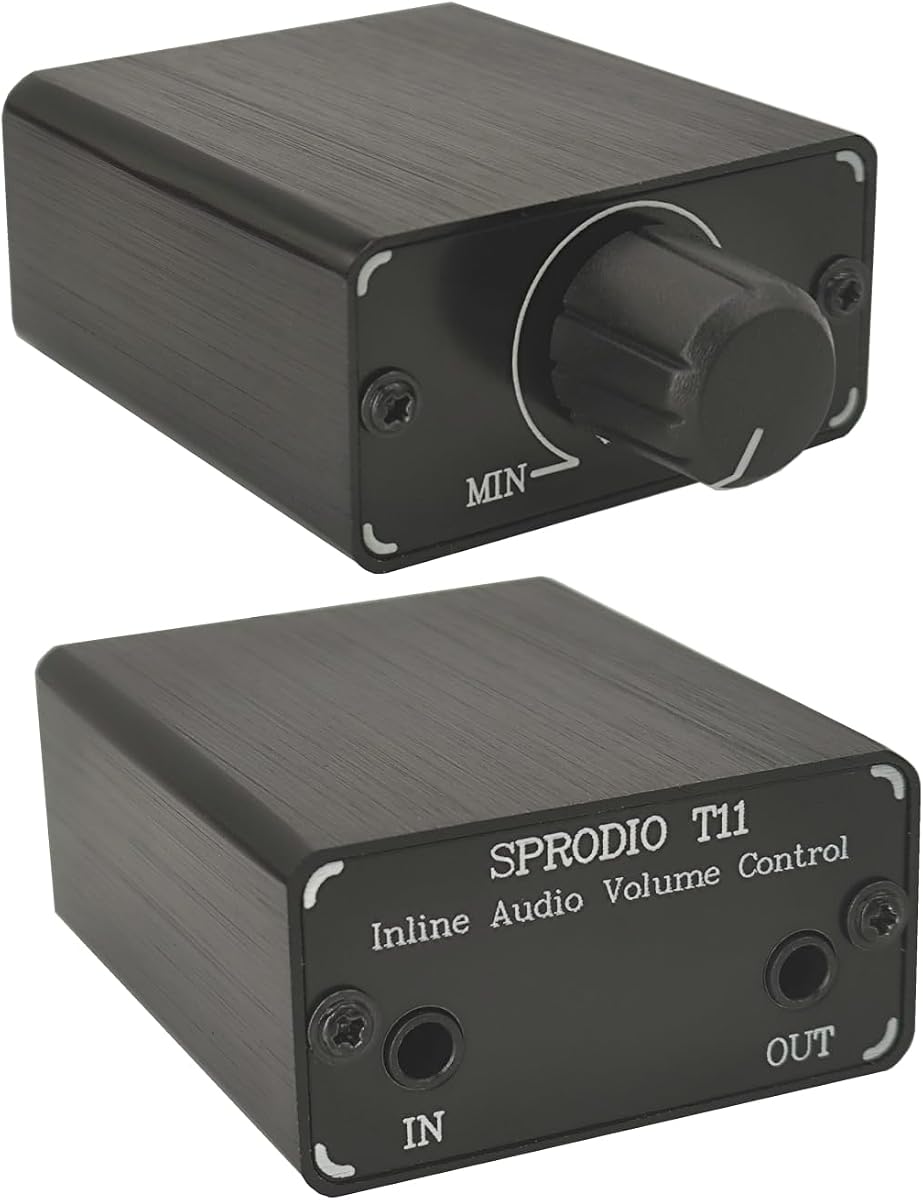
The SPRODIO T11 is a compact 3.5mm volume controller aimed at straightforward headphone and speaker setups. Its 4.1 rating indicates a solid but less exceptional customer reception than the leading products. A rotary knob allows users to raise or lower the level directly, while input and output mini jacks complete the inline path.
We may earn a commission when you buy through this link, at no additional cost to you.
The controller uses a solid CNC aluminum chassis that is intended to look durable and withstand regular use. It needs no power supply or battery, so setup is effectively plug and play. Its focused design makes it a sensible addition to a workspace where the computer or source lacks a convenient physical volume control.
Its specification set is intentionally limited. The product does not advertise quarter-inch, RCA, stepped attenuation, or advanced microphone handling. Buyers should treat it as a standard passive audio-level control rather than a universal audio hub. It also cannot provide amplification, so a source that already outputs quietly will remain quiet.
The SPRODIO T11 is best for someone who wants a small, attractive control in a 3.5mm setup and values a metal housing. It works well for everyday headphone listening at a desk or portable speaker arrangement. If broader connector support, TRRS behavior, or selectable attenuation is more important, a different model will serve better.
The controller adds a tactile level control without requiring a large external amplifier. It can sit near a keyboard or speaker and provide a more convenient way to make small output adjustments.
Since the T11 requires neither a power supply nor a battery, users can connect it and begin using the control immediately. That simplicity also makes it convenient to store when it is not needed.
We may earn a commission when you buy through this link, at no additional cost to you.
The Volbox Mini inline volume control is a compact option for standard 3.5mm audio equipment. It carries a 4.2 rating and uses a small knob to adjust output for headphones and speakers. Its compatibility with both TRS and TRRS jacks adds useful flexibility within the standard mini-jack format.
We may earn a commission when you buy through this link, at no additional cost to you.
The passive design requires no batteries and provides adjustment from full output to mute. The product information emphasizes clear stereo reproduction, making it appropriate for phones, tablets, computers, gaming headsets, and portable speakers. Its small form is particularly useful for travel, remote work, streaming, and other setups where space is limited.
As with other mini attenuators, its strengths come with boundaries. It does not provide 6.35mm or RCA support, and there is no stepped selector for calibrated attenuation. It also remains an output-level controller, so it cannot boost a source beyond its original output or solve the problem of an inadequately powered headphone system.
This model is a good choice for travelers and everyday listeners who need a compact, simple controller for compatible 3.5mm gear. It can be tucked into a bag or positioned between a laptop and a gaming headset without adding much bulk. Users with multiple connector requirements should favor the dual-size or multi-format attenuators instead.
The mini housing keeps the overall setup uncluttered and is easy to carry between a home desk, office, or travel bag. It provides a physical control without requiring users to open a device menu.
Supporting both common 3.5mm formats can simplify headphone and headset arrangements. The user should still verify the physical plug and ensure the source device accepts the intended audio path.
We may earn a commission when you buy through this link, at no additional cost to you.
The Tangxi Stereo Audio Passive Attenuator is the most specialized model in this group. It has a 5.0 rating and provides six switchable modes: -3 dB, -6 dB, -9 dB, -12 dB, -15 dB, and 0 dB. Rather than relying on a continuously variable knob, it allows the listener to choose a defined reduction level.
We may earn a commission when you buy through this link, at no additional cost to you.
Its connector support is extensive, covering 3.5mm AUX, TS, 6.35mm quarter-inch, and RCA interfaces. The product is aimed at home theater setups, audio equipment, and formal sound-performance situations where balancing different source levels is useful. Its passive design requires no external power and is described as preserving the original signal without static interference.
The black metal casing is designed for durability, low noise, and reduced electromagnetic interference. The enclosure is also described as compact and lightweight for storage or transport. The main trade-off is that a stepped selector is less fluid than a stepless knob: it offers repeatable attenuation values but cannot provide the same continuous precision as a rotary attenuator.
This is the premium recommendation for users who want calibrated reduction choices and a wider range of connections. It is well suited to a home theater or multi-device audio system where one source is louder than another and a fixed attenuation level is more useful than momentary fine adjustment. The zero-decibel mode also allows the signal to pass through without reduction.
The six selectable settings make it easier to match a louder source with another device in the same system. Rather than estimating a continuous knob position, the user selects a clearly labeled attenuation level.
Support for AUX, TS, quarter-inch, and RCA connections gives the attenuator broader relevance than the standard 3.5mm controllers. It can serve as a central adjustment point in a more varied audio setup.
The compact, lightweight housing is easy to store or carry, while the metal enclosure is intended to minimize electromagnetic interference. No power connection is needed, so deployment remains straightforward.
We may earn a commission when you buy through this link, at no additional cost to you.
The right attenuator depends mainly on connector type, control preference, and the equipment involved. Review these factors before choosing a model to avoid compatibility problems or an unnecessary loss of adjustment flexibility.
In short, inspect the actual plug and connection count before buying rather than relying on a general description of compatibility.
Choose a smooth knob for flexible everyday listening, or selectable levels when exact and repeatable reductions matter most.
Treat an attenuator as a volume-reduction tool, not a way to increase power or overcome poor headphone matching.
Separate playback attenuation from microphone control, and verify both functions if your primary use involves calls, streaming, or gaming communication.
Choose a sturdy housing and appropriate cable length for the amount of movement and handling expected in your setup.
Match controller size and cord length to the listening location, whether that is a pocket, desktop, studio, or entertainment center.
Prioritize useful conveniences such as mute and a clip, but ensure the core connections and adjustment style meet your needs first.
Favor designs with clear passive construction and well-defined specifications, while considering the quality of the rest of your audio chain.
Begin with the source volume set low. Connect the appropriate input end of the attenuator to the phone, computer, speaker, instrument, or other audio source, and then connect the output end to the headphones or speaker. Once both sides are secure, raise the source to a moderate level before turning the inline knob up.
Make small adjustments with the rotary control, or choose a defined attenuation setting on a stepped model. If the audio is too quiet, check the source first because an attenuator cannot amplify the signal. For TRRS equipment, confirm that the microphone and playback functions behave as expected, and remember that some controllers change only the playback channel.
To care for the unit, unplug it before changing connections and avoid sharply bending the cable at either plug. Keep the housing dry and avoid pulling the connector instead of gripping the molded plug body. Store it loosely without wrapping the cable tightly around the controller, and clean the exterior with a dry cloth rather than exposing the contacts to moisture.
No. A passive attenuator reduces the audio signal traveling toward the headphones and does not add power. If the source is already too quiet, you need a different solution, such as a compatible headphone amplifier, a powered audio device, or a source with a stronger output.
A TRS plug has tip, ring, and sleeve contacts and commonly carries stereo audio. A TRRS plug has an additional contact and is often used to combine headphones with a microphone. Because the layouts differ, users should verify that both the controller and connected equipment use compatible 3.5mm standards.
Turning a passive controller to its minimum position generally acts as a mute function and does not harm the headphones. The device is simply reducing the signal. Proper care still matters, so avoid yanking the plug and keep the cable from developing sharp bends or pinches.
It depends on the connector arrangement. A controller with 3.5mm input and output can work with compatible stereo headset connections, while TRRS support may be needed for a combined headset plug. Check the headset specification and the controller listing, particularly if the headset microphone needs to pass through or be controlled.
An attenuator does not correct interference, distortion, or weak recordings generated by the source. It only adjusts the signal level, and the products are designed to avoid adding obvious hiss or static themselves. If noise persists, check the source connection, cable, grounding, and equipment settings.
A rotary knob is more convenient for continuous, fine adjustments while listening, gaming, or joining calls. A stepped attenuator is better when you want defined and repeatable reduction levels, particularly in a home theater or multi-device system where sources have noticeably different output strengths.
No. Passive attenuators operate as part of the analog signal path and require no external power. That makes them simple to deploy, although their maximum output remains limited to the signal supplied by the connected source.
Set the source and inline level to their minimum before connecting or disconnecting the cable, then raise them gradually. Check that plugs are fully seated and that the controller is not being pulled sharply. Sudden changes in the source volume or connection movement are common causes of audible clicks.
The 3.5mm 6.35mm Stereo Volume Controller is the strongest all-around choice for listeners who want a smooth knob and support for two common connector sizes. The Tangxi is the premium choice for selectable attenuation levels and broader home theater connections, while the Koss VC20 offers an affordable way to place a long-corded 3.5mm controller within easy reach.
Most buyers should prioritize correct plug compatibility, the required level-control style, and whether the device must pass a headset microphone. Compact 3.5mm models suit travel and everyday headphone use, quarter-inch options suit music equipment, and a TRRS cable is appropriate only when the connected headset and source support that standard.
Product ratings, availability, and prices can change, so review the latest listing and seller information before ordering. Confirm the connector shape, cable length, attenuation behavior, and microphone limitations, then choose the controller that fits the equipment and listening environment most directly.