
Logitech Wireless Presenter R800
4.6Editor score
Bright green laser
Built-in timer display
Up to 100-foot range
Compare the 10 best laser pointers for presentations, covering visibility, wireless range, controls, compatibility, batteries, and portability.
A laser pointer for presentations should do more than draw attention to a slide. It should advance slides reliably, remain easy to operate without looking, connect without unnecessary setup, and provide a visible pointer across the room. The right model can make teaching, training, and business presentations feel noticeably more polished.
This guide compares ten presentation laser pointers based on the features listed in their product information, including pointer color, wireless range, receiver design, button controls, battery requirements, charging method, and supported devices. It covers options for classrooms, meeting rooms, auditoriums, and speakers who want to move freely among their audience.
Each selection highlights a different practical advantage, from highly visible green lasers to compact rechargeable models and extended-range remotes. Ratings, feature details, and availability can change over time, and current prices fluctuate, so readers should confirm the latest specifications and product listing before purchasing.
4.6Editor score

4.6Editor score

4.6Editor score
The comparison below highlights the most important differences among the ten presenters, including pointer color, connection style, wireless reach, control features, and power management.

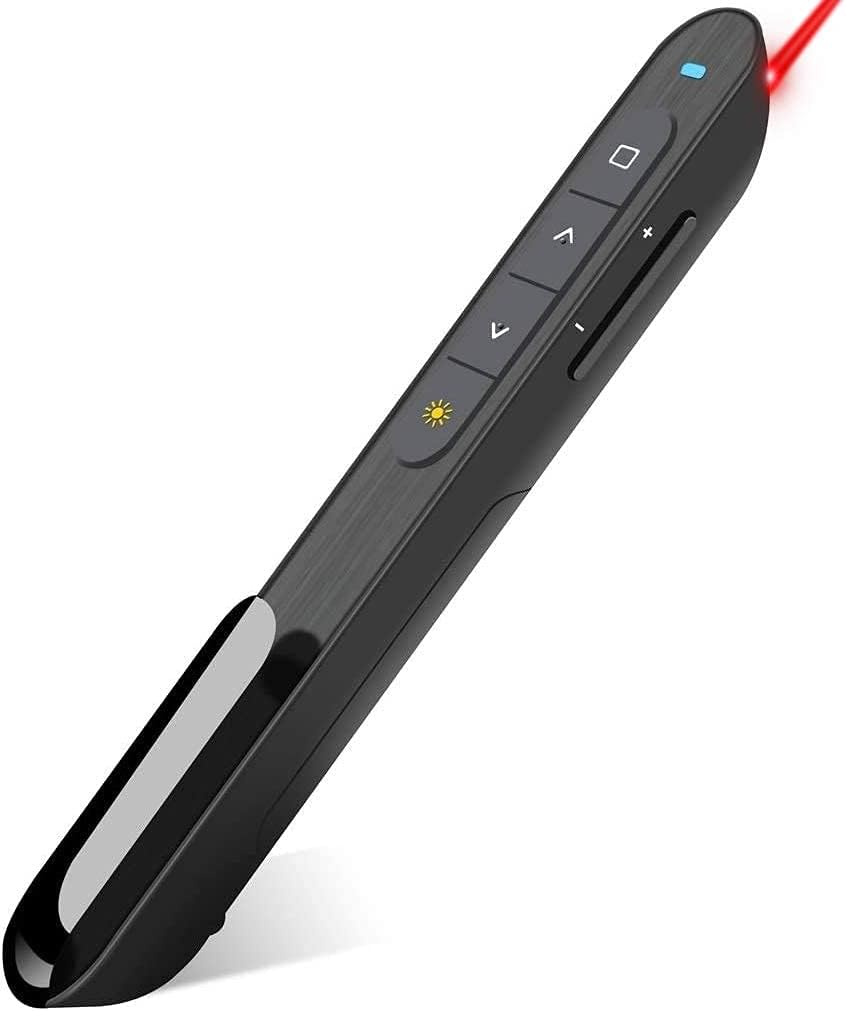



This green-light presentation clicker combines a highly visible 532nm laser with USB-C charging and a broad set of presentation controls. Its 4.6 rating reflects a strong balance of everyday usability and classroom readiness. The crisp green dot is designed to stand out on projection screens and whiteboards, making it especially useful when red pointer light can be difficult to see.
We may earn a commission when you buy through this link, at no additional cost to you.
The rechargeable design removes one of the most common presentation-day hassles. A one-hour USB-C charge is stated to provide power for weeks of daily classroom use, while the included charging cable keeps the process simple. Its USB receiver works with Mac, Windows, and Chromebook computers, and no drivers, pairing routine, or software installation are required. The receiver can also snap into the clicker magnetically, reducing the chance of leaving it behind in a classroom or meeting room.
Control is another major strength. The down and up arrows advance and reverse slides, while separate controls handle hyperlinks, application switching, black or full-screen mode, and volume adjustment. A presenter can therefore complete a standard slideshow without repeatedly reaching for the keyboard. The trade-off is that its green laser may not be appropriate for every display, and the product depends on its USB receiver rather than offering Bluetooth connectivity.
This is the strongest all-around choice for teachers, lecturers, and business presenters who value pointer visibility, rechargeable convenience, and comprehensive controls. It is particularly well suited to projection screens and whiteboards. Buyers who need Bluetooth should instead examine the Logitech R500s, while anyone who needs a built-in timing display may prefer the R800.
The 532nm green light is intended to produce a crisp, easily seen dot across ambient light. It is a practical choice for classrooms and meeting rooms where presentation content is projected onto a screen or written on a whiteboard.
USB-C charging removes the need to keep spare AAA batteries for routine use. The magnetic receiver storage also helps keep the essential USB component attached to the remote between presentations.
We may earn a commission when you buy through this link, at no additional cost to you.
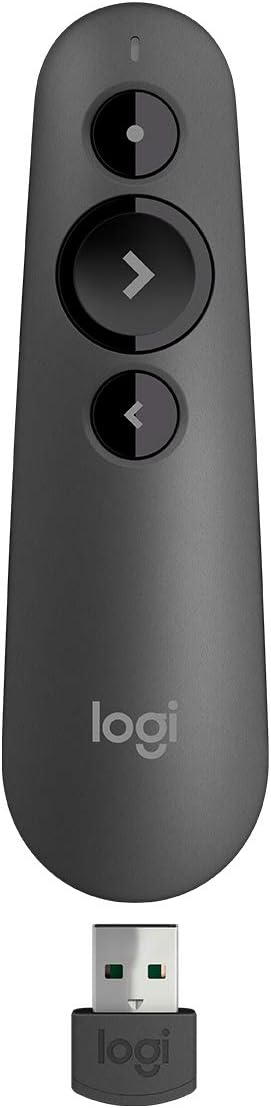
The Logitech Wireless Presenter R400 is a straightforward solution for anyone who wants dependable slide control and a basic red laser without navigating a complicated setup. It holds a 4.6 rating and uses intuitive touch keys that can be understood quickly, even if the remote is being used by a first-time presenter. It supports the essential functions expected from a presentation clicker.
We may earn a commission when you buy through this link, at no additional cost to you.
Its 2.4GHz RF connection provides up to 50 feet of wireless range, allowing the speaker to step away from a desk and move in front of a screen. The receiver plugs directly into a USB port, and no software needs to be installed. Once the presentation ends, the receiver fits inside the presenter for convenient storage. That straightforward approach makes the R400 suitable for offices, classrooms, and smaller meeting rooms.
The built-in Class 2 red laser is described as easy to see against most backgrounds, although the range is shorter than that of several competing products. It also lacks some of the specialized functions found in more elaborate models, such as a timer display or app-based button customization. The remote uses AAA batteries, so keeping a spare set nearby is advisable for a critical event.
The R400 is best for people who value simplicity, recognizable controls, and quick plug-and-play operation. It works well when the presentation room is not especially large and the speaker only needs to move a moderate distance from the computer. Those wanting a brighter green pointer, a timer, or a larger operating range should consider the R800 instead.
The R400 avoids app downloads and complicated configuration. Its receiver works through a standard USB connection, making it a practical choice for people who want a familiar presentation remote that is ready to use.
The stated 50-foot range gives a presenter more freedom than a wired keyboard pointer. It is best suited to classrooms and meeting spaces where the computer stays within a relatively modest distance from the screen.
We may earn a commission when you buy through this link, at no additional cost to you.
This wireless presenter offers a generous set of controls at a budget-minded position. It receives a 4.4 rating and supports forward and backward navigation, hyperlink activation, volume control, application switching, and black or full-screen mode. That makes it a useful general-purpose remote for classroom lessons, internal meetings, training sessions, and more involved presentations.
We may earn a commission when you buy through this link, at no additional cost to you.
The listed wireless range reaches up to 100 feet, allowing the presenter to move around a larger room. Its bright red laser is designed to be visible against most backgrounds, although the product information specifically advises against using it on LCD, LED, or television screens. A one-piece magnetic USB storage system keeps the receiver attached to the remote and reduces the chance of misplacing it.
The raised, rubberized buttons are designed to make navigation easier by touch, which is helpful when the presenter is looking at the audience rather than the remote. A one-piece magnetic USB storage system keeps the receiver attached to the remote and reduces the chance of misplacing it. An energy-saving sleep function is included, although the remote still requires one AAA battery that is not supplied.
This remote offers a strong feature-to-cost balance for buyers who need more than simple forward and back controls. It is less suitable for people who present on modern flat-panel displays and want a clearly visible pointer, or for anyone who wants rechargeable power. The green-light rechargeable presenter is a better fit for those needs.
Hyperlink, volume, window-switching, and display-mode controls expand the remote's usefulness beyond basic slide navigation. These options are helpful for live demonstrations, multimedia, and presentations that rely on linked material.
A magnetic one-piece USB holder keeps the receiver close to the clicker. This is especially helpful for teachers or consultants who carry presentation equipment between several rooms.
We may earn a commission when you buy through this link, at no additional cost to you.
The Logitech Wireless Presenter R800 is the premium selection in this roundup, combining a bright green laser, a useful LCD timer, and up to 100 feet of wireless range. Its 4.6 rating and feature-rich design make it particularly appropriate for consultants, lecturers, sales presenters, and anyone delivering a timed or information-dense talk.
We may earn a commission when you buy through this link, at no additional cost to you.
The green pointer is described as powerful and easy to see, even on LCD and plasma displays and in brightly lit rooms. That visibility makes it more versatile than many red-light alternatives. Its LCD display provides a timer with silent, vibrating alerts, allowing the speaker to monitor time without creating audible interruptions. The display controls are designed to remain easy to adjust as the presentation progresses.
Presentation control is supported by an up-to-100-foot operating range, and a reception-level indicator helps the presenter avoid wandering beyond the signal area. The receiver is storable inside the unit and works through a plug-and-play USB connection without software. The main compromise is its use of AAA batteries, which means a spare set can be useful for long schedules. The timer also adds complexity that may not be necessary for short talks.
The R800 is the strongest choice for a presenter who wants more than a basic slide advancer. The timer is particularly valuable for high-stakes meetings, training sessions, and conference appearances where staying within a planned duration matters. For a simpler green-light alternative with rechargeable convenience, the first-ranked presenter is a more direct fit.
The LCD timer enables silent, vibrating alerts that communicate time without interrupting the audience. It helps a speaker pace slides, transitions, and discussion while keeping attention on the room.
The green laser is designed to remain visible in bright conditions and across several display types. Combined with the long operating range, it supports presenters who move freely through large rooms.
We may earn a commission when you buy through this link, at no additional cost to you.
The Logitech Wireless Presenter R500s is designed for modern, flexible presenting. It carries a 4.4 rating and supports both a USB receiver and Bluetooth Low Energy, giving it an advantage over models limited to one connection method. That makes it a practical choice for people who alternate between shared office computers, personal laptops, tablets, and phones.
We may earn a commission when you buy through this link, at no additional cost to you.
Its operating range extends up to 20 meters, or 65 feet, making it suitable for medium and large rooms. The remote works with Windows, Mac OS, iOS, and Android, along with leading software such as PowerPoint, Keynote, Google Slides, and Prezi. The Logitech Presentation App can customize button functions, check battery status, and provide an on-screen timer when installed on a Mac or PC.
Smart battery management is another key feature. The R500s is stated to run for up to 12 months on one AAA battery and enters a power-saving mode when the battery is low, temporarily disabling the laser to extend operating time. The built-in dock stores the USB receiver. The trade-off is that the most useful customization features depend on installing the Logitech app and using a compatible computer system.
This is a strong recommendation for technology-flexible presenters who want both USB and Bluetooth options. It is less compelling for someone who needs a specifically green, highly visible laser, since the supplied information does not identify the pointer color. It is also a better fit for users comfortable installing an optional application than for those requiring a completely software-free experience.
The combination of a stored USB receiver and Bluetooth Low Energy gives the R500s flexibility across different devices. It is particularly useful for presenters who cannot always rely on one fixed computer or docking arrangement.
The Logitech Presentation App allows button remapping, battery monitoring, and timer setup on compatible Mac and PC systems. This adds flexibility for users who need a control layout tailored to a particular presentation style.
We may earn a commission when you buy through this link, at no additional cost to you.
The QUI presentation clicker stands out for its stated 328-foot wireless control distance, making it the longest-range model listed here. Its 4.3 rating reflects a broadly useful feature set for conference rooms, lecture halls, and training spaces where the presenter may need to move far from the computer.
We may earn a commission when you buy through this link, at no additional cost to you.
The remote provides page-up and page-down navigation, hyperlink control, volume adjustment, power control, and full-screen or black-screen switching. It works with Mac OS and Windows systems and supports PowerPoint, Keynote, Google Slides, Excel, ACDSee, and Prezi. Setup requires only plugging in the USB receiver, with no software or driver installation.
A bright red pointer is included to highlight important slide content, and a clip lets the presenter attach the remote to a notebook or pocket. The main limitation is that it requires one AAA battery, which is not included. Its 4.3 rating is also the lowest among the ten products, although it still provides a compelling set of capabilities for large spaces.
This remote is best for presenters who value range and portability above rechargeable convenience or a green laser. The exceptional listed reach makes it interesting for large halls, although actual performance can depend on the room and computer environment. Those who want a more premium timing function should look at the R800, while USB-C users may prefer a dual-connector alternative.
The stated control distance allows the presenter to move beyond a fixed lectern area. It is designed for conference rooms, lecture halls, and other settings where audience interaction may take place throughout the room.
Page navigation, hyperlinks, volume, and display switching cover common live-presentation needs. A direct USB receiver connection keeps the initial setup brief.
We may earn a commission when you buy through this link, at no additional cost to you.
The Norwii N95 combines a bright green laser, rechargeable power, and programmable controls in a modern presentation remote. Its 4.5 rating makes it a particularly interesting option for users who want more flexibility than a conventional fixed-function clicker. It is suited to classrooms, auditoriums, churches, and other large presentation environments.
We may earn a commission when you buy through this link, at no additional cost to you.
A two-in-one USB-A and USB-C receiver allows connection to iPads, Macs, laptops, and compatible mobile devices without a separate adapter. The receiver supports plug-and-play slide control with leading software such as PowerPoint, Prezi, Keynote, Google Slides, ProPresenter, and MediaShout. The product information notes that specific feature compatibility should be checked in the user guide.
The forward and backward buttons can be remapped through the Norwii Presenter app or by holding them for three seconds. Four function modes cover up/down, left/right, page-up/page-down, and scroll operations. Its 300mAh lithium-polymer battery charges through USB-C and is stated to last for weeks after a two-to-three-hour charge, although the charging cable is not included. The 100-meter range is suitable for large spaces but varies by environment.
This is a good match for tech-savvy presenters who want a green pointer, rechargeable convenience, and flexible control modes. The main caution is that it is not intended for television screens, and buyers should account for the missing charging cable. It also requires the Norwii app for full button customization, although basic operation remains straightforward.
Four programmable navigation modes let the remote behave more like a mouse, scroll control, or conventional slide advancer. This flexibility is helpful when moving between presentation software, web demonstrations, and other on-screen tasks.
The two-in-one USB receiver supports both common connector types, while the internal lithium-polymer battery avoids routine disposable-battery use. A slowly blinking indicator provides a low-power alert.
We may earn a commission when you buy through this link, at no additional cost to you.
This compact presentation remote offers both USB-A and USB-C connections, making it a straightforward option for users who carry a modern laptop but may also encounter older classroom computers. Its 4.4 rating reflects dependable basic slide control, a red pointer, and a design intended to be carried in a pocket.
We may earn a commission when you buy through this link, at no additional cost to you.
The 2.4GHz wireless system has a listed range of up to 49 feet. Forward, backward, black-screen, and full-screen functions are assigned to separate buttons, reducing the need to look down while presenting. Setup is generally plug-and-play, although Mac users may need to complete a simple initial configuration. The receiver is stored beneath the battery cover to help prevent it from being left behind.
The product supports numerous operating systems, including Windows versions from Windows 2003 through Windows 10, Linux, and Android. It is also listed for use with Keynote, Google Slides, Prezi, Microsoft Word, Excel, PowerPoint, ACDSee, and websites. Its limitations are a shorter operating range than most alternatives and the specific warning that the red light is not recommended for television, LED, or LCD displays.
The remote is best for mobile presenters who prioritize a small body and flexible USB connectivity over long-range operation. It is a sensible classroom companion for a speaker who moves only a short distance from the computer. Those presenting on large displays should consider a green laser, while users who regularly work in large rooms may want a longer stated range.
Supporting USB-A and USB-C reduces adapter dependence across different presentation venues. It is useful for anyone whose work computer may change from one meeting to the next.
Separate forward, backward, black-screen, and full-screen keys make operation more predictable. The raised layout is intended to be found by touch during a live presentation.
We may earn a commission when you buy through this link, at no additional cost to you.
The Dual-USB Wireless Presenter is a lightweight and feature-rich remote designed for teachers, business professionals, and lecturers. Its 4.4 rating reflects a useful combination of a red pointer, a 100-foot listed control range, and separate controls for slides, volume, display modes, and application switching.
We may earn a commission when you buy through this link, at no additional cost to you.
The receiver includes both USB-A and USB-C connectors, allowing it to fit directly into either common computer port. It works with Mac OS, Windows, and Linux and supports PowerPoint, Keynote, Google Slides, and Prezi. No driver or software installation is needed, so the remote can be ready to use almost immediately after connecting the receiver.
The remote weighs 55 grams and is small enough for a pocket or laptop bag. Its contoured keys have a soft-touch coating, while the listed wireless range supports moving around a presentation space. Power comes from two AAA batteries, which are not included. An automatic sleep feature is designed to reduce consumption, and a magnetic slot at the base stores the receiver securely.
This is a good option for presenters who want many controls, broad device support, and a very light body. It is less suitable for anyone who needs rechargeable operation, and its red laser may not be the best choice for modern LCD or LED screens. For green visibility, the Norwii N95 or Logitech R800 would be more appropriate.
At 55 grams, the remote is designed to remain comfortable in the hand without adding bulk to a laptop bag. Its contoured, soft-touch controls support confident operation during extended speaking engagements.
Page navigation, volume, full-screen and black-screen modes, and application switching cover the most common live-control tasks. These extras are useful when a presentation includes media, browser windows, or linked applications.
We may earn a commission when you buy through this link, at no additional cost to you.
The Compact Red Laser Presenter is a highly portable option for teachers, office professionals, conference speakers, and anyone who prefers a small remote. It receives a 4.5 rating and provides a red laser, wireless slide control, and a reported weight of only 38 grams with the battery included. Its dimensions are designed to fit easily in a pocket or bag.
We may earn a commission when you buy through this link, at no additional cost to you.
The listed control distance is 98 feet, or 30 meters, giving the presenter room to move away from the computer. The laser pointer itself has a separate stated range of 328 feet, or 100 meters. Setup requires no drivers: connect the USB dongle, press the connect button on the back of the remote, and begin using the slide controls.
The dongle fits in a slot inside the battery compartment, which helps prevent the most common travel mistake of leaving the receiver behind. One AAA battery powers the device, and the stated battery life is approximately two months. Windows, Mac OS, and Linux are supported, along with Keynote, Google Slides, Microsoft Word, Excel, PowerPoint, websites, and PDF viewing.
This is a compelling pick for people who prioritize low weight and compact storage over rechargeable power or advanced presentation timing. The dark gray buttons and black body keep the design visually restrained. New owners should note the product's instruction to remove the insulating film from the battery before first use.
The 38-gram body and pocket-friendly dimensions minimize the burden of carrying a presenter. The internal dongle storage makes the remote convenient for repeated classroom, office, and conference use.
The remote supports the operating systems and applications commonly encountered in professional and educational settings. It is a practical choice for presenters who need standard navigation without a dedicated timer or programmable modes.
We may earn a commission when you buy through this link, at no additional cost to you.
The most useful presentation laser pointer is the one that combines a visible pointer, dependable wireless control, intuitive buttons, and compatibility with the computer and room where it will be used. These factors determine how naturally the remote supports a live presentation.
Pointer visibility depends on the laser color, the display or surface being marked, room lighting, and the distance between the presenter and the target. Green light is frequently easier for many viewers to distinguish, and the R800 and Norwii N95 are designed for strong visibility. Red-light models can still work well on projection screens, whiteboards, and darker backgrounds, but several products explicitly advise against using them on LCD, LED, or television screens.
Choose a color that contrasts with the actual presentation surface. A bright dot on a modern display may remain difficult to see even when the presenter is close, while green can perform better in bright rooms or across larger spaces.
Wireless range determines how far a presenter can walk from the computer while retaining slide control. The listed products span approximately 49 feet to as much as 328 feet of control distance. Longer reach can be useful in large halls, auditoriums, and interactive training sessions, although real-world performance varies with the environment and computing conditions.
Match the range to the space rather than choosing the largest figure automatically. A classroom usually needs less reach than a convention center, and a compact range may be sufficient for presentations conducted beside a screen.
USB-A remains common on classroom and office computers, while USB-C suits many modern laptops. Models such as the Norwii N95 and the Dual-Connector Wireless Presenter support both connector types, reducing the need for an adapter. The Logitech R500s goes further by offering USB and Bluetooth Low Energy, useful for changing devices and shared computers.
Check the operating system, presentation software, and connector before purchasing. If a specific application or device is important, verify compatibility in the product listing and user guide rather than assuming every remote supports every function.
Rechargeable presenters remove the need to replace disposable batteries between events. The rank-one green-light model uses USB-C charging, while the Norwii N95 uses a rechargeable lithium-polymer battery. Several alternatives rely on one or two AAA batteries, and some do not include them, so buyers should plan for obtaining a fresh cell before first use.
For frequent presenters, rechargeable power is usually the more convenient pattern. For occasional use, replaceable batteries may be perfectly adequate, but carrying a spare set remains sensible for a critical event.
The most basic clicker advances and reverses slides, but many models also control hyperlinks, volume, window switching, black-screen mode, and full-screen mode. Dedicated buttons are easier to operate by touch than a crowded or ambiguous layout. Software-aware remotes such as the R500s and Norwii N95 add programmable functions for users who need more tailored behavior.
Prioritize the controls used in actual presentations. Extra features are helpful only when they remain easy to reach and configure without delaying event setup.
The USB receiver is essential to many presenters, yet it is also the easiest component to leave in a classroom or meeting room. Magnetic, integrated, and compartment-based storage systems appear throughout this roundup. A compact body also matters for people who move frequently between appointments and carry a computer bag from one location to another.
Look for a design that keeps the receiver attached to the remote when possible. The lowest weight and smallest dimensions may be more valuable than extra features for a speaker who travels frequently.
Timing tools can help speakers stay within an allotted period, especially during meetings, training, and conference appearances. The R800 includes an LCD timer with silent, vibrating alerts. The R500s can provide an on-screen timer through its companion app. These functions offer awareness without showing a visible countdown to the audience.
If timing is central to the event, choose a model with a dedicated display or reliable timer software. Otherwise, standard slide and pointer controls may be sufficient and less distracting.
A good clicker should be easy to operate without looking down. Raised, rubberized, or distinctly sized buttons help users distinguish forward, backward, and other functions by touch. Compact shapes, contoured surfaces, and a secure grip also reduce the chance of dropping the remote during an animated presentation.
Check whether the forward and backward controls are prominent and physically distinct. A control that is technically present but difficult to identify can interrupt a presentation more often than a model with fewer functions.
Before the event, install any fresh battery according to the manufacturer's instructions or fully charge a rechargeable model. For removable-film batteries, remove the insulating film before first use. Connect the receiver to the presentation computer, turn on the remote, and confirm that forward and backward navigation works in a short test slide deck.
Practice the controls while looking toward the audience rather than down at the remote. Identify the forward, backward, black-screen, hyperlink, and volume buttons by touch. When using a green laser, direct the dot only at the intended screen or whiteboard area, and avoid shining it toward attendee eyes. In large rooms, begin with a moderate control range and move farther only after confirming reliable communication.
After the presentation, switch off the remote and disconnect the receiver if the device supports manual power control. Return the receiver to its built-in storage area, clean the remote with a soft dry cloth, and avoid moisture or harsh cleaning products. Store spare batteries separately, and recharge rechargeable models before storage so they are ready for the next class, meeting, or conference session.
Green light is often easier for an audience to see, particularly in bright rooms or on projection screens and whiteboards. Red light can still work well on darker surfaces, but several product descriptions advise against using red pointers on LCD, LED, and television displays. The best choice depends on the screen, wall, room lighting, and viewing distance.
Most of the products listed support both Mac and Windows systems through a USB receiver, although exact feature compatibility can vary. The R500s also supports Bluetooth Low Energy, while several dual-connector models include both USB-A and USB-C. Always check the specific operating systems, software, connector, and button functions before buying.
A smaller classroom may work well with a range near 50 feet, while large auditoriums and convention halls benefit from substantially more reach. The listed controls range from roughly 49 feet to 328 feet. Choose based on the farthest distance you expect to travel from the computer, and remember that walls, interference, and other environmental factors can affect actual performance.
Most of the featured remotes operate through a plug-and-play USB receiver without required software. The R500s uses optional Logitech software for customization and battery monitoring, while the Norwii N95 uses its app for button remapping. Basic slide control remains the main purpose of these products even when optional configuration tools are available.
Rechargeable models are more convenient for frequent presenters because they do not require routine battery replacement. The Norwii N95 and the rank-one green-light presenter use USB-C charging, with the latter including a charging cable. AAA-powered models can be simple and inexpensive to maintain, but buyers should check whether batteries are included and carry a spare set for important events.
Store the receiver inside the remote whenever possible. The products in this roundup use magnetic attachment, built-in docking, or a battery-compartment slot to reduce the chance of leaving it behind. A compact remote with internal receiver storage is particularly useful for teachers and consultants who move between different presentation rooms.
Most models support standard forward, backward, black-screen, and full-screen functions across widely used applications. Compatibility is usually strongest with PowerPoint, Keynote, and Google Slides, while specialized controls may vary. Review the product's software list and consult the user guide when your presentation depends on hyperlink behavior, application switching, or a specific function.
A timer, silent vibration alerts, and clear slide controls are the most relevant features. The Logitech R800 includes an LCD timer designed to help speakers manage presentation time discreetly. The R500s also supports an on-screen timer through its companion app. Volume and black-screen controls can further reduce interruptions during the event.
The rank-one Green Light USB-C Rechargeable Presenter is the most complete general recommendation, combining a visible 532nm green laser, rechargeable power, comprehensive slide controls, and magnetic receiver storage. The Logitech R800 earns the premium position when a built-in timer and long-range green pointer matter most, while the R400 delivers a simpler experience for users who prioritize familiar controls and immediate setup.
Most buyers should prioritize the display surface, room size, connector type, and frequency of use before adding features. A green laser is advantageous for many modern classrooms, a rechargeable battery is convenient for frequent speakers, and a receiver that stores inside the remote reduces travel-related mistakes. Programmable controls and timing tools are worth considering for technically confident presenters who work in complex slide environments.
Ratings, software compatibility, battery claims, and product availability may change, and current prices also fluctuate. Before buying, verify the latest listing, check the connector and operating system, confirm the required controls, and review any setup notes. That final check helps ensure the selected laser pointer for presentations is ready for the room where it will be used.
