
Magnifying Glass with Light
4.4Editor score
Four detachable optical lenses
Directional rechargeable LED light
Adjustable nose bridge
Magnifying glasses for computer monitors can make small interface elements, fine text, and detailed on-screen work easier to inspect. The right choice depends on whether you need a monitor-mounted filter, a freestanding screen amplifier, or a flexible magnifier positioned in front of a display.
We compared the included products by magnification method, viewing area, lighting, adjustability, compatibility, portability, and intended use. The list covers dedicated monitor magnifiers, laptop and tablet amplifiers, clip-on magnifiers, and wearable magnifiers that can also be used for close work.
Each review explains the product's strongest use case, important limitations, and ideal buyer. Ratings and product details reflect the supplied information at the time of writing, while prices and availability can change, so readers should verify current listing details before purchasing.
4.4Editor score

4.5Editor score

3.4Editor score
As an Amazon Associate we earn from qualifying purchases.
The products below range from monitor-mounted filters to flexible desk magnifiers and wearable LED headsets, making a direct comparison especially useful before choosing the correct form factor.


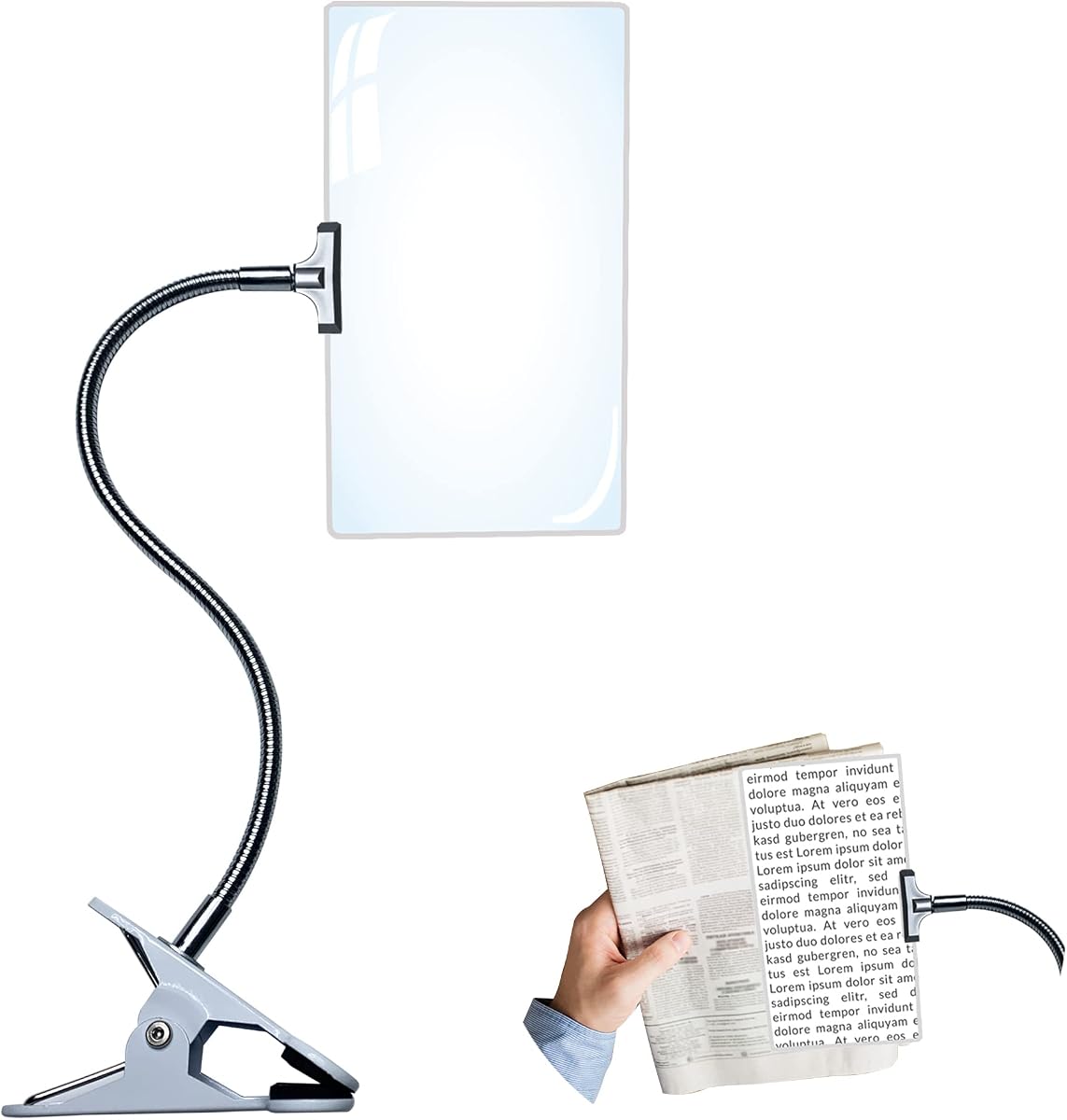
This clip-on magnifying glass offers 5X optical magnification through a large 10-by-6-inch viewing area. Its 3.6 rating reflects a mixed customer response, but the product's flexible 14-inch gooseneck and detachable design make it practical for positioning directly in front of a computer display, printed material, or detailed craft project.
We may earn a commission when you buy through this link, at no additional cost to you.
The stand separates from the magnifying lens, allowing the user to move between a clipped setup and a handheld reading position. Optical-grade PVC is used instead of a conventional Fresnel lens, and the listed construction aims to provide a clear image with minimal distortion. The 360-degree adjustment lets the lens be raised, lowered, and angled rather than fixed in one position.
Its main drawback is the absence of integrated illumination. Bright or reflective display areas can therefore make the magnified view less comfortable than a headset with directional LEDs. The supplied information also does not identify the product as a dedicated monitor filter, so monitor compatibility depends on positioning rather than a fitted frame or measured screen dimensions.
This magnifier is a sensible choice for users who want a broad viewing area and the freedom to move the lens around. It is especially useful when a computer monitor is used alongside books, manuals, sewing, crafts, or other detailed tasks. For users who need a self-contained light source, one of the LED-equipped headsets may be a better fit.
Because the lens is attached to an adjustable gooseneck rather than fitted directly to a display, it can be moved between different screens and work surfaces. This flexibility is useful in multi-device workspaces, although it requires enough desk space for the stand.
The 10-by-6-inch lens provides considerably more room than a small handheld magnifier. That larger area makes it easier to inspect interface text, spreadsheet cells, maps, photographs, and other dense on-screen details without constantly repositioning the lens.
We may earn a commission when you buy through this link, at no additional cost to you.
This freestanding 21-inch screen magnifier is designed to enlarge laptop, tablet, and related displays by approximately three to five times. Its 3.2 rating is among the lower scores in this guide, but the adjustable viewing structure and broad display format can still make it useful for reading small fonts, watching videos, and viewing games.
We may earn a commission when you buy through this link, at no additional cost to you.
An acrylic Fresnel lens provides the amplification without requiring power. The stand supports a standing angle from zero to 45 degrees and a lying reading angle from 45 to 90 degrees, allowing the user to optimize the viewing position. Its lightweight, collapsible construction also makes it easier to carry than a permanent monitor attachment.
The product's own guidance highlights important environmental limitations. It is not recommended for backlit or reflective surroundings, and direct sunlight can reduce the visible benefit. The claimed perception of reduced radiation and eye fatigue should therefore be understood as a product feature claim rather than a substitute for appropriate display settings or professional vision advice.
This is most suitable for users who want an entire laptop or tablet screen to appear larger while retaining a hands-free setup. It is less attractive for bright offices, glossy desks, or sunlight-filled rooms, where reflected light can interfere with the Fresnel grooves. Buyers who regularly work in changing lighting conditions should consider that limitation carefully.
The two supported angle ranges let users alternate between an upright viewing position and a lower reading position. This is useful when moving between documents, videos, and other laptop activities, and it can reduce the need to change the magnifier's physical location.
The collapsible frame and passive lens eliminate a power cable and make the product convenient to pack. Its portability is particularly appealing for travelers who regularly use a laptop but have limited access to a larger external monitor.
We may earn a commission when you buy through this link, at no additional cost to you.
This large screen magnifier uses a wooden frame and high-definition optical lens material to magnify laptop, tablet, and phone screens by approximately three to five times. It does not have a listed customer rating, so its appeal should be evaluated primarily through its dimensions, adjustment system, and broad device compatibility.
We may earn a commission when you buy through this link, at no additional cost to you.
The complete unit measures 19.41 inches long and 14.3 inches high, while the screen magnifier section measures 19.3 by 10.28 inches. The product listing identifies compatible laptop and tablet sizes from 14 through 21 inches, although actual fit will vary by device proportions and viewing position. Six branch points and four pivoting joints allow numerous configurations.
Its size is the most obvious trade-off. A wooden frame with multiple articulated points is less convenient for compact desks than a small clip-on lens or a fitted monitor filter. The listing also describes applications beyond computers, including reading newspapers and viewing piano scores, which gives the product more flexibility than a single-device accessory.
This magnifier is best for a user who alternates among several screen sizes and wants a broad, hands-free viewing area. It may suit a home office or shared study space more than a travel kit. Because no customer rating is supplied, prospective buyers should review current user feedback and confirm that their preferred device can fit within the stated dimensions.
Four pivots that rotate more than 180 degrees allow the frame to be set in several orientations. This flexibility can accommodate different laptops, tablets, and phones more effectively than a fixed-size monitor accessory.
The freestanding design keeps the enlarged image at a comfortable distance without requiring the user to hold a lens. It is most suitable when a stable surface is available and the magnifier can remain set up throughout the session.
We may earn a commission when you buy through this link, at no additional cost to you.
The YOCTOSUN headset combines five interchangeable acrylic lenses with integrated LED lighting, earning a 4.5 rating and making it the strongest all-around option for close inspection tasks. Magnification ranges from 0.75X to 4.0X, allowing the user to move from a slight enlargement to substantially closer viewing.
We may earn a commission when you buy through this link, at no additional cost to you.
A click-and-release system makes lens changes straightforward. The three lights can be adjusted between two brightness levels, which is especially useful when inspecting a monitor in a dim room or illuminating small printed details. A built-in rechargeable lithium battery is supplied with a USB Type-C cable, eliminating the need for disposable batteries.
The frame includes a rubber-wrapped, flexible nose bridge and an elastic head strap intended to distribute pressure and help prevent slipping. These are meaningful advantages when a magnifier will be worn for an extended session. However, the product is intended for detailed hobby work rather than corrective vision, and wearing a close-viewing headset is not the same as enlarging an entire monitor.
This is a good choice for readers who work with small text, electronics, crafts, jewelry, cross-stitch, and similar details on a monitor or immediately beside it. It may not suit someone wanting to watch an entire video or operate software conventionally. For that purpose, a freestanding screen magnifier would be more natural.
The three integrated LEDs provide illumination directly above and around the viewing area. This reduces dependence on room lighting and makes small characters, component labels, and intricate craft details easier to distinguish.
The five lens powers cover both subtle and substantial enlargement, making the headset useful for document review, model painting, watch repair, sewing, and other precision work. The interchangeable design also avoids committing to a single magnification level.
We may earn a commission when you buy through this link, at no additional cost to you.
This four-lens magnifying headset has a 4.4 rating and combines 1.5X, 2.5X, 3.5X, and 5X magnification with a rechargeable LED headlight. It is a practical value-oriented choice for users who want strong close-up capability and hands-free lighting without a complex monitor-mounted system.
We may earn a commission when you buy through this link, at no additional cost to you.
The light can be angled upward or downward to illuminate the exact area being inspected, while a side indicator shows when charging is needed. The battery takes about 1.5 hours to recharge and is listed as providing between 3.5 and 7 hours of continuous LED use. Each acrylic resin lens has a 5H surface hardness rating and fits into a single quick-change slot.
Magnification and working distance are related. The listed focal lengths range from 13.11 inches at 1.5X to 3.93 inches at 5X, and each lens has a fixed focal length. Users should therefore make small distance adjustments to obtain the clearest image. The headset also lacks a reduction setting, so it is not intended for viewing an entire screen at once.
This product best suits crafters, repairers, readers, and anyone inspecting small elements on or beside a monitor. The adjustable silicone-coated nose bridge, elastic head strap, and light frame help support longer sessions. It is less appropriate for normal computer use because the user must bring close details within the fixed focal range.
The adjustable headlight can be directed toward a work surface rather than relying on broad ambient lighting. This is particularly useful for small text, solder joints, beads, thread, and other details that benefit from localized contrast.
A single lens slot and two-finger release system make it easy to move between the four powers. A supplied cleaning cloth helps remove fingerprints without scratching the acrylic lens.
We may earn a commission when you buy through this link, at no additional cost to you.
This headset provides a straightforward 200% magnification with LED lighting on both sides of the frame. Its 4.1 rating places it behind the two multi-lens headsets in the guide, but the rechargeable design, lightweight construction, and broad close-work applications make it worth considering for users who do not need multiple magnification levels.
We may earn a commission when you buy through this link, at no additional cost to you.
The magnifying element is described as durable, lightweight polycarbonate. Two built-in LED lights illuminate small text and fine details, while a blue-light-blocking feature is intended to reduce exposure from electronic displays and artificial lighting. A USB charging cable is included, and the battery is said to reach a full charge in approximately 1.5 hours.
Its fixed 2X magnification is the chief limitation. There is no option to reduce magnification for a wider field or increase it for extremely small details. The lights also appear fixed rather than independently aimed, so the lighting may be less adaptable than the adjustable headlight offered by the four-lens model. The listing describes benefits for eye strain, headaches, and sleep patterns, but individual experiences can vary.
This magnifier is a good fit for needlework, circuit board inspection, painting, watch repair, reading, and handicrafts. Users who work across a wide range of detail sizes should choose an interchangeable-lens headset instead. For computer-focused use, it is best treated as a tool for inspecting small screen elements rather than viewing a complete interface.
Lights on both sides of the frame illuminate the working area more broadly than a single centered source. This can improve visibility when the object cannot remain directly beneath a movable headlamp.
The built-in rechargeable battery removes disposable battery replacements and keeps the operating process uncomplicated. A one-and-a-half-hour charging time also makes it convenient to top up between tasks.
We may earn a commission when you buy through this link, at no additional cost to you.
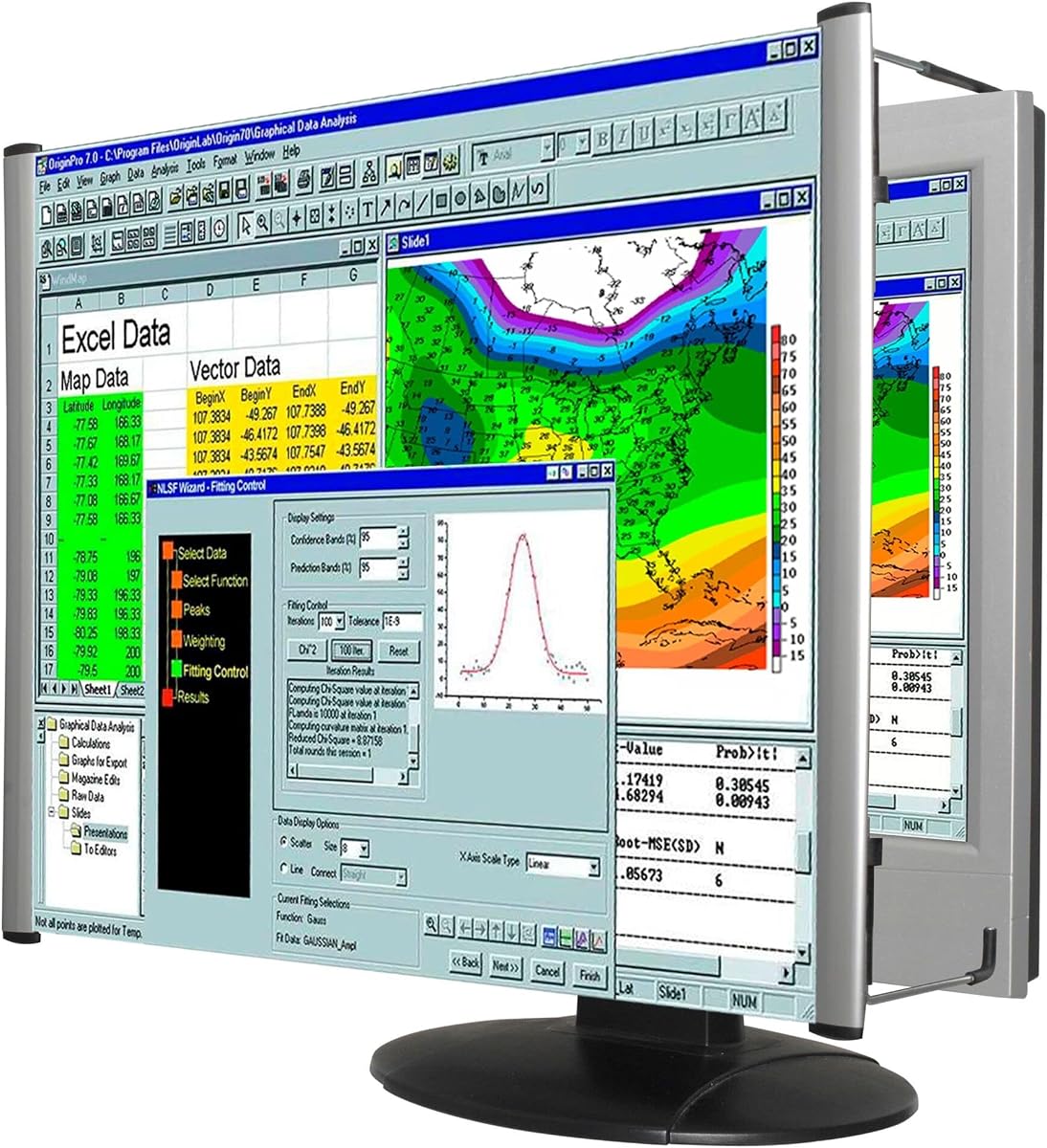
The Kantek LCD Monitor Magnifier Filter is designed specifically for a 22-inch widescreen flat-panel monitor, offering a more native-looking alternative to a freestanding amplifier. Its 3.4 rating reflects mixed satisfaction, but the direct monitor format and straightforward installation are compelling for users with a compatible display.
We may earn a commission when you buy through this link, at no additional cost to you.
The magnifier uses a Fresnel lens with an antiglare coating and comes fully assembled. Magnification is adjustable, allowing the user to change the apparent image size according to viewing position. Its lightweight construction avoids adding substantial weight to a desktop monitor, and the listed installation process is designed to be quick and easy.
Compatibility is the decisive issue. This product targets a 22-inch display and supports 16:9 or 16:10 aspect ratios, so it is not a universal choice for larger monitors, 4K panels, laptops, or small tablets. The lens may also create optical edge effects or reflections depending on room lighting, just as other Fresnel-based magnifiers can.
This is the strongest choice for a user who wants magnification to feel integrated with a compatible desktop monitor rather than positioned in front of it. It is also useful for office work where a stable, hands-free arrangement is important. Buyers should measure their display and review the installation guidance before ordering, especially if the monitor has an unusual bezel or stand.
A monitor-specific filter uses the display's existing footprint, avoiding the depth and bulk of a separate desktop magnifier. That can preserve desk space and create a more natural viewing arrangement for sustained office tasks.
The antiglare coating is intended to reduce unwanted reflections on the optical surface. It can improve the viewing experience in normally lit rooms, although intense surrounding light may still be reflected in the Fresnel grooves.
We may earn a commission when you buy through this link, at no additional cost to you.
This large clip-on magnifier holds a 4.6 rating, the highest listed score among the products in the guide. It provides up to 5X magnification, a large high-definition lens, and a spring clamp that can hold the tool at the edge of a desk or another suitable surface.
We may earn a commission when you buy through this link, at no additional cost to you.
The bendable hose changes the angle and height of the viewing area, making it easy to move the lens over a monitor, book, sewing project, or repair item. A desktop stand structure provides stability while taking up relatively little space. The magnifier is therefore more hands-free than a traditional handheld glass and more flexible than a fixed monitor filter.
There is no built-in light, so the magnified image depends on the brightness of the screen and the surrounding room. The alloy spring clamp also needs enough clearance to attach securely. A thick monitor bezel, recessed desk edge, or other obstruction may require a different mounting point, so users should inspect the intended location before setup.
This is a strong choice for users who want a high magnification level, a large viewing area, and flexible placement without a full freestanding frame. It suits reading, handwork, sewing, maintenance, watch repair, and detailed computer-screen inspection. It is less useful in dark environments unless the user adds a separate task light.
The alloy spring clamp provides a firmer connection than a basic friction clip and helps prevent the magnifier from shifting during use. This makes the hands-free arrangement more practical for extended reading or repair sessions.
At up to 5X, the lens is suited to inspecting tiny interface text, component markings, and dense graphics. The bendable support allows the user to move across a display without repeatedly picking up and repositioning a handheld lens.
We may earn a commission when you buy through this link, at no additional cost to you.
This hands-free magnifier provides a 10-by-6-inch viewing area with 4X magnification, making it suitable for full-page reading and broad inspection of a computer display. Its 3.3 rating is among the lower scores, but the flexible stand and detachable plastic lens offer practical versatility.
We may earn a commission when you buy through this link, at no additional cost to you.
The lens is described as a non-glass Fresnel design that resists breaking and scratching compared with conventional glass. Its gooseneck can flex through 360 degrees to adapt to different reading or work positions. The magnifier can clamp onto a desk, bed, or chair, reducing wrist fatigue compared with holding a traditional magnifier for long periods.
The product is not intended to provide medical or corrective vision. Its plastic Fresnel construction may also produce subtle visual patterns or edge distortion, particularly at high magnification. As with other unlit magnifiers, the viewing experience depends heavily on ambient light and the brightness of the source beneath the lens.
This model is best for users who alternate between reading full pages, sewing, crafts, and computer-screen inspection while wanting a detachable, hands-free design. It may be especially convenient beside a bed or on a flexible work surface. Users needing a brighter, distortion-free image may prefer an optical-grade lens with integrated illumination.
The clamp and flexible neck allow the lens to remain above a book or beside a display while the user works. Removing the lens for handheld use adds another option when the magnifier needs to travel with the user.
The plastic Fresnel construction is lighter and less likely to break than glass, making it suitable for homes, travel, and shared workspaces. Users should still clean it carefully to avoid smudges that can make the enlarged image look unclear.
We may earn a commission when you buy through this link, at no additional cost to you.
The Kantek MAXVIEW MAG22WL is engineered for 21.5-inch and 22-inch widescreen LCD monitors and uses a light-tinted optical-grade acrylic Fresnel lens. Its 3.4 rating reflects mixed feedback, while the detailed size requirements and adjustable optical distance make it a specialized desktop-monitor solution.
We may earn a commission when you buy through this link, at no additional cost to you.
The magnifier measures 21.5 inches wide by 13.125 inches high, with a stated visual area of 19.875 by 12.625 inches. It can increase the apparent image size by up to double, and the user adjusts magnification by moving the magnifier closer to or farther from the display. Its lightweight, fully assembled, patented design avoids complicated setup.
Important limitations are clearly stated. The product is not suitable for laptops and is explicitly not designed for people with visual impairment; the manufacturer notes that magnification is insufficient and the tint may restrict visibility. Strong perimeter lighting can also be reflected within the Fresnel grooves, creating distractions in an otherwise normal office.
This filter is best for a user with a compatible desktop monitor who wants a stable, integrated setup for reading dense information without occupying the desk with a freestanding frame. Confirm that the magnifier's visual area is at least as large as the display's visible area and follow the supplied installation instructions. It is not the right choice for general accessibility or laptop use.
The product provides explicit outer and visual-area dimensions, allowing buyers to compare it with their display before ordering. This is especially important because a magnifier that is too small will not cover the monitor's entire visible area.
Changing the distance between the filter and display alters the apparent image size. Because the magnifier is already integrated with the monitor area, it can provide a more stable and natural viewing position than a separate freestanding unit.
We may earn a commission when you buy through this link, at no additional cost to you.
The most useful monitor magnifier depends on screen size, viewing habits, lighting, and how much of the display you want to enlarge. Consider the form factor before comparing magnification claims.
Monitor filters sit directly in front of compatible desktop displays and often provide the most integrated result. Freestanding amplifiers can handle laptops, tablets, and phones but require desk space. Clip-on magnifiers and wearable headsets are better for inspecting small details than for viewing an entire interface. Selecting the right form factor prevents a buyer from expecting a headset to function like a full-screen filter or a fitted filter to support a laptop.
Monitor-specific magnifiers must match both diagonal size and aspect ratio. The Kantek options in this guide target 21.5-inch or 22-inch widescreen displays, while freestanding units list broader compatibility ranges. Screen dimensions alone may not be enough, so check the visible viewing area and bezel arrangement. A product that is too small may leave parts of the display uncovered.
Higher magnification is not automatically better. Stronger lenses reveal finer details but usually have a shorter focal distance and a smaller usable field. The four-lens headset lists different fixed focal lengths for each power, while the freestanding products advertise approximate three-to-five-times ranges. Wearable 2X models are simpler but cannot cover the same detail range as interchangeable-lens systems.
Integrated LEDs can make small text and components easier to see, particularly in a dim room. Unlit magnifiers depend on the display and ambient light. Conversely, Fresnel surfaces can reflect bright windows, lamps, and other intense surrounding light, so a product that works well in a dim office may be less suitable beside a sunlit window. Directional lighting and antiglare coatings are worth considering.
A comfortable fit matters most when a magnifier is worn or held for extended periods. The LED headsets include adjustable nose bridges, rubber contact points, and head straps, while desk magnifiers should have a stable base and flexible neck. Adjustability is valuable because the ideal position differs between a laptop on a table, a raised monitor, and a document viewed from the side.
A small lens is convenient for scanning one line of text or a small component. A large full-page magnifier is better for reading a paragraph, reviewing a spreadsheet, or following a dense graphic. The clip-on products in this guide offer 10-by-6-inch lenses, while monitor filters cover much of the display. Consider whether the priority is portability, a broad field, or concentrated detail.
Passive Fresnel magnifiers require no charging and can be moved readily, which makes them useful for travel or occasional use. Rechargeable headsets offer integrated lighting but add electronics and a charging routine. The two freestanding screen magnifiers in the guide are described as lightweight and collapsible, whereas the monitor filters remain attached to a desktop setup.
A magnifier enlarges visible content but does not correct vision, eliminate every source of eye strain, or create a new high-resolution image. Products marketed for accessibility have specific limitations, and the Kantek MAXVIEW is explicitly not designed for people with visual impairment. Review the intended use, environmental restrictions, and manufacturer instructions before treating any magnifier as an accessibility solution.
Begin by choosing a stable viewing position. For a monitor filter, measure the display and follow the installation instructions. For a freestanding amplifier, place it on a level desk directly in front of the screen. For a clip-on lens, secure the clamp to a suitable edge and bend the gooseneck until the viewing area sits comfortably above the content. Wearable magnifiers should be fitted before the screen is brought into the ideal focal position.
Begin with a modest magnification level and adjust the distance between the lens and the content. Higher powers generally require closer positioning, and each lens has a fixed focal length. Reduce the monitor brightness if the screen appears overly bright through a magnifier, and use the headset's brightness controls to match the LED output to the room. Avoid staring directly into intense light sources reflected in the lens, and take regular breaks from close viewing.
Clean acrylic and plastic lenses with a soft lint-free cloth and avoid harsh chemicals or abrasive surfaces. Fingerprints can make a magnified image look hazy, so handle the lens by its frame whenever possible. Keep clips and pivots free from dust, recharge wearable units according to their instructions, and store foldable frames in a protective pouch. Periodic inspection helps identify loose hinges, damaged coatings, or reduced lighting output before they affect use.
A fitted monitor magnifier is compatible only with the sizes and aspect ratios specified by its manufacturer. General-purpose clip-on and freestanding magnifiers can be positioned in front of many screens, but users should check the available desk space and viewing angle. Measure the display before purchasing a model intended for a specific monitor.
Freestanding screen magnifiers often work with laptops because they sit in front of the display rather than attaching to it. The Kantek MAXVIEW product is explicitly not suitable for laptops. A wearable magnifier can also inspect small laptop details, but it will not enlarge the complete screen for ordinary use.
A monitor filter is convenient when an entire desktop display needs consistent enlargement. A large clip-on lens is useful when only part of a screen or a nearby document requires magnification. For the smallest characters and components, a wearable headset with selectable magnification and built-in LEDs usually offers more focused lighting and a closer working distance.
Some products can make text and images easier to inspect, but magnification requirements vary widely. The Kantek MAXVIEW is explicitly not designed for people with visual impairment and warns that its tint may restrict visibility. Anyone needing an accessibility device should consult the product instructions and a qualified vision professional.
Enlarging text can reduce the need to lean close to a display, while integrated LEDs can illuminate a dark work area. It may improve comfort for some users, but it does not eliminate fatigue, correct vision problems, or guarantee protection from radiation. Display brightness, screen distance, lighting, and regular breaks also matter.
Fresnel lenses use fine grooves to create magnification, and those grooves can produce visible lines, edge distortion, or reduced clarity at certain angles. A larger optical-grade lens may provide a cleaner image than a compact plastic alternative. Cleaning the surface and positioning the lens more directly over the content can also improve the view.
Bright sunlight and strong surrounding light can reflect in Fresnel grooves and reduce contrast. The 21-inch screen magnifier specifically warns against direct sunlight and reflective environments. Use a shaded setup, adjust the display brightness, or choose a product with an antiglare coating when working in a brightly illuminated location.
A non-powered magnifier is simple, portable, and always ready to use. Rechargeable headsets add integrated lighting without disposable batteries but require periodic charging. None of the reviewed monitor magnifiers is described as requiring a wired power connection, so the main decision is between passive simplicity and rechargeable illumination.
The YOCTOSUN headset is the most versatile all-around pick because it combines five magnification levels, three lights, two brightness settings, and a comfortable rechargeable frame. The four-lens headset offers an attractive budget alternative with strong magnification and directional lighting, while the Kantek 22-inch filter is the premium choice for users who want a fitted desktop-monitor solution.
Prioritize form factor before magnification. Choose a measured monitor filter for a compatible desktop, a foldable freestanding amplifier for a laptop or tablet, a large clip-on lens for flexible hands-free inspection, or a wearable headset for tiny details and illuminated close work. In every case, check the viewing area, lighting conditions, and adjustability so the device complements your workspace rather than becoming another source of frustration.
Ratings, product information, and availability can change over time, and current prices should be verified on the linked listings before buying. The best magnifying glass for computer monitors is ultimately the one that fits the screen, suits the intended task, and creates a comfortable and consistent magnified view in the user's normal environment.