
Jabra Speak 510
4.7Editor score
Bluetooth and USB connectivity
Portable conference speaker design
Broad device and platform support
Microphones for Teams meetings range from compact desktop models to portable conference speakerphones designed to carry sound around a room. A strong choice should capture voices clearly, reduce distracting noise, and connect without disrupting the first moments of your call. The right type depends on whether you work alone, in a small group, or in a shared conference space.
We compared all ten products by examining pickup pattern, microphone range, noise and echo controls, connection methods, mute features, speaker output, portability, and platform compatibility. The list includes dedicated USB conference microphones, wired condenser microphones, and Bluetooth speakerphones for hybrid meetings, online classes, presentations, and everyday Microsoft Teams conversations.
Each review explains what stands out, where trade-offs appear, and which users will benefit most. We also call out important distinctions, such as microphones without built-in speakers, products designed mainly for one person, and speakerphones better suited to group conversations. Product ratings and availability can change, and current prices should be checked before buying.
4.7Editor score

4.3Editor score
4.3Editor score
As an Amazon Associate we earn from qualifying purchases.
The comparison below separates the major product types and highlights the most useful differences in pickup, processing, connectivity, and portability for Microsoft Teams users.
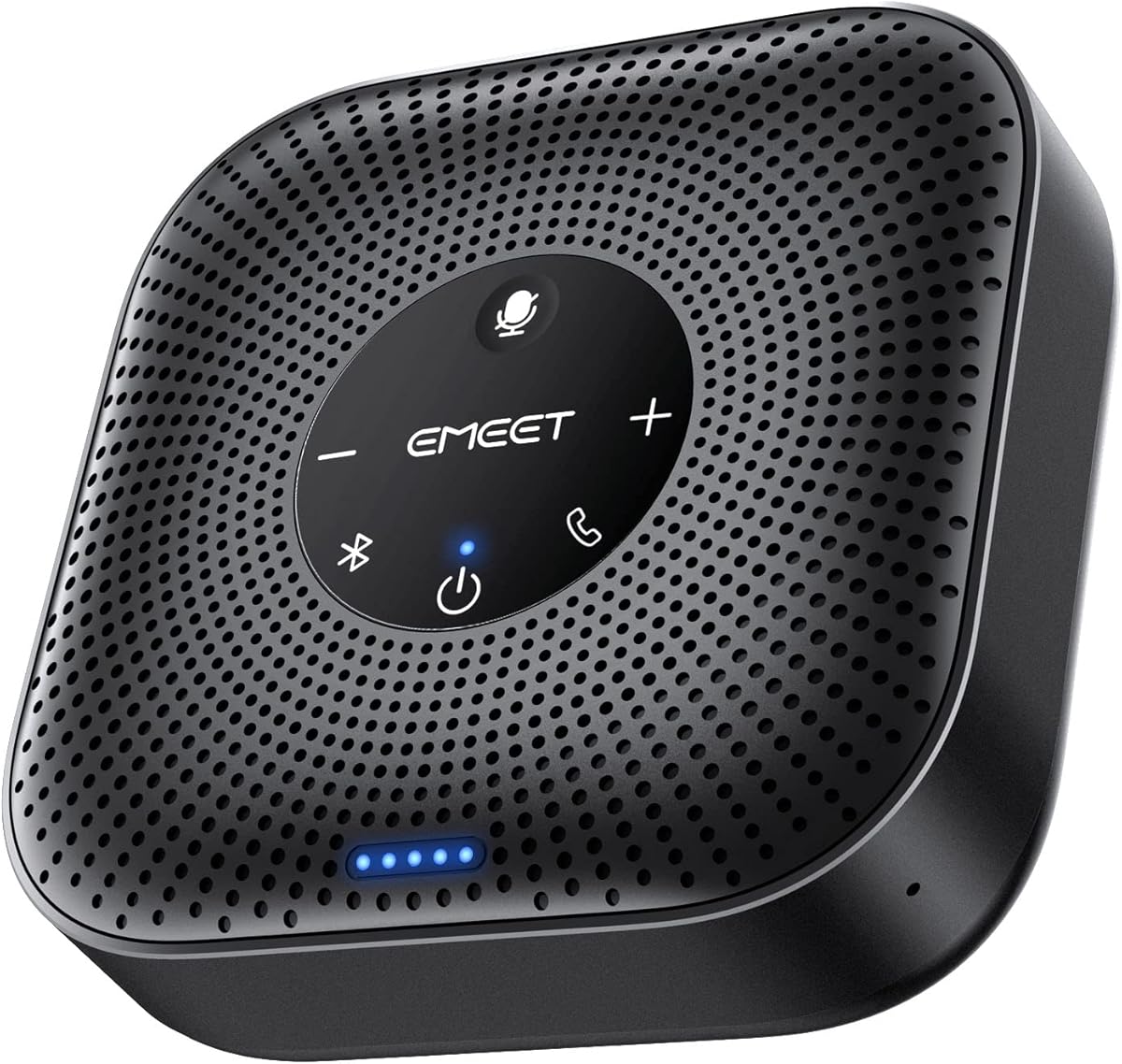




The EMEET M0 Plus is a conference speakerphone and microphone with a 4.2 rating, designed for users who want one device to handle both voice pickup and call audio. Its standout feature is the four-microphone array, which gathers voices from around the table while the VoiceIA algorithm works to reduce background noise and speaker echo.
We may earn a commission when you buy through this link, at no additional cost to you.
The M0 Plus offers an unusually flexible connection setup. It works through USB-C, includes a USB-C-to-A adapter, and supports Bluetooth 5.0 with single-device or dual-device pairing. That makes it practical for Microsoft Teams meetings on a laptop, a switch between a computer and phone, or travel between meeting rooms. Its three-watt speaker is designed to distribute audio evenly through a small room.
The most distinctive capability is daisy-chain expansion. Two compatible EMEET speakerphones can work together to extend coverage, effectively supporting as many as 16 attendees. This is more relevant for growing hybrid meeting spaces than for one-person calls, and it also makes the device less appealing if your needs are strictly personal. Nevertheless, the core package remains straightforward to deploy with plug-and-play setup and no required drivers.
Choose the M0 Plus when a small group regularly meets in the same room, you want freedom between USB and Bluetooth, or you may need to expand coverage later. It is less suitable for users who only need a private desktop microphone, but for shared Teams calls it offers a balanced combination of pickup, portability, and room flexibility.
The four-microphone array and daisy-chain capability make this a practical option for conference rooms that may grow. It can cover a current group while leaving a path to extend the setup when attendance increases.
USB-C and Bluetooth 5.0 support cover both wired computer calls and phone-based meetings. Dual-device Bluetooth also gives users more freedom when switching among participants or devices.
We may earn a commission when you buy through this link, at no additional cost to you.
The TONOR G11 is a USB condenser microphone with a 4.3 rating and an omnidirectional pattern intended for small and medium meetings. It is a microphone rather than a speakerphone, allowing people around the desk to speak without raising their voices while the computer handles playback through separate speakers or headphones.
We may earn a commission when you buy through this link, at no additional cost to you.
Its specified 11.5-foot pickup distance is among the most generous figures in this guide. That reach makes the G11 useful for conference tables where participants may not be seated directly in front of a directional capsule. The included one-point-eight-meter nylon-shielded cable offers a stable wired connection, while the metal body and anti-slip base help keep the microphone steady.
The G11 prioritizes simplicity. It works with Windows and macOS without drivers, and its built-in mute button is supported by a blue indicator light. Its limitation is that it does not include a speaker, so Teams audio still needs to come from the computer, an external speaker, or a headset. The wired design also lacks the flexibility of Bluetooth models.
This is a sensible choice for a home office or small meeting room where several people share one computer. Avoid it if you need a self-contained speakerphone, wireless pairing, or a highly directional microphone for an individual desk. For broad group capture with minimal setup, however, the G11 is a practical and approachable option.
A broad pickup pattern and 11.5-foot range let the G11 collect voices from different directions. It is particularly helpful when meeting participants share a table and cannot remain close to the microphone.
The stable metal base, anti-slip pad, and shielded cable are well suited to a permanent office desk. Plugging the microphone into a computer avoids pairing delays and extra charging routines.
We may earn a commission when you buy through this link, at no additional cost to you.
This adjustable gooseneck USB microphone has a 4.4 rating and offers a simple way to improve voice capture for Microsoft Teams calls. Its flexible neck can be positioned near the speaker, while the condenser capsule and intelligent noise-canceling technology are designed to preserve speech and reduce background noise and echo.
We may earn a commission when you buy through this link, at no additional cost to you.
The gooseneck is the model’s defining advantage. A user can angle the microphone toward their mouth without leaving a fixed desktop position, which can be more useful than a flat puck-style microphone in a compact workspace. A one-click mute button and integrated LED make call status easy to see, and the included six-foot USB cable provides useful reach.
Setup is straightforward: the microphone connects by USB and works without additional drivers on supported Windows and macOS systems. The supplied description specifically notes compatibility with Windows 7, 8, 10, and 11, while it excludes Xbox, Raspberry Pi, and Android. Its omnidirectional capture can also pick up nearby environmental sound, so a quiet room remains important.
This model best suits individual contributors who want an adjustable, wired desktop microphone for Teams meetings, online teaching, gaming, or voice dictation. It is not a conference speakerphone and does not have a built-in speaker, so it is better for voice input than shared room audio.
The adjustable metal gooseneck makes it easy to bring the capsule closer to a talker or alter its angle during a call. That flexibility can improve personal voice capture without a complicated mount.
A dedicated one-touch mute control and visible LED provide immediate confirmation of the microphone state. These simple signals are valuable when privacy or recording status must be clear at a glance.
We may earn a commission when you buy through this link, at no additional cost to you.
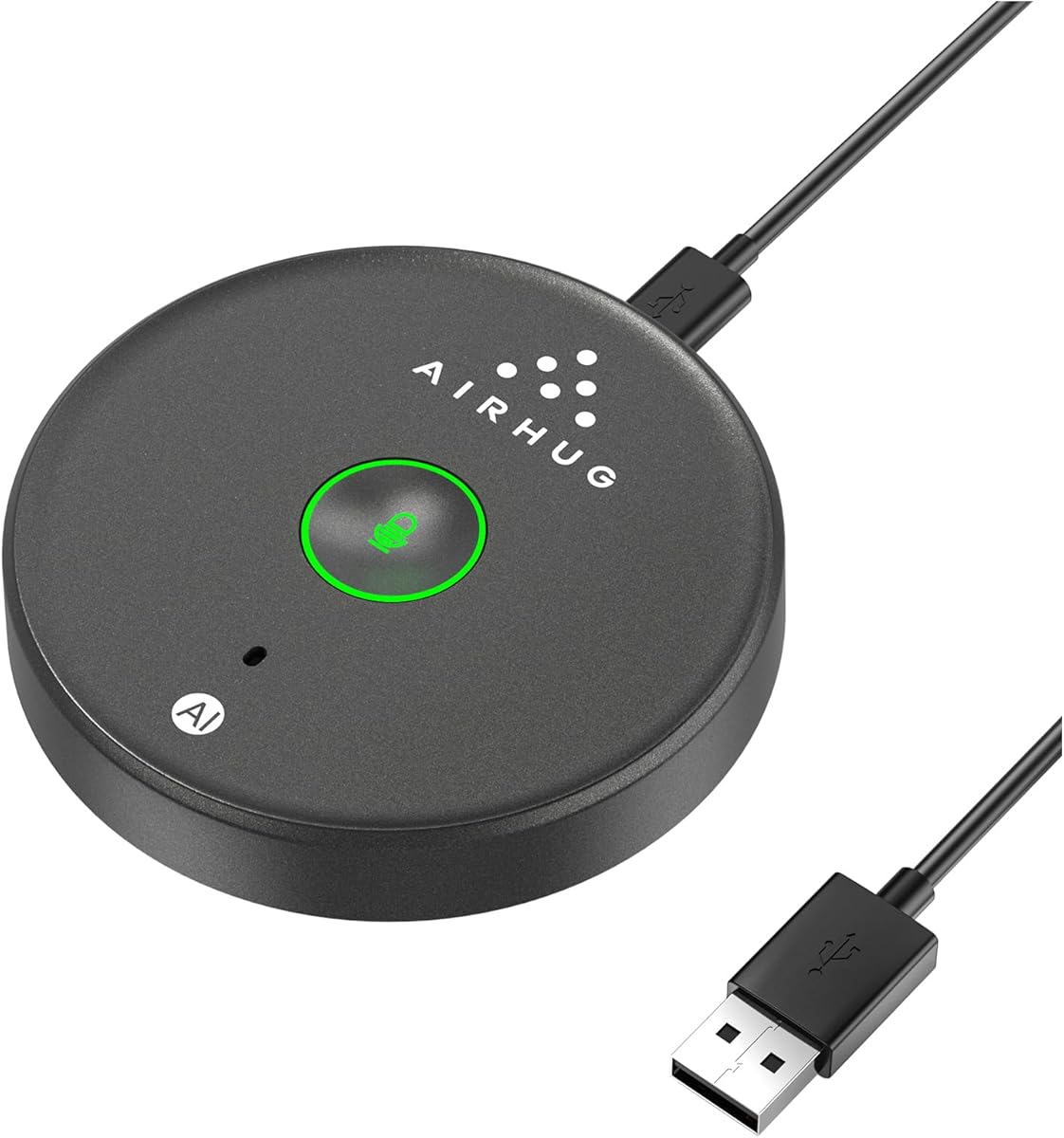
The AIRHUG 21 is a compact USB conference microphone with a 4.3 rating, intended primarily for small meetings involving one to three people. It captures voice from all directions within a six-foot radius and includes a dedicated AI noise reduction mode for reducing fan noise, keyboard clicks, and general background disturbance.
We may earn a commission when you buy through this link, at no additional cost to you.
Its mode system gives users useful control. Blue illumination indicates AI noise reduction, green indicates the more natural Original Mode, and red shows that the microphone is muted. The device also remembers the last selected sound mode, while its recording-reset behavior means it returns unmuted after a restart, reducing the chance of a meeting beginning without audio.
The most important limitation is clearly stated: the AIRHUG 21 has no speaker and no echo cancellation. It is therefore a microphone, not an all-in-one speakerphone. Echoes may occur if the computer's speakers are positioned close to the microphone, and users needing two-way acoustic control would need a different model. Its flat, portable form and 6.5-foot cable remain useful for travel and temporary setups.
For a quiet, compact workspace serving a very small group, the AIRHUG 21 offers a helpful balance of noise filtering, portability, and straightforward controls. It works with Microsoft Teams and other major meeting applications, and it can also support learning, seminars, and training. It is less appropriate when a group needs room-filling playback or full echo suppression.
AI mode is intended to clean up common distractions, while Original Mode offers a more natural, realistic presentation. The illuminated controls make it easy to compare both settings during a call.
The low-profile enclosure, anti-slip base, and included two-meter cable make the AIRHUG 21 easy to pack for business trips. Its stated range suits a small conference or one-to-three-person meeting rather than a large boardroom.
We may earn a commission when you buy through this link, at no additional cost to you.
The AIRHUG 01 is a portable Bluetooth and USB speakerphone with a 4.0 rating for small group calls. It combines a full-duplex digital microphone, a built-in speaker, intelligent noise reduction, and echo cancellation in a pocket-size package intended for home offices, business trips, and conference rooms.
We may earn a commission when you buy through this link, at no additional cost to you.
Connection flexibility is its strongest feature. The device can maintain Bluetooth and USB-C connections simultaneously, allowing a computer and phone to participate without repeated re-pairing. It supports Windows, macOS, Android, and Linux, along with Teams, Zoom, Skype, Google Meet, Webex, FaceTime, and other meeting applications. Acoustic prompts announce power, pairing, and connection events.
Audio processing is designed for two-way conversations. The included DSP processor performs echo cancellation, including suppression of echoes with a stated length of 400 milliseconds, while noise reduction targets engine noise, howling, and background babble. The microphone picks up voices within six feet, making the device best suited to groups of roughly four to six people rather than a large conference room.
Choose the AIRHUG 01 when portability, wireless freedom, and an all-in-one meeting device matter more than maximum room capacity. One caution is that the manufacturer recommends restarting it if it automatically turns off after being fully charged. That quirk does not erase its broad feature set, but it should be considered for all-day schedules.
Simultaneous Bluetooth and USB connections simplify calls involving both a phone and a computer. This makes the AIRHUG 01 useful for mobile workers who switch between communication methods.
The dedicated processor combines echo suppression with noise reduction for a compact group speakerphone. It is especially useful where computer speakers might otherwise create feedback or audible echo.
We may earn a commission when you buy through this link, at no additional cost to you.
The EMEET M1A is a USB conference speakerphone with a 4.3 rating and a balanced approach to Microsoft Teams calls. It combines two omnidirectional microphones with a built-in speaker, giving the device a role in both sending and receiving meeting audio without requiring a separate desktop microphone.
We may earn a commission when you buy through this link, at no additional cost to you.
Its VoiceIA processing includes noise reduction, echo cancellation, voice amplification, and full-duplex operation. The two microphones capture voices from 360 degrees, while nine speaker volume settings make it easy to tune output for different rooms. A blue LED on the control panel provides a visual indication of the selected volume level.
Connection is deliberately straightforward. The built-in USB-C cable supports plug-and-play use, and an included USB-C-to-USB-A adapter broadens compatibility. The speaker and microphones can be muted together for privacy. This stable wired approach is dependable for fixed conference rooms, although it provides less freedom than a Bluetooth speakerphone and does not include a battery in the listed features.
The M1A is a strong all-around recommendation for small and medium business meetings, education, government, medical, and legal use cases. It is especially appropriate when both group voice pickup and intelligible speaker output are needed. Users who prioritize wireless portability may prefer a Bluetooth model, but the M1A's processing and straightforward wired setup make it an especially confident conference-room choice.
Noise reduction, echo cancellation, amplification, and full-duplex operation work together to improve two-way meeting audio. This makes the M1A more suitable for group calls than a basic personal desktop microphone.
The included USB-C cable and USB-C-to-A adapter minimize connection friction. A combined mute control and visible level feedback also support quick, discreet meeting management.
We may earn a commission when you buy through this link, at no additional cost to you.
The Amazon Basics Condenser Microphone has a 4.4 rating and focuses on producing clear, isolated speech for a single user. Its cardioid pattern reduces the pickup of sound from behind and beside the microphone, making it a good fit for personal Teams calls, streaming, podcasting, and recording.
We may earn a commission when you buy through this link, at no additional cost to you.
A 14-millimeter condenser diaphragm provides high sensitivity with low noise and distortion. The microphone head sits on a 360-degree adjustable stand, allowing the user to set the angle and height for their workspace. It also includes a one-tap silent mode, while the USB connection requires no additional drivers on the listed supported operating systems.
This model is less suitable for a group seated around one computer. Its primary strength is directional personal capture, whereas the omnidirectional conference microphones and speakerphones in this guide are designed to share voice pickup across a table. There is also no built-in speaker, so users must rely on computer speakers, a headset, or separate audio hardware.
For one person who wants a clear microphone for Microsoft Teams presentations, online classes, or content creation, the cardioid pattern and adjustable stand are compelling. It also detaches from the included stand and can be installed on a standard threaded boom arm or tripod, adding flexibility for users who already have recording equipment.
The cardioid pattern favors sound arriving from the front while reducing unwanted rear and side pickup. This helps a personal Teams call sound clearer in a shared room.
The included adjustable desktop stand is easy to position, while standard mounting support allows the microphone to move to a boom arm or tripod. It suits both quick calls and more permanent recording setups.
We may earn a commission when you buy through this link, at no additional cost to you.
The AIRHUG Magnetic USB Microphone has a 4.3 rating and focuses on adaptable placement. Its flat body can rest on a desk, clip to clothing, or attach to a metal surface with the included magnetic patch and reusable nano adhesive dots, making it useful in meeting rooms where a conventional stand would be inconvenient.
We may earn a commission when you buy through this link, at no additional cost to you.
Voice pickup is omnidirectional across a six-foot range. A one-press mute button and three-color LED report AI noise reduction, Original Mode, and muted status. AI Mode is intended to filter fans and keyboard clicks, while Original Mode offers a more natural, high-fidelity presentation. The product description also suggests switching modes if a transcription application struggles with the current capture.
The two-meter USB-C-to-USB-A cable provides plenty of reach for laptop, desktop, and travel arrangements. Plug-and-play operation is supported on Windows and macOS, with compatibility listed for Teams, Zoom, Skype, and recording applications. As with the AIRHUG 21, this is a microphone without a speaker, so separate playback hardware is required.
This model is ideal for users who need unusual placement options, a flat travel-friendly device, or both AI and unprocessed voice modes. It is less attractive for a large conference room or users who want a complete speakerphone. Within personal and small-group Teams setups, its magnetic versatility is a clear differentiator.
Laying the microphone flat, clipping it to clothing, and attaching it to metal surfaces offer more flexibility than a standard desktop stand. The supplied adhesive dots add further mounting choices.
Distinct LED colors make it easy to see whether AI reduction, Original Mode, or mute is active. This visibility helps users adjust the microphone without interrupting a meeting.
We may earn a commission when you buy through this link, at no additional cost to you.
The TONOR G11 Pro is a conference USB microphone with a 4.3 rating and upgraded AI noise cancellation. It is designed to reduce distractions such as fan noise and keyboard clicks while retaining the 11.5-foot, 360-degree pickup capability associated with the TONOR G11 line.
We may earn a commission when you buy through this link, at no additional cost to you.
Physical controls are the model's defining addition. The microphone body includes buttons for adjusting microphone and monitoring volume through four levels, plus a one-tap mute function. A 3.5-millimeter headphone jack provides direct monitoring, and a three-second long press changes among blue microphone mode, red mute, and purple monitoring states.
The headphone connection requires care. TONOR specifically warns against connecting the 3.5-millimeter jack to external speakers because that can create feedback interference. Users should use headphones for monitoring. The product also remains a microphone rather than a speakerphone, so separate audio output is still needed. Plug-and-play operation works with Windows and macOS without drivers.
The G11 Pro is a strong choice for small and medium groups that need broad pickup, upgraded filtering, and hands-on level control. Its monitoring support is especially helpful for users who want to hear their own voice. It is less suitable for a private directional recording, and users who need one device for both microphone and room audio should choose a speakerphone instead.
The Pro version adds processing intended to remove common distractions such as fans and keyboard sounds. This is valuable in busy offices where a basic condenser microphone may capture more unwanted ambience.
The built-in headphone jack lets users hear their microphone level without relying on room speakers. Keeping the jack connected to headphones also avoids the feedback interference warned about by the manufacturer.
We may earn a commission when you buy through this link, at no additional cost to you.
The Jabra Speak 510 has a 4.7 rating, making it the highest-rated product in this guide. It is a portable USB and Bluetooth conference speaker designed to deliver clear, professional meeting audio with a quick connection process and minimal setup.
We may earn a commission when you buy through this link, at no additional cost to you.
Its principal appeal is flexibility across devices. Users can connect through Bluetooth or USB to a laptop, smartphone, desk phone, softphone, or other compatible endpoint. The product information states that it works with online meeting platforms and can also handle streaming music, giving it more flexibility than a strictly wired conference microphone.
The published specification is intentionally high level. It does not provide a specific microphone count, pickup radius, noise-reduction algorithm, battery duration, or exact echo-cancellation method. Those omissions make a feature-level comparison less detailed than with some models in the list, but they do not diminish the product's clear emphasis on sharp audio, quick setup, and portable use.
Choose the Jabra Speak 510 when you want a recognizable, polished conference speakerphone that can move between computers and phones with minimal effort. It is well suited to mobile professionals, small meeting rooms, and hybrid calls. Buyers who need highly specific technical specifications or very advanced disclosed processing may prefer one of the EMEET models, but the Jabra remains a premium all-in-one option.
Bluetooth and USB support make the Speak 510 easy to use with a laptop, phone, desk phone, or softphone. That flexibility is particularly useful for professionals who move between meeting locations.
The speakerphone is designed around quick setup and straightforward operation. Its portable format allows it to move easily between a home office, shared room, or business trip.
We may earn a commission when you buy through this link, at no additional cost to you.
The right Teams microphone depends on room size, group size, speaking position, and connection preferences. Use the following factors to narrow the field before comparing models and features.
A conventional USB microphone is built primarily to capture one voice, several nearby voices, or a small group around a desk. It generally does not include a speaker, so computer audio must play through headphones or separate speakers. A conference speakerphone combines microphones, signal processing, and a built-in speaker, making it the more self-contained option for a shared Teams room.
Choose a microphone when you work alone or need focused voice capture. Choose a speakerphone when several people need to hear the call and be heard from around a table.
Pickup specifications provide a useful indication of intended room size, though real performance also depends on placement, background noise, and the application's audio settings. Six-foot pickup suits a compact desk or small meeting, while 11.5-foot coverage can accommodate a larger conference table. Omnidirectional models gather sound from every direction and are useful for groups; cardioid models emphasize the speaker directly in front of them.
Do not focus on maximum range alone. Match the microphone to the number of participants, their typical distance, and the amount of ambient sound in the space.
Noise reduction targets steady or intermittent disturbances such as fans, engines, keyboard clicks, and background conversation. Echo cancellation addresses sound from a speaker being picked up again by the microphone. These features solve different problems, and some products provide one without the other. The AIRHUG 21, for example, includes AI noise reduction but explicitly lacks echo cancellation.
For a laptop-only setup, use headphones or a separate speaker positioned away from the microphone. For a shared room, an all-in-one speakerphone with both processing features is usually the safer choice.
Omnidirectional capture is most appropriate when people share a meeting space and their positions change. It gathers voices from all directions but can also collect more room noise. Cardioid capture is better for an individual user because it emphasizes sound from the front and reduces unwanted signals from behind. A gooseneck or adjustable head gives a personal microphone a directional advantage when it is positioned close to the speaker.
Think about where the device will sit. A central desktop model can serve several colleagues, while a personal microphone should sit directly in front of its user.
USB connections are dependable, provide low-latency wired audio, and require no charging. Bluetooth offers mobility and makes it easy to move between a phone and laptop, while some speakerphones support both simultaneously. Compatibility with Microsoft Teams is central, but you should also verify the operating system, USB port type, conference application, and whether a USB-C-to-A adapter is included.
The most convenient setup is the one that avoids driver installation, pairing delays, and last-minute connection problems at the start of a meeting.
A physical mute control is valuable for private conversations, recorded sessions, and moments when background noise should not be transmitted. An LED indicator confirms whether a microphone is live, muted, or operating in a particular processing mode. Some conference devices allow both the microphone and speaker to be muted together, while others offer a single microphone control with a separate volume adjustment.
Choose controls that are easy to identify and operate without opening software menus. Clear status feedback is especially helpful in shared spaces where another person may be sitting near the device.
A fixed desk setup can favor a wired model because it remains connected and consistently available. Frequent travelers benefit from a compact speakerphone, a long cable, and a battery that can support a full schedule. The EMEET M0 Plus specifies more than ten hours of talk time, while other models do not list a comparable figure. The included carrying case on the AIRHUG 01 also supports mobile use.
Consider how often the device will move, whether a charging outlet will be nearby, and how much space is available in the meeting room.
A small meeting room does not need enormous speaker volume. Clear voice pickup, controlled echo, and moderate output are usually more valuable than excessive loudness. Speakerphones such as the EMEET M0 Plus and M1A include built-in amplification and multiple volume levels, while basic desktop microphones leave playback entirely to the computer. Match output to the room so voices remain natural without sounding amplified or distorted.
Avoid placing a basic microphone too close to computer speakers. Proper spacing can prevent feedback and echo more effectively than simply increasing the microphone volume.
Begin by placing the microphone where it can collect voices without sitting directly beside a noisy computer fan. Conference speakerphones work best near the center of the group, while personal microphones should be positioned close to the mouth and aimed toward the person speaking. Leave enough distance from the computer speaker to prevent echo, and use headphones when a separate microphone has limited echo cancellation.
Connect the device using the method it supports best. Plug a USB microphone or wired speakerphone into the computer, select it as the input and output device if necessary, and confirm the application is using the correct source. For Bluetooth models, complete pairing and make a short test recording before the meeting. On models with AI, Original, mute, or monitoring modes, check the LED color and select the mode that matches the environment.
Between meetings, power down portable speakerphones when appropriate, clean the microphone surface gently, and keep the cable or adapter organized. Do not block the microphone array or speaker grille, and avoid placing the device where it can be knocked over. For travel, use the supplied case or protect the microphone in a padded compartment. Periodically test the mute control and check that software privacy settings still allow microphone access.
A built-in laptop microphone can work for short calls in a quiet room, but a dedicated model usually improves voice clarity and reduces unwanted sound. An external microphone is especially helpful if you move around, sit away from the computer, or work in a noisy environment. A conference speakerphone becomes useful when several people need to participate from different positions.
A USB microphone is usually simpler for a fixed personal desk, while a Bluetooth speakerphone is better for group calls and flexible locations. Wired models avoid pairing and charging concerns, whereas Bluetooth models are easier to carry between rooms. Some conference speakerphones support both connection types, providing a useful compromise.
Noise reduction attempts to remove distracting sounds such as fans, keyboard clicks, or background conversation. Echo cancellation prevents audio played by a speaker from being picked up again by the microphone. A device can support one without the other, so check both specifications when working in a shared room or using external speakers.
Most products in this guide support Microsoft Teams and also list compatibility with platforms such as Zoom, Google Meet, Webex, Skype, or FaceTime. Because operating systems and conferencing applications update over time, verify current device requirements in Teams before an important meeting. A standard USB input or output is generally the most broadly compatible connection.
Place it near the center of the table, within its stated pickup range, and away from laptop fans, phone speakers, and other sources of noise. Do not cover the microphone openings, and avoid moving it after a call unless the app is muted. If computer speakers create echo, use headphones or move the speakers farther away.
The listed models are designed for driver-free plug-and-play use on their supported Windows and macOS systems. Teams may still ask permission to use the microphone, and users may need to select it as the input device in system or application settings. If a device is not detected, checking privacy permissions and the selected input source is the usual next step.
A cardioid microphone is usually better for one person because it emphasizes sound from the front. An omnidirectional microphone is better for a small group because it collects voices from multiple directions. In a noisy room, a cardioid pattern placed close to the speaker can still outperform a more exposed omnidirectional model.
Look for the mute icon in Teams and inspect the physical LED on the microphone. In this guide, red commonly indicates mute, while blue or green may indicate an active processing mode, depending on the model. Because indicator meanings vary, check the device instructions and confirm the input level in Teams before speaking.
The Jabra Speak 510 stands out as the premium all-in-one option, offering strong ratings, portable construction, and both Bluetooth and USB connectivity. The EMEET M1A is the balanced editor's choice for a fixed conference room, while the AIRHUG 21 delivers the most budget-friendly combination of compact placement, AI noise reduction, and easy status controls. Each serves a distinct group and meeting style.
Prioritize the audio task before the feature list. Personal users should consider a focused cardioid model or adjustable USB microphone, while small groups need omnidirectional pickup and separate or built-in speaker output. Shared rooms benefit most from a conference speakerphone with both echo cancellation and noise reduction. Cable length, mute feedback, portability, and operating system support can then determine the final choice.
Ratings, software compatibility, and product availability can change, and current prices should be checked before purchasing. Comparing the latest listing details, included accessories, and device requirements will help ensure that the selected microphone remains a good fit for your Microsoft Teams setup.