
Korg KAOSS Pad V
4.6Editor score
Dual-touch XY performance pad
Direct guitar Hi-Z input
Built-in sampling and looping
Integrated USB audio interface
Simultaneous input options
Looking for MIDI pads for guitarists? This expert guide compares ten controllers on pad response, connectivity, MIDI control, recording features, and studio
MIDI pads for guitarists can turn loose timing, clipped riffs, and awkward computer shortcuts into hands-on control over a DAW, sampler, or effect processor. A useful pad controller should feel responsive, connect reliably, and offer enough assignment options to fit the way you compose, rehearse, record, and perform.
We compared the ten featured controllers by examining their pad layouts, velocity sensitivity, knobs, faders, MIDI and USB connectivity, included software, sampling capabilities, and suitability for guitar-oriented workflows. The list covers clip launchers, compact MPC-style controllers, drum pads, hybrid keyboards, and an effect sampler with guitar input.
Each review explains the strongest reason to choose that model, along with the compromises guitarists should consider. Ratings and product details reflect the supplied catalog information, while availability, bundles, and prices can change, so readers should verify the current listing before purchasing.
4.6Editor score

4.8Editor score

4.4Editor score
The comparison below highlights pad configuration, hands-on controls, recording connectivity, and the most practical use for guitar-focused home studios and live rigs.


The Akai Professional APC40 MKII is the most complete command surface in this roundup, combining a 5-by-8 RGB clip-launch matrix with nine channel faders, eight control knobs, eight device controls, and an assignable A/B crossfader. Its 4.8 rating reflects its exceptional fit for producers who want to move away from constant mouse operation and work directly inside Ableton Live.
We may earn a commission when you buy through this link, at no additional cost to you.
For guitarists, the most useful strength is the separation between performance controls and mix controls. Pads can launch guitar pedals, backing tracks, sampled riffs, and clips, while the faders and knobs provide immediate access to volume, pan, effects, and virtual instruments. The RGB feedback makes it easier to identify active clips and organize a live set without looking away from the guitar or audience.
The main limitation is specialization. Although MIDI assignment offers flexibility beyond stock mappings, the controller is designed around Ableton Live version 9.1.3 and later, so guitarists committed to Logic Pro, Cubase, FL Studio, or another DAW should confirm their preferred assignments and workflow in advance. Its footprint is also larger than that of the LPD8, nanoPAD2, or APC Mini MK2.
Despite those qualifications, the APC40 MKII is the strongest all-around choice here for a guitarist who records with Ableton or performs with clip-based backing tracks. It combines enough triggers, faders, and displays to function as the main interface between the instrument and the DAW, reducing interruptions during writing, rehearsal, and live performance.
Clip launching puts rhythm ideas, guitar loops, effect chains, and section markers under the performer's hands. That makes it easier to build arrangements without repeatedly reaching for a track list, helping a guitarist concentrate on playing rather than navigation.
The bank of faders and assignable crossfader supports hands-on volume changes, device blending, and DJ-style transitions. These controls are particularly useful when rehearsing arrangements or performing with multiple guitar tones and backing-track layers.
We may earn a commission when you buy through this link, at no additional cost to you.
The Akai Professional APC Mini MK2 packs 64 RGB pads into a compact controller aimed at clip launching, looping, mixing, and live performance. Its 4.6 rating and pre-mapped Ableton Live integration make it an appealing choice for guitarists who organize songs as clips but need more launch capacity than a conventional eight- or 16-pad unit.
We may earn a commission when you buy through this link, at no additional cost to you.
Eight assignable faders plus a master fader provide direct mixer control, while the 8-by-8 grid can trigger loops, vocals, and melodic samples. The Drum sample mode integrates with Ableton Drum Rack, and Smart Scale View in Note mode helps performers select pitches visually. Together, these features make the controller useful for composing alongside guitar parts and experimenting with clip-based arrangements.
Its strongest limitation is that the most polished experience depends on Ableton Live. Ableton Live Lite is included for Mac or PC, but a guitarist using another DAW will need to learn and configure mappings independently. The controller also lacks the physical keyboard of a hybrid MIDI controller, so those who want to compose full melodies at the desk may need another input device.
Guitarists who want a compact, visually organized Ableton performance surface should give this model serious consideration. It provides more clip triggers than the APC40 MKII in less space, making it particularly suitable for a small home studio, rehearsal room, or stage setup where every piece of equipment must earn its footprint.
The 64-pad matrix is useful for guitarists who maintain many variations of a song, such as clean, crunch, lead, ambient, and percussion layers. Each scene can be arranged for quick recall rather than cramming every function into a smaller grid.
Pre-mapped operation reduces the setup burden for Ableton users. Faders handle mixer duties, the display and pads provide visual context, and plug-and-play USB power keeps the signal chain simple on stage and in the studio.
We may earn a commission when you buy through this link, at no additional cost to you.
The Akai Professional LPD8 is a compact beat-making and MIDI controller with eight RGB-backlit MPC-style pads, eight assignable Q-Link knobs, and four programmable preset slots. Its 4.4 rating reflects a straightforward, portable option that gives guitarists essential trigger and parameter-control functions without a large desktop footprint.
We may earn a commission when you buy through this link, at no additional cost to you.
Its eight pads are suitable for launching guitar clips, switching amp or effect settings, triggering samples, or selecting song sections. The knobs can be mapped to DAW parameters, virtual instruments, and insert effects, allowing tone changes to happen as naturally as playing. Four preset slots make it easier to recall different mappings for songwriting, rehearsal, and live use.
The trade-off is capacity. With only eight pads, the LPD8 cannot offer the visual overview or scene recall of the APC Mini MK2 or APC40 MKII. It also provides no dedicated crossfader, transport section, or keyboard, so users will rely more heavily on their DAW and computer for those functions.
It remains a well-balanced choice for a guitarist building a first home studio, traveling to rehearsals with a laptop, or seeking a simple pad-and-knob interface. The universal DAW compatibility, plug-and-play setup, and slim construction make it one of the most approachable options in the guide.
The slim housing fits naturally into a laptop bag and avoids the clutter created by a full-size keyboard controller. It is a practical way to add tactile control to a mobile guitar-recording setup.
Four preset slots let a guitarist move between projects or performance configurations without rebuilding every knob assignment. This saves time while keeping effect and virtual-instrument changes accessible from the instrument.
We may earn a commission when you buy through this link, at no additional cost to you.
The Korg KAOSS Pad V differs from traditional grid-based pad controllers by combining a dual-touch XY pad, built-in effects, sampling, looping, and audio connectivity. Its 4.6 rating reflects a particularly compelling option for guitarists who want to manipulate the instrument signal itself rather than merely send commands to a DAW.
We may earn a commission when you buy through this link, at no additional cost to you.
The dedicated Hi-Z input accepts guitar or bass directly, and the XY surface can shape two parameters simultaneously. Voice FX adds harmonies, pitch shifting, and vocal-oriented tones, while the sampling engine can capture audio up to eight bars, depending on tempo. Overdubbing, playback modes, and slicing support performance-oriented ideas that sit between guitar playing and sound design.
An integrated USB audio interface simplifies recording, streaming, and processing between the KAOSS Pad V and a computer. MIC, LINE, and USB inputs can also be used simultaneously, while MIDI connectivity opens the door to external gear. The tradeoff is that guitarists expecting a bank of velocity-sensitive drum pads will not find that layout here.
This is the pick for a guitarist who wants to record, loop, and transform an electric performance in one dedicated box. It is especially attractive for ambient playing, sound design, live looping, and experimental arrangements where the XY pad offers more expressive control than preset buttons.
The Hi-Z input is designed for direct instrument connection, reducing the need for a separate preamp when shaping guitar sounds. It also makes the KAOSS Pad V usable as a standalone performance processor rather than only a DAW accessory.
Dual-touch operation allows two parameters to change at once, enabling movements that are difficult to reproduce with conventional knobs. Guitarists can blend pitch, modulation, filtering, and other parameters through intuitive gestures.
We may earn a commission when you buy through this link, at no additional cost to you.
The Akai Professional MPK Mini IV combines 25 velocity-sensitive mini keys, eight velocity- and pressure-sensitive MPC pads, eight assignable knobs, a full-color display, and a push/turn encoder. Its 4.6 rating makes it the most versatile hybrid instrument in the group for guitarists who write melodies as well as play and record their instrument.
We may earn a commission when you buy through this link, at no additional cost to you.
The pads can trigger samples, drum sounds, clips, or assigned functions, while the keyboard covers synth leads, piano-style parts, and sample triggering. Real-time screens and encoders reduce the need to hunt through software menus, and the supplied Ableton Live Lite, Logic Pro, FL Studio, and other tools support a broad starting workflow. A large virtual instrument collection adds more immediate creative material.
The 25 mini keys are compact but may feel restrictive for players accustomed to full-size keyboards. Eight pads also offer much less visual organization than the larger APC controllers. Furthermore, while the specification includes broad DAW support, users should verify the exact control mappings required for their preferred software.
Guitarists who mainly need clip launching may prefer a dedicated grid controller, but this model is ideal for songwriters who want one portable device for chords, bass lines, melodies, drum programming, and effect control. Its USB-C connection, MIDI output, and mobile support also make it suitable for travel and streaming setups.
The keyboard gives users a way to sketch melodies, bass lines, and chord progressions without adding a separate controller. This supports complete song development from a single compact station.
A vibrant display and push/turn encoder make parameter changes visible and immediate. Guitarists can adjust virtual instrument and DAW settings without repeatedly moving the mouse, preserving momentum during writing sessions.
We may earn a commission when you buy through this link, at no additional cost to you.
The LEKATO PD705 is a nine-pad percussion and sample system with dual-zone, velocity-sensitive pads, 592 preset sounds, 30 drum kits, and extensive trigger connectivity. Its 4.3 rating reflects a capable option for guitarists who want to build an electronic rhythm section and use custom samples alongside their instrument.
We may earn a commission when you buy through this link, at no additional cost to you.
Individual LEDs and a dot-matrix display provide visual feedback, while a 1/4-inch footswitch can manage kick and hi-hat functions. Two trigger inputs can accept dual-zone trigger pads or acoustic drum triggers, and five-pin MIDI I/O expands compatibility with external sound modules and software. USB-B connectivity supports computer-based workflows and backing-track triggering.
Customization is a major strength. Up to 20 user kits can be saved to a 32GB SD card or USB drive, and WaveManager for Windows and macOS allows sample importing. The tradeoff is size and specialization: this is not a portable clip-launch controller, and guitarists focused on song arrangement may find the four-zone screen and drum-oriented layout less central to their work.
It is best suited to producers who want a hands-on percussion hub, a way to organize custom sounds, or an expansion for an electronic drum setup. Paired with a guitar pedalboard or DAW, it can deliver rhythmic layers and sampled textures while keeping control tactile.
WaveManager and removable storage make it possible to import personal samples and retain up to 20 custom kits. Guitarists can organize sounds by song, style, or rehearsal rather than rebuilding a percussion palette every session.
Dedicated trigger inputs allow existing electronic or acoustic drum triggers to become part of the system. This creates an opportunity to combine live foot and hand percussion with programmed backing tracks.
We may earn a commission when you buy through this link, at no additional cost to you.
The Korg nanoPAD2 is a low-profile controller with 16 solid, velocity-sensitive pads and an X-Y touchpad for controlling multiple MIDI parameters. Its 4.0 rating places it among the simplest options here, but that simplicity can be valuable for guitarists seeking a portable way to enter drums, trigger clips, or operate software.
We may earn a commission when you buy through this link, at no additional cost to you.
The pads can serve as finger-drum triggers or programmable MIDI buttons, and the XY surface adds continuous parameter control without requiring a large desktop unit. Its slim case is easy to place beside a laptop or guitar interface and less disruptive in a rehearsal space than a keyboard controller.
Compared with modern RGB-equipped competitors, the nanoPAD2 offers little visual state information and fewer dedicated controls. The touchpad is useful but cannot replace the immediacy of multiple rotary knobs, faders, and a display. Buyers who depend on clear clip colors or broad parameter visibility may find it less satisfying for live organization.
The best fit is a guitarist who wants a straightforward, portable MIDI input for drum programming, basic triggering, and software control. It can also serve as a lightweight front-end for a more complex production setup without taking over the studio.
The low-profile body leaves more desk space for a guitar pedalboard, interface, and laptop. It is also straightforward to carry to rehearsals, lessons, or a small writing space.
Combining trigger pads with an X-Y touchpad gives a small controller two distinct control styles. Drums can be entered with the pads while filters, pitch, or virtual parameters respond to the touch surface.
We may earn a commission when you buy through this link, at no additional cost to you.
The Alesis Sample Pad 4 is a compact four-pad unit with velocity-sensitive surfaces, 25 built-in percussion and electronic drum sounds, eight ready-to-play kits, and SD card sample loading. Its 4.1 rating reflects an approachable option for guitarists who want tactile triggering and a personal sound library without a large pad grid.
We may earn a commission when you buy through this link, at no additional cost to you.
Users can add samples through a standard SD card, then tune the loaded sounds and add reverb before assigning them to the pads or kick input. MIDI output allows the device to control software or sound modules. A dual trigger input provides some expansion, making the unit more flexible than a simple four-button trigger pad.
The primary drawback is the limited number of playing surfaces. Four pads and a kick input cannot provide the scene recall or multi-layer control available on larger controllers. There is also no supplied information about a large display or bank of dedicated knobs, so broader parameter work will happen in software.
It is a sensible choice for compact practice setups, simple backing-track triggering, or adding percussion to a guitar-focused project. Guitarists seeking to load a favorite break, assign several samples, and control them from the hardware should consider it especially carefully.
SD card loading lets a guitarist move custom samples into the unit without relying on a computer during a session. Loaded sounds can be tuned and shaped with reverb for a more personal backing layer.
MIDI output lets the Sample Pad 4 act as a controller for connected hardware or software. This makes it easy to combine its percussion assignments with a larger guitar-focused production setup.
We may earn a commission when you buy through this link, at no additional cost to you.
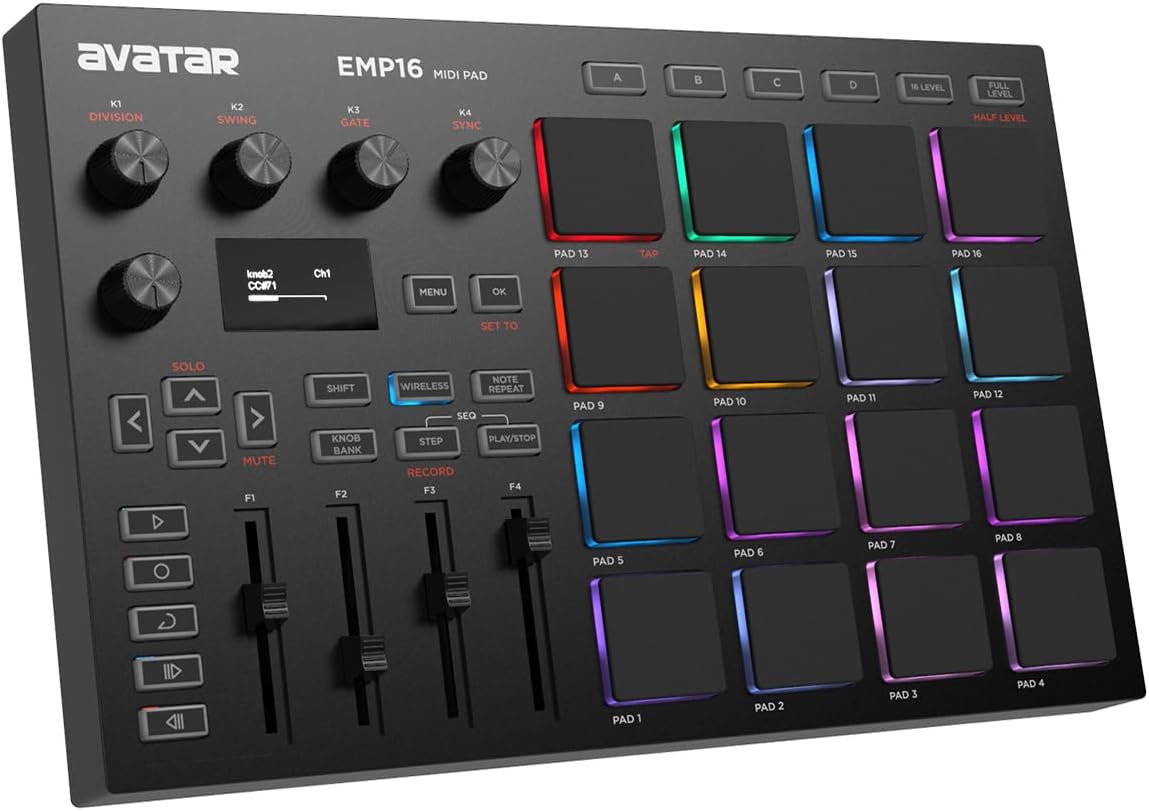
The EMP16 MIDI Pad Controller combines 16 RGB-lit pads, four banks, Bluetooth 5.0, an OLED display, and a substantial collection of assignable performance controls. Its 4.2 rating makes it a noteworthy option for guitarists who want to move between a computer and compatible mobile device without maintaining a cable connection.
We may earn a commission when you buy through this link, at no additional cost to you.
The pads support selectable velocity curves, level modes, aftertouch, note repeat, swing, gate, sequencing, clock synchronization, transport, and tap tempo. Four assignable faders, five buttons, and four endless knobs add hands-on control beyond the pads. USB MIDI and standard MIDI input and output support studio hardware, while the included cable and adapter simplify setup.
The wireless feature depends on compatibility and a stable connection, and battery operation is optional rather than universal. The product also depends on Cubase LE15 or Cubasis LE3 software offers for beginners, so guitarists should understand which applications they already use before purchasing. It does not offer the same established DAW-specific integration as the Akai APC models.
For a guitarist writing on an iPad or iPhone, the EMP16's combination of wireless control, customizable lighting, and extensive sequencing options is distinctive. It is also useful for portable live rigs where cable management matters and external MIDI hardware must remain connected.
Bluetooth 5.0 supports a cleaner connection to compatible iPad, iPhone, iPod touch, and Mac systems. That convenience is especially helpful when a guitarist wants to keep an instrument cable and pedalboard in place while changing software.
Velocity curves, aftertouch, note repeat, swing, gate, and sequencer controls provide considerable performance depth. The result is closer to a compact beat-making workstation than a collection of isolated buttons.
We may earn a commission when you buy through this link, at no additional cost to you.
The Akai Professional MPD218 is a portable USB pad controller with 16 thick MPC-style pads, three selectable banks, and 18 assignable 360-degree knobs. Its 4.4 rating reflects a strong combination of expressive triggering and deep parameter control for guitarists who want to program beats, samples, clips, and effects directly.
We may earn a commission when you buy through this link, at no additional cost to you.
The dedicated controls make it easy to switch among 48 assignable pads while using the knobs to manage DAW, virtual effect, and virtual instrument parameters. MPC note repeat and full-level controls support expressive finger-drumming patterns, while Ableton Live Lite, Drum Synth 500, and MPC Beats provide production tools and sound material.
Its physical size is compact and suitable for a laptop bag, but the absence of RGB illumination and a display reduces at-a-glance feedback compared with the APC Mini MK2, APC40 MKII, or EMP16. A guitarist who relies heavily on color-coded scenes may find bank selection less immediate.
The MPD218 is a strong recommendation for performers and producers who value pad feel and a broad knob bank over visual clip management. It is especially effective for layering guitar samples, creating rhythmic patterns, and shaping virtual effects while remaining hands-on throughout a session.
Large MPC-style pads are designed for finger-drumming and triggering, giving the controller a more performance-oriented character than a simple grid of buttons. Note repeat further supports controlled rolls and repeated rhythmic figures.
Eighteen knobs across three banks provide more dedicated control than most compact pad units. Guitarists can move from one effect or virtual-instrument parameter to another without relying exclusively on a crowded software interface.
We may earn a commission when you buy through this link, at no additional cost to you.
The most useful MIDI pad controller depends on whether it will launch songs, trigger samples, control effects, or process the guitar signal directly. Consider workflow, response, connectivity, and the amount of hardware control your playing style requires.
A small grid of eight pads suits simple trigger duties, but guitarists who organize songs by sections benefit from larger matrices. The APC Mini MK2 offers 64 pads for clip organization, the APC40 MKII provides 40 pads alongside extensive faders, and the MPD218 uses 16 pads for more tactile, performance-oriented programming. A hybrid keyboard such as the MPK Mini IV makes sense when songwriting and melody writing are equally important.
Velocity sensitivity lets a controller distinguish softer and harder strikes, which adds expression when triggering drums or samples. Some models also support pressure, aftertouch, level modes, and selectable velocity curves. These characteristics can make finger drumming feel more natural and allow quiet guitar arrangements to sit alongside louder rhythmic parts without relying on separate software mixing.
A controller that is pre-mapped for one DAW can save considerable setup time, but it may be less convenient in a multi-platform studio. The APC Mini MK2 and APC40 MKII emphasize Ableton Live, while the LPD8 supports popular applications such as Logic, Studio One, Cubase, Pro Tools, FL Studio, and Ableton Live. Guitarists should confirm that their preferred software recognizes the controller and that essential controls can be mapped as expected.
USB MIDI is standard for computer control, but traditional MIDI DIN connections can link the pad controller to external effects, synths, and drum modules. The LEKATO PD705 and EMP16 provide five-pin MIDI connectivity, while the APC40 MKII can also influence lighting systems through assignable controls. If the goal is to process a guitar directly, the KAOSS Pad V offers a dedicated Hi-Z input and integrated USB audio interface rather than only MIDI commands.
A wired controller offers a simple and dependable computer connection, but wireless operation can be valuable for a rehearsal room or mobile guitar setup. The EMP16 includes Bluetooth 5.0 for compatible iPad, iPhone, iPod touch, and Mac systems. Guitarists should consider battery life, wireless reliability, operating-system support, and whether their usual DAW operates smoothly over Bluetooth before choosing.
Pads handle discrete actions, while knobs and faders provide continuous control over gain, volume, pan, filters, and effects. The MPD218 offers 18 knobs, the APC40 MKII combines nine channel faders with several knob banks, and the EMP16 includes assignable faders, buttons, and endless knobs. Displays and RGB lighting improve visibility, but they add bulk and may matter more to stage performers than to a writer working at a desk.
For guitarists building arrangements with custom sounds, sample loading can be more important than a large clip grid. The Alesis Sample Pad 4 uses standard SD cards, the LEKATO PD705 imports samples through WaveManager and stores kits on SD or USB media, and the Korg KAOSS Pad V records and slices audio directly. These functions support one-off performances, custom breaks, and layered arrangements that ordinary clip launching cannot produce.
Plug-and-play operation can make a controller immediately useful, but software bundles add value only when they match the user's DAW. The APC Mini MK2 includes Ableton Live Lite, the MPD218 includes Ableton Live Lite, Drum Synth 500, and MPC Beats, and the MPK Mini IV offers a substantial software instrument collection. Owners should verify operating-system requirements, download procedures, and ongoing compatibility before deciding that a bundle improves the overall value.
Begin by connecting the controller to the computer or MIDI device before opening the guitar software, then select it in the DAW's MIDI input list. Assign only the controls needed for the current task, give each a recognizable label, and save separate presets or templates for writing, rehearsal, and live performance. This prevents a dense pad map from becoming confusing during a session.
For a guitar-focused setup, map pads to clip launchers, amp or effect changes, sampler sounds, and recording controls. Use velocity-sensitive assignments for expressive samples, dedicate faders to mix levels, and keep critical functions in the same physical area. In Ableton, use the stock integration where appropriate; with other DAWs, consult the controller's mapping software or the DAW's MIDI assignment interface before performing.
Protect the controller by placing it on a stable surface away from excessive heat, moisture, and heavy impact. Clean pads gently with a soft, lightly damp cloth, avoid abrasive cleaners, and disconnect cables before transporting it. For wired models, use the supplied connection where possible and inspect adapters for strain; for the EMP16, remove batteries when the unit will remain unused for an extended period.
Yes, provided the pedalboard can send or receive the required MIDI messages. A MIDI pad controller can launch recorded guitar parts, change software effects, and control compatible hardware parameters. Some guitar effects do not support MIDI, while others require specific configurations, so check the pedalboard's manual before assigning controls.
All of the featured controllers can work with Ableton Live, but their out-of-the-box integration varies. The APC Mini MK2 and APC40 MKII are specifically designed around Ableton Live, while the MPD218, LPD8, and MPK Mini IV provide mappings or software that support common production tasks. Manual MIDI assignment is available for parameters that are not pre-mapped.
MIDI pads send instructions such as note, program-change, or control messages; they do not ordinarily capture an audio signal by themselves. An audio looper records and plays back sound. The Korg KAOSS Pad V combines pad-style performance control with guitar input, sampling, looping, and a USB audio interface, making it closer to both categories.
No. More pads improve scene organization and simultaneous trigger options, but they can also make navigation harder if they lack clear color feedback. A guitarist who needs one riff, three effects, and a record command may be better served by a compact eight- or 16-pad controller than a large clip-launch matrix.
They can control compatible software effects and some hardware devices, but they do not replicate the physical feel, footswitch behavior, or exact signal routing of guitar pedals. For many guitarists, the strongest setup combines MIDI pads for song structure and broad control with a pedalboard for the most natural tone and performance changes.
Velocity sensitivity is useful for drums and samples, but it does not directly improve an electrical guitar recording. It adds expression when triggering loops, percussion, and virtual instruments. If your primary goal is DAW mixing or clip launching, focus instead on faders, knobs, displays, and software integration.
They can be, provided the connected device and DAW provide stable wireless operation. The EMP16 supports Bluetooth 5.0 for compatible systems. For critical shows, a wired controller may be preferable because it removes wireless variability, so performers should test the complete setup in rehearsal before relying on it onstage.
Confirm your DAW, operating system, connection method, pad count, control assignments, and required MIDI ports. Consider whether you need clip launching, sample loading, audio processing, wireless control, or simply tactile triggers. Also check the dimensions and included software, since these factors determine whether the controller will fit comfortably into your actual guitar setup.
The Akai APC40 MKII is the most complete choice for a guitarist who wants extensive Ableton Live control, while the APC Mini MK2 offers the strongest compact clip-launch grid. The KAOSS Pad V stands apart for direct guitar processing, sampling, and looping, and the LPD8 provides an approachable, portable foundation for a smaller studio or mobile setup.
Prioritize the function that interrupts your workflow most. Choose abundant pads for song organization, responsive pads for finger-drumming, assignable knobs and faders for hands-on mixing, traditional MIDI for external gear, and an audio interface only when direct signal processing is genuinely required. The most successful setup should feel like an extension of playing rather than a separate technical exercise.
Ratings, bundles, software availability, and prices can change, so check the current listing and confirm compatibility before buying. Reading recent buyer feedback and testing essential mappings with your own guitar software can prevent surprises and help ensure that the selected controller supports the way you actually write, record, rehearse, and perform.