
TRENDnet TEG-S562
4.4Editor score
Four 2.5G RJ45 ports
Two 10G SFP+ uplinks
Fanless wall-mountable design
Our guide compares the best network switch for Google Fiber options for homes and offices, covering port speed, capacity, management, PoE, and fiber expansion.
A network switch for Google Fiber should provide enough wired ports, negotiate speeds correctly, and integrate cleanly with the equipment already supplied by your internet provider. The right choice depends on whether you need basic expansion, multi-gigabit performance, PoE, advanced routing, or fiber uplinks for a larger installation.
The products in this guide were compared using their stated port configurations, supported link speeds, switching capacity, management features, mounting options, and intended use. The list includes unmanaged, smart-managed, and fully managed switches ranging from compact five-port models to rack-ready systems with dozens of Gigabit Ethernet connections.
Each review highlights the features that matter most for extending a Google Fiber connection, including copper and SFP connectivity, VLAN support, routing, PoE availability, cooling, and ease of installation. Product ratings and specifications can change, and prices fluctuate frequently, so readers should verify the current listing and compatibility before purchasing.
4.4Editor score

4.8Editor score

4.6Editor score
The comparison covers ten switches suited to different Google Fiber installations, from straightforward gigabit expansion to 2.5GbE, 10G fiber, PoE, and managed routing. Port type, management level, capacity, and physical design are the most important distinctions.


This 8-Port 10G SFP+ Switch is a high-performance choice for a Google Fiber installation that needs more than ordinary Ethernet expansion. With a 4.6 rating, it stands out for eight 10Gbps SFP+ ports, 160Gbps switching capacity, and Layer 3 managed routing. It is particularly compelling for advanced home labs, studios, and compact business networks built around fiber links.
We may earn a commission when you buy through this link, at no additional cost to you.
The switch can support inter-VLAN routing through static routes, RIP v1 and v2, and OSPF v2, reducing the routing burden that might otherwise fall on a primary router. A web interface and industry-standard console port provide configuration access, while ERPS offers millisecond-level loop recovery. DAI and ACL features add layers of protection against spoofing and unauthorized internal traffic.
The main complication is its SFP+-first design. It does not offer the same straightforward bank of copper RJ45 ports found on most consumer-oriented alternatives, and compatible SFP+, DAC, or copper transceiver modules must match the selected global rate mode. The two available modes are 10G/1G by default and 10G/2.5G, with a change applying to all eight ports. That shared configuration requirement deserves careful attention before deployment.
This is the strongest pick for users who genuinely need managed 10G fiber switching. Its fanless metal chassis makes it appropriate for a quiet office or media-focused workspace, while flexible installation supports both desktop and wall-mounted arrangements. Buyers with ordinary one-gigabit devices may find a multi-gig copper model easier to use, but for advanced routing and high-density fiber expansion, this model offers the most ambitious feature set in the guide.
All eight SFP+ ports support 10Gbps operation, and the stated 160Gbps switching capacity provides ample headroom for demanding local traffic. The switch is positioned for NAS storage, high-speed workstations, Wi-Fi 7 access points, and large file workflows that can benefit from multi-gigabit or 10G links.
Layer 3 features allow the switch to handle inter-VLAN traffic internally, while ERPS, DAI, and ACLs improve resilience and control. These capabilities are most useful in structured networks where administrators need more than simple plug-and-play port expansion.
We may earn a commission when you buy through this link, at no additional cost to you.
The TRENDnet TEG-S562 is a versatile and approachable switch for Google Fiber users who want both 2.5GbE copper and 10G fiber options without purchasing a fully managed model. Its 4.4 rating reflects a balanced feature set, with four 2.5GBASE-T RJ45 ports, two 10G SFP+ ports, and a stated 60Gbps switching capacity.
We may earn a commission when you buy through this link, at no additional cost to you.
The four copper ports can operate at 100Mbps, 1Gbps, or 2.5Gbps over existing Cat5e or better wiring. The two SFP+ ports support 1G or 10G connections for high-speed links, making the device useful when bridging a fiber segment to a local network. Auto-negotiation and backward compatibility reduce installation friction because older one-gigabit devices can connect without special adapters.
As an unmanaged switch, it is not intended for VLAN segmentation, sophisticated traffic policies, or inter-VLAN routing. Instead, it offers a straightforward way to expand a Google Fiber network with a useful blend of interface types. LED indicators make port and power status visible, while the compact fanless case is designed for quiet operation, lower energy use, and convenient wall placement.
This is an attractive choice for users who need a few multi-gigabit ports and a possible 10G uplink but do not want to manage a complex switch. Its lifetime manufacturer protection and technical support add reassurance, while the physical design works well in a home office or small business. Those needing advanced routing should look farther up the list, but for practical expansion this is a well-balanced selection.
The mix of four 2.5GbE RJ45 ports and two 10G SFP+ ports gives users more flexibility than a copper-only model. It can connect compatible high-speed devices locally while reserving SFP+ connectivity for a fiber uplink or aggregation link.
No configuration is required, so the switch can be installed by connecting devices and the appropriate uplink. Its fanless design reduces operating noise, and the wall-mountable chassis makes it suitable for a media cabinet, utility area, or small office.
We may earn a commission when you buy through this link, at no additional cost to you.
The TP-Link TL-SG108 is a straightforward way to turn one Google Fiber connection into multiple wired Ethernet connections. It has a 4.7 rating and eight RJ45 ports that support 10, 100, and 1000Mbps speeds. For homes where the main need is reliable wired access for computers, televisions, printers, and game consoles, simplicity is a major advantage.
We may earn a commission when you buy through this link, at no additional cost to you.
Installation requires no configuration or software. The switch is ready after devices and the network uplink are connected, and its eight shielded ports help maintain dependable performance while reducing electromagnetic interference. A durable metal housing promotes heat dissipation and gives the unit a more robust physical design than a lightweight plastic switch.
The lack of multi-gigabit ports means it cannot exploit faster local links when modern devices and wiring support them. It also lacks VLAN controls, port isolation, and Layer 3 routing, so it is better suited to a trusted home or office network than to segmented enterprise environments. IEEE 802.3x flow control and traffic optimization help maintain smooth data transfer under ordinary conditions.
This switch makes the most sense for users who need eight dependable one-gigabit connections and value a quick, configuration-free installation. The fanless case is quiet enough for a bedroom, home office, or conference room, while automatic power adjustment based on link status and cable length improves energy efficiency. Buyers with 2.5GbE devices should instead consider a multi-gig model in this guide.
Eight auto-negotiating Gigabit ports are enough for most common household and small-office devices. The switch provides a convenient central point for wired connections without introducing routing complexity or software dependencies.
The metal housing, shielded ports, energy-conscious operation, and limited lifetime protection make this a low-maintenance option. Fanless operation also helps it blend into quiet living spaces and professional work areas.
We may earn a commission when you buy through this link, at no additional cost to you.
The TP-Link TL-SG108S-M2 delivers the strongest all-around balance for a modern Google Fiber network. It has a 4.8 rating, eight 2.5GbE ports, and up to 40Gbps switching capacity. That combination makes it a natural fit for a home or small office that wants room for fast access points, NAS systems, workstations, servers, and modern gaming PCs.
We may earn a commission when you buy through this link, at no additional cost to you.
Each port auto-negotiates among 100Mbps, 1Gbps, and 2.5Gbps, allowing legacy and high-speed devices to coexist. The ability to use existing Cat5e wiring lowers the practical barrier to a multi-gigabit upgrade, although actual throughput still depends on every device, cable, and network path involved. The switch is designed for instant transfers, entertainment, LAN parties, home offices, and professional creative spaces.
Its primary limitation is that it remains unmanaged. There are no stated VLAN, QoS, or routing controls, so it is best deployed as a transparent local network switch. The absence of native SFP connectivity may also matter in installations that want a dedicated fiber uplink or long-distance link. For most users, however, eight convenient RJ45 ports compensate for that limitation.
This is the Editor's Choice because it combines the highest customer rating, generous port count, modern 2.5GbE support, straightforward installation, and silent operation without an advanced-management learning curve. It is especially attractive for Google Fiber customers adding a NAS, Wi-Fi 6 or newer access points, or several wired workstations. Users requiring VLAN segmentation should look to a managed or smart-managed model.
Eight 2.5GbE ports provide room for numerous high-bandwidth wired endpoints without forcing users toward an SFP-heavy design. The switch is especially practical for modern local networks built around fast storage and access points.
Auto-negotiation handles mixed device speeds, while compatibility with Cat5e wiring can make 2.5GbE expansion less disruptive. It is an approachable upgrade for homes and offices that want more than basic Gigabit switching.
We may earn a commission when you buy through this link, at no additional cost to you.
The TP-Link TL-SG105 is a compact choice for a small Google Fiber network that only needs a few additional wired connections. Its 4.7 rating, five Gigabit RJ45 ports, plug-and-play setup, and fanless metal design make it approachable for basic home networking, small offices, and dedicated entertainment or office stations.
We may earn a commission when you buy through this link, at no additional cost to you.
The five ports support 10, 100, and 1000Mbps with auto-negotiation and auto MDI/MDIX, eliminating common cabling concerns. Users can connect computers, a printer, a game console, a television, or other Ethernet-compatible equipment without installing configuration software. Energy-efficient technology is designed to reduce consumption while maintaining network capacity.
Although the switch is unmanaged in the broader sense, it includes port-based 802.1p/DSCP QoS and IGMP snooping. Those features can improve prioritization of latency-sensitive voice or video traffic and may assist with managed multicast traffic. The metal case, desktop or wall-mounting options, and quiet fanless design suit both living spaces and professional environments.
The main tradeoff is its limited five-port count and one-gigabit ceiling. It cannot connect a 2.5GbE device at that speed and offers no SFP option for fiber expansion. Even so, it is a well-rounded solution for users whose needs are modest and stable. The included three-year warranty and free technical support add practical support to an otherwise simple and dependable design.
Five ports keep the installation compact while still covering the needs of a focused workstation, entertainment area, or small office. Port-based QoS and IGMP snooping provide useful traffic handling without requiring a full management interface.
The switch operates without software installation or configuration. Shielded ports, a durable metal case, and flexible mounting options allow it to be placed neatly on a desk or attached near the equipment it serves.
We may earn a commission when you buy through this link, at no additional cost to you.
The TP-Link TL-SG105S-M2 is a compact multi-gig switch for Google Fiber users who need 2.5GbE performance without a larger eight-port chassis. It carries a 4.7 rating, offers five 2.5Gigabit ports, and provides up to 25Gbps switching capacity. It is a good fit for a focused workstation, small server area, or any setup with a handful of high-speed wired endpoints.
We may earn a commission when you buy through this link, at no additional cost to you.
Auto-negotiation detects compatible speeds at 100Mbps, 1Gbps, and 2.5Gbps, allowing newer and older devices to share the switch. Its support for Cat5e wiring reduces the need for immediate cable replacement, although the full benefit of 2.5GbE depends on compatible endpoint adapters, network equipment, and cabling throughout the path.
The switch is unmanaged, which keeps installation simple but also means there are no stated VLAN, QoS, or routing controls. It is therefore most appropriate for a flat home or small-office network. The five-port count, rather than eight, is the main capacity limitation for users with many wired devices, and the lack of SFP ports rules out a built-in fiber uplink option.
This model is ideal for buyers who want a discreet, quiet, multi-gig switch for a small collection of devices. The durable metal casing, fanless operation, and desktop or wall-mount design make placement flexible. It also offers a tidy alternative to adding several separate adapters around a basic Gigabit switch, while leaving room for a larger eight-port model in more demanding installations.
Five 2.5GbE ports are enough to connect a fast NAS, a workstation, a high-performance access point, and several other devices. The 25Gbps switching capacity provides headroom for local multi-gig traffic.
A 5.45 by 4.96 by 3.99-inch metal housing can sit on a desk or be mounted on a wall. Fanless construction keeps it quiet, and no software setup is necessary beyond connecting the devices and uplink.
We may earn a commission when you buy through this link, at no additional cost to you.
The MokerLink 8-Port 10G Switch is a specialized unmanaged fiber switch for Google Fiber installations that need several high-speed SFP+ connections. It has a 4.1 rating, eight SFP+ slots, and 160Gbps switching capacity. The design is aimed at access, core, and aggregation-style networking, long-distance fiber transmission, enterprise transport, and advanced home networks.
We may earn a commission when you buy through this link, at no additional cost to you.
Each port supports standard 1G or 10G SFP modules, including compatible open-standard optical modules. The switch also supports 10KB jumbo frames and is stated to provide non-blocking 10G line-speed forwarding with forwarding delay below 10 microseconds. These characteristics make it interesting for users moving large files between distributed systems or building a dedicated fiber segment.
The main requirement is additional hardware. SFP modules are not included, and compatible optics, direct-attachment cables, or copper modules must be obtained separately. The switch is also unmanaged, so it does not offer the routing, security policies, or sophisticated traffic controls found in managed alternatives. The included industrial-grade fan prioritizes heat dissipation over silent operation.
This model is best for technically experienced users who already understand SFP interfaces and need multiple 10G fiber ports. Its desktop, wall-mount, and rack-mount options support more permanent installations than a typical consumer switch. For a small home network needing convenient RJ45 connections, an eight-port 2.5GbE model will be easier, but this switch is built for serious fiber aggregation and throughput.
Eight dedicated SFP+ slots make it possible to build a high-speed fiber-centric topology without relying on copper media. Compatible modules can connect the switch to optical segments, storage systems, or other network infrastructure.
A 160Gbps switching capacity and non-blocking 10G forwarding support demanding local traffic. Power and port LEDs make operating status and link rates visible, while plug-and-play operation reduces initial configuration requirements.
We may earn a commission when you buy through this link, at no additional cost to you.
The YuanLey 6-Port 2.5G Switch offers a flexible middle ground for Google Fiber networks that need a few multi-gigabit copper ports, potential 10G fiber links, and basic traffic isolation. It has a 4.4 rating, four 2.5GbE RJ45 ports, two 10G SFP ports, and a stated switching capacity of up to 60Gbps.
We may earn a commission when you buy through this link, at no additional cost to you.
The copper ports comply with IEEE 802.3bz and support adaptive 10, 100, 1000, and 2500Mbps operation with auto MDI/MDIX. This makes them suitable for compatible Wi-Fi 6 access points, NAS devices, servers, gaming PCs, 4K video endpoints, and PCIe adapters. The SFP ports accept compatible 1G or 2.5G modules, although an SFP module is not included.
A one-key VLAN feature isolates communication between the RJ45 ports. It is a simple form of segmentation that can reduce unnecessary traffic and improve organization, but it is not the same as a fully configurable managed switch with multiple VLANs, tagging controls, or a comprehensive web interface. That distinction matters in larger or more security-conscious networks.
The durable metal case, fanless design, cooling holes, and 6kV lightning protection support stable operation. A stated operating range of -10 to 50 degrees Celsius adds flexibility, and LED indicators make status easy to monitor. This is a practical option for a compact home lab or small business that values hybrid connectivity and basic isolation over comprehensive administration.
Four multi-gig RJ45 ports support common local devices, while two SFP positions add flexibility for fiber or compatible module connections. The mixed layout makes it possible to build a compact hybrid network without moving to an all-fiber design.
One-key VLAN mode separates communication among the copper ports, which can help reduce unnecessary local traffic. The fanless metal chassis, cooling openings, lightning protection, and desktop or wall-mount options support varied installations.
We may earn a commission when you buy through this link, at no additional cost to you.
The NETGEAR GS724TP is a smart-managed, PoE-focused switch for offices, studios, warehouses, and larger homes with many powered network endpoints. It has a 4.6 rating, 24 Gigabit Ethernet ports, 24 PoE+ ports, and a 190W total PoE budget. Two additional 1G SFP ports provide a path for fiber connectivity and network expansion.
We may earn a commission when you buy through this link, at no additional cost to you.
PoE is the defining feature. Compatible access points, cameras, VoIP equipment, and other powered devices can receive both network connectivity and power through a single wired connection. Auto-negotiating Gigabit ports work with existing Cat5e or Cat6 cabling, making this an accessible way to organize a distributed installation with numerous low-power and power-hungry devices.
Unlike a basic unmanaged model, smart software offers managed control for setup and access, SNMP support through NMS 300, and one year of NETGEAR Insight remote management. That makes the switch more appropriate for administrators who want visibility and control, although the requirement to understand network management tools may be excessive for a simple home.
The compact metal design supports desktop or rack mounting, and the 26-port format provides much greater expansion than compact multi-gig models. It is a strong choice when PoE coverage matters more than 2.5GbE per port. Users with a few standard endpoints may find it excessive, but for structured business networks it provides useful port density and centralized powered-device support.
The 190W PoE budget is distributed across 24 PoE+ ports, allowing numerous compatible devices to operate without nearby outlets. This can simplify access point, camera, and voice-over-IP deployments in offices and larger properties.
Smart management, SNMP access, and remote NETGEAR Insight management offer more visibility than an unmanaged switch. These features help administrators maintain access, organize settings, and monitor a network distributed across several rooms or areas.
We may earn a commission when you buy through this link, at no additional cost to you.
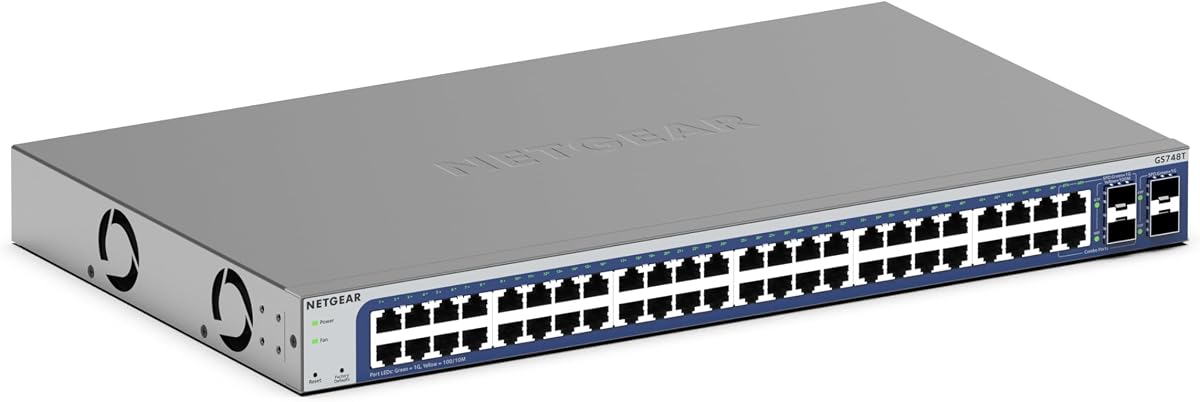
The NETGEAR GS748T is built for high-density Google Fiber networks that need dozens of wired endpoints. It carries a 4.4 rating and provides 48 Gigabit Ethernet ports, along with four 1G SFP ports, two of which are shared. That combination is aimed at offices, educational environments, shared workspaces, and larger properties where centralized switching is important.
We may earn a commission when you buy through this link, at no additional cost to you.
The 48 copper ports support 1Gbps and auto-negotiate with connected devices over existing Cat5e or Cat6 cables. SFP connectivity supports fiber-optic links and network expansion, giving administrators more ways to connect distant switches or building segments. The smart-managed software provides an interface for controlled setup and access, SNMP management through NMS 300, and one year of NETGEAR Insight remote management.
Its large port count comes with a correspondingly large physical footprint, making it unnecessary for a typical household with a handful of wired devices. The model also remains limited to Gigabit copper links, so it does not take advantage of 2.5GbE endpoints. Buyers must decide whether port density and centralized management are more important than multi-gigabit speed in each access port.
A fanless design keeps the switch silent, while IEEE 802.3az Energy Efficient Ethernet reduces power use without compromising performance. Desktop or rack mounting offers flexibility, although rack placement is the more natural choice at this scale. For a large deployment that needs many connections and managed oversight, the GS748T is a capable and energy-conscious choice.
Forty-eight Gigabit ports make it possible to connect many offices, classrooms, cameras, access points, or workstations to one central device. Auto-negotiation simplifies connection of mixed-speed endpoints.
Smart software, SNMP support, and remote NETGEAR Insight management give administrators a more structured way to oversee the network. Fanless operation and Energy Efficient Ethernet help control noise and energy consumption in an always-on installation.
We may earn a commission when you buy through this link, at no additional cost to you.
The right switch depends on device count, link speed, physical cabling, management needs, and whether the network uses PoE or optical fiber. Comparing these factors before buying prevents an underpowered or unnecessarily complex installation.
RJ45 ports are the simplest and most compatible way to connect computers, access points, printers, televisions, and other Ethernet devices. SFP and SFP+ ports provide more specialized connectivity for optical fiber, high-speed network segments, and long-distance links, but they may require separately purchased transceivers. A mixed switch can provide both, allowing a local network to use convenient copper connections while reserving fiber for an uplink.
Choose copper for most homes and small offices. Choose fiber or mixed interfaces when you have specific SFP equipment, need a 10G backbone, or plan to connect distributed network segments over longer distances.
Gigabit switches support up to 1Gbps per active connection, while 2.5GbE models can serve newer Wi-Fi access points, NAS devices, gaming PCs, and high-resolution media workflows. A 10G switch is appropriate for specialized high-bandwidth aggregation rather than ordinary access-port use. A faster uplink can prevent bottlenecks even when individual endpoint connections operate at lower speeds.
Match port speed to the devices that will actually connect. Do not pay for 10G ports that will remain idle, but avoid a Gigabit-only switch when a 2.5GbE NAS or access point is central to the installation.
Switching capacity indicates how much aggregate data the switch can move internally. Full-duplex networks can send and receive simultaneously, so a well-chosen switch needs enough capacity for all active ports, uplinks, and local traffic. The multi-gig and 10G models in this guide range from 25Gbps to 160Gbps, giving ample room for different installation sizes.
Prioritize sufficient headroom, especially if local file transfers, multiple access points, and a high-speed uplink may run at the same time. The capacity does not make endpoint devices faster, but it helps prevent the switch itself from becoming a limitation.
Unmanaged switches operate without meaningful configuration and are ideal for trusted, simple networks. Smart-managed switches add monitoring, access controls, VLAN capabilities, and remote management. Fully managed Layer 3 equipment provides advanced routing, inter-VLAN operation, loop recovery, and detailed security policies. Greater control is useful in growing offices, but it also adds setup and maintenance responsibilities.
Choose unmanaged operation for a straightforward home extension. Choose smart or full management when you need segmentation, centralized visibility, PoE policies, routing, or remote administration.
PoE can supply power and network connectivity through one cable to compatible access points, security cameras, VoIP phones, and other devices. A switch with a 190W PoE budget and 24 PoE+ ports is designed for business-scale powered-device deployments. PoE availability may also depend on the specific port and power budget, so administrators should verify device requirements and total draw before installation.
Use a PoE switch when powered endpoints are central to the design. For ordinary computers and televisions, a non-PoE switch is usually simpler and avoids unused capability.
A five-port switch works well for a focused desk, entertainment area, or small office. Eight-port models provide more flexibility for a full household or several access points. Models with 24, 26, or 48 ports are intended for dense installations where every connection must be available in a central location. Leaving several spare ports can simplify future expansion without changing the entire network.
Count current wired endpoints, then add room for growth, a network uplink, and temporary connections. Choose a physical design that fits the intended rack, cabinet, desk, or wall location.
Many 2.5GbE switches can operate over Cat5e or better wiring, which can make a speed upgrade easier than replacing an entire structured cabling system. 10G copper standards commonly rely on Cat6 or better, while fiber links depend on the type of module and path. Physical environment also matters: fanless models suit quiet rooms, whereas models with fans may be preferable in high-heat equipment cabinets.
Verify the cable category, room temperature, mounting space, and ventilation needs. A wall-mountable, fanless model is convenient for a media cabinet, while a rack-ready metal switch is better suited to a dedicated network rack.
Security features such as ACLs, Dynamic ARP Inspection, loop recovery, port isolation, and VLAN segmentation can limit unwanted traffic and improve reliability. Smart-managed products may provide access controls and remote monitoring, while advanced managed switches support more granular policies. These features matter most when users, guests, cameras, servers, and business systems share a network.
Match protection to the environment rather than selecting features by count. A flat home network may need little beyond reliable hardware, while a segmented office network benefits from VLANs, access control, and management visibility.
Begin by identifying how the Google Fiber equipment will connect to the new switch. In many installations, the provider's network terminal or router connects to one switch port, while computers, access points, televisions, and other wired devices use the remaining ports. Connect the upstream link first, power the switch, and allow its status indicators to stabilize before checking each downstream connection. If the Google Fiber gateway performs routing and the switch only extends wired LAN ports, avoid creating an unnecessary second router or routing layer.
For multi-gig and 10G equipment, verify that every component in the path supports the intended speed. That includes the network terminal, adapter, cable, access point, NAS, and endpoint. Cat5e may support 2.5GbE in suitable installations, but 10G copper usually calls for Cat6 or better. With fiber switches, install the correct compatible SFP or SFP+ module in each occupied port, connect the appropriate fiber or DAC cable, and confirm that link LEDs show the expected rate. The MokerLink and YuanLey models do not include SFP modules, and the advanced 8-Port 10G managed model requires compatible transceivers.
Give the switch a stable power source, adequate ventilation, and a clean location away from direct heat, moisture, and dust. Fanless units need unobstructed airflow around the cooling openings or chassis. Check LED indicators periodically, document which devices occupy each port, and update the documentation if ports are moved. For managed models, save the configuration and use strong administrator credentials. For PoE deployments, check total device power requirements against the switch budget, and for any segmentation or routing configuration, test device access and inter-network rules before putting the installation into daily use.
Usually not for a simple home network. An unmanaged switch can add reliable wired connections while the Google Fiber gateway or router continues handling internet access and local addressing. Managed or smart-managed equipment becomes more useful when you need VLANs, PoE control, remote monitoring, detailed access policies, or Layer 3 routing. The best choice depends on your network's complexity rather than the type of internet service alone.
It can improve performance between devices, but it does not automatically increase the internet download or upload speed provided by Google Fiber. A 2.5GbE switch helps when connected devices and the local network path support that speed, such as a NAS, modern access point, or workstation transferring large files. If the service port and connected equipment are limited to one gigabit, the faster switch alone will not remove that limitation.
Yes, in most cases the upstream connection from the Google Fiber network terminal or router connects to one of the switch's high-speed ports, while other devices connect to the remaining ports. The exact setup depends on whether the provider gateway is acting as a router and whether you intend to use a separate router. Avoid placing two devices in the same router role accidentally, because that can create address or routing conflicts.
Not necessarily. The 2.5GbE models in this guide are described as compatible with existing Cat5e wiring, allowing some installations to gain faster local links without immediately replacing every cable. For 10G copper links, however, Cat6 or better is generally the appropriate choice. Cable length, installation quality, interference, and the specifications of every device in the path all affect whether a link reaches its intended speed.
SFP interfaces support lower link rates, while SFP+ interfaces are designed for 10Gbps connections. The two ports on the MokerLink unmanaged switch support 1G or 10G SFP modules, while the advanced 8-Port 10G managed switch uses SFP+ ports and offers selectable 10G/1G or 10G/2.5G global modes. Compatible optical or copper modules are generally purchased separately, so confirm module type and speed before buying.
It depends on the access point. Many PoE-capable access points can operate with a PoE switch, simplifying cable installation by carrying power and data together, while others use a separate power connection. A PoE switch is most useful when deploying several compatible access points, cameras, or phones. Check the endpoint's power standard, the switch's per-port limits, and the total PoE budget before connecting equipment.
Count each wired computer, television, printer, access point, camera, game console, and other endpoint, then reserve several ports for future devices. A five-port model suits a focused area, eight ports are common for a larger home, and 24- or 48-port models suit offices and dense installations. Also account for the uplink that connects the switch to the Google Fiber equipment.
They still need airflow, but they do not require active fans to move air. Keep the chassis or cooling openings unobstructed and place the unit away from heat-producing equipment. A closed media cabinet can trap heat even when the switch itself is fanless. For larger or rack-mounted systems, adequate room and organized cabling are especially important for reliable operation.
The TRENDnet TEG-S562 is the practical budget choice for users who want a blend of 2.5GbE copper and 10G SFP+ connectivity without management complexity. The TP-Link TL-SG108S-M2 is the most versatile all-around pick, with eight 2.5GbE ports, a 4.8 rating, and straightforward installation. The 8-Port 10G L3 Managed Switch is the premium option for advanced routing, security, and high-speed fiber aggregation.
Prioritize the features your network will actually use. Basic gigabit expansion is covered by the TP-Link TL-SG108 and TL-SG105, while multi-gig copper networks suit the TL-SG108S-M2 or TL-SG105S-M2. Choose TRENDnet or YuanLey for mixed copper and SFP layouts, NETGEAR for high-density managed or PoE deployments, and a 10G managed or unmanaged fiber model for specialized high-speed backbones.
Before ordering, verify the current listing, port count, supported speeds, transceiver requirements, PoE needs, and mounting options. Product ratings, features, and availability can change, and prices fluctuate frequently. Comparing the final specifications with your Google Fiber terminal, router, cables, and connected devices ensures that the selected switch integrates cleanly into the installation.