Amazon Basics Bluetooth Computer Speakers
4.4Editor score
Bluetooth 5.3 wireless audio
Three flexible input options
Blue ambient lighting
Bluetooth computer speakers combine convenient wireless listening with the fuller, more directional sound expected from a dedicated desktop system. The right model can improve videos, music, calls, games, and presentations while giving your monitor or desk a more polished audio presence.
We compared the 10 featured models across their driver configurations, output ratings, wireless versions, wired inputs, controls, enclosure designs, and intended uses. The list covers compact systems, powered bookshelf-style speakers, a studio monitor, and a distinctive home speaker for listeners who want more than a typical PC setup.
Each review identifies the product's strongest contribution, from budget-friendly USB power and ambient lighting to richer wired performance, detailed tone controls, and room-filling output. Product availability, firmware behavior, and device compatibility can change, so confirm the current specifications and ports before purchasing.
4.4Editor score

4.4Editor score

4.5Editor score
As an Amazon Associate we earn from qualifying purchases.
The comparison below highlights the major differences in output, wireless standards, wired connectivity, adjustment features, and physical design, making it easier to match a speaker system to a particular computer, monitor, and listening space.



The Logitech Z207 is a straightforward 2.0 desktop speaker set built for people who want to move between a computer and a phone without repeatedly reconnecting a cable. It carries a 4.3 rating, and its most useful quality is not raw specification ambition but the combination of familiar controls, flexible inputs, and an easy-to-understand physical design.
We may earn a commission when you buy through this link, at no additional cost to you.
Each enclosure combines one active full-range driver with a passive radiator for bass extension. The right speaker handles power, volume, Bluetooth pairing, and the 3.5mm headphone output, while Logitech Easy-Switch makes it possible to pause playback on one source and begin playback on another. Bluetooth 4.2 and the analog input support computers, televisions, tablets, smartphones, and other compatible sources.
The trade-off is that this is a simple system rather than a fully configurable one. It offers no visible bass or treble controls, and its Bluetooth version is older than those found on several newer competitors. A 3.5mm connection is also required for wired use, but that limitation is understandable for a model designed around straightforward desktop convenience.
Choose the Z207 if you want a tidy pair of speakers for a home office, study area, or small workspace and value effortless source switching over extensive tonal control. It is especially attractive for users who want a computer and mobile device to share one speaker system. For those seeking newer wireless specifications or adjustable bass and treble, one of the more configurable models will fit better.
Easy-Switch reduces the friction of moving between devices. Pausing one source and starting another can transfer the active Bluetooth connection, making the system useful for calls, playlists, and desktop audio.
Bluetooth 4.2 and 3.5mm audio cover many common sources, while the built-in headphone jack offers a convenient private-listening option without unplugging the full system.
We may earn a commission when you buy through this link, at no additional cost to you.
The Nylavee Computer Speakers use a long sound-bar format to place four speaker units and two independent bass diaphragms across the front of a desk. The system has a 4.3 rating, and its defining advantage is the amount of acoustic hardware packed into a low, horizontally oriented enclosure.
We may earn a commission when you buy through this link, at no additional cost to you.
The manufacturer describes double-layer neodymium magnets, mica-fiber diaphragms, and a cavity designed to improve loudness and stereo separation. Bluetooth 5.0 and a 3.5mm AUX connection make the bar compatible with laptops, desktop PCs, phones, tablets, Xbox consoles, and PS5 systems. USB power removes the need for an internal battery and starts the system automatically.
The primary limitation is control. A side knob handles the available functions, but the specification does not mention independent bass, treble, or EQ settings. The single sound-bar structure also makes it harder to position the drivers widely apart than a conventional pair of separate speakers.
This model makes sense for users who want a broad front-facing sound field from one compact object, particularly under a monitor or on a crowded desk. It suits gaming, general media, and everyday music listening where the richer internal driver arrangement matters more than granular acoustic adjustment. It is less appropriate for a room-filling hi-fi arrangement.
The elongated enclosure spreads multiple units across a wider area than a typical compact pair. That can make voices and positional effects feel more evenly presented across a workstation.
Because the system is powered by USB rather than an internal battery, it can stay connected to a computer or powered hub and turn on automatically after power is restored.
We may earn a commission when you buy through this link, at no additional cost to you.
The Creative Pebble V3 is a compact, polished 2.0 system that balances useful desktop features with a less cluttered installation. It carries a 4.4 rating, and its standout strengths are clear spoken-dialog processing, a single-cable USB-C workflow, and drivers angled upward toward a seated listener.
We may earn a commission when you buy through this link, at no additional cost to you.
Larger 2.25-inch full-range drivers provide the core performance, with 8W RMS and up to 16W peak output. A gain switch can add amplification when connected to a 10W USB-C or USB-A port. Clear Dialog is designed to improve intelligibility in movies, television, and online videos without interfering with background effects, making the system particularly effective for spoken content.
Connection options include USB-C audio, Bluetooth 5.0, and a 3.5mm AUX input. The AUX cable is not included, but the supplied USB-C cable greatly simplifies use with a compatible modern computer. A USB-C-to-USB-A converter is also included for older systems. Bass and treble adjustment are not listed among the primary controls.
The Pebble V3 is an excellent choice for small desks, home offices, and users who regularly watch videos or follow presentations while working. Its understated footprint and elevated drivers also suit laptop-based setups. Choose it when clarity and tidy USB-C operation matter more than deep low-frequency extension or a larger physical system.
Clear Dialog focuses on intelligibility in spoken content, a valuable feature for videos, tutorials, conference calls, and streaming material where voices can otherwise compete with background effects.
The main USB-C connection combines power and digital audio in one cable on compatible computers. This keeps the desk visually simpler while eliminating the need for a separate analog audio lead.
We may earn a commission when you buy through this link, at no additional cost to you.
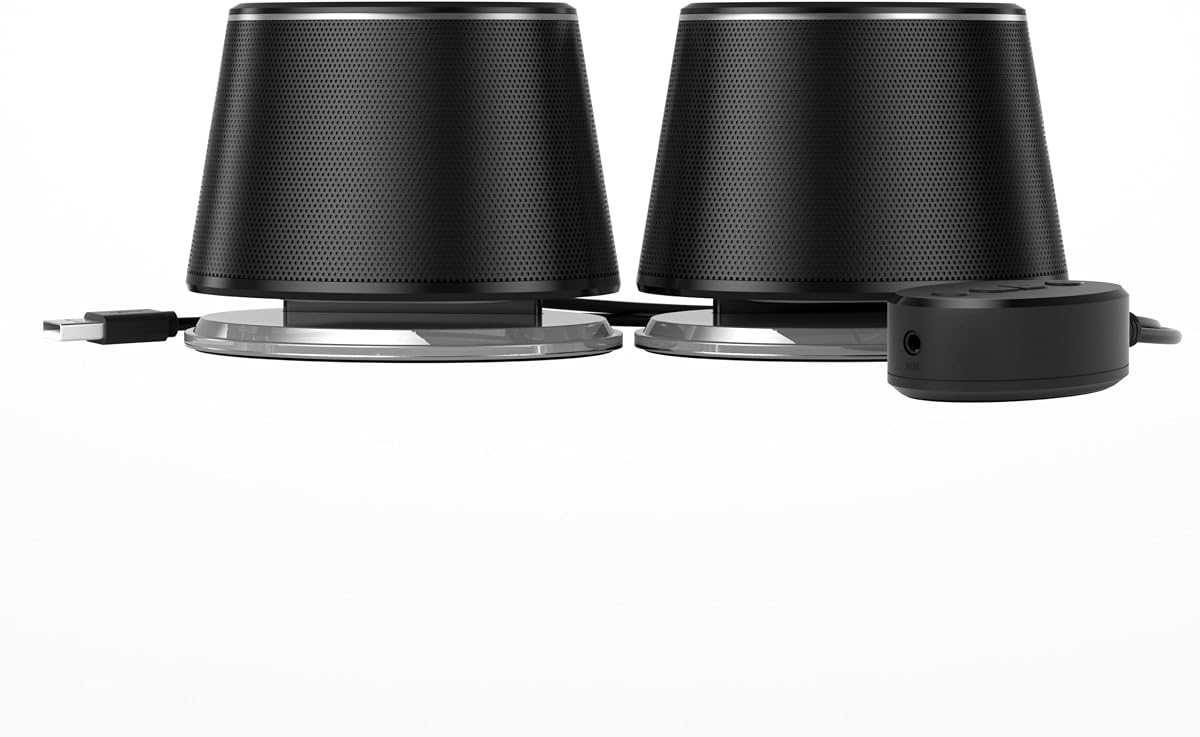
Amazon Basics takes a practical, budget-oriented approach with a conventional two-speaker set, a separate wired control pod, blue illumination, and three connection methods. The 4.4 rating reflects a broadly useful feature set, particularly for users who want Bluetooth, USB audio, and analog input within the same system.
We may earn a commission when you buy through this link, at no additional cost to you.
Each speaker uses a 1.75-inch full-range driver with passive radiator support for stronger low-end response than a very small single-driver system. Bluetooth 5.3 provides wireless connectivity, while USB audio and a 3.5mm AUX input cover wired sources. The control pod supplies volume adjustment, source selection, an AUX port, and LED on/off control without crowding either speaker.
The system requires USB power and has no internal battery, so it is intended to remain connected rather than operate as a portable speaker. Users should also check whether a television's USB port supports audio, because many USB ports provide power only. The illumination adds character but can also be distracting in a dark workspace.
This pair is a strong choice for a first dedicated computer-speaker system, a dorm room, a home office, or a gaming desk that needs flexible connectivity. It offers more source options than many budget alternatives and useful physical controls. Listeners seeking deep bass, refined tone shaping, or studio-level accuracy should look to more specialized powered systems.
Bluetooth, USB audio, and 3.5mm AUX cover phones, laptops, desktops, televisions, and other compatible sources. This makes the system adaptable as the devices on a desk change.
Keeping source selection, volume, AUX access, and lighting control in one separate unit makes the speakers easier to reach and reduces the number of buttons placed on the enclosures.
We may earn a commission when you buy through this link, at no additional cost to you.
Bluedee combines modern wireless connectivity, a compact powered design, and customizable lighting in a desktop package. Its 4.4 rating makes it a credible option for users who want their computer speakers to look as considered as the rest of a modern desk while retaining both wired and wireless options.
We may earn a commission when you buy through this link, at no additional cost to you.
The system uses two tweeters, two full-range drivers, and two passive radiators, with DSP tuning intended to smooth harsh highs and reduce distortion. A multifunction knob handles volume, playback, lighting, and source changes. Bluetooth 5.4 offers the newest wireless standard in this roundup, while USB and USB-C provide a direct digital path for compatible computers.
The listed 20W peak output is lower than the headline power of the larger 60W systems, so it should not be considered an equivalent replacement for a high-output powered setup in a large room. It is better positioned for a desk, where its stated output and physical scale are more relevant. The selectable RGB effects are visually engaging but unnecessary for every listener.
Choose the Bluedee system for a contemporary workstation where Bluetooth convenience, modern styling, and color customization are priorities. It is also a straightforward option for users who dislike installation software because the specification states that no drivers are required. For serious bass, extensive EQ, or room-filling volume, one of the higher-output alternatives is more appropriate.
Built-in digital signal processing is intended to smooth the tonal presentation and minimize distortion, providing a more controlled foundation for music, video, and daily desktop use.
Eight selectable effects and an off option let the lighting match a workstation or switch off when a more understated appearance is preferable.
We may earn a commission when you buy through this link, at no additional cost to you.
The H1 is one of the strongest conventional desktop choices in the group, combining a 60W powered 2.0 system with Bluetooth 5.3 and several high-quality wired paths. Its 4.6 rating reflects a feature set oriented toward users who want meaningful output and direct control over the final sound.
We may earn a commission when you buy through this link, at no additional cost to you.
Each speaker combines a 3-inch carbon-fiber woofer, a 1-inch silk-dome tweeter, and a rear bass reflex port. The specified frequency range extends from 40Hz to 20kHz, with a signal-to-noise ratio of at least 95dB. A 100W-rated Texas Instruments amplifier provides headroom behind the 60W system output, while DSP supports the powered presentation.
For wired listening, a 24-bit USB-C DAC path, optical input, and 3.5mm AUX input offer distinct digital and analog options. Bluetooth 5.3 remains the most convenient source, although the digital resolution advantage of the USB-C path does not carry over to wireless playback. The system also requires more room than a small two-speaker set.
The H1 is ideal for a monitor workstation, gaming desk, or compact listening area where listeners want more volume and deeper low end than a miniature computer speaker can provide. Front-panel bass, treble, and volume controls make ongoing adjustments straightforward. It is less suitable for anyone who values a nearly invisible footprint over output and wired flexibility.
The built-in 24-bit USB-C DAC accepts a digital signal from compatible computers, reducing the number of conversion steps and making USB-C the preferred wired source for detail-sensitive listeners.
Separate bass, treble, and master-volume controls allow quick changes for games, films, music, and different listening positions without navigating software.
We may earn a commission when you buy through this link, at no additional cost to you.
OHAYO offers a compact bookshelf-style pair that is visually closer to a miniature hi-fi system than a typical utility computer speaker. It has a 4.4 rating, and the combination of 30W output per speaker, a wooden enclosure, and a rear bass port makes it a strong option for compact gaming and music setups.
We may earn a commission when you buy through this link, at no additional cost to you.
The driver complement includes a 0.75-inch carbon-fiber silk-dome tweeter and a 3-inch carbon-fiber full-range driver. A rear bass port extends low-end depth, while the MDF cabinet is designed to limit box resonance. An integrated sound card and a front-mounted volume knob keep daily operation straightforward.
Bluetooth 5.3 is supported alongside RCA, AUX, and USB inputs. However, unlike the H1, the listed USB connection is a power and input option rather than a clearly specified digital DAC path. The front controls cover volume, not independent bass or treble, so tonal shaping remains limited compared with several competitors.
The OHAYO pair suits users who want a more substantial appearance and greater stated output than compact plastic speakers. It works well for gaming, music streaming, small-room listening, and mixed entertainment. Choose it when a classic bookshelf look and analog versatility matter more than a one-cable digital workflow or detailed on-speaker tone adjustment.
The MDF enclosures and separated tweeter-and-woofer layout create a more traditional hi-fi appearance, while the rear bass port helps the compact cabinets produce fuller low-end output.
RCA, AUX, and USB inputs make the system easy to connect to computers, televisions, media players, mixers, and other equipment that relies on familiar analog or powered connections.
We may earn a commission when you buy through this link, at no additional cost to you.
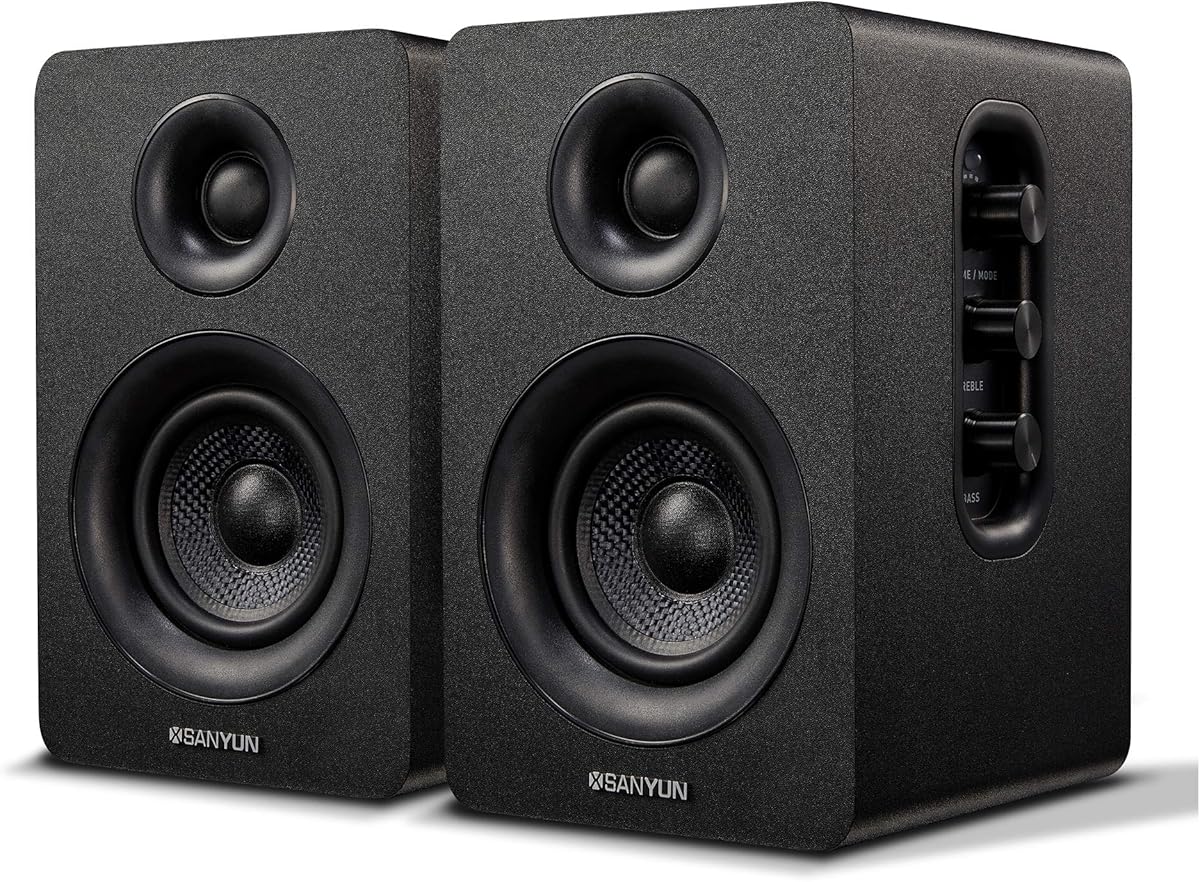
The Sanyun SW208 is a compact active bookshelf system centered on direct digital playback and user-adjustable tone. Its 4.3 rating reflects a capable design for listeners who want more control than a basic desktop pair and a digital audio path without requiring an external DAC.
We may earn a commission when you buy through this link, at no additional cost to you.
Carbon-fiber speaker units use multi-layer voice-coil technology, while the built-in 24-bit DAC receives a digital signal over USB. The manufacturer states that this direct path reduces digital-to-analog conversion loss and works toward a more faithful presentation of the source. Bluetooth 5.0 provides the wireless alternative, and 30W output per speaker gives the system useful power for a desk or small room.
Bass and treble controls sit beside the main speaker, along with the master volume control. Their placement is less immediately visible than a front-panel layout, and the listed Bluetooth version trails newer alternatives. The system also includes a noise-elimination feature intended to keep the speakers quiet during standby.
The SW208 is a compelling choice for desktop listeners who prioritize USB digital audio, manual tone adjustment, and bookshelf-style presentation. It can also function as a compact pair for music, video, and small-room entertainment. Listeners wanting the newest wireless standard, front-mounted controls, or a larger output specification should consider one of the more recently specified systems.
The built-in 24-bit DAC can receive digital audio directly from a compatible source over USB, which is appealing for computer users who want to avoid an external converter or analog connection.
Separate bass, treble, and volume controls make it possible to adapt the speakers to different music, dialogue, and gaming material without depending on source-device EQ.
We may earn a commission when you buy through this link, at no additional cost to you.
The Edifier MR3 is the most explicitly monitoring-oriented product in the roundup, combining Hi-Res Audio certification, wired production-style inputs, Bluetooth multipoint, and app-based sound customization. Its 4.5 rating makes it a strong premium pick for creators as well as listeners who want more control than a conventional entertainment speaker offers.
We may earn a commission when you buy through this link, at no additional cost to you.
The specified response extends from 52Hz to 40kHz, providing a wide frequency range with an emphasis on accuracy. A pair of 3.5-inch mid-low drivers and 1-inch tweeters produces 18W RMS per speaker, reaching a listed peak sound-pressure level of 92.5dB. The MDF cabinet is intended to reduce distortion and support a controlled low-frequency response.
Balanced TRS, RCA, and AUX inputs support studio, computer, and consumer equipment. Bluetooth supports multipoint operation, and the EDIFIER ConneX app provides deeper EQ adjustments. Music, Monitor, and Custom modes let the same pair serve casual listening, more analytical work, or a personalized configuration. Its enclosure and driver scale are larger than entry-level desktop models.
Choose the MR3 for music creation, video editing, instrument practice, or a serious desktop listening position where accuracy and input flexibility matter. It is also a refined choice for users who want one system to switch between creative and entertainment roles. Casual listeners who only need clearer dialogue and compact Bluetooth convenience may find smaller systems more appropriate.
Music, Monitor, and Custom modes provide distinct starting points for entertainment, analytical work, and personal preferences, making the speakers more versatile than a fixed desktop presentation.
Balanced TRS, RCA, and AUX inputs make the MR3 suitable for interfaces, mixers, instruments, and conventional playback equipment in addition to computers and phones.
We may earn a commission when you buy through this link, at no additional cost to you.
The Marshall Acton III is a single home speaker rather than a conventional desktop pair, but it brings a distinctive design, a 4.7 rating, and a broad room-filling presentation. It is included because some computer users want their primary audio system to also serve as an attractive living-room or studio companion.
We may earn a commission when you buy through this link, at no additional cost to you.
Marshall describes a wider soundstage than the preceding generation, with the aim of producing immersive, room-filling signature sound. The streamlined cabinet retains the brand's recognizable rock-and-roll visual language while using a PVC-free build composed of 70% recycled plastic and vegan materials. Pairing and playback are designed to be direct rather than dependent on a complex setup.
The central limitation is its relationship to stereo computer listening. This is one speaker, not a matched left-right pair, and the supplied details do not emphasize a computer-specific DAC, optical input, or fine tone controls. It may therefore be less natural for precise desktop imaging than a dedicated pair such as the Creative Pebble V3, H1, or Edifier MR3.
Choose the Acton III if appearance, room coverage, and simple wireless playback are the main priorities. It can work well as a stylish single speaker in a creative office, bedroom, or living area and may complement rather than replace a conventional desktop stereo pair. For dedicated computer monitoring or precise channel placement, a two-speaker system is the more logical choice.
The Acton III is designed to project a wide, room-filling presentation from one enclosure, making it visually and acoustically different from a compact left-right desktop pair.
Its PVC-free construction, 70% recycled plastic content, and vegan materials support a more sustainability-conscious approach while retaining Marshall's characteristic visual identity.
We may earn a commission when you buy through this link, at no additional cost to you.
The most useful Bluetooth computer speaker is one that matches your source devices, physical space, preferred controls, and expected listening level. Sound quality, connectivity, convenience, and construction should be considered together rather than judged from a single specification.
Begin with the way you expect to listen most often. Bluetooth provides the easiest way to move between a desktop, laptop, and phone, while USB-C audio can offer a direct digital path from a compatible computer. AUX remains useful for televisions, game consoles, audio interfaces, and other analog sources. The Edifier MR3 supports balanced TRS and RCA in addition to auxiliary connections, while the H1 includes USB-C, optical, and 3.5mm options. Check the ports on your computer and monitor before choosing, especially when a television USB port may provide power without audio.
Desktop speakers generally do not need enormous amplification, but output matters when the system must fill a larger office, gaming area, or small listening room. The H1 and OHAYO pair are specified at 60W of system output, while the Bluedee system lists 20W peak power. The Edifier MR3 uses 18W RMS per speaker and is optimized more for accuracy than sheer level. Headphone and near-field listening need far less power than filling an open room, so output should match the intended distance from the speakers.
Driver size alone does not determine audio quality, but it can indicate how much air and low-frequency energy a compact enclosure is designed to move. The Creative Pebble V3 uses 2.25-inch full-range drivers, the H1 combines 3-inch woofers with 1-inch tweeters, and the Edifier MR3 pairs 3.5-inch mid-low drivers with 1-inch tweeters. Passive radiators and rear bass ports help add lower-frequency extension, but placement remains important. Leave room around ports and orient the speakers toward the listening position rather than pushing them against a wall.
Basic systems commonly provide master volume and source controls, while more advanced models add bass, treble, EQ, or app-based adjustment. The H1 places volume, bass, and treble controls on its front panel. The Sanyun SW208 provides separate tone knobs, and the Edifier MR3 adds Music, Monitor, and Custom modes with deeper personalization through an app. If you listen to a mixture of games, conferencing, films, and music, a few quick tone controls can make the system more adaptable without requiring software for every adjustment.
Newer Bluetooth versions can bring improvements in connection efficiency, stability, and device management, although actual performance also depends on the source device. The Logitech Z207 uses Bluetooth 4.2, the Pebble V3 and SW208 use 5.0, the Amazon Basics and H1 use 5.3, the Bluedee system uses 5.4, and the Edifier MR3 supports multipoint connections. If you regularly alternate between a laptop and phone, multipoint or a convenient source-switching feature is worth prioritizing. For maximum fidelity, a wired digital input remains preferable because Bluetooth compresses the audio signal.
A computer speaker system may be used as often for tutorials, meetings, and videos as it is for music. Creative's Clear Dialog processing is designed to improve spoken intelligibility without obscuring background effects. The Acton III emphasizes a wide, room-filling soundstage, while the H1 and OHAYO pair focus on stronger output for gaming and entertainment. Think about your dominant task: clarity for spoken content, output for games, accurate imaging for editing, or broad coverage for background listening.
Desk space is a practical constraint. The Pebble V3 and Amazon Basics system use compact enclosures, while the Nylavee model adopts a horizontal sound bar. The H1, OHAYO, SW208, and Edifier MR3 have larger bookshelf-style cabinets that can function as part of a more permanent entertainment system. Lighting can improve the atmosphere of a gaming desk but may be distracting in an office. The Marshall Acton III is designed as a single statement piece, so it offers a different visual and listening format from a matched stereo pair.
The placement of controls can affect daily convenience. Front-panel volume and tone controls are easy to reach, while side-mounted knobs may be less visible. A separate control pod, as included with the Amazon Basics set, can keep source selection and lighting controls in one accessible location. Headphone outputs are useful for private listening, and Bluetooth pairing buttons should be easy to identify. Check whether essential cables are included, because the Creative Pebble V3's 3.5mm AUX cable is not included, whereas some systems include adapters for different computer ports.
Begin by placing the two speakers at the same height and angling their drivers toward your main listening position. Separate them enough to create a clear stereo image, but keep the distance between the enclosures consistent. Connect the appropriate power and audio cables, then select the desired source. For Bluetooth, put the speakers into pairing mode using their control, press the Bluetooth button, or initiate pairing from the source device's settings. For USB-C audio, connect the supplied cable to a compatible computer and select the digital input on the speaker.
Set a moderate volume before making tone adjustments, then listen to familiar content for several minutes. If the system includes bass, treble, EQ, or listening modes, change one setting at a time and return to the previous position between tests. Keep digital sources at a stable sample rate and avoid unnecessary repeated plugging and unplugging. If Bluetooth sound becomes interrupted, confirm that the source device is still connected and that another nearby device has not claimed the speaker.
Treat the speaker cabinets and drivers with more care than ordinary accessories. Keep liquid away from the enclosures, vents, ports, and control surfaces, and use a soft dry cloth when cleaning them. Do not block rear bass ports or front controls. For wired models, inspect cables for bending or pinching, and avoid leaving a disconnected cable where it can be pulled. Periodic dust removal and careful source changes will help maintain reliable operation and preserve the speakers' appearance.
Bluetooth is usually more convenient because it removes the audio cable and makes it easy to switch between computers, phones, and tablets. Wired connections can be preferable when using a digital input, because they may avoid the compression applied to Bluetooth audio. The ideal choice depends on whether convenience, source flexibility, or maximum fidelity matters more.
Many computer speaker sets use USB only for power and have no internal battery. That is common for systems sold as desktop speakers because they are intended to remain near a computer or powered hub. A system such as the Marshall Acton III is designed as a standalone wireless home speaker, so its power arrangement is different from a permanent USB-powered desktop pair.
You can connect them if the monitor provides a compatible audio output, such as Bluetooth transmission, 3.5mm audio, RCA, optical, or USB audio. Check the monitor's manual because some USB ports provide power only, and some displays do not support Bluetooth audio transmission. The H1, OHAYO, and Edifier MR3 offer multiple wired inputs that can make monitor integration easier.
A recent version such as Bluetooth 5.3 or 5.4 is preferable for current phones and computers, especially when switching between devices is frequent. Older versions can still work well for basic audio, but they do not offer the newest connection features. Bluetooth multipoint is particularly useful when you regularly move between a laptop and phone.
They can, although wired connections may reduce latency in latency-sensitive games. For calls, microphone quality usually comes from the computer, headset, or webcam rather than the speakers themselves. Choose a system with clear dialogue performance, such as the Creative Pebble V3, if spoken content is a major part of the listening experience.
A small system with 20W peak power may be sufficient for close listening at a modest desk, while a 60W system offers more headroom for games, movies, and a larger room. Power alone does not determine sound quality, so driver design, tuning, placement, and the intended listening distance should also be considered.
A stereo pair is generally better for computer use because separate left and right channels create clearer directional imaging for games, films, and music. A single speaker is more convenient for portable placement and room-filling background listening. The Marshall Acton III is a single-speaker option, while the other featured systems are designed primarily as pairs.
No. Some USB ports are designed only for data or power, and many television USB ports do not transmit audio. For digital audio, verify that the computer or monitor supports USB audio output and use a compatible cable or converter. The Creative Pebble V3 includes a USB-C-to-USB-A converter for use with a compatible USB-A system.
The Creative Pebble V3 is the most balanced Editor's Choice for typical desks because it combines a compact footprint, one-cable USB-C operation, Bluetooth 5.0, useful Clear Dialog processing, and elevated drivers. The Amazon Basics pair is the Best Budget selection, offering three source options, modern Bluetooth 5.3, a separate control pod, and blue lighting. The Edifier MR3 is the Best Premium option for creators and accuracy-focused listeners, with Hi-Res certification, multiple wired inputs, multipoint Bluetooth, and app-based adjustment.
For a higher-output workstation, the H1 provides 60W of system power, front-panel bass and treble controls, USB-C DAC playback, and optical input. The OHAYO pair offers a similar 60W class with bookshelf styling and broad analog connectivity, while the Sanyun SW208 is especially appealing when a built-in 24-bit DAC and manual tone controls are priorities. The Logitech Z207 remains a practical choice for effortless source switching, and the Bluedee system adds modern wireless specifications and customizable lighting.
Before making a final selection, compare the available computer, monitor, television, and game-console ports with the speaker's input list, then consider room size, placement, and control preferences. Current listings and device compatibility can change, so verify the latest specifications, included accessories, and manufacturer guidance on the retail page before purchasing.