
Mount-It! Tilted Laptop Riser
4.6Editor score
Brushed aluminum platform
Open airflow and cable organization
Supports laptops and tablets
A laptop wedge raises the front of your computer while preserving a familiar typing position, making it a simple way to improve screen visibility, airflow, and desk organization. The best model balances a stable platform, a useful viewing angle, device protection, and portability rather than focusing on elevation alone.
We compared the ten stands in this guide using their listed dimensions, materials, supported devices, angle or height adjustments, anti-slip features, ventilation, and intended uses. The list covers simple fixed wedges, multi-piece silicone risers, aluminum models, portable folding stands, and an adjustable metal design.
Each review identifies the stand best suited to a particular setup, from a compact home-office upgrade to a premium option for larger laptops and tablets. Ratings and product details reflect the supplied information, while prices and availability can change, so check the current listing before purchasing.
4.6Editor score

4.6Editor score

4.6Editor score
As an Amazon Associate we earn from qualifying purchases.
This side-by-side comparison highlights each laptop wedge's principal design, construction, portability, and device compatibility, making it easier to identify the right format for your desk and routine.




The Aluminum Laptop Stand Riser is a 4.6-rated fixed wedge that combines a refined metal platform with practical everyday features. Rather than attempting dramatic elevation, it raises the rear of a laptop by 35 mm, or 1.38 inches, to create a gentler typing angle while keeping the keyboard within familiar reach.
We may earn a commission when you buy through this link, at no additional cost to you.
Its 6061 aluminum alloy construction gives the stand a more substantial feel than lightweight plastic models. The elongated 30 by 6.5 cm base distributes the laptop's weight across a broad area, while the open structure allows air to circulate below the device. A large silicone contact pad reduces sliding and protects the laptop's finish from scratches.
The fixed angle is the main limitation because it cannot accommodate different users, desks, or viewing preferences. Some users may also find the 30 cm platform longer than necessary for a small notebook. Even so, the metal construction, stable footprint, and restrained 35 mm rise make these trade-offs reasonable for users who want one dependable stand rather than an elaborate adjustable mechanism.
This is the strongest general choice for a home office, study area, or shared workspace. It suits MacBook, Chromebook, notebook, and other laptop users who value a moderate angle, a stable surface, and durable materials. Choose it over a folding model if it will remain on one desk, and look to an adjustable option if you need to change height frequently.
The 35 mm rise improves screen visibility and creates a more comfortable typing angle without turning the computer into a steep display. It is a useful compromise for users who still prefer a low-profile setup.
The wide base, silicone contact areas, and aluminum frame create a secure platform, while the engraved inch and centimeter markings add a useful desktop function beyond basic elevation.
We may earn a commission when you buy through this link, at no additional cost to you.
The Yeebline Universal 4-Pack is a 4.4-rated set of four compact, tilting stands designed to serve more than one device at a time. Each piece can elevate a laptop, notebook, tablet, or keyboard, making the set especially useful for households or offices that need several small risers.
We may earn a commission when you buy through this link, at no additional cost to you.
A soft silicone exterior helps keep equipment from moving and protects surfaces from unwanted scratches. Beneath that protective layer, the stable plastic frame supplies structural support. The ventilated shape creates space below the device, while the central opening offers a convenient place to guide or organize a charging cable.
The main limitation is that this is a compact fixed-angle system rather than a height-adjustable riser. The included pieces are also less substantial than a full-width aluminum platform, and the 4.4 rating is slightly below the strongest alternatives. However, obtaining four stands in one package is a practical advantage for shared workspaces, travel, or keeping a spare at work.
Choose the Yeebline set when portability, versatility, and multiple-device use matter most. It is a good match for cafés, offices, home desks, and hotel rooms where space is limited and equipment changes frequently. Users seeking a single permanent centerpiece for a premium laptop may prefer a heavier metal stand, while this set excels at flexible, multi-location use.
The four-piece format lets you support different devices at once or keep a riser in several locations. That versatility is particularly useful for shared desks, travel, and mobile work routines.
The silicone surface limits sliding and protects against scratches, while the vented form and center opening support both airflow and basic cable organization.
We may earn a commission when you buy through this link, at no additional cost to you.
The ergounion 3-in-1 Silicone Laptop Stand is a 4.5-rated accessory built around three selectable incline levels: 6, 8, and 10 degrees. Those choices allow users to shift between reading and typing positions without replacing the stand, making it more versatile than a standard fixed wedge.
We may earn a commission when you buy through this link, at no additional cost to you.
Its soft silicone construction provides a stable, scratch-conscious surface, while the broad oval base is designed to reduce wobbling. The same product can function as a laptop or tablet riser, a keyboard stand, a straight-edge ruler, or storage for a compatible stylus. Its stated compatibility includes MacBook, iPad mini, Kindle, Fire HD, and laptops from major brands.
Because the platform is not a full rectangular keyboard tray, it may not feel natural for every large desktop keyboard. Some of the listed tablet and e-reader combinations may also require careful size and accessory checks. Even so, the three angles and multifunctional design offer more flexibility than simpler one-angle silicone stands.
This stand is well suited to students, home workers, travelers, and readers who alternate among several devices. Select it if you value one compact product that can serve different purposes throughout the day. A conventional full-width stand may be more appropriate when your priority is keeping a complete keyboard entirely elevated and supported.
The 6, 8, and 10-degree positions let you tailor the screen and typing position to the task. That flexibility is valuable when one device serves as a workstation, reading station, and travel setup.
Ruler functionality and compatible stylus storage turn the stand into a multi-purpose desk tool. Those extras are particularly relevant for students and users carrying several accessories.
We may earn a commission when you buy through this link, at no additional cost to you.
The MoKo Universal 4-Pack is a 4.3-rated collection of compact, tilting risers designed for laptops, tablets, and keyboards. Each stand measures 6.3 by 3.39 by 1.38 inches and weighs 4.2 ounces, making the set easy to distribute between locations or use with several devices.
We may earn a commission when you buy through this link, at no additional cost to you.
Its soft silicone exterior helps prevent sliding and protects against scratches, while the internal plastic frame creates a stable base. The angled structure introduces ventilation beneath the supported device. A center cutout can also help guide cables, although its role is primarily modest organization rather than full cable management.
The product does not support mobile phones, and its fixed angle means it cannot meet every ergonomic preference. The 4.3 rating is among the lower results in this list, although it still reflects a generally positive user reception. Its four-piece format and low individual weight remain meaningful advantages over single-piece models.
The MoKo set is most useful for people who want lightweight risers for a travel bag, office, home, and occasional shared workspace. It can support many popular laptops and tablets, including MacBook, Chromebook, Surface, iPad, and models from HP, ASUS, Lenovo, and Google. Buyers should verify the dimensions of a particular keyboard before relying on it for full-width support.
Each lightweight riser is easy to place in a laptop bag and move between desks. Four units provide useful redundancy for travel, offices, and homes.
The silicone outer layer reduces the chance of scratching a device while also discouraging movement. A rigid internal frame keeps the angled platform from feeling flimsy.
We may earn a commission when you buy through this link, at no additional cost to you.
The Mount-It! Tilted Laptop Riser is a 4.6-rated premium wedge made from lightweight brushed aluminum. Its angled platform is designed to elevate laptops, Chromebooks, Surface devices, and iPad Pro models with 11-inch to 15-inch screens, including setups where a supported tablet is used for drawing.
We may earn a commission when you buy through this link, at no additional cost to you.
A substantial open structure promotes airflow around the device. Cutouts in the platform help route cords and keep the workspace orderly, while rubberized edges secure the computer and padded feet maintain stability on glass or wooden desktops. The brushed finish is intended to coordinate visually with premium notebooks and modern office equipment.
Unlike a small wedge designed only to lift the front edge of a keyboard, this model offers a full platform with a more deliberate appearance. The tradeoff is a larger footprint and greater material weight than ultra-compact plastic or silicone options. It also has a fixed angle rather than adjustable height, so users seeking a broad range of positions may need a different design.
This is the premium choice for a permanent workstation, a MacBook-focused desk, or a creative tablet setup. It combines the appearance and stability expected from a metal accessory with practical cable and airflow features. Choose it when presentation, durable construction, and a full-platform feel matter more than minimal size.
The brushed aluminum construction gives the riser a coordinated appearance that suits a visible desk setup. It provides the visual and physical stability of a dedicated accessory rather than a disposable plastic spacer.
Support for compatible iPad Pro and drawing tablets adds meaningful versatility. The angled platform can hold a supported device in a more useful working position for pen-based tasks.
We may earn a commission when you buy through this link, at no additional cost to you.
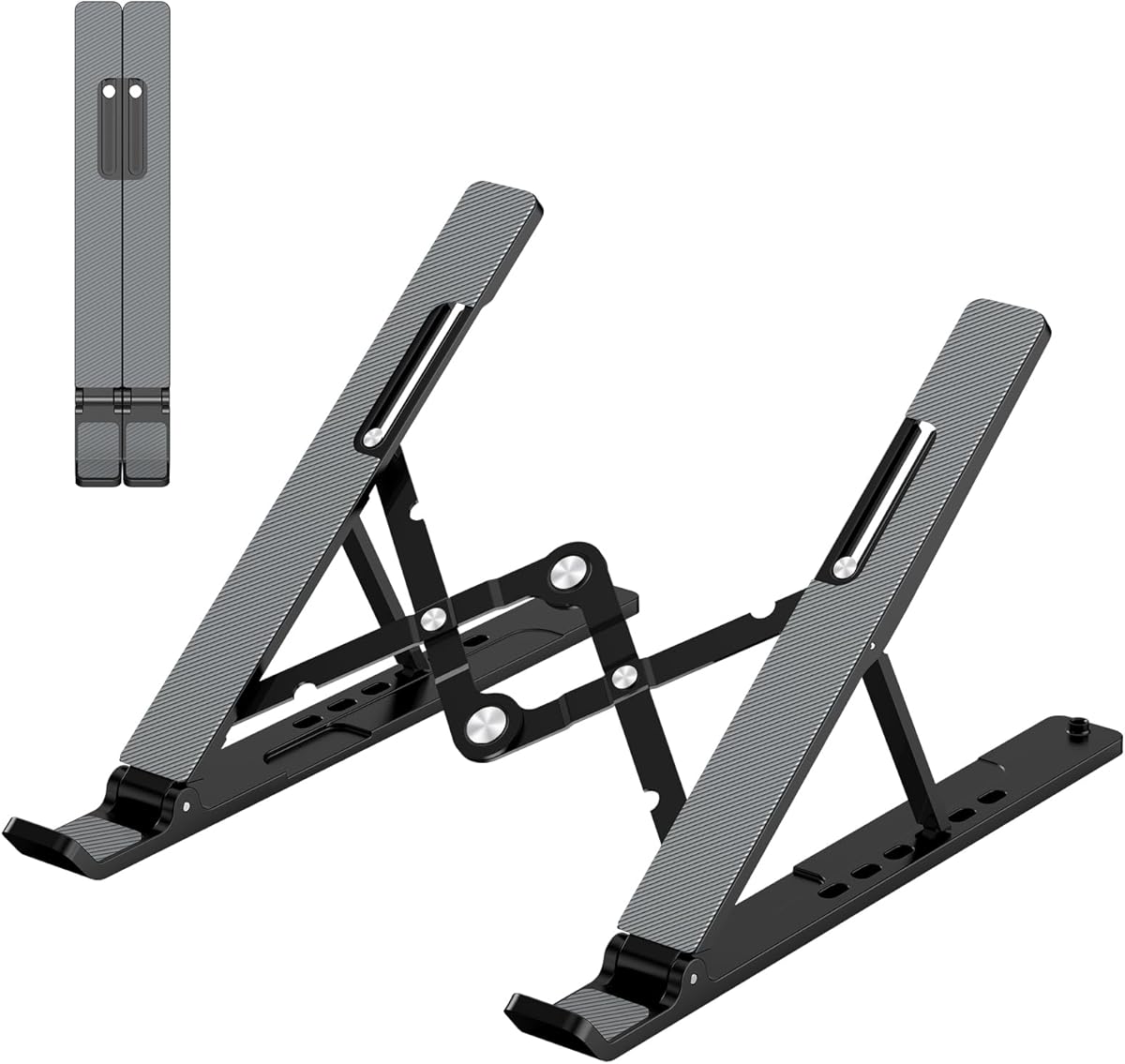
The Adjustable Laptop Stand is a 4.5-rated portable riser with six height levels, allowing the platform to be raised from 4.34 to 6.59 inches. That adjustability makes it more useful than a low fixed wedge when users want to bring the screen closer to eye level or experiment with different working positions.
We may earn a commission when you buy through this link, at no additional cost to you.
The forward-tilt angle and open frame create space for air to move beneath the laptop. A large anti-slip silicone pad helps hold the computer in place and protect its surface, while smooth edges and a triangular support structure improve handling and stability. The foldable design compresses to 9.96 by 1.98 by 0.68 inches.
The adjustment mechanism adds a step that a simple wedge does not require. Its instructions specifically note that both support bars should be inserted at the same level to maintain balance. The product also weighs 0.49 pounds, so while portable, it is not as pocket-sized as the two-piece or mini risers in this guide.
This stand is a strong fit for frequent travelers, shared workstations, and anyone who needs a genuine range of screen heights. It supports laptops from 10 to 15.6 inches, including MacBook, Dell XPS, HP, ASUS, Pixelbook, Lenovo ThinkPad, Acer, Chromebook, and Microsoft Surface models. For a fixed desktop, it offers more control than a conventional wedge.
Six levels spanning 4.34 to 6.59 inches let you move beyond the narrow range of a basic front-edge wedge. That makes it easier to match the screen to your posture and work environment.
The foldable structure suits business travel, although users should verify that the support bars are level before placing a laptop. Its open construction also promotes airflow while in use.
We may earn a commission when you buy through this link, at no additional cost to you.
The PATIKIL Laptop Wedge is a 4.6-rated pair of ultra-compact plastic stands measuring 75 by 27 by 27 millimeters. Their small size makes them easy to carry in a laptop bag or pocket, while the two-pack allows users to elevate a laptop and keyboard or keep a spare available.
We may earn a commission when you buy through this link, at no additional cost to you.
Anti-slip surfaces keep supported devices stable and help protect them from scratches. A center opening provides a simple route for cables, improving the appearance of a compact workspace. The raised angle is intended to support laptops, notebooks, tablets, keyboards, desktop speakers, and other small items.
The fixed, compact form does not offer the viewing-angle range of an adjustable stand. The manufacturer also notes that devices should not exceed the stand's load-bearing capacity. Without a specific capacity figure in the supplied details, it is wise to check the current listing and avoid placing heavier equipment on these small wedges.
This product is an appealing option for travel, meetings, coworking spaces, and compact home offices. It also works as a general desktop organizer for keyboards and small accessories. Choose it when low weight, quick setup, and a minimal footprint are more important than a full-width platform or multiple height settings.
The compact 75 mm length and light construction make these wedges easy to carry between work locations. They can be deployed quickly when a café table or meeting-room desk needs extra clearance.
Besides notebooks and tablets, the wedges can support keyboards, desktop speakers, and other small desktop items. That makes the two-pack a flexible organizer as well as a laptop accessory.
We may earn a commission when you buy through this link, at no additional cost to you.
The 2pcs Keyboard Stands are a 4.6-rated pair of mini risers made from aluminum alloy. They provide a straightforward way to lift a keyboard or laptop front edge, improve the operating angle, and create space below the device for additional airflow.
We may earn a commission when you buy through this link, at no additional cost to you.
The two-piece construction can be placed under the front of a compatible device without requiring a full platform. The listed applications include MacBook Pro, ThinkPad, Samsung, Lenovo, and Dell systems. Their compact shape makes them straightforward to move between a home desk, office, and travel setup.
The stands do not provide height adjustment, and the small format may not accommodate every full-size keyboard. Because they are not described as height-adjustable, they cannot reproduce the screen positioning of a conventional elevated laptop tray. However, for basic elevation, cooler clearance, and a less demanding viewing angle, the straightforward design remains effective.
This pair is the budget-minded choice for users who want a simple metal riser without a complex folding mechanism. It works particularly well for keyboard elevation and for compatible laptops whose front edges can rest on the two supports. For frequent height changes or a larger screen platform, choose a more substantial adjustable model instead.
The aluminum alloy construction and two-piece layout offer a straightforward way to raise a compatible device. There are no complicated hinges or controls to adjust before use.
Lifting the front edge creates space beneath the device, which can support airflow and make room for a cleaner desk arrangement. The effect is especially noticeable during extended typing sessions.
We may earn a commission when you buy through this link, at no additional cost to you.
The Foldable Metal Keyboard Stand is a 4.5-rated pair of compact pieces designed to attach magnetically to the bottom of a laptop. Each measures about 2.36 by 1.18 by 0.39 inches and weighs only 1.5 ounces, making it one of the most travel-oriented options in this guide.
We may earn a commission when you buy through this link, at no additional cost to you.
The zinc alloy construction provides a rigid support structure with a listed load capacity of up to 22 pounds, or 10 kilograms. Two configurations are available: a 3.5 cm height with an 8-degree angle and a 6 cm height with a 13-degree angle. The magnetic two-piece design attaches at both ends and leaves the central underside unobstructed.
Because the support attaches directly to the laptop, it is more integrated than a conventional desktop wedge. The magnetic connection may be unsuitable for surfaces or devices where magnets could cause an issue, so compatibility should be considered carefully. The pieces also support only part of the laptop underside rather than providing a broad platform.
Choose this stand for travelers, students, and mobile workers who prioritize compact storage and quick setup. Its folding magnetic design takes up almost no bag space and can be attached in seconds. For a stationary desk, a conventional wedge may offer a more integrated visual appearance, but this model's portability and selectable angles are difficult to match.
The two small pieces fold into a package measuring roughly 6 by 3 centimeters and weighing about 43 grams each. That makes the stand easy to carry without dedicating much luggage space.
The magnetic design keeps both supports attached to the laptop and lets users switch between 8- and 13-degree positions. The central section remains open to avoid blocking underside ventilation.
We may earn a commission when you buy through this link, at no additional cost to you.
The Adjustable Metal Laptop Riser is a 4.6-rated stand that lets users change both height and angle. Its metal construction, ventilated platform, and protective contact surfaces make it a practical option for users who want more control than a fixed wedge offers.
We may earn a commission when you buy through this link, at no additional cost to you.
The stand supports up to 17.6 pounds, or 8 kilograms, according to the supplied information. Two rubber mats on the hooks and anti-skid silicone pads on the top and bottom help prevent sliding and protect both the laptop and the desktop. Multiple holes across the upper surface encourage airflow beneath the device.
The foldable structure lets it fit into a backpack for travel, but it is still bulkier than a mini two-piece riser. Adjustment also takes more effort than placing a fixed wedge under a laptop. Buyers should also check that the support configuration suits the ports and underside geometry of their specific computer.
This is a strong recommendation for a home or office user who wants a conventional elevated stand with durable materials and adjustable positioning. It supports laptops from 10 to 15.6 inches, including MacBook, Pixelbook, Dell XPS, HP, ASUS, Lenovo ThinkPad, Acer, Chromebook, and Microsoft Surface systems. It balances portability and adjustability well.
Adjustable height and angle allow the screen and keyboard to be positioned more closely to your preferred working posture. This is useful when several people share a desk or when a laptop is used in different roles.
The metal platform supplies rigidity and a listed 8-kilogram capacity, while multiple openings promote airflow. Rubber and silicone contact points protect the device and improve stability at the same time.
We may earn a commission when you buy through this link, at no additional cost to you.
The most useful laptop wedge depends on how much elevation you need, where it will be used, which devices it must support, and whether portability or a permanent workstation appearance matters more.
A low fixed wedge is best when you want a modest change in viewing angle without separating your hands from the keyboard. Models that raise the rear by about 35 mm are intended to preserve a familiar typing position while adding clearance. Adjustable stands are more appropriate when you want the screen closer to eye level, regularly alternate between sitting and standing, or share a workstation with people of different heights.
Not every stand that raises a laptop lets you change its angle. Fixed models offer fewer moving parts and a consistent setup, while multi-angle and adjustable designs can accommodate typing, reading, presenting, and viewing. Look for clearly stated angle or height ranges and consider whether the device is likely to remain in one position or move frequently. A modest range may be enough, but a wide range provides more flexibility.
Compatibility involves more than recognizing a brand name. Check the supported screen sizes, the dimensions of the support surface, and whether the stand is intended for a full laptop, only the front edge, a keyboard, or a tablet. Some models are designed for 10- to 15.6-inch laptops, while others focus on compact notebooks or particular tablet sizes. Also consider the placement of ports and the shape of the laptop's underside.
A stand should hold the computer without sliding and should avoid transferring scratches to the device. Look for silicone pads, rubberized edges, non-slip surfaces, and a base that resists shifting on the desk. Metal frames can provide strong support, while silicone surfaces add grip and protect finishes. The width and weight of the base also influence stability, particularly with larger laptops or tablets.
Elevation creates room for air beneath a laptop, but an open or ventilated structure can improve that benefit. Designs with large openings, vented tops, or space under the device encourage circulation compared with a flat, enclosed platform. Cooling support is useful during extended work, study, or gaming, although a stand cannot replace good internal laptop maintenance or guarantee lower operating temperatures in every environment.
Permanent desk stands can use a wider, heavier design, while travel users should favor folding, lightweight, or magnetically attached models. Mini wedges fit easily into a pocket or laptop bag, whereas adjustable stands tend to occupy more bag space. Consider how often you will move between rooms, offices, cafés, and meeting rooms, then balance that need against the stability and full-platform support of a larger stand.
Aluminum and zinc alloy provide rigidity, a refined desktop appearance, and a stable platform, but they are usually heavier than plastic or silicone designs. Plastic stands are lightweight and often less expensive, while silicone products prioritize grip and surface protection. A dark or silver metal accessory can blend into a professional workspace, whereas a colorful silicone model may be more approachable for a study or travel setup.
Cable openings, ventilation, built-in rulers, stylus storage, and multi-device compatibility can add useful value without changing the stand's core function. A center opening may provide modest cable guidance, while a full set of cutouts can keep a busy desk more orderly. Multifunctional stands are convenient when desk space is limited, but confirm that each extra feature works with the devices and accessories you already use.
Start with a clean, stable desktop and place the wedge where the computer will be used. For a full-platform model, center the laptop over the support and ensure all contact points rest securely. For a front-edge or two-piece riser, place the supports under the front corners without blocking ports, vents, buttons, or the laptop's opening mechanism.
Adjust the height or angle before beginning extended work. On models with selectable support bars, insert both sides at the same level to maintain balance. A forward tilt can improve screen visibility and airflow, but the keyboard should remain comfortable to reach. If the computer slides, feels uneven, or cannot rest without pressure on an unsupported edge, reposition or discontinue use.
Clean the wedge with a soft, lightly dampened cloth and allow it to dry fully before replacing a device. Avoid abrasive pads, harsh chemicals, and excessive moisture around vents or adjustment points. Inspect silicone pads and rubber surfaces occasionally for debris, and remove dust from ventilated openings so the stand continues to support airflow and stable contact.
A laptop wedge is usually better when you want a moderate angle and want to keep the laptop close to the keyboard. A full stand is better when you need significant screen elevation, multiple height settings, or a broad platform for a full-size keyboard. Your device size, desk space, and required typing position should guide the decision.
A wedge can improve airflow by lifting the computer and keeping vents from sitting directly against the desk. It cannot guarantee that a laptop will remain cool or prevent every thermal problem. Fans, internal maintenance, workload, and ambient conditions also affect heat, so an open or ventilated design is preferable for regular cooling support.
Most laptop wedges are designed for common notebook sizes, but you should confirm the stated compatibility, supported dimensions, and device weight. A full-width model may accommodate several laptops, while a mini riser is better suited to devices with compatible front edges. Also check whether ports or underside features could interfere with the supports.
The best height depends on your desk, chair, posture, and whether you type frequently. A low rise is useful for maintaining a natural typing position, while greater elevation can improve screen visibility. Adjustable stands offer a safer way to find the right setting because personal preference and viewing distance can vary significantly.
They can reduce wrist and palm strain by presenting the keyboard at a more natural incline and creating a clearer transition to a raised screen. Comfort still depends on desk height, chair position, keyboard layout, and how long you work. A wedge is an ergonomic tool rather than a complete workstation solution.
Metal wedges generally provide a firmer platform, greater visual polish, and strong durability, while silicone wedges tend to be lighter and better at preventing scratches. The best choice depends on whether you prioritize stability, portability, surface protection, or appearance. Foldable and magnetic designs are especially convenient for travel.
Many laptop wedges can support or elevate a keyboard, although mini stands may only accommodate compact models. If you use an external keyboard, consider a full-width platform or a pair of compact risers with enough width to support the keyboard safely. Check the stated dimensions before placing the full keyboard on smaller pieces.
Choose a stand with silicone pads, rubberized edges, or a non-slip surface, and keep those contact areas free of dust and grit. Place the computer carefully rather than dragging it across the stand. A clean soft cloth can be used to wipe the protective contact layer and the laptop's underside during routine care.
The Aluminum Laptop Stand Riser is the most balanced overall choice, combining a moderate 35 mm rise, durable aluminum, a broad base, airflow, and protective silicone. The Mount-It! Tilted Riser stands out as the premium option for a polished permanent setup, while the 2pcs Keyboard Stands provide a straightforward, budget-conscious way to add elevation and clearance.
Prioritize the factors that shape your daily experience: stable support for your device, a comfortable viewing angle, enough airflow, and a footprint that suits the desk. Adjustable models suit changing postures, magnetic mini stands prioritize travel, and silicone sets are helpful when multiple devices or locations need support.
Ratings and product information can evolve, and prices and availability change over time. Review the current listing, measurements, load guidance, and device compatibility before making a final purchase so the stand remains comfortable, secure, and well matched to your setup.