
Cooler Master QUBE 540
4.4Editor score
Flexible horizontal or vertical use
Impressive 415mm GPU clearance
Tempered glass side panel
Explore the best horizontal PC cases for home theater, compact gaming, and office builds, with side-by-side comparisons of size, cooling, ports, and compatibili
A horizontal PC case places components side by side rather than stacking them vertically, making it especially useful beside a television, under a desk, or within a dedicated entertainment cabinet. The best examples balance compact dimensions with airflow, cable management, front connectivity, and enough room for modern motherboards, power supplies, coolers, and graphics cards.
We compared these ten cases by examining their stated motherboard support, graphics card clearance, cooling options, dimensions, orientation, I/O features, and intended use. The list covers slim home theater enclosures, compact gaming systems, Micro-ATX workhorse cases, and flexible models that can operate in horizontal or vertical arrangements.
Each review identifies the reason a case is worth considering, along with the compromises potential buyers should understand. Product ratings and specifications reflect the supplied listing information, while availability, configurations, and prices can change. Always verify the current listing and component dimensions before ordering.
4.4Editor score

4.5Editor score

4.5Editor score
This side-by-side comparison shows how the ten cases differ in form factor, hardware capacity, cooling support, orientation, and connectivity, making it easier to match a chassis to a specific home theater, gaming, or office build.


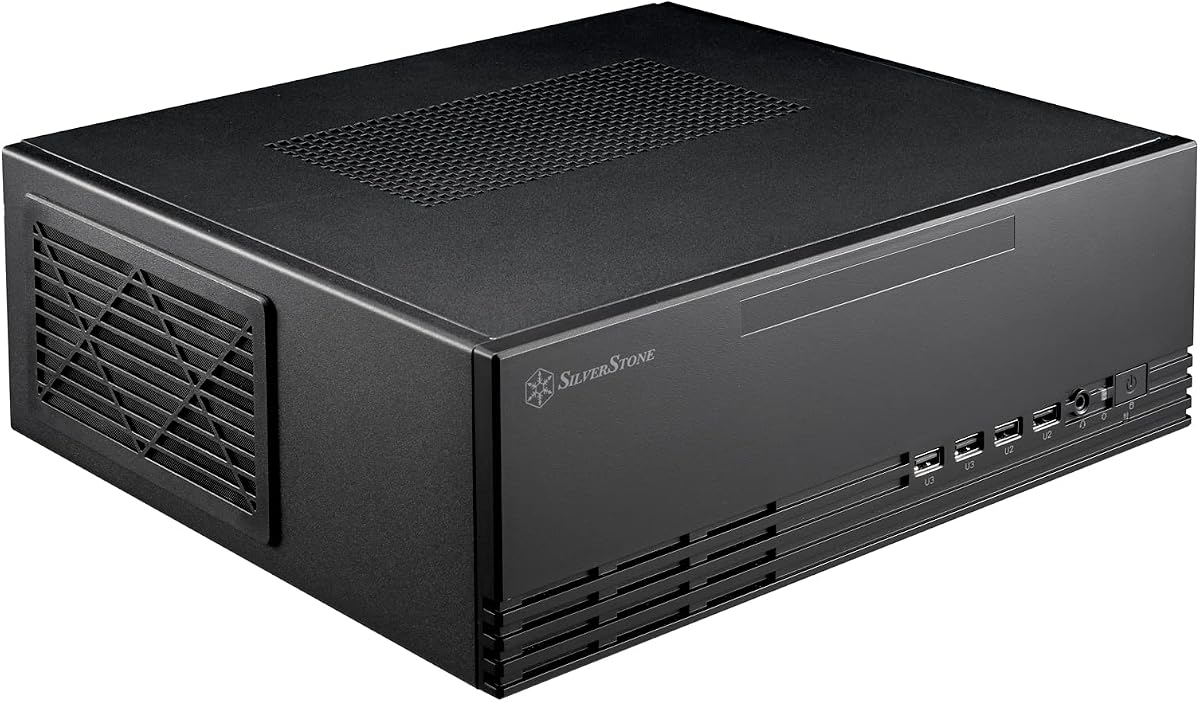
The SilverStone GD09B is a purpose-built horizontal home theater enclosure with a 4.5 rating and a design centered on quiet operation, controlled airflow, and convenient placement inside an entertainment cabinet. Its faux aluminum appearance is intended to blend with audiovisual equipment rather than resemble a conventional tower, while its 358mm depth gives larger components room to operate without making the enclosure excessively shallow.
We may earn a commission when you buy through this link, at no additional cost to you.
One of the most important strengths is the positive-pressure airflow approach. Rather than relying only on open vents, the case directs cooling air into the enclosure while helping limit dust entry. Quick-access filters make routine maintenance more convenient, especially in a living-room environment where the system may operate for long periods with little direct attention. Compatibility with SSI-CEB, ATX, and Micro-ATX motherboards also gives builders more freedom than a case limited to compact Mini-ITX boards.
The main trade-off is that the supplied information does not list liquid-cooling radiator support, so builders planning a 240mm or 360mm liquid cooler would need to confirm fitment elsewhere or choose another model. It is also deeper than the most compact cases in this list. That extra depth is not necessarily wasteful: it provides practical hardware space and reflects the goal of making a full entertainment-center PC without making every component tiny.
This is the strongest general recommendation for someone building a quiet, horizontally placed living-room system around ATX or Micro-ATX hardware. It suits media-center PCs, streaming machines, and understated gaming systems that should look at home beside a television or audio console. Buyers should prioritize the quiet positive-pressure design and broad board support, then verify GPU length, cooler height, power supply dimensions, and available drive options against their selected hardware.
The horizontal layout and subdued faux aluminum finish make the GD09B more visually appropriate near a television than a conventional desktop tower. Its stated focus on cooling and quietness also aligns well with a system expected to run in a shared entertainment space rather than on an actively managed gaming desk.
Positive air pressure helps manage dust, while the quick-access filter design allows periodic cleaning without a complicated teardown. This combination is particularly useful for compact systems whose tightly arranged cooling paths can otherwise accumulate debris.
We may earn a commission when you buy through this link, at no additional cost to you.
The Cooler Master QUBE 540 is a flexible ATX mid-tower that can be laid horizontally or placed vertically. It carries a 4.4 rating and differs from most home theater cases by supporting demanding hardware, including motherboards up to 11 inches wide, E-ATX boards, and graphics cards as long as 415mm when the front fan is removed. That makes it an unusually capable option for a horizontal gaming or workstation build.
We may earn a commission when you buy through this link, at no additional cost to you.
The reversible I/O panel and movable handles allow the case to be repositioned without rebuilding the layout around a permanently vertical orientation. A full front mesh panel and pre-installed SickleFlow 120mm fan create an airflow-focused foundation, while tempered glass provides a view of the components. The front panel also includes two USB 3.2 Gen1 ports and a USB 3.2 Gen2 Type-C port for convenient access to storage, controllers, and accessories.
There is an important configuration detail: the maximum 415mm GPU clearance is available without the front fan. Owners who need that extra length must plan the intake arrangement accordingly. Although the case is advertised as compact for an ATX mid-tower, it is not as tailored to a minimalist media center as the SilverStone enclosures. Its visual and practical priorities lean more toward a capable compact PC that can also serve as a horizontal display or secondary gaming system.
The QUBE 540 is a strong choice for builders who want horizontal placement but do not want to surrender modern graphics card capacity or full-size motherboard support. It is especially attractive for a compact gaming rig using one of the long cards referenced in the product information, provided the front fan position is planned correctly. Check GPU thickness, radiator needs, and clearance around the power supply before finalizing the internal arrangement.
The QUBE 540 is not merely a tower placed on its side. Its reversible I/O panel and movable handles are designed for horizontal operation, making the layout more intentional. It can still stand vertically when a conventional tower arrangement is more convenient.
Supporting graphics cards up to 415mm without the front fan gives this case an advantage over many compact alternatives. That room can accommodate large modern cards, although the front fan position must be adjusted and adequate intake preserved.
We may earn a commission when you buy through this link, at no additional cost to you.
The SilverStone Grandia 11 is a premium compact home theater case offering a rare combination in a horizontally oriented enclosure: full-size motherboard options, positive air pressure, and support for a 240mm radiator. Its 4.5 rating reflects a well-rounded feature set, while the stereo-shaped chassis and fully meshed front panel give it a deliberate entertainment-center appearance.
We may earn a commission when you buy through this link, at no additional cost to you.
The shortened chassis and large front mesh area work together to maximize intake surface in a compact form. Positive-pressure design supports cooling and dust prevention, which is important for a living-room PC that may run for extended periods. Radiator support is a major differentiator from simpler HTPC designs: the Grandia 11 can accommodate a 240mm liquid cooler when a quieter or higher-capacity thermal solution is desired.
Its 240mm maximum listed radiator size does not mean every cooling arrangement is possible, and the case remains specialized for home theater use rather than universal compact gaming. The adjustable LED indicator offers a simple status reference without turning the enclosure into an aggressively illuminated display. Buyers should also confirm the exact placement and dimensions of the radiator, motherboard, and graphics card before committing to the layout.
Choose the Grandia 11 when entertainment-room presentation, controlled airflow, and liquid-cooling capability are priorities. It is well suited to powerful ATX or Micro-ATX media systems, quiet gaming consoles, and builds where the owner wants a full-width chassis without the visual bulk of a full tower. The premium designation reflects the more capable cooling layout and refined home theater design rather than merely decorative extras.
The 240mm radiator opening provides a practical route to quieter or more capable cooling. It is especially useful for sustained media playback, streaming, and gaming workloads that place sustained heat on the processor.
A shortened chassis combined with a fully meshed front panel creates a large intake area relative to the enclosure's footprint. Positive air pressure then helps the system draw cool air while limiting dust accumulation.
We may earn a commission when you buy through this link, at no additional cost to you.
The Lian Li B4-mATX combines a compact 21.3-liter footprint with a distinctive real wood exterior, giving small-form-factor builds a more refined appearance than typical metal-and-glass cases. Its 4.5 rating and dual-position design make it a compelling option for a compact workstation, understated gaming system, or entertainment PC that needs to fit neatly into a living area.
We may earn a commission when you buy through this link, at no additional cost to you.
Despite its small dimensions, the case supports graphics cards up to 358mm and CPU coolers up to 165mm tall. Two non-RGB slim 120mm fans are included, providing immediate airflow without requiring a separate fan purchase. Cooling can be expanded with additional fans or radiators, including a 360mm AIO, depending on power supply choice and the available configuration.
The primary limitation is motherboard support. Builders cannot assume that full-size ATX or E-ATX boards will fit, so Micro-ATX and smaller layouts are the relevant design path. The wood finish is another matter of preference: it can integrate beautifully with furniture and media furniture, but it may not align with a high-visibility gaming setup built around black metal and RGB lighting.
The B4-mATX is ideal for someone who values appearance, compact dimensions, and flexible placement more than full tower compatibility. Its horizontal orientation lets it resemble a large set-top enclosure, while vertical placement preserves tower-style usability. Confirm the graphics card, CPU cooler, power supply, and radiator options together, because compact cases reward careful planning rather than generous assumptions about clearance.
The real wood finish differentiates the B4-mATX from conventional compact PC enclosures. That makes it particularly appealing in a living room, studio, or office where the case may sit on a shelf rather than disappear beneath a desk.
The two included slim fans provide a practical starting point, and the stated cooling flexibility extends to additional fans or a 360mm AIO. This gives small-system builders more thermal options than a purely minimalist enclosure would allow.
We may earn a commission when you buy through this link, at no additional cost to you.
The Cooler Master Q300L V1 is an approachable Micro-ATX enclosure for buyers who want useful component clearance without moving into a larger full tower. It has a 4.5 rating, supports Micro-ATX and Mini-ITX motherboards, and provides room for graphics cards up to 360mm, CPU coolers up to 159mm, and power supplies up to 160mm long.
We may earn a commission when you buy through this link, at no additional cost to you.
Its open thermal design is notable for a compact case. Perforation across multiple sides encourages airflow and heat dissipation, while the transparent side panel allows the build to remain visible. The I/O panel can be positioned at the front, top, or bottom on either side, which is especially useful when the chassis is rotated for horizontal placement or installed in a less conventional cabinet.
Cooling flexibility is another advantage. The case can accommodate a 240mm liquid cooler and up to five fans according to the supplied information, allowing builders to create a more deliberate thermal arrangement than a minimalist enclosure might permit. On the other hand, its motherboard support excludes ATX systems, and the V1 design should not be confused with later versions that may have different layouts or specifications.
The Q300L V1 is a sensible choice for a compact Micro-ATX gaming PC, home office system, or streaming machine. It offers more clearance than many similarly small enclosures and remains easy to adapt to different orientations. The buyer's main task is to select components from the supported size categories and confirm that any additional cooling hardware follows the case's mounting pattern and airflow direction.
The stated 360mm GPU and 160mm power supply clearances make the Q300L V1 less restrictive than several ultra-compact alternatives. That extra room can simplify a first compact build, especially for someone familiar with full-size components but new to small form factors.
The modular I/O panel can move to the front, top, or bottom and be accessed from either side. This flexibility makes the case easier to use in horizontal and vertical arrangements without sacrificing convenient front connectivity.
We may earn a commission when you buy through this link, at no additional cost to you.
The Shiny Snake G300 is a 16.8-liter portable small-form-factor gaming chassis designed for people who want a capable PC that can move between locations. Its 4.4 rating, aluminum mesh construction, reinforced handle, and vibration-dampened base distinguish it from typical desktop cases. The supplied information specifically positions it for tournaments, dorm moves, and daily commuting.
We may earn a commission when you buy through this link, at no additional cost to you.
Hardware support is more ambitious than the small volume might suggest. The case fits Micro-ATX motherboards, four-slot graphics cards up to 340mm, CPU air coolers up to 164mm, and ATX power supplies up to 140mm when using air cooling. Its horizontal PSU placement is intended to reduce cable interference with the graphics card, while tool-free access and a removable PCI bracket simplify upgrades and troubleshooting.
The cooling choices involve a trade-off. An ATX power supply leaves the case on the air-cooling path, while using an SFX or SFX-L power supply unlocks support for a 240mm or 280mm AIO radiator. The front I/O is unusually generous, including a 10Gbps USB-C port, two USB 3.0 ports, and two USB 2.0 ports, but these features add complexity compared with a simple home theater enclosure.
The G300 makes the most sense for a portable gaming enthusiast who regularly transports a system and can plan the power supply and cooling configuration in advance. It can also serve as a LAN-party build or a compact desktop that must fit into a mobile lifestyle. It is less suitable for a first-time builder who wants unrestricted cooling and power supply choices, since the compact system's internal planning is central to achieving the intended performance.
The military-grade handle, vibration-dampened base, and mesh aluminum chassis indicate that transport is part of the design rather than an afterthought. These features make the G300 relevant to LAN events, shared dorm rooms, and users who regularly move a gaming PC.
Four-slot graphics card support and 340mm clearance allow substantial gaming hardware inside a compact enclosure. The case also provides service-oriented touches such as a removable PCI bracket and tool-free access, which are useful when components need frequent attention.
We may earn a commission when you buy through this link, at no additional cost to you.
The Lian Li A3-mATX is a 26.3-liter compact case that combines a walnut wood front with steel mesh side and top panels. Its 4.8 rating is the highest among the ten products, and the supplied specifications show a strong emphasis on both hardware capacity and airflow. It is a compelling choice for builders who want a refined living-room or desk system without giving up long graphics cards or large radiators.
We may earn a commission when you buy through this link, at no additional cost to you.
Graphics cards up to 415mm can be installed, matching the QUBE 540's stated maximum and exceeding most compact alternatives. Cooling support includes a 360mm radiator and up to ten 120mm fans, while the high-airflow steel mesh panels promote heat transfer through the side and top surfaces. The case supports Micro-ATX and ITX motherboards with four expansion slots.
Power supply installation is more flexible than in many similarly sized cases. ATX, SFX, SFX-L, and LIAN LI EDGE power supplies are supported, with front and side orientation options that can improve clearance and cable management. The trade-offs are the restricted motherboard format and the specialized visual character of the wood front. It is not a universal replacement for a full tower, and buyers who prefer a uniform metal appearance may find the styling less versatile.
The A3-mATX is a strong match for a compact gaming system, stylish workstation, or horizontally displayed entertainment PC. Its generous GPU clearance and 360mm radiator capability make it particularly attractive for powerful builds, while the wood front helps it blend with furniture. Buyers should use the included fan and radiator placement diagram to establish a compatible cooling plan and verify the power supply length and orientation before ordering.
The modular walnut front panel gives the case a distinctive finish that works well in living rooms and design-conscious workspaces. Unlike a purely decorative facade, the case pairs that appearance with steel mesh panels that support functional airflow.
Support for a 360mm radiator and as many as ten 120mm fans provides considerable cooling flexibility. Combined with 415mm GPU clearance, it creates room for a powerful compact system rather than requiring a full-size chassis.
We may earn a commission when you buy through this link, at no additional cost to you.
The SilverStone GD09B-C is a horizontal home theater case distinguished by a front USB Type-C port. Its 4.3 rating and overall design are closely aligned with the established GD09 concept: subdued faux aluminum styling, positive air pressure, broad motherboard support, and a chassis intended to fit inside a home theater cabinet.
We may earn a commission when you buy through this link, at no additional cost to you.
The USB-C front connection is the defining practical advantage over cases that rely only on legacy rectangular USB ports. It offers a convenient modern attachment point for compatible devices, storage, or accessories. The positive-pressure design continues to emphasize quiet cooling and dust prevention, while quick-access filters make upkeep more approachable. SSI-CEB, ATX, and Micro-ATX motherboards can be supported.
The enclosure also supports SilverStone RA02 rackmount ears, which can help integrate it into a more structured home theater or rack-oriented installation. Those ears are not stated as included, however, and the listing does not mention radiator support. Buyers planning liquid cooling should therefore verify the available fan and heatsink options rather than assuming standard 240mm or 360mm mounting support.
Choose the GD09B-C when a front USB-C port is a priority within a quiet, horizontally oriented home theater build. It is appropriate for media-center systems, living-room gaming PCs, and setups that need broad board compatibility in a cabinet-friendly enclosure. It may be especially useful to owners moving from an older front-panel standard who want modern peripheral connectivity without changing the overall case format.
The front USB Type-C port provides a cleaner, more versatile connection for compatible peripherals and storage. It updates an otherwise traditional home theater enclosure for users who regularly move accessories between a desktop and media system.
Positive air pressure supports cooling while reducing dust intrusion, and quick-access filters simplify cleaning. These features are valuable in a cabinet where the case may remain enclosed and run for long periods.
We may earn a commission when you buy through this link, at no additional cost to you.
The SilverStone GD09B from the Grandia Series is an established aluminum-style HTPC enclosure with a 4.3 rating. It is designed for horizontal placement beside entertainment equipment and emphasizes a relatively slim, wide presentation rather than the tall silhouette of a conventional ATX tower. Its 358mm depth gives the system room to breathe while still fitting comfortably within a home theater cabinet.
We may earn a commission when you buy through this link, at no additional cost to you.
The case supports ATX motherboards and expansion cards up to 12.2 inches long, which provides useful graphics card flexibility for a compact HTPC chassis. Positive air pressure is used to support cooling, quiet operation, and dust prevention, while quick-access filters help maintain that airflow over time. The aluminum-inspired finish allows the enclosure to sit more naturally among amplifiers, media players, and other AV equipment.
Compared with newer variants, the listed information does not emphasize a front USB-C connection, so buyers who need that interface may prefer the GD09B-C. The supplied data also does not confirm liquid-cooling radiator capacity. This case should therefore be evaluated primarily for its air-cooled HTPC layout and full-length expansion support rather than assumed to offer every feature found in newer compact designs.
The GD09B remains a practical option for a dedicated media PC, living-room gaming machine, or quiet desktop stored in an entertainment cabinet. It is especially relevant when ATX board support and long expansion cards matter more than fashionable styling or a removable front-panel system. Before building, verify the graphics card, CPU cooler, power supply, storage arrangement, and any front I/O requirements.
The wide horizontal aluminum aesthetic resembles rack and network equipment more than a gaming tower. That makes the enclosure easier to integrate with media components and other entertainment hardware in a cabinet or rack-like space.
Expansion card support up to 12.2 inches is a meaningful advantage over smaller HTPC cases. It gives builders a wider selection of graphics hardware while retaining the low, horizontally oriented form factor.
We may earn a commission when you buy through this link, at no additional cost to you.
The SilverStone Milo 11 is the smallest case in this roundup by stated volume, using a 10.35-liter Micro-ATX enclosure for office or home theater use. Its 4.1 rating is the lowest listed here, but the product addresses a distinct need: a very small horizontal computer that can also be positioned vertically when an even narrower footprint is desired.
We may earn a commission when you buy through this link, at no additional cost to you.
The main requirement is a TFX-form-factor power supply, which is sold separately. That constraint gives the case much of its compactness but also shifts responsibility to the buyer to source a compatible component and plan the internal cable layout. It supports Micro-ATX motherboards and one 9.5mm slim optical drive, making it suitable for compact office systems, dedicated media players, and minimalist installations.
Because the Milo 11 is so compact, it is less forgiving than the larger cases in the list. Large graphics cards, oversized power supplies, extensive cooling hardware, and several drive bays may not fit, depending on the exact configuration. The product information also does not list a front USB-C port, radiator support, or the same broad GPU clearance available from the QUBE 540, A3-mATX, and other performance-oriented choices.
The Milo 11 is best for a buyer whose priority is the smallest possible enclosure and who can design the system around a TFX power supply. It is less appropriate for a high-end gaming build or a future-proof system that may receive large upgrade components. Confirm every case dimension, motherboard socket position, cooling option, and power supply requirement before committing to this ultra-compact layout.
At 10.35 liters, the Milo 11 offers a notably compact base for a Micro-ATX system. It can sit horizontally in a media shelf or rotate vertically when the surroundings favor a narrow tower profile.
The required TFX power supply is central to the case's compact layout and must be purchased separately. A planned TFX purchase allows the builder to account for its dimensions and connector arrangement before the rest of the system is selected.
We may earn a commission when you buy through this link, at no additional cost to you.
The right horizontal case depends on the hardware you already own or plan to buy, the space where it will live, and how much attention you want to give cleaning, cooling, and future expansion. Motherboard format, graphics card length, power supply size, and cooler clearance should be confirmed before aesthetics become the deciding factor.
Start with the board you intend to use because it establishes the most restrictive part of the case layout. The SilverStone GD09B, GD09B-C, and Grandia 11 support ATX and Micro-ATX, while the Cooler Master QUBE 540 expands the upper tier to E-ATX boards as wide as 11 inches. The Lian Li B4-mATX, A3-mATX, and Shiny Snake G300 are primarily Micro-ATX choices, and the SilverStone Milo 11 follows a more specialized compact Micro-ATX approach. CPU socket position, rear I/O alignment, and expansion slots also need to match the enclosure.
Graphics card clearance is often more important in a horizontal enclosure than a conventional tower because the card and power supply may share the same horizontal zone. The QUBE 540 and A3-mATX list support up to 415mm, the Q300L V1 and B4-mATX reach 360mm and 358mm respectively, and the G300 fits cards up to 340mm. The SilverStone GD09B variants list expansion support up to 12.2 inches. Remember that maximum card length can depend on fan position, front radiators, power supply placement, and cable bend radius.
Power supply selection can determine whether a compact case works for the intended build. The Milo 11 requires a TFX unit sold separately, while the G300 supports ATX power supplies for air cooling but uses SFX or SFX-L to unlock 240mm or 280mm AIO support. The A3-mATX accepts ATX, SFX, SFX-L, and LIAN LI EDGE power supplies with flexible placement. For other cases, verify the supported format, maximum length, and whether the PSU sits above or beside the graphics card.
A horizontal case may use a low-profile air cooler, a full-size tower cooler, or a liquid cooler depending on its height and layout. The Q300L V1 lists support for a 240mm liquid cooler and five fans, the B4-mATX supports a 360mm AIO, and the A3-mATX also lists 360mm radiator support. The Grandia 11 offers 240mm radiator support, while the G300 provides 240mm or 280mm AIO options when paired with an SFX-class power supply. Match the radiator, pump, fans, and mounting points to the case's stated configuration.
A horizontal chassis can be mounted beneath a television, inserted into a media cabinet, placed on a low shelf, or rotated vertically. Dual-position cases such as the QUBE 540, B4-mATX, and Milo 11 provide the most flexibility, but their I/O orientation and handle placement still need to be considered. The Grandia 11 emphasizes a shortened chassis, while the Milo 11's 10.35-liter volume is ideal when available space is exceptionally tight. Always measure the full exterior, including any feet, handles, cables, and required ventilation clearance.
Front connectivity matters when a case lives in an entertainment cabinet or below a display. The QUBE 540 and G300 include front USB Type-C, while the SilverStone GD09B-C adds a front USB-C port to its home theater design. The Q300L V1's I/O panel can move among the front, top, and bottom on either side, which helps when switching orientation. Check the number and type of USB ports, audio jacks, power button location, and whether the controls remain accessible in the intended position.
Horizontal cases should provide unobstructed intake and a controlled path through the components. Positive-pressure designs such as the SilverStone GD09B, GD09B-C, Grandia 11, and the original GD09B listing emphasize dust prevention and quiet operation. Full mesh or perforated panels, as found on the QUBE 540, Q300L V1, G300, and A3-mATX, promote stronger airflow. Filters are useful in all environments, but quick-access filters are especially valuable where the system operates in a living room, office, or dusty workspace.
The best case is one that suits both its hardware and its surroundings. The SilverStone HTPC models use subdued aluminum-inspired styling for entertainment cabinets, while the Lian Li wood finishes offer a warmer furniture-like appearance. The QUBE 540 and Q300L V1 use transparent panels for visible builds, and the G300's aluminum mesh and portable handle emphasize mobility. Consider lighting, shelf dimensions, nearby equipment, and whether a subtle enclosure or a display-oriented design better matches the room.
Begin assembly with the final orientation in mind. If the system will operate horizontally, place the case temporarily in that position, locate the I/O panel, and identify whether the power supply, drives, or risers need a revised arrangement. Install the power supply and motherboard according to their respective mounting instructions, then use the case diagram to position fans and radiators so intake and exhaust paths remain consistent.
Route power, storage, and front-panel cables away from fans and heat sinks. Check that every cable bend remains within the connector's recommended minimum radius and that plugs do not press against the graphics card, side panel, or filter. For cases with removable filters, PCI brackets, or modular I/O panels, photograph the original arrangement before making changes so the configuration can be restored easily.
Maintain the enclosure by cleaning filters on a regular schedule and inspecting the interior for dust that may have bypassed them. Power the system down before opening the case, use gentle cleaning methods, and keep liquids away from vents and electrical components. After cleaning, confirm that the panels are secure, the filter is seated, and no cable has been pinched before returning the system to service.
It depends on the model. The Cooler Master QUBE 540, Lian Li B4-mATX, and SilverStone Milo 11 are explicitly designed for both horizontal and vertical orientation. Other cases may physically fit in a vertical position but place I/O, feet, filters, or airflow controls in an awkward location. Follow the manufacturer's intended orientation and check the bottom panel for feet or vents that should not be blocked.
They are often more suitable because their wide, low shape resembles an AV component and can sit beneath a television. Cases such as the SilverStone GD09B and Grandia 11 also emphasize positive-pressure airflow, quiet operation, and cabinet-friendly dimensions. The best choice still depends on graphics card length, cooling needs, and the exact cabinet opening.
Micro-ATX is the most broadly supported compact format in this list, while ATX appears in the SilverStone GD09B, GD09B-C, Grandia 11, and QUBE 540. The QUBE 540 also supports E-ATX. Do not rely on board size alone, because socket position, rear I/O, expansion slots, and the case's power supply arrangement also need to fit.
Many models can, but only within their stated clearance. The QUBE 540 and A3-mATX support cards up to 415mm, while the Q300L V1 and B4-mATX reach 360mm and 358mm. The G300 supports up to 340mm and four-slot cards. Maximum length figures may assume a particular front-fan, radiator, or power supply arrangement.
No. Many horizontal systems use low-profile air coolers or standard CPU coolers where height permits. Liquid cooling is optional and may help with acoustics or sustained performance, but the Grandia 11, B4-mATX, A3-mATX, and Q300L V1 list specific radiator support. Always verify radiator dimensions, pump placement, and mounting space.
Not always. The QUBE 540 includes a SickleFlow 120mm fan, and the B4-mATX includes two slim non-RGB 120mm fans. Included fans can provide a useful starting point, but the case's overall airflow strategy may require additional intake, exhaust, or a radiator to move heat away from high-performance components.
Power down the system, disconnect it, and remove the power cable before opening the case. Use a soft brush or controlled compressed air to remove dust from fans, filters, vents, and heatsinks while keeping the system powered off. Clean removable filters according to the case instructions, and avoid pushing debris deeper into the chassis.
Measure the cabinet opening, the case's full exterior dimensions, and the space needed for cables and ventilation. Check that doors do not block intake or exhaust, that the selected orientation leaves the I/O accessible, and that the case is not resting on an unfiltered surface. Leave enough clearance for heat to escape and for routine filter access.
The SilverStone GD09B stands out as the most balanced home theater recommendation, combining a horizontal entertainment format with positive-pressure airflow, broad motherboard support, and accessible filters. The Cooler Master QUBE 540 is the value-oriented option for builders who need powerful hardware and flexible orientation, while the SilverStone Grandia 11 is the premium pick when 240mm radiator support and refined HTPC styling are priorities.
Other builders may find a better match in the Lian Li B4-mATX for a stylish 21.3-liter system, the A3-mATX for 415mm GPU and 360mm radiator capacity, the G300 for portable gaming, or the Milo 11 for the smallest possible footprint. Prioritize exact component clearances, power supply format, and cooling arrangement before considering appearance. A case that looks ideal on the outside is only a good choice if the selected motherboard, graphics card, cooler, and power supply fit together as intended.
Product listings, configurations, availability, and prices can change, so check the current details before purchasing. Review manufacturer diagrams, measure installed parts, and confirm the latest compatibility information directly on the product page. Taking those extra steps can prevent the most common horizontal case mistake: choosing an attractive enclosure that cannot comfortably accommodate the hardware inside it.