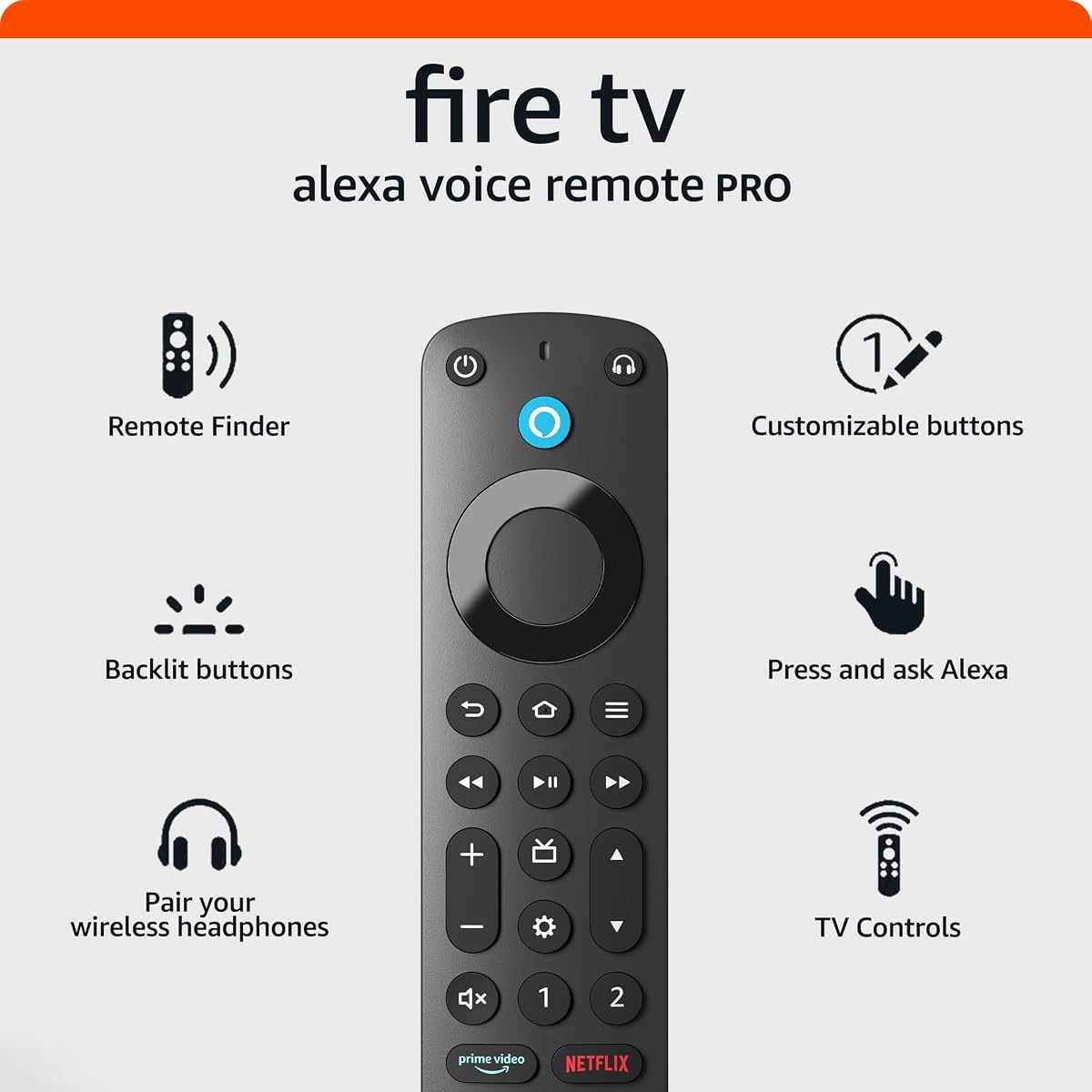
Amazon Fire TV Alexa Voice Remote Pro
4.5Editor score
Alexa remote finder feature
Motion-activated button backlighting
Integrated TV power controls
Two customizable shortcut buttons
Dedicated headphone shortcut
Our Fire Stick Replacement Remote guide compares ten options for compatibility, voice control, shortcut buttons, TV controls, setup, and everyday convenience.
A Fire Stick replacement remote should do more than navigate menus. It should match your streaming device, respond reliably to voice commands, provide convenient shortcuts, and feel familiar enough for every member of the household. Model compatibility matters most, followed by control layout, pairing method, power, and included accessories.
This guide compares ten official and third-party Fire TV remotes using the information available for each product. We examine supported Fire Stick, Fire TV Cube, and smart television models, along with voice functions, shortcut buttons, TV controls, pairing guidance, and package contents. Exact compatibility should always be confirmed before ordering.
Each listing highlights the strongest use case for its remote, along with important limitations. Some excel as straightforward replacements, while others add TV controls, backlighting, a remote finder, or additional shortcut buttons. Product availability and prices can change, so check the current listing and your device model before making a final purchase.
4.5Editor score

4.5Editor score
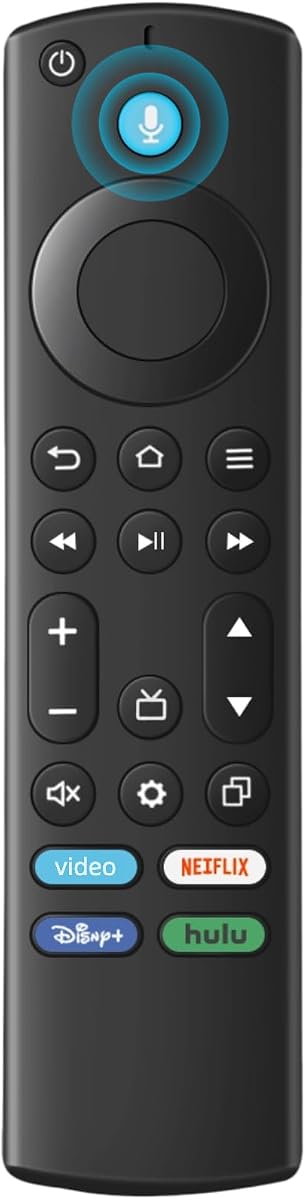
4.2Editor score
The table below compares all ten remotes by their supported hardware, standout features, pairing approach, and practical limitations, making it easier to identify the model that fits your Fire TV setup.


This replacement voice remote offers a practical way to restore navigation to a compatible Fire Stick, Fire TV Cube, or supported smart television. It carries a 4.2 rating and stands out for broad model coverage, straightforward voice functionality, and compatibility with popular Fire TV-based television brands such as Insignia, Toshiba, Pioneer, Omni, and Ember.
We may earn a commission when you buy through this link, at no additional cost to you.
The stated compatibility list includes the third-generation TV Stick, first- and second-generation TV Stick 4K, Select and Plus variants, first- and second-generation TV Stick 4K Max, second- and third-generation TV Cube, and first- and second-generation TV Stick Lite. It also supports compatible smart televisions that accept voice commands, giving the product broader utility than a remote intended for only one streaming stick.
The main trade-off is that this is not a universal Fire TV remote. It explicitly does not support the first- or second-generation TV Stick, first-generation TV Cube, or first-, second-, and third-generation TV Box. Batteries are also excluded, and the instructions are important because pairing methods can differ among streaming devices and televisions.
This is a sensible choice for someone replacing a damaged remote on a supported current-generation device without needing advanced TV controls, backlighting, or a remote finder. Confirm the exact hardware model first, then follow the included pairing instructions and install two AAA batteries.
The remote supports several popular generations of Fire Stick, Fire TV Cube, and Fire TV Stick Lite hardware. Its listed smart television support is especially useful for owners whose television uses Fire TV but whose original remote has failed.
A dedicated voice function lets users search for content and issue commands without navigating every menu. Availability and behavior depend on the paired device, so users should complete the specified setup process before expecting the microphone to respond.
We may earn a commission when you buy through this link, at no additional cost to you.
The Alexa Voice Remote Pro is the feature-rich choice in this roundup, combining a 4.5 rating with a remote finder, backlit buttons, customizable shortcuts, and integrated television controls. It is designed for users who want more than a basic replacement and who regularly navigate Fire TV menus in a dim room or operate a compatible television and streaming device with one controller.
We may earn a commission when you buy through this link, at no additional cost to you.
Its remote finder can emit a ring when asked to find the remote through an Alexa-enabled device, the Alexa app, or the Fire TV app. Motion-activated backlighting helps locate the controls during a movie night, while two customizable buttons can open favorite channels, applications, or Alexa commands. A dedicated headphone button leads directly to the on-screen Bluetooth menu, and integrated controls cover power, volume, and live-TV channel navigation.
Voice can also be used to find shows, launch applications, manage volume, and control compatible smart home devices. The advanced features come with a clear compatibility boundary: it does not support first- and second-generation Fire TV, first-generation Fire TV Stick, Element Fire TV Edition, certain Insignia models, the Hisense U6HF 4K ULED Fire TV Series, or Echo Show 15.
This is our premium recommendation for compatible modern Fire TV hardware. The remote finder, backlighting, and television controls justify choosing a more advanced official-style controller when convenience and multi-device operation are priorities. Older owners should verify their model before ordering.
The ability to ask Alexa to find the remote is the Pro model's most distinctive convenience feature. A ringing signal can save time spent searching around furniture, cushions, and entertainment centers.
Motion-activated illumination makes the button layout easier to see without disrupting a dark viewing environment. Power, volume, and channel controls also reduce the need to reach for a separate television remote.
We may earn a commission when you buy through this link, at no additional cost to you.
This replacement remote earns a 4.5 rating and stands out for one of the most extensive compatibility lists in the category. It supports multiple generations of Fire Stick, Fire TV Cube, and a long collection of Fire Smart TV series, making it a strong candidate for owners who are unsure exactly which Fire-branded television model they own.
We may earn a commission when you buy through this link, at no additional cost to you.
Compatibility extends to Fire Smart TV Stick 4K Max, first- and second-generation Fire Smart TV Stick 4K, first-, second-, and third-generation Fire Smart TV Stick, and all three listed generations of Fire Smart TV Cube. The remote also names specific television series and model numbers, while separately identifying several replaced remote part numbers.
The shortcut layout is unusually generous, with four shortcut buttons and two additional customizable buttons. Holding the designated controls allows users to program quick access to favorite streaming services. Voice activation is available, although users must follow the included manual to pair the remote and activate that function. Two AAA batteries are required and are not included.
The listing is notably specific about devices it does not support, including Roku sticks, Insignia televisions, Toshiba televisions, Hisense televisions, and TCL televisions. Those restrictions make careful model verification essential, but for a supported Fire device, this remote offers broad coverage and useful shortcut customization.
The supported range covers numerous Fire Stick generations, Fire TV Cube models, and many named Fire Smart TV series. That breadth can be particularly helpful when a replacement remote must serve a mixed household with several compatible devices.
Four shortcut buttons and two customizable controls can reduce the steps needed to open popular services or favorite channels. Programmable controls add flexibility without requiring a complicated interface.
We may earn a commission when you buy through this link, at no additional cost to you.
This Fire Stick replacement combines a 4.3 rating with a broad selection of supported modern devices, four shortcut buttons, voice control, and an unusually explicit reconnection procedure. It is aimed at owners of Fire Stick 4K Max, TV Stick 4K HD, Plus, Select, third-generation Stick, and second- or third-generation Cube devices.
We may earn a commission when you buy through this link, at no additional cost to you.
The listing also identifies Insignia, Toshiba, Omni, Echo Show 12 and 15, and Ember TV among compatible hardware. The manufacturer states that the remote can operate from as far as 12 meters, or 40 feet, and that its buttons support more than 20,000 clicks through approved testing. These are useful considerations for larger rooms and frequently used remotes.
Voice commands require pairing and activation according to the manual. For connection problems, the suggested method is to disconnect the device's power, wait 15 seconds, restore power, install fresh batteries, and allow the remote to pair automatically. The package includes one voice remote and a user manual, but not the two required AAA batteries.
The product is best for newer compatible hardware and users who value quick reconnection. It does not support first-, second-, or third-generation Fire TV devices, first- or second-generation Fire TV Sticks, first-generation Fire TV Cube, or Fire TV Edition televisions, so model confirmation remains important.
The documented power-cycle procedure gives users a clear recovery path when the remote loses its connection. A restart and fresh batteries may restore pairing without a more involved reset.
Four application shortcuts can speed up everyday streaming, while the stated 12-meter operating range may be beneficial in larger rooms. The claimed click endurance also supports buyers concerned about long-term button wear.
We may earn a commission when you buy through this link, at no additional cost to you.
This replacement TV remote provides a balanced set of features for compatible Fire Stick and Fire TV owners. It has a 4.2 rating, supports voice control, includes four pre-programmed application shortcuts, and is described as automatically syncing with a streaming device or compatible smart television.
We may earn a commission when you buy through this link, at no additional cost to you.
The supported streaming-device range includes first- and second-generation TV Stick 4K Max, first- and second-generation TV Stick 4K, Plus and Select variants, third-generation TV Stick HD, third-generation TV Cube, and first- and second-generation TV Stick Lite. The listed television support extends to Insignia, Toshiba, Omni, and voice-controlled second- and fourth-series smart TVs.
Voice commands can be used to search for content, launch applications, and adjust volume. Four shortcut buttons provide direct access to popular streaming applications and channels, while automatic syncing is intended to simplify initial configuration. The package contains one remote and one manual, with two AAA batteries required but not supplied.
The remote does not support first- or second-generation TV Stick hardware, and it is not intended for soundbars or other receivers. Buyers seeking the easiest setup may appreciate the automatic syncing claim, while those with older equipment should look elsewhere.
Automatic syncing can reduce the setup burden compared with a manually programmed replacement. Users should still follow the manual and allow the remote to connect before judging its performance.
Four pre-programmed buttons put popular services closer at hand. These shortcuts are particularly useful for households that regularly switch between different streaming applications.
We may earn a commission when you buy through this link, at no additional cost to you.
This replacement voice remote is designed as a general option for numerous Fire Series streaming devices and Fire Smart TVs. Its 4.3 rating, third-generation-style layout, voice functionality, and clearly described pairing method make it a practical candidate for current-generation equipment.
We may earn a commission when you buy through this link, at no additional cost to you.
The supported list includes first- and second-generation TV Stick 4K Max, first- and second-generation TV Stick 4K, second- and third-generation TV Stick, TV Stick Lite, and first-, second-, and third-generation TV Cube. Third-generation smart TVs are also listed. Standard navigation and playback controls remain available alongside voice commands for finding content, playing music, checking the weather, viewing compatible camera feeds, and operating compatible smart home devices.
Pairing involves removing the streaming stick, disconnecting its power, reconnecting power, and reinserting the stick. The user then holds the Home button for 10 to 15 seconds until the remote's indicator flashes amber rapidly for approximately 10 seconds. The listing states that pairing then occurs automatically.
The remote excludes first- and second-generation Smart TVs, first-generation Smart TV Sticks, and Smart TV Edition hardware. Two AAA batteries are needed but not included. Its broad support and guided setup make it a solid choice after the buyer has checked the device model.
The voice function extends beyond opening applications to listed tasks such as checking the weather or viewing compatible camera feeds. Support for these features depends on the connected Fire TV environment.
The amber flashing indicator gives users a clear signal that the remote has entered pairing mode. This visual cue can make the setup process more understandable than waiting without feedback.
We may earn a commission when you buy through this link, at no additional cost to you.
The Amazon Fire TV Alexa Voice Remote is our editor's choice because it balances a polished feature set, a 4.5 rating, and inclusive battery packaging. It is particularly attractive for owners who want Alexa functionality, dedicated television controls, application shortcuts, and live-TV guidance in one controller.
We may earn a commission when you buy through this link, at no additional cost to you.
Compatibility covers Fire TV Stick Lite, Fire TV Stick HD, third-generation and later Fire TV Stick, first-generation and later Fire TV Stick 4K, Fire TV Stick 4K Plus, first-generation and later Fire TV Stick 4K Max, second-generation and later Fire TV Cube, and Echo Show 15. It does not support first-, second-, or third-generation Fire TV, first- or second-generation Fire TV Stick, first-generation Fire TV Cube, or Fire TV Edition smart TVs.
Users can press and ask Alexa to find, launch, and control content. Dedicated power, volume, and mute buttons work with a compatible television, soundbar, or receiver, while preset buttons speed access to favorite applications. A dedicated guide button presents channel and program listings for supported live-TV applications. The package includes two AAA batteries, removing one small setup task.
This remote does not have the Alexa Voice Remote Pro's remote finder or motion-activated backlighting, but it still offers an excellent combination of navigation, voice, and TV control. It is the most balanced recommendation for a compatible modern Fire TV setup, especially for households that do not need the Pro model's extra conveniences.
Power, volume, and mute buttons can control compatible televisions, soundbars, and receivers. Preset application buttons and the guide button make the remote useful beyond simply opening a streaming service.
Two AAA batteries are included, so a replacement remote can be installed without sourcing separate batteries. The remaining work is pairing and confirming that the selected device is supported.
We may earn a commission when you buy through this link, at no additional cost to you.
This Firestick voice remote carries a 4.4 rating and provides a clear, no-frills approach to replacement remote control. It supports TV Stick Lite, the 2020 TV Stick release, TV Stick 4K, second-generation TV Stick, first- through third-generation TV Cube, and third-generation smart TVs.
We may earn a commission when you buy through this link, at no additional cost to you.
Its voice function accepts commands such as turning on the television, raising the volume, or switching to a sports channel. The product listing also supplies helpful troubleshooting guidance for cases where pairing prompts for an update, the remote will not connect, or the LED does not flash. These notes can be valuable when replacing a remote without nearby assistance.
Pairing is performed by holding the Home key for approximately 10 seconds. A rapidly flashing indicator means pairing mode has been reached, and the remote can be used after waiting roughly 30 to 60 seconds. If the light does not flash, the instructions recommend checking the battery level or replacing the battery.
First- and second-generation Smart TVs, first-generation Smart Stick, and Smart TVs Edition are excluded. The remote is a strong fit for owners of the listed devices who want a straightforward voice-enabled replacement and are comfortable with the manual pairing process.
The hold-Home method, rapid-flash indicator, and 30- to 60-second wait give users a structured sequence to follow. Battery troubleshooting is included for the common situation in which pairing never begins.
The microphone can be used for basic entertainment commands such as power, volume, and channel changes. This keeps frequently used actions accessible without repeatedly opening on-screen menus.
We may earn a commission when you buy through this link, at no additional cost to you.
This voice remote replacement has a 4.3 rating and supports a substantial mix of Fire streaming hardware and Fire TV-based televisions. It is built around current and recent generations rather than a single model, with particular attention to Fire TV Cube, Fire Stick 4K, Fire Stick 4K Max, standard Fire Stick, and Fire Stick Lite.
We may earn a commission when you buy through this link, at no additional cost to you.
First- through third-generation Fire Smart TV Cube, first-generation 4K Max, first- and second-generation 4K, second- and third-generation Fire Stick, Fire Stick Lite, and third-generation Fire Smart TVs are included in the stated support. Insignia, Toshiba, and Pioneer smart televisions are also mentioned, while Samsung and Roku devices are explicitly excluded.
Four preset application buttons provide quick access to favorite services, and the built-in microphone supports content searches and standard navigation. Pairing starts by holding the Home button for approximately 10 to 15 seconds until the LED rapidly flashes, followed by a 30- to 60-second automatic pairing period.
An important troubleshooting step is removing the batteries from the old remote before pairing. A powered old remote can interfere with the new connection. The product is a good fit for compatible recent devices, but buyers should verify both the streaming hardware and television brand before ordering.
The remote spans several generations of Fire Stick, Fire Stick 4K, Fire Stick 4K Max, Fire Stick Lite, and Fire TV Cube. That range makes it useful for a household with more than one compatible streaming device.
Removing the old remote's batteries prevents it from remaining available to the device during setup. This simple step can resolve a common pairing problem before the new remote is connected.
We may earn a commission when you buy through this link, at no additional cost to you.
This remote voice replacement offers a 4.4 rating and one of the broadest streaming-device lists in the roundup. It supports Fire TV HD, first- and second-generation Fire TV Stick 4K Max, first- and second-generation Fire TV Stick 4K, second- and third-generation Fire TV Stick, both generations of Fire TV Stick Lite, all three listed generations of Fire TV Cube, and third-generation Fire TV.
We may earn a commission when you buy through this link, at no additional cost to you.
Compatible television families include Omni, Insignia, Toshiba, and Pioneer Fire-series smart TVs. The voice function supports commands for finding content, skipping ahead, adjusting volume, and pausing a program. Four dedicated shortcut buttons can launch top streaming applications, reducing the need to scroll through the main interface.
Setup requires two AAA batteries, which are not included. Users enter pairing mode by holding the Home button for about 10 seconds until the LED blinks rapidly, then wait 30 to 60 seconds for automatic pairing. The listing also highlights dedicated support for buyers who encounter setup difficulties.
The remote is incompatible with first- and second-generation Smart TVs, first-generation Smart TV Sticks, and Smart TV Edition televisions. With its wide hardware coverage, four shortcuts, and clear pairing sequence, it is a versatile option after model verification.
The compatibility list includes several Stick generations, both Lite versions, multiple 4K variants, and all listed Cube generations. It also covers several established Fire television brands.
The listing gives practical examples such as finding action movies, skipping ahead, raising the volume, and pausing a show. These examples make the microphone's intended use easier for first-time users to understand.
We may earn a commission when you buy through this link, at no additional cost to you.
Compatibility should come first, but the most useful remote is also one that matches your television, preferred controls, and setup tolerance. Consider hardware support, voice functions, shortcuts, power, and pairing before ordering.
Fire TV remotes are not interchangeable across every product generation. Check the model of your Fire Stick, Fire TV Cube, or Fire television rather than relying on the broad term Fire Stick. The listings in this guide distinguish first-, second-, and third-generation sticks, different 4K variants, and multiple Cube generations. Some remotes support only the most recent hardware, while others include older models and named television series.
Confirm the exact model and generation before ordering.
A television equipped with Fire TV may use a compatible remote, but compatibility can vary by television brand and series. Insignia, Toshiba, Pioneer, Omni, and Ember appear across several listings, yet individual models and series differ. The product descriptions also contain important exclusions for Insignia, Hisense, Samsung, TCL, and other hardware. Review the stated model numbers and compare them with the label on your television.
Treat television brand alone as insufficient; match the full model.
Every remote in this list offers some form of voice capability, but setup requirements differ. Some pair and activate voice through the included manual, while others use a power-cycle or hold-Home procedure. Alexa Voice Remote Pro also supports Alexa as a broader assistant, including smart-home control and the remote finder. A voice microphone is convenient, but reliable pairing and a compatible device remain essential.
Choose the clearest pairing method for your technical comfort.
A streaming remote controls the Fire TV interface, while a full television remote may also include power, volume, mute, and channel buttons. The Amazon remotes in the list provide dedicated television controls, and the Pro model adds live-TV channel navigation. Third-party replacements vary: some include a few TV-related functions, while others focus on standard Fire navigation and voice commands. Consider how many devices you currently operate.
Choose one remote for both streaming and television when possible.
Shortcut buttons can place frequently used streaming services or channels one press away. The included models range from four preset application buttons to configurations with four shortcuts plus two customizable controls. Official-style remotes also use preset application buttons and may include dedicated guide or headphone shortcuts. More buttons are useful when your household has a predictable routine, but they can make the layout feel busier.
Prioritize the number of shortcuts your household will actually use.
A remote can lose its connection after a power interruption, battery replacement, or device reset. The Pro model addresses this partly through a remote finder, while other remotes describe automatic pairing, power-cycling, or a hold-Home sequence. Pay attention to indicator-light behavior and troubleshooting steps, especially if the remote must be paired without technical assistance. These details can make a major difference in everyday reliability.
Look for clear pairing feedback and recovery instructions.
Most third-party remotes require two AAA batteries but do not include them. The Amazon Fire TV Alexa Voice Remote listed here includes two AAA batteries, while the Voice Remote Pro listing does not specify an included set. Manuals are common, which is especially useful for third-party alternatives with less familiar pairing methods. Compare the package contents before ordering so you know which accessories must be supplied separately.
Check for batteries, a manual, and any required adapters.
The Pro model's motion-activated backlighting is the clearest premium convenience, making buttons easier to locate in a dark room. Remote finders add another way to locate a misplaced controller. Other considerations include button layout, the number of controls, and whether you want a minimalist or feature-heavy design. Physical appearance and button feel are harder to compare from specifications, so review customer images and feedback when possible.
Balance extra features against the layout you will use most.
Begin by confirming the device model and reviewing the remote's compatibility list. Install two fresh AAA batteries with the correct polarity, remove the batteries from the old remote if applicable, and follow the pairing sequence in the included manual. Depending on the product, you may need to disconnect the streaming device from power, reconnect it, insert it again, and hold the Home button until the indicator flashes. Allow the stated 30- to 60-second pairing period before trying additional commands.
After pairing, test navigation, playback, the microphone, and every shortcut button. Confirm that power, volume, and mute functions operate the intended television, soundbar, or receiver. Official-style remotes may also require an Alexa device, the Alexa app, or the Fire TV app for features such as the Pro model's remote finder. If a shortcut opens the wrong service, consult the relevant instructions before reprogramming it.
For long-term care, use a dry, lint-free cloth to clean the surface and avoid moisture around the buttons. Remove batteries if the remote will remain unused for an extended period, and replace them promptly if controls become sluggish or the pairing indicator behaves unusually. Store the remote away from food, spills, direct heat, and heavy objects that could damage the microphone or buttons.
No. Fire TV remotes generally correspond to particular device generations, and some support specific smart television series. Check both the streaming device and television model against the replacement remote's complete compatibility list. First-generation hardware is excluded by many newer options, while some older Fire TV Box and Cube generations require a different controller.
Most of the third-party remotes in this guide include a microphone and support voice commands after the specified pairing and activation process. Their behavior can differ from Amazon's official remotes, and additional Alexa features may not be available. Confirm that the connected Fire TV device supports the desired voice functions and follow the included setup guide.
Common causes include incompatible hardware, weak batteries, an old remote still connected, or an incorrect pairing sequence. Remove the old remote's batteries, install fresh batteries in the replacement, and follow the product's power-cycle or hold-Home instructions. Allow enough time for automatic pairing, and verify the exact device model before concluding that the remote is defective.
Most of the remotes reviewed require two AAA batteries. The batteries are often not included, so owners should have a fresh pair ready before pairing. The Amazon Fire TV Alexa Voice Remote in the list explicitly includes two AAA batteries, while the other listings should be checked for their exact package contents.
No. It is compatible with most Fire TV streaming players, Fire TV smart televisions, and smart televisions with Fire TV built in, but it excludes first- and second-generation Fire TV, first-generation Fire TV Stick, Element Fire TV Edition, certain Insignia and Hisense models, and Echo Show 15. Check the current compatibility notes before ordering.
It depends on the model. The Amazon Fire TV Alexa Voice Remote Pro and standard Alexa Voice Remote include dedicated power, volume, mute, and related television controls. Third-party replacements vary, with some focusing on Fire TV navigation and voice functions. Confirm the listed controls and the compatibility of your television, soundbar, or receiver.
No. Several third-party remotes provide four preset application shortcuts, and one listing adds two customizable buttons. The Amazon remotes also include shortcut controls, but the degree of customization differs. Read the product details to learn whether buttons are preset, programmable, or assigned to a specific service.
The Alexa Voice Remote Pro includes a remote finder that can emit a ring when asked through an Alexa-enabled device, the Alexa app, or the Fire TV app. This feature depends on the compatible device and Alexa environment. Basic replacement remotes generally do not include an equivalent locating function.
The Amazon Fire TV Alexa Voice Remote Pro is the strongest premium option, with a remote finder, motion-activated backlighting, customizable shortcuts, and integrated television controls. The standard Amazon Fire TV Alexa Voice Remote offers the most balanced package, including batteries and dedicated TV functions, while the Replacement Voice Remote for Fire Stick provides a straightforward, budget-conscious option across numerous supported devices.
For third-party alternatives, prioritize exact hardware compatibility, pairing clarity, and the controls your household will use most. Models with four application shortcuts and automatic pairing can be particularly convenient, but a broad compatibility list is useful only if it includes the device you actually own. Voice functionality should be paired and tested before relying on it for daily navigation.
Prices, ratings, and product details can change, so review the current listing before purchasing. Also recheck the device model and the remote's excluded-device notes. Taking a few minutes to verify compatibility can prevent the most common replacement-remote disappointment: buying a controller that simply cannot connect to the intended Fire TV hardware.