
BOSGAME E5 Mini PC
4.6Editor score
Dual 2.5GbE networking
Expandable 64GB memory
Triple 4K display support
Explore the best Mini Pcs for Homelab with a side-by-side comparison of networking, processing power, memory, storage expansion, displays, and overall
Mini PCs for Homelab offer an efficient way to build compact servers, network appliances, monitoring stations, and always-on services without filling a room with full-size towers. The strongest models balance processing power, memory expandability, wired networking, cooling, and low physical footprint, giving self-hosted enthusiasts hardware that can handle demanding workloads reliably.
This guide compares ten compact computers using their published specifications and customer ratings, focusing on the features that matter in a home laboratory. It covers processor capability, dual-network support, RAM and storage expansion, display options, wireless connectivity, power efficiency, and the likely suitability of each system for NAS functions, firewalls, virtual machines, and other services.
The selections reveal that no single mini PC wins every category. Some prioritize affordability and compactness, while others deliver stronger processing, faster networking, larger storage, or premium performance. Each review explains who the system best serves, and availability and pricing can change, so readers should confirm current specifications and terms before purchasing.
4.6Editor score

4.5Editor score

4.3Editor score
The comparison highlights each system's processor, included memory and storage, networking hardware, and expansion options, helping readers match a compact computer to the services and workloads planned for their Homelab.


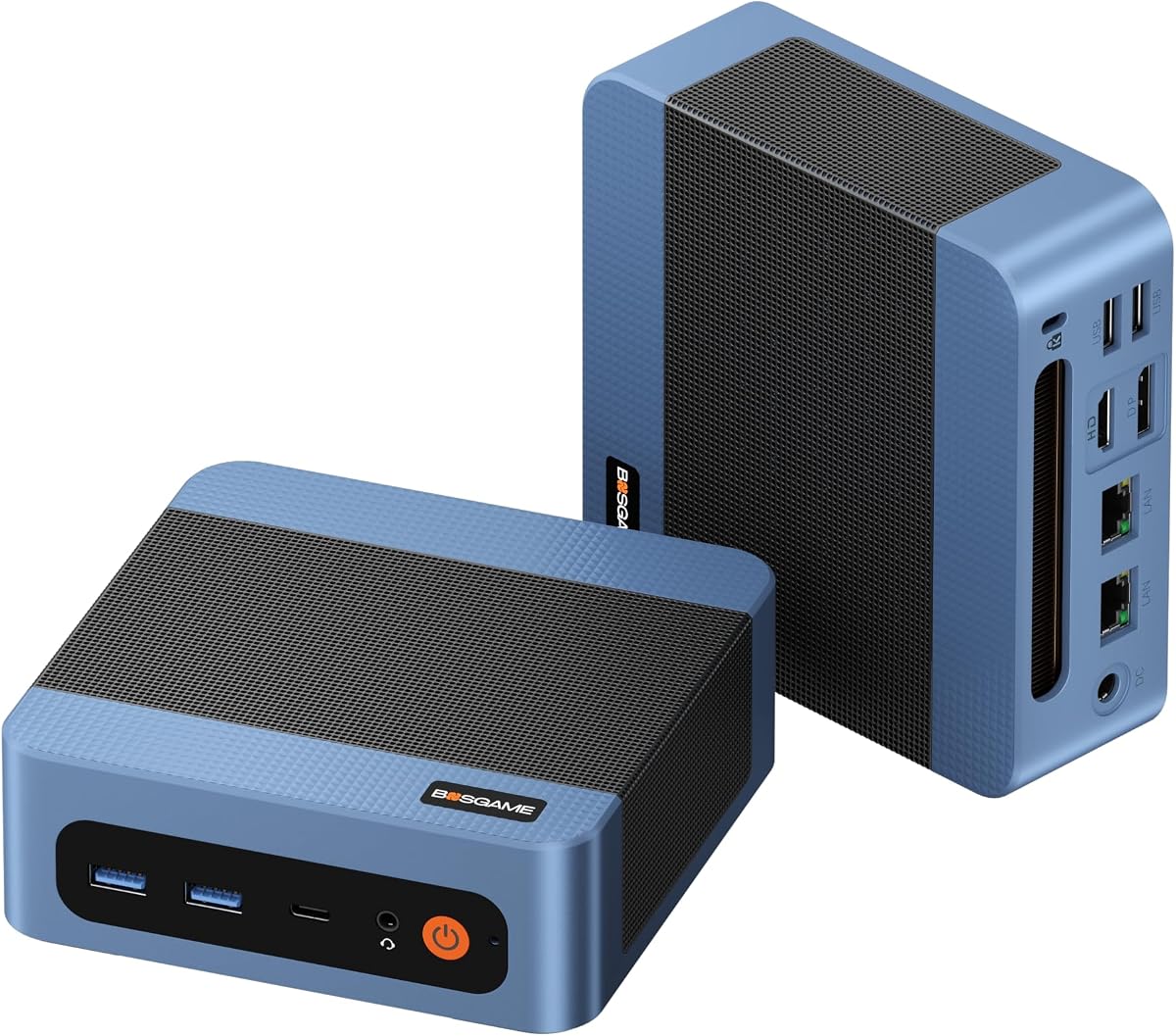


The BOSGAME E5 Mini PC combines a Ryzen 3 5300U processor, 8GB of DDR4 memory, and a 256GB M.2 SSD in a compact design aimed squarely at practical Homelab use. Its 4.6 customer rating reflects a well-regarded balance of capability, particularly for users who value network connectivity over raw gaming performance. The 4-core, 8-thread processor supplies enough capability for standard productivity, virtual machines, and background network services when the system is configured appropriately.
We may earn a commission when you buy through this link, at no additional cost to you.
Its strongest homelab-specific feature is the pair of Realtek RTL8125 2.5GbE RJ45 ports. These allow the E5 to serve as the foundation for a high-speed router, pfSense or OPNsense firewall, network-attached storage system, or virtual-machine host without requiring an immediate USB network adapter. Two SODIMM slots support memory expansion up to 64GB, while a second M.2 2280 NVMe PCIe 3.0 position permits additional storage to be added without removing the original system drive.
The E5 also supports three independent 4K displays at 60Hz through HDMI 2.0, DisplayPort, and full-function USB-C. That makes it useful not only as a background server but also as a desktop for dashboards, network monitoring, documentation, and side-by-side system administration. Its optimized fan, copper heat pipes, and compact footprint are particularly appropriate for a cabinet, shelf, or monitor-mounted installation. The main limitation is the included 8GB memory, which is modest for several simultaneous virtual machines.
This is a strong recommendation for budget-conscious homelab builders who need capable networking and useful expansion without moving to a premium platform. Adding memory and a second NVMe drive during setup would produce a much more capable long-term system. It is less appropriate for demanding 3D rendering, intensive 3A gaming, or heavily saturated virtual-machine environments, but for common firewall, NAS, and service workloads, the E5 offers one of the strongest feature combinations in this guide.
A particularly attractive characteristic is how evenly the E5 balances its major components. It does not rely on an unusually slow processor to remain compact, and it avoids equipping the system with only one basic Ethernet port when a dual-port network appliance is such a common Homelab requirement. The result is a machine that can transition between an ordinary desktop and a dedicated infrastructure node as a user's requirements develop.
For a first Homelab system, the E5 is easier to justify than a specialized bare-metal appliance because it offers general-purpose computing alongside networking. The additional storage slot, generous memory ceiling, and three-display support make it particularly flexible. Its 256GB starting drive is adequate for an operating system and essential services, although users planning to retain large media libraries or multiple machine images will want additional storage.
Dual 2.5GbE networking is the E5's defining advantage. It simplifies router, firewall, and segmented-network experiments while offering more throughput headroom than the single Gigabit Ethernet connection found on many entry-level mini PCs.
The 64GB memory ceiling and secondary NVMe slot mean the initial 8GB configuration need not define the machine's lifespan. Adding capacity as services become more demanding can be a practical way to preserve the system's usefulness without replacing it.
We may earn a commission when you buy through this link, at no additional cost to you.
The BOSGAME E5 Plus is a Ryzen 3 5400U-based mini PC with 8GB of DDR4 memory and a 256GB SATA M.2 drive. Its 4.3 rating reflects a capable configuration that is especially relevant to users planning a router, virtualization platform, or private NAS. The 4-core, 8-thread processor can reach 4.0GHz, giving it a useful balance of responsive general computing and manageable power consumption for a compact home server.
We may earn a commission when you buy through this link, at no additional cost to you.
Like the standard E5, this system carries two RTL8125 2.5GbE Ethernet controllers. That gives users immediate options for firewall deployment, dual-LAN routing, virtual-machine networking, and direct storage transfers. Its two SODIMM slots allow memory expansion up to 64GB, and the additional M.2 2280 NVMe PCIe 3.0 x4 slot offers a clear path toward faster secondary storage. The included 256GB SATA SSD remains practical for an operating system and core applications.
The E5 Plus includes Wi-Fi 5 and Bluetooth 5.0, along with HDMI 2.0, DisplayPort, and full-function USB-C display outputs. All three can support 4K at 60Hz, making the machine suitable for an administration dashboard or a multi-screen workspace. Two front USB 3.2 Gen 2 Type-A ports provide 10Gbps transfer capability, while rear USB 2.0 ports and a 3.5mm audio jack cover more conventional accessories.
This model makes more sense than the less expensive E5 for builders who expect sustained productivity, somewhat heavier virtual-machine use, or a desire for a preinstalled Windows 11 Pro environment. It also supports Ubuntu and other Linux distributions. The trade-offs are the modest amount of included RAM and the use of a SATA drive in the base configuration, so buyers seeking the strongest possible foundation should plan to install a larger, faster NVMe drive and additional memory.
Its appeal lies in a clear upgrade path. Rather than locking buyers into a single-purpose appliance, the E5 Plus offers a general-purpose operating environment with fast networking and storage provisions. This makes it a practical center of a Homelab that may later include containers, a file server, DNS filtering, monitoring, and other common self-hosted services.
The platform's four-core design remains appropriate for many Homelab duties, although it will not satisfy users expecting the thread count of a six- or eight-core processor. For users who prioritize networking, familiar Windows support, and a clean upgrade path over maximum processing capacity, the E5 Plus is a flexible and convincing choice.
The two 2.5GbE ports make the E5 Plus particularly well suited to routing, firewall services, and storage transfers. They also provide a straightforward way to separate management and service traffic without immediately buying additional networking hardware.
Although the included 256GB drive uses SATA, the vacant PCIe 3.0 x4 M.2 slot permits a much faster drive later. Users can keep the system drive separate while placing VMs, databases, or large application libraries on NVMe storage.
We may earn a commission when you buy through this link, at no additional cost to you.
The Getorli Ryzen 5 7430U stands out with six CPU cores, 12 threads, 16GB of DDR4 memory, and a 512GB solid-state drive. Its 4.5 customer rating and balanced specifications make it the strongest all-around choice for a homelab that may combine desktop access, virtual machines, and network services. The processor reaches up to 4.3GHz, providing more parallel capacity than the four-core alternatives in this list.
We may earn a commission when you buy through this link, at no additional cost to you.
Dual 2.5GbE wired networking makes the system particularly attractive for virtualized routers, firewalls, labs, and storage tasks. Wi-Fi 6 and Bluetooth 5.3 add modern wireless capabilities, although the 2.5GbE ports remain the important feature for sustained infrastructure use. The included 16GB memory is a more useful starting point for lightweight virtualization than 8GB, while the 512GB drive provides more room for applications, containers, logs, and a small collection of virtual-machine images.
Expansion is another strength. Memory can be increased as high as 64GB, and solid-state storage can be expanded as high as 4TB through reserved expansion slots. The aluminum alloy shell and honeycomb ventilation openings support heat dissipation and sustained operation. HDMI, DisplayPort 1.2, and USB Type-C enable triple 4K display output, giving administrators a convenient way to view dashboards, logs, and multiple monitoring windows.
The principal trade-off is that the Ryzen 5 7430U belongs to an older generation of mobile processors. It is not a match for the Ryzen 7 6800H in the P6 Neo for demanding compilation, intensive virtualization, or graphics-heavy tasks. Even so, its 6-core design gives it more breathing room for several background services than the less expensive four-core systems. The included memory and larger drive also reduce the amount of immediate upgrading required.
This is the model to choose when a homelab is a serious personal project but not necessarily a dedicated enterprise environment. It can serve as a general-purpose workstation, a compact Proxmox or virtualization host, a monitoring terminal, or a Linux-based service machine. Its dual fast Ethernet ports and expandable memory are especially valuable for users who want one small system to fulfill several roles.
Among the products reviewed, the Getorli has the most convincing combination of core count, included memory, storage capacity, fast networking, modern wireless support, and expansion potential. It therefore stands as the Editor's Choice for readers seeking a mini PC that can comfortably grow beyond a single experimental service.
The six-core, 12-thread Ryzen 5 7430U gives virtual machines and parallel background tasks more scheduling capacity than four-core alternatives. That extra headroom is particularly helpful when monitoring, routing, and ordinary desktop tasks share the same machine.
Starting with 16GB of RAM and a 512GB SSD materially improves the first-day experience for virtual-machine experimentation. Expandable memory and storage make it easier to increase capacity as the number and intensity of hosted services grow.
We may earn a commission when you buy through this link, at no additional cost to you.
The Pentium N3700 mini PC is built around a 6W Intel processor with four cores and four threads, accompanied by 8GB of RAM and a 128GB SSD. Its 3.7 rating is the lowest in this group, but that figure should be interpreted in context: this is a highly compact, low-power system intended for lightweight services rather than a high-performance virtual-machine host. It measures just 0.47L and weighs approximately 0.28kg.
We may earn a commission when you buy through this link, at no additional cost to you.
For a homelab, the processor's low thermal output and quiet cooling system are useful for always-on operation. Published specifications position it for virtual machines, NAS functions, Docker containers, and multiple background services, although actual performance will depend on the particular workload and available memory. Intel HD Graphics with hardware H.264 and H.265 decoding also makes it a credible choice for lightweight media tasks and dual 4K display output.
The main limitation is its single Gigabit Ethernet port. Unlike the dual-network systems elsewhere in the guide, it cannot directly provide two wired network segments without an additional adapter or switch. It does include dual-band 802.11ac Wi-Fi and Bluetooth 4.2, two HDMI connections, two USB 3.1 ports, two USB 2.0 ports, and two USB Type-C connections. Storage can be expanded as high as 2TB.
The strength of this system is its efficient footprint. It can be mounted behind a monitor with the included VESA bracket, tucked into a cabinet, or carried between locations. That physical convenience makes it attractive for a small homelab where shelf space and power draw matter. The 128GB starting drive and 8GB memory, however, are likely to require upgrades for meaningful storage-intensive or multi-service use.
Choose this model for lightweight monitoring, a simple file or media service, a small test environment, or a secondary always-on node where minimal power use matters. It is not the right choice for a high-throughput firewall with multiple 2.5GbE links, extensive virtualization, or several demanding containers. Within those limits, its compactness and efficient operation are compelling.
The product's low rating compared with the other systems reinforces the need to match hardware to expectations. This is not a performance-first mini PC. Its value lies in doing a modest set of jobs in a tiny, quiet, and energy-conscious enclosure, making it most valuable as a focused node rather than the central hub of an expanding lab.
The 0.47L chassis and 6W processor make this system especially useful where space, acoustics, and electricity use are priorities. It can be mounted out of sight and left to perform focused background functions.
With one Gigabit Ethernet connection, the mini PC works best as a single-purpose client or lightweight server. Users planning router duties or segmented networks should prioritize a system with two Ethernet ports.
We may earn a commission when you buy through this link, at no additional cost to you.
The KAMRUI Ryzen 5 3501U pairs an older but capable four-core, eight-thread AMD processor with 8GB of DDR4 memory and a 256GB SSD. Its 4.6 rating makes it one of the strongest-rated products in this roundup, and the inclusion of two Gigabit Ethernet ports gives it immediate relevance to home routers, firewalls, NAS projects, and dual-home-network experiments.
We may earn a commission when you buy through this link, at no additional cost to you.
Radeon Vega 8 integrated graphics distinguish it from basic mini PCs with more limited integrated graphics. The published specifications describe smooth 4K video playback, responsive window animations, and suitability for light esports titles, media previews, and graphics-heavy web applications. This makes the KAMRUI more versatile as an everyday desktop than a conventional server-only appliance, particularly for users who also need monitoring screens or local media applications.
Two SO-DIMM slots support memory expansion up to 32GB, and dual M.2 2280 positions allow solid-state storage expansion up to 4TB. These are meaningful benefits for virtual machines, containers, media libraries, and network services. The system also offers triple 4K output through HDMI 2.0, DisplayPort 1.4, and a full-featured USB-C port that accepts 65W power delivery. That last feature can simplify a one-cable desktop arrangement with a compatible display.
The trade-off is that its Ethernet ports operate at 1Gbps rather than the 2.5GbE standard found on several competitors. For many home networks, that is still perfectly adequate, particularly when the relevant switch and storage devices do not support faster Ethernet. Its Ryzen 5 3501U processor is also from an older generation and will not match the Getorli's six-core design or the P6 Neo's Ryzen 7 performance.
The cooling system uses a 28W design with dual copper heat pipes and a low-noise fan, making the computer suitable for continuous operation beside a desk or in a homelab cabinet. The combination of dual wired networking, expandable storage, useful graphics, and quiet cooling makes this an approachable choice for builders who want one system to handle both infrastructure and light desktop duties.
For users creating a router, testing network services, or running a small mixed workload, the KAMRUI is easier to recommend than many basic office mini PCs. It is especially appealing when two wired connections are required but 2.5GbE throughput is unnecessary. As with the other 8GB configurations, adding memory at installation would help it remain comfortable under heavier multitasking.
The two 1Gbps RJ45 ports are enough to build a basic segmented network, connect a firewall to a switch, or attach a server to separate management and data paths. They make the system less dependent on USB network adapters.
Radeon Vega 8 gives the KAMRUI more headroom for media playback and light graphical applications than a basic office-oriented mini PC. Triple display support also helps when dashboards and service status pages need to remain visible together.
We may earn a commission when you buy through this link, at no additional cost to you.
The BOSGAME E5 11 Pro combines a Ryzen 3 5300U with 8GB of dual-channel DDR4 memory, a 256GB M.2 2280 SSD, and a preinstalled Windows 11 Pro system. Its 4.4 rating reflects a system that is ready for both ordinary business computing and network-oriented Homelab projects. The processor delivers four cores and eight threads with boost speeds up to 3.8GHz.
We may earn a commission when you buy through this link, at no additional cost to you.
The system's defining infrastructure feature is again its pair of 2.5GbE Ethernet ports. These make it suitable for software routers, pfSense or OPNsense firewalls, local NAS configurations, and homelab services. An additional empty M.2 2280 NVMe PCIe 3.0 slot allows a second high-speed drive, with the supplied listing identifying capacity of up to an additional 2TB. This enables the operating system and larger data workloads to reside on separate devices.
Display connectivity is unusually versatile for an entry-oriented system. HDMI 2.0, DisplayPort, and full-function USB-C each support 4K at 60Hz, allowing three independent monitors. The front USB-C port also handles data, display output, and PD 3.0 power delivery. Two front USB 3.2 Gen 2 Type-A ports, two rear USB 2.0 ports, and a 3.5mm combo audio jack provide a practical selection of peripherals.
Its Windows 11 Pro installation is the main convenience for users who want a familiar administrative environment without immediately arranging an operating system. Ubuntu is also supported. At the same time, the included 8GB memory can become a bottleneck for heavier virtualization, and the four-core processor is less generous than the Getorli's six-core option. A VESA mount and an under-25dB cooling design are helpful for quiet, out-of-sight installation.
This is a good fit for a homelab that requires a Windows base for management software, remote access, or mixed commercial and experimental workloads. It also works for users who want a straightforward local NAS or firewall platform but do not need top-end processing power. Its strongest selling points are the fast dual Ethernet, clean operating-system setup, and accessible storage expansion.
Compared with the base BOSGAME E5, this model is differentiated most clearly by its Windows 11 Pro environment and documented storage and noise details. The core platform remains similar, which makes it easier to recommend to a buyer who prioritizes immediate usability and a tidy software setup over maximum performance.
Windows 11 Pro is preinstalled and described as clean and activated, reducing the work required before a homelab operator can begin configuring the machine. Linux remains available for users whose preferred services run more naturally in an open-source environment.
The vacant NVMe slot makes it possible to keep the 256GB operating-system drive intact while adding storage for VMs, containers, media, or backups. This separation is especially convenient once a homelab begins handling more than one project.
We may earn a commission when you buy through this link, at no additional cost to you.
The 16GB BOSGAME E5 is a more immediately usable version of the E5 platform, with twice the included memory and a faster 512GB M.2 2280 NVMe PCIe 3.0 SSD. Its 4.6 rating indicates strong customer reception, and the configuration is particularly appealing to homelab builders who want room for containers, lightweight virtual machines, or several background applications without performing memory upgrades immediately.
We may earn a commission when you buy through this link, at no additional cost to you.
Ryzen 3 5300U provides four cores and eight threads with boost capability up to 3.8GHz. That level of performance is suitable for standard business software, online classes, spreadsheets, and network server applications. The supplied information specifically cautions against expecting demanding professional 3D rendering or intensive 3A gaming performance, which helps set realistic expectations for a general-purpose Homelab node.
Dual 2.5GbE networking remains one of the strongest features. Realtek RTL8125 controllers allow the mini PC to be used in router, firewall, NAS, or virtual-machine arrangements with fast wired connectivity. Memory can be expanded to 64GB through the dual SODIMM design, and a second M.2 2280 NVMe PCIe 3.0 slot provides a straightforward storage upgrade without removing the original system drive.
Triple 4K display output at 60Hz through HDMI 2.0, DisplayPort, and full-function USB-C gives the system more value as a desktop. A front USB-C port handles data, video, and PD 3.0 power delivery, while copper heat pipes and an optimized cooling fan support quiet operation. The main drawback is that the platform remains based on a four-core processor, so users running many demanding VMs simultaneously should look toward the six-core Getorli or the Ryzen 7-based P6 Neo.
The best fit is a homelab enthusiast who values fast networking, substantial included memory, and NVMe storage more than maximum core count. It can serve as a file server, network monitoring station, desktop with multiple screens, or general-purpose virtualization machine. Its 16GB configuration gives the system a more comfortable margin for mixed workloads than the 8GB E5.
This model also demonstrates how meaningful configuration differences can be within one product family. The same chassis, networking, and expansion approach appears across several BOSGAME E5 listings, but larger memory and storage can make one version substantially more convenient for a growing lab. Users should compare the included components carefully rather than judging only by the family name.
Sixteen gigabytes of DDR4 is a meaningful advantage for users running containers, several lightweight VMs, and ordinary desktop services together. It reduces the likelihood that the first expansion purchase will be required immediately.
The 512GB PCIe 3.0 NVMe drive provides a responsive operating system and application platform while leaving the secondary M.2 slot available for bulk storage, separate virtual-machine images, or a dedicated data drive.
We may earn a commission when you buy through this link, at no additional cost to you.
The C3 mini PC uses an Intel Core i3-5005U, providing two cores and four threads alongside 8GB of RAM and a 512GB M.2 2280 SSD. Its 4.2 rating suggests a dependable low-power general-purpose computer, but the older processor is the critical consideration. It is most convincing for digital signage, thin-client use, media serving, and monitoring rather than virtual-machine-heavy homelab work.
We may earn a commission when you buy through this link, at no additional cost to you.
Storage is its most notable strength. The included 512GB drive is generous for a compact system, while an additional M.2 SATA or NVMe position can expand capacity by as high as 2TB. A further 2.5-inch SATA SSD or HDD bay with cable supports another 2TB, producing a stated total potential of 4TB. This makes the C3 useful for media libraries, local archives, and backup-focused roles where storage matters more than CPU throughput.
The 15W processor is designed around steady operation. The published specifications position the C3 for continuous commercial and industrial use, including signage, thin clients, home media servers, POS displays, and monitoring terminals. Its optimized cooling fan is designed to remain quiet during extended sessions, and the compact chassis weighs less than 1kg, making it easy to deploy on a shelf or beside a display.
Networking consists of one Gigabit Ethernet port, Wi-Fi 5, and Bluetooth 5.0. That is adequate for a standard server or management client, but it lacks the dual-port convenience of the stronger homelab picks. Two HDMI outputs support displays up to 2560 by 1600 at 60Hz, while front USB 3.2 Gen 1 and USB-C connections support faster peripherals. The USB-C port is listed as data only rather than a display or power-delivery connection.
This recommendation fits buyers who need a dependable, quiet node with substantial storage but modest compute requirements. It can handle a lightweight file server, media endpoint, or status display without taking up much room. It is less suitable for multiple simultaneous VMs, intensive container orchestration, or routing tasks where two physical Ethernet connections are important.
The machine's value rests on combining a useful starting drive with multiple future storage paths in a low-power enclosure. While the Core i3-5005U is dated, that limitation is acceptable for workloads centered on access, playback, monitoring, and storage rather than compute-intensive applications.
The 512GB starting drive, additional M.2 support, and 2.5-inch expansion bay make the C3 unusually flexible for media and archive workloads. Users can add capacity without replacing the original system disk.
A 15W processor and optimized cooling are well suited to always-on media, signage, and monitoring roles. The compact chassis can be placed close to the display or within an unobtrusive cabinet.
We may earn a commission when you buy through this link, at no additional cost to you.
The BOSGAME P6 Neo is the premium performance choice in this guide, using a Ryzen 7 6800H with eight cores, 16 threads, a 3.3GHz base clock, and boost speeds up to 4.7GHz. Its 4.3 rating reflects a capable high-end compact system, and the processing headroom makes it appropriate for users who want to run demanding containers, virtual machines, development workloads, or a mini PC that doubles as a capable everyday computer.
We may earn a commission when you buy through this link, at no additional cost to you.
The included 24GB of LPDDR5X 4800MT/s memory provides a generous operating margin, while the 1TB M.2 2280 NVMe PCIe 4.0 x4 drive offers fast startup and file access. A second M.2 2280 SSD position supports additional storage. One important limitation is that the onboard LPDDR5X memory cannot be upgraded, so buyers must choose the included capacity carefully if their workload will grow substantially.
Radeon 680M integrated graphics operate at up to 2200MHz and can drive three 4K displays at 60Hz through HDMI 2.0, DisplayPort, and full-function USB-C. This provides enough graphics capability for streaming, creative applications, and popular games without a discrete GPU. The dual-fan cooling system is designed to remove heat while keeping operating noise under control, which is important given the higher-performance processor.
Networking includes two Gigabit Ethernet ports, an AX210 wireless module with Wi-Fi 6E and Bluetooth 5.3, three USB 3.2 Gen 2 Type-A ports, one USB 2.0 port, a full-function USB-C connection, and a 3.5mm audio jack. The wired ports are limited to 1Gbps, however, meaning this premium system does not offer the 2.5GbE connectivity found on less expensive BOSGAME E5 models. That limitation matters when storage is spread across a high-speed network.
Windows 11 Pro is preinstalled, Ubuntu is supported, and a VESA bracket is included. The system is therefore convenient for users who want immediate access while retaining the option to deploy Linux for a dedicated server role. The same enclosure can serve as a development workstation, emulation host, high-load service node, or premium everyday desktop.
The P6 Neo is best recommended to homelab users whose workloads justify premium processing and abundant included memory. It is the strongest option here for compiling, multiple demanding VMs, and advanced container environments. Users whose priority is fast network transport rather than CPU performance may obtain a better balanced value from a dual-2.5GbE E5 configuration.
The Ryzen 7 6800H offers the largest processing capacity in this roundup. Its eight cores and 16 threads provide better headroom for concurrent VMs, container builds, and demanding development tasks than the four- and six-core alternatives.
Twenty-four gigabytes of LPDDR5X and a 1TB PCIe 4.0 SSD create a high-capacity starting point. The tradeoff is that the memory is onboard and cannot be expanded, so users should plan around its fixed capacity.
We may earn a commission when you buy through this link, at no additional cost to you.
The Bmax B1 Plus pairs an Intel Celeron J3355 processor with 6GB of LPDDR3 memory and 128GB of onboard eMMC storage. Its 4.2 rating places it among the more positively rated entry-level options, although its specifications place it firmly in the lightweight category. It is most appropriate for basic office tasks, web access, lightweight services, and small always-on nodes that do not demand intensive processing.
We may earn a commission when you buy through this link, at no additional cost to you.
The processor offers four cores and four threads with speeds up to 2.5GHz. Windows 11 Home is preinstalled, and Linux and Ubuntu are supported, allowing the system to transition into a simple server role. The onboard eMMC provides fast boot-ups, while the dual M.2 design—one SATA and one NVMe—allows storage expansion as high as 2TB without replacing the original internal storage.
Its physical design is exceptionally small at 4.2 by 4.1 by 1.4 inches and approximately 0.49 pounds. The included VESA bracket permits installation behind a monitor, and the smart silent fan and heat-sink system are designed for reliable continuous operation. Dual HDMI outputs support 4K at 60Hz, which is useful for a two-screen desktop, digital display, or lightweight monitoring arrangement.
Connectivity includes dual-band Wi-Fi, Bluetooth 5.0, and one Gigabit Ethernet port. The lack of a second Ethernet port limits its usefulness as a dedicated router or segmented-network node without an adapter. The fixed 6GB memory is also a substantial constraint for virtualization and container experimentation, and the Celeron's relatively modest performance does not encourage heavy parallel workloads.
The F9 one-click restore feature is a practical advantage for novice or nontechnical users who want a simple recovery path. The machine can serve as a compact client, lightweight media endpoint, inexpensive access terminal, or introductory Linux learning platform. Those applications reward its small size while remaining within the limits of its processor and memory.
This Bmax is best for users seeking the smallest practical general-purpose system rather than a scalable infrastructure platform. It can be introduced into a homelab as a peripheral endpoint, but it is not the strongest foundation for a firewall, NAS with multiple users, or a multi-VM host. Adding an SSD and using it for a focused task would make better use of its design.
The Bmax's tiny footprint and low weight make it easy to place behind a display, inside a cabinet, or in a location where a conventional mini PC would be inconvenient. VESA mounting helps keep the workspace clean.
The SATA and NVMe M.2 positions allow the compact onboard storage to remain intact while more space is added. This is useful for a lightweight Linux installation with additional files, logs, or locally hosted content.
We may earn a commission when you buy through this link, at no additional cost to you.
A useful Homelab mini PC should fit the intended services, provide reliable connectivity, and have enough room to grow. Processor cores, memory, network speed, storage expansion, cooling, and physical placement should be evaluated before making a choice.
Processor selection should begin with the number of services expected to run simultaneously. A four-core chip can handle basic containers, file sharing, lightweight routing, and a modest virtual-machine environment, while six cores provide more comfortable scheduling when several guests or background tasks are active. The eight-core Ryzen 7 6800H in the P6 Neo offers the greatest headroom for compilation, advanced containers, and more demanding virtual machines, although the older processors in this guide remain appropriate for focused roles. Users should also consider whether occasional CPU-intensive tasks will coexist with always-on services, because a faster processor improves responsiveness but can consume more power than a deliberately modest system.
Ethernet ports can determine which Homelab projects are practical. Two ports allow a system to sit between a modem and switch, operate as a firewall, link separate network segments, or connect directly to storage without an immediate USB network adapter. The BOSGAME E5 family and Getorli use dual 2.5GbE connections, which also provide useful throughput headroom for large file transfers and virtualized networks. Systems with one Gigabit port are still suitable for conventional servers and clients, but they may require extra hardware for multi-interface routing. A router with only one Ethernet port can often be managed through a switch, but two integrated ports generally produce a simpler and more flexible installation.
Memory is often the first hardware limit encountered in a growing Homelab. Eight gigabytes is reasonable for a firewall, a light file server, or a handful of basic containers, but 16GB is more comfortable for several lightweight VMs and 24GB is preferable for a broader mixed workload. The E5 and Getorli systems offer paths to 64GB, while the KAMRUI supports up to 32GB. The C3 lists expansion up to 32GB, and the Bmax's 6GB LPDDR3 configuration is fixed. The P6 Neo's 24GB LPDDR5X memory is fast and generous but cannot be upgraded, so long-term plans should be checked before purchase rather than after installation.
Storage requirements depend on whether the system will host operating systems, application data, media, backups, or virtual-machine images. A 128GB drive is workable for a stripped-down Linux node, while 256GB suits a general-purpose installation and 512GB is more comfortable for multiple services. Empty M.2 slots are especially valuable because they allow the system disk to remain in place while users add separate data or VM storage. The C3 goes further with both an additional M.2 position and a 2.5-inch bay, while the Bmax supports SATA and NVMe M.2 drives. Users should also account for drive interface speed, cooling, and whether their planned software supports the proposed storage layout.
Display support matters for homelabs that double as workstations. Triple 4K output can be invaluable for service dashboards, logs, monitoring graphs, and side-by-side administration, and most Ryzen-based picks provide three compatible outputs. Systems limited to two displays can still be useful when one screen is reserved for a dashboard and the other for administration. HDMI-only systems may be adequate for a headless server, but a mix of HDMI, DisplayPort, and USB-C provides more flexibility in choosing monitors. Full-function USB-C is particularly valuable when it supports display output and power delivery, potentially allowing a compatible display to handle video and power with one cable. The actual display role should be considered before assigning a premium to extra outputs.
A homelab often runs beside a desk, inside a cabinet, or near audio equipment, so cooling and noise should influence the decision. The Ryzen 3 5300U, Ryzen 3 5400U, Ryzen 5 3501U, and Ryzen 5 7430U systems all use compact cooling arrangements with copper heat pipes, while the P6 Neo uses dual fans for its higher-performance processor. The Pentium N3700 is designed around a 6W processor and a 0.47L chassis, and the Bmax is even smaller at 4.2 by 4.1 by 1.4 inches. VESA mounts can help place a system behind a monitor, but enclosure airflow must remain unobstructed. A quiet system is valuable in a living space, yet adequate cooling remains essential for stable long-term operation.
Operating-system support can simplify a first homelab build. The E5 Plus and E5 11 Pro include Windows 11 Pro, the P6 Neo also has Windows 11 Pro, and the Bmax includes Windows 11 Home. Several systems support Ubuntu or other Linux distributions, which may be more appropriate for containers, DNS, file serving, and virtual-machine management. Users should confirm the exact operating-system edition and whether installation media, drivers, and initial configuration are included. Recovery features are worth noting for less experienced administrators: the Bmax provides a one-click restore function, while support terms and warranty periods vary across the range.
Begin by deciding whether the mini PC will act as a router, server, workstation, or a combination of roles. Confirm that its Ethernet ports, memory, and storage fit the intended service, then install the required operating system and apply all available updates. For network functions, update the router or firewall firmware, configure the wired connections according to the desired topology, and change default administrative credentials before exposing any management interface.
Choose a stable surface or VESA-compatible monitor location with adequate ventilation. Avoid stacking the computer beneath papers, inside a fully closed cabinet, or beside equipment that blocks its air vents. Connect only the power and network cables required for the role, use high-quality Ethernet cables for reliable links, and label ports so a later reboot or hardware change does not disrupt the entire network.
Monitor temperature, storage health, memory use, and service status through the operating system or your management platform. Keep the system updated, back up important configuration files, and verify that any virtualization host stores backups somewhere other than the same storage device. Periodic restarts can help clear minor service issues, but persistent applications should be configured to restart automatically. If performance declines, check available memory, storage utilization, and network congestion before assuming the processor is inadequate.
A suitable mini PC should provide reliable networking, enough memory for the intended services, and a processor that can handle the expected workload. Dual Ethernet ports are especially useful for routing and firewall roles, while memory and storage expansion make it easier to grow a lab over time. Quiet cooling and VESA mounting can also improve its practicality in a living space.
Eight gigabytes is sufficient for a lightweight firewall, simple file server, a few basic containers, or one modest virtual machine. It becomes restrictive when multiple VMs, databases, development tools, and ordinary desktop tasks share the system. A 16GB configuration offers a more comfortable starting point, while 24GB or more suits broader virtualization and mixed workloads.
Two ports allow the mini PC to sit directly between a network connection and another switch or device, making it easier to build a firewall, router, segmented network, or dedicated storage node. Systems with 2.5GbE ports also offer more throughput headroom than single Gigabit Ethernet models, although actual performance depends on the connected switches, storage, and cabling.
Windows is convenient when you need familiar administration tools, remote desktop software, or a preinstalled Windows Pro environment. Linux is often preferred for containers, DNS, file sharing, and lightweight virtualization because of its flexibility and efficient resource use. Choose the operating system based on the software you intend to run rather than treating one platform as automatically better for every homelab.
Several models can run virtual machines, but processor cores and available memory are the deciding factors. The six-core Getorli with 16GB and the eight-core P6 Neo with 24GB provide the strongest balance for heavier experimentation, while the four-core models are better suited to a small number of lightweight guests. A dedicated NVMe drive can also prevent virtual-machine files from competing with the operating-system drive.
At least 256GB is advisable for a general-purpose system, with 512GB offering more room for applications, logs, containers, and virtual-machine images. Look for an unused M.2 slot so a second drive can be installed without replacing the system disk. Users planning extensive media, backups, or multiple virtual machines should size storage for both current needs and expected growth.
Many of the listed models are designed or marketed for continuous operation, with low-power processors, optimized cooling, and quiet fans. Even so, proper ventilation, stable power, firmware updates, and routine monitoring are important. A system intended for critical unattended services should receive more attention than a temporary experiment, including tested recovery procedures and regular configuration backups.
No. A more powerful processor adds capability for heavy virtualization, rapid compilation, and many concurrent services, but it may also consume more energy. A lower-powered four-core model can be a better fit for a simple firewall, media client, or lightweight file server. Match the hardware to the workload rather than choosing the fastest option for every role.
The BOSGAME E5 Mini PC stands out as the best-balanced budget choice because it combines fast dual 2.5GbE networking, expandable memory and storage, and three 4K display outputs at a modest specification level. The Getorli Ryzen 5 7430U is the Editor's Choice for buyers wanting more processing cores, 16GB of included memory, a 512GB drive, and modern Wi-Fi 6 connectivity.
For demanding virtual machines, development tasks, and heavier container workloads, the BOSGAME P6 Neo provides the strongest premium foundation with a Ryzen 7 6800H, 24GB of LPDDR5X, and 1TB PCIe 4.0 storage. Priority should be placed first on the number of Ethernet ports, followed by the expected memory requirement, processor workload, and storage expansion needs. Smaller systems remain useful for focused tasks, but they are not substitutes for a more capable core homelab node.
Specifications and availability can change, and current pricing should be checked before making a final decision. Buyers should also verify the exact configuration, included operating system, warranty, port layout, and upgrade limitations on the current listing. With those details confirmed, the right mini PC can provide a compact, efficient, and expandable home for self-hosted services.