
Logitech K400 Plus Wireless Touch TV Keyboard
4.4Editor score
Large integrated touchpad
Plug-and-play Unifying receiver
Up to 18-month battery life
Spill-resistant construction
This guide compares the best mini keyboard with touchpad options for portability, connectivity, backlighting, touchpad control, battery life, and device
A mini keyboard with touchpad combines compact tactile typing with remote-style navigation in one portable controller. The right model can make streaming boxes, smart TVs, tablets, phones, and presentations easier to control while reducing the need to hunt for on-screen keyboards or separate pointing devices.
The products in this guide were compared by examining their stated connection methods, touchpad capabilities, key layouts, backlighting, battery systems, portability, and supported devices. The list covers rechargeable dual-mode models, dedicated 2.4GHz controllers, and established wireless TV keyboards with different platform requirements.
Each review identifies the strongest use case and the compromises that potential buyers should understand before ordering. Ratings and product details reflect the supplied listings, while availability, bundled accessories, device support, and current pricing can change over time.
4.4Editor score

4.3Editor score

4.2Editor score
The comparison highlights connection flexibility, touchpad design, illumination, power source, portability, and device support. These differences matter more than physical size alone when choosing a controller for a television, streaming box, computer, tablet, or presentation.


This compact dual-mode keyboard earns a 4.2 rating by offering a broad feature set without moving beyond the basic mini-controller format. Its principal strengths are flexible connectivity, a rechargeable 600mAh battery, seven selectable backlight colors, multimedia hotkeys, and a touchpad that supports both left- and right-click functions plus multi-finger navigation.
We may earn a commission when you buy through this link, at no additional cost to you.
Connection switching is especially useful for people who move between different platforms. Bluetooth 5.0 can serve phones, tablets, compatible televisions, and other supported devices, while the 2.4GHz receiver provides a straightforward option for PCs and streaming hardware. The keyboard automatically connects when the USB dongle is inserted, and the listing notes that Bluetooth pairing is performed with FN+F3.
There are compatibility details to consider before buying. Bluetooth is listed for compatible devices, while Amazon Fire TV Stick use in 2.4GHz mode requires an OTG adapter. The battery specification also includes a realistic caveat: capacity can decrease after prolonged use. Despite those limitations, the combination of touchpad control, tactile typing, colored illumination, and automatic sleep makes this a versatile general-purpose option.
This is a sensible choice for users who want one compact controller for a television, Android TV box, projector, computer, or tablet. It is especially attractive if seven-color backlighting and the convenience of both wireless modes matter more than premium construction or exceptionally long standby time.
Bluetooth and 2.4GHz support broaden the list of compatible equipment. The 2.4GHz receiver is automatically recognized when inserted, while Bluetooth can be selected for supported mobile and smart-TV devices.
Seven adjustable backlight colors make keys easier to locate in low-light settings. Even illumination can support comfortable couch browsing without the complexity of a full-size illuminated keyboard.
We may earn a commission when you buy through this link, at no additional cost to you.
The K808 receives a 4.3 rating and stands out as a balanced all-purpose mini keyboard with touchpad. Its rotating 90-degree touchpad, separate mouse buttons, dual wireless modes, seven-color backlight, and integrated laser pointer give it more flexibility than a basic remote replacement.
We may earn a commission when you buy through this link, at no additional cost to you.
The rotating touchpad is the signature feature. Pressing FN+Alt changes its orientation, which can be useful when navigating a wide television interface or a vertically oriented phone screen. Dedicated left- and right-click buttons provide more familiar feedback than relying entirely on tap gestures. Bluetooth also avoids occupying a USB port, while the included 2.4GHz receiver supports PCs and televisions.
A built-in laser pointer adds genuine value for presentations, although buyers should follow local presentation rules and use the pointer responsibly. The compact body is listed at approximately 6 by 2.33 by 0.51 inches, and its rechargeable 600mAh battery, Type-C charging, and automatic sleep function support regular travel or home-theater use.
The K808 is a strong recommendation for anyone who wants more than basic cursor movement. It suits IT workers, presenters, travelers, smart-TV users, and Android TV Box owners who will benefit from typing, navigation, and device switching in one compact accessory.
The 90-degree rotation gives users a choice between vertical phone-style navigation and horizontal browsing. Dedicated mouse buttons support precise selection, reducing the need to memorize complicated gesture combinations.
The integrated laser pointer and dual-mode connectivity make the K808 relevant to presentations and temporary workstations. Its compact dimensions also make it easy to carry between locations.
We may earn a commission when you buy through this link, at no additional cost to you.
The Fosmon mini keyboard has a 4.0 rating and focuses on broad entertainment compatibility. It combines a compact QWERTY layout, integrated touchpad, backlighting, 2.4GHz wireless, and Bluetooth 5.2 in a controller designed for TVs, streaming platforms, computers, tablets, phones, and selected gaming devices.
We may earn a commission when you buy through this link, at no additional cost to you.
Its stated device range is extensive. The listing names Apple TV, Amazon Fire Stick, Google TV, PlayStation 4, PS4 Pro, PS5, HTPC and IPTV systems, VR headset boxes, iOS, Android, and Windows devices, plus Mac OS X 10.7 Lion and later. Wireless range is stated at approximately 33 feet, making it suitable for navigating a television from across a room.
The rechargeable battery is another strength, with up to 10 days of continuous working time and up to 50 days of standby stated by the manufacturer. LED indicators show charging and low-battery states, and the included USB-C cable simplifies charging. Compatibility remains the main caveat: Xbox Series systems are excluded, and users should confirm that a particular television supports Bluetooth.
This model is well suited to households with varied media devices or users who want one keyboard to cover computers, streaming boxes, tablets, and supported consoles. It is a practical choice when broad platform support matters more than the rotating touchpad and laser-pointer features found in some newer alternatives.
Bluetooth 5.2 and the 2.4GHz dongle support a wide range of computers and media devices. Always confirm Bluetooth capability on a particular smart television or streaming product before purchasing.
The stated working and standby durations are generous for intermittent couch use. USB-C charging and visible status indicators simplify routine maintenance.
We may earn a commission when you buy through this link, at no additional cost to you.
The Logitech K400 Plus has a 4.4 rating and focuses on a proven television-control experience. Rather than competing with compact models on touchpad rotation or laser-pointer functions, it emphasizes a large integrated touchpad, quiet keys, uncomplicated setup, and a battery life stated at up to 18 months.
We may earn a commission when you buy through this link, at no additional cost to you.
Its Logitech Unifying receiver makes initial installation straightforward: connect the receiver to an available USB port and use Logitech Options Software to adjust preferences. A wireless range of up to 33 feet provides ample reach from a sofa, while the full-size-style arrangement offers familiar navigation for Windows and Android interfaces.
Compatibility is narrower than with dual-mode products. The listed support covers Windows 7, Windows 8, Windows 10 and later, Android 7 or later, and Chrome OS. It does not offer Bluetooth, so it is best for a PC-connected television rather than a directly paired smart-TV operating system. The spill-resistant design adds practical durability for a living-room environment.
The K400 Plus is an excellent choice for users who want uncomplicated PC-based media control with minimal charging. Its long battery life, large touchpad, and straightforward setup make it particularly suitable for a home theater PC, although buyers needing Bluetooth should choose one of the dual-mode alternatives.
The 33-foot range allows users to control a PC-connected television from a couch. Wireless operation also removes the need to manage a separate keyboard and mouse during casual viewing.
With an on/off control and a stated battery life of up to 18 months, the keyboard suits occasional home-theater use. The spill-resistant design adds reassurance in shared living spaces.
We may earn a commission when you buy through this link, at no additional cost to you.
The Rii i4 carries a 4.4 rating and offers a straightforward combination of portability, dual-mode connectivity, and broad device support. It is designed as a small remote keyboard for home-theater systems, mobile devices, computers, tablets, and compatible streaming hardware.
We may earn a commission when you buy through this link, at no additional cost to you.
Bluetooth 4.0 allows the keyboard to pair without occupying a USB port, while the bundled 2.4GHz dongle supports a receiver-based connection. The listing identifies support for Fire Stick, Fire TV Box, Apple iOS devices, iPad Pro mini 4, iPhone X, Android tablets, Galaxy Tab, Windows, and Mac OS 6.0 and later.
Its rechargeable lithium-ion design avoids disposable battery replacements, and the pocket-sized form is intended for travel as well as couch control. The package includes the keyboard, a USB charging cable, and a 2.4GHz USB dongle. It lacks some of the more elaborate touchpad and lighting features found elsewhere in this list, but the core functions remain easy to appreciate.
The Rii i4 is a good fit for buyers who value a high customer rating and broad platform coverage at a compact size. It is particularly practical for traveling between mobile devices and television systems, provided the target devices support the relevant connection method.
Bluetooth and 2.4GHz modes let the keyboard move between mobile and receiver-based environments. The two approaches also provide a fallback when a particular device supports only one connection style.
A lightweight, pocket-sized body is easy to place in a carry-on or backpack. The rechargeable battery and included cable keep the controller ready for extended travel.
We may earn a commission when you buy through this link, at no additional cost to you.
This dual-mode mini keyboard has a 4.3 rating and an unusually rich feature set for its compact category. A rotating touchpad, adjustable sensitivity, gesture support, dedicated mouse buttons, seven-color backlight, and laser pointer make it suitable for both media navigation and presentations.
We may earn a commission when you buy through this link, at no additional cost to you.
The touchpad can rotate 90 degrees using FN+Alt, allowing users to match navigation to a television, laptop, or vertically held phone. FN+Spacebar changes the touchpad DPI, which helps tune cursor speed for different tasks. Windows, macOS, Android, smart TVs, and Linux are listed as compatible platforms, with Bluetooth and a stored USB receiver providing two connection paths.
Its slim body measures approximately 15.3 by 5.9 by 1.3 centimeters, making it easy to carry. The rechargeable battery uses USB-C charging and automatic sleep and wake functions. The seller recommends a complete two-hour initial charge. The in-box package includes the keyboard, USB receiver, USB-C cable, and guide.
This keyboard is a strong option for mobile users and presenters who value adaptable touchpad behavior. It is less appropriate for buyers who want the simplest possible setup, because the orientation, sensitivity, and connection controls depend on shortcut combinations.
Rotating the touchpad and changing its DPI addresses both screen orientation and cursor precision. These controls make the keyboard more useful across phones, tablets, and computers.
A built-in laser pointer supports presentations, while the slim profile and dual-mode connection suit travel. The included receiver and charging cable cover the primary accessories needed for setup.
We may earn a commission when you buy through this link, at no additional cost to you.
The K809 has a 4.2 rating and is the most premium-oriented option in this group. Its aluminum frame, modern Bluetooth 5.2 connection, 1000mAh battery, adjustable touchpad, and approximately smartphone-sized footprint distinguish it from basic plastic mini remotes.
We may earn a commission when you buy through this link, at no additional cost to you.
The construction is designed for portability without looking disposable. Dimensions are listed at 5.98 by 2.36 by 0.45 inches, and the touchpad supports three DPI levels using Ctrl+Space. Bluetooth 5.2 pairs with compatible iPads, Macs, and smartphones, while the included 2.4GHz receiver provides plug-and-play access for USB-only PCs and gaming devices.
RGB illumination cycles through colors with one-touch control, making keys easier to see in low-light conditions. The built-in 1000mAh lithium-ion battery is larger than the 600mAh cells used by several competitors, while automatic sleep and wake help conserve power. The package includes the keyboard, receiver, USB-C cable, and guide.
The K809 is a compelling recommendation for buyers who want a refined portable controller rather than the simplest media remote. Its premium frame, modern connectivity, larger battery, and sensitivity controls justify choosing it over similarly compact plastic designs, provided those extras match the intended use.
The aluminum frame gives the keyboard a more durable, upscale feel while maintaining a slim profile. Its compact dimensions are intended to fit easily into a bag without adding bulk.
Bluetooth 5.2, a 2.4GHz receiver, and a 1000mAh rechargeable battery provide a modern connectivity and endurance combination. USB-C charging and automatic sleep make ongoing use convenient.
We may earn a commission when you buy through this link, at no additional cost to you.
This mini keyboard earns a 4.3 rating by delivering the same broad mix of media controls, portability, and presentation features in an ultra-thin format. Its defining elements are dual-mode wireless connectivity, a rotating gesture touchpad, a seven-color backlight, and a built-in laser pointer.
We may earn a commission when you buy through this link, at no additional cost to you.
The touchpad rotates 90 degrees with FN+Alt and supports gestures alongside dedicated left- and right-click buttons. Its DPI can be adjusted through FN+Spacebar, making it possible to move between precise selection and faster media navigation. Bluetooth and 2.4GHz modes support Windows, macOS, Android, smart TVs, Linux, phones, tablets, and computers.
The listed dimensions are approximately 15.3 by 5.9 by 1.3 centimeters. USB-C recharges the 600mAh battery, while automatic sleep and wake preserve charge during intermittent use. A two-hour initial charge is recommended. The package includes a USB receiver, USB-C cable, and guide, providing the essentials for both connection styles.
This model is most attractive to users who want a pocketable controller for many kinds of screens. It is a sound all-around choice for travel, office, home, and presentations, though buyers who dislike shortcut-based adjustments may prefer a more traditional touchpad design.
The rotating touchpad helps align cursor movement with different screen shapes. Adjustable DPI offers another layer of control when switching from television menus to text entry.
A stored USB receiver, charging cable, and compact body make the keyboard easy to pack. Its dual connection methods also reduce dependence on a particular device's available ports.
We may earn a commission when you buy through this link, at no additional cost to you.
This dual-mode mini keyboard has a 4.4 rating and combines a 4.4-star customer reception with a broad control set. It is designed for smartphones, tablets, traditional PCs, projectors, smart TVs, classroom lectures, and portable everyday use.
We may earn a commission when you buy through this link, at no additional cost to you.
Bluetooth and 2.4GHz connections make it flexible across modern and receiver-based systems. The 90-degree rotating touchpad is activated with FN+Alt, while FN+Spacebar selects among three DPI levels. Windows, macOS, Android, and smart TVs are listed as supported, giving the keyboard a wider intended audience than a basic television-only model.
A built-in laser pointer supports presentations, and seven-color illumination makes the compact key layout easier to use in darkness. The receiver fits in the back of the keyboard, reducing the chance of leaving it behind. A 600mAh rechargeable battery, USB-C charging, and automatic sleep and wake support regular use, with a full two-hour initial charge recommended.
This is a well-rounded choice for teachers, presenters, travelers, and households seeking a single portable controller. The 4.4 rating is encouraging, but buyers should still confirm the exact interface requirements of their television, projector, or streaming device before ordering.
The integrated laser can point out details during talks, while tactile keys and a touchpad provide a more convenient way to navigate slides or settings. Check venue rules before using the pointer.
Keeping the USB receiver in a rear storage compartment simplifies packing and reduces lost-accessory problems. Dual-mode operation adds flexibility across computers and mobile devices.
We may earn a commission when you buy through this link, at no additional cost to you.
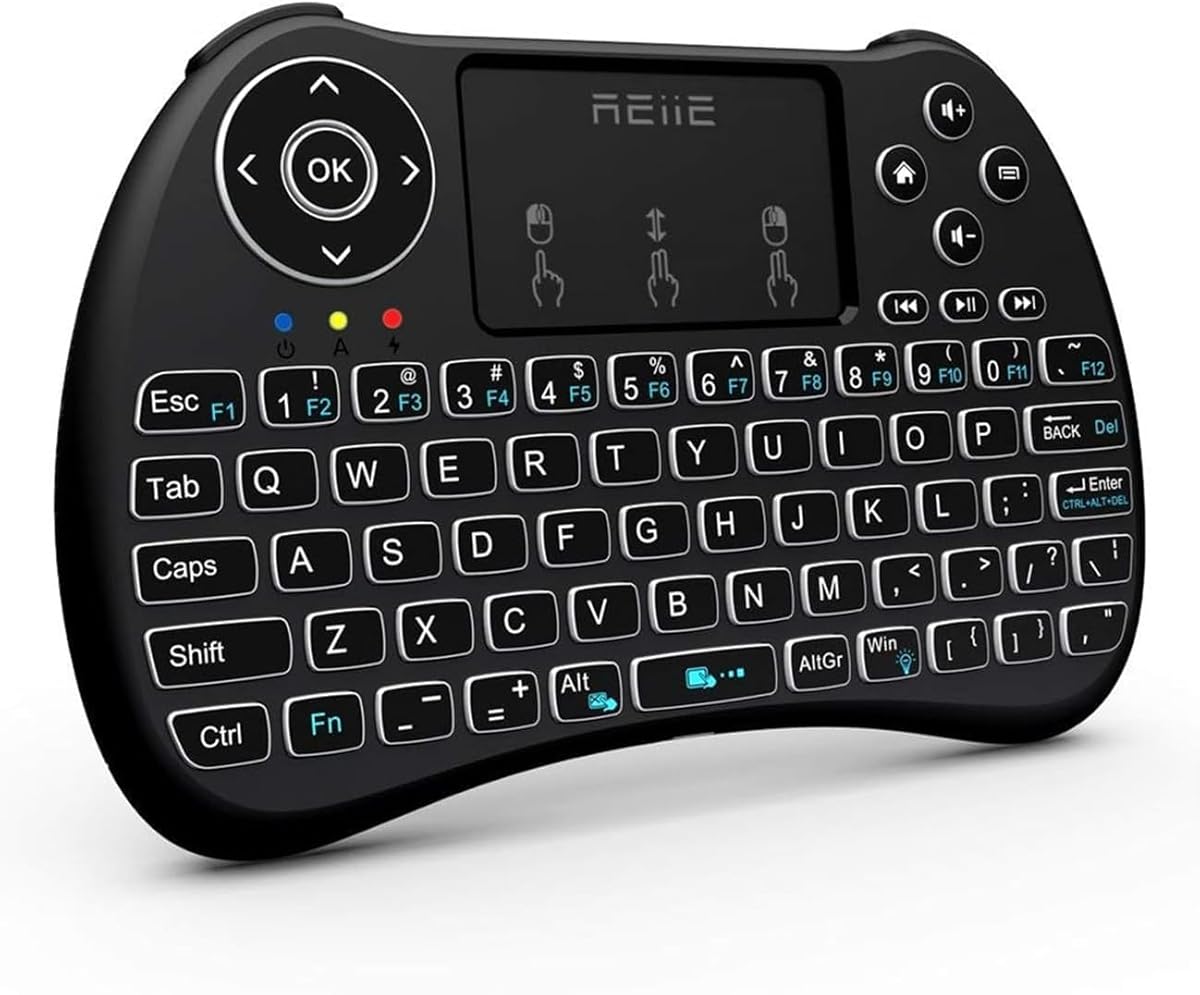
The REIIE H9+ has a 4.3 rating and serves buyers who prefer the simplicity of a dedicated 2.4GHz receiver. Its 73-key QWERTY layout, integrated touchpad, and soft white backlight provide the essential functions of a smart-TV remote without requiring a separate keyboard.
We may earn a commission when you buy through this link, at no additional cost to you.
The device uses a USB receiver and is intended for PCs, Raspberry Pi 2, tablets, smart TVs, Android TV boxes, and HTPC or IPTV systems. It supports Windows 7, 8, and 10 according to the listing. The compact design and plug-and-play receiver make setup direct for a system with an accessible USB port.
Touchpad navigation uses familiar gestures: a single-finger click functions as a left click, two-finger click functions as a right click, and a two-finger drag scrolls. The backlight is activated with FN+Win and uses a soft white design. The listing advises charging for one hour before first use because the battery is nearly empty for transportation and unstable pairing can occur when it is low.
The H9+ is best for users of a television or computer setup that already supports 2.4GHz USB receivers. It is not suitable for Bluetooth-only environments, so checking the available USB ports before purchase is essential.
Single-finger clicking, two-finger right-clicking, and two-finger scrolling provide recognizable controls. This makes the compact touchpad easier to learn than less conventional button arrangements.
The included receiver creates a direct wireless link to compatible equipment. Since the product does not support Bluetooth, the target device must have a suitable USB port.
We may earn a commission when you buy through this link, at no additional cost to you.
The best mini keyboard with touchpad depends on where it will be used, how the target device connects, and how much control the user expects from the touchpad. Comparing these factors before buying helps avoid compatibility problems and a frustrating setup.
Bluetooth is the cleaner choice for phones, tablets, and modern computers because it does not require a receiver or occupy a USB port. Pairing may take a few steps, and every target device must support the relevant Bluetooth version. A 2.4GHz receiver is often simpler for Windows PCs, Android TV boxes, projectors, and televisions, but it needs a free USB port and the tiny dongle must be kept with the keyboard. Dual-mode products offer the most flexibility, allowing users to select whichever method suits the device or situation.
Choose Bluetooth when port freedom matters most; choose 2.4GHz when dependable receiver-based pairing is the priority. Dual mode is the safest general option.
A useful touchpad should support both cursor movement and selection without making users reach for another device. Fixed touchpads are straightforward, while rotating designs can match horizontal television screens or vertical mobile displays. Dedicated left- and right-click buttons can provide clearer feedback than tap-only operation. Gesture support may add scrolling and navigation options, but the included instructions should be consulted because gestures vary between models.
Prioritize a large touchpad, recognizable clicks, and gestures you will actually use. Rotation is valuable for frequently changing screen orientations.
DPI determines how far the pointer travels for a given physical movement of a finger. A slow setting can make precise selections easier, while a fast setting is better for quickly crossing large television menus. Some mini keyboards offer one fixed sensitivity, while others provide two or three levels adjusted through a keyboard shortcut. This feature is particularly useful when one device is used for both text entry and media browsing.
Adjustable DPI is useful across mixed workflows, but a stable default matters more than having many levels. Test the available settings after connecting.
Mini keyboards save space by reducing key size and sometimes the number of keys. A QWERTY layout helps users who already know conventional typing, while a 73-key design may require more adaptation than a fuller layout. The ideal controller is large enough to type short searches comfortably but small enough to hold with two hands. Dimensions should be compared with the intended use: pocketable travel devices differ from couch-oriented television remotes.
Choose a layout that supports your typing frequency. Occasional search and menu control favor maximum compactness; regular typing favors a larger key field.
Backlighting is valuable in dim bedrooms, home theaters, and presentation rooms. Single-color illumination is often sufficient for visibility, while seven-color and RGB systems also provide visual customization. The relevant question is not only whether the keyboard lights up, but whether the light is evenly distributed and bright enough without being distracting. Adjustment controls and light placement should be checked against personal preference.
A simple white backlight provides reliable visibility. Multicolor lighting is a bonus for users who value customization more than subtle presentation.
Rechargeable models remove the inconvenience of finding replacement batteries, while disposable-battery models can be convenient when an existing stock of cells is available. Compare stated battery capacity, charging connector, standby behavior, and auto sleep and wake functions. Very small rechargeable models may lose usable capacity gradually, so the manufacturer should be charged according to the included instructions. Long stated working times are most useful for intermittent rather than continuous use.
Rechargeable is convenient, but charging time and battery warnings matter. Follow the initial-charge guidance included with the product.
Compatibility is more than an operating-system label. A smart television may support Bluetooth but restrict keyboard input, while an Android TV box may require specific adapter arrangements or a USB receiver. Verify the port, operating system, Bluetooth version, and any required OTG hardware before buying. Product listings for streaming devices should be checked carefully, and exclusions such as unsupported console models should be taken seriously.
Make a short list of every device you intend to control, then confirm that each supports the keyboard's connection method and required accessories.
A compact mini keyboard is most useful when it is easy to carry. Compare the listed dimensions, weight where provided, and whether the USB receiver has an internal storage compartment. Aluminum frames may add a refined feel and improved rigidity, while plastic bodies can reduce weight and cost. Features such as a laser pointer, rotating touchpad, and media keys also contribute to overall utility, but they may not be necessary for every user.
Prioritize a comfortable size, durable construction, and a receiver that is easy to carry. Extra features should support your routine rather than add clutter.
Begin by charging a rechargeable keyboard according to the manufacturer's instructions, then install the 2.4GHz receiver or begin Bluetooth pairing. For Bluetooth models, put the target device into pairing mode and use the listed FN shortcut. With 2.4GHz models, insert the receiver into a compatible USB port and allow the keyboard to recognize it automatically. Re-pairing instructions differ between models, so the supplied guide remains the authoritative reference.
Once connected, open a text field and test the keyboard, touchpad, left- and right-click functions, scrolling, and any media keys. If the touchpad rotates, change its orientation with the specified shortcut and confirm that the pointer moves in the expected direction. Adjust DPI when cursor movement feels too fast or slow. On streaming devices, test basic navigation before settling on the couch, and verify that search boxes, playback controls, and application interfaces accept the keyboard.
For maintenance, keep the charging port free of dust and avoid placing the controller where moisture or excessive heat can reach it. Use a soft, dry cloth to clean the keys and touchpad, and do not spray liquid directly onto the device. Store the receiver in its compartment when one is provided. Charge the battery before long periods of inactivity, and follow the recommended initial charge because a low battery can make pairing unreliable.
Yes, provided the smart TV supports an appropriate Bluetooth keyboard connection or can use a compatible 2.4GHz receiver. Some television platforms restrict the types of keyboard input they accept, so check the television's manual and the keyboard listing before purchasing. A streaming stick may also require an OTG adapter in 2.4GHz mode.
Bluetooth is often more convenient because it avoids occupying a USB port and does not require carrying a dongle. A 2.4GHz receiver can be simpler with Windows PCs, Android TV boxes, and televisions that support receiver-based input. Dual-mode keyboards provide the safest choice when you will use several device types.
Rotation lets the pointer direction match the orientation of the display. It can make vertical scrolling on a phone more intuitive while retaining horizontal movement for a laptop or television. The feature is optional, but it is useful for users who alternate between mobile and large-screen interfaces.
They are best for short messages, searches, settings, and presentation notes because the reduced key field can make extended typing less comfortable. A compact conventional QWERTY layout remains usable for light work, but buyers who write continuously should consider a full-size keyboard with a larger touchpad.
DPI describes the pointer's sensitivity to finger movement. A higher setting moves the cursor farther for the same gesture, while a lower setting provides finer control. Mini keyboards with adjustable DPI can switch between precise selection and faster movement across a television interface.
Some manufacturers ship the battery with little or no charge to comply with transportation rules. A low battery can prevent initial pairing or cause an unstable 2.4GHz connection. Charging for the full recommended period helps establish a stable starting point and supports more accurate battery-status readings.
Compatibility depends on the console and the keyboard's connection method. Some products explicitly support PlayStation systems, while others exclude certain console generations. Check every compatibility note carefully, and do not assume that a general Android or Windows device will automatically mean full console support.
Avoid resting a palm on the touchpad and keep your hands positioned over the keys. If movement is caused by an accidental bump, recheck the touchpad orientation and sensitivity using the model's stated FN shortcut. Because shortcut combinations differ, use the product guide instead of assuming another keyboard's commands will apply.
The Logitech K400 Plus stands out as a straightforward television companion with a large touchpad, quiet operation, and exceptional stated battery life. The K808 offers a more versatile all-purpose package with dual-mode connectivity, a rotating touchpad, seven-color illumination, and a laser pointer. For buyers who value construction and modern power management, the K809's aluminum frame, Bluetooth 5.2, and 1000mAh battery make it the premium choice.
Prioritize compatibility before features. Confirm the target device, required receiver or adapter, operating system, and connection mode. After that, compare touchpad behavior, key layout, battery requirements, backlighting, and portability according to where the keyboard will be used most. A simple dedicated controller can be better for a living room, while a dual-mode model is more adaptable for travel and office use.
Ratings, listings, bundled accessories, and current pricing can change, so review the latest product page and compatibility notes before making a final decision. Checking the manufacturer's instructions after delivery will also help establish the correct pairing process and get the most from the touchpad, backlight, and connection options.
