
JOTO 4 Pack Cable Management Sleeve
4.6Editor score
Four flexible neoprene sleeves
Zippered access design
Holds multiple desktop cables
Nineteen to twenty inch length
Cable sleeves turn a loose collection of monitor, power, peripheral, and networking cords into a more controlled route around a desktop PC. A good sleeve should fit the cable bundle, resist everyday wear, remain easy to access, and create a cleaner appearance without restricting equipment movement or airflow.
We compared the included products by examining sleeve length, diameter, closure method, material, cable capacity, mounting accessories, cut-to-fit flexibility, exit-hole options, and suitability for desks, towers, monitors, and entertainment areas. The guide covers zippered neoprene sleeves, self-closing split loom, braided tubes, and comprehensive cable-management kits.
Each pick highlights a different practical advantage, from broad accessory coverage to compact routing, long customizable runs, and strong pet or child protection. Ratings and product details reflect the supplied marketplace information, while prices and availability can change, so readers should confirm current listings before buying.
4.6Editor score
4.6Editor score

4.2Editor score
As an Amazon Associate we earn from qualifying purchases.
The comparison covers closure style, cable capacity, length, and the most useful desktop-specific features, from adhesive clips and reusable ties to cut-to-fit loom and zippered routing sleeves.


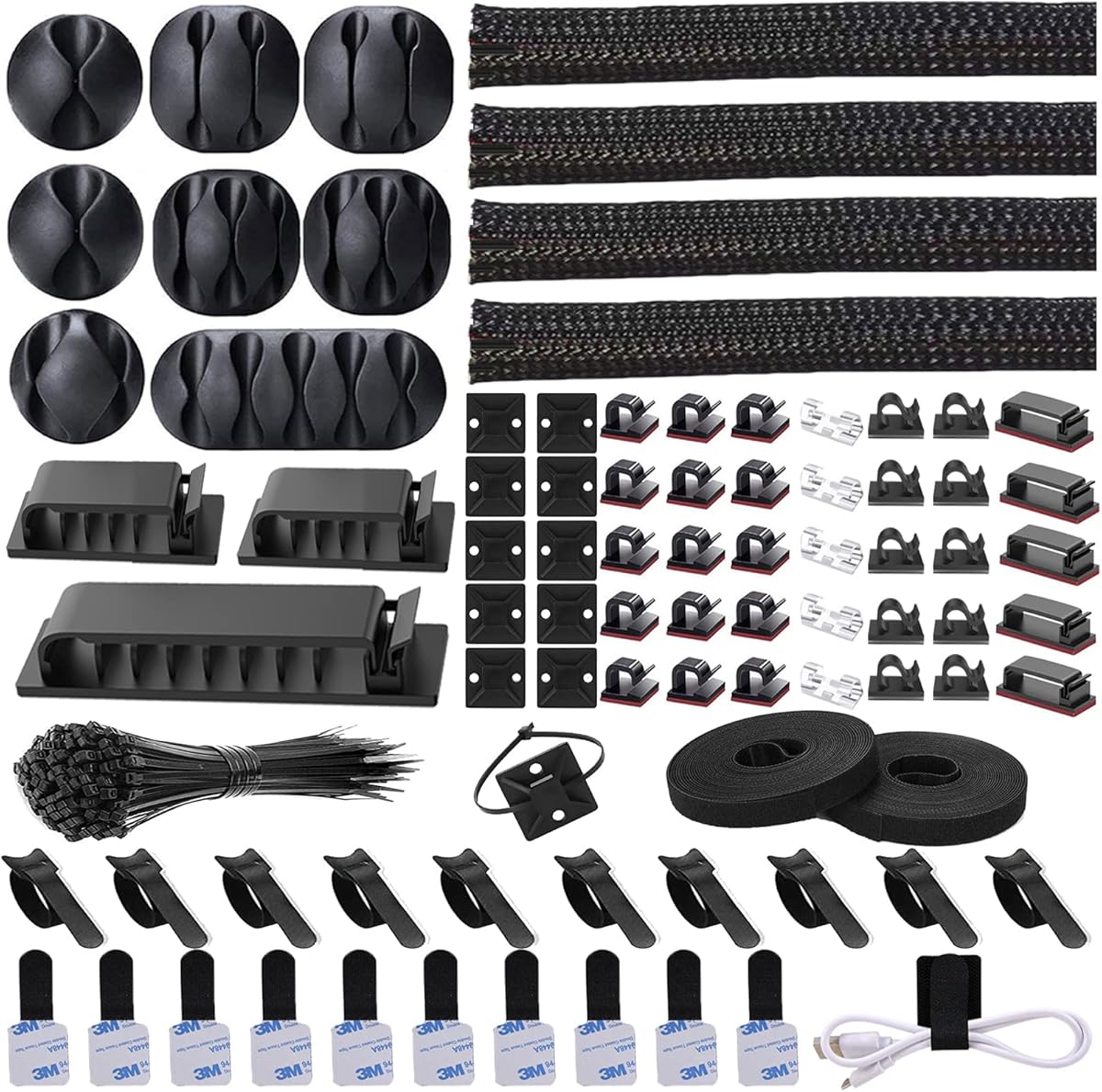
The N NOROCME Cable Management Kit is the most versatile option in this guide because it combines four split cable sleeves with clips, reusable wire ties, adhesive rolls, zip-tie mounts, and fastening ties. Its 4.6 rating reflects a strong marketplace reception, while the breadth of the package makes it especially useful for a desktop PC where several different kinds of cords need to be controlled. The four sleeves are each 20 inches long and 0.4 inches wide, giving users multiple segments for routing monitor leads, power cords, and peripheral wiring.
We may earn a commission when you buy through this link, at no additional cost to you.
The most useful feature is the mixture of attachment methods. The kit includes 35 cable clips and 11 cord holders made from Polyamide66, along with adhesive cable-tie rolls that can be connected to form longer ties. There are also 20 cable zip-tie mounts and 100 fastening ties. These components solve problems that a sleeve alone cannot: securing a bundle to a desk edge, holding a power adapter in place, controlling a short monitor cable, or creating a defined route from a computer tower. The included self-adhesive pads are intended for clean surfaces such as desks, walls, baseboards, cabinets, wood, and ceramics.
There are some practical trade-offs. A 192-piece package includes many similarly shaped small components, so sorting and assigning the right piece to each cable can take a little time. The sleeves are narrower than the larger zippered options in the list, which may make them less suitable for a very thick bundle of monitor and power leads. Their 20-inch length is useful for local runs but does not span the full back of a large desk by itself. Nevertheless, the remaining components make the kit versatile enough to handle those separate tasks.
This is the strongest choice for readers who want more than one sleeve and want to organize a complete PC workstation rather than conceal only one cord bundle. The split construction allows cables to be loaded without disconnecting them, and the stated self-closing braid keeps the cover wrapped after installation. It also offers the added benefit of helping deter cats from chewing exposed cords. For broad, flexible desktop organization, the range of included accessories is difficult to match.
The clips, holders, reusable ties, and adhesive rolls expand the kit beyond basic concealment. A user can bundle monitor cables in a sleeve, anchor a thinner power lead to the desk, and add another tie where a cord crosses a walking path.
Because the braided sleeves split open, cords can be placed around existing connections without unplugging the PC or monitors. Once loaded, the sleeve closes around the bundle to create a tidier route.
We may earn a commission when you buy through this link, at no additional cost to you.
The JOTO 4 Pack Cable Management Sleeve is a straightforward way to improve the appearance of a PC setup without buying a large collection of clips and mounts. It carries a 4.6 rating and includes four sleeves measuring approximately 19 to 20 inches long. Each sleeve expands to a diameter of 1.2 inches when zipped, a useful size for the medium bundles typically created by a monitor, a desktop tower, and several peripherals.
We may earn a commission when you buy through this link, at no additional cost to you.
The flexible neoprene construction is one of its main advantages. It conforms around the bundle rather than holding a rigid shape, making the sleeves suitable for routing behind a monitor stand, along the rear of a desk, or around an entertainment center. Each sleeve can accommodate approximately eight to ten cables, although the actual number depends on connector thickness and how tightly the bundle is arranged. The zipper provides easy access when a display, keyboard, or network connection needs to be changed.
The main limitation is that the package focuses on sleeves rather than complete mounting hardware. Users will still need something to keep a routed bundle in position, such as the adhesive clips or ties found in the N NOROCME kit. The sleeves can also be combined for a longer run, which makes the included quantity more versatile than a single long tube. Shortening a sleeve requires cutting, and buyers should select the appropriate point before installation to keep the result straight.
The JOTO set is a good match for a straightforward monitor or office-PC installation where the main goal is to gather several loose wires into a clean, flexible bundle. It offers a useful balance of capacity, access, and straightforward installation. It is particularly appealing for readers who already know how they want to position the cables and simply need four versatile covers for separate sections of the setup.
A stated capacity of eight to ten cables makes each sleeve suitable for a realistic desktop arrangement. The diameter provides room for power, display, and peripheral wiring while keeping the bundle comparatively narrow.
Soft neoprene bends around monitor stands and desk structures without requiring a rigid corner. The zippered cover also keeps the bundle covered while remaining easier to reopen than some permanently closed alternatives.
We may earn a commission when you buy through this link, at no additional cost to you.
The Wrap-It Storage Zipper Cable Sleeve is designed for relatively broad cable runs and has a 4.6 rating. Its four black sleeves are each 24 inches long and 4 inches wide, creating a more substantial cover than the slim neoprene alternatives. That size is useful when a workstation includes a desktop tower, multiple monitors, external storage, speakers, and several power connections that would otherwise spread across the back of the desk.
We may earn a commission when you buy through this link, at no additional cost to you.
The installation process is uncomplicated. The sleeve wraps around a group of cords, and its zipper draws the opening closed without requiring the cables to be unplugged. It is suitable for power cords, HDMI cables, chargers, and speaker wire, all common elements in a desktop entertainment or office setup. When equipment changes, the zipper can be opened to add, remove, or swap a cable. This reusable access distinguishes it from narrow self-closing loom that can be harder to open once tightly bundled.
Its substantial dimensions are the main consideration. A 4-inch-wide sleeve is practical for a full media or workstation bundle, but it may be excessive for a laptop user or a small desk with only a few thin wires. The set does not include clips or anchors, so it handles concealment and bundling but does not independently complete the mounting process. Buyers should also account for the visual bulk of four large covers when deciding where they belong.
This sleeve is well suited to users who want a clean, substantial cable run behind a desk or media console and who expect to add or remove equipment occasionally. The zipper is especially useful for active workstations where connections change regularly. For compact setups, a narrower option would be more space-efficient, but for a full desktop PC and entertainment system, the larger opening reduces the need to force multiple cables into a narrow tube.
The wide opening makes the sleeve suitable for thicker bundles containing display, speaker, charging, and power leads. Its 24-inch sections can cover separate zones rather than requiring one continuous piece across an entire wall.
The zipper allows a workstation to evolve without dismantling the complete sleeve. Users can expose a connector, add a newly installed peripheral, or remove a cable without unplugging every other connection in the bundle.
We may earn a commission when you buy through this link, at no additional cost to you.
The CableGeeker Cable Management Sleeve provides a long, highly adjustable way to route cords behind a desktop or entertainment center. Its 4.5 rating reflects a solid marketplace showing, while the 10-foot length gives it a different role from the shorter zippered packs. At approximately 1.5 inches in diameter, it can hold around eight to ten cables and covers a substantial portion of a desk's rear edge or floor-level run.
We may earn a commission when you buy through this link, at no additional cost to you.
Customization is the defining feature. The sleeve can be cut with scissors to fit a specific desk width, leaving unused material out of the installation. Users can also create branch openings wherever a power cord or display lead needs to leave the main run. The reversible black-and-white design offers a practical visual choice: black can hide dirt in a high-traffic area, while white creates a brighter appearance under or behind a clean workspace. Hook-and-loop backing holds the cut sleeve securely after it is sized.
This flexibility introduces a degree of setup work. Exit holes need to be cut carefully enough not to damage the sleeve or the cable passing nearby, and the stated instructions should be followed. The full ten-foot length is only useful if the installation area or intended future route can accommodate it. The package also includes reusable cable ties, eyelets, and hooks, which add useful control for oversized or heavy cords, but the sleeve still benefits from proper positioning after installation.
The CableGeeker option suits an experienced builder who wants a permanent, tailored route rather than several short covers. It is particularly compelling for desks with a defined run, wall-mounted systems, or setups where a single cable must branch toward several outlets. Buyers seeking a quick zip-and-place solution may find a shorter sleeve easier, but this product offers superior coverage and custom fit for a carefully planned workstation.
Cutting the sleeve to fit avoids leaving excess material bunched behind the desk. Branch holes can be positioned where individual display or power cables need to leave the main protected run.
The reversible face allows the finished route to suit different surroundings. Reversing the sleeve does not change its routing function, but it makes it easier to coordinate the cover with light or dark furniture.
We may earn a commission when you buy through this link, at no additional cost to you.
The AGPTEK White Cable Management Sleeve combines a tidy appearance with strong protection-oriented specifications. It has a 4.6 rating and includes two five-foot sleeves with a 1.2-inch diameter. The self-closing design allows the sleeve to wrap around connected cables, making it useful behind a desktop PC, beside an entertainment center, or around computer wiring in a more demanding environment.
We may earn a commission when you buy through this link, at no additional cost to you.
The listed temperature range of approximately -50°C to +150°C and UL94 V-2 flame-protection classification make this option appealing where heat resistance matters. The manufacturer also describes the material as flame-retardant, robust, flexible, and free from a chemical smell. These characteristics are particularly relevant to cable runs near computer equipment, automation components, automotive applications, and speaker or audio wiring, where a thin split sleeve may otherwise feel less substantial.
The sleeve can be cut to length with scissors, and the supplied information recommends heating the cut position with fire after cutting to prevent spreading. That step is a meaningful installation consideration and should be handled carefully. It does not include separate mounting clips, so the finished sleeve may need another anchor to keep it in a specific position. The white finish also needs a reasonably clean route to maintain its appearance, particularly in high-traffic locations.
AGPTEK is a strong selection for users who want split-sleeve convenience along with pet, child, heat, and abrasion-oriented protection. The two five-foot sections offer enough material for a couple of distinct desktop runs, and the flexible construction can handle different cable thicknesses. It is less convenient for frequent connector changes than a zippered design, but for a fixed installation it provides a secure and protective finished appearance.
The sleeve's stated flame-retardant properties and broad temperature tolerance make it suitable for more demanding routes than a basic fabric cover. It is also marketed to help protect cords from chewing by cats, dogs, and other household pets.
The self-closing sleeve can accommodate different cable sizes and remain open enough to add or separate wires. This makes installation easier when several connectors need to pass through the same section.
We may earn a commission when you buy through this link, at no additional cost to you.
The StangH Office Cable Management Sleeve is a long fabric option intended to make a PC, television, theater, or home-office setup look more orderly. It has a 4.6 rating and includes two white sleeves, each measuring 39 inches by 3.5 inches. At that length, the sections can cover a long run behind a desk, connect around a corner, or handle separate zones without requiring many short pieces.
We may earn a commission when you buy through this link, at no additional cost to you.
The zipper closure makes the cover accessible and reusable. Cables can be gathered before the sleeve is closed, and individual wires can later be removed without dismantling the entire cable-management arrangement. The stated blackout fabric is also described as helping block light and heat, while the flexible sleeve gives users some ability to create holes for branching leads. The two pieces can be used independently or connected to create a longer covered route.
The main concern is that the product focuses on fabric bundling rather than physical attachment. It does not include dedicated clips, and the sleeve must still be secured if it could sag, move, or become exposed. Its white color also requires more attentive cleaning in a dusty or high-traffic area. In addition, the 3.5-inch width gives the bundle a broader, more covered appearance than the slimmer split sleeves, which may be desirable for a full entertainment setup but excessive for a few thin desktop wires.
This product is a good fit for a larger office desk, home theater, or entertainment area where long cable runs and a tidy fabric-covered appearance are priorities. The zipper and washable or cleanable design make it practical for setups that are rearranged periodically. Buyers should plan separate anchors and assess the width against the scale of their desk. Once properly positioned, it can create a noticeably more finished look behind a computer setup.
Thirty-nine-inch sections reduce the number of separate covers needed for a rear-of-desk route. The zipper allows users to reopen a section and change a cable while preserving the rest of the organized arrangement.
The 3.5-inch fabric sleeve creates a substantial visual barrier and can contain a wider collection of entertainment or office cables. This makes it more suitable for concealing a large mixed bundle than a thin single-cord protector.
We may earn a commission when you buy through this link, at no additional cost to you.
The Alex Tech Cord Protector Wire Loom is one of the strongest-rated products in the guide, carrying a 4.7 rating. Its 10-foot length provides enough material to protect several individual desktop leads, while the half-inch diameter is intended for narrower wires. The listed uses include USB cables, power cords, audio and video cables, HDMI wiring, speaker wire, and automotive applications, so it serves as a general-purpose cord protector rather than only a desk organizer.
We may earn a commission when you buy through this link, at no additional cost to you.
Thermal specifications distinguish this sleeve from basic fabric alternatives. The listed operating range is approximately -103°F to 257°F, with a melt temperature of 446°F, and the product is described as UL Recognized. Its split, self-wrapping construction also makes installation straightforward: the sleeve opens, cables are placed inside, and the material closes around the bundle. This construction is especially useful for protecting multiple thin cords without unplugging connected equipment first.
Its main limitation is the half-inch diameter. That is appropriate for a single USB lead, an audio cable, or a small group of thin wires, but it is not intended for the thick bundle formed by a desktop tower, several display cables, and a large power connector. The sleeve is also intended to remain wrapped around the cable rather than being opened routinely. Users who need a wide zippered cover or frequent access to individual connectors should consider one of the larger options in this comparison.
The Alex Tech loom is a smart choice for readers who want a long, durable-looking protector for individual cables around a PC, speaker, or entertainment system. It is particularly relevant where household pets might chew exposed cords, and its material specifications suit a broader range of environments than a conventional fabric sleeve. The key is to match the half-inch opening to the cable size rather than forcing a large bundle into it.
The half-inch diameter works best for one cable or a small number of thin wires. It can turn a loose USB, audio, or video lead into a neater line while discouraging pet chewing.
The listed operating and melt temperatures, insulation characteristics, and UL recognition make this sleeve suitable for more technical cable-routing contexts. It can also serve automotive or speaker wiring when the bundle matches its size.
We may earn a commission when you buy through this link, at no additional cost to you.
The One-Inch 8ft Cable Management Loom Sleeve has the highest listed rating in this comparison at 4.8. It combines a relatively generous one-inch diameter with an eight-foot length, making it a practical middle ground between the half-inch Alex Tech loom and the larger zippered fabric sleeves. It can be used for computer, television, appliance, automotive, audio, and speaker wiring whenever the cable bundle fits the stated opening.
We may earn a commission when you buy through this link, at no additional cost to you.
The split, self-wrapping design allows the sleeve to open around existing cords and close around them after installation. It can be cut with scissors, which helps users adapt the eight-foot length to a desk, entertainment center, or equipment route. The flexible PET material is described as odorless, non-toxic, and resistant to fading, while also offering protection from children and pets that might chew or scratch exposed wiring. The sleeve additionally helps keep cables cleaner by shielding them from dust and incidental damage.
Temperature performance is another notable strength. The stated operating range runs from approximately -58°F to 302°F, with a melt temperature of 464°F and a UL94 V-2 flame-protection classification. That makes the product suitable for demanding cable environments as well as ordinary office setups. It does not, however, include clips or other mounting accessories, so its ability to remain in the desired route depends partly on the user arranging and securing it correctly.
This loom is an attractive option for a builder who wants a self-closing sleeve with more diameter than narrow wire loom but less visual bulk than a fabric cover. It works particularly well for fixed installations where individual wires are unlikely to need frequent removal. The highest listed rating supports its appeal, although the final fit still depends on the number and thickness of the cables. Buyers should compare the one-inch opening with their actual bundle before choosing it.
The one-inch opening can contain a more substantial group of cords while retaining a tubular appearance. It is a useful middle option for medium desktop bundles that do not require a full zippered sleeve.
The split construction makes initial loading easier, and scissors allow the user to trim the sleeve to a more appropriate length. The material then closes around the installed wires to conceal and protect them.
We may earn a commission when you buy through this link, at no additional cost to you.
The StarTech Neoprene Cable Management Sleeve is a polished option for professional offices, home offices, and desktop workstations. Its 4.2 rating is the lowest among the ten listed products, but the supplied specifications show a carefully engineered solution: a 39.4-inch sleeve made from 3-millimeter-thick soft neoprene, equipped with a zipper, end buckles, and eleven evenly spaced cable exit holes.
We may earn a commission when you buy through this link, at no additional cost to you.
The exit-hole pattern is particularly useful because it allows several cables to branch from the main route without requiring users to cut the sleeve. That makes it easier to create separate paths for a monitor, power connection, network cable, and peripheral. Built-in connector buckles also allow multiple sleeves to be daisy-chained, extending coverage under a long desk or across adjacent equipment. The design supports a clean professional look without concealing every lead in one oversized fabric pouch.
Installation is designed around live equipment. The sleeve wraps around existing cords, and the zipper fastens without unplugging connections or interrupting work. Its flexible neoprene can curve around corners and bends, while the stated durability addresses wear from extended use, foot traffic, and pets. The included two-year warranty adds a clear manufacturer commitment, although the product's rating remains lower than that of several other highly rated alternatives.
This sleeve is best for users who value a structured, repeatable workstation route more than a low-cost fabric bundle. It is particularly compelling in offices with multiple monitors, classroom setups, or complex power and network arrangements where evenly distributed branch points matter. The one-meter segment is fixed in length, but the buckles reduce that limitation. For buyers who want built-in professional features rather than creating holes manually, StarTech provides a focused and polished solution.
Eleven evenly spaced exit holes let individual cables leave the main route at predictable intervals. This is particularly useful when monitors, computers, and power connections need distinct paths.
Buckles on both ends allow separate sleeves to be connected into a longer run. Flexible neoprene then carries the finished route around corners without requiring rigid, sharp-edged bends.
We may earn a commission when you buy through this link, at no additional cost to you.
The Split Design Braided Sleeve is the longest continuous option in the guide, offering 25 feet of coverage with a three-quarter-inch inner diameter. Its 4.6 rating and simple split-braid design make it appealing for protecting several individual desktop leads, running wires along a wall, or organizing cords beyond the immediate area beneath a monitor. The white braided exterior also produces a clean appearance in a light-colored workspace.
We may earn a commission when you buy through this link, at no additional cost to you.
The split construction is the central benefit. Users can open the sleeve, place wires inside, and allow the tight curl to hold them in place without disconnecting equipment. It also allows additional cables to be added later, which is useful when a workstation gains another monitor or peripheral. The flexible polyethylene construction resists abrasion and heat up to the stated 302°F, while the sleeve is also described as helping protect cords against pet chewing.
The main limitation is its fixed three-quarter-inch diameter. It can handle individual cords and modest bundles, but it is not designed for a thick set of desktop power and display cables with large connectors. The long length also needs a logical routing plan; a sleeve that is much longer than the intended run can be trimmed, but it should be cut cleanly before installation. Mounting hardware is not included, so a separate anchor may be needed to hold the sleeve in position.
This product is a strong choice for readers who want long-term coverage without assembling a series of shorter sleeves. It works particularly well for thin power, charging, network, and peripheral wires that can be gathered into a modest bundle. The ability to add cables later improves its usefulness for evolving setups. For larger workstation bundles, however, a one-inch loom or zippered sleeve offers more room and easier inspection of individual connections.
Twenty-five feet can cover a long wall, desk edge, or floor-level cable path in one continuous section. This reduces the number of joins that might otherwise interrupt a clean route.
The split braid can be opened when another wire is needed, allowing a desktop to expand without replacing its existing sleeve. Its abrasion and heat resistance also supports use in more demanding cable environments.
We may earn a commission when you buy through this link, at no additional cost to you.
The right desktop cable sleeve depends on bundle size, routing length, closure style, and how often cables need to change. Consider the complete workstation rather than selecting a tube solely by its diameter.
Start by gathering the cables you intend to conceal and estimating their combined diameter. A half-inch sleeve works well for a single USB, audio, or video lead, while a three-quarter-inch option can contain several thin wires. A one-inch sleeve accommodates a medium collection, and one-point-two or four-inch sleeves suit larger mixed bundles containing desktop power leads, monitor cables, speakers, and charging cords. Diameter is only a guide because large connectors and stiff power bricks can make a bundle feel wider than its cords alone suggest.
Measure the intended path along the back of the desk, around a monitor stand, or behind a media console. Short sections are convenient for separate equipment zones and easier to position, while longer sleeves can create a more continuous route. A 10-foot or 25-foot option is useful when the run extends beyond a single workstation. Cut-to-fit products offer more flexibility, but users should make final sizing decisions before installation to avoid an uneven or loosely gathered appearance.
Zippered sleeves provide the easiest access when individual cables must be added, replaced, or inspected. They are especially useful for active desks with frequently changed peripherals. Self-closing split loom is faster to install and can accommodate different cable sizes, but it is generally intended to remain around the bundle. Hook-and-loop sleeves offer flexible, reusable access, while braided or self-wrapping tubes work well for fixed installations where individual leads do not need to be removed often.
A long covered bundle still needs a way for individual cables to reach their devices. Built-in holes, such as those on the StarTech sleeve, offer repeatable branching without cutting. Other products can be cut to create openings, giving more freedom but requiring careful work. If several monitors, power connections, or network cables need different paths, prioritize a sleeve with usable branches or plan to position separate short covers around each connection zone.
Neoprene is flexible and suited to frequent repositioning, while fabric sleeves create a broader, softer-looking cover. Polyethylene and PET loom options are marketed for abrasion resistance, heat tolerance, and protection from dust or pet chewing. Review the stated temperature range when cables run near warm equipment, automotive areas, or other demanding locations. Material choice should reflect the environment as well as appearance, especially in homes where children or pets may encounter exposed cords.
A sleeve conceals and groups wires, but it may still need to be anchored. Self-adhesive clips, reusable ties, cable mounts, eyelets, and hooks can connect a route to a desk edge or keep a bundle in position. The N NOROCME kit offers the broadest selection of these accessories, while several dedicated sleeves are designed to be paired with separate clips. Check whether the intended surface is clean and suitable for adhesive mounting, since the supplied information notes that its adhesive pads work best on clean surfaces.
Desktop setups evolve when a monitor is replaced, a new peripheral is added, or a charging cable is moved. A zippered cover is convenient for these situations because it can reopen without disturbing the whole bundle. Split sleeves also permit later additions, although they take more care to open. Before purchasing, consider how often cables will actually change. For a fixed setup, a simple self-closing tube may be sufficient; for a frequently adjusted workstation, accessible closures are worth the extra attention.
A large fabric sleeve can make a substantial entertainment setup look intentionally organized, while narrow black loom creates a technical, discreet line. White sleeves coordinate with light desks but may show dust more readily. Zippered neoprene provides a balanced professional appearance and flexible routing. Think about the visible area, the number of cables, and whether the sleeve will reinforce the desk's design or become the most noticeable feature of the setup.
Begin by unplugging the desktop if the installation will be difficult, although split and zippered sleeves can often be installed around connected cables. Lay out the intended route, remove the sleeve if necessary, and position it along the rear or underside of the desk. Confirm that the length, diameter, and branch locations suit the bundle before making permanent cuts.
For a zippered sleeve, gather the cables, open the zipper, wrap the sleeve around the bundle, and close it evenly. For split or self-closing loom, spread the opening, press the cables into the sleeve, and allow the material to wrap around them. If the product includes reusable ties, clips, or adhesive holders, secure the covered bundle at intervals without pinching the cables. Route power cords and data cables together only when doing so does not create strain or an unsafe bend.
Inspect the installation periodically, especially where a sleeve crosses a sharp desk edge, sits near a moving chair, or covers connectors that are unplugged often. Clean fabric or neoprene covers according to their care instructions, and use a dry or lightly damp method where appropriate. Replace loosened adhesive mounts, reposition sections that have twisted, and trim split ends neatly before the material begins to fray.
The correct size depends on the combined thickness of the cables, not just the number of leads. A half-inch sleeve suits individual USB, audio, or video cables, while a three-quarter-inch tube can hold several thin wires. One-inch and larger sleeves are better for mixed desktop bundles containing power cords, display cables, and substantial connectors. Choose a diameter that compresses the bundle gently without forcing connectors into the opening.
It is safest to unplug the computer and peripherals before arranging a route, especially if the sleeve must be cut or shortened. However, split loom and many zippered sleeves are specifically designed to wrap around existing connections without unplugging them. Installing power-down is still the safer choice when the cable path is complicated, the desk must be moved, or the user is unfamiliar with routing the wires.
That depends on the closure. Zippered sleeves are among the easiest to reopen and are best for frequently changed equipment. Split or self-closing sleeves can generally be opened enough to add or remove a cable, although the material may be harder to manipulate after a tight bundle has settled. Hook-and-loop covers offer reusable access as well, but their fit can loosen over time.
A long sleeve can cover many cables, but the setup may still need separate branches for power, display, network, and peripheral connections. Long products with cut-to-fit openings or built-in exit holes are more adaptable. Some workstations are better served by several medium sleeves, each covering a particular zone and remaining easier to access than one very large bundle.
Several listed sleeves are specifically marketed to reduce chewing, scratching, or access by household pets and children. A sturdy split sleeve can conceal vulnerable cords, while a broad fabric cover can make them less accessible. Protection is not guaranteed, however, so cables should still be routed away from curious animals and out of reach of young children.
Cable sleeves cover wiring rather than the computer's main ventilation openings, so they do not normally prevent airflow through a tower. Cables carrying substantial heat should still be routed with care, and the sleeve's listed temperature rating should be considered. Loose cable bundles should not be compressed so tightly that they retain excessive heat, and sleeves should never be placed over active computer cooling vents.
A zippered sleeve opens along a full seam and offers easier access to individual connectors. It is more convenient for active workstations, though it may appear bulkier. A self-closing split sleeve wraps around the bundle and holds itself in place, making it simple, compact, and suitable for fixed installations where cables rarely need to be removed.
Secure it at regular intervals with reusable ties, clips, or an appropriate mounting point. The N NOROCME kit includes several types of ties and adhesive holders, while the CableGeeker set includes reusable ties, eyelets, and hooks. Avoid attaching adhesive hardware to a dusty or dirty surface because a strong, level bond depends on proper contact. Position anchors so the sleeve follows the intended route without creating tight bends in the cables.
The N NOROCME kit offers the broadest solution because it combines four sleeves with clips, reusable ties, adhesive holders, and mounting pieces. JOTO is a practical budget-oriented choice for gathering several moderate bundles, while StarTech provides the most polished professional design with a neoprene body, built-in exit holes, connectable ends, and a two-year warranty.
For most buyers, the most important priorities are correct diameter, manageable length, and a closure that suits the workstation. Choose a zipper for frequent equipment changes, split loom for a secure fixed route, and built-in branches or cut-to-fit sections when several cables must reach separate devices. Matching the sleeve to the environment and adding suitable anchors will produce a cleaner result than choosing on appearance alone.
Ratings provide a useful starting point, but the most important information is the bundle size and intended route. Confirm current product details, availability, and prices on the linked listings before ordering, since marketplace information and costs can change. A carefully measured sleeve and a few dependable mounting pieces can make a substantial difference to the space behind a desktop PC.