
B31N1912 C31N1912 for ASUS VivoBook 14
4.3Editor score
11.55V 42Wh battery
Three-cell Li-ion design
Screwdrivers included
An ASUS laptop battery replacement can restore portability to a machine that no longer holds a dependable charge. The right replacement depends on more than the ASUS name: battery part number, voltage, capacity, cell configuration, connector design, and the exact laptop model must all align. A close visual match can still be unsafe or incompatible if those specifications are wrong.
This guide compares ten replacement batteries spanning modern VivoBook 14 models, TUF gaming systems, ROG Zephyrus and Strix notebooks, and several older ASUS families. We evaluated the options using the supplied compatibility lists, electrical specifications, included installation accessories, stated safety protections, customer ratings, and seller support information. The result is a guide organized around model fit and practical ownership needs.
Each review highlights who the battery best serves, along with the compromises that deserve attention. The VivoBook selections dominate the list because several fit the same B31N1912 and C31N1912 platform, while higher-capacity gaming options target different chassis entirely. Product listings, ratings, and seller terms can change, so verify the laptop label and current listing details before ordering.
4.3Editor score

4.4Editor score

4.6Editor score
As an Amazon Associate we earn from qualifying purchases.
The table below summarizes the battery family, core electrical rating, primary ASUS compatibility, and distinguishing feature of every option, making it easier to narrow the list before checking the exact model and part number.
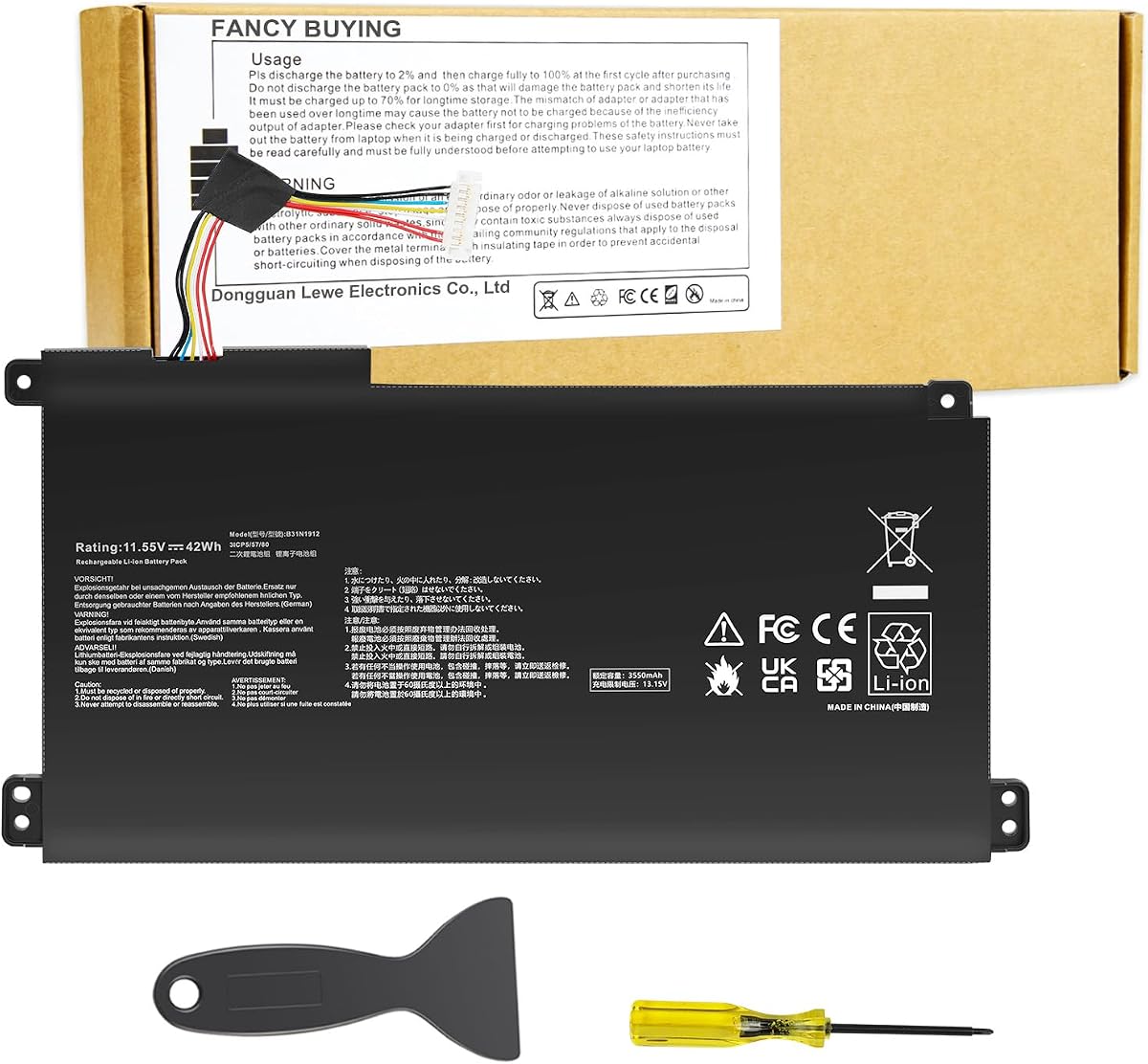


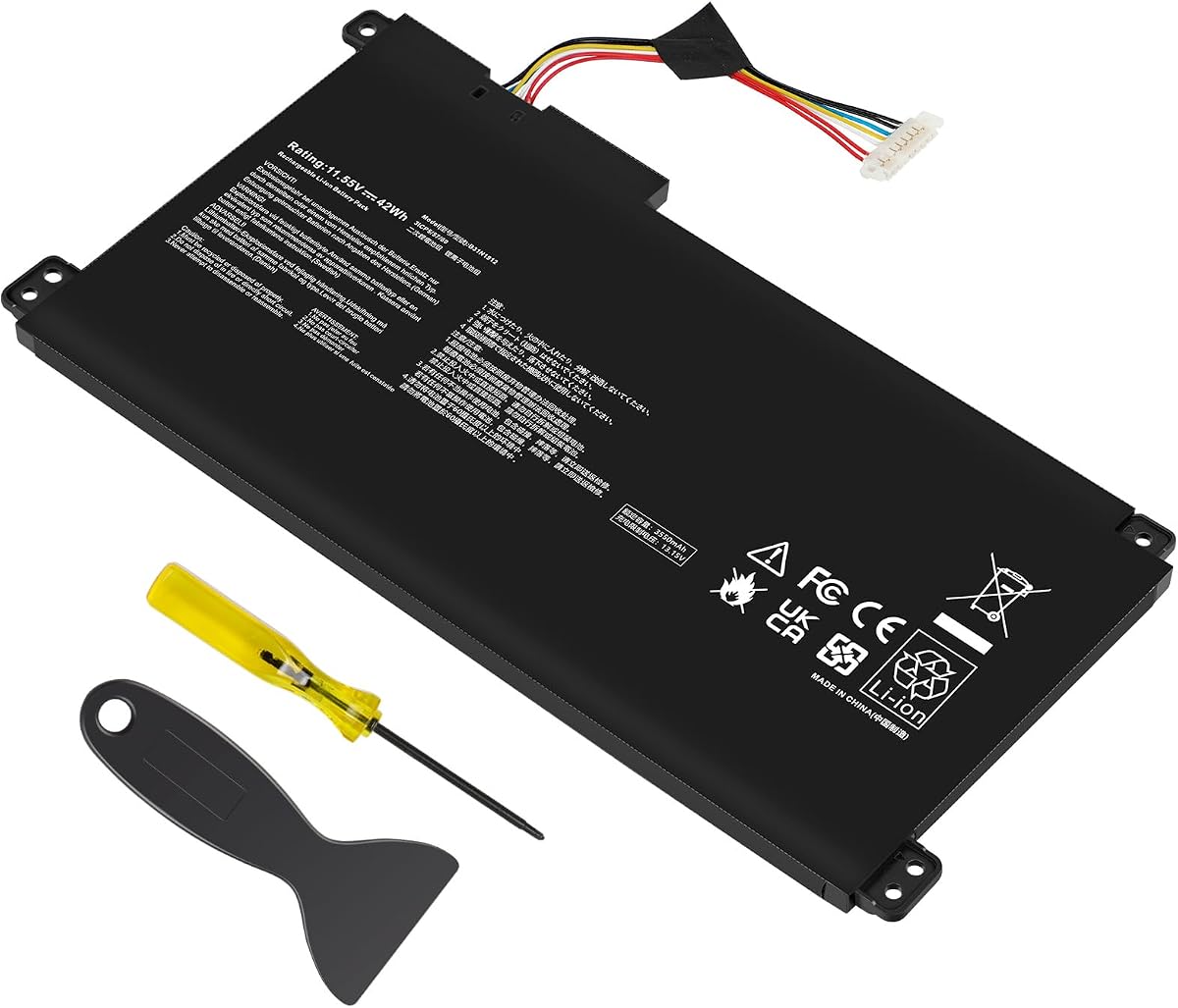

This B31N1912 replacement is a practical choice for owners of several ASUS VivoBook 14 families, including E410, L410, F414, E510, and L510 variants. It carries a 4.3 customer rating and stands out for combining a clearly stated 11.55V, 42Wh specification with a three-cell Li-ion design. The supplied compatibility information is unusually extensive for this type of replacement.
We may earn a commission when you buy through this link, at no additional cost to you.
The strongest benefit is the combination of common B31N1912 and C31N1912 part numbers with a long list of model suffixes. It also accepts additional identifiers such as 0B200-03680000 and 0B200-03680100. Screwdrivers are included, which removes one common reason for delaying a straightforward battery swap. The listing states that grade A cells are used and describes a potential life of up to 500 recharge cycles.
The main drawback is the seller-specific support process. Its guidance directs buyers experiencing a problem to contact the seller through the relevant order option, and it notes that Amazon return windows may close after one month. That distinction matters for buyers who value a straightforward marketplace return process rather than direct seller support. The battery also has only three cells, although its 42Wh capacity may be sufficient for the targeted VivoBook models.
This is a sensible recommendation for a compatible VivoBook owner who wants a well-specified, broadly documented replacement and values included tools. Before ordering, compare the physical connector, battery shape, and the label located beneath the laptop. If all identifiers match, it offers a strong combination of compatibility information and everyday replacement value.
The supported range covers common E410MA, L410MA, E510MA, L510MA, F414MA, and R522MA families, along with numerous specific suffixes. Verify the complete model identifier rather than relying only on the broad series name.
The package includes screwdrivers, a useful detail for owners who do not already have a precision driver set. Having the correct tool can reduce the risk of damaging the battery connector or chassis screws during removal.
We may earn a commission when you buy through this link, at no additional cost to you.
This B31N1912 and C31N1912 replacement targets a broad collection of ASUS VivoBook 14 systems and carries a 4.3 rating. Its core electrical specification is an 11.55V, 42Wh, three-cell polymer battery rated at 3550mAh. The product listing goes beyond general series names by identifying many individual model suffixes.
We may earn a commission when you buy through this link, at no additional cost to you.
Its principal strength is the depth of the compatibility list. It includes E410MA-EK007TS, EK017TS, EK026TS, EK087T, EK211T, EK319T, EK321T, EK327TS, EK367TS, EK378T, EK505T, EK542T, EK946TS, EK991TS, and several L410MA variants. Additional replacement identifiers include 0B200-03680000, 0B200-03680100, 0B200-03680200, and 3ICP5/57/80.
The package contains the battery, an auxiliary installation tool, and a user manual. That combination is useful for buyers who want some guidance beyond simply swapping the connector. On the other hand, the support policy explains that the seller requests contact through its store listing and says the return window closes one month after receipt. Buyers should therefore understand the distinction between marketplace eligibility and seller-directed troubleshooting.
Choose this option if your exact VivoBook suffix appears in the listing and you want explicit cross-reference to multiple part numbers. It is a credible alternative to the first pick, with effectively the same core capacity and voltage. The final decision should be based on your exact model label, connector geometry, and the condition of the included installation tool.
The listing explicitly names many configurations that may be difficult to distinguish from one another. Matching the complete suffix can reduce the chance of confusing near-identical VivoBook variants with different battery fitments.
A user manual and auxiliary tool are supplied, although buyers should still power the laptop down, disconnect the charger, and consult the computer manufacturer's service guidance before opening the chassis.
We may earn a commission when you buy through this link, at no additional cost to you.
The C21N1347 is a strong fit for owners of older ASUS X555-family laptops. It has a 4.4 rating, which is among the higher ratings in this group, and supplies a clear 7.6V, 38Wh, 5000mAh three-cell configuration. It supports the X555 series and numerous related families, including A555L, K555L, Y583LD, W519LD, R556L, and VM590L.
We may earn a commission when you buy through this link, at no additional cost to you.
The part number references are equally important. It is designed for C21N1347, 2ICP4/63/134, and PP21AT149Q-1. Within the X555 range, the listing names X555LN, X555LA, X555LD, X555LP, X555LJ, X555SJ, X555YI, X555LD4030, and X555LD4210. That detail makes it a useful choice for buyers with older ASUS hardware, many of which may no longer have an easy OEM replacement path.
The lower voltage is the key technical consideration. The listing states that 7.6V is compatible with 7.4V systems, but this does not mean the pack can replace an 11.55V VivoBook battery or a 15.4V ROG battery. Shape and connector fitment still matter. Built-in circuit protection is listed, and the product is described as CE and FCC certified with attention to environmental compliance.
This is our Editor's Choice because it serves a mature hardware family with a well-defined, widely rated battery rather than duplicating the abundant VivoBook options. It is most appropriate for an X555 or related model whose original label shows C21N1347. Confirm that the connector, thickness, and mounting points match before purchase, especially when multiple X555 variants are listed.
Older ASUS models can be difficult to support with current OEM parts. A clearly identified replacement for the C21N1347 platform can give a functioning notebook a new service life when the operating system and hardware remain suitable for the user's needs.
The 5000mAh rating and three-cell polymer construction provide a clear benchmark for comparison. Because milliamp-hour ratings are not always directly equivalent across different voltages, compare watt-hour capacity and the required part number as well.
We may earn a commission when you buy through this link, at no additional cost to you.
The A32-K55 replacement serves an unusually broad collection of legacy ASUS notebooks, including A45, A55, A75, K45, K55, K75, R400, R500, U57, and X45 families. It carries a 4.3 rating and uses an 11.1V, 5200mAh Li-polymer configuration. For an owner of an older ASUS notebook, that breadth can make model matching easier than searching for a battery tied to only one recent series.
We may earn a commission when you buy through this link, at no additional cost to you.
Compatibility extends across many suffixes in the A, K, and R families, plus X45 and X55 variants. The listing says the battery is assembled from quality materials and circuit boards and provides overcharge, overdischarge, over-temperature, and short-circuit protection. It also states an expected life of up to 500 recharge cycles and includes a 12-month warranty with a 30-day refund policy.
The biggest issue is that broad compatibility can obscure the need for precise verification. Buyers should compare the complete laptop model, the A32-K55 identifier, voltage, connector, and physical dimensions rather than relying on a family name. A long list may include related configurations with different battery shapes, so a close visual match is not sufficient evidence.
This option is best recommended for a legacy ASUS laptop whose original battery label identifies A32-K55 and whose connector matches the listing. It may be especially valuable for maintaining older systems used for document work, light productivity, or local computing where replacing the whole laptop would be unnecessary. Precise model confirmation remains the essential first step.
The supported list includes many A45, A55, A75, K45, K55, K75, R400, R500, U57, and X45 variants. This reach is useful, but the full suffix and original battery label should still govern the decision.
Overcharge, overdischarge, temperature control, and short-circuit protections are all stated. These features support safer operation, though they do not remove the need to use a suitable charger and inspect the battery for physical damage.
We may earn a commission when you buy through this link, at no additional cost to you.
This listing offers the same 11.55V, 42Wh, 3550mAh three-cell battery platform seen in several leading VivoBook options, but it is especially useful for owners searching by a specific DF112 identifier. It has a 4.3 rating and supports a wide collection of E410, L410, E510, L510, F414MA, and R522MA configurations.
We may earn a commission when you buy through this link, at no additional cost to you.
A clear benefit is the inclusion of exact identifiers such as L510MA-WB04(DF112), L410MA-BV058TS, E410MA-EK017TS, and E510KA-EJ033TS. It also references B31N1912, C31N1912, 0B200-03680000, 0B200-03680100, 0B200-03680200, and 3ICP5/57/80. Buyers with a DF112 designation can therefore match the listing against several ways a manufacturer may identify the same battery platform.
The battery ships with an auxiliary installation tool and a user manual. As with the other VivoBook listings, the seller describes a replacement policy and directs questions through the seller store. The return-window wording is not especially detailed, so buyers who expect a simple, self-directed replacement process should review the current policy carefully.
This is a good option for a VivoBook whose label includes DF112 or another explicitly listed suffix. It is functionally very similar to the other B31N1912 choices in this guide, so selection should ultimately depend on complete model confirmation, connector orientation, available accessories, and the current seller terms rather than on capacity alone.
The explicit DF112 reference helps buyers who encounter that designation in a listing or parts index. It should still be reconciled with the complete model number printed on the laptop's underside.
The 11.55V, 42Wh, three-cell format matches the core specifications repeated across this VivoBook group. Confirming those values against the original battery provides a useful second check after part-number matching.
We may earn a commission when you buy through this link, at no additional cost to you.
The B31N1726 replacement is aimed at ASUS TUF Gaming and related FX notebooks. It has a 4.3 rating and supplies a three-cell, 11.4V, 48Wh Li-polymer battery. That capacity is higher than the 42Wh packs offered for the VivoBook group, which makes this an interesting option for compatible gaming laptops that place greater demands on their battery systems.
We may earn a commission when you buy through this link, at no additional cost to you.
Its model coverage includes TUF Gaming FX504, FX505, FA506, and FA706II families, along with FX80 and FX86 variants. The listing names several relevant part identifiers: B31N1726, B31N1726-1, B31BnEH, B31Bn91, A41LK9H, 3ICP7/60/80, 0B200-02910000, and 0B200-02910200. This gives a buyer several ways to verify that the replacement corresponds with the original installed pack.
Protective functions include overcurrent, anti-overcharge, anti-overdischarge, temperature control, and short-circuit protection. The stated construction uses quality materials and circuit boards, and the product is described as manufacturer-new with a potential life of up to 500 recharge cycles. A 30-day refund and 12-month warranty are also stated.
The tradeoff is specificity: this battery does not cover the VivoBook models or the higher-voltage ROG platforms covered elsewhere in the guide. It is a strong recommendation for an FX504, FX505, FX80, FX86, FA506, or compatible FA706II owner who confirms the B31N1726 label and physical connector. Gaming-system replacement should never rely on the FX family name alone.
The 48Wh rating is six watt-hours higher than the featured VivoBook packs. That difference can be meaningful in a larger gaming chassis, although runtime still depends on the display, processor, graphics workload, power settings, and battery condition.
The B31BNEH, B31BN91, A41LK9H, and 0B200-series identifiers offer several ways to check compatibility. At least one of them should correspond with the original label or the service documentation for the exact chassis.
We may earn a commission when you buy through this link, at no additional cost to you.
The TREE.NB B31N1912 is a compactly described replacement for several common ASUS VivoBook 14 models. It has a 4.3 rating and matches the group’s standard 11.55V, 42Wh, 3550mAh, three-cell Li-ion configuration. Supported models include E410MA, L410MA, E410KA-EK139TS, E510MA, E510KA-EJ033TS, F414MA, L510MA, and R522MA.
We may earn a commission when you buy through this link, at no additional cost to you.
The listing identifies B31N1912, C31N1912, 0B200-03680000, and 0B200-03680200 as replacement part numbers. It also names several specific suffixes, including E410MA-EK026TS, EK018TS, L410MA-BV058TS, and E510KA-EJ033TS. This is enough detail for many owners, although it is less exhaustive than several competing VivoBook listings.
Its safety description emphasizes correct voltage, circuit protection, capacity, stable current, low self-discharge, and battery life. The stated testing language is useful when comparing this option with listings that focus more heavily on included tools or lengthy customer-service policies. However, the description does not identify any included screwdriver, installation guide, or specific return period.
This battery is a sensible choice for a buyer whose complete model and part number match and who prefers a straightforward product description. It may also appeal to those who do not need extra installation accessories. Before selecting it over the more extensively documented B31N1912 alternatives, verify that the listed suffixes include the exact configuration and confirm that the seller has a suitable charger installation tool available.
The core families covered are the ones most frequently associated with the B31N1912 platform. Match the complete model designation because broad family names can encompass several different battery revisions.
Voltage, stable current, circuit protection, and low self-discharge are highlighted as tested characteristics. These attributes matter for preserving usable runtime and avoiding a battery that behaves inconsistently after installation.
We may earn a commission when you buy through this link, at no additional cost to you.
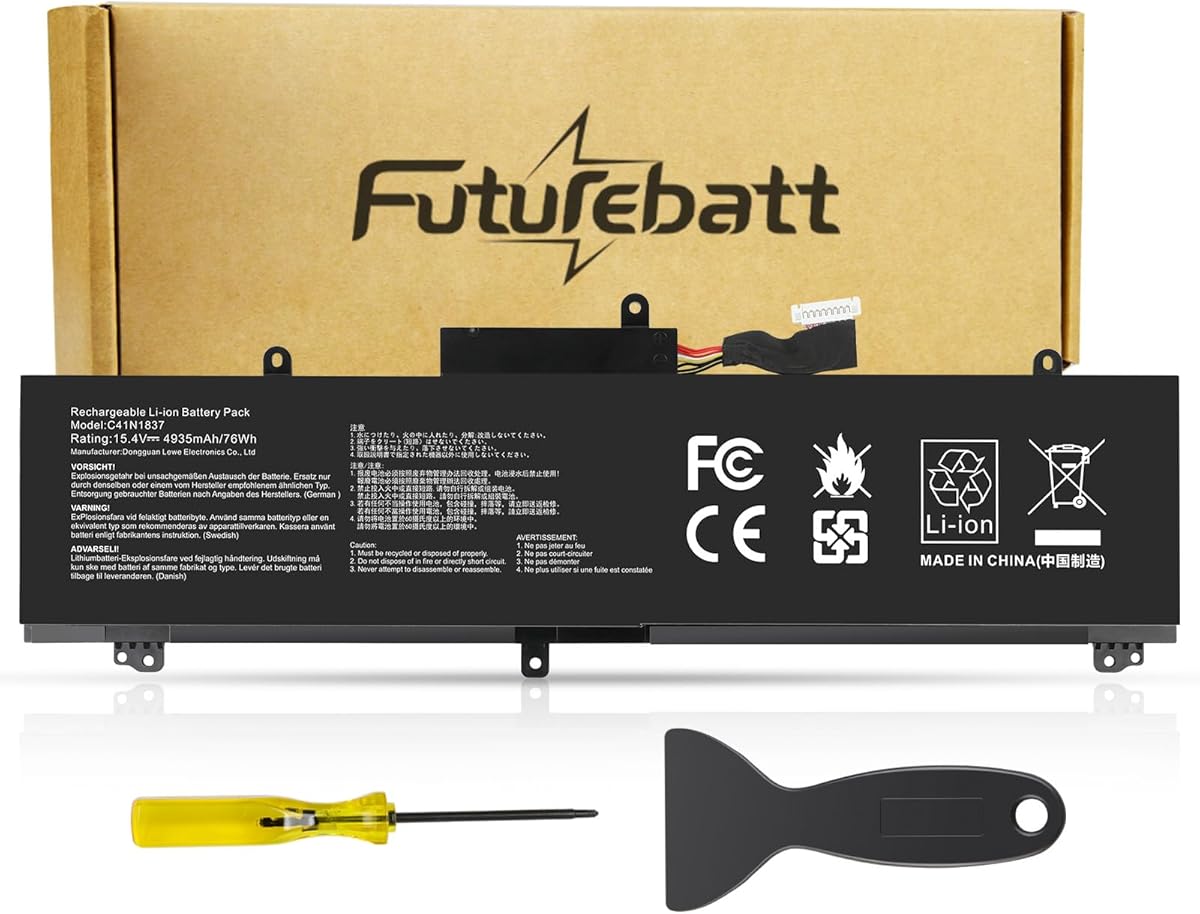
The C41N1837 targets ASUS ROG Zephyrus and selected high-performance notebook families. It carries a 4.2 rating and has a substantial 15.4V, 76Wh specification. That makes it substantially different from the lower-voltage VivoBook options in this guide and suitable only for systems designed around the corresponding battery platform.
We may earn a commission when you buy through this link, at no additional cost to you.
The compatibility list covers GA502 and GU502 variants, GX502LXS, GX502GV, GX502GW, GX502LWS, GU532, GX532, and several GU532 and GX532 variants. It also includes ASUS TUF Dash F15 models FX516PR and FX516PM and ProArt StudioBook 15 systems such as H500GV and W500GV. Replacement identifiers include C41N1837, 0B200-03380100, 0B200-03380200, and 0B200-03380300.
Multiple protections are stated, including overcharge, overdischarge, over-temperature, and short-circuit protection. The listing also mentions grade A construction, fast charging, low power consumption, and a potential lifespan of up to 500 charge cycles. Its 30-day refund and 12-month replacement policy provides some additional reassurance for a high-capacity gaming battery.
This is the right choice only when the original battery identifies C41N1837 and the connector and chassis layout match. Its 4.2 rating is the lowest among the ten listings, so the specification breadth and high capacity should be weighed against a less emphatic customer-rating profile. Buyers should inspect the battery, use a compatible charger, and follow ASUS service instructions carefully.
A 76Wh rating is considerably higher than the VivoBook selections and the 67Wh ROG Strix option. Such capacity can support demanding notebooks, although actual runtime remains workload-dependent and cannot be inferred from watt-hours alone.
ROG Zephyrus, TUF Dash, and ProArt StudioBook families appear together because they use the same C41N1837 platform. Similar physical size does not guarantee compatibility, so verify the connector and exact model.
We may earn a commission when you buy through this link, at no additional cost to you.
This TREE.NB B31N1912 option has a 4.4 rating and offers the familiar 11.55V, 42Wh, 3550mAh, three-cell Li-ion specification used by several compatible VivoBook 14 systems. It is a refined middle-ground selection in a group where many alternatives share nearly identical electrical characteristics.
We may earn a commission when you buy through this link, at no additional cost to you.
Its main point of distinction is the stated use of grade A cells, combined with CE and UL certification. The listing identifies 0B200-03680000, 0B200-03680200, and B31N1912 as relevant part numbers. Compatible systems include the E410M and E410MA series, L410M and L410MA series, E410KA-EK139TS, E510KA-EJ033TS, F414MA, L510MA, R522MA, and E510MA.
The installation note is useful for owners encountering recognition issues. It recommends checking that the interface is fully connected, discharging a newly installed battery to 10–20% rather than zero, and then charging and cycling it several times. These directions align with the common practice of allowing a new pack's firmware and charge controller to calibrate, although the laptop should remain connected to a suitable charger during the process.
This battery is recommended for a compatible VivoBook owner who places importance on stated safety certification and a high customer rating but does not need bundled tools. Its practical advantage is a clear, conventional description of the core specification. As with every replacement, buyers should check the complete laptop model, original label, connector position, and physical outline.
The stated use of grade A cells and CE and UL certification makes this listing particularly attractive for buyers who prioritize documented safety characteristics. Certification does not guarantee fit, so model identification remains equally important.
The listing's 10–20% discharge and multi-cycle recommendation can help the battery controller recognize the new pack. Use the manufacturer's approved charger and avoid interrupting the first full charging cycle unnecessarily.
We may earn a commission when you buy through this link, at no additional cost to you.
The C41N1731-2 is the strongest overall option among the ROG-focused replacements, combining a 4.6 customer rating—the highest in this guide—with a 15.4V, 67Wh battery rated at 4335mAh. It is aimed at the ASUS ROG Strix G15 and G17 generation and their G512, G531, G532, G712, G731, and G732 variants.
We may earn a commission when you buy through this link, at no additional cost to you.
The compatibility detail is extensive. Named configurations include G512LU, G512LV, G512LW, G512LWS, G531GU, G531GV, G531GW, G532LV, G532LW, G532LWS, G712LU, G712LV, G712LW, G712LWS, G731GU, G731GV, G731GW, G732LV, G732LW, G732LWS, and G732LXS. The original battery label should show C41N1731-2 for this replacement to be appropriate.
Its stated BattArmor safety system includes overcharge, circuit-overload, short-circuit, and temperature protection. The battery is described as an all-new 5.0 technology upgrade using high-capacity cells for longer-lasting and safer performance. The package includes the battery, installation tools and guide, and a service manual, giving it a more complete ownership package than many alternatives.
This is our premium recommendation for a compatible ROG Strix owner because it combines the strongest rating with detailed model coverage, a high capacity, advanced protection claims, and useful installation materials. It remains a platform-specific part rather than a general ROG battery. Confirm the C41N1731-2 label, connector orientation, and physical fit before ordering, and use the included guide carefully.
The long list of G512, G531, G532, G712, G731, and G732 variants makes this a strong candidate for many current-generation ROG Strix owners. Match the entire model code, not only the G15 or G17 family marketing name.
Installation tools, a guide, and a service manual are included. That package is particularly useful for a high-capacity battery in a gaming notebook, where the owner should understand the correct removal, connector seating, and charging procedure.
The 67Wh rating and 4335mAh capacity target demanding hardware, while BattArmor protection is listed for overcharge, overload, short circuit, and temperature. These protections support reliability but do not justify using a mismatched charger or bypassing damaged components.
We may earn a commission when you buy through this link, at no additional cost to you.
A compatible replacement should match the original battery's part number, voltage, capacity, connector, and physical layout. These factors determine safe installation and useful runtime, while included tools, certifications, and support terms can make the ownership experience better.
Start with the label on the battery currently installed in the laptop. The part number, such as B31N1912, C31N1347, B31N1726, C41N1837, or C41N1731-2, is more reliable than a shared series name. Some ASUS families include several visually similar configurations, and the marketing designation alone may cover multiple battery platforms. Search the listing for that exact identifier and any secondary 0B200-series reference. If the original battery has been removed or its label is unreadable, look for the complete model number under the laptop and check the manufacturer or service documentation before purchasing.
Voltage must be compatible with the laptop's charging system. The selections in this guide fall into distinct groups: the VivoBook B31N1912 platform uses 11.55V, the C21N1347 pack uses 7.6V, the TUF B31N1726 pack uses 11.4V, and the higher-capacity ROG options use 15.4V. Cell count also matters because it influences the pack's physical dimensions and connector arrangement. Never assume a replacement with a similar watt-hour rating is interchangeable merely because both are ASUS batteries.
Capacity can be expressed in watt-hours or milliamp-hours, and the two cannot be compared without considering voltage. The C21N1347 combines 7.6V with 5000mAh to provide 38Wh, while the VivoBook packs pair 11.55V with 3550mAh for 42Wh. Higher-capacity replacements may support longer runtime, but only when the system is designed for them. The most reliable target is the watt-hour rating of the original battery, followed by the part number and physical configuration.
A correct model name does not eliminate the need to check the connector. Compare the number and arrangement of pins, the cable exit and connector angle, battery thickness, mounting tabs, and the overall outline. Some compatible listings cover multiple suffixes with slightly different internal or connector arrangements. Compare the replacement directly with the old battery before applying power. If a plug requires force, appears to enter backward, or sits at an unusual angle, stop and recheck the fit.
A suitable replacement should state its protection features and applicable certifications. Listings in this guide mention combinations of overcharge, overdischarge, overcurrent, short-circuit, and temperature protection, with CE, FCC, UL, and RoHS certification mentioned by certain products. These claims provide useful screening criteria, but certification should not be confused with proof of compatibility. Also inspect the pack for swelling, impact damage, corrosion, or a wet connector before installing it.
The B31N1912 C31N1912 option in first place and the C41N1731-2 ROG Strix battery include tools. Some listings also provide a user guide or service manual. These accessories can make the replacement process more convenient, especially for a first-time owner, but they do not replace the need to follow the ASUS service procedure. Confirm the correct screwdrivers are present and use the service guide to identify adhesive, ribbon cables, or structural pieces that may require careful handling.
The listings describe different return windows, replacement periods, and support routes. Some sellers ask buyers to contact them directly through an order or store option, while others mention a 30-day refund or a 12-month warranty or replacement policy. Review the current listing because terms can change. Keep the order record and installation evidence, and contact the seller promptly if the battery is not recognized, does not charge, or behaves inconsistently. Do not wait until a stated support window has closed.
A new battery may expose problems elsewhere in an aging notebook. If the laptop does not recognize the new pack, reseat the connector and follow the listing's conditioning guidance. If it charges but shuts down unexpectedly, inspect the charger, power circuit, operating system battery report, and adapter compatibility. Swollen, leaking, or physically damaged batteries should not be used or recharged. For a machine with other significant faults, replacing the battery may not be the most economical repair.
Before installation, power down the ASUS laptop completely, disconnect the charger, and consult the manufacturer's service instructions for that exact model. Check that the replacement has not swollen, cracked, leaked, or been damaged in transit. Photograph the original battery and connector, compare the cable and connector orientation, and install the new pack only when every connection can be made without force. Use the supplied tools where appropriate and avoid scratching the battery connector with a metal object.
After installation, reconnect the appropriate charger and allow the operating system to recognize the new battery. If the pack does not appear, confirm that the connector is fully seated and close the laptop so the battery can be detected. Several listings advise discharging to approximately 5–20% rather than zero, then charging and cycling three or four times to condition the pack. Follow the manufacturer's calibration guidance, avoid heat and physical impact, and use a compatible ASUS-approved or otherwise correctly specified charger.
For long-term care, keep the battery away from high temperatures, direct sunlight, moisture, and conductive objects. Clean the contacts with a dry, lint-free method if contamination is visible, and avoid inserting metal objects into the connector. Monitor the system battery report for unexpected shutdowns, rapid capacity loss, swelling, or unusual heat. When any of those signs appear, stop using the battery and arrange professional service. Replacing the pack periodically is usually unnecessary; replacing it when physical or electrical condition deteriorates is the more sensible approach.
Read the part number printed on the current battery and compare it with the replacement listing. Then confirm the complete laptop model, voltage, connector arrangement, and physical outline. A shared family name such as X555, TUF FX505, or ROG Strix is not enough because several related configurations can use different battery packs.
Many owners replace these batteries successfully with the correct tools and careful handling. The process usually involves opening the rear panel, disconnecting the battery, swapping the pack, and reconnecting the power lead. Because internal procedures vary, consult the service manual or manufacturer instructions and consider professional assistance if the laptop is still under warranty or if you are uncomfortable handling internal components.
Shut down the laptop, disconnect the charger, and check that the battery connector is fully seated. Then reconnect the charger and allow the system to detect the pack. If it still does not appear, follow the listing's conditioning guidance, which commonly includes discharging to around 10–20% and completing several charge cycles. Contact the seller promptly if the issue continues.
No. The replacement must match the laptop's voltage, charging system, connector, and physical design. A higher watt-hour rating may provide longer runtime only when the charger and notebook are designed to support it. For most owners, reproducing the original part number and electrical specification is the safest approach.
The operating system may need time to learn the new pack's charge characteristics, and early readings may not reflect the battery's settled capacity. Several listings recommend completing several charge-and-discharge cycles. Continue monitoring the battery report over time and contact the seller if the runtime remains inconsistent or the pack fails to hold charge.
Yes, several listings indicate that the B31N1912 and C31N1912 platform fits multiple E410, L410, E510, L510, F414, and R522MA variants. Compatibility still depends on the complete suffix, connector, and shape, so confirm the exact model rather than assuming every laptop in the broad family uses the same pack.
Stop charging and using the laptop, disconnect the charger if it is safe to do so, and avoid pressing or puncturing the battery. Swelling and unusual heat can indicate a damaged pack or an electrical fault. Arrange professional service and do not place the battery near flammable material or dispose of it in ordinary household waste.
Included tools can make disassembly easier, but they should still be used with the exact model in mind. Confirm screw type and head size, retain every screw in an organized location, and follow any included service manual alongside ASUS guidance. Never force a screw, plug, or cable into a position it does not naturally fit.
The strongest general-value option is the B31N1912 C31N1912 VivoBook replacement in first place, particularly when the included screwdrivers and extensive part-number cross-reference make the installation easier. For an older X555-family notebook, the C21N1347 stands out with its 4.4 rating and clear 7.6V, 38Wh specification. Compatible ROG Strix owners get the strongest premium selection in the C41N1731-2, which pairs the guide's highest rating with detailed model coverage and installation materials.
Whatever the selected model, prioritize exact compatibility over marketing language. Match the battery label, laptop model, voltage, capacity, connector, and physical outline before ordering. After installation, use the appropriate charger, condition the battery according to the listing, and monitor the system battery report for signs of proper operation. If the laptop has additional charging or power-system faults, replacing the battery alone may not resolve the problem.
Finally, review current ratings, return terms, seller guidance, and product details before buying because marketplace information changes. Availability can also shift, and warranty or return language is controlled by the individual seller. Taking a few minutes to verify the part number and current listing can prevent the most common and avoidable replacement mistake.