
Anker 8-in-1 USB-C Hub
4.5Editor score
Dual HDMI display support
85W power pass-through
GigaLAN and card readers
Compare the best docking station for Lenovo Yoga laptop options for displays, power, connectivity, portability, and everyday productivity.
A docking station can transform a Lenovo Yoga laptop from a portable computer into a flexible desktop workstation. The right model adds displays, wired networking, faster USB connections, memory-card access, and dependable charging while reducing cable clutter. Because USB-C capabilities vary among Yoga models, compatibility matters as much as the number of ports.
The products in this guide were compared using their stated display support, charging capacity, port selection, data speeds, included accessories, and Lenovo or general USB-C compatibility information. The list covers travel-sized hubs, full-size ThinkPad docks, premium workstation options, and universal multiport adapters suitable for different Yoga generations and workflows.
Each review identifies the dock's strongest use case, important limitations, and the buyer who is likely to benefit most. The top three recommendations represent the strongest overall, budget, and premium options, while the complete comparison covers all ten products. Availability, ratings, and prices can change, so confirm current details before purchasing.
4.5Editor score

4.2Editor score

4.6Editor score
The table below compares all ten docks by their intended use, display configuration, charging capability, and principal connectivity advantage. These details make it easier to match a dock to a specific Yoga model, desk setup, and budget without overlooking display or power limitations.




The Lenovo USB-C Dual Display Travel Dock earns a 4.2 rating and stands out as a balanced choice for Yoga users who want one connection to handle two displays, laptop charging, USB devices, and Ethernet. Its seven-port design includes DisplayPort 1.4, HDMI 2.0, three 10Gbps USB connections, and Gigabit Ethernet. The integrated cable also reduces the need to carry a separate host lead.
We may earn a commission when you buy through this link, at no additional cost to you.
Its most valuable feature is the stated ability to drive two displays at up to 4K, making it practical for a desk where a large productivity screen accompanies the Yoga's built-in panel. The dock can deliver up to 100W to the laptop when paired with the optional 135W USB-C adapter, while the model that includes a power adapter provides 65W. An always-on USB port is useful for continuously charging a phone, watch, or other small device.
The main caveat is that the included power configuration depends on the exact package. A buyer who expects full 100W charging may need the optional adapter, while another concern is the stated macOS restriction for multiple external displays. These limitations do not materially weaken its value for a compatible Lenovo Yoga, but the laptop's USB-C capabilities still determine the final experience.
This is the most broadly appealing pick for professionals who alternate between a home office, shared workspace, and travel setup. Choose it when dual displays, a clean single-cable connection, fast USB ports, and wired networking matter more than having a permanently installed desktop dock. Verify display support on the specific Yoga model before ordering.
The combination of DisplayPort 1.4 and HDMI 2.0 allows a compatible Yoga to use two external displays at resolutions up to 4K. That screen space is valuable for keeping documents, communication windows, and reference material visible during detailed work.
USB-C power delivery, 10Gbps USB ports, and Gigabit Ethernet reduce the number of cables reaching the laptop. The always-on port adds convenient charging for mobile accessories even while the dock is serving the computer.
We may earn a commission when you buy through this link, at no additional cost to you.
The ThinkPad Thunderbolt 3 Dock Gen 2 135W carries a 4.1 rating and is designed for users who need a broad selection of display outputs from a single Thunderbolt connection. It includes two HDMI ports, two DisplayPort connections, one Thunderbolt 3 port, a USB-C connection, four USB 3.1 Gen 2 ports, and an always-on USB port.
We may earn a commission when you buy through this link, at no additional cost to you.
Its extensive port layout makes it a strong desktop option for a compatible Lenovo Yoga that supports dual 4K display output. A Gigabit Ethernet connection provides a stable wired option, while the included 135W adapter can handle demanding laptop and peripheral workloads. The package also contains a power cord and Thunderbolt 3 cable, reducing the need for separate purchases.
Compatibility is the principal consideration. The listed system support names Windows 7 and Windows 10, and the compatibility list includes several older ThinkPad models, including second- and third-generation X1 Yoga systems. Buyers with a newer Yoga should confirm operating-system and display support rather than assuming every function will work identically.
The dock is best for a permanent or semi-permanent desk where multiple peripherals and display options are important. Its size and power adapter make it less convenient for frequent travel than the smaller Lenovo hubs. It remains a compelling choice for compatible systems that benefit from a Thunderbolt-centered, high-power setup.
Two HDMI and two DisplayPort outputs give a compatible laptop more ways to configure a multi-monitor workspace. This flexibility can be valuable when testing different monitor arrangements or connecting presentation equipment.
The substantial 135W power solution and numerous USB-A ports suit a desk that remains connected throughout the workday. It prioritizes stable expansion and accessory support over the smallest possible travel footprint.
We may earn a commission when you buy through this link, at no additional cost to you.
The Lenovo USB-C 7-in-1 Hub has a 4.5 rating, making it a compelling value-oriented recommendation for Yoga owners who need several common ports but travel regularly. Its seven functions include a 4K HDMI output, three USB-A connections, SD and TF card readers, and USB-C power pass-through.
We may earn a commission when you buy through this link, at no additional cost to you.
The hub's integrated cable and compact body make it particularly convenient for café tables, shared offices, and hotel workspaces. The card readers are a useful addition for photographers or creators who need to transfer media without carrying a separate reader. Plug-and-play operation also reduces setup friction for users who do not want to install additional drivers.
This is primarily a single-display solution, which separates it from the dual-screen docks in this guide. It also requires an additional 45W or 65W USB-C power adapter for laptop charging. Those limitations are reasonable for a travel accessory, but buyers who need continuous dual-monitor output or desktop-level power should choose a larger dock.
The Lenovo 7-in-1 Hub is best for a budget-conscious mobile workflow involving one external display, several USB peripherals, and occasional media-card access. It offers a particularly attractive combination of portability and specialized ports. Confirm that the Yoga supports DisplayPort Alt Mode for the stated 4K HDMI output.
Separate SD and TF readers can eliminate a common accessory from a travel bag. They are especially useful for moving images or documents from camera media to a compatible USB-C laptop.
The concealed integrated cable and driver-free setup reduce connection time. A user can arrive at a temporary desk, attach the hub, and begin using supported accessories quickly.
We may earn a commission when you buy through this link, at no additional cost to you.
The Lenovo USB-C Slim Travel Dock earns a 4.4 rating and offers a refined middle ground between a basic hub and a full workstation. It has eight ports, including two USB-A and three USB-C connections rated at 10Gbps, plus one HDMI 2.1 output supporting 4K at 60Hz.
We may earn a commission when you buy through this link, at no additional cost to you.
Its integrated USB-C cable and slim enclosure make it easy to carry between a home office and a mobile setup. Support for USB-C laptops up to 65W covers many mainstream Yoga configurations, and the fast data connections are useful for fast storage, input devices, and other peripherals.
Because it has one HDMI port, it does not meet the needs of a user who wants two external screens. The 65W pass-through ceiling may also be too low for a high-performance Yoga that requires more power while several demanding devices are connected. Display performance and charging behavior still depend on the laptop's capabilities.
This dock is a strong choice for a single-monitor mobile workstation that values a slim body, rapid USB transfers, and simple cable management. It is especially suitable for office work, study, and light creative tasks where a full-size dock would be excessive.
The mix of USB-A and USB-C connections covers common accessories while preserving a travel-friendly enclosure. It is easier to carry than a desktop dock yet more expandable than a minimalist four-port adapter.
The 10Gbps USB connections can take full advantage of compatible flash drives, storage devices, and card readers. This speed is most useful when moving larger files or maintaining responsive external storage.
We may earn a commission when you buy through this link, at no additional cost to you.
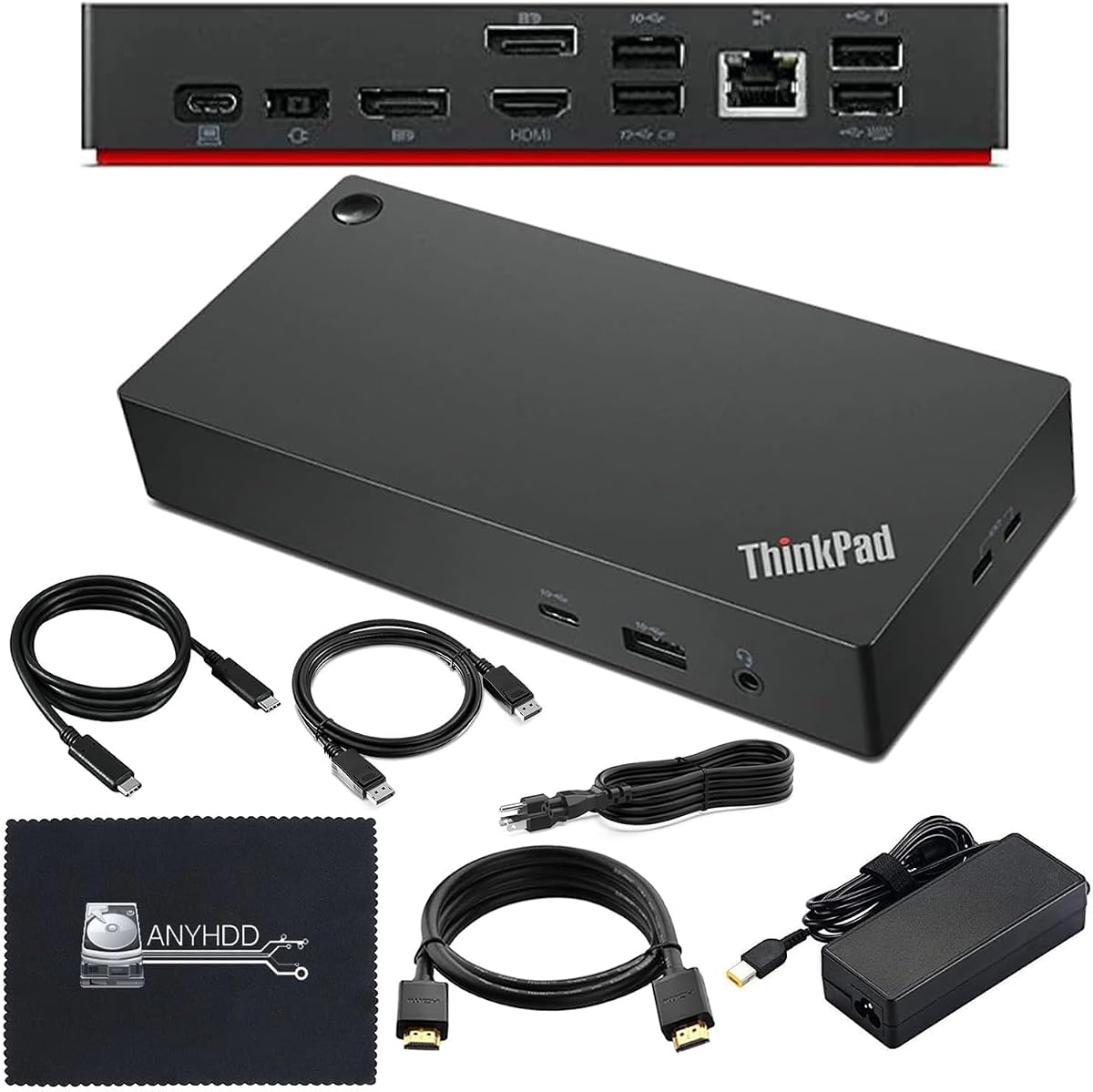
The ThinkPad Thunderbolt 4 Workstation Dock 40AY0090US has the highest customer rating in this roundup at 4.6. It is positioned as a premium desktop dock with HDMI, DisplayPort, and USB-C connectivity, support for 4K displays, and a 90W AC power adapter for connected devices.
We may earn a commission when you buy through this link, at no additional cost to you.
Its package includes a USB-C cable, a 4K HDMI cable, a 4K DisplayPort cable, and a microfiber cloth. That bundle is useful because many buyers prefer having the necessary display leads ready immediately. The combination of modern USB-C expansion and dedicated display connections suits a desk-based workflow that requires dependable charging and multiple peripheral types.
The listing cautions that the computer must support USB-C or Thunderbolt as appropriate and recommends updating dock firmware if connection issues occur. Actual display support can also depend on the Yoga's USB-C implementation. Those compatibility checks are essential because a dock's advertised resolution does not guarantee that every laptop can drive every output simultaneously.
This is the leading premium recommendation for a Lenovo Yoga user building a serious desk setup. It is particularly suitable for users who value included cables, a dedicated power supply, and a polished workstation design. It is less appropriate for someone wanting a lightweight travel accessory.
The included display leads, host cable, power adapter, and cloth create a more complete desk package than a basic hub. It is designed to reduce setup friction in a dedicated workspace.
The manufacturer's note about firmware updates indicates that compatibility is not entirely automatic for every setup. Checking the current firmware and validating the Yoga's display capabilities can prevent avoidable connection problems.
We may earn a commission when you buy through this link, at no additional cost to you.
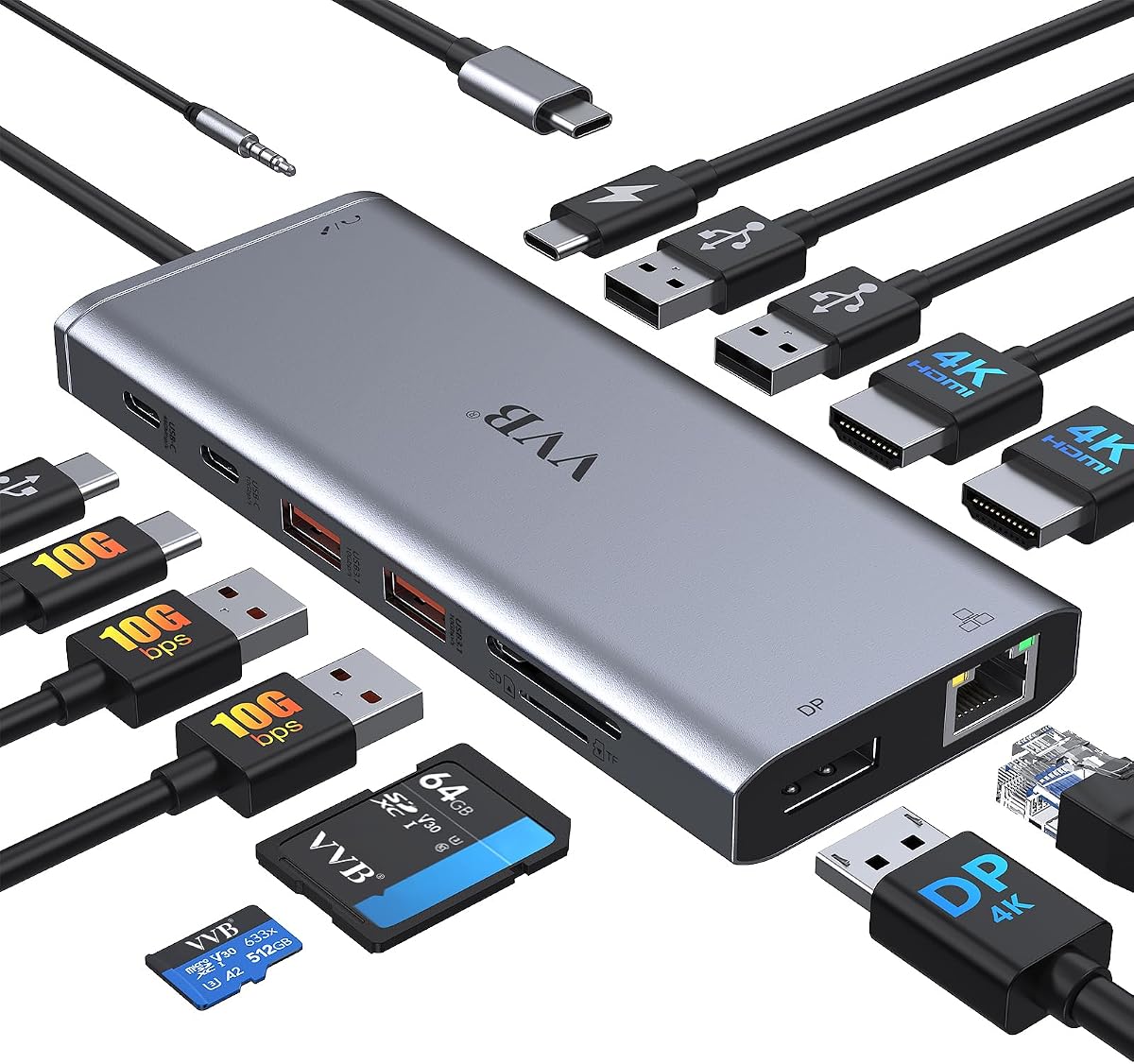
The 14-in-1 USB-C Docking Station has a 4.3 rating and offers the broadest port inventory in the guide. Its selection includes two HDMI ports, DisplayPort, a 100W USB-C power-delivery input, Gigabit Ethernet, several USB-A and USB-C connections, SD and microSD readers, and a 3.5mm audio jack.
We may earn a commission when you buy through this link, at no additional cost to you.
Display flexibility is the main attraction. The stated modes include a single 4K at 60Hz output, dual-monitor combinations of 4K at 30Hz and 1080p at 60Hz, and triple-monitor output at 1080p. The broad compatibility language specifically includes Lenovo ThinkPad and Yoga systems, although the exact model still needs to support the required USB-C functions.
There are important operating limits. A charging cable and adapter are not included, safe laptop output is stated as 87W, and macOS is limited to mirrored multi-monitor arrangements. The high port count can also make the setup less tidy than a more focused travel dock.
This adapter is best for a Windows-based Yoga user who needs many peripheral types and occasional multi-screen operation. It offers strong value for a crowded desk where separate adapters would otherwise be necessary. Users should plan the power supply and confirm the desired display mode before purchasing.
The fourteen-port layout replaces several common desk adapters for displays, storage, networking, charging, and audio. It is particularly useful for users who routinely connect a wide mixture of equipment.
Single, dual, and triple-display modes have different resolution and refresh-rate combinations. Reviewing the exact target monitor setup helps prevent disappointment when the dock falls back to a lower mode.
We may earn a commission when you buy through this link, at no additional cost to you.
The Anker Nano 13-in-1 Dock has a 4.2 rating and addresses a problem many accessory buyers face: needing one solution at a desk and a different one while traveling. Its detachable six-in-1 hub can remain at home while the smaller section accompanies the Lenovo Yoga.
We may earn a commission when you buy through this link, at no additional cost to you.
The desktop section supports up to three displays through two HDMI ports and one DisplayPort. Stated configurations include single 4K at 60Hz, dual 2K at 60Hz, and triple 1080p at 60Hz. It also includes two USB-C data ports with 5Gbps and 10Gbps options, three USB-A ports, Gigabit Ethernet, audio, and card slots.
Power delivery reaches up to 100W, and the package includes a 140W adapter to support performance under a heavy peripheral load. The listed broad compatibility includes Lenovo ThinkPad and most Windows USB-C laptops, but a specific Yoga still needs to support the required display and charging protocols. The dock also cannot function until a laptop is connected through its upstream port.
This is a strong recommendation for a user who alternates between a multi-monitor office and mobile work. The detachable design offers more versatility than a fixed travel hub, while the complete package reduces setup uncertainty. It is less suitable for someone who needs only one simple adapter.
Leaving the main dock at the desk and taking the detachable hub on trips reduces duplication. The design adapts more effectively than a conventional full-size dock that must travel as a complete unit.
The 100W delivery target and included 140W adapter are useful for a Yoga handling demanding applications. The upstream connection must remain attached for the dock's ports and indicator to operate.
We may earn a commission when you buy through this link, at no additional cost to you.
The ThinkPad USB-C Dock Gen 2 40AS0090US has a 4.3 rating and is aimed at users who want extensive desk expansion. It provides one HDMI port, two DisplayPort connections, three USB 3.1 ports, two USB 2.0 ports, a combo audio jack, and Gigabit Ethernet.
We may earn a commission when you buy through this link, at no additional cost to you.
The dock can support as many as three external monitors. It is described as capable of DisplayPort 1.4 and HDMI 2.0, including one 4K output at 60Hz, but the product information also makes clear that actual video output depends on the connected system. A Yoga with suitable USB-C display capabilities is therefore essential for taking full advantage of it.
A 90W AC adapter, power cord, and USB-C cable are included, making the package reasonably complete for setting up a fixed workstation. The older model number and dated operating assumptions make current compatibility verification particularly important for recent Yoga releases.
This dock is a solid choice for a power user who needs three screens, several USB peripherals, and a wired connection. It is best used on a permanent desk where the included adapter and full-size footprint are acceptable.
The mix of HDMI and DisplayPort outputs supports a multi-monitor workstation with room for separate applications or reference windows. The connected Yoga's capabilities remain the deciding factor for the final resolution and refresh rate.
Three faster USB ports cover modern accessories, while two USB 2.0 ports can support older peripherals. The audio and Ethernet connections complete a practical fixed-desk arrangement.
We may earn a commission when you buy through this link, at no additional cost to you.
The ThinkPad Hybrid USB-C Dock 40AF0135US has a 4.1 rating and offers a high-power renewed option for compatible Lenovo users. It combines two DisplayPort 1.2 ports, two HDMI ports, one USB-C port, three USB 3.1 Gen 2 Type-A ports, two USB 2.0 Type-A ports, and Gigabit Ethernet.
We may earn a commission when you buy through this link, at no additional cost to you.
The included 135W AC adapter is a notable strength for a workstation that needs substantial power delivery. The package also includes USB-C, HDMI, and DisplayPort cables along with a microfiber cloth. A one-year warranty adds some reassurance, although renewed products naturally carry a different risk profile from new units.
Compatibility deserves careful attention. The listing says compatible notebooks were internally tested for display, power delivery, and port expansion, but it also warns that hardware or software changes can alter functionality. Buyers should verify their exact Yoga model and ensure it supports the required USB-C display and charging protocols.
This dock is a compelling option for a buyer who values high power, multiple video outputs, and the included accessory bundle over buying a brand-new workstation dock. It is best for users comfortable with renewed equipment and able to confirm compatibility before purchase.
The 135W adapter provides ample charging headroom for a compatible high-performance Yoga. It is particularly useful when several powered accessories share the dock.
A renewed dock can provide substantial hardware capability at a more restrained cost. Reviewing the condition description, warranty terms, and included accessories helps set realistic expectations.
We may earn a commission when you buy through this link, at no additional cost to you.
The Anker 8-in-1 USB-C Hub has a 4.5 rating and combines useful expansion with a restrained physical footprint. It includes two HDMI ports, two USB-A data ports, a USB-C power-delivery input, Gigabit Ethernet, and a microSD/SD card reader behind one host connection.
We may earn a commission when you buy through this link, at no additional cost to you.
Its dual-display capability is a major advantage over basic travel adapters. The stated options include one display at 4K at 60Hz or two displays at 4K at 30Hz. Power pass-through reaches up to 85W, which is suitable for many mainstream and performance-oriented Yoga laptops, although the actual result depends on the host port and attached power supply.
The required 100W PD wall charger and USB-C-to-C cable are not included, adding a separate purchase for a complete charging setup. The listing also states that macOS will show identical content on both external monitors and that Linux is not supported. These are meaningful restrictions for buyers outside the main Windows use case.
This is the top budget pick for a Lenovo Yoga owner who wants two external displays, Ethernet, card reading, and charging without moving to a large workstation dock. It is a particularly balanced value for Windows users who can source the required power accessories separately.
Two HDMI outputs create a useful two-screen workspace without requiring a bulky desktop dock. The available 4K modes make it practical for high-resolution productivity setups.
Ethernet, USB-A, and combined memory-card access cover common desk tasks. The integrated card reader is helpful for transferring media without another peripheral.
We may earn a commission when you buy through this link, at no additional cost to you.
Choosing a Lenovo Yoga docking station involves balancing display support, power delivery, port coverage, and portability. The most important step is identifying the exact Yoga model and confirming which USB-C functions it supports before selecting a dock.
A USB-C connector does not guarantee that every dock feature will work. Display output depends on support for DisplayPort Alternate Mode, the underlying USB-C lane configuration, and the graphics capabilities of the specific Yoga model. Charging also requires compatible Power Delivery, while some Thunderbolt features may need a Thunderbolt-capable port. Review the laptop's technical specifications and the dock's compatibility notes before purchasing, especially when planning multiple displays.
Choose a dock only after confirming video, charging, and data functions are all supported. A connector that works for charging may not support two external screens.
Single-screen travel docks prioritize compact size, while dual-screen and workstation models suit desk-based productivity. Resolution and refresh rate depend on the display mode, operating system, cable, and laptop. Some docks advertise 4K for a single monitor but use lower refresh rates or resolutions for multiple screens. Triple-display support is even more dependent on the Yoga's USB-C implementation and should never be assumed from the dock's port count alone.
Match the stated display modes to your exact monitor arrangement. Check both resolution and refresh rate before buying.
A dock can simplify charging by delivering power over the same USB-C cable used for data and displays. Charging options in this guide range from 65W pass-through to adapters rated at 90W or 135W. A larger Yoga with a high-power processor may require more than a basic travel dock can provide. Some packages omit the charger or USB-C cable entirely, while others include an adapter that delivers a specific output level.
Check the Yoga's power requirement and the dock's included or supported power supply. Choose enough headroom for sustained heavy workloads.
USB-A remains useful for keyboards, mice, storage, and legacy accessories, while USB-C adds compatibility with newer equipment. Data speed matters when working with external SSDs, flash drives, or card readers. The leading options provide 10Gbps USB connections, but lower-speed ports can still be valuable for peripherals that do not benefit from maximum throughput. Consider both connector type and transfer rate rather than simply counting ports.
Prioritize 10Gbps ports for fast storage. Keep a slower USB-A port for accessories that need no bandwidth.
Gigabit Ethernet provides a dependable wired connection for large file transfers, meetings, and fixed workspaces. It can be especially useful in offices where Wi-Fi is crowded or restricted. A 3.5mm audio jack also enables a straightforward wired headset or speaker connection. Some compact hubs omit these features, so users who rely on stable internet access or wired audio should treat them as important requirements.
Choose Gigabit Ethernet and a dedicated audio jack when your work depends on them. Travel users can sometimes accept wireless networking.
Portability depends on more than the number of ports. An integrated USB-C host cable can prevent a separate lead from being left behind, while a detachable hub can separate desktop and travel functions. Slim travel docks are convenient for mobile work, whereas full-size workstation docks usually require a dedicated bag and a larger power adapter. Choose based on how often the setup will be transported and whether the dock will remain at a desk.
Travel users should value compact size and an integrated cable. Desktop users can favor a larger dock with more ports.
The presence of a power adapter, host cable, display cables, and documentation affects the true setup cost and convenience. Some docks include everything needed for a permanent workstation, while others require a compatible USB-C cable and wall charger. Renewed models may offer strong specifications at a restrained cost, but their physical condition and included accessories can vary. A warranty and clear condition description deserve attention when choosing a renewed product.
Inventory the included cables and adapter. A dock that arrives complete is usually more convenient for immediate setup.
Specialized ports can make a dock more valuable for a particular profession. SD and TF readers help photographers and content creators transfer media. Always-on USB charging is useful for phones and wearables. Multiple display outputs suit trading, engineering, editing, and research workflows. A 3.5mm jack supports private calls in offices where headset options are limited. Select extra features based on recurring tasks rather than on port count alone.
Choose specialized ports for your recurring work. Avoid paying for features you will never use.
Begin by confirming that the Lenovo Yoga's USB-C port supports the display, charging, and data functions required by the dock. Connect the host cable directly to the laptop before attaching displays and other peripherals. Install any dock firmware update recommended by the manufacturer, connect the appropriate power adapter, and then add displays one at a time. This order makes troubleshooting easier if the operating system does not immediately recognize the full port selection.
Choose the display configuration that matches the dock's stated mode, and use cables appropriate for the required resolution and refresh rate. Configure the Yoga's display settings to extend or mirror the desktop as required. After the displays appear, connect Ethernet, storage, input devices, and audio. Hot-swapping accessories is generally convenient with USB, but the most stable approach is to connect the core display and network setup first and test remaining devices individually.
Keep the dock and its integrated cable free from sharp bends, pulling force, and liquids. Do not leave a connected workstation unattended if the exposed connector or cable could be stepped on. When the dock is not in use, disconnect it cleanly and store travel models in a protective pouch. Update firmware when advised, inspect connectors for debris, and avoid using a charger or cable that exceeds the dock's supported power or data specifications.
A Lenovo Yoga generally needs a USB-C port that supports the functions the dock offers. Data and basic display use may work on some models, while dual displays, high-resolution output, Thunderbolt features, and high-wattage charging require more specific support. Check the exact Yoga model's port specifications and the dock's compatibility notes before purchasing.
It depends on both the Yoga and the dock. Several docks in this guide support two external displays, but the host laptop must support the required DisplayPort Alternate Mode or Thunderbolt configuration. The operating system and display mode can also affect resolution and refresh rate. Verify the dock's stated multi-monitor limits for the number of screens and resolutions you plan to use.
Some products include a power adapter, while others provide only pass-through capability or omit the wall charger entirely. The 7-in-1 Lenovo hub, for example, calls for an additional 45W or 65W USB-C adapter for charging, while several ThinkPad docks include their own power supply. Check the package contents and ensure the adapter has enough power for the Yoga and connected peripherals.
A Thunderbolt dock can provide stronger expansion, faster data transfer, and more display options, but only when the laptop has a compatible Thunderbolt port. A standard USB-C dock may be sufficient for basic office accessories and a single or dual-display setup. Choosing Thunderbolt is most valuable for demanding workflows, provided the specific Yoga model supports it.
A compatible dock can usually provide power and data through the same USB-C connection. The charging rate depends on the dock's supported output, the power adapter, the cable, and the Yoga's requirements. A dock advertising 65W may not be enough for every high-performance configuration, so compare the laptop's recommended adapter with the dock's power delivery rating.
Renewed products can provide the same core functionality as new models, but their physical condition, packaging, and included accessories may differ. Review the condition description, warranty, and return terms carefully. The renewed ThinkPad Hybrid USB-C Dock in this guide includes a stated one-year warranty, which is worth comparing against the savings and the condition of comparable new products.
The Lenovo USB-C Slim Travel Dock and Lenovo USB-C 7-in-1 Hub are especially travel-oriented because they are compact and include an integrated host cable. The slim model offers eight ports and one 4K display, while the 7-in-1 hub includes card readers and power pass-through. The Anker Nano system is another flexible option because its six-port section detaches from the larger desktop dock.
The final resolution can be limited by the Yoga model, operating system, dock port, cable, monitor, and selected multi-display mode. Some docks offer 4K at 60Hz only with a single display and use lower refresh rates or resolutions when multiple screens are active. Update the laptop and dock firmware, use a suitable cable, and select the intended display mode in system settings.
The Lenovo USB-C Dual Display Travel Dock is the most versatile recommendation because it combines two-display support, a useful port selection, Ethernet, and laptop charging in a travel-friendly form. The Anker 8-in-1 USB-C Hub is the best budget choice for dual displays and common desk accessories, while the ThinkPad Thunderbolt 4 Workstation Dock leads the premium category with a complete desktop package.
Prioritize the features your Yoga can actually support. A compact single-screen hub is ideal for mobility, a dual-screen model is better for productivity, and a larger workstation dock makes sense when a permanent desk needs power, networking, fast storage, and numerous peripherals. Exact Yoga compatibility should always be checked before ordering.
Finally, review current availability, ratings, included accessories, and prices before buying. Dock bundles can vary, and compatibility details may evolve with laptop or firmware updates. Comparing the current package against the display, power, and connectivity needs of your specific setup is the surest way to choose the right model.

