Wall Mount Compatible with Switch 1/OLED/2
4.6Editor score
Supports three console generations
Ventilated open-air structure
Integrated controller and game storage
Mounting hardware included
This Nintendo Switch wall mount guide compares 10 models for compatibility, cooling, storage, charging, installation, and overall versatility.
A Nintendo Switch wall mount can transform a crowded entertainment center by lifting the console, dock, controllers, and game cards into a compact display area. The best model offers a secure fit, deliberate airflow, convenient port access, and enough organization to keep frequently used accessories close at hand.
We compared all ten options by examining console compatibility, mounting style, ventilation, storage capacity, charging functions, included hardware, and practical design details. The list covers simple metal shelves, concealed steel mounts, RGB charging organizers, and compact models intended to save space without adding unnecessary complexity.
Each review highlights what distinguishes its chosen mount and identifies the setups it suits best. Product ratings and specifications reflect the available listing information, while current prices and promotions can change over time, so shoppers should confirm the latest listing details before purchasing.
4.6Editor score

4.8Editor score

4.8Editor score
The following comparison brings all ten mounts together, showing their console support, mounting approach, organization, and standout functions so buyers can quickly identify the most suitable design for their gaming space.


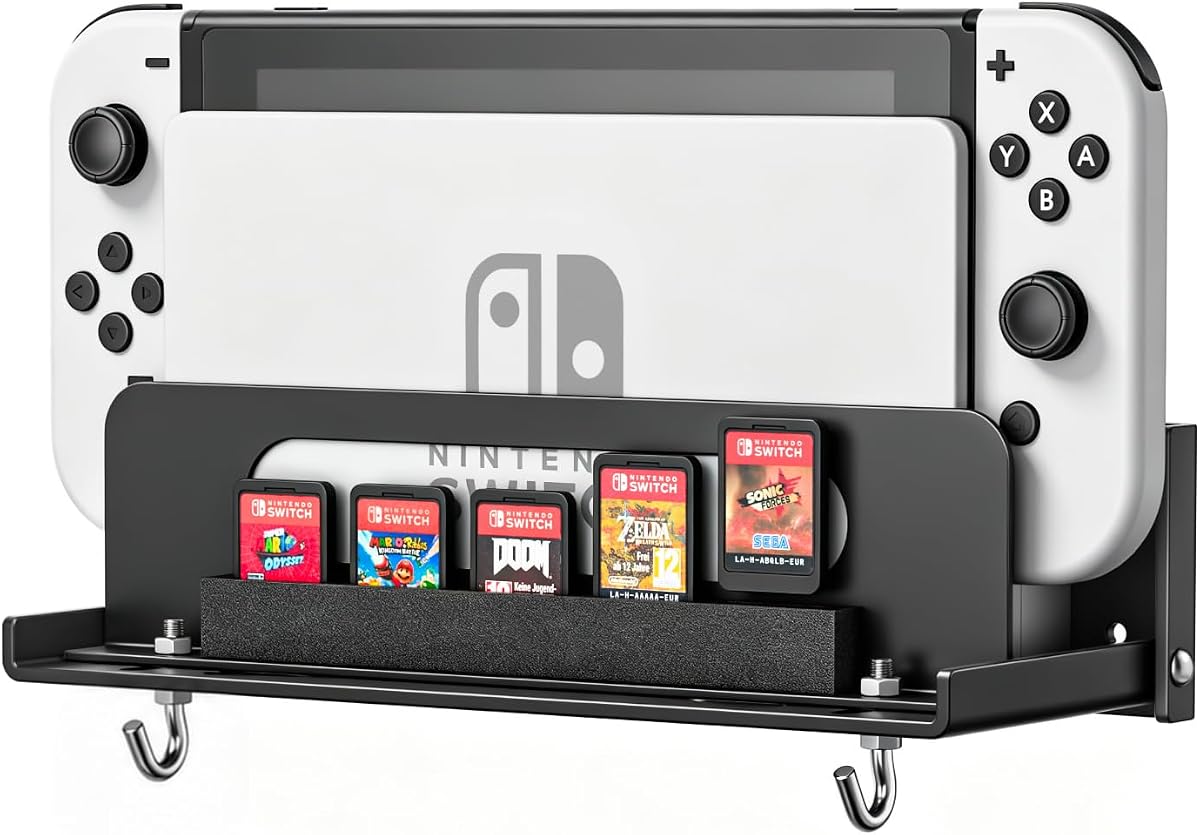
This black metal wall mount combines a console shelf with useful storage for game cards and detached Joy-Con controllers. Its 4.8 rating reflects a strong balance of simple construction, organized accessories, and practical cooling features, making it an appealing option for Switch 1 or Switch OLED owners.
We may earn a commission when you buy through this link, at no additional cost to you.
The shelf uses foam strips along the sides and rear to stabilize the dock without forcing it tightly against the mounting surface. Five foam-lined game card slots protect cartridges from rubbing against bare metal, while four T-shaped hooks provide dedicated places for Joy-Cons. A large opening beneath the shelf supports heat dissipation during longer play sessions.
The main limitation is its compatibility with the original Switch and Switch OLED rather than Switch 2. Its five-card capacity may also feel modest for collectors, but the selection is clearly intended for frequently used games rather than an entire library. Installation involves three screws, wall anchors, and a small bubble level for alignment.
This mount is a strong choice for anyone who wants a visible, reachable organizer rather than a fully concealed bracket. It suits a gaming room, living-room television wall, or shelf where the console, a few games, and frequently used controllers should remain close at hand without occupying the main surface area.
Unlike a fully hidden bracket, this shelf keeps the dock and commonly used accessories in plain view. The dedicated game card slots and Joy-Con hooks reduce clutter while making it easy to grab a controller and start a session.
The offset foam arrangement and lower vent are designed to avoid trapping the console against the wall. Buyers should still keep the mount in an open area with reasonable airflow and follow normal console safety guidance.
We may earn a commission when you buy through this link, at no additional cost to you.
The HIDEit mount is built for buyers who want the Nintendo Switch to disappear into an entertainment center. Rated 4.8, it uses a custom dock design and an offset structure to hold the console behind a television or compatible display while preserving ventilation and easy access to the console.
We may earn a commission when you buy through this link, at no additional cost to you.
Cutouts in the mount correspond with the Switch vents, while the offset geometry helps maintain airflow around the dock. Heavy-gauge cold-rolled steel gives the bracket a substantial feel, and the powder-coated finish is intended to resist scratching, rust, and chipping during normal use.
A concealed mount necessarily offers less visible storage than a shelf-style organizer. Installation also depends on adequate space behind the chosen television and the ability to route the required power and display cables. Some entertainment cabinets may require additional planning to ensure the cables and console can be removed comfortably.
This is the strongest choice for a minimalist gaming room, wall-mounted television installation, or clean home theater where visual clutter matters more than convenient game card storage. It gives Switch 1 and Switch OLED owners a durable, purpose-built way to mount the dock with ventilation in mind.
Mounting the dock behind the display removes the console from the visible entertainment area. That makes the setup especially suitable for streamlined living rooms and media cabinets where exposed accessories would interrupt the room's appearance.
The offset construction and strategically aligned openings give warm air a path away from the console. This is especially relevant for a dock mounted in a less open position than a standalone shelf.
We may earn a commission when you buy through this link, at no additional cost to you.
This FASTSNAIL kit is the most feature-rich option in the roundup, combining a console charging area, accessory storage, and RGB illumination. Its 4.8 rating and broad Switch 2, Switch 1, and OLED compatibility make it a strong centerpiece for a modern gaming setup.
We may earn a commission when you buy through this link, at no additional cost to you.
The wall-mounted organizer includes capacity for one console, ten game cards, six Joy-Cons, four wrist straps, two Pro Controllers, and associated cables. Two additional USB 2.0 ports support low-current charging and data transfer, while the main charging area uses an orange indicator during charging and blue when the controllers are charged or ready.
Fifteen lighting modes include seven monochrome and eight dynamic options, with controls for cycling colors, memorizing a selection, and turning the lighting off. Because the product combines a charger, lighting controller, and storage system, it demands more setup and cable routing than a basic steel bracket.
This kit makes the most sense for players who want a single station for charging and organizing several accessories. It also works as a desktop stand, which adds flexibility for users who may relocate the gaming area or want a temporary station away from the television wall.
The integrated charging area keeps four Joy-Cons ready while the surrounding compartments organize games, straps, controllers, and cables. That combination can replace several small stands and hooks around a television.
The RGB illumination gives the installation more visual presence than a concealed steel mount. Buyers who prefer a subtle setup can switch off or memorize a single color when the console is not in use.
We may earn a commission when you buy through this link, at no additional cost to you.
This RGB wall mount is designed for Switch 1 and Switch OLED owners who want more than a plain bracket. It earns a 4.8 rating by combining a four-position Joy-Con charger with a larger accessory organizer and a choice of static and dynamic lighting effects.
We may earn a commission when you buy through this link, at no additional cost to you.
Storage includes room for ten game cards, six Joy-Cons, four wrist straps, two Pro Controllers, one console, and cables. Two USB ports provide low-current charging and data-transfer functions. Red and blue indicators communicate charging status, and the charging mode can be disabled so the unit functions simply as an illuminated stand.
Its main drawback relative to newer kits is the absence of explicit Switch 2 support. It also has more moving parts and connections than a conventional mount, so buyers who do not use RGB lighting or need multi-controller charging may find the added functionality excessive.
This is a strong option for an existing Switch 1 or OLED collection that has outgrown a simple dock shelf. It suits players who regularly use multiple controllers and physical games and want those accessories consolidated into a single illuminated station.
Ten game card slots and separate areas for Joy-Cons, Pro Controllers, wrist straps, and cables reduce the need for scattered accessories. The plug-in storage arrangement is more stable than relying on many small hanging points.
The same structure can serve as a wall mount behind a television or a desktop stand. This makes it practical for gaming corners where the main television is wall-mounted and a smaller display is used for casual play.
We may earn a commission when you buy through this link, at no additional cost to you.
This compact hollow metal mount supports Switch 2, the original Switch, and Switch OLED, giving it unusually broad console coverage. Its 4.7 rating reflects a straightforward design that combines a ventilated console holder with modest storage for frequently used accessories.
We may earn a commission when you buy through this link, at no additional cost to you.
The open hollowed structure is intended to improve heat dissipation while leaving room for flexible placement behind a television or on a desktop. EVA strips reduce movement, and the powder-coated steel construction provides a stable support surface. Four Joy-Con hangers and eight game card slots add organization without turning the mount into a large charging station.
Because the mount does not include a charger, players who expect controller charging will need a separate dock or charging solution. The accessory capacity is also more limited than the larger FASTSNAIL organizers, which is appropriate for a minimalist display but not for a large collection.
This is a good fit for owners who may move between console generations or want one mounting solution for several systems. Its low-profile, multipurpose construction is especially useful for compact gaming rooms where visual bulk and excessive storage should be avoided.
Compatibility across Switch 2, Switch 1, and OLED reduces the need to replace wall hardware after a console upgrade. The shared mounting approach also suits households with more than one compatible system.
Eight game slots and four controller hangers cover the accessories used most often, while the open frame keeps the overall design visually restrained. It is a middle ground between a bare bracket and a full charging organizer.
We may earn a commission when you buy through this link, at no additional cost to you.
This universal wall mount offers broad console compatibility and useful organization at a value-focused level. Its 4.6 rating reflects a practical design intended for bedrooms, dorms, entertainment centers, and gaming rooms where a simple mounted dock can reclaim valuable surface space.
We may earn a commission when you buy through this link, at no additional cost to you.
The ventilated open-air structure is designed to reduce heat buildup by allowing air to circulate around the console and dock. Integrated storage keeps Joy-Con controllers and game cards within reach, although the listing does not provide exact slot or hook quantities for comparison with larger organizers.
The model does not include a controller charger, so it serves as a mounting and storage solution rather than a complete charging station. Buyers seeking specific capacities, concealed mounting, or RGB lighting should examine the photographs and dimensions carefully because those details are not emphasized in the supplied specification list.
This mount is a sensible choice for buyers who prioritize compatibility, straightforward organization, and space savings over advanced lighting or charging features. It is particularly practical for a dorm room or compact entertainment center where the console must be stored vertically without taking up a shelf.
The built-in storage positions keep controllers and game cards together rather than scattered across a desk. That makes the installation feel more like a compact gaming station than a bare metal bracket.
The ventilated frame avoids enclosing the console in a solid box. This supports airflow around the dock, although the mount should still be installed in a location that is not tightly enclosed.
We may earn a commission when you buy through this link, at no additional cost to you.
This wall mount combines a four-position Joy-Con charging station with RGB lighting and broad accessory storage. It holds a 4.7 rating and offers the most complete presentation-oriented option for Switch 1 and OLED consoles that do not require Switch 2 compatibility.
We may earn a commission when you buy through this link, at no additional cost to you.
Red and blue indicator lights show when controllers are charging or fully charged, and the charging function can be switched off to create a stand. Additional storage accommodates Joy-Cons, game cards, wrist straps, Pro Controllers, and the console, while two extra USB ports handle low-current charging and data transfer.
Fifteen lighting choices include monochrome and dynamic modes, providing more personality than a standard steel shelf. The tradeoff is that the unit requires a power connection, needs sufficient clearance for cables, and does not list explicit Switch 2 support. It also takes up more visual and physical space than a concealed mount.
Buyers who regularly play with several controllers and want their charging and storage in one place should find this model practical. It is best suited to a gaming display where the RGB elements are welcome and the station can be mounted close to an accessible outlet.
The integrated four-position charger means controllers can be returned to the wall station instead of a separate dock. Red and blue indicators make the charging state easy to check at a glance.
Dynamic and static RGB modes let the unit function as part of the room's gaming aesthetic. Turning the lights off or choosing a single color provides a more restrained alternative when visual presentation matters less.
We may earn a commission when you buy through this link, at no additional cost to you.
This white metal shelf is a lighter visual alternative to the black version in the same general design category. With a 4.7 rating, it offers a practical console holder, five foam-lined game card positions, and four Joy-Con hooks for Switch 1 and OLED systems.
We may earn a commission when you buy through this link, at no additional cost to you.
Foam strips along the dock area help hold the console in place without pressing it too tightly against the wall, while the card slots keep physical games from scraping against metal. A large lower vent helps release heat, and the white powder-coated finish can blend more naturally with pale walls, shelving, and entertainment furniture.
Compatibility is limited to the original Switch and Switch OLED, and five game card spaces are not enough for a large physical collection. As with other shelf-style mounts, controller charging is handled separately, and the appearance of the dock may vary depending on the color of the console and installed accessories.
This is a good option for a bright living room, white media cabinet, or minimalist wall where a black bracket would stand out too prominently. It provides the same useful mix of docking, game storage, and controller access in a more decorative finish.
The white finish gives the organizer a less industrial appearance than darker metal hardware. That makes it easier to integrate into a bright entertainment center without making the mounted console feel visually dominant.
The included foam pieces stabilize the dock and cushion the stored game cards. They also help preserve breathing room at the rear, which is important when the mount is installed near a television.
We may earn a commission when you buy through this link, at no additional cost to you.
This metal console holder focuses on the practical details that matter after the Switch is mounted. Its 4.7 rating reflects a sturdy, ventilated design with controller hooks, integrated cable routing, and an emphasis on protecting the console during everyday use.
We may earn a commission when you buy through this link, at no additional cost to you.
The open back and targeted cutouts promote airflow during extended sessions, while side hooks provide homes for Joy-Con and Pro Controllers. Integrated routing keeps charging and HDMI cords out of sight, reducing the loose-cable clutter that commonly develops beside a television or entertainment cabinet.
The listed compatibility covers Switch 1 and OLED, not Switch 2. There is also no built-in charging function, so users need to retain access to a power source and route the cable without bending it sharply. The precise hook count and mounting dimensions are not stated in the supplied listing details.
This holder is a strong choice for players who prioritize clean cable management and controller organization over decorative lighting or integrated charging. It works especially well beside a television, inside a media cabinet, or anywhere a tangled console cable would otherwise consume useful space.
Charging and display cables can be directed along the mount rather than left in loose loops. Proper routing keeps the area safer and makes it easier to disconnect the console when it is not being used.
Side hooks keep controllers within reach while reducing the chance that they will be pressed against the console. Rounded metal edges also help guard the console casing from scratches during installation and daily use.
We may earn a commission when you buy through this link, at no additional cost to you.
The VIVO bracket is a minimalist alternative for buyers who want the console off the floor or shelf without a shelf, charging system, or lighting package. Its 4.6 rating reflects a straightforward adjustable steel design that supports both Switch 1 and Switch 2.
We may earn a commission when you buy through this link, at no additional cost to you.
The mounting width adjusts from 1.9 to 3 inches, allowing the dock to slide into a secure fit across supported console configurations. An open frame promotes airflow, and the lightweight steel construction is intended to make the mounting process fast and uncomplicated.
This is one of the simplest options in the roundup, which also means it offers no dedicated game card slots, controller hooks, RGB lighting, or integrated charging. A buyer who only needs a concealed or compact mounting point may appreciate that restraint, while collectors will need separate storage.
The mount is a sensible choice for a basic entertainment center, secondary gaming display, or minimalist setup where visual simplicity is the goal. It is particularly attractive for owners with multiple supported console generations who value adjustable fit and straightforward hardware.
A movable width gives the dock a more secure seating than a fixed-size bracket. The adjustment also makes the mount easier to accommodate across supported Switch configurations.
The open steel frame avoids adding visual bulk or unnecessary compartments. All mounting hardware and instructions are included, simplifying the initial setup for competent DIY users.
We may earn a commission when you buy through this link, at no additional cost to you.
The right wall mount depends on console generation, available clearance, storage habits, and whether charging and lighting are worthwhile additions. Reviewing these factors before buying helps prevent an installation that looks attractive but functions poorly in your specific gaming space.
Begin by confirming that the mount supports the exact console generation in your home. The original Switch and Switch OLED appear across most selections, while Switch 2 support is explicitly provided by only a few products in this roundup. Compatibility should apply to the docked console, not merely the tablet or handheld unit, because most wall mounts are designed to hold the dock and connected accessories.
Also consider whether a mount is intended to sit behind a television, beside a display, or on an open wall. A bracket that appears compact in product photographs may require additional clearance for cables, adapters, or the depth of the television cabinet. Verify dimensions and installation requirements before drilling any holes.
Choose a model explicitly rated for your console and dock. This is especially important when a household plans to upgrade from Switch 1 to Switch 2 without replacing its wall hardware.
A wall mount should support airflow rather than enclose the console in a tight cavity. Look for open frames, offset brackets, cutouts aligned with console vents, or lower openings that allow warm air to escape. Foam or padding may stabilize the dock, but it should not push the console tightly against the mounting surface or block the vent openings.
Consider the location as carefully as the mount itself. A shelf in an open room generally has better circulation than a bracket inside a closed media cabinet. Even a ventilated product should be installed where the console can dissipate heat normally and where cables do not obstruct its vents.
Prioritize ventilation for long gaming sessions. An open, offset, or vent-aligned design is usually more important than a small decorative feature, especially when the dock remains powered while the console is in use.
Basic console holders keep the dock in one place, while shelf and organizer designs also provide positions for game cards, detached Joy-Cons, Pro Controllers, wrist straps, and cables. Capacity matters most for players who keep several physical games in rotation or regularly detach controllers for multiplayer sessions.
Storage can be visibly organized or deliberately hidden. A shelf with dedicated slots makes frequently used items easy to locate, whereas a concealed bracket reduces visual clutter. Larger charging organizers tend to hold more accessories but occupy more space and require more mounting effort.
Choose storage based on your routine rather than the total size of your collection. A five-slot shelf may be ideal for a small rotation, while a ten-slot organizer benefits owners who regularly move between several physical titles.
An integrated charging station can reduce cable clutter by keeping controllers in dedicated charging positions near the console. The RGB organizer options described here include four Joy-Con charging positions, charging indicators, and additional low-current USB ports. This convenience comes with more power connections, more setup, and another component that must be maintained.
A simple wall mount does not need to provide charging, and many gaming setups already have a dependable charging dock. Separate charging can be more convenient when controllers are used with multiple displays or stored away from the console during travel.
Decide whether charging is a regular requirement or simply a bonus. If you already own an effective charging solution, a straightforward mount may provide a cleaner and more reliable installation.
The most useful mount is one that suits the furniture and sightlines in the room. Behind-TV brackets minimize visible hardware, shelves keep games and controllers accessible, and full organizers create a deliberate gaming display. A light-finished shelf can blend into a bright media center, while a black steel bracket often suits darker entertainment furniture.
Check the direction of controller access and the location of the dock's ports. The mount should not block buttons, ventilation, display output, or power connections. If the television sits on a console table, wall placement may still be difficult because the display stand can prevent the dock from sliding into position.
Match the mount's visibility to your room. Choose a concealed design for minimalist spaces and an illuminated organizer when the console is intended to be part of the display.
Steel construction is common across the strongest selections because it provides a stable support surface without making the bracket excessively heavy. Powder-coated finishes protect the metal from scratching, chipping, and corrosion while also creating a surface less likely to damage the console casing.
Padding, EVA strips, or foam strips can keep the dock from shifting and protect game cards from rubbing against bare metal. Rounded edges are another useful detail because they reduce the chance of leaving a sharp mark on the console during installation or removal.
Look for rigid steel, a protective finish, and non-abrasive contact points. These details matter more for a visible shelf than for a fully concealed bracket, although both should be handled with care.
Most mounts include screws, wall anchors, and basic instructions, but not every wall or installation environment is equally suitable. Drywall, wood studs, masonry, and entertainment cabinets require different fastening approaches. The included hardware is intended for common wall surfaces, while unusual materials may call for additional or different anchors.
Before installation, locate a suitable stud or anchor point and check for hidden wiring or plumbing. A small bubble level, included with some models, helps keep the console visually straight. Measure the available area and test the dock fit before committing to a final position.
Installation is easiest when the console, dock, and all cables can be removed from the wall after mounting. Leave enough service slack so the dock can be disconnected without pulling hard against the display cable or power adapter.
RGB lighting is optional functionality rather than an essential mounting requirement. It can give a gaming room a coordinated atmosphere, especially when the display already includes other illuminated equipment. The featured RGB products offer static and dynamic modes, color memory, and controls for turning the lighting off.
Illuminated accessories also draw more attention to the installation. Some users will appreciate that presentation, while others may prefer a bracket that disappears behind the television. If the RGB function will not be used regularly, a conventional metal shelf may deliver a cleaner result with fewer parts.
Treat lighting as a preference, not a performance measure. Focus first on secure mounting, airflow, and compatibility, then choose illumination if it enhances the intended room design.
Choose a clean, structurally suitable installation area and gather the included screws, anchors, screwdriver, level, and instructions. Confirm the console generation and dock fit before drilling, then use appropriate anchors for the wall material. A stud or solid mounting point is preferable where one is available, and hidden utilities should be checked before making holes.
Attach the wall plate securely, position it level, and follow the bracket's direction for attaching the dock. Connect the power and display cables before sliding the console into its final position. Route cords without sharply bending them, keep ventilation openings unobstructed, and leave enough slack to remove the dock without unplugging unrelated equipment.
For daily care, wipe the steel surfaces with a soft, dry or lightly damp cloth and avoid abrasive cleaners that could damage the powder coating. Check the mounting screws and controller hooks periodically, especially if the console is frequently removed. Clean the game card slots gently to prevent dust from collecting, and unplug any charging organizer before inspecting its connections or changing its lighting configuration.
A properly fitted Nintendo Switch wall mount is designed to hold the console dock securely. The exact fit depends on model compatibility, mounting alignment, and the wall surface. Follow the included instructions, tighten the fasteners fully, and confirm that the dock cannot shift before connecting cables or placing the console in use.
Ventilation depends on the mount's design and installation position. Models with open frames, offset brackets, rear spacing, and vent-aligned cutouts are designed to reduce restricted airflow. Avoid placing a vented mount in a sealed cabinet and keep the dock's vents unobstructed during extended sessions.
Only some mounts in this roundup explicitly support Nintendo Switch 2. The FASTSNAIL Switch 2 kit, hollow metal multi-generation mount, universal ventilated mount, and VIVO adjustable bracket list Switch 2 compatibility. Other products are identified for the original Switch, Switch OLED, or both, so buyers should check the current listing before ordering.
A behind-TV installation is ideal when visual clutter is a priority, but adequate space is required for the dock, cables, and airflow. Measure the gap between the television and wall, then confirm the television stand or mounting system will not prevent the dock from sliding into the bracket. Some televisions also need a specific VESA-compatible arrangement.
Most simple metal mounts do not include charging, but the larger RGB organizer kits provide four Joy-Con charging positions and status indicators. If you already own a dependable charging dock, a straightforward bracket may be enough. If you want controllers to charge in the display area, choose one of the integrated charging models.
A five-slot shelf suits players with a small rotation of physical games, while the larger organizers offer ten slots. Collectors with dozens of titles will still need separate storage, and a wall mount should not be overloaded with additional objects. Choose a capacity that makes frequently used games easy to reach without creating visual clutter.
Several products in the roundup can function as a desktop stand as well as a wall mount, particularly the RGB organizer kits. A dedicated wall bracket normally needs removal before it can stand independently. Check the product description and included base to confirm whether desktop use is a built-in feature.
Verify the wall material, locate a stud or suitable anchor point, and check for hidden electrical wiring or plumbing. Confirm that the mount fits the available space and that the dock can be removed without disconnecting the television. Use the appropriate fasteners and consult the manufacturer's instructions if your wall condition is unusual.
The HIDEit TV-style mount stands out for buyers who want a concealed, ventilation-conscious installation, while the FASTSNAIL RGB Switch 2 kit offers the most extensive charging, storage, and lighting functions. For a more restrained option, the universal ventilated mount provides broad compatibility and useful organization at a value-focused level.
The most important priorities are correct console support, a secure fit, open ventilation, and enough clearance for cables. Accessory storage matters for players with physical games and detached controllers, while integrated charging and RGB lighting should remain secondary considerations unless they will be used regularly.
Before buying, compare the current product listing, dimensions, included hardware, and compatibility details. Prices, promotions, and product information can change, so checking the live listing helps ensure that the selected mount still matches your console and intended installation.


