
KINESIS Freestyle2 Ergonomic Keyboard
4.1Editor score
Adjustable separation and tenting
Standard Mac shortcut layout
Low-force tactile membrane keys
A split keyboard can make long typing sessions more comfortable by separating the left and right key zones, reducing inward wrist bending, and supporting a more natural forearm position. For Mac users, the best model should also provide familiar macOS shortcuts, dependable connectivity, and a layout that works across MacBooks, iMacs, and other Apple devices.
We compared ten split keyboards based on the supplied product specifications, including their ergonomic design, key layout, connection options, Mac support, backlighting, customization features, battery behavior, and included accessories. The list covers wired, wireless, mechanical, and membrane models, with options for desk space, travel, and typing preferences.
Each review highlights the most useful strengths and realistic trade-offs of its keyboard, helping you identify whether a model suits your workspace, operating habits, and comfort priorities. Product availability and prices change over time, so confirm the current listing and specifications before making a final purchase.
4.1Editor score

4.1Editor score
4.8Editor score
As an Amazon Associate we earn from qualifying purchases.
This side-by-side overview compares the ten keyboards by connection style, layout, Mac-specific features, comfort hardware, and customization options.


This Macally wired keyboard is an approachable entry into the split-keyboard category, earning a 4.1 rating while offering a familiar MacOS-style layout and a gently sloped, curved design. Its 100-key arrangement includes 16 shortcuts, so users moving from an Apple keyboard can retain access to common system and media functions.
We may earn a commission when you buy through this link, at no additional cost to you.
Comfort comes from several practical adjustments rather than extreme adjustability. The split shape positions the two key groups farther apart, the padded wrist rest supports the forearms, and four kickstands provide several angle choices. Backlit keys offer off, low, mid, and high brightness settings for use across different lighting conditions.
The main compromises are practical rather than fundamental. It uses a fixed five-foot USB-A cable, so there is no wireless freedom or USB-C connection, and it lacks a built-in hub for peripherals. The scissor-switch keys are also likely to feel different from a mechanical keyboard, though the manufacturer describes them as similar to typing on a MacBook.
This is a sensible choice for someone who wants a simple, familiar, backlit split keyboard without navigating complicated configuration software. Mac users wanting a dedicated USB-C keyboard, adjustable separation, or extensive personalization should look higher in the list.
The 100-key layout and 16 shortcuts reduce the friction of switching from a standard Apple keyboard. Three brightness levels plus an off setting make the backlighting useful in both bright rooms and dim workspaces.
The curved split profile, padded support, and four adjustable kickstands provide several ways to tune the typing angle. A wired plug-and-play connection also avoids drivers, pairing steps, and battery management.
We may earn a commission when you buy through this link, at no additional cost to you.
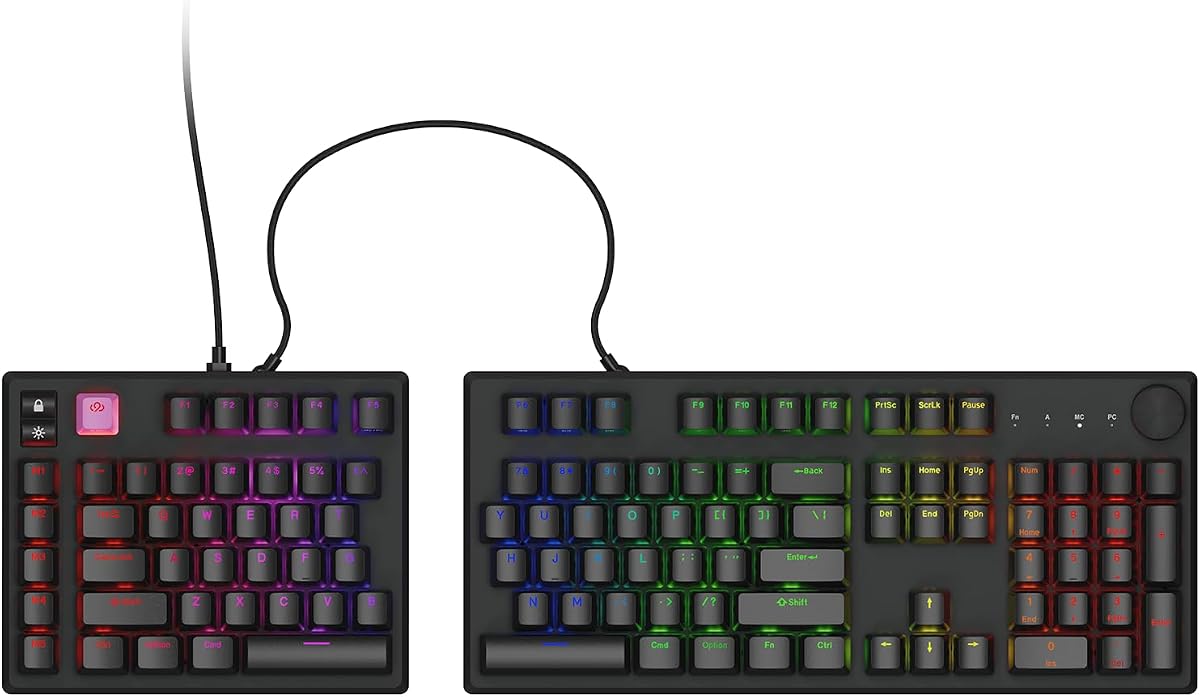
The KINESIS Freestyle2 is the standout for users who want meaningful control over keyboard geometry. It has a 4.1 rating and can rotate and separate its two key modules by as much as nine inches, allowing the hands, wrists, and forearms to adopt a more natural position than a fixed split design permits.
We may earn a commission when you buy through this link, at no additional cost to you.
The preinstalled VIP3 lifters add tenting options of five, 10, or 15 degrees and support cushioned palm rests. KINESIS also uses a standard Mac layout with Cut, Copy, Paste, multimedia controls, and a two-port hub, allowing it to function without software or special drivers.
Its low-activation-force membrane switches produce tactile feedback and aim to reduce finger fatigue, but some typists may prefer the sharper response or deeper customization of mechanical hardware. It is also a wired model, so cable management and a permanent desk connection are unavoidable.
Choose the Freestyle2 if shoulder width, hand position, and tenting are your biggest ergonomic concerns. It is especially compelling for long workdays in which a one-size-fits-all keyboard has not delivered a comfortable position.
Adjustable rotation and separation let each user position the key modules independently. That flexibility is valuable when fixed split boards feel too narrow, too wide, or insufficiently angled.
The standard Mac layout, multimedia keys, and integrated USB hub work immediately without drivers. Low-force tactile switches also reduce the amount of finger pressure required during extended sessions.
We may earn a commission when you buy through this link, at no additional cost to you.
This Macally model stands out as a practical desktop keyboard, carrying a 4.1 rating and combining a split ergonomic layout with an unusually useful set of ports. Its dual plug includes USB-C and USB-A, while the built-in hub adds two USB-A ports and one USB-C port for accessories.
We may earn a commission when you buy through this link, at no additional cost to you.
The keyboard is designed for MacOS and other compatible devices, including MacBook Pro, MacBook Air, iMac, iPad, and iPhone connections that support the relevant interfaces. A 100-key layout includes 16 shortcuts for brightness, media, and everyday functions, reducing the learning curve for Apple users.
Comfort comes from a curved slope, split configuration, and cushioned wrist support, although the geometry itself cannot be separated or tented like the KINESIS. The wired design also means no charging or pairing, which can be an advantage for a permanent workstation but a limitation for mobile use.
This is an excellent match for a Mac-heavy desk where one keyboard must connect through different ports and also provide room for a mouse, drive, or other peripheral. Buyers who prioritize USB-C convenience and hub functionality will find this model especially compelling.
The supplied dual plug allows use with USB-C or USB-A systems without an adapter. That flexibility is useful when moving between an Apple laptop, desktop, or tablet throughout the day.
Two USB-A ports and one USB-C port can handle essential accessories while the keyboard itself remains connected. This makes the design useful for users who want a streamlined desktop without a full docking station.
We may earn a commission when you buy through this link, at no additional cost to you.
The Cloud Nine ErgoPRO combines a split ergonomic format with extensive enthusiast features, and its 4.8 rating is the highest among the listed models. It is explicitly designed for macOS while also supporting Windows, making it a natural choice for creative professionals, programmers, and power users.
We may earn a commission when you buy through this link, at no additional cost to you.
QMK firmware support enables custom keymaps, macros, shortcuts, and layers. The VIA application runs directly in a browser without a traditional installation process, while RGB lighting includes 43 pre-programmed presets and further customization. This is far more flexible than the fixed shortcut layouts offered by many conventional ergonomic keyboards.
The keyboard uses a hot-swappable PCB, allowing compatible mechanical switches to be replaced without soldering. Its aluminum keyframe supplies rigidity, and the PBT keycaps are designed to resist shine, fading, and wear, addressing common durability concerns in mechanical boards.
The trade-off is complexity. Users who never plan to customize keymaps or switches may find that a simpler membrane or scissor keyboard better matches their needs, and the full-size design demands ample desk space. Even so, the ErgoPRO is the most capable pick for users who treat keyboard configuration as part of their workflow.
QMK, VIA, programmable layers, and macro support turn the keyboard into a task-specific tool. You can tailor shortcuts for coding, design, gaming, or general productivity rather than relying on a fixed set of Mac keys.
Hot-swappable sockets make changing compatible three-pin and five-pin switches much easier. The aluminum frame and PBT keycaps also suggest durability for setups that receive frequent daily use.
We may earn a commission when you buy through this link, at no additional cost to you.
The SABLUTE bundle offers a coordinated wireless workspace and earns a 4.8 rating. Rather than focusing only on the keyboard, it includes an ergonomic mouse with palm and thumb support, four DPI levels, and forward and back buttons for a more complete desk setup.
We may earn a commission when you buy through this link, at no additional cost to you.
The full-size split keyboard follows a curved layout, provides a number pad, and includes a soft memory-foam wrist rest with a water-resistant surface. Four adjustable tilt legs allow users to tune the angle while seated or standing, while a dedicated system key switches between Windows and Mac layouts.
Wireless operation uses a 2.4GHz USB-A receiver, with a separate USB-C adapter included for compatible devices. Both keyboard and mouse are rechargeable, and five-second auto sleep helps conserve power. The manufacturer lists standby figures of up to 250 hours for the keyboard and 350 hours for the mouse.
The primary limitation is space. The keyboard measures 19 by 10.45 by 1.88 inches and needs considerably more room than a compact model. For users who want one purchase to cover keyboard, mouse, and wireless operation, this bundle offers unusual breadth, but desk dimensions should be checked first.
The included mouse follows the same ergonomic intent as the keyboard, reducing the need to assemble a matching setup from separate manufacturers. Shared wireless charging and sleep behavior also simplify routine maintenance.
The full-size layout includes a number pad, while the mouse offers configurable DPI and navigation buttons. That makes the bundle practical for spreadsheet work, data entry, and everyday browsing.
We may earn a commission when you buy through this link, at no additional cost to you.
This Macally wireless model is designed for Apple users who move among several devices, with a 3.8 rating and support for pairing and switching among three Bluetooth devices. Compatible examples include a MacBook, iPad, iMac, and iPhone, making it well suited to a shared workspace.
We may earn a commission when you buy through this link, at no additional cost to you.
The keyboard retains a familiar 100-key MacOS layout with 13 shortcuts, while the split form, padded wrist support, and four adjustable kickstands provide its ergonomic structure. LED illumination offers off, low, mid, and high settings for visibility in different environments.
Power comes from a built-in 2000mAh rechargeable battery, and a USB-C charging cable is included. Compared with smaller wireless designs, the larger battery is one of its more attractive specifications for users who do not want to recharge frequently.
The 3.8 rating is lower than that of several alternatives, and the supplied information does not describe a wired mode or USB hub. Nevertheless, this keyboard is a sensible option when multi-device Bluetooth switching and a familiar Apple layout matter more than extensive programmability.
Dedicated Bluetooth switching reduces the need to re-pair the keyboard whenever you move between an Apple computer, tablet, or phone. It is a practical convenience for mobile workflows.
The 2000mAh battery and included USB-C charging cable remove disposable battery maintenance. Backlighting and a conventional key arrangement add utility without requiring a separate wireless receiver.
We may earn a commission when you buy through this link, at no additional cost to you.
The Macally Dual-Mode model combines Bluetooth flexibility with a wired fallback in an 86-key package. Its 3.4 rating is the lowest in this guide, so prospective buyers should weigh that against the unusually broad connection support and compact footprint.
We may earn a commission when you buy through this link, at no additional cost to you.
The true two-zone split design is angled for more natural hand placement and includes a cushioned palm rest. It supports Bluetooth and wired connections through USB-C or USB-A, allowing continuous use while charging and adding a reliable option for systems where wireless pairing is inconvenient.
Up to three devices can be connected, and dedicated keys simplify switching among macOS, iPadOS, and iOS environments. Fifteen shortcuts include Mission Control, Spotlight, and media controls, while scissor switches provide a quiet, familiar feel.
The 500mAh battery is specified to last up to one or two months and recharge in about two hours. Its compact key count preserves common controls while saving space, but users who rely on a dedicated number pad may find the layout less accommodating.
Bluetooth supports a clean desk and portable use, while USB-C or USB-A wired mode offers instant access and permits charging. This hybrid approach is useful in offices where device policies restrict wireless peripherals.
The 86-key layout reduces desktop requirements while retaining 15 Apple-relevant shortcuts. Dedicated switching keys make it easy to move among a Mac, iPad, and iPhone.
We may earn a commission when you buy through this link, at no additional cost to you.
The Logitech ERGO K860 brings a polished, established approach to split typing and carries a 4.4 rating. Its curved keyframe and sloping design are intended to support more natural wrist and forearm positioning, while the pillowed wrist rest provides substantial support during extended sessions.
We may earn a commission when you buy through this link, at no additional cost to you.
Logitech describes the rest as offering 54 percent more wrist support and 25 percent less wrist bending than a standard keyboard without a palm rest. Scoped key shapes are designed to improve fingertip contact, and three leg positions—zero, negative four, and negative seven degrees—let users adjust the incline.
Connectivity supports both Bluetooth and the included USB receiver. The full-size layout includes quiet keys and a Caps Lock indicator, while Logitech Options provides Fn-key customization, shortcut creation, and battery notifications. The keyboard is also certified by United States Ergonomics.
The curve and tenting are not independently adjustable, so users who want dramatic separation or angle changes may prefer the KINESIS. Even so, the K860 offers a balanced mix of comfort, familiar functionality, wireless convenience, and polished everyday features.
The contoured keyframe, pillowed memory-foam rest, and angled platform work together to reduce wrist extension. Three-position palm lift allows the user to tune the final height without disassembling the keyboard.
Users can connect over Bluetooth or with the USB receiver, choosing the approach that best suits their Mac setup. Options software adds shortcut control and battery-life notifications.
We may earn a commission when you buy through this link, at no additional cost to you.
The RK ROYAL KLUDGE S70 brings compact mechanical customization to the split format and earns a 4.3 rating. Its 75-percent layout reduces the footprint compared with a full-size board while retaining essential keys for work, programming, and gaming.
We may earn a commission when you buy through this link, at no additional cost to you.
Eight adjustable feet let users alter the position and tenting of each half, and a coiled cable links the sections when wired. The pre-lubed linear creamy switches are smooth, while the hot-swappable PCB accepts compatible three-pin and five-pin mechanical switches for future customization.
Connectivity includes 2.4GHz wireless, Bluetooth, and USB-C. A 3150mAh battery is specified to last up to two weeks with the backlight off, and five programmable macro keys are available. The left half contains a battery and retains wireless and macro functionality, allowing one-handed use.
Customization is strongest on Windows, where RK software supports remapping and RGB adjustment, although the keyboard is compatible with Mac, Windows, and Android. Mac users should therefore expect conventional operation there, while the hardware remains compatible across multiple systems.
Hot-swappable sockets and pre-lubed linear switches provide a tactile foundation that can be refined later. The 75-percent format saves desk space without becoming as restrictive as a tenkeyless design.
Bluetooth, 2.4GHz, and USB-C cover many connection preferences. A built-in battery in the left module also preserves wireless functionality and macro access during one-handed operation.
We may earn a commission when you buy through this link, at no additional cost to you.
The Perixx Periboard-612B offers a conventional split-key experience with wireless flexibility and a 3.9 rating. Its one-piece frame separates the keys into left and right zones, reducing inward wrist bending while maintaining a familiar overall keyboard shape.
We may earn a commission when you buy through this link, at no additional cost to you.
The keyboard switches between a 2.4GHz nano receiver and Bluetooth, and setup requires no drivers or dedicated software. A bottom control changes the active operating system, while four additional Mac and Windows keys can be installed with the included key puller for further personalization.
Its long-travel membrane keys provide tactile feedback that the manufacturer compares with brown mechanical switches. Curved rows and stepped keycaps are intended to support natural fingertip placement, and the construction is rated for up to 20 million keystrokes.
The principal drawback is reliance on two AA alkaline batteries, which are not included. The split geometry is fixed rather than freely adjustable, and the supplied information does not mention backlighting. It remains a worthwhile option for users who prefer familiar membrane keys and uncomplicated cross-platform wireless operation.
Long key travel and tactile membrane feedback can make the transition easier for typists accustomed to conventional keyboards. Curved rows and shaped keycaps support the split design without introducing unfamiliar mechanics.
The 2.4GHz receiver and Bluetooth connection avoid driver installation, and a physical operating-system switch supports Mac and Windows. Removable auxiliary keys provide extra flexibility for platform-specific controls.
We may earn a commission when you buy through this link, at no additional cost to you.
The best split keyboard for Mac depends on your desk, connection habits, typing experience, and desired level of adjustability. Use the following factors to narrow the field before making a purchase.
A split layout separates the left and right key groups to limit inward wrist bending, but the degree of separation and tenting varies widely. Fixed designs are simpler and often more affordable, while adjustable modules can accommodate different shoulder widths, desk heights, and preferred forearm angles. The KINESIS Freestyle2 offers the most dramatic geometry changes, whereas the Macally and Logitech models use predetermined curves.
A keyboard marketed for Mac should provide familiar modifier placement, system shortcuts, and an easy way to select the correct operating system. The options range from 13 dedicated shortcuts on the Macally Bluetooth model to 15 shortcuts on the compact dual-mode board. QMK support on the Cloud Nine ErgoPRO provides the greatest opportunity for building a fully customized Mac keymap.
Wired keyboards offer plug-and-play reliability and eliminate charging, while wireless models reduce cable clutter and support portable work. Bluetooth can connect directly to a Mac, whereas 2.4GHz receivers often provide a dedicated connection path. Hybrid keyboards such as the Macally dual-mode model allow both approaches, while the wired USB hub model focuses on stable desktop use.
Scissor switches offer a familiar laptop-like feel, membrane keys generally produce a quieter and lighter response, and mechanical switches provide a broader range of tactile and linear options. The KINESIS uses a low-force tactile membrane design, while the Cloud Nine ErgoPRO and RK S70 provide hot-swappable mechanical sockets for users who may want to change switches later.
Wrist rests should support the heels of your hands without forcing the wrists upward, while tenting can reduce forearm strain by positioning the keyboard more naturally. Look for memory foam or cushioned palm pads, adjustable legs, or independently movable halves. The Logitech K860 provides a particularly prominent memory-foam rest, while the KINESIS and RK models offer greater control over angle.
Backlighting makes keys easier to locate in dim rooms, although brightness levels and customization options vary. The wired Macally models and Bluetooth Macally keyboard use three brightness settings, the Logitech focuses on everyday wireless utility, and the Cloud Nine ErgoPRO offers extensive RGB presets and VIA-based control. Users who work in consistently low light should prioritize visible, adjustable illumination.
Split designs occupy more width than ordinary compact keyboards because the two halves are separated. Full-size products can also include a number pad, while the Macally dual-mode and RK S70 use 86-key and 75-percent layouts respectively. Measure your desk and compare the listed dimensions before ordering, particularly if you also want room for a mouse, monitor, or writing area.
Rechargeable wireless keyboards reduce ongoing battery costs but add charging and battery-health considerations. The SABLUTE bundle, Macally Bluetooth model, and compact Macally dual-mode model use rechargeable batteries, while the Perixx requires two AA alkaline batteries. Wired products avoid the issue entirely. Also consider cleaning access, keycap materials, switch replaceability, and the availability of included charging cables.
Begin by placing the keyboard directly in front of you rather than using its original angled box position as a guide. Position the two halves at roughly shoulder width, bring your elbows close to your sides, and adjust the feet, tenting, or separation until your forearms feel approximately level. Keep your wrists neutral rather than sharply bending them upward, and let the palm rest support the sides of your hands.
For a wireless model, charge the keyboard fully before the first extended session, then install the receiver or pair it through macOS Bluetooth settings. If the keyboard has an operating-system switch, choose Mac before typing. Test the modifier keys, brightness controls, media keys, and device-switching buttons, and use the supplied configuration software only after confirming that the basic layout works as expected.
To maintain the keyboard, disconnect it before cleaning and use a soft, lightly dampened cloth rather than pouring liquid over the keys. Avoid abrasive pads and harsh cleaners, especially on coated keycaps or display-like lighting surfaces. Remove loose debris with compressed air, recharge rechargeable models before long storage periods, and replace batteries in non-rechargeable models if performance becomes inconsistent.
A split keyboard can improve comfort if it encourages straighter wrists and a more natural forearm position. The result depends on adjustment, desk height, hand size, and habit, since no design fits everyone. Mac users should additionally confirm that the modifier keys, shortcuts, and operating-system switching match their usual workflow.
No, many split keyboards work with both macOS and Windows. A Mac-specific model is still useful when it provides a traditional Apple modifier arrangement, convenient system shortcuts, and simple device switching. Models with QMK or configurable layers can also be adapted to Mac shortcuts, although setup may require more effort.
At minimum, look for adjustable feet or palm lift, with independently separated halves providing even greater flexibility. Adjustable tenting is valuable when your desk height or preferred forearm angle does not match a fixed keyboard. Users with a new ergonomic setup may need several days to adapt, so begin with modest changes.
Mechanical models generally provide more switch options, a distinct tactile response, and greater long-term customization, especially when hot-swappable. Membrane and scissor models are often quieter, lighter, and more familiar to laptop users. The best choice depends on sound preference, maintenance tolerance, and whether you value switch customization.
Several options support multi-device use through Bluetooth or selectable connection modes. The Macally Bluetooth model switches among three devices, the dual-mode model supports three devices, and the Logitech K860 offers Bluetooth plus a USB receiver. Verify that every target device supports the relevant connection method before purchasing.
A wired keyboard is dependable, simple, and always ready to use, making it a strong choice for a fixed desk. Wireless reduces cable clutter and makes the keyboard easier to move between a laptop and other devices, although charging, pairing, and receiver management may be less convenient. Hybrid models offer both approaches.
Some full-size split designs include a number pad, while more compact models omit it to save desk space. The SABLUTE bundle includes one in its full-size layout, whereas the Macally dual-mode and RK S70 use smaller key arrangements. Check spreadsheet and data-entry needs before choosing a compact configuration.
Adjustment commonly takes several days to a few weeks because the key zones and hand positions feel different at first. Begin with a modest split and angle, type for short periods, and avoid making large posture changes every day. If pain persists rather than gradually fading, reassess the keyboard height and consider an ergonomic assessment.
The KINESIS Freestyle2 is the strongest choice for adjustability, with independently repositioned modules, several tenting angles, and a standard Mac layout. The Macally wired USB hub model stands out for dependable connections and integrated ports, while the Cloud Nine ErgoPRO leads for mechanical customization, QMK features, and RGB lighting.
Other users may find better fits in the Logitech ERGO K860 for polished everyday comfort, the SABLUTE bundle for a complete keyboard-and-mouse setup, or the RK S70 for a compact mechanical layout. Prioritize the connection method, physical desk space, key feel, and degree of ergonomic adjustment you will actually use rather than choosing on features alone.
Review the latest product listing before purchasing, because configurations, bundled accessories, software behavior, and prices can change. Confirm Mac compatibility, measure your workspace, and consider beginning with a comfortable rather than extreme keyboard position to make the transition easier.