
SanDisk 64GB Ultra USB 3.0
4.7Editor score
Up to 100MB/s reads
USB 3.0 and 2.0
Private-file software
Our 64GB USB Flash Drive guide compares ten top models for speed, capacity, portability, security, compatibility, and everyday file storage needs in 2026.
A 64GB USB flash drive remains a remarkably versatile way to carry documents, photos, music, presentations, and video between computers. The right model should balance useful transfer speed, dependable construction, broad device compatibility, and a design you are unlikely to lose. Capacities, interfaces, security features, and physical sizes can vary considerably across otherwise similar drives.
This guide compares ten 64GB flash drives using the supplied product specifications and customer ratings. It examines advertised read speeds, USB generations, connector designs, storage options, encryption support, portability, multi-packs, and practical compatibility claims. The list includes conventional USB-A models, a dual USB-C and USB-A drive, low-profile options, and bundles designed for people who need several drives.
Each review explains who benefits most from a particular model and where its trade-offs appear. The top picks represent the strongest combinations of value, performance, and premium construction, while the remaining reviews cover worthwhile alternatives for different needs. Product details and availability can change, and prices fluctuate frequently, so compare current listings and your device ports before ordering.
4.7Editor score
4.6Editor score

4.7Editor score
This side-by-side comparison highlights the main differences among the ten drives: advertised performance, connector style, portability, protection, and pack quantity. It is designed to make it easier to narrow the field according to the devices you use and the kinds of files you carry.


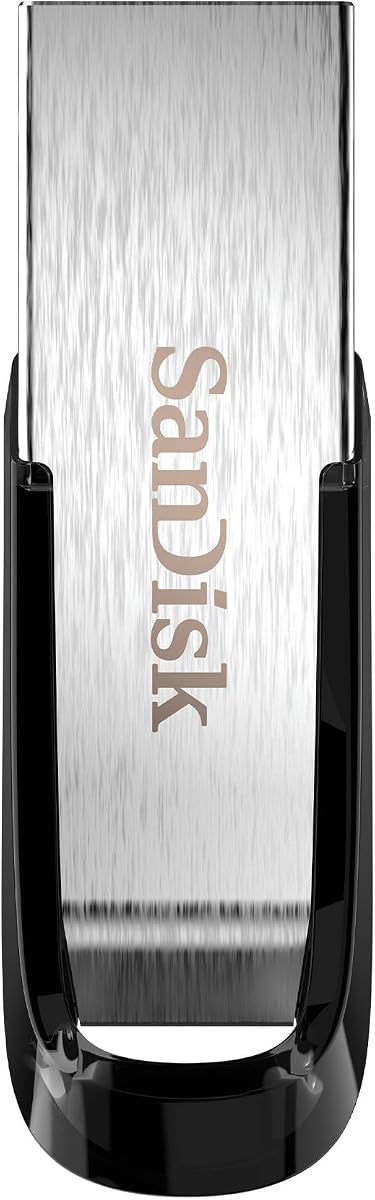
The SanDisk Ultra Flair combines a familiar USB-A connector with the highest advertised read speed in this roundup, reaching up to 150MB/s. Its 4.6 rating reflects a generally well-received balance of performance and build quality. The metal housing gives it a more substantial feel than a basic plastic thumb drive, while the understated shape suits both work bags and everyday key rings.
We may earn a commission when you buy through this link, at no additional cost to you.
Transfer speed is the Ultra Flair's defining benefit. SanDisk states that it can move a 1.2GB MPEG-4 movie in less than 30 seconds when connected to a USB 3.0 host, although actual results vary with the source device, file attributes, and usage conditions. It can also write up to 15 times faster than a standard 4MB/s USB 2.0 drive under the conditions described in the product data. That makes it attractive for moving large presentations, photo collections, and video clips.
Private storage is another strength. The included SanDisk SecureAccess approach uses 128-bit AES encryption and password protection for selected files. Windows 7, Windows 8, Windows 10, and Mac OS X 10.9 or later are supported, although Mac users must download the relevant software. This is a meaningful convenience for a portable drive that may contain sensitive documents, though users who need the strongest available security specification may prefer a model advertising 256-bit AES.
The main limitation is that the headline transfer rate requires a USB 3.0 port. Older machines and devices will connect it but will not deliver the same speed. The Ultra Flair is nevertheless a strong general recommendation for anyone seeking a fast, attractive, conventional USB-A drive with hardware-conscious construction and practical file protection.
The advertised 150MB/s read speed is especially useful when moving folders of high-resolution photos, presentations, or compressed video between compatible computers. Results will vary, so the USB 3.0 connection and the speed of the source drive remain important parts of the overall transfer experience.
Password protection gives sensitive files an extra layer of protection when the drive leaves your desk or travels with you. Remember the password securely and install the necessary software before relying on the protected vault, particularly when using macOS.
We may earn a commission when you buy through this link, at no additional cost to you.
The SanDisk 64GB Ultra USB 3.0 is a balanced general-purpose drive with a 4.7 rating, tying for the highest customer rating among the products in this guide. Its advertised read speed of up to 100MB/s is fast enough for routine file transfers while remaining straightforward to use with both modern and older systems.
We may earn a commission when you buy through this link, at no additional cost to you.
Compatibility is one of its most useful traits. The drive supports USB 3.0 and USB 2.0, so it can be used across a broad collection of computers without requiring the newest interface. SanDisk Secure Access software helps keep private files organized, while the stated operating range of 32 to 113 degrees Fahrenheit covers many normal indoor working environments.
This is not the fastest option here. The Ultra Flair claims up to 150MB/s, while several other products also advertise higher figures, so buyers with large archives and frequent transfers may prefer those models. On the other hand, the Ultra USB 3.0 avoids a more specialized form factor and includes the privacy software without requiring a premium-style design.
Choose this drive if you want a well-rated 64GB model for school, office work, presentations, and general media storage. It is a particularly sensible pick for anyone who needs backward compatibility without giving up a modern USB 3.0 connection. The balance of simplicity, broad support, and a strong customer rating makes it a dependable first flash drive.
An advertised read speed of up to 100MB/s covers everyday document transfers and media copying well. The included Secure Access software adds privacy without changing the familiar plug-and-use workflow.
USB 2.0 support broadens the pool of compatible computers, while USB 3.0 provides faster transfers when the host supports it. It is a useful choice for offices with mixed hardware generations.
We may earn a commission when you buy through this link, at no additional cost to you.
The Lexar A30E 3-Pack is a practical choice for students, teachers, office administrators, or families that need more than one portable storage device. Each drive offers 64GB, and the three-drive format makes it easier to divide storage among several people or maintain separate collections for work, school, travel, and backups.
We may earn a commission when you buy through this link, at no additional cost to you.
Performance is advertised at up to 100MB/s, making it similar to the standard SanDisk Ultra in expected transfer class. The USB 3.2 Gen 1 Type-A interface works with tablets, laptops, Macs, and traditional Type-A devices without software installation. A push-button retractor keeps the connector protected, while the lanyard loop adds another practical way to carry or identify each drive.
Lexar DataShield provides the most notable feature: a password-protected safe with automatic encryption. Files removed from the safe are securely erased and cannot be recovered according to the supplied information. This is useful for separating private records, but the drive's 7.41-gram weight and slim form mean it should still be treated as a portable item that can be lost.
The trade-off is straightforward: a three-pack offers more utility for multiple-drive users but can be excessive for someone who only needs one drive. It also lacks the unusual convenience of a USB-C connector. For buyers who want a consistent set of compact, password-capable drives, however, the A30E bundle stands out as flexible and clearly organized.
Three matching 64GB drives are useful for assigning separate profiles to family members, project teams, or travel and backup categories. A consistent design also makes the set easier to label and distribute.
Lexar DataShield creates a password-protected safe with auto-encryption for sensitive files. It adds useful privacy without making the drive itself dependent on a complex setup for ordinary storage.
We may earn a commission when you buy through this link, at no additional cost to you.
The SanDisk Ultra 2-Pack provides a middle ground between buying one drive and choosing a larger workplace bundle. It includes two 64GB USB-A drives and carries a 4.6 rating. The pair is well suited to couples, students sharing equipment, small teams, or anyone who wants a spare drive ready for a separate purpose.
We may earn a commission when you buy through this link, at no additional cost to you.
Advertised read speeds reach up to 130MB/s, placing it between the standard 100MB/s Ultra and the 150MB/s Ultra Flair in the lineup. SanDisk states that transfer performance can be up to 10 times faster than standard USB 2.0 drives under the conditions described in the product data. A USB 3.0 port is needed to reach the headline performance, and actual results depend on the host device.
The drives remain compatible with USB 2.0, which makes them easier to use across mixed hardware. Secure file encryption and password protection add a practical security layer for work documents, coursework, or personal records. The supplied information does not detail the encryption standard for this particular pack, so buyers who require a specific algorithm should verify the current product documentation.
This pack is most compelling when two matching drives solve a real organizational need. A single-drive buyer can save money elsewhere, and someone transferring enormous video libraries may prefer the fastest available model. Even so, the combination of 130MB/s performance, backward compatibility, two-drive flexibility, and protection is difficult to dismiss for a small group.
Two matching drives are useful when one device can be issued to a colleague or family member while another remains available for your own files. Labeling each drive also helps prevent accidental mix-ups.
Password-based file encryption is valuable for assignments, client documents, and other material that should not remain casually accessible. Confirm that your preferred operating system and any required software are ready before transferring critical files.
We may earn a commission when you buy through this link, at no additional cost to you.
The PNY Turbo Attaché 3 5-Pack is built for high-volume use, offering five 64GB drives with a 4.6 rating. It is a natural fit for events, training sessions, classrooms, nonprofit teams, or any workflow where several people need consistent portable storage for documents, media, and presentations.
We may earn a commission when you buy through this link, at no additional cost to you.
The advertised advantage is transfer performance of up to 10 times standard USB 2.0 flash drives. Unlike several competitors, the supplied product details do not provide a specific maximum read speed in megabytes per second, making it difficult to compare it precisely with the 100MB/s, 130MB/s, and 150MB/s claims elsewhere in this guide. It remains clearly positioned as a modern USB 3.0 option.
A convenient sliding collar protects the connector without a separate cap that could be lost. The drives are compatible with most PCs and Mac laptops and desktops that have USB 3.0 ports. They also work with USB 2.0 hosts, though transfers occur at USB 2.0 speeds. That backward support makes them suitable for mixed environments where newer ports may not be available.
The obvious limitation is that five drives are unnecessary if you only plan to carry files for yourself. This package earns its place through convenience and consistency rather than a uniquely specialized feature. Organizations should also maintain a simple inventory and labeling system, since multiple identical drives can otherwise be difficult to identify once they are distributed.
A five-drive set reduces the need to source matching storage separately. Administrators, instructors, and event organizers can prepare each drive with the same core file set before handing it out.
The sliding collar helps protect the connector without introducing a small cap to lose. It is a simple design choice that can be valuable in bags, pockets, and busy shared workspaces.
We may earn a commission when you buy through this link, at no additional cost to you.
The Lexar D40E stands apart with both USB Type-A and USB Type-C connectors in one 64GB drive. Its 4.4 rating is the lowest among the ten products, but its design addresses a genuine compatibility gap: one storage device can connect directly to modern USB-C phones, tablets, and computers as well as traditional Type-A equipment.
We may earn a commission when you buy through this link, at no additional cost to you.
The dual interface works as a 2-in-1 USB-C storage option, and the 360-degree swivel allows the user to expose either connector without handling a detachable cap. It supports plug-and-play operation across compatible USB-C smartphones, tablets, laptops, Macs, and Type-A devices, with no software installation required for ordinary use.
Performance reaches up to 100MB/s based on internal testing, though results vary with the host device, interface, and operating conditions. The metal enclosure weighs 26 grams and measures 70.4 by 16.9 by 11.7 millimeters. Its stated temperature range is 32 to 122 degrees Fahrenheit, and it is backed by a three-year limited warranty.
Security is a meaningful strength: the supplied details advertise 256-bit AES encryption, which is stronger than the 128-bit protection stated for several SanDisk models. The trade-offs are the lower customer rating and a read speed below the fastest choices. Buyers who need both connector types and advanced encryption will find the D40E unusually accommodating, while those transferring huge files should prioritize speed.
The retractable USB-C and USB-A ends eliminate the need to carry an adapter for many everyday devices. It is particularly useful when moving between newer laptops, phones, and older classroom or office equipment.
The advertised 256-bit AES encryption makes the D40E appealing for confidential documents and personal records. Verify the current software setup and keep a backup of irreplaceable files, because encryption should complement rather than replace sound backup habits.
We may earn a commission when you buy through this link, at no additional cost to you.
This two-pack of 64GB USB 2.0 thumb drives is aimed at users who prioritize broad compatibility, a protective swivel, and the option to customize the drives for an organization. Its 4.5 rating places it in the middle of the group, but the older interface makes it most relevant for legacy computers and installed equipment that lacks faster USB ports.
We may earn a commission when you buy through this link, at no additional cost to you.
The drives support USB 2.0 and 1.1 ports and work with Windows 7, Windows 8, Windows 10, Windows Vista, Windows XP, Unix, Windows 2000, Windows ME, NT Linux, and Mac OS. They are plug-and-play and require no software installation. This wide platform list is especially helpful for schools, businesses, and support environments that still encounter older systems.
A 360-degree metal swivel helps shield the USB connector and reduces fingerprints. A ring makes it easy to attach the drive to a key chain, while the surface can be branded with a company name and an overview of its policies. That customization potential gives the pack an advantage over many unbranded alternatives when it will be distributed to employees or customers.
The decisive limitation is USB 2.0 speed. Users moving large video libraries or extensive photo archives may find newer USB 3.0 alternatives more satisfying. For basic documents, music, photos, and general file exchange across old and new systems, however, the combination of two drives, broad compatibility, and a durable swivel makes this a functional choice.
USB 1.1 and 2.0 compatibility makes these drives relevant for older equipment that cannot use newer flash drive standards. Verify the port on each target computer before planning a large deployment.
The ability to mark each drive with a company name and relevant information can help recipients identify the correct storage device. Labeling also reduces the chance of mix-ups when several identical drives are in circulation.
We may earn a commission when you buy through this link, at no additional cost to you.
The SanDisk Cruzer Glide 64GB is one of the highest-rated options in this guide, earning a 4.7 rating. The USB 3.0 interface places it in the modern performance category, while its standard 64GB capacity and familiar thumb-drive format make it a logical choice for routine document and media storage.
We may earn a commission when you buy through this link, at no additional cost to you.
The supplied product information is concise and identifies the specific SDCZ600-064G-B35 model without adding a detailed transfer-speed figure, durability claims, or security specifications. As a result, the strongest evidence for this pick comes from its customer rating, clear USB 3.0 interface, and established model designation rather than a more extensive feature list.
That limited information also means buyers should compare the current listing carefully. USB 3.0 establishes the connection standard, but it does not by itself reveal the drive's exact read and write rates. Likewise, no particular encryption or physical resistance claims are supplied here, so those features should not be assumed based on other SanDisk models included in the roundup.
The Cruzer Glide is best for someone who recognizes the product line, values a well-rated 64GB capacity, and wants USB 3.0 rather than a legacy connection. It is also a sensible alternative when the Ultra Flair's higher stated read speed is unnecessary. Buyers seeking detailed performance information or a specific protection feature may prefer one of the models whose specifications are more thoroughly documented.
The 4.7 customer rating suggests strong general satisfaction, while the USB 3.0 interface suits modern computers. It is a straightforward option for everyday users who value a familiar name and format.
Because the supplied description is limited, buyers should check the current manufacturer and retailer details for speed, dimensions, and compatibility. Those checks help ensure the model meets specialized requirements.
We may earn a commission when you buy through this link, at no additional cost to you.
The Samsung BAR Plus 64GB is the premium pick in this roundup, pairing a 4.7 customer rating with an upscale metal design and an extensive list of physical safeguards. Its champagne-silver appearance is more refined than many functional flash drives, making it suitable for a professional kit, gift, or everyday carry where presentation matters.
We may earn a commission when you buy through this link, at no additional cost to you.
The product title advertises up to 300MB/s, while the supplied feature details state speeds up to 200MB/s. That discrepancy is important and should be checked in the current listing before making a performance-based decision. Regardless of the exact figure, the USB 3.1 interface supports high-speed transfers and is backward compatible with USB 3.0 and USB 2.0 hosts.
Samsung describes the casing as rugged metal and says the drive is waterproof, shockproof, magnetproof, temperatureproof, and X-ray-proof. A key ring helps reduce the chance of leaving it behind, and the stated operating range extends from 0 to 60 degrees Celsius. These claims make the drive appealing for mobile storage where bumps, moisture, and varied conditions may be encountered.
The USB-A-only format and ambiguous speed statement are the main trade-offs. Modern USB-C-only users may need an adapter, while buyers focused on maximum transfer rate should confirm which speed figure applies. Even with those caveats, the BAR Plus offers one of the most attractive combinations of customer rating, rugged construction, portability, and refined appearance in the guide.
The listed resistance to water, shock, magnets, temperature, and X-rays makes the BAR Plus a reassuring choice for travel and daily transport. It should still be handled with normal care and kept in a safe place when not in use.
The metal body, champagne-silver finish, and integrated key ring give the drive a premium appearance. It can serve as a polished work accessory without sacrificing backward compatibility with older USB ports.
We may earn a commission when you buy through this link, at no additional cost to you.
The SanDisk Ultra Fit is built for people who want to add storage without carrying a bulky drive. Its 4.6 rating and USB 3.1 interface support a modern, high-speed use case, while the compact, plug-and-stay format is intended to remain connected to a laptop, game console, in-car audio system, or other compatible device without protruding awkwardly.
We may earn a commission when you buy through this link, at no additional cost to you.
Advertised read speeds reach up to 130MB/s. SanDisk also states that a full-length movie can be moved to the drive in less than 30 seconds using a USB 3.1 Gen 1 or USB 3.0 host, with results varying by host device and file attributes. The drive can write up to 15 times faster than a standard USB 2.0 drive under the conditions described in the product data.
Its low profile is both its defining convenience and its main practical drawback. A drive that stays inserted is easy to use for expanded storage or media access, but it may be less noticeable and therefore easier to leave behind. A protective case or a small retaining strap can reduce that risk. The standard USB-A connector also limits direct use with USB-C-only devices unless an adapter is available.
SanDisk SecureAccess provides password protection using 128-bit AES encryption for private files. Windows 7 through Windows 10 and macOS 10.9 are listed as supported, with a software download required for Mac. Choose the Ultra Fit when a discreet, always-available drive matters more than a full-size design or a multi-pack, particularly for compatible laptops and game consoles.
The compact body can stay connected to a compatible device, making extra files feel more like part of the machine's storage. It is especially convenient for consoles, laptops, and in-car audio systems that support USB flash media.
Password protection uses 128-bit AES encryption to protect selected files through SanDisk SecureAccess. Install the required software before placing important private documents on the drive, especially if you use macOS.
We may earn a commission when you buy through this link, at no additional cost to you.
Choosing a 64GB USB flash drive means balancing interface speed, physical design, device compatibility, security, and the number of drives you need. A drive that looks ideal for desktop transfers may be inconvenient on a phone, while an inexpensive legacy model may be more appropriate for old systems.
The USB generation determines the connection standard and influences how quickly a drive can work with a compatible host. USB 3.0, USB 3.1, and USB 3.2 Gen 1 products in this guide advertise substantially faster performance than the USB 2.0 option, with claimed read speeds ranging from 100MB/s to 150MB/s in the detailed listings. The PNY five-pack instead emphasizes being up to 10 times faster than standard USB 2.0, while the Samsung listing and supplied feature details present conflicting maximum figures. Read the current listing carefully and distinguish read speed from write speed, since they are not interchangeable.
Most computers use USB-A, which makes conventional Type-A flash drives broadly convenient. The Lexar D40E adds a retractable USB-C connector, allowing it to work with compatible phones, tablets, laptops, and Macs without a separate adapter. USB-C-only users should confirm that a drive's alternate connector supports the data role they need, because physical shape alone does not guarantee compatibility with every device. Legacy systems may require USB-A and USB 2.0 support, making the two-pack of generic swivel drives more relevant in older computing environments.
A 64GB drive offers a practical balance for documents, coursework, photos, music, and moderate video collections. The useful capacity will be somewhat less than the nominal figure because the operating system reserves some space for drive management, and individual files can consume substantial room. Users planning to transfer extensive 4K footage, large project archives, or multiple operating system images may need more than 64GB. Conversely, a single 64GB drive is usually ample for text documents, presentations, image sets, and a smaller collection of compressed media.
Portable storage can easily be misplaced, so password protection is worth considering for work documents, student records, or personal information. SanDisk models in this guide describe 128-bit AES protection through SecureAccess, while the Lexar D40E advertises 256-bit AES encryption and the A30E provides an automatically encrypted vault. These features add useful protection, but they also create a dependency on correct software setup and password management. Make sure you can access the protected files on every operating system you use, and keep critical data backed up elsewhere.
Full-size drives are easy to handle and can include a metal casing, swivel mechanism, or sliding collar. The SanDisk Ultra Fit takes the opposite approach with a compact plug-and-stay profile suited to laptops, game consoles, and in-car audio systems. The Lexar D40E also uses a swivel design to expose its two connectors without detachable caps. Every portable format has a potential drawback: small drives can be harder to find, while larger metal bodies may occupy more space in a narrow pocket or laptop sleeve.
The Samsung BAR Plus has the most extensive physical protection claims in the supplied data, including water, shock, magnet, temperature, and X-ray resistance. The Ultra Flair and PNY Turbo Attaché 3 emphasize durable or lightweight metal designs, while the generic swivel pack uses a metal cap and the Lexar D40E uses a metal enclosure. No ruggedness label is automatically equivalent to waterproofing, so read the complete description carefully. A protective pouch and sensible handling remain sensible even for a well-built drive.
The list includes two-, three-, and five-drive packs, making pack quantity one of the most important purchasing decisions. A multi-pack is valuable for shared workspaces, classrooms, events, customer handoffs, and travel kits, while a single drive is usually more appropriate for personal storage. Matching drives can simplify distribution because users receive the same capacity, speed, and design. They can also become difficult to identify, so use labels or a written inventory as soon as the pack is opened.
Customer ratings provide useful context because they summarize the experience of many buyers rather than one controlled test. The SanDisk Ultra USB 3.0, Cruzer Glide, and Samsung BAR Plus each carry a 4.7 rating in the supplied data, while the Lexar D40E has a 4.4 rating despite distinctive connector and encryption features. Ratings should be considered alongside compatibility, warranty, design, and the completeness of the listing. A highly rated drive with the wrong connector is less useful than a slightly lower-rated model that meets your exact requirements.
Before moving important files, update the computer, format the new drive using a file system appropriate for the devices involved, and confirm that the drive appears correctly. Copy files using the normal file manager, wait for the transfer to finish, and use the operating system's safe eject command before unplugging it. For a newly purchased drive, testing a small group of files first can reveal compatibility or storage problems before a critical deadline.
Use the drive as one part of a safer storage routine rather than the only location for irreplaceable files. Maintain a separate backup on a computer, network drive, or another storage service, particularly when using password protection. Avoid pulling the connector out while files are transferring, and do not use the drive to store the only copy of your only backup. Label multiple drives clearly, and keep a record of any password-protection software associated with each one.
To protect the hardware, use the cap, collar, or swivel to cover the connector when it is not in use and avoid moisture, extreme heat, impact, and crowded pockets where the drive could be crushed. Low-profile models are particularly easy to forget when connected, so check every port before leaving a computer or console. When transferring confidential material, lock the protected vault, safely eject the drive, and store it somewhere physically secure.
For documents, presentations, coursework, music, and moderate photo collections, 64GB is usually a useful amount of space. The usable capacity is slightly less than the advertised 64GB because the drive reserves some space for management functions. Large video libraries, extensive photo archives, and complete project backups may require a larger capacity.
A USB 3.0 drive can usually connect to a USB 2.0 port, but it will operate at the slower interface's limits. To approach the advertised read speed, the host computer must have a compatible USB 3.0 or newer port. File size, source-device speed, drive construction, and operating conditions can also affect the result.
USB-A is the broader rectangular connector found on many traditional computers, while USB-C is smaller and increasingly common on modern phones, tablets, and laptops. The Lexar D40E includes both, making it convenient for mixed-device use. If you own only USB-C devices, confirm that the device supports the drive's data and storage functions before buying.
The supplied specifications for the Ultra Flair and Ultra Fit state that Mac support is available, but a software download is required for Mac users. Compatibility is listed for macOS 10.9 or later on those models. Install and test the security software before moving files that you will not otherwise be able to recover easily.
It is good for a moderate collection of photos and compressed or edited video, especially when you need to move files without a network connection. High-resolution images and 4K video consume substantial space, so estimate the total size of your files before committing to one drive. Faster models are also more comfortable when copying long video clips.
A multi-pack is valuable for classrooms, events, teams, customer distribution, or keeping separate personal and work collections. It offers less value if you need only one drive and can handle routine transfers without a faster interface. Label matching drives and inventory them as soon as they are distributed.
Use a drive with password protection or AES encryption, such as the Lexar D40E with advertised 256-bit AES support or the listed SanDisk models with 128-bit AES protection. Keep passwords in a secure password manager, test access on all relevant systems, and safely eject the drive after locking the protected area. Encryption does not replace a separate backup of irreplaceable files.
Some listings emphasize maximum read speed, while others advertise write performance or a general multiple over USB 2.0 without giving every underlying figure. The Samsung BAR Plus product title and supplied details in this guide also present different maximum speed claims. Compare the exact model and current manufacturer specifications, and treat all performance figures as conditional on the host device and file conditions.
The SanDisk 64GB Ultra USB 3.0 is the most balanced budget-oriented choice, combining a 4.7 rating, up to 100MB/s advertised reads, broad compatibility, and privacy software. The Ultra Flair takes the lead for readers who want more speed and metal construction, while the Samsung BAR Plus stands out as the premium option with its refined body, key ring, and extensive resistance claims. The Lexar D40E is the connector specialist, offering both USB-C and USB-A plus stronger advertised encryption.
Your priority should determine the winner. Choose the SanDisk Ultra for straightforward daily storage, the Ultra Flair for faster USB-A transfers, the BAR Plus for premium durability, and the D40E when USB-C compatibility matters. Multi-drive buyers can evaluate the SanDisk two-pack, Lexar A30E three-pack, or PNY five-pack according to how many people need storage, while the low-profile Ultra Fit suits devices where a small, persistent drive is convenient.
Finally, check the current listing, connector, security requirements, and computer ports before ordering. Prices and product details can change over time, and advertised speed always depends partly on the device performing the transfer. The right 64GB USB flash drive is the one that combines sufficient capacity with the interface, protection, and physical design needed for your routine.