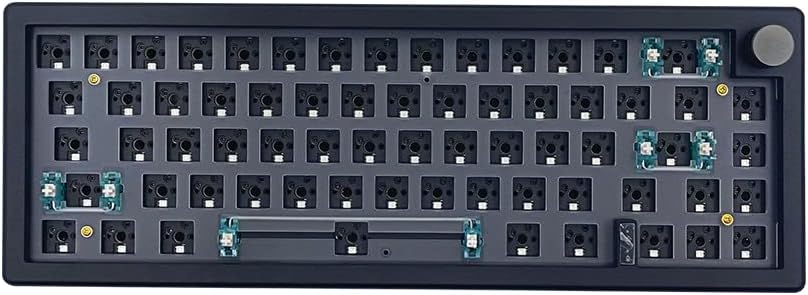
BOYI GMK67 Black
4.3Editor score
Hot-swappable 65% layout
Tri-mode wireless connectivity
VIA programming and RGB
Discover the best Barebones Keyboard Kits, comparing layouts, connectivity, programmability, mounting, RGB lighting, displays, and build features for you.
Barebones keyboard kits provide the foundation for a personalized mechanical keyboard without forcing you to select every component at once. The best kits balance a sturdy case, mounting system, hot-socket PCB, wireless options, programmable controls, and a layout that suits your desk, productivity needs, and preferred typing style.
We compared these kits by examining their layouts, switch compatibility, mounting structures, connectivity modes, battery capacities, RGB lighting, programmability, and extra features such as rotary knobs and displays. The list covers full-size, 80%, 75%, and 65% options for builders at different experience levels.
Each review explains what distinguishes its kit, where its design makes the most sense, and which compromises may affect your build. Ratings and specifications reflect the supplied product information, while current availability and prices can change, so check the latest listing before purchasing.
4.3Editor score

4.8Editor score

4.6Editor score
The comparison highlights meaningful differences in footprint, display hardware, wireless support, battery capacity, mounting, and programming. Every option supports a hot-swappable build, but the best choice depends on whether you prioritize a complete full-size layout, a compact daily driver, a dedicated display, or a simpler wired design.


The GMK104 Black combines a complete 104-key layout with a smart display, a metal knob, and extensive wireless support. Its 4.6 rating reflects a well-rounded package for builders who want visual customization and everyday productivity rather than a minimal blank canvas. The full-size format includes a numpad, arrow keys, and function row.
We may earn a commission when you buy through this link, at no additional cost to you.
Its strongest distinguishing feature is the display, which can show updated images while two multimedia buttons manage the backlight and screen. A metal knob provides precise volume control, while QMK and VIA support allow key remapping, macros, and lighting changes. Bluetooth 5.0, 2.4GHz, and wired USB-C connectivity give the kit flexibility across computers and other compatible devices.
The gasket-mounted, hot-swappable PCB accepts standard 3-pin and 5-pin mechanical switches without soldering. South-facing RGB lighting, NKRO operation, and a 4000mAh battery round out the feature set. The main drawback is physical size: a full-size keyboard with a numpad needs considerably more desk space than the 65%, 75%, or 80% alternatives in this guide.
Choose this kit when you want the traditional full-size format and appreciate extra controls. It is especially attractive for office-focused builders who use a numpad, want a display, and value rotary volume control. Those who prioritize desk space, minimalist styling, or a lower-complexity build may find one of the compact kits more suitable.
The screen turns an otherwise conventional barebones kit into a more interactive centerpiece. Updating its image and controlling screen or backlight behavior gives the builder more visible personalization than a standard RGB keyboard.
The 104-key arrangement preserves dedicated navigation and numeric keys, while tri-mode connectivity supports a desk setup that can move between wired and wireless configurations.
We may earn a commission when you buy through this link, at no additional cost to you.
The BOYI GMK67 White delivers the most balanced compact package in this roundup, earning a 4.5 rating. Its 65% layout removes the numpad while retaining a practical selection of navigation keys, making it well suited to small desks. A multifunction knob, south-facing RGB, and a 4000mAh battery add utility beyond the basic blank PCB.
We may earn a commission when you buy through this link, at no additional cost to you.
This kit arrives with meaningful builder support, including preinstalled foam and a polycarbonate plate that the user can install. The gasket-mounted design is intended to reduce internal vibration and cavity sound. Its hot-swappable PCB accepts 3-pin and 5-pin mechanical switches, including Cherry, Gateron, Otemu, Kailh, and other MX-style options.
QMK and VIA programming support tailored key mapping, macros, and lighting effects, while Bluetooth 5.0, 2.4GHz, and USB-C modes provide flexible connectivity. One important limitation is that the PCB is not suitable for optical or magnetic switches. The compact layout also means users who rely heavily on a numpad or separate arrow cluster may need to adjust their habits.
This is a compelling choice for first-time builders, compact desks, and gamers who want a wireless mechanical keyboard without giving up hot-swap sockets. The combination of sound-related components, programmable controls, and a rotary knob makes it more ambitious than a basic wired starter kit.
A 65% footprint is a practical compromise for users who want fewer visual distractions but still need a broad selection of navigation keys. The knob and RGB lighting add character to a layout that would otherwise be quite minimal.
Preinstalled foam and an included polycarbonate plate simplify assembly. Combined with hot-swap sockets, these features can help newcomers focus on choosing switches, keycaps, and a satisfying final configuration.
We may earn a commission when you buy through this link, at no additional cost to you.
The GMK108 Black is built for users who want the largest traditional key arrangement among these options. Its 108-key layout expands on the standard full-size format and includes a numpad, arrow keys, and function keys. The result is a 4.1-rated kit aimed at office work, gaming, and builders who refuse to sacrifice dedicated keys.
We may earn a commission when you buy through this link, at no additional cost to you.
It shares several practical foundations with the GMK104, including a gasket-mounted hot-swappable PCB, south-facing RGB, VIA programming, and a 4000mAh battery. Bluetooth 5.0, 2.4GHz, and wired Type-C connections allow it to operate in different setups. Standard 3-pin and 5-pin mechanical switches can be installed without soldering.
Unlike the GMK104, its supplied information does not highlight a smart display or metal knob. It is therefore more of a traditional full-size platform with the focus placed on layout, programmability, and flexible connectivity. The larger footprint and additional keys may feel unnecessary if you only use the alphabet row, modifiers, and a small navigation area.
Buyers who regularly use a numpad or want the most expansive key selection should give this model strong consideration. It is less compelling for compact workspaces than the GMK67 or GMK87, but its extended layout may prevent you from buying separate navigation and number-pad accessories later.
The extended 108-key format is the defining benefit for spreadsheet users, programmers, and general office workflows. Having dedicated function, navigation, and numeric areas can reduce dependence on compact-layout workarounds.
The 4000mAh battery and three connection modes make this substantial layout usable away from a fixed USB port. Switch combinations also allow quick movement between connected devices.
We may earn a commission when you buy through this link, at no additional cost to you.
The GMK104 White stands out with the highest customer rating in this group, a 4.8, and one of the strongest overall feature combinations. It offers a traditional 104-key layout, a customizable smart display, a metal knob, tri-mode connectivity, and a 4000mAh battery. For a builder who wants a complete foundation rather than a blank minimal board, it is especially compelling.
We may earn a commission when you buy through this link, at no additional cost to you.
QMK and VIA support make the kit deeply configurable, with options for remapping keys, creating macros, and adjusting lighting effects. The display can present updated images, while nearby multimedia buttons control the display and backlight. The knob handles volume with a more deliberate feel than a conventional key-based volume control.
Construction features include a gasket-mounted hot-swappable PCB, support for 3-pin and 5-pin mechanical switches, south-facing RGB, NKRO, and compatibility with Windows and macOS. Bluetooth 5.0, 2.4GHz, and wired USB-C modes offer flexible operation. The tradeoff is its substantial full-size footprint, especially compared with the 65% and 80% alternatives.
This is the most balanced recommendation for office users, enthusiasts, and first-time builders who want display-based personalization. People with very small desks or strict minimalist requirements may prefer a smaller board, but for a feature-rich full-size foundation, the combination of layout, display, knob, programmability, and connectivity is exceptionally well rounded.
A full-size layout, smart screen, and knob cover productivity, personalization, and everyday control in one kit. The result is a more complete starting point than boards limited to keys and lighting.
The display allows a different kind of customization from ordinary RGB lighting. Combined with programmable controls, it gives builders a visible focal point that can be updated with images.
We may earn a commission when you buy through this link, at no additional cost to you.
The BOYI GMK67 Black is a compact, understated alternative to the white version of the same kit. It carries a 4.3 rating and combines a 65% layout with a rotary knob, south-facing RGB, a 4000mAh battery, and three connection modes. The dark finish is particularly useful for builds that favor a restrained office or gaming aesthetic.
We may earn a commission when you buy through this link, at no additional cost to you.
Its gasket-mounted structure and preinstalled foam are designed to reduce vibration and cavity noise, while the included polycarbonate plate gives builders a straightforward foundation. The hot-swappable PCB accepts 3-pin and 5-pin mechanical switches, so compatible MX-style switches can be installed without soldering. Optical and magnetic switches are not supported.
VIA software supports custom key mapping, macros, and RGB effects, and Bluetooth 5.0, 2.4GHz, and USB-C modes keep the keyboard versatile. The main limitations come from its compact format and hardware compatibility. A 65% layout omits a numpad and reduces the number of dedicated navigation keys, while non-mechanical switch owners would need a different kit.
This model is a strong fit for compact desks, gaming setups, and builders who want wireless convenience without an elaborate display. It also works well for anyone who prefers a conventional black case but still wants a knob, hot-swap sockets, and programmable lighting in a space-saving format.
The black finish makes this kit less conspicuous than brighter custom builds. Its restrained appearance suits office desks while the RGB lighting and knob still provide visual and functional customization.
Gasket mounting, preinstalled foam, and an included plate provide a head start for reducing internal vibration. The final sound still depends on switches, keycaps, and assembly, but these components improve the foundation.
We may earn a commission when you buy through this link, at no additional cost to you.
The GMK87 White uses an 80% layout to strike a middle ground between a full-size board and a compact 65% kit. Its 87 keys, TFT-LCD display, and metal knob offer a useful balance of screen space, navigation keys, and desk efficiency. The 3.9 rating is the lowest among the feature-rich models in this roundup, so buyers should evaluate the listing carefully.
We may earn a commission when you buy through this link, at no additional cost to you.
The display can be updated in real time and configured to show images, the date, or the time, while the knob handles volume. This creates a more interactive kit than a conventional barebones board. VIA software adds macro programming and custom RGB effects, and the hot-swap PCB works with common 3-pin and 5-pin Cherry, Gateron, Otemu, Kailh, and other MX-style switches.
Bluetooth 5.0, 2.4GHz, and wired USB-C modes provide broad device support, and the keyboard can operate with tablets, PCs, laptops, and mobile phones. Its 3000mAh battery is smaller than the 4000mAh batteries used by the GMK104 and GMK67. A dual-stage kickstand, gasket mounting, and built-in USB storage compartment improve ergonomics and cable management.
Choose the GMK87 White if you want a display and navigation keys without committing to a full-size numpad. It is a sensible middle ground for mixed productivity and gaming use. Those needing the largest battery, the broadest QMK support, or a 104-key arrangement should compare the GMK104 alternatives first.
The 87-key format preserves useful navigation keys while eliminating the numpad. That makes it easier to reconcile display-led customization with an uncluttered and relatively compact desk.
Showing a date, time, or custom image turns the TFT screen into a functional dashboard. The surrounding knob and multimedia-oriented design complement that visual focus.
We may earn a commission when you buy through this link, at no additional cost to you.
The M87 Kit Black provides a comparatively straightforward route into custom mechanical keyboard building. It uses a 75% layout, hot-swappable PCB, south-facing RGB, and a detachable USB-C connection. Its 4.2 rating makes it a credible option for builders who value a simple wired design and do not need a display, knob, or wireless switching.
We may earn a commission when you buy through this link, at no additional cost to you.
The kit includes sound absorption foam and a silicone bottom pad intended to reduce clatter without compromising responsiveness. Its PCB supports 3-pin and 5-pin mechanical switches, including Cherry, Otemu, Gateron, Kailh, and their clones. Full-key anti-ghosting and NKRO support help maintain reliable input across the board.
Software customization includes up to 18 factory lighting and music-rhythm modes, along with custom software for macros and per-key effects. The lack of listed wireless connectivity is the main distinction from the premium alternatives, but that can be a benefit for users who want fewer configuration variables or simply prefer a dependable wired connection.
This kit is a sensible pick for a desk-bound setup, a first custom build, or anyone who prefers a 75% layout with a detachable cable. It may not suit people who need Bluetooth, a rotary control, an integrated screen, or extensive QMK-based flexibility, but its core construction features remain useful and approachable.
With hot-swap sockets and standard switch support, the kit removes soldering from the basic build process. The detachable USB-C cable also makes routine connection and storage straightforward.
Foam and a silicone bottom pad target the hollow resonance often associated with metal and plastic cases. They provide a useful acoustic foundation, though the selected switches and keycaps will shape the final sound.
We may earn a commission when you buy through this link, at no additional cost to you.
The GMK87 Black brings a display-equipped 80% design to a darker gaming-oriented aesthetic. Like its white counterpart, it offers 87 keys, a customizable TFT-LCD screen, a metal knob, and tri-mode connectivity. Its 3.9 rating means it trails the more highly rated full-size and 65% kits, but the underlying feature set remains appealing.
We may earn a commission when you buy through this link, at no additional cost to you.
Real-time display customization can show images, dates, and times, while the metal knob provides volume control. The hot-swappable PCB supports common 3-pin and 5-pin mechanical switches, and the kit includes a gasket-mounted structure for softer internal vibration. VIA adds macro and per-key RGB customization, including adjustable effects, brightness, and speed.
Bluetooth 5.0, 2.4GHz, and wired Type-C connections make the board adaptable across PCs, laptops, tablets, and mobile devices. A 3000mAh rechargeable battery, dual-stage foldable kickstand, and USB storage compartment improve daily convenience. Compared with the 4000mAh cells in the GMK104 and GMK67 kits, its capacity is more modest.
The GMK87 Black is best suited to users who want a screen and wireless flexibility in a relatively compact gaming layout. It may appeal to creators who enjoy displaying a custom image beside the keyboard. Buyers who place greater importance on ratings, battery capacity, or a full numpad should examine the higher-rated alternatives.
The black case provides a more subdued backdrop for the TFT display. A custom image can become a decorative focal point without requiring a larger full-size enclosure.
Hot-swap sockets make switch changes straightforward, and tri-mode connectivity supports different devices. VIA programming lets builders adapt controls for both productivity sessions and games.
We may earn a commission when you buy through this link, at no additional cost to you.
The BOYI GMK67Pro Black emphasizes programmability within a compact 65% format. It supports both QMK and VIA, giving users broad options for key mapping, macros, and backlight behavior. Its 4.0 rating, 4000mAh battery, and three connection modes place it between the more highly rated GMK67 and the lower-rated GMK87 models.
We may earn a commission when you buy through this link, at no additional cost to you.
The gasket structure includes PORON gaskets intended to reduce vibration and cavity sound. A polycarbonate plate and preinstalled foam give the builder useful starting components, while the hot-swappable PCB accepts Cherry MX, Kailh, Gateron, and other compatible 3-pin or 5-pin mechanical switches. Optical switches are not supported by the supplied information.
A multifunction knob handles multimedia controls, and south-facing RGB offers customizable lighting. Bluetooth 5.0, 2.4GHz, and wired USB-C modes provide flexible operation across devices. The main omission relative to the GMK87 and GMK104 is a screen, so the kit's visual personality comes from RGB, the knob, and the custom components you add.
This is a good match for builders who care more about open programmability than a display. It is particularly appealing for compact desks and users who want advanced remapping without moving to a full-size board. If a visual display is essential, choose a GMK87 or GMK104 instead.
QMK and VIA support makes the kit approachable for custom workflows while leaving room for more specialized configurations. Users can tailor key actions, macros, and lighting to their routines.
A 4000mAh battery gives this small keyboard meaningful wireless endurance potential. The combination of three modes and a compact footprint suits desks where every inch matters.
We may earn a commission when you buy through this link, at no additional cost to you.
The M87 Kit White is the simplest connectivity-focused entry in this guide, using a detachable USB-C cable rather than a listed wireless system. It offers a 75% layout, hot-swappable PCB, south-facing RGB, and acoustic components. Its 3.5 rating is the lowest among the ten products, so it is best considered for buyers who prioritize a straightforward wired foundation.
We may earn a commission when you buy through this link, at no additional cost to you.
Sound absorption foam and a silicone bottom pad form part of the internal design, targeting the noisy resonance that can occur in rigid cases. The PCB accepts 3-pin and 5-pin mechanical switches from Cherry, Otemu, Gateron, Kailh, and compatible MX-style families. It also supports NKRO and full-key anti-ghosting.
The lighting package includes as many as 18 factory-set lighting and music-rhythm modes, and custom software can create macros and per-key effects. Windows and macOS compatibility broadens its usefulness, while the detachable cable improves portability and cable management. What it does not offer is Bluetooth, a 2.4GHz receiver, a knob, or an integrated display.
The M87 Kit White is appropriate for a fixed workstation, a first custom build, or anyone who specifically wants a wired 75% platform. Its lower rating warrants checking recent customer feedback for any concerns. Users wanting wireless flexibility, richer programmability, or more integrated hardware should favor the GMK67, GMK87, or GMK104.
A wired-only design removes wireless pairing and battery-management decisions from the build. The detachable USB-C cable still provides convenient handling and storage.
Hot-swap sockets, acoustic foam, and customizable lighting are meaningful starting features. The absence of a screen, knob, and wireless modes should determine whether the simpler design matches your priorities.
We may earn a commission when you buy through this link, at no additional cost to you.
The right barebones kit depends on your desk size, preferred key layout, switch ecosystem, software requirements, and tolerance for assembly. Reviewing the core hardware together prevents a beautiful compact board from failing to fit your daily workflow or a full-size model from crowding your workspace.
Layout is the most visible and immediately consequential decision. The 65% GMK67 models maximize desk space and suit users comfortable with compact navigation. The GMK87 provides an 87-key 80% layout with a useful middle ground, while the M87 kits use 75% layouts and the GMK104 and GMK108 provide complete full-size arrangements with numeric keys. A full-size option is valuable for spreadsheets, accounting, navigation, and gaming shortcuts, while a compact layout is generally more convenient on a shared or smaller desk.
Most premium kits support Bluetooth 5.0, 2.4GHz wireless, and wired USB-C, allowing a single keyboard to serve different devices. The GMK87 and BOYI GMK67 families provide all three modes, as do the GMK104 and GMK108. The M87 kits are listed as wired designs with detachable USB-C cables. Consider whether you need to move between a desktop and laptop, whether you prefer a stable cable, and whether wireless mode adds enough value to justify battery monitoring and device-pairing steps.
A gasket-mounted structure isolates the plate from the case more softly than a rigid connection and can reduce harsh vibration. The BOYI GMK67 models and GMK87 include gasket-related components, with the GMK67Pro also identifying PORON gaskets. The M87 kits emphasize sound absorption foam and a silicone bottom pad. These features can improve the acoustic foundation, but the final sound also depends on your switches, keycaps, plate, and assembly quality.
All ten kits use hot-swappable PCB positioning systems, so compatible mechanical switches can be installed without soldering. Most support standard 3-pin and 5-pin MX-style switches, including common Cherry, Gateron, Otemu, and Kailh families. The BOYI GMK67 models explicitly do not support optical switches, and the GMK67Pro also notes that optical switches are unsupported. If you already own unusual switches, verify their pin configuration and PCB compatibility before buying a kit.
Programmability determines how freely you can assign keys, create macros, and control lighting. QMK and VIA offer the broadest stated flexibility, appearing on the GMK104 kits and BOYI GMK67Pro. The BOYI GMK67, GMK87, and GMK108 also support VIA customization. The M87 kits include factory lighting modes and custom software for macros and per-key effects, but they offer less advanced integration than the display-equipped models.
Displays create a visual focal point and can show custom images, dates, or times. The GMK104 and GMK87 kits include smart screens, with the GMK104 pairing its display with a metal knob. A display is appealing for desk aesthetics and at-a-glance information, but it adds complexity compared with a clean keycap-and-RGB build. If your goal is a timeless blank canvas, the M87 or GMK67 may be more suitable.
The GMK104, GMK108, GMK67, and GMK67Pro list 4000mAh batteries, while the GMK87 models list 3000mAh rechargeable batteries. Greater listed capacity can be reassuring for frequent wireless use, although actual runtime depends on lighting levels, activity, connection mode, and sleep settings. The wired M87 kits do not need a rechargeable battery for operation, which may be preferable for a permanently connected workstation.
A full-size kit, display, and knob can make a compact desk feel crowded. Before ordering, measure the area available and consider how frequently you use arrow keys, function keys, and a numpad. A 65% model can free meaningful space, but it may require alternate shortcuts. The 80% GMK87 offers navigation keys without a numpad, making it a useful middle point for compact but function-heavy setups.
Begin by identifying the included plate, PCB, gaskets, foam, stabilizers, and fasteners, then compare them with the kit's assembly instructions. Install stabilizers before switches if your layout includes keys wider than one unit. Fit each switch carefully into the hot-socket PCB, confirm that metal contacts sit correctly, and avoid forcing a switch that does not align.
Before completing the build, connect the keyboard with the supplied or recommended cable and test every key, the rotary knob if included, the screen if present, and each lighting effect. If your kit supports VIA or QMK, install the appropriate software, update its firmware if instructed, and begin with a basic layer before attempting complex macros or lighting animations.
For long-term care, clean the case and keycaps with a soft dry cloth or lightly dampened cloth, avoiding excessive liquid around the PCB and display. Keep debris away from sockets, periodically check the case and fasteners, and use a protective cover when the keyboard is not in use. Charge wireless models periodically and update software cautiously, especially if custom layouts are not backed up.
A barebones keyboard kit generally includes the case, PCB, plate, mounting components, and various foam or gasket parts, but not switches or keycaps. Some listings also include stabilizers, while others may require the builder to supply them separately. Check the package contents and assembly guide carefully because accessories and included parts can differ between models.
They can be, particularly the kits with hot-swappable PCBs and preinstalled foam or plates. A beginner still needs to understand switch alignment, stabilizer installation, and the relationship between the PCB and plate. Starting with a straightforward wired model such as the M87 is useful, while experienced builders may prefer the programmability of a QMK or VIA kit.
No, the featured kits use hot-swappable PCB sockets, allowing compatible 3-pin and 5-pin mechanical switches to be installed without soldering. You still need to install the switches correctly and align them with the plate. Do not assume every switch technology is supported; the BOYI GMK67 family explicitly excludes optical switches, and other unusual types require separate verification.
A 65% layout is the most compact option here and removes the numpad plus some navigation keys. A 75% layout preserves more dedicated controls, while the 87-key 80% format offers a middle ground with navigation keys but no numeric keypad. Full-size kits include the numpad, arrow cluster, and function row, making them ideal for users who depend on those keys.
Tri-mode kits can connect through Bluetooth, 2.4GHz wireless, or USB-C, making them convenient for multiple computers. The GMK104, GMK108, GMK67 family, and GMK87 all list three operating modes. The M87 kits are listed as wired, so they can also work with different computers through USB-C but require a cable for each session.
Gasket mounting uses flexible material between the plate and case to reduce rigid vibration transfer, while foam can absorb internal resonance. Together, these parts often produce a softer or less hollow sound, although the outcome depends on switches, keycaps, plate material, and assembly. They improve the foundation but cannot fully determine how the completed keyboard will sound.
Programmable models use VIA or QMK software for functions such as key mapping, macros, and lighting effects. QMK offers deeper firmware-level control, while VIA provides a more approachable interface for many common assignments. The M87 kits list custom software and factory lighting modes, so confirm the current software and download requirements on the product listing before beginning.
Choose a display-equipped GMK104 or GMK87 if you want custom images, visible date or time information, and a stronger centerpiece for your desk. Choose a GMK67 or M87 if you prefer a cleaner design built around keycaps, switches, and RGB. Displays add visual interest and utility, but they also make the build more complex than a basic blank-canvas kit.
The GMK104 White is the strongest all-around choice in this guide, combining a 4.8 rating with a full-size layout, smart display, metal knob, QMK and VIA support, and tri-mode connectivity. The BOYI GMK67 White offers a more compact and approachable 65% build, while the GMK104 Black is an equally compelling feature-rich option for builders who prefer a dark finish.
Prioritize layout before decorative features. Choose a full-size model when the numpad and dedicated navigation keys are genuinely useful, a GMK87 when a display and 87-key balance matter, and a GMK67 when desk space is the priority. For wired setups, the M87 kits simplify the process, while QMK and VIA support can be valuable for advanced customization.
Finally, check the current listing, package contents, compatibility details, and latest customer feedback before ordering. Availability and prices change over time, and the supplied ratings reflect particular customer experiences rather than a hands-on evaluation by this guide. Choose the kit whose layout, controls, and software best match the keyboard you actually want to build.